How to stop Microsoft Edge WebView2 from running in the background?


Equalness

Member
Local time
4:51 AM
Posts
28
OS
Windows 11 Pro
The problem is that it runs even while Microsoft Edge is fully closed.

1754233459635.webp
 

My Computer

System One

  • OS
    Windows 11 Pro
    Computer type
    PC/Desktop
Make sure these are off in Edge.

Screenshot 2025-08-03 081841.webp

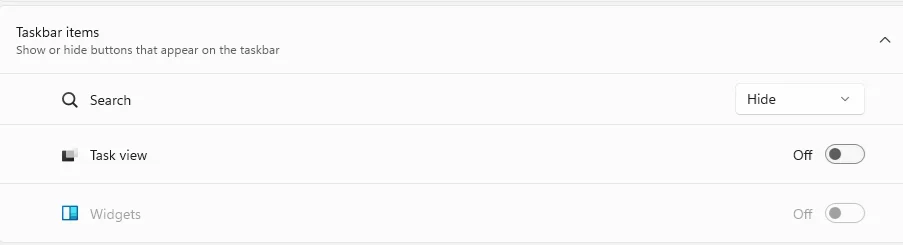
Widgets can keep these running as well.
 

My Computer

System One

  • OS
    Windows 11 Pro
Make sure these are off in Edge.

View attachment 141226

Widgets can keep these running as well.
Yes, they're already off before I made this post, and Microsoft Edge WebView2 still runs in the background regardless of that (while it's closed, too).

How do I disable the Widgets that may keep these processes running?
 

My Computer

System One

  • OS
    Windows 11 Pro
    Computer type
    PC/Desktop
So I'm taking it if you have the taskbar weather widget enabled and the lock screen cards enabled you will have these Microsoft Edge WebViews running, correct?
 

My Computers

System One System Two

  • OS
    Windows 11 25H2
    Computer type
    Laptop
    Manufacturer/Model
    Alienware 18 Area-51
    CPU
    Intel Core Ultra 9 275HX (24-Core)
    Motherboard
    Alienware
    Memory
    64GB DDR5 6400MT/s
    Graphics Card(s)
    NVIDIA GeForce RTX 5080 and Intel UHD Graphics
    Sound Card
    Onboard, Realtek high-performance Audio chips (ALC3329 & ALC1708))
    Monitor(s) Displays
    300HZ 18-inch QHD 500 nit Comfort View+
    Screen Resolution
    2560 x 1600
    Hard Drives
    2TB NVMe M.2 PCIe Gen 5 SSD
    Case
    Magnesium Alloy
    Cooling
    Advanced Cryo-Tech Quad-Fan Cooling system & large vapor chamber
    Keyboard
    Cherry MX ultra low profile mechanical keyboard with per key AlienFX RGB lighting
    Mouse
    Logitech MX Master 4
    Browser
    Vivaldi (main), Firefox, Chrome, Edge
    Antivirus
    MS Defender and Malwarebytes Free
  • Operating System
    Windows 11 25H2
    Computer type
    Laptop
    Manufacturer/Model
    Microsoft Surface Laptop 7
    CPU
    Qualcomm Snapdragon X Elite (12 Core) ARM based CPU
    Motherboard
    Microsoft Corp.
    Memory
    16GB LPDDR5
    Graphics card(s)
    Qualcomm Adreno X1-85
    Sound Card
    Omnisonic speakers with Dolby Atmos spatial sound
    Monitor(s) Displays
    120 Hz 13.8-inch 600 nit PixelSense Flow touchscreen
    Screen Resolution
    2304x1536
    Hard Drives
    1TB NVMe Gen 4 SSD
    Case
    Anodized Aluminum
    Cooling
    Traditional active cooling fan system
    Keyboard
    Mechanical QWERTY, backlit when in use
    Mouse
    Logitech MX Master 4 and Surface Arc Mouse
    Browser
    Vivaldi (main), Firefox, Chrome, Edge
    Antivirus
    MS Defender and Malwarebytes Free
FWIW, the first post in this link helped me stop Edge from running in the background.
 

My Computer

System One

  • OS
    Windows 10 Pro
FWIW, the first post in this link helped me stop Edge from running in the background.
Thank you, but that post doesn't say anything about which specific processes it attempts to close. It's too vague to be trusted.
 

My Computer

System One

  • OS
    Windows 11 Pro
    Computer type
    PC/Desktop
Back
Top Bottom