HP 9010 AIO set up using HPSupportSolutionsFramework but not found by HP scan software


PhilB

Well-known member
Power User
VIP
Local time
11:44 AM
Posts
748
Location
Western USA
OS
Windows 11 2H25
When my HP scan software stopped working recently, I uninstalled all HP software and then reinstalled the full Webpack for this printer, When I could not get the scanner software to detect the printer, I downloaded the HPSupportSolutionsFramework. It properly recognized the printer's IP address on my home LAN, and enabled me to modify some printer settings. However, the HP Scan program doesn't detect the printer.

This printer has had IP 192.168.1.242 since like I first got it and it always worked fine as a scanner or printer. I used ping and of course the address is confirmed.

Recently HP has made using this printer, at least for scanning, much more complicated. So is there a workaround, or do I need to look for a paid alternative?

Is HP turning evil? They seem to be pushing their overpriced ink monthly subscription service.
 

My Computer My Computer

At a glance

Windows 11 2H25AMD 9900X64 GBAMD 9070 XT
OS
Windows 11 2H25
Computer type
PC/Desktop
Manufacturer/Model
DIY
CPU
AMD 9900X
Motherboard
MSI X870E Carbon
Memory
64 GB
Graphics Card(s)
AMD 9070 XT
Sound Card
built-in
Monitor(s) Displays
Dell 24"
Hard Drives
Sabrent 1 TB NVMe, 4 x SSD (need to check models), 4 x 3.5" HDD, 8-16 TB, all WD
PSU
Seasonic 850
Case
Fractal Design North XL (which I likw)
Cooling
Corsair AIO for CPU, fans for case
Keyboard
Das Keyboard 4
Mouse
Corsair M65 (white)
Internet Speed
1 TB download
Browser
Firefox
Antivirus
Bitdefender
Other Info
Also have Lenovo T14S laptop (me) and Lenovo Slim 71 (wife)
have you tried installing Windows Scan from the Microsoft store

best of luck Steve ..
 

My Computers My Computers

  • At a glance

    Debian 13 KDE .. Windows 11 HomeRyzen 7 5825u64GB DDR4 3200Ryzen 7 5825u
    OS
    Debian 13 KDE .. Windows 11 Home
    Computer type
    PC/Desktop
    Manufacturer/Model
    HP 24" AiO
    CPU
    Ryzen 7 5825u
    Motherboard
    HP
    Memory
    64GB DDR4 3200
    Graphics Card(s)
    Ryzen 7 5825u
    Sound Card
    RealTek
    Monitor(s) Displays
    24" HP AiO
    Screen Resolution
    1920 x 1080 @60 Hz
    Hard Drives
    1TB WD Blue SN580 M2 SSD Partitioned.
    2x 1TB USB HDD External Backup/Storage.
    PSU
    90W external power brick
    Case
    24" All in One
    Cooling
    Default Air Cooling
    Keyboard
    HP WiFi UK extended
    Mouse
    HP WiFi 3 Button
    Internet Speed
    1GB full fibre
    Browser
    Edge & Firefox
    Antivirus
    AVG Internet Security/Windows Defender
    Other Info
    Mainly Open Source Software
  • At a glance

    Ubuntu 22.04.5 LTSi5 7200u16GB DDR4Intel
    Operating System
    Ubuntu 22.04.5 LTS
    Computer type
    Laptop
    Manufacturer/Model
    Dell 13" Latitude 2017
    CPU
    i5 7200u
    Motherboard
    Dell
    Memory
    16GB DDR4
    Graphics card(s)
    Intel
    Sound Card
    Intel
    Monitor(s) Displays
    13" Dell Laptop
    Hard Drives
    250GB Crucial 2.5" SSD
    Mouse
    Generic WiFi 3 button
    Internet Speed
    WiFi only
    Browser
    Firefox
    Antivirus
    ClamAV TK
    Other Info
    Mainly Open Source Software
Try the Troubleshooter.
Start>Setting>System>Troubleshooter>Other Troubleshooter>Printer
In what way has HP ---made running the scanner much more complicated ---and do you still have the original installation method available?
 

My Computer My Computer

At a glance

win 10amd ryzen 5-2600ng skill sniper x 16gbnvidea gtx 1050
OS
win 10
Computer type
PC/Desktop
Manufacturer/Model
home built
CPU
amd ryzen 5-2600
Motherboard
gigabyte b450m-ds3h
Memory
ng skill sniper x 16gb
Graphics Card(s)
nvidea gtx 1050
Monitor(s) Displays
benq fp 92
Hard Drives
samsung 860 evo 500gb m2 ssd
PSU
antec ea550g
Case
nzxt noctis 450
Browser
edge
There are two parts to an AIO, the Printer and Scanner, they are not the same device. Different drivers and associated Apps for each.

Uninstall both including any non working/ghost instances, and start afresh again following the manufacturers instructions.

It appears that the basics are in:
1. Software and Full/Basic Driver print and scan functionality only.
2. Driver Universal Scan driver.

The others are optional like:
Printer Firmware update.
Fax driver.
OCR Add-on software.

It takes me on and off all day to install networked AIOs with one working instance of what is required. However that has lasted 6 years without any re-installs.
 

My Computer My Computer

At a glance

Windows 11
OS
Windows 11
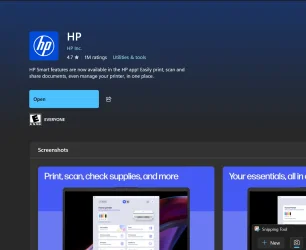
HP has a new app in the Microsoft Store that just became available recently. Just type HP or it won't show. That Support Solutions app you installed is not supported anymore.

1782564573920.webp
 

My Computer My Computer

At a glance

Windows 11 & Zorin ProIntel® Core™ Ultra 9 Processor 275HX 2.7 GHz32 gbNVIDIA® GeForce RTX™ 5060 Laptop GPU
OS
Windows 11 & Zorin Pro
Computer type
Laptop
Manufacturer/Model
Asus Rog Strix G16
CPU
Intel® Core™ Ultra 9 Processor 275HX 2.7 GHz
Motherboard
AsusteK Computer
Memory
32 gb
Graphics Card(s)
NVIDIA® GeForce RTX™ 5060 Laptop GPU
Sound Card
Realtek High Definition Audio
Monitor(s) Displays
Laptop 16 inch
Screen Resolution
2560 X 1600
Hard Drives
Boot: Samsung 9100 NVME 2 TB Microsoft Storage Controller: Standard NVM Express Driver: Microsoft 6/21/2006. No SATA/AHCI on my motherboard or in bios
Mouse
Pad
Browser
Google Chrome
Antivirus
Microsoft
Other Info
Printer: HP Color LaserJet MFP M477dw
Back
Top Bottom