
Solved HP Scanjet G4010 Scanner software


Kimbolini

Well-known member
Local time
4:27 PM
Posts
14
OS
Windows 11 Pro
I have managed to get Windows 11 on this new computer to recognize my 11 year old scanner, HP Scanjet G4010, but the scanner settings are all lost. Since the hardware is so old I haven't got the original software disks to install anymore.

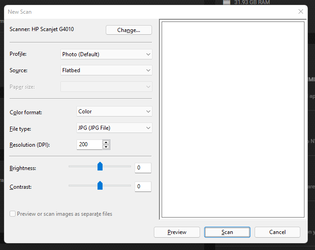
There are 4 buttons on the top of the scanner to choose from, so that you can either scan to pdf, photo, or scan negatives, or a generic scan. None of them work anymore - or more accurately, all of them produce the same result. i.e. this:
Screenshot_1.png
The 'Change' button only offers to change to another printer. The 'Profile' drop-down offers 'add profile', 'documents', 'use last settings', 'photo (default)'. The output files only offer image types, no pdf.

This scanner is meant to scan documents to OCR pdf and have a lot of other functions that are no longer shown. HP website doesn't offer the software anywhere that I can find that allows all of these functions.

This scanner still works well so I really don't want to replace it, but it's not that useful to me anymore if I can't scan to pdf. Wondering if anyone has any solution to this?

Thanks for any help!
 
Windows Build/Version
Version 21H2 (OS Build 22000.282) Windows 11 Pro

My Computer My Computer

At a glance

Windows 11 ProAMD Ryzen 9 5900X 12-Core ProcessorNVIDIA GeForce RTX 3080
OS
Windows 11 Pro
Computer type
PC/Desktop
Manufacturer/Model
Alienware Aurora Ryzen
CPU
AMD Ryzen 9 5900X 12-Core Processor
Graphics Card(s)
NVIDIA GeForce RTX 3080
Keyboard
Logitec K860 ergonomic
Mouse
Logitec M570
Internet Speed
lousy
Hi,
it looks as if I have found a driver at HP Australia:
(I also have an old HP scanner, but not as old as yours (y))
 

My Computer My Computer

At a glance

WIN 11 / WIN 10 dual bootIntel Pentium G 4400 (Skylake)DDR4 12 GBinternal (Intel HD 510)
OS
WIN 11 / WIN 10 dual boot
Computer type
PC/Desktop
Manufacturer/Model
No clue (x64 based) from 2016
CPU
Intel Pentium G 4400 (Skylake)
Motherboard
MS 7971, Bios: American Megatrend C.E0 (2018)
Memory
DDR4 12 GB
Graphics Card(s)
internal (Intel HD 510)
Hard Drives
2x Western Digital (no SSD)
I have managed to get Windows 11 on this new computer to recognize my 11 year old scanner, HP Scanjet G4010, but the scanner settings are all lost. Since the hardware is so old I haven't got the original software disks to install anymore.

There are 4 buttons on the top of the scanner to choose from, so that you can either scan to pdf, photo, or scan negatives, or a generic scan. None of them work anymore - or more accurately, all of them produce the same result. i.e. this:
View attachment 11469
The 'Change' button only offers to change to another printer. The 'Profile' drop-down offers 'add profile', 'documents', 'use last settings', 'photo (default)'. The output files only offer image types, no pdf.

This scanner is meant to scan documents to OCR pdf and have a lot of other functions that are no longer shown. HP website doesn't offer the software anywhere that I can find that allows all of these functions.

This scanner still works well so I really don't want to replace it, but it's not that useful to me anymore if I can't scan to pdf. Wondering if anyone has any solution to this?

Thanks for any help!
This site offers the original drivers,


I downloaded the drivers and ran a Defender scan on it. It's clean but it's entirely up to you if you want to try them from a third party site. Maybe create an image prior just in case.

Screenshot_2.png

Screenshot_4.png

Edit, might be worth running it in compatibility mode.

 
Last edited:

My Computers My Computers

  • At a glance

    Win 11 ProAMD Ryzen™ 7 7730U24GB Dual-Channel DDR4 @ 1596MHz (22-22-22-52)512MB ATI AMD Radeon Graphics (ASUStek Comput...
    OS
    Win 11 Pro
    Computer type
    Laptop
    Manufacturer/Model
    ASUS Vivobook
    CPU
    AMD Ryzen™ 7 7730U
    Motherboard
    M1605YA
    Memory
    24GB Dual-Channel DDR4 @ 1596MHz (22-22-22-52)
    Graphics Card(s)
    512MB ATI AMD Radeon Graphics (ASUStek Computer Inc)
    Monitor(s) Displays
    Generic PnP Monitor (1920x1200@60Hz) - P1 PLUS (1920x1080@59Hz)
    Screen Resolution
    1920 X 1200
    Hard Drives
    953GB Western Digital WD
    PSU
    45 Watts
    Mouse
    Lenovo Bluetooth.
    Internet Speed
    500 Mbps
    Browser
    Edge
    Antivirus
    Defender
  • At a glance

    Windows 11AMD Ryzen 7 5800H / 3.2 GHz32 GB DDR4 SDRAM 3200 MHzNVIDIA GeForce RTX 3060 6 GB GDDR6 SDRAM
    Operating System
    Windows 11
    Computer type
    Laptop
    Manufacturer/Model
    ACER NITRO
    CPU
    AMD Ryzen 7 5800H / 3.2 GHz
    Motherboard
    CZ Scala_CAS (FP6)
    Memory
    32 GB DDR4 SDRAM 3200 MHz
    Graphics card(s)
    NVIDIA GeForce RTX 3060 6 GB GDDR6 SDRAM
    Sound Card
    Realtek Audio. NVIDIA High Definition Audio
    Monitor(s) Displays
    15.6" LED backlight 1920 x 1080 (Full HD) 144 Hz
    Screen Resolution
    1920 x 1080 (Full HD)
    Hard Drives
    Samsung 970 Evo Plus 2TB NVMe M.2
    PSU
    180 Watt, 19.5 V
    Mouse
    Lenovo Bluetooth
    Internet Speed
    500 Mbps
    Browser
    Edge
    Antivirus
    Defender
Hi,
it looks as if I have found a driver at HP Australia:
(I also have an old HP scanner, but not as old as yours (y))
Thanks, RogerOver. This is where I got the driver from already that enabled the computer to recognize the scanner and give it the basic functionality that it has. I'm hoping to get all of the other functions back though. Appreciate the suggestion.
 

My Computer My Computer

At a glance

Windows 11 ProAMD Ryzen 9 5900X 12-Core ProcessorNVIDIA GeForce RTX 3080
OS
Windows 11 Pro
Computer type
PC/Desktop
Manufacturer/Model
Alienware Aurora Ryzen
CPU
AMD Ryzen 9 5900X 12-Core Processor
Graphics Card(s)
NVIDIA GeForce RTX 3080
Keyboard
Logitec K860 ergonomic
Mouse
Logitec M570
Internet Speed
lousy
This site offers the original drivers,


I downloaded the drivers and ran a Defender scan on it. It's clean but it's entirely up to you if you want to try them from a third party site. Maybe create an image prior just in case.
This worked, thanks so much @Fabler2

I will note for anyone else looking to do this, that the files hide and all you will find at first are 'shortcuts' that take you to the HP site. I eventually found the actual application under (Program Files > Common Files > Hewlett-Packard > Scanjet > G4010 > hpbdu which I had to run in Windows XP compatibility to get it to work. Yay.
 

My Computer My Computer

At a glance

Windows 11 ProAMD Ryzen 9 5900X 12-Core ProcessorNVIDIA GeForce RTX 3080
OS
Windows 11 Pro
Computer type
PC/Desktop
Manufacturer/Model
Alienware Aurora Ryzen
CPU
AMD Ryzen 9 5900X 12-Core Processor
Graphics Card(s)
NVIDIA GeForce RTX 3080
Keyboard
Logitec K860 ergonomic
Mouse
Logitec M570
Internet Speed
lousy
This worked, thanks so much @Fabler2

I will note for anyone else looking to do this, that the files hide and all you will find at first are 'shortcuts' that take you to the HP site. I eventually found the actual application under (Program Files > Common Files > Hewlett-Packard > Scanjet > G4010 > hpbdu which I had to run in Windows XP compatibility to get it to work. Yay.
Good find and fix 👍
 

My Computers My Computers

  • At a glance

    Win 11 ProAMD Ryzen™ 7 7730U24GB Dual-Channel DDR4 @ 1596MHz (22-22-22-52)512MB ATI AMD Radeon Graphics (ASUStek Comput...
    OS
    Win 11 Pro
    Computer type
    Laptop
    Manufacturer/Model
    ASUS Vivobook
    CPU
    AMD Ryzen™ 7 7730U
    Motherboard
    M1605YA
    Memory
    24GB Dual-Channel DDR4 @ 1596MHz (22-22-22-52)
    Graphics Card(s)
    512MB ATI AMD Radeon Graphics (ASUStek Computer Inc)
    Monitor(s) Displays
    Generic PnP Monitor (1920x1200@60Hz) - P1 PLUS (1920x1080@59Hz)
    Screen Resolution
    1920 X 1200
    Hard Drives
    953GB Western Digital WD
    PSU
    45 Watts
    Mouse
    Lenovo Bluetooth.
    Internet Speed
    500 Mbps
    Browser
    Edge
    Antivirus
    Defender
  • At a glance

    Windows 11AMD Ryzen 7 5800H / 3.2 GHz32 GB DDR4 SDRAM 3200 MHzNVIDIA GeForce RTX 3060 6 GB GDDR6 SDRAM
    Operating System
    Windows 11
    Computer type
    Laptop
    Manufacturer/Model
    ACER NITRO
    CPU
    AMD Ryzen 7 5800H / 3.2 GHz
    Motherboard
    CZ Scala_CAS (FP6)
    Memory
    32 GB DDR4 SDRAM 3200 MHz
    Graphics card(s)
    NVIDIA GeForce RTX 3060 6 GB GDDR6 SDRAM
    Sound Card
    Realtek Audio. NVIDIA High Definition Audio
    Monitor(s) Displays
    15.6" LED backlight 1920 x 1080 (Full HD) 144 Hz
    Screen Resolution
    1920 x 1080 (Full HD)
    Hard Drives
    Samsung 970 Evo Plus 2TB NVMe M.2
    PSU
    180 Watt, 19.5 V
    Mouse
    Lenovo Bluetooth
    Internet Speed
    500 Mbps
    Browser
    Edge
    Antivirus
    Defender
This worked, thanks so much @Fabler2

I will note for anyone else looking to do this, that the files hide and all you will find at first are 'shortcuts' that take you to the HP site. I eventually found the actual application under (Program Files > Common Files > Hewlett-Packard > Scanjet > G4010 > hpbdu which I had to run in Windows XP compatibility to get it to work. Yay.
I still have the original CD but having trouble installing. Trying running "setup" from disks, Keeps saying can't install with "run as . . .", no matter compatibility I use. Won't pass OS check.

With the download from "driverscolkection.com" , do you run "compatibility" for setup?
Thanks.
 

My Computer My Computer

At a glance

windows 11
OS
windows 11
Computer type
Laptop
Manufacturer/Model
Lenovo

Latest Support Threads

Back
Top Bottom




