JavaScript is disabled. For a better experience, please enable JavaScript in your browser before proceeding.
You are using an out of date browser. It may not display this or other websites correctly.
You should upgrade or use an
alternative browser .
Hp fan sounds like its working overtime
Hi so Ive noticed my desktop has been humming like the fans overworking. I opened it up and removed the dust but still the pc just has this hum to it. Granted its not a high performance PC but is there anything i can do like replace the fan? my desktop is a HP Slim Desktop S01-aF0xx.
win 11 AMD Athlon Silver 3050U DDR4, 8GB Processor AMD Radeon Graphic win 11 PC/Desktop HP Slim Desktop - S01-aF0209 AMD Athlon Silver 3050U 876C DDR4, 8GB Processor AMD Radeon Graphic
Well-known member
Power User
VIP
You can remove the processor heatsink and replace the thermal medium.
Windows 11 Enterprise 25H2 26200 7462 Intel XEON E5-2699 v3 64GB Teamgroup UD4-3600 NVIDIA GeForce GTX 1080 Ti Windows 11 Enterprise 25H2 26200 7462 PC/Desktop Custom Build Intel XEON E5-2699 v3 ASUS X99-A 64GB Teamgroup UD4-3600 NVIDIA GeForce GTX 1080 Ti Integrated ACER X34 Predator 3440 x 1440 Crucial CT1000P 3P SSD8 1TB GameMax Pro Fractal Design Corsair H110iGT + 6 140mm Fans Corsair K4 G-Skill G502 300MBs Chrome OEM ASUS RT-AC87U Router
25H2 26200.5074 Laptop ASUS X555LA 8GB Chrome OEM
Well-known member
Pro User
VIP
I prefer to look at a service manual, or at least specs, for an appliance PC before making suggestions.
"S01-aF0xx" is too generic to allow specs to be checked. Service manuals don't seem to be available for download.
A utility like
Coretemp (freeware) should tell if the CPU is running hot. If it is, the thermal paste (or pad) on the CPU may need to be replaced, as "Rollback_Jockey" suggests.
Windows 11 26300.9278 Amd Threadripper 7970X 128GB (4 X 32) G.Skill DDR5 6400 (RDIMM) Gigabyte RTX 4090 OC Windows 11 26300.9278 PC/Desktop homebuilt Amd Threadripper 7970X Gigabyte TRX50 Aero D Rev. 1.0 128GB (4 X 32) G.Skill DDR5 6400 (RDIMM) Gigabyte RTX 4090 OC none (USB to speakers), Realtek Innocn 32" OLED 3840 X 2160 @ 60Hz Crucial T700 2TB M.2 NVME SSD BeQuiet! Straight Power 12 1500W Lian Li 011 Dynamic Evo XL SilverStone Technology XE360-TR5, with 3 Phanteks T30 fans Cherry KC 500 MX LP (mechanical) Logitech M500s (wired) 2000/250 Mbps (down/up) xFinity gateway
windows 11 26300.9278 Intel I9-13900K 64GB G.Skill DDR5-6000 Gigabyte RTX 3090 ti windows 11 26300.9278 PC/Desktop homebuilt Intel I9-13900K Asus RoG Strix Z690-E 64GB G.Skill DDR5-6000 Gigabyte RTX 3090 ti built in Realtek Philips 27E1N8900 27" OLED 3840 X 2160 @60Hz WDC SN850 1TB eVGA SuperNOVA 1300 GT Lian Li 011 Dynamic Evo Corsair iCUE H150i ELITE CAPELLIX Liquid CPU Cooler Cherry Streaming (wired) Logitech M500s (wired)
downloaded coretemp, temps ranging from 65C to 75C is that good?
win 11 AMD Athlon Silver 3050U DDR4, 8GB Processor AMD Radeon Graphic win 11 PC/Desktop HP Slim Desktop - S01-aF0209 AMD Athlon Silver 3050U 876C DDR4, 8GB Processor AMD Radeon Graphic
Well-known member
Power User
VIP
Have you got a security suite installed? Is it happening all the time for long periods or infrequent short periods?
Windows 11 Pro AMD Ryzen 9 8945HS 32GB DDR5 SO-DIMM Integrated AMD Radeon 780M (4.00 GHz) Windows 11 Pro PC/Desktop GMKtec K11 AMD Ryzen 9 8945HS 32GB DDR5 SO-DIMM Integrated AMD Radeon 780M (4.00 GHz) Benq 2250HM 1920 x 1080 1 TB PCIe 4.0 NVMe M.2 SSD Bit Defender Total Security
Windows 11 Home Intel® Core™ Ultra 7 - 255H processor 16 GB LPDDR5 SDRAM Intel Arc 140T onboard graphics Windows 11 Home Laptop ASUS Zenbook 14 OLED 14" Laptop - UX3405CA-QL192W Intel® Core™ Ultra 7 - 255H processor 16 GB LPDDR5 SDRAM Intel Arc 140T onboard graphics 1920 x 1200 (16:10 WUXGA resolution) OLED Touchscreen 1TB SSD Bit Defender Total Security
I have bitdefender installed, task manager "System" and "System Interrupts" seem to spike.
win 11 AMD Athlon Silver 3050U DDR4, 8GB Processor AMD Radeon Graphic win 11 PC/Desktop HP Slim Desktop - S01-aF0209 AMD Athlon Silver 3050U 876C DDR4, 8GB Processor AMD Radeon Graphic
Well-known member
Member
VIP
Hi,
Windows 11 Pro 25H2 AMD Ryzen™ 7 6800H 3.2-4.7 GHz 32 GB DDR5 4800MHz Dual Channel Crucial NVIDIA GeForce RTX™ 3050 Windows 11 Pro 25H2 Laptop ASUS ROG STRIX G513RC AMD Ryzen™ 7 6800H 3.2-4.7 GHz 32 GB DDR5 4800MHz Dual Channel Crucial NVIDIA GeForce RTX™ 3050 15.6 inches FHD (1920 x 1080) IPS Display Crucial T500 2TB RGB Keyboard
Well-known member
Pro User
VIP
downloaded coretemp, temps ranging from 65C to 75C is that good?
If that's at
idle (nothing exercising the CPU, which is how PCs run most of the time), it's poor.
I suggest checking the CPU temperature and usage (the latter using Task Manager) at the same time.
If CPU usage is a few percent but it's running at 65C or hotter, "Rollback_Jockey's" suggestion that the thermal compound between the CPU and its heatsink need to be replaced is the obvious answer. It may even be the right answer.
Windows 11 26300.9278 Amd Threadripper 7970X 128GB (4 X 32) G.Skill DDR5 6400 (RDIMM) Gigabyte RTX 4090 OC Windows 11 26300.9278 PC/Desktop homebuilt Amd Threadripper 7970X Gigabyte TRX50 Aero D Rev. 1.0 128GB (4 X 32) G.Skill DDR5 6400 (RDIMM) Gigabyte RTX 4090 OC none (USB to speakers), Realtek Innocn 32" OLED 3840 X 2160 @ 60Hz Crucial T700 2TB M.2 NVME SSD BeQuiet! Straight Power 12 1500W Lian Li 011 Dynamic Evo XL SilverStone Technology XE360-TR5, with 3 Phanteks T30 fans Cherry KC 500 MX LP (mechanical) Logitech M500s (wired) 2000/250 Mbps (down/up) xFinity gateway
windows 11 26300.9278 Intel I9-13900K 64GB G.Skill DDR5-6000 Gigabyte RTX 3090 ti windows 11 26300.9278 PC/Desktop homebuilt Intel I9-13900K Asus RoG Strix Z690-E 64GB G.Skill DDR5-6000 Gigabyte RTX 3090 ti built in Realtek Philips 27E1N8900 27" OLED 3840 X 2160 @60Hz WDC SN850 1TB eVGA SuperNOVA 1300 GT Lian Li 011 Dynamic Evo Corsair iCUE H150i ELITE CAPELLIX Liquid CPU Cooler Cherry Streaming (wired) Logitech M500s (wired)
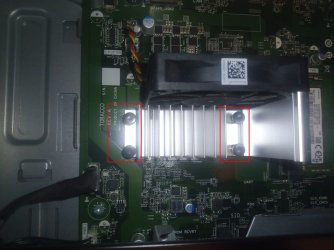
Hi Just wondering how do i remove these or release them so i can apply the thermal paste? im new to all this.
IMG_20240822_062720_982-2.jpg
74.4 KB
· Views: 2
win 11 AMD Athlon Silver 3050U DDR4, 8GB Processor AMD Radeon Graphic win 11 PC/Desktop HP Slim Desktop - S01-aF0209 AMD Athlon Silver 3050U 876C DDR4, 8GB Processor AMD Radeon Graphic
Well-known member
Pro User
VIP
Hi Just wondering how do i remove these or release them so i can apply the thermal paste? im new to all this.
I'm not certain, but I'm fairly confident that they're pushpins. Unfortunately.
This is an old video, but it may be helpful:
There are no notches on the top of your pins that indicate position, though.
Avoid brutality. You don't want to damage the pins or the motherboard.
Windows 11 26300.9278 Amd Threadripper 7970X 128GB (4 X 32) G.Skill DDR5 6400 (RDIMM) Gigabyte RTX 4090 OC Windows 11 26300.9278 PC/Desktop homebuilt Amd Threadripper 7970X Gigabyte TRX50 Aero D Rev. 1.0 128GB (4 X 32) G.Skill DDR5 6400 (RDIMM) Gigabyte RTX 4090 OC none (USB to speakers), Realtek Innocn 32" OLED 3840 X 2160 @ 60Hz Crucial T700 2TB M.2 NVME SSD BeQuiet! Straight Power 12 1500W Lian Li 011 Dynamic Evo XL SilverStone Technology XE360-TR5, with 3 Phanteks T30 fans Cherry KC 500 MX LP (mechanical) Logitech M500s (wired) 2000/250 Mbps (down/up) xFinity gateway
windows 11 26300.9278 Intel I9-13900K 64GB G.Skill DDR5-6000 Gigabyte RTX 3090 ti windows 11 26300.9278 PC/Desktop homebuilt Intel I9-13900K Asus RoG Strix Z690-E 64GB G.Skill DDR5-6000 Gigabyte RTX 3090 ti built in Realtek Philips 27E1N8900 27" OLED 3840 X 2160 @60Hz WDC SN850 1TB eVGA SuperNOVA 1300 GT Lian Li 011 Dynamic Evo Corsair iCUE H150i ELITE CAPELLIX Liquid CPU Cooler Cherry Streaming (wired) Logitech M500s (wired)