
Navigation
Install the app
How to install the app on iOS
Follow along with the video below to see how to install our site as a web app on your home screen.
Note: This feature may not be available in some browsers.
More options
Style variation
System
Light
Dark
You are using an out of date browser. It may not display this or other websites correctly.
You should upgrade or use an alternative browser.
You should upgrade or use an alternative browser.
Solved Huge Macrium ProgramData
- Thread starter Haydon
- Start date
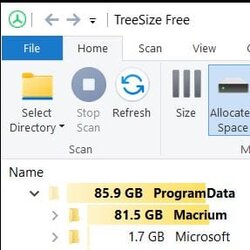

Mine has ballooned to 81.5 GB, what's yours?
I think I will have to uninstall/reinstall, no?
View attachment 47258
Well, either the backups are being included or... you have a problem. Mine is 480 MB

And I have 343 GB of backups.
My Computers
-
At a glance
Win 11 Home ♦♦♦26300.9550 ♦♦♦♦♦♦♦26H2AMD Ryzen 7 3700XG.Skill (F4-3200C14D-16GTZKW)EVGA RTX 2070 (08G-P4-2171-KR)- OS
- Win 11 Home ♦♦♦26300.9550 ♦♦♦♦♦♦♦26H2
- Computer type
- PC/Desktop
- Manufacturer/Model
- Built by Ghot® [May 2020]
- CPU
- AMD Ryzen 7 3700X
- Motherboard
- Asus Pro WS X570-ACE (BIOS 5302)
- Memory
- G.Skill (F4-3200C14D-16GTZKW)
- Graphics Card(s)
- EVGA RTX 2070 (08G-P4-2171-KR)
- Sound Card
- Realtek ALC1220P / ALC S1220A
- Monitor(s) Displays
- Dell U3011 30"
- Screen Resolution
- 2560 x 1600
- Hard Drives
- 2x Samsung 860 EVO 500GB,
WD 4TB Black FZBX - SATA III,
WD 8TB Black FZBX - SATA III,
DRW-24B1ST CD/DVD Burner
- PSU
- PC Power & Cooling 750W Quad EPS12V
- Case
- Cooler Master ATCS 840 Tower
- Cooling
- CM Hyper 212 EVO (push/pull)
- Keyboard
- Ducky DK9008 Shine II Blue LED
- Mouse
- Logitech Optical M-100
- Internet Speed
- 300/300
- Browser
- Firefox (latest)
- Antivirus
- Bitdefender Total Security
- Other Info
- Speakers: Klipsch Pro Media 2.1
-
At a glance
Windows XP Pro 32bit w/SP3AMD Athlon 64 X2 5000+ (OC'd @ 3.2Ghz)TWIN2X2048-6400C4DHX (2 x 1GB, DDR2 800)EVGA 256-P2-N758-TR GeForce 8600GT SSC- Operating System
- Windows XP Pro 32bit w/SP3
- Computer type
- PC/Desktop
- Manufacturer/Model
- Built by Ghot® (not in use)
- CPU
- AMD Athlon 64 X2 5000+ (OC'd @ 3.2Ghz)
- Motherboard
- ASUS M2N32-SLI Deluxe Wireless Edition
- Memory
- TWIN2X2048-6400C4DHX (2 x 1GB, DDR2 800)
- Graphics card(s)
- EVGA 256-P2-N758-TR GeForce 8600GT SSC
- Sound Card
- Onboard
- Monitor(s) Displays
- ViewSonic G90FB Black 19" Professional (CRT)
- Screen Resolution
- up to 2048 x 1536
- Hard Drives
- WD 36GB 10,000rpm Raptor SATA
Seagate 80GB 7200rpm SATA
Lite-On LTR-52246S CD/RW
Lite-On LH-18A1P CD/DVD Burner
- PSU
- PC Power & Cooling Silencer 750 Quad EPS12V
- Case
- Generic Beige case, 80mm fans
- Cooling
- ZALMAN 9500A 92mm CPU Cooler
- Keyboard
- Logitech Classic Keybooard 200
- Mouse
- Logitech Optical M-BT96a
- Internet Speed
- 300/300
- Browser
- Firefox 3.x ??
- Antivirus
- Symantec (Norton)
- Other Info
- Still assembled, still runs. Haven't turned it on for 15 years?

Mine has ballooned to 81.5 GB, what's yours?
That's larger than mine, I have just 1.5MB....Well, either the backups are being included or... you have a problem. Mine is 480 MB
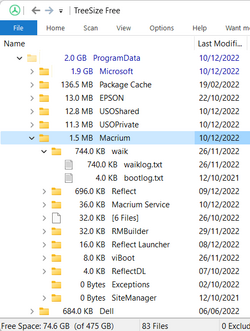
I think I will have to uninstall/reinstall, no?
First you should expand the Macrium folder in TreeSize as I did above and see what's eating up all that space.
My Computers
-
At a glance
Windows 11 HomeAMD Athlon Silver 3050U8GBRadeon Graphics- OS
- Windows 11 Home
- Computer type
- Laptop
- Manufacturer/Model
- Acer Aspire 3 A315-23-R9VY
- CPU
- AMD Athlon Silver 3050U
- Memory
- 8GB
- Graphics Card(s)
- Radeon Graphics
- Monitor(s) Displays
- laptop screen
- Screen Resolution
- 1366x768 native resolution, up to 2560x1440 with Radeon Virtual Super Resolution
- Hard Drives
- 1TB Samsung EVO 870 SSD (from April 2026: 250GB EVO 850)
- Internet Speed
- 150 Mbps
- Browser
- Edge, Firefox
- Antivirus
- Defender
- Other Info
- UPDATE - 11 April 2026: due to lid hinges starting to break up this laptop has been retired from active duty. The OS with all software and files has been migrated to my System Seven in 'Other systems' to carry on as my general purpose 'main machine'.
I've now clean installed 25H2 and used Garlin's scripts to update Secure Boot to CA 2023 and revoke the PCA 2011 certificates. It's new role is to test secure boot issues.
Info for 2021-2026:
fully 'Windows 11 ready' laptop. Windows 10 C: partition migrated from my old unsupported 'main machine' then upgraded to 11. A test migration ran Insider builds for 2 months. When 11 was released on 5th October 2021 it was re-imaged back to 10 and was offered the upgrade in Windows Update on 20th October. Windows Update offered the 22H2 Feature Update on 20th September 2022. It got the 23H2 Feature Update on 4th November 2023 through Windows Update, 24H2 on 3rd October 2024 through Windows Update by setting the Target Release Version for 24H2, and 25H2 on 30th September 2025 through Windows Update by setting the Target Release Version for 25H2.
-
At a glance
Windows 11 ProIntel® Core™ i5-520M8GB(integrated graphics) Intel HD Graphics- Operating System
- Windows 11 Pro
- Computer type
- Laptop
- Manufacturer/Model
- Dell Latitude E4310
- CPU
- Intel® Core™ i5-520M
- Motherboard
- 0T6M8G
- Memory
- 8GB
- Graphics card(s)
- (integrated graphics) Intel HD Graphics
- Screen Resolution
- 1366x768
- Hard Drives
- 500GB Crucial MX500 SSD
- Browser
- Firefox, Edge
- Antivirus
- Defender
- Other Info
- unsupported machine: Legacy bios, MBR, TPM 1.2, upgraded from W10 to W11 using W10/W11 hybrid install media workaround.
In-place upgrade to 22H2 using ISO and a workaround.
Feature Update to 23H2 by manually installing the Enablement Package.
In-place upgrade to 24H2 using hybrid 23H2/24H2 install media.
Upgraded to 25H2 by Enablement Package.
Also running Insider Experimental 263xx and 29xxx builds and Windows 10 as native boot .vhdx.
-
My SYSTEM THREE is a Dell Latitude 5410, i7-10610U, 32GB RAM, 512GB NVMe ssd, supported device running Windows 11 Pro.
My SYSTEM FOUR was a 2-in-1 convertible Lenovo Yoga 11e (1st gen) type 20DA, Celeron N2930, 8GB RAM, 256GB ssd. Unsupported device. This has now been sold. It has been replaced by my System Eight.
My SYSTEM FIVE is a Dell Latitude 3190 2-in-1, Pentium Silver N5030, 8GB RAM, 1TB NVMe ssd, supported device running Windows 11 Pro, plus Insider Beta, Experimental 263xx and 29xxx builds (and a few others) as a native boot .vhdx.
My SYSTEM SIX is a Dell Latitude 5550, Core Ultra 7 165H, 64GB RAM, 1TB NVMe SSD, supported device, Windows 11 Pro, Hyper-V host machine. Updated to 25H2 on 30th September 2025.
My SYSTEM SEVEN is a Lenovo Thinkpad T580, 1920x1080 touchscreen, Intel Core i7-8650U, 16GB RAM, 512GB NVMe SSD + 2nd 512GB NVMe SSD, a supported device for Windows 11. This is my current general purpose 'main machine'. The installed Windows 11 Home from my System One has been migrated to this machine. As its new home has an existing digital licence for Pro I've been able to upgrade the migrated OS from Home to Pro.
My SYSTEM EIGHT is a 2-in-1 convertible Lenovo Yoga 11e (5th gen) type 20LN, Celeron N4120, 8GB RAM, 512GB NVMe ssd, a supported device for Windows 11. Currently running Windows 11 Pro, plus Insider Beta, Experimental 263xx and 29xxx builds as native boot vhdx.

That's larger than mine, I have just 1.5MB....
View attachment 47259
First you should expand the Macrium folder in TreeSize as I did above and see what's eating up all that space.
The PE environment.
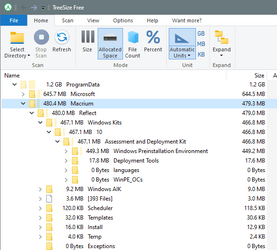
While this is fun... I'm not the OP.
My Computers
-
At a glance
Win 11 Home ♦♦♦26300.9550 ♦♦♦♦♦♦♦26H2AMD Ryzen 7 3700XG.Skill (F4-3200C14D-16GTZKW)EVGA RTX 2070 (08G-P4-2171-KR)- OS
- Win 11 Home ♦♦♦26300.9550 ♦♦♦♦♦♦♦26H2
- Computer type
- PC/Desktop
- Manufacturer/Model
- Built by Ghot® [May 2020]
- CPU
- AMD Ryzen 7 3700X
- Motherboard
- Asus Pro WS X570-ACE (BIOS 5302)
- Memory
- G.Skill (F4-3200C14D-16GTZKW)
- Graphics Card(s)
- EVGA RTX 2070 (08G-P4-2171-KR)
- Sound Card
- Realtek ALC1220P / ALC S1220A
- Monitor(s) Displays
- Dell U3011 30"
- Screen Resolution
- 2560 x 1600
- Hard Drives
- 2x Samsung 860 EVO 500GB,
WD 4TB Black FZBX - SATA III,
WD 8TB Black FZBX - SATA III,
DRW-24B1ST CD/DVD Burner
- PSU
- PC Power & Cooling 750W Quad EPS12V
- Case
- Cooler Master ATCS 840 Tower
- Cooling
- CM Hyper 212 EVO (push/pull)
- Keyboard
- Ducky DK9008 Shine II Blue LED
- Mouse
- Logitech Optical M-100
- Internet Speed
- 300/300
- Browser
- Firefox (latest)
- Antivirus
- Bitdefender Total Security
- Other Info
- Speakers: Klipsch Pro Media 2.1
-
At a glance
Windows XP Pro 32bit w/SP3AMD Athlon 64 X2 5000+ (OC'd @ 3.2Ghz)TWIN2X2048-6400C4DHX (2 x 1GB, DDR2 800)EVGA 256-P2-N758-TR GeForce 8600GT SSC- Operating System
- Windows XP Pro 32bit w/SP3
- Computer type
- PC/Desktop
- Manufacturer/Model
- Built by Ghot® (not in use)
- CPU
- AMD Athlon 64 X2 5000+ (OC'd @ 3.2Ghz)
- Motherboard
- ASUS M2N32-SLI Deluxe Wireless Edition
- Memory
- TWIN2X2048-6400C4DHX (2 x 1GB, DDR2 800)
- Graphics card(s)
- EVGA 256-P2-N758-TR GeForce 8600GT SSC
- Sound Card
- Onboard
- Monitor(s) Displays
- ViewSonic G90FB Black 19" Professional (CRT)
- Screen Resolution
- up to 2048 x 1536
- Hard Drives
- WD 36GB 10,000rpm Raptor SATA
Seagate 80GB 7200rpm SATA
Lite-On LTR-52246S CD/RW
Lite-On LH-18A1P CD/DVD Burner
- PSU
- PC Power & Cooling Silencer 750 Quad EPS12V
- Case
- Generic Beige case, 80mm fans
- Cooling
- ZALMAN 9500A 92mm CPU Cooler
- Keyboard
- Logitech Classic Keybooard 200
- Mouse
- Logitech Optical M-BT96a
- Internet Speed
- 300/300
- Browser
- Firefox 3.x ??
- Antivirus
- Symantec (Norton)
- Other Info
- Still assembled, still runs. Haven't turned it on for 15 years?

- Local time
- 1:53 AM
- Posts
- 3,327
- OS
- Windows 11 Pro
Do you have a Windows Kits folder?
Windows ADKs may be consuming some of that if you've been creating Windows PE (WinPE) boot media.
C:\ProgramData\Macrium\Reflect\Windows Kits
Edit: I didn't see your similar post above, @Ghot until later.
Windows ADKs may be consuming some of that if you've been creating Windows PE (WinPE) boot media.
C:\ProgramData\Macrium\Reflect\Windows Kits
Edit: I didn't see your similar post above, @Ghot until later.
Last edited:
My Computers
-
At a glance
Windows 11 ProIntel Core i9-10900XCorsair 64 GB (4 x 16 GB) CMW64GX4M4C3000C15 ...GIGABYTE GeForce GTX 1660 Super Mini ITX 6 GB OC- OS
- Windows 11 Pro
- Computer type
- PC/Desktop
- Manufacturer/Model
- Stigg's Build
- CPU
- Intel Core i9-10900X
- Motherboard
- GIGABYTE X299X DESIGNARE 10G
- Memory
- Corsair 64 GB (4 x 16 GB) CMW64GX4M4C3000C15 Vengeance RGB Pro 3000Mhz DDR4
- Graphics Card(s)
- GIGABYTE GeForce GTX 1660 Super Mini ITX 6 GB OC
- Sound Card
- Realtek ALC1220
- Monitor(s) Displays
- Samsung 27" FHD LED FreeSync Gaming Monitor (LS27F350FHEXXY)
- Screen Resolution
- 1920 x 1080
- Hard Drives
- Samsung 970 Pro Series 1TB M.2 2280 NVMe SSD
Western Digital Red Pro WD8003FFBX-68B9AN0 8 TB, 7200 RPM, SATA-III
Western Digital Red Pro WD8003FFBX-68B9AN0 8 TB, 7200 RPM, SATA-III
- PSU
- Corsair HX1200 1200W 80 Plus Platinum
- Case
- Fractal Design Define 7 Black Solid Case
- Cooling
- Noctua NH-D15 Chromax Black
- Keyboard
- Razer Ornata V2
- Mouse
- Razer DeathAdder Essential
- Internet Speed
- FTTN 100Mbps / 40Mbps
- Browser
- Mozilla Firefox
- Antivirus
- N/A
- Other Info
- Logitech BRIO 4k Ultra HD USB-C Webcam
-
At a glance
Windows 10 ProCore i7-8750HSK Hynix 32 GB (2 x 16 GB) HMA82GS6CJR8N-VK 1...NVIDIA GeForce GTX 1070- Operating System
- Windows 10 Pro
- Computer type
- Laptop
- Manufacturer/Model
- ASUS ROG Zephyrus M GM501GS
- CPU
- Core i7-8750H
- Motherboard
- Zephyrus M GM501GS
- Memory
- SK Hynix 32 GB (2 x 16 GB) HMA82GS6CJR8N-VK 16 GB DDR4-2666 DDR4 SDRAM
- Graphics card(s)
- NVIDIA GeForce GTX 1070
- Sound Card
- Realtek ALC294
- Monitor(s) Displays
- AU Optronics B156HAN07.1 [15.6" LCD]
- Screen Resolution
- 1920 x 1080
- Hard Drives
- Samsung MZVKW512HMJP-00000 512 GB, PCI-E 3.0 x4
Samsung SSD 860 QVO 4TB 4 TB, SATA-III
- PSU
- N/A
- Case
- N/A
- Cooling
- N/A
- Keyboard
- PC/AT Enhanced PS2 Keyboard (101/102-Key)
- Mouse
- Razer DeathAdder Essential
- Internet Speed
- FTTN 100Mbps / 40Mbps
- Browser
- Mozilla Firefox
- Antivirus
- N/A
- Other Info
- USB2.0 HD UVC Webcam
That makes sense, I don't bother with the download for WinPE, I just use WinRE.The PE environment.
While this is fun... I'm not the OP.

My Computers
-
At a glance
Windows 11 HomeAMD Athlon Silver 3050U8GBRadeon Graphics- OS
- Windows 11 Home
- Computer type
- Laptop
- Manufacturer/Model
- Acer Aspire 3 A315-23-R9VY
- CPU
- AMD Athlon Silver 3050U
- Memory
- 8GB
- Graphics Card(s)
- Radeon Graphics
- Monitor(s) Displays
- laptop screen
- Screen Resolution
- 1366x768 native resolution, up to 2560x1440 with Radeon Virtual Super Resolution
- Hard Drives
- 1TB Samsung EVO 870 SSD (from April 2026: 250GB EVO 850)
- Internet Speed
- 150 Mbps
- Browser
- Edge, Firefox
- Antivirus
- Defender
- Other Info
- UPDATE - 11 April 2026: due to lid hinges starting to break up this laptop has been retired from active duty. The OS with all software and files has been migrated to my System Seven in 'Other systems' to carry on as my general purpose 'main machine'.
I've now clean installed 25H2 and used Garlin's scripts to update Secure Boot to CA 2023 and revoke the PCA 2011 certificates. It's new role is to test secure boot issues.
Info for 2021-2026:
fully 'Windows 11 ready' laptop. Windows 10 C: partition migrated from my old unsupported 'main machine' then upgraded to 11. A test migration ran Insider builds for 2 months. When 11 was released on 5th October 2021 it was re-imaged back to 10 and was offered the upgrade in Windows Update on 20th October. Windows Update offered the 22H2 Feature Update on 20th September 2022. It got the 23H2 Feature Update on 4th November 2023 through Windows Update, 24H2 on 3rd October 2024 through Windows Update by setting the Target Release Version for 24H2, and 25H2 on 30th September 2025 through Windows Update by setting the Target Release Version for 25H2.
-
At a glance
Windows 11 ProIntel® Core™ i5-520M8GB(integrated graphics) Intel HD Graphics- Operating System
- Windows 11 Pro
- Computer type
- Laptop
- Manufacturer/Model
- Dell Latitude E4310
- CPU
- Intel® Core™ i5-520M
- Motherboard
- 0T6M8G
- Memory
- 8GB
- Graphics card(s)
- (integrated graphics) Intel HD Graphics
- Screen Resolution
- 1366x768
- Hard Drives
- 500GB Crucial MX500 SSD
- Browser
- Firefox, Edge
- Antivirus
- Defender
- Other Info
- unsupported machine: Legacy bios, MBR, TPM 1.2, upgraded from W10 to W11 using W10/W11 hybrid install media workaround.
In-place upgrade to 22H2 using ISO and a workaround.
Feature Update to 23H2 by manually installing the Enablement Package.
In-place upgrade to 24H2 using hybrid 23H2/24H2 install media.
Upgraded to 25H2 by Enablement Package.
Also running Insider Experimental 263xx and 29xxx builds and Windows 10 as native boot .vhdx.
-
My SYSTEM THREE is a Dell Latitude 5410, i7-10610U, 32GB RAM, 512GB NVMe ssd, supported device running Windows 11 Pro.
My SYSTEM FOUR was a 2-in-1 convertible Lenovo Yoga 11e (1st gen) type 20DA, Celeron N2930, 8GB RAM, 256GB ssd. Unsupported device. This has now been sold. It has been replaced by my System Eight.
My SYSTEM FIVE is a Dell Latitude 3190 2-in-1, Pentium Silver N5030, 8GB RAM, 1TB NVMe ssd, supported device running Windows 11 Pro, plus Insider Beta, Experimental 263xx and 29xxx builds (and a few others) as a native boot .vhdx.
My SYSTEM SIX is a Dell Latitude 5550, Core Ultra 7 165H, 64GB RAM, 1TB NVMe SSD, supported device, Windows 11 Pro, Hyper-V host machine. Updated to 25H2 on 30th September 2025.
My SYSTEM SEVEN is a Lenovo Thinkpad T580, 1920x1080 touchscreen, Intel Core i7-8650U, 16GB RAM, 512GB NVMe SSD + 2nd 512GB NVMe SSD, a supported device for Windows 11. This is my current general purpose 'main machine'. The installed Windows 11 Home from my System One has been migrated to this machine. As its new home has an existing digital licence for Pro I've been able to upgrade the migrated OS from Home to Pro.
My SYSTEM EIGHT is a 2-in-1 convertible Lenovo Yoga 11e (5th gen) type 20LN, Celeron N4120, 8GB RAM, 512GB NVMe ssd, a supported device for Windows 11. Currently running Windows 11 Pro, plus Insider Beta, Experimental 263xx and 29xxx builds as native boot vhdx.


My Computers
-
At a glance
Win 11 Pro 26H2 26300.9550Intel® Core™ i7-14700KG.SKILL Ripjaws S5 Series 64GB (2 x 32GB) DDR5ASUS GeForce RTX 4070 Super 12GB- OS
- Win 11 Pro 26H2 26300.9550
- Computer type
- PC/Desktop
- Manufacturer/Model
- Self Built
- CPU
- Intel® Core™ i7-14700K
- Motherboard
- ASUS TUF Z690-PLUS WIFI (BIOS 4505)
- Memory
- G.SKILL Ripjaws S5 Series 64GB (2 x 32GB) DDR5
- Graphics Card(s)
- ASUS GeForce RTX 4070 Super 12GB
- Sound Card
- Sound Blaster AE-5 Plus
- Monitor(s) Displays
- ASUS TUF Gaming 27" 2K HDR Gaming
- Screen Resolution
- 2560 x 1440
- Hard Drives
- Samsung 990 Pro 1TB NVMe (Win 11 25H2)
SK hynix P41 500GB NVMe
SK hynix P41 2TB NVMe (x3)
Crucial P3 Plus 4TB
- PSU
- Corsair RM850x Shift
- Case
- Antec Dark Phantom DP502 FLUX
- Cooling
- Corsair Nautilus 360 RS AIO
- Keyboard
- Logitech MK 320
- Mouse
- Razer Basilisk V3
- Internet Speed
- 750Mbs
- Browser
- Firefox
- Antivirus
- Winows Security
- Other Info
- MR 8.1 Home
-
At a glance
Win 11 Pro 25H2 26200.9550Intel Core i5-1140064 GB DDR4MSI GeForce RTX 3060 Ventus 2X 12GB- Operating System
- Win 11 Pro 25H2 26200.9550
- Computer type
- PC/Desktop
- Manufacturer/Model
- Self Built
- CPU
- Intel Core i5-11400
- Motherboard
- Asus TUF Gaming Z590 Plus WiFi (BIOS 2803)
- Memory
- 64 GB DDR4
- Graphics card(s)
- MSI GeForce RTX 3060 Ventus 2X 12GB
- Sound Card
- SoundBlaster Audigy Fx V2
- Monitor(s) Displays
- Samsung F27T350
- Screen Resolution
- 1920x1080
- Hard Drives
- Samsung 980 Pro 1TB
Samsung 970 EVO Plus 2TB
Samsung 870 EVO 500GB SSD
- PSU
- Corsair HX750
- Case
- Cougar MX330-G Window
- Cooling
- Thermalright Frozen Edge 240 Black AIO
- Internet Speed
- 350Mbps
- Browser
- Firefox
- Antivirus
- Windows Security
-
System Three
Win 11 Pro 25H2 26200.9550
ASUS PRIME Z370-P II BIOS 3004 7/12/21
Intel Core i7-8700 CPU @ 3.20GHz
32GB DDR4 RAM (4x8)
EVGA RTX 2060 (used)
iGPU Intel UHD Graphics 630 (backup)
Cooler Master Hyper 212
Mid-Tower Desktop
- Local time
- 4:53 PM
- Posts
- 3,250
- OS
- Windows 11 Pro 25H2 (RP channel)
2.28MB here
My Computer
At a glance
Windows 11 Pro 25H2 (RP channel)AMD Ryzen 7 9800X3D 8-core64GB Corsair Titanium 6000/CL30MSI Suprim 5080 SOC
- OS
- Windows 11 Pro 25H2 (RP channel)
- Computer type
- PC/Desktop
- Manufacturer/Model
- MSI
- CPU
- AMD Ryzen 7 9800X3D 8-core
- Motherboard
- MEG X870E Godlike
- Memory
- 64GB Corsair Titanium 6000/CL30
- Graphics Card(s)
- MSI Suprim 5080 SOC
- Sound Card
- Soundblaster AE-9
- Monitor(s) Displays
- ASUS TUF Gaming VG289Q
- Screen Resolution
- 3840x2160
- Hard Drives
- Samsung 9100 Pro 4TB (gen 5 x4, system drive/games)
Samsung 990 Pro 2TB
Samsung 980 Pro 2TB
Samsung 870 Evo 4TB
Samsung 870 Evo 2TB
Samsung T9 4TB
- PSU
- Seasonic PX-2200
- Case
- Bequiet! Dark Base Pro 901
- Cooling
- Noctua NH-D15S Chromax black
- Keyboard
- Logitech G915 X (wired)
- Mouse
- Logitech G903 with PowerPlay charger
- Internet Speed
- 900Mb/sec
- Browser
- Microsoft Edge
- Antivirus
- Windows Defender

- Local time
- 4:53 PM
- Posts
- 3,134
- OS
- Win7,Win11
That is where it downloads and extracts stuff. Pe from ms and the various packages.
Have a look and see what is in there. You could just delete it after you have satisfied your curiosity.
why do you need treesize to look inside - is there something wrong with explorer ?
Have a look and see what is in there. You could just delete it after you have satisfied your curiosity.
why do you need treesize to look inside - is there something wrong with explorer ?
My Computers
-
At a glance
Win7,Win11i7-97002x16gb 3600mhz- OS
- Win7,Win11
- Computer type
- PC/Desktop
- CPU
- i7-9700
- Motherboard
- gigabyte b365m ds3h
- Memory
- 2x16gb 3600mhz
- Monitor(s) Displays
- benq gw2480
- PSU
- bequiet pure power 11 400CM
- Cooling
- cryorig m9i
-
At a glance
win7,win11i5-84002x8gb 3200- Operating System
- win7,win11
- Computer type
- PC/Desktop
- CPU
- i5-8400
- Motherboard
- gigabyte b365m ds3h
- Memory
- 2x8gb 3200
- PSU
- xfx pro 450

- Local time
- 11:53 AM
- Posts
- 1,990
- OS
- Windows 10 Pro
Folks, I cleaned up humongous amounts of GBs from viBoot with VirtualBox (that I no longer use, I now use viBoot with Hyper-V) and my ProgramData > Macrium now has 4.9 MB of which 4.0 MB are Templates that I did not dare to delete.
Thanks to all who responded I will mark this thread 'Solved' 
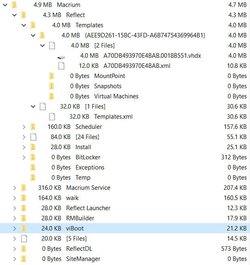
Thanks to all who responded
I will mark this thread 'Solved' My Computer
At a glance
Windows 10 Pro
- OS
- Windows 10 Pro
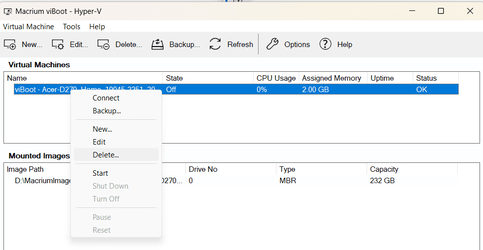
Ah, that explains it. When you have finished using a viBoot VM it is vital to delete the VM from within viBoot, do not just delete it in Hyper-V Manager. Only when you delete it using viBoot does it know that it's safe to delete the differencing virtual disk that it created in ProgramData, viBoot will also tell Hyper-V Manager to delete the VM.I cleaned up humongous amounts of GBs from viBoot.....
My Computers
-
At a glance
Windows 11 HomeAMD Athlon Silver 3050U8GBRadeon Graphics- OS
- Windows 11 Home
- Computer type
- Laptop
- Manufacturer/Model
- Acer Aspire 3 A315-23-R9VY
- CPU
- AMD Athlon Silver 3050U
- Memory
- 8GB
- Graphics Card(s)
- Radeon Graphics
- Monitor(s) Displays
- laptop screen
- Screen Resolution
- 1366x768 native resolution, up to 2560x1440 with Radeon Virtual Super Resolution
- Hard Drives
- 1TB Samsung EVO 870 SSD (from April 2026: 250GB EVO 850)
- Internet Speed
- 150 Mbps
- Browser
- Edge, Firefox
- Antivirus
- Defender
- Other Info
- UPDATE - 11 April 2026: due to lid hinges starting to break up this laptop has been retired from active duty. The OS with all software and files has been migrated to my System Seven in 'Other systems' to carry on as my general purpose 'main machine'.
I've now clean installed 25H2 and used Garlin's scripts to update Secure Boot to CA 2023 and revoke the PCA 2011 certificates. It's new role is to test secure boot issues.
Info for 2021-2026:
fully 'Windows 11 ready' laptop. Windows 10 C: partition migrated from my old unsupported 'main machine' then upgraded to 11. A test migration ran Insider builds for 2 months. When 11 was released on 5th October 2021 it was re-imaged back to 10 and was offered the upgrade in Windows Update on 20th October. Windows Update offered the 22H2 Feature Update on 20th September 2022. It got the 23H2 Feature Update on 4th November 2023 through Windows Update, 24H2 on 3rd October 2024 through Windows Update by setting the Target Release Version for 24H2, and 25H2 on 30th September 2025 through Windows Update by setting the Target Release Version for 25H2.
-
At a glance
Windows 11 ProIntel® Core™ i5-520M8GB(integrated graphics) Intel HD Graphics- Operating System
- Windows 11 Pro
- Computer type
- Laptop
- Manufacturer/Model
- Dell Latitude E4310
- CPU
- Intel® Core™ i5-520M
- Motherboard
- 0T6M8G
- Memory
- 8GB
- Graphics card(s)
- (integrated graphics) Intel HD Graphics
- Screen Resolution
- 1366x768
- Hard Drives
- 500GB Crucial MX500 SSD
- Browser
- Firefox, Edge
- Antivirus
- Defender
- Other Info
- unsupported machine: Legacy bios, MBR, TPM 1.2, upgraded from W10 to W11 using W10/W11 hybrid install media workaround.
In-place upgrade to 22H2 using ISO and a workaround.
Feature Update to 23H2 by manually installing the Enablement Package.
In-place upgrade to 24H2 using hybrid 23H2/24H2 install media.
Upgraded to 25H2 by Enablement Package.
Also running Insider Experimental 263xx and 29xxx builds and Windows 10 as native boot .vhdx.
-
My SYSTEM THREE is a Dell Latitude 5410, i7-10610U, 32GB RAM, 512GB NVMe ssd, supported device running Windows 11 Pro.
My SYSTEM FOUR was a 2-in-1 convertible Lenovo Yoga 11e (1st gen) type 20DA, Celeron N2930, 8GB RAM, 256GB ssd. Unsupported device. This has now been sold. It has been replaced by my System Eight.
My SYSTEM FIVE is a Dell Latitude 3190 2-in-1, Pentium Silver N5030, 8GB RAM, 1TB NVMe ssd, supported device running Windows 11 Pro, plus Insider Beta, Experimental 263xx and 29xxx builds (and a few others) as a native boot .vhdx.
My SYSTEM SIX is a Dell Latitude 5550, Core Ultra 7 165H, 64GB RAM, 1TB NVMe SSD, supported device, Windows 11 Pro, Hyper-V host machine. Updated to 25H2 on 30th September 2025.
My SYSTEM SEVEN is a Lenovo Thinkpad T580, 1920x1080 touchscreen, Intel Core i7-8650U, 16GB RAM, 512GB NVMe SSD + 2nd 512GB NVMe SSD, a supported device for Windows 11. This is my current general purpose 'main machine'. The installed Windows 11 Home from my System One has been migrated to this machine. As its new home has an existing digital licence for Pro I've been able to upgrade the migrated OS from Home to Pro.
My SYSTEM EIGHT is a 2-in-1 convertible Lenovo Yoga 11e (5th gen) type 20LN, Celeron N4120, 8GB RAM, 512GB NVMe ssd, a supported device for Windows 11. Currently running Windows 11 Pro, plus Insider Beta, Experimental 263xx and 29xxx builds as native boot vhdx.
- Local time
- 11:53 AM
- Posts
- 1,990
- OS
- Windows 10 Pro
Wow, I have 3 weeks worth of images, each one of which has 81.5 GB worth of crud 
 only one image is made after the clean up
  I really feel like my avatar now
Edit: This explains, IMHO, why Windows clean up follows the maxim 'if it is unclear whether it is safe or unsafe to delete something, don't delete'. Even 81.5 GB worth of crud does not affect performance at all. That's the reason I didn't notice the crud, I only found it after looking for it.
only one image is made after the clean up I really feel like my avatar now Edit: This explains, IMHO, why Windows clean up follows the maxim 'if it is unclear whether it is safe or unsafe to delete something, don't delete'. Even 81.5 GB worth of crud does not affect performance at all. That's the reason I didn't notice the crud, I only found it after looking for it.
Last edited:
My Computer
At a glance
Windows 10 Pro
- OS
- Windows 10 Pro
Similar threads


- Replies
- 7
- Views
- 1K
- Replies
- 25
- Views
- 3K
Latest Support Threads
-
-
Xbox Microsoft Store game not visible in Windows Explorer
- Started by hispanico
- Replies: 0
-

-
Is the Administrator protection FINALLY has been rolled out? Take a look from the images.
- Started by win11freak
- Replies: 5
-
First look at 26H2: MS broke Win32k.sys, quality continues to degrade
- Started by Anixx
- Replies: 6

Latest Tutorials
-
 Accessibility Enable or Disable Auto Zoom Out for Narrator Math Reading Navigation in Windows 11
- Started by Brink
- Replies: 0
-
 Accessibility Change Narrator Math Reading Navigation Verbosity in Windows 11
- Started by Brink
- Replies: 0
-
 Accessibility Change Narrator Math Reading Navigation Mode in Windows 11
- Started by Brink
- Replies: 0
-
 Accessibility Change Narrator Math Reading Pause Factor in Windows 11
- Started by Brink
- Replies: 0
-
 Accessibility Change Narrator Math Reading Speech Rate in Windows 11
- Started by Brink
- Replies: 0