
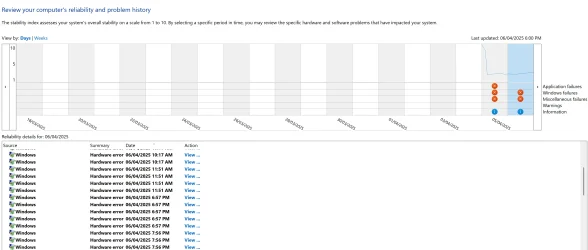
I am having a weird issue where everytime my screen turns off (goes into standby) then turned back on a again, a HW error is trigged in the reliability history and a dmp file as well. The weird thing is that there is no trace in the event viewer as an error, I think it is shown as an information event. Also, I am not experiencing any crash, black screen or error being displayed after the screen turns back on.
I used windbg to analyze the dmp file and its pointing to dxgkrnl and dwm process. Something is triggering the dmp file but I cant figure out which process is it.
I already tried running usual commands "DISM.exe /Online /Cleanup-image /Restorehealth " and "sfc /scannow" but the issue remains.
I also tried reinstalling windows using the latest available iso created form the media creator tool.
Below is a screenshot of the hardware errors, in addition to the attached the log collector output and watchdog dmp file.
Log Collector Output
I used windbg to analyze the dmp file and its pointing to dxgkrnl and dwm process. Something is triggering the dmp file but I cant figure out which process is it.
I already tried running usual commands "DISM.exe /Online /Cleanup-image /Restorehealth " and "sfc /scannow" but the issue remains.
I also tried reinstalling windows using the latest available iso created form the media creator tool.
Below is a screenshot of the hardware errors, in addition to the attached the log collector output and watchdog dmp file.
Log Collector Output
- Windows Build/Version
- Windows 11 Pro 26100.3476 24H2
Attachments
Last edited:
My Computer
At a glance
Windows 11 ProRyzen 7 9800X3DCorsair DDR5 32GB 6000MHz CL30NVIDIA 5070 Ti 16GB VRAM
- OS
- Windows 11 Pro
- Computer type
- PC/Desktop
- Manufacturer/Model
- ASUS TUF GAMING Pre-Built PC
- CPU
- Ryzen 7 9800X3D
- Motherboard
- ASUS TUF GAMING B850-PLUS WIFI
- Memory
- Corsair DDR5 32GB 6000MHz CL30
- Graphics Card(s)
- NVIDIA 5070 Ti 16GB VRAM
- Sound Card
- Realtek
- Monitor(s) Displays
- LG OLED C2 42"
- Screen Resolution
- 3840x2160
- Hard Drives
- Kingston KC3000 2TB PCIe Gen4 (DATA)
TeamGroup Z440 1TB PCIe Gen4 (OS)
- PSU
- NZXT C850 (850W Gold)
- Case
- Lian Li A3-WD
- Cooling
- DeepCool LE520
- Keyboard
- ASUS TUF GAMING K3 GEN II
- Mouse
- Attack Shark X3
- Internet Speed
- 700Mbps
- Browser
- Microsoft Edge
- Antivirus
- Windows Defender






