
Hyper-V error 0x80070570 when starting VM


tecknot

living in a van down by the river
Power User
Local time
3:47 PM
Posts
456
OS
Windows 11 Pro 25H2 build 26200.9457
Sorry for being such an annoyance, but I'm a bit desperate.

Okay, previously I created a .vhdx on a 130GB partition and had attempted to run Hyper-V and connect to the .vhdx. This was not working so I deleted the .vhdx and decided to create it in a new VM (I have no other VMs). So, I was able to create a new VM in the Hyper-V manager (after a small hiccup). Cool, I started up the VM, but I got an error 0x80070570 (see below).
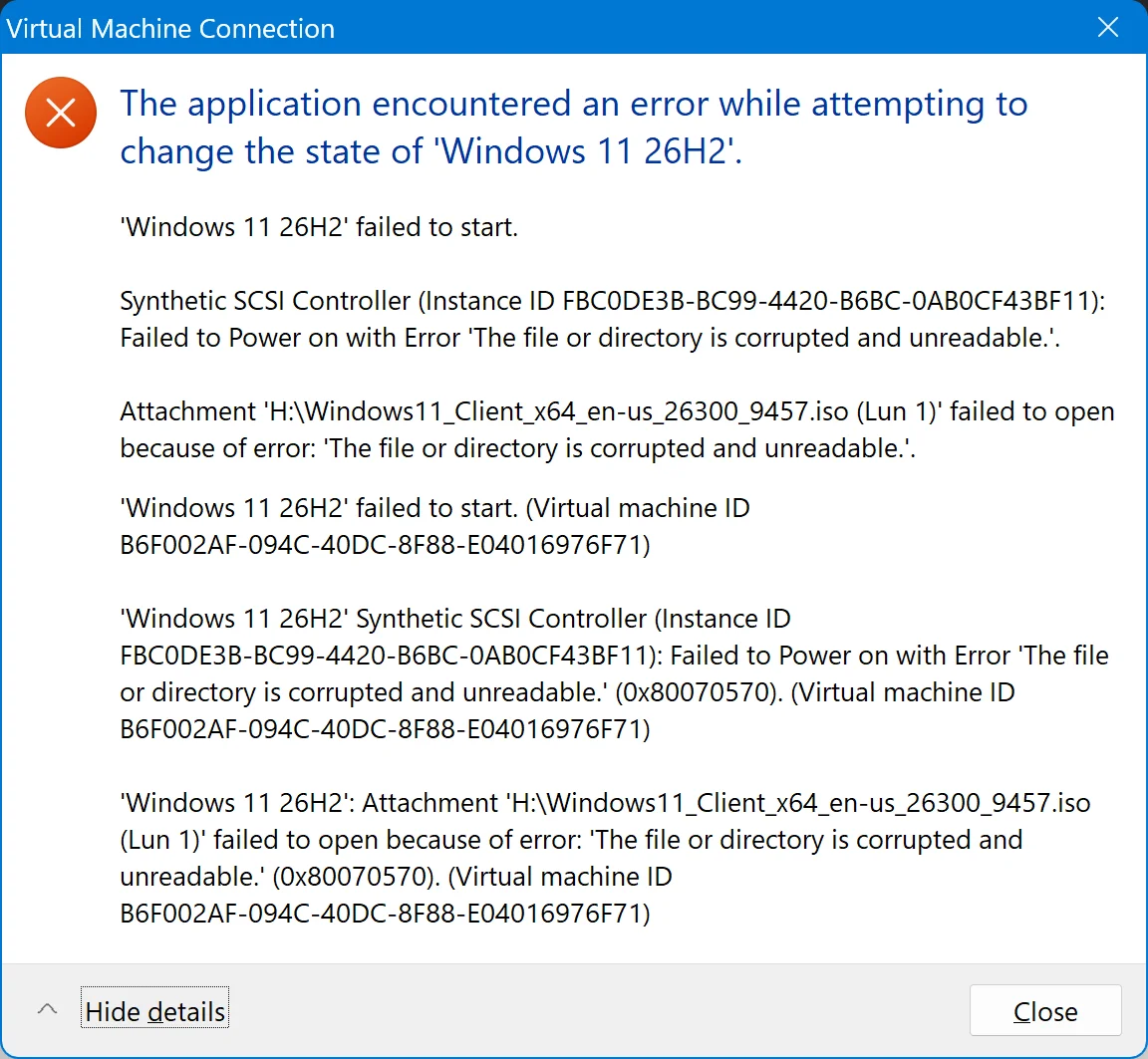
Hyper-V VM error 0x80070570.webp


I did a "Google" search and found some fixes, but none of them worked for me. They weren't in same scenario as in my situation. So, now I am at another loss and don't know what to do.

Do any of you happen to know what I can do to get my VM up and running.

Kind regards,

tecknot
 

My Computer My Computer

At a glance

Windows 11 Pro 25H2 build 26200.9457Intel i7 8750H @ 2.2 GHz16 GB (all Samsung) DDR4-3200 SODIMM (non-ECC...Intel UHD Graphics 630 & NVIDIA Quadro P600
OS
Windows 11 Pro 25H2 build 26200.9457
Computer type
Laptop
Manufacturer/Model
Lenovo ThinkPad Workstation P72
CPU
Intel i7 8750H @ 2.2 GHz
Motherboard
Lenovo 01YU291
Memory
16 GB (all Samsung) DDR4-3200 SODIMM (non-ECC) PCIe 3
Graphics Card(s)
Intel UHD Graphics 630 & NVIDIA Quadro P600
Sound Card
Realtek ALC3286 & Focusrite Saffire 24 Pro DSP
Monitor(s) Displays
17.3"
Screen Resolution
3840x2160
Hard Drives
1TB SSD Samsung 860 EVO SATA 3
1TB SSD Samsung 970 EVO M.2 NVMe PCIe 3 x 4
2TB SSD Samsung 990 PRO M.2 NVMe PCIe 3 x 4
PSU
230W
Cooling
fan
Keyboard
UltraNav
Mouse
Kensington wireless Orbit
Internet Speed
640Mbps
Browser
DuckDuckGo and Firefox
Antivirus
Defender
Other Info
CM246 Chipset
In Windows (the host) are you able to right-click the ISO and mount it? Most of the errors point to an issue with the ISO itself.
 

My Computer My Computer

At a glance

Linux Mint
OS
Linux Mint
Computer type
Laptop
Manufacturer/Model
System76 Lemur Pro
In Windows (the host) are you able to right-click the ISO and mount it? Most of the errors point to an issue with the ISO itself.

Hi neemobeer,

Ah, no I can't. The ISO file is corrupted. Guess I'll have to remake it.

Thanks!

Kind regards,

tecknot
 

My Computer My Computer

At a glance

Windows 11 Pro 25H2 build 26200.9457Intel i7 8750H @ 2.2 GHz16 GB (all Samsung) DDR4-3200 SODIMM (non-ECC...Intel UHD Graphics 630 & NVIDIA Quadro P600
OS
Windows 11 Pro 25H2 build 26200.9457
Computer type
Laptop
Manufacturer/Model
Lenovo ThinkPad Workstation P72
CPU
Intel i7 8750H @ 2.2 GHz
Motherboard
Lenovo 01YU291
Memory
16 GB (all Samsung) DDR4-3200 SODIMM (non-ECC) PCIe 3
Graphics Card(s)
Intel UHD Graphics 630 & NVIDIA Quadro P600
Sound Card
Realtek ALC3286 & Focusrite Saffire 24 Pro DSP
Monitor(s) Displays
17.3"
Screen Resolution
3840x2160
Hard Drives
1TB SSD Samsung 860 EVO SATA 3
1TB SSD Samsung 970 EVO M.2 NVMe PCIe 3 x 4
2TB SSD Samsung 990 PRO M.2 NVMe PCIe 3 x 4
PSU
230W
Cooling
fan
Keyboard
UltraNav
Mouse
Kensington wireless Orbit
Internet Speed
640Mbps
Browser
DuckDuckGo and Firefox
Antivirus
Defender
Other Info
CM246 Chipset
Hi @neemobeer,

Tried a few times to download the ISO file from Microsoft, but each time failed, some unknown error.

Tried it with another old ISO and it seems to be working. I will follow through with this installation just to see if it is all working out. I'll be back if it isn't.

Kind regards,

tecknot
 

My Computer My Computer

At a glance

Windows 11 Pro 25H2 build 26200.9457Intel i7 8750H @ 2.2 GHz16 GB (all Samsung) DDR4-3200 SODIMM (non-ECC...Intel UHD Graphics 630 & NVIDIA Quadro P600
OS
Windows 11 Pro 25H2 build 26200.9457
Computer type
Laptop
Manufacturer/Model
Lenovo ThinkPad Workstation P72
CPU
Intel i7 8750H @ 2.2 GHz
Motherboard
Lenovo 01YU291
Memory
16 GB (all Samsung) DDR4-3200 SODIMM (non-ECC) PCIe 3
Graphics Card(s)
Intel UHD Graphics 630 & NVIDIA Quadro P600
Sound Card
Realtek ALC3286 & Focusrite Saffire 24 Pro DSP
Monitor(s) Displays
17.3"
Screen Resolution
3840x2160
Hard Drives
1TB SSD Samsung 860 EVO SATA 3
1TB SSD Samsung 970 EVO M.2 NVMe PCIe 3 x 4
2TB SSD Samsung 990 PRO M.2 NVMe PCIe 3 x 4
PSU
230W
Cooling
fan
Keyboard
UltraNav
Mouse
Kensington wireless Orbit
Internet Speed
640Mbps
Browser
DuckDuckGo and Firefox
Antivirus
Defender
Other Info
CM246 Chipset
Okay, running into a problem... When I attempt to create a .vhdx to install Windows on (according to this Turorial: Create Windows 11 Virtual Hard Disk (VHDX) at Boot to Native Boot), I am getting errors in Diskpart the last of which is "Access is denied." When I enter the command "List volume," it only list the USB drive which has the ISO file. It doesn't list any of the other drives on the machine, so I can't designate the partition set aside for the .vhdx.

Any help would be greatly appreciated.

Kind regards,

tecknot
 

My Computer My Computer

At a glance

Windows 11 Pro 25H2 build 26200.9457Intel i7 8750H @ 2.2 GHz16 GB (all Samsung) DDR4-3200 SODIMM (non-ECC...Intel UHD Graphics 630 & NVIDIA Quadro P600
OS
Windows 11 Pro 25H2 build 26200.9457
Computer type
Laptop
Manufacturer/Model
Lenovo ThinkPad Workstation P72
CPU
Intel i7 8750H @ 2.2 GHz
Motherboard
Lenovo 01YU291
Memory
16 GB (all Samsung) DDR4-3200 SODIMM (non-ECC) PCIe 3
Graphics Card(s)
Intel UHD Graphics 630 & NVIDIA Quadro P600
Sound Card
Realtek ALC3286 & Focusrite Saffire 24 Pro DSP
Monitor(s) Displays
17.3"
Screen Resolution
3840x2160
Hard Drives
1TB SSD Samsung 860 EVO SATA 3
1TB SSD Samsung 970 EVO M.2 NVMe PCIe 3 x 4
2TB SSD Samsung 990 PRO M.2 NVMe PCIe 3 x 4
PSU
230W
Cooling
fan
Keyboard
UltraNav
Mouse
Kensington wireless Orbit
Internet Speed
640Mbps
Browser
DuckDuckGo and Firefox
Antivirus
Defender
Other Info
CM246 Chipset
Just tried to use Diskpart outside of the Hyper-V VM session and listed the volumes. There it indicates that the partition for the .vhdx is "I". So, I tried that in my command to create the .vhdx inside the Hyper-V, but Diskpart could not find the path.

Still stuck.

Kind regards,

tecknot
 

My Computer My Computer

At a glance

Windows 11 Pro 25H2 build 26200.9457Intel i7 8750H @ 2.2 GHz16 GB (all Samsung) DDR4-3200 SODIMM (non-ECC...Intel UHD Graphics 630 & NVIDIA Quadro P600
OS
Windows 11 Pro 25H2 build 26200.9457
Computer type
Laptop
Manufacturer/Model
Lenovo ThinkPad Workstation P72
CPU
Intel i7 8750H @ 2.2 GHz
Motherboard
Lenovo 01YU291
Memory
16 GB (all Samsung) DDR4-3200 SODIMM (non-ECC) PCIe 3
Graphics Card(s)
Intel UHD Graphics 630 & NVIDIA Quadro P600
Sound Card
Realtek ALC3286 & Focusrite Saffire 24 Pro DSP
Monitor(s) Displays
17.3"
Screen Resolution
3840x2160
Hard Drives
1TB SSD Samsung 860 EVO SATA 3
1TB SSD Samsung 970 EVO M.2 NVMe PCIe 3 x 4
2TB SSD Samsung 990 PRO M.2 NVMe PCIe 3 x 4
PSU
230W
Cooling
fan
Keyboard
UltraNav
Mouse
Kensington wireless Orbit
Internet Speed
640Mbps
Browser
DuckDuckGo and Firefox
Antivirus
Defender
Other Info
CM246 Chipset
Here is a screenshot of the volumes in Diskpart while in the Hyper-V. Note that the volume listed is the DVD ROM.

Volumes in Hyper-V.webp


Kind regards,

tecknot
 

My Computer My Computer

At a glance

Windows 11 Pro 25H2 build 26200.9457Intel i7 8750H @ 2.2 GHz16 GB (all Samsung) DDR4-3200 SODIMM (non-ECC...Intel UHD Graphics 630 & NVIDIA Quadro P600
OS
Windows 11 Pro 25H2 build 26200.9457
Computer type
Laptop
Manufacturer/Model
Lenovo ThinkPad Workstation P72
CPU
Intel i7 8750H @ 2.2 GHz
Motherboard
Lenovo 01YU291
Memory
16 GB (all Samsung) DDR4-3200 SODIMM (non-ECC) PCIe 3
Graphics Card(s)
Intel UHD Graphics 630 & NVIDIA Quadro P600
Sound Card
Realtek ALC3286 & Focusrite Saffire 24 Pro DSP
Monitor(s) Displays
17.3"
Screen Resolution
3840x2160
Hard Drives
1TB SSD Samsung 860 EVO SATA 3
1TB SSD Samsung 970 EVO M.2 NVMe PCIe 3 x 4
2TB SSD Samsung 990 PRO M.2 NVMe PCIe 3 x 4
PSU
230W
Cooling
fan
Keyboard
UltraNav
Mouse
Kensington wireless Orbit
Internet Speed
640Mbps
Browser
DuckDuckGo and Firefox
Antivirus
Defender
Other Info
CM246 Chipset
I exited the Command prompt and I proceeded to install Windows just to see what would happen. Guess what, Windows installed on the .vhdx. Don't ask me how. Must have been because it was formatted so according to the VM settings. Anyhow, now I have an old version of Windows 11 in Hyper-V.

Now I just have to get 26H2 on a USB drive and reinstall Windows or just do an update, I guess.

Kind regards,

tecknot
 

My Computer My Computer

At a glance

Windows 11 Pro 25H2 build 26200.9457Intel i7 8750H @ 2.2 GHz16 GB (all Samsung) DDR4-3200 SODIMM (non-ECC...Intel UHD Graphics 630 & NVIDIA Quadro P600
OS
Windows 11 Pro 25H2 build 26200.9457
Computer type
Laptop
Manufacturer/Model
Lenovo ThinkPad Workstation P72
CPU
Intel i7 8750H @ 2.2 GHz
Motherboard
Lenovo 01YU291
Memory
16 GB (all Samsung) DDR4-3200 SODIMM (non-ECC) PCIe 3
Graphics Card(s)
Intel UHD Graphics 630 & NVIDIA Quadro P600
Sound Card
Realtek ALC3286 & Focusrite Saffire 24 Pro DSP
Monitor(s) Displays
17.3"
Screen Resolution
3840x2160
Hard Drives
1TB SSD Samsung 860 EVO SATA 3
1TB SSD Samsung 970 EVO M.2 NVMe PCIe 3 x 4
2TB SSD Samsung 990 PRO M.2 NVMe PCIe 3 x 4
PSU
230W
Cooling
fan
Keyboard
UltraNav
Mouse
Kensington wireless Orbit
Internet Speed
640Mbps
Browser
DuckDuckGo and Firefox
Antivirus
Defender
Other Info
CM246 Chipset
Here is something weird... I just discovered that the .vhdx was actually installed on the USB on which the ISO file is on. Now, when I want to start Hyper-V to access the VM, I have to have the USB plugged in. And I guess the stuff on the intended .vhdx is just junk.

ugh!

Kind regards,

tecknot
 

My Computer My Computer

At a glance

Windows 11 Pro 25H2 build 26200.9457Intel i7 8750H @ 2.2 GHz16 GB (all Samsung) DDR4-3200 SODIMM (non-ECC...Intel UHD Graphics 630 & NVIDIA Quadro P600
OS
Windows 11 Pro 25H2 build 26200.9457
Computer type
Laptop
Manufacturer/Model
Lenovo ThinkPad Workstation P72
CPU
Intel i7 8750H @ 2.2 GHz
Motherboard
Lenovo 01YU291
Memory
16 GB (all Samsung) DDR4-3200 SODIMM (non-ECC) PCIe 3
Graphics Card(s)
Intel UHD Graphics 630 & NVIDIA Quadro P600
Sound Card
Realtek ALC3286 & Focusrite Saffire 24 Pro DSP
Monitor(s) Displays
17.3"
Screen Resolution
3840x2160
Hard Drives
1TB SSD Samsung 860 EVO SATA 3
1TB SSD Samsung 970 EVO M.2 NVMe PCIe 3 x 4
2TB SSD Samsung 990 PRO M.2 NVMe PCIe 3 x 4
PSU
230W
Cooling
fan
Keyboard
UltraNav
Mouse
Kensington wireless Orbit
Internet Speed
640Mbps
Browser
DuckDuckGo and Firefox
Antivirus
Defender
Other Info
CM246 Chipset
Back
Top Bottom




