Solved Hyper-V error 0xC03A000E


tecknot

living in a van down by the river
Power User
Local time
9:19 PM
Posts
478
Location
US (West Coast)
OS
Windows 11 Pro 25H2 build 26200.9457
Hello everyone,

I successfully created a new VM with Windows 11 26H2 the other day. This evening I am getting the above error. The VM has been working earlier in the day.
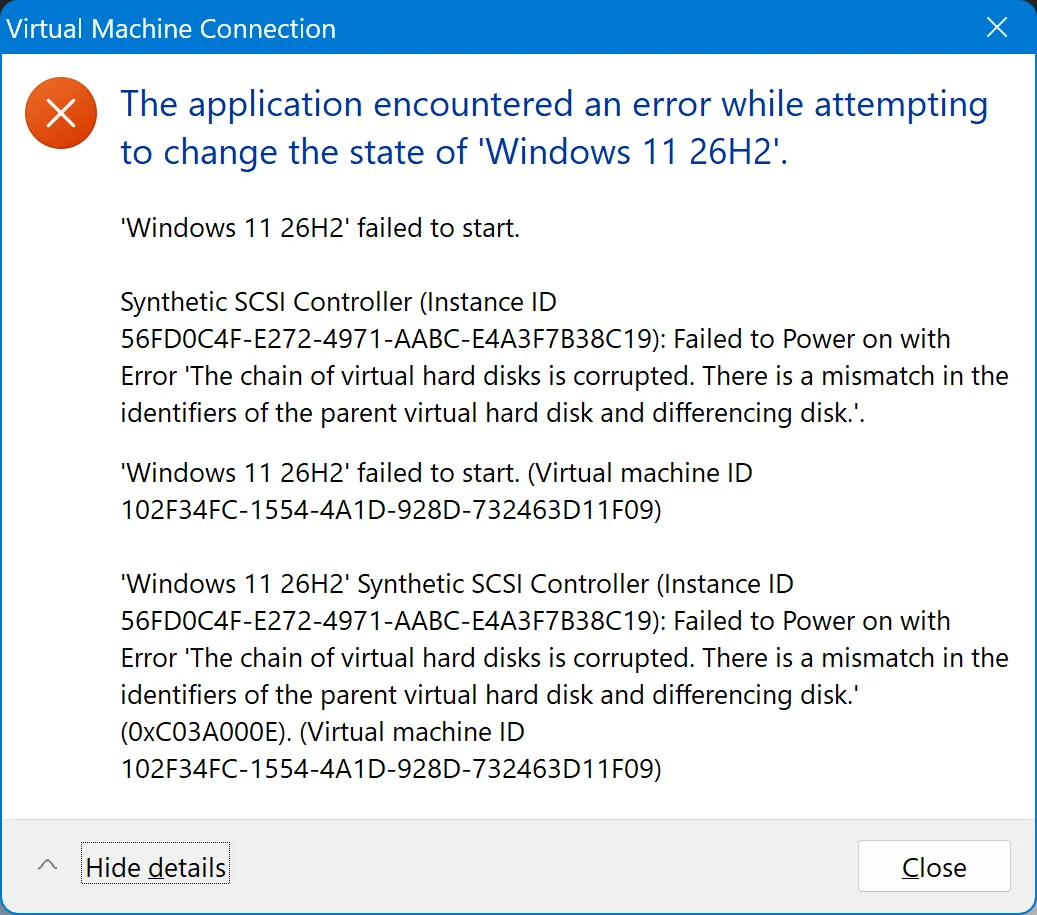
Hyoer-V error 0xC03A000E Synthetic SCSI Controller.webp


I have taken the following steps:

I have tried changing settings for the SCSI Controller. I changed the SCSI Controller location from 0 to 1, but still got the error.
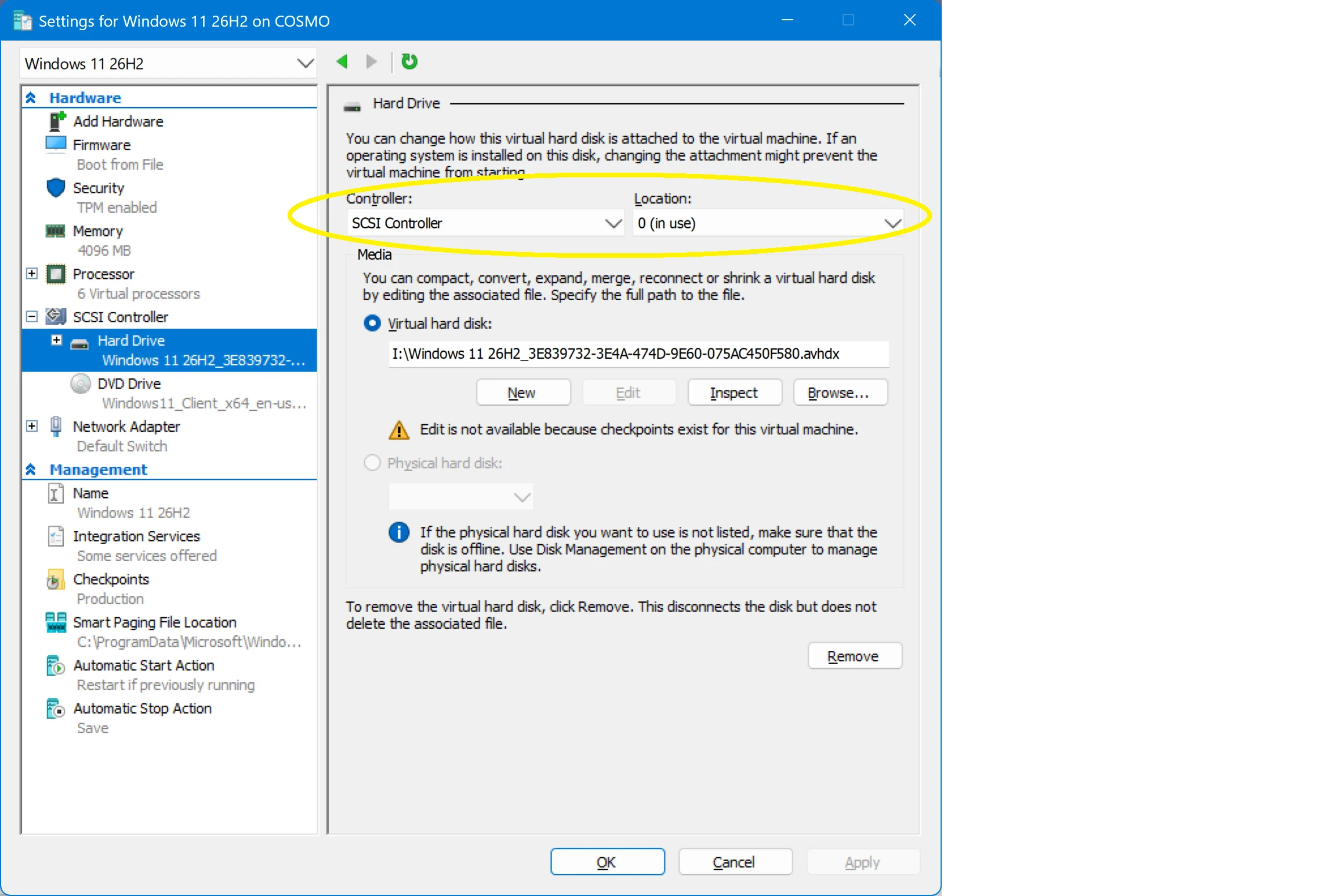
Change SCSI controller location.webp


I've tried changing Media (under SCSI controller) to use with my virtual CD/DVD drive to None and Removed it under SCSI controller.
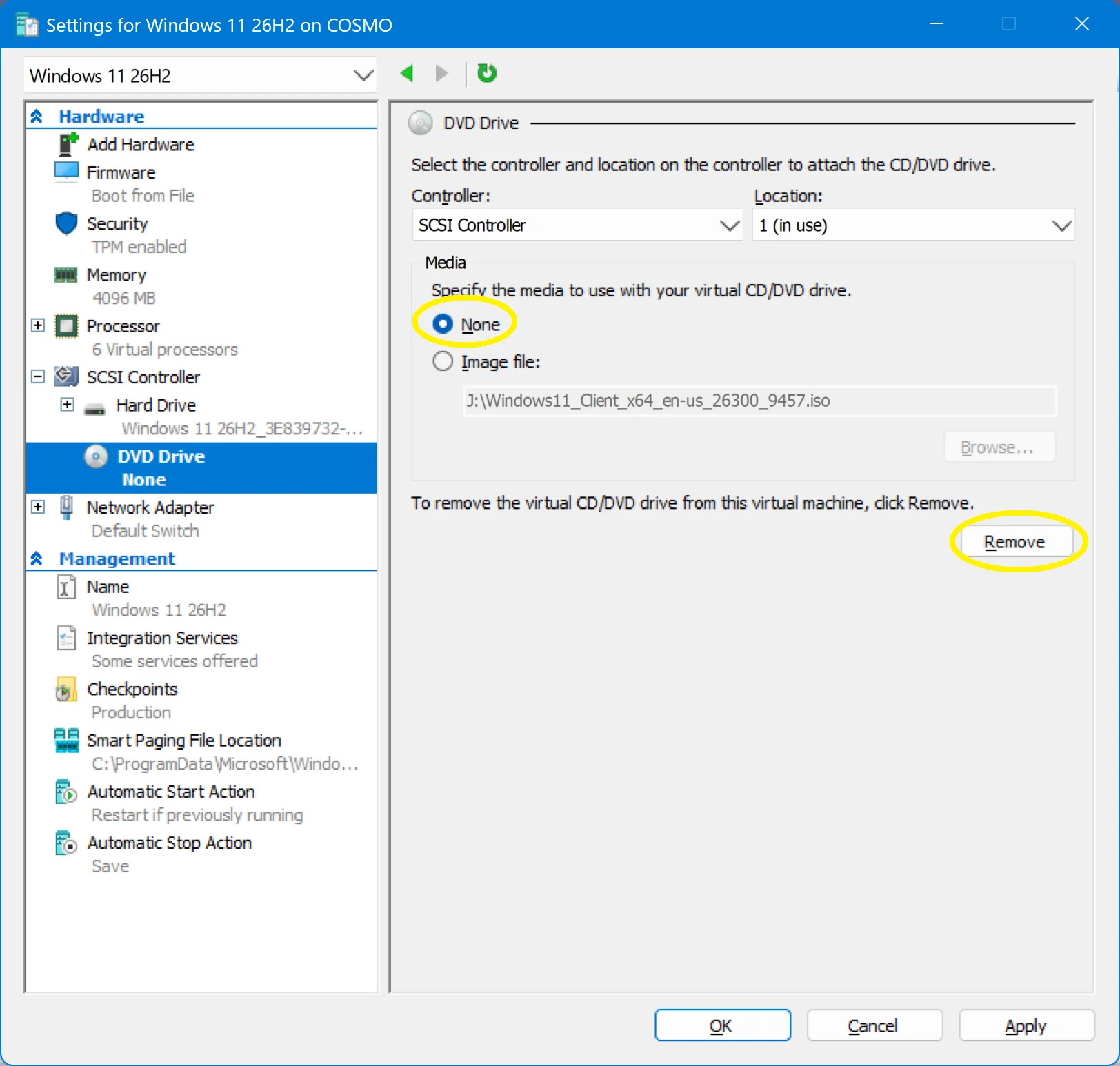
Media changed to None.webp


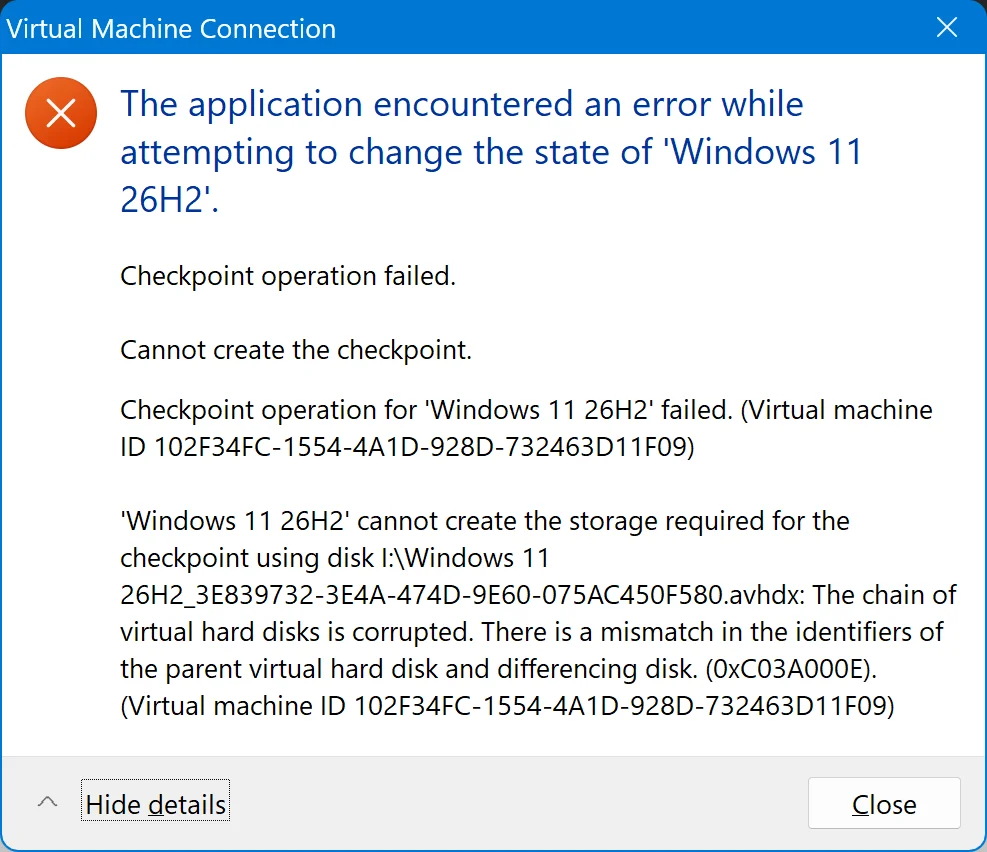
I even removed Checkpoints as well as expanding the storage space on VM's partition when I got this error message:
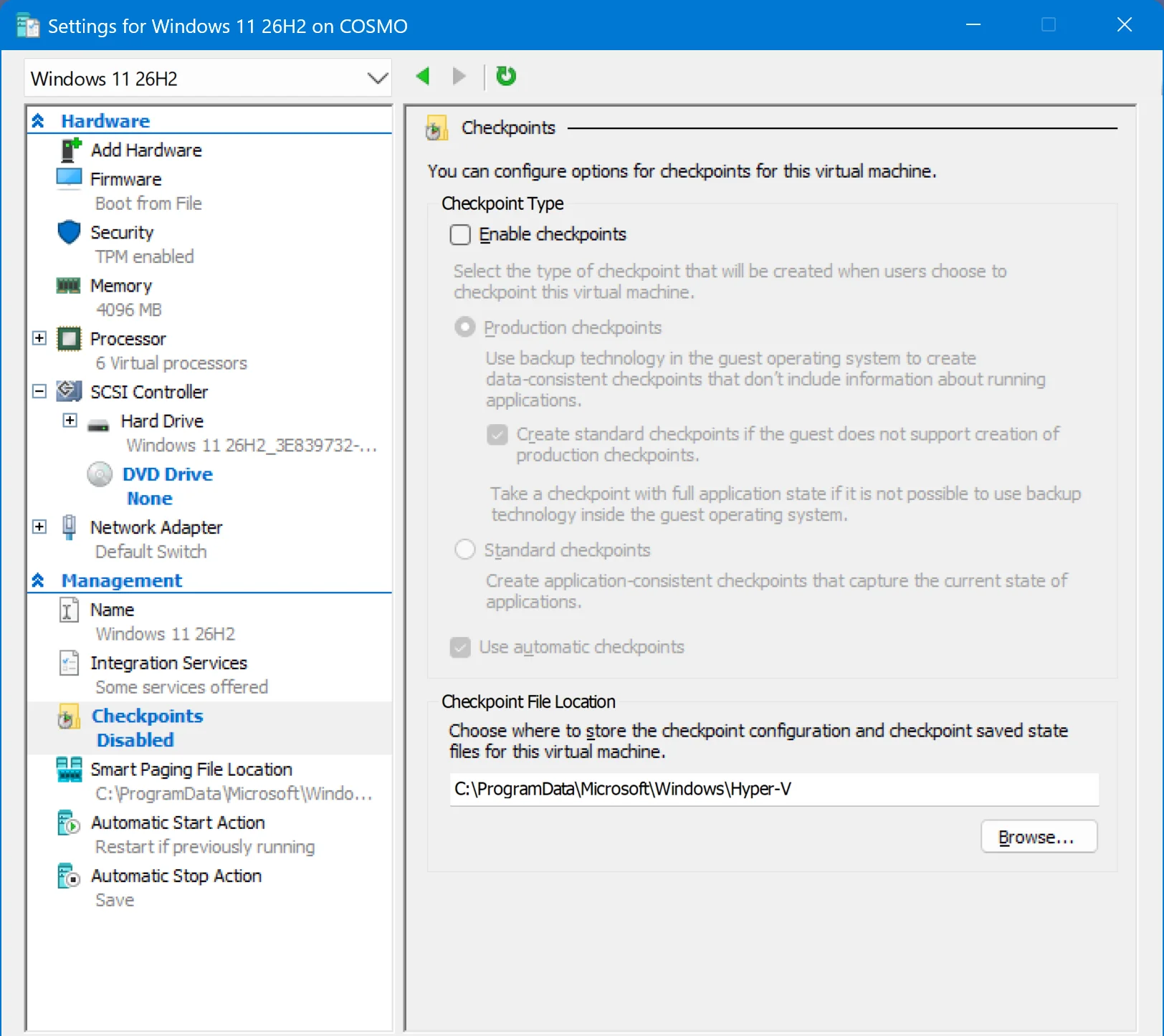
Remove Checkpoints.webp


Hyoer-V error 0xC03A000E Checkpoint and storage required.webp


Does anyone have any suggestion(s) on resolving this error?

Kind regards,

tecknot
 

My Computers My Computers

  • At a glance

    Windows 11 Pro 25H2 build 26200.9457Intel i7 8750H @ 2.2 GHz16 GB (all Samsung) DDR4-3200 SODIMM (non-ECC...Intel UHD Graphics 630 & NVIDIA Quadro P600
    OS
    Windows 11 Pro 25H2 build 26200.9457
    Computer type
    Laptop
    Manufacturer/Model
    Lenovo ThinkPad Workstation P72
    CPU
    Intel i7 8750H @ 2.2 GHz
    Motherboard
    Lenovo 01YU291
    Memory
    16 GB (all Samsung) DDR4-3200 SODIMM (non-ECC) PCIe 3
    Graphics Card(s)
    Intel UHD Graphics 630 & NVIDIA Quadro P600
    Sound Card
    Realtek ALC3286 & Focusrite Saffire 24 Pro DSP
    Monitor(s) Displays
    17.3"
    Screen Resolution
    3840x2160
    Hard Drives
    1TB SSD Samsung 860 EVO SATA 3
    1TB SSD Samsung 970 EVO M.2 NVMe PCIe 3 x 4
    2TB SSD Samsung 990 PRO M.2 NVMe PCIe 3 x 4
    PSU
    230W
    Cooling
    fan
    Keyboard
    UltraNav
    Mouse
    Kensington wireless Orbit
    Internet Speed
    640Mbps
    Browser
    DuckDuckGo and Firefox
    Antivirus
    Defender
    Other Info
    CM246 Chipset
  • VM with Windows 11 26H2 b 26300.9711: 4 GB (all Samsung) DDR4-3200 SODIMM (non-ECC) PCIe 3; 150GB on SSD Samsung 990 PRO M.2 NVMe PCIe 3 x 4
What instructions did you follow in taking the actions that you did?
 

My Computer My Computer

At a glance

Windows 11 Pro 26H2
OS
Windows 11 Pro 26H2
Computer type
Laptop
Manufacturer/Model
Toshiba
Antivirus
Defender
What instructions did you follow in taking the actions that you did?

Good morning Banjoman301,

I followed these instructions:


Hyper-V issues (multiple issues with VM's) (post No. 7)

And just some trial and error.

Kind regards,

tecknot
 

My Computers My Computers

  • At a glance

    Windows 11 Pro 25H2 build 26200.9457Intel i7 8750H @ 2.2 GHz16 GB (all Samsung) DDR4-3200 SODIMM (non-ECC...Intel UHD Graphics 630 & NVIDIA Quadro P600
    OS
    Windows 11 Pro 25H2 build 26200.9457
    Computer type
    Laptop
    Manufacturer/Model
    Lenovo ThinkPad Workstation P72
    CPU
    Intel i7 8750H @ 2.2 GHz
    Motherboard
    Lenovo 01YU291
    Memory
    16 GB (all Samsung) DDR4-3200 SODIMM (non-ECC) PCIe 3
    Graphics Card(s)
    Intel UHD Graphics 630 & NVIDIA Quadro P600
    Sound Card
    Realtek ALC3286 & Focusrite Saffire 24 Pro DSP
    Monitor(s) Displays
    17.3"
    Screen Resolution
    3840x2160
    Hard Drives
    1TB SSD Samsung 860 EVO SATA 3
    1TB SSD Samsung 970 EVO M.2 NVMe PCIe 3 x 4
    2TB SSD Samsung 990 PRO M.2 NVMe PCIe 3 x 4
    PSU
    230W
    Cooling
    fan
    Keyboard
    UltraNav
    Mouse
    Kensington wireless Orbit
    Internet Speed
    640Mbps
    Browser
    DuckDuckGo and Firefox
    Antivirus
    Defender
    Other Info
    CM246 Chipset
  • VM with Windows 11 26H2 b 26300.9711: 4 GB (all Samsung) DDR4-3200 SODIMM (non-ECC) PCIe 3; 150GB on SSD Samsung 990 PRO M.2 NVMe PCIe 3 x 4
Sometimes it's just easier to delete that VM and just start again. Can you post a screenshot of Disk Management?
 

My Computers My Computers

  • At a glance

    Windows 11 Pro 26H2 26300.9711AMD Ryzen 7 5825U with Radeon Graphics16GB
    OS
    Windows 11 Pro 26H2 26300.9711
    Computer type
    Laptop
    Manufacturer/Model
    Acemagic LX15PRO
    CPU
    AMD Ryzen 7 5825U with Radeon Graphics
    Motherboard
    BIOS CT_BI_AMI_LX15PRO_AB8139_A-004
    Memory
    16GB
    Screen Resolution
    1920 x 1080
    Hard Drives
    SSD 2TB
    Internet Speed
    30 Mbps
    Browser
    Brave
    Antivirus
    Webroot SecureAnywhere Complete beta
  • At a glance

    Windows 11 Pro 23H2 22631.2506Atom N450 1.66GHz2GB
    Operating System
    Windows 11 Pro 23H2 22631.2506
    Computer type
    Laptop
    Manufacturer/Model
    HP Mini 210-1090NR PC (bought in late 2009!)
    CPU
    Atom N450 1.66GHz
    Memory
    2GB
    Browser
    Brave
    Antivirus
    Webroot
  • Acer Swift SF114-34 laptop
    OS Windows 11 Pro 26200.8894
    CPU Pentium Silver N6000
    RAM 4GB
    BIOS v1.17
    SSD Samsung 970 EVO Plus SSD 2TB (an upgrade)

My Computers My Computers

  • At a glance

    Windows 11 Pro 25H2 build 26200.9457Intel i7 8750H @ 2.2 GHz16 GB (all Samsung) DDR4-3200 SODIMM (non-ECC...Intel UHD Graphics 630 & NVIDIA Quadro P600
    OS
    Windows 11 Pro 25H2 build 26200.9457
    Computer type
    Laptop
    Manufacturer/Model
    Lenovo ThinkPad Workstation P72
    CPU
    Intel i7 8750H @ 2.2 GHz
    Motherboard
    Lenovo 01YU291
    Memory
    16 GB (all Samsung) DDR4-3200 SODIMM (non-ECC) PCIe 3
    Graphics Card(s)
    Intel UHD Graphics 630 & NVIDIA Quadro P600
    Sound Card
    Realtek ALC3286 & Focusrite Saffire 24 Pro DSP
    Monitor(s) Displays
    17.3"
    Screen Resolution
    3840x2160
    Hard Drives
    1TB SSD Samsung 860 EVO SATA 3
    1TB SSD Samsung 970 EVO M.2 NVMe PCIe 3 x 4
    2TB SSD Samsung 990 PRO M.2 NVMe PCIe 3 x 4
    PSU
    230W
    Cooling
    fan
    Keyboard
    UltraNav
    Mouse
    Kensington wireless Orbit
    Internet Speed
    640Mbps
    Browser
    DuckDuckGo and Firefox
    Antivirus
    Defender
    Other Info
    CM246 Chipset
  • VM with Windows 11 26H2 b 26300.9711: 4 GB (all Samsung) DDR4-3200 SODIMM (non-ECC) PCIe 3; 150GB on SSD Samsung 990 PRO M.2 NVMe PCIe 3 x 4
Sometimes it's just easier to delete that VM and just start again. Can you post a screenshot of Disk Management?

Hi kelper,

I would hate to do that on account I modified the installation greatly (removed unwanted apps, a lot of Group Policy editing, etc.)

Nonetheless, here is a screen shot of my Disk Management:

Disk Management.webp


Kind regards,

tecknot
 

My Computers My Computers

  • At a glance

    Windows 11 Pro 25H2 build 26200.9457Intel i7 8750H @ 2.2 GHz16 GB (all Samsung) DDR4-3200 SODIMM (non-ECC...Intel UHD Graphics 630 & NVIDIA Quadro P600
    OS
    Windows 11 Pro 25H2 build 26200.9457
    Computer type
    Laptop
    Manufacturer/Model
    Lenovo ThinkPad Workstation P72
    CPU
    Intel i7 8750H @ 2.2 GHz
    Motherboard
    Lenovo 01YU291
    Memory
    16 GB (all Samsung) DDR4-3200 SODIMM (non-ECC) PCIe 3
    Graphics Card(s)
    Intel UHD Graphics 630 & NVIDIA Quadro P600
    Sound Card
    Realtek ALC3286 & Focusrite Saffire 24 Pro DSP
    Monitor(s) Displays
    17.3"
    Screen Resolution
    3840x2160
    Hard Drives
    1TB SSD Samsung 860 EVO SATA 3
    1TB SSD Samsung 970 EVO M.2 NVMe PCIe 3 x 4
    2TB SSD Samsung 990 PRO M.2 NVMe PCIe 3 x 4
    PSU
    230W
    Cooling
    fan
    Keyboard
    UltraNav
    Mouse
    Kensington wireless Orbit
    Internet Speed
    640Mbps
    Browser
    DuckDuckGo and Firefox
    Antivirus
    Defender
    Other Info
    CM246 Chipset
  • VM with Windows 11 26H2 b 26300.9711: 4 GB (all Samsung) DDR4-3200 SODIMM (non-ECC) PCIe 3; 150GB on SSD Samsung 990 PRO M.2 NVMe PCIe 3 x 4

Latest Support Threads

Back
Top Bottom