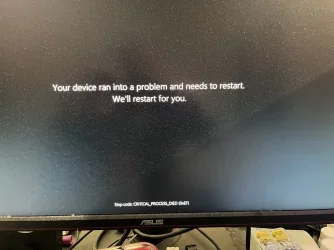
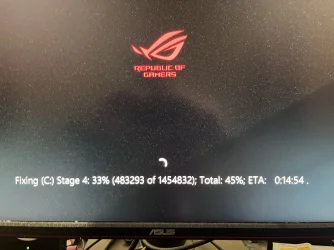
I cannot load Win 11 since auto update yesterday - goes straight to BIOS


I’ve switched off the Windows
Get the latest updates as soon as they’re available as it was an update that caused this problem.
Is their a way to check if updates are safe?
 

My Computer My Computer

At a glance

Windows 1113th Gen Intel(R) Core(TM) i7-13700k (3.4 GHz)32.0 GBNVIDIA GeForce RTX 4070 Ti
OS
Windows 11
Computer type
PC/Desktop
Manufacturer/Model
self build
CPU
13th Gen Intel(R) Core(TM) i7-13700k (3.4 GHz)
Motherboard
ASUS ROG MAXIMUS Z790 HERO
Memory
32.0 GB
Graphics Card(s)
NVIDIA GeForce RTX 4070 Ti
Get the latest updates as soon as they’re available as it was an update that caused this problem.

Preview updates are optional, non-security updates that provide fixes and improvements ahead of their inclusion in a subsequent regular monthly update. For most users, there is no need to install a preview update unless they specifically need one of the fixes it contains.

"Get the latest updates as soon as they're available" is turned off by default. When this setting is off, non-security optional preview updates are not installed automatically and must be downloaded manually by selecting "Download & install."
 

My Computers My Computers

  • At a glance

    Windows 11 ProAMD Ryzen 9 9950X3DKingston FURY Beast 64GB (2x32GB) DDR5 6000MT/sASUS TUF Gaming Radeon RX 9070 OC Edition 16G...
    OS
    Windows 11 Pro
    Computer type
    PC/Desktop
    CPU
    AMD Ryzen 9 9950X3D
    Motherboard
    ASRock B650E Taichi Lite
    Memory
    Kingston FURY Beast 64GB (2x32GB) DDR5 6000MT/s
    Graphics Card(s)
    ASUS TUF Gaming Radeon RX 9070 OC Edition 16GB GDDR6
    Hard Drives
    Solidigm P44 Pro 2TB M.2 NVMe SSD
  • At a glance

    Windows 11 HomeIntel Core Ultra 9 275HX64GB (2x 32GB) DDR5-6400NVIDIA GeForce RTX 5080 16GB GDDR7 Laptop GPU
    Operating System
    Windows 11 Home
    Computer type
    Laptop
    Manufacturer/Model
    Lenovo Legion Pro 7i Gen 10 16"
    CPU
    Intel Core Ultra 9 275HX
    Memory
    64GB (2x 32GB) DDR5-6400
    Graphics card(s)
    NVIDIA GeForce RTX 5080 16GB GDDR7 Laptop GPU
    Hard Drives
    2x 1TB M.2 NVMe SSD (SK Hynix)
Have you re-enabled secure boot in the Bios?
 

My Computer My Computer

At a glance

Windows 11 Pro 25H2Intel Alder lake i7 12700K32 Gb Corsair Vengeance LPX DDR4 3200 XMP2EVGA 3070ti FTW3 Ultra Gaming & Intel Arc
OS
Windows 11 Pro 25H2
Computer type
PC/Desktop
Manufacturer/Model
My Self
CPU
Intel Alder lake i7 12700K
Motherboard
Asus z690 Gaming WiFi D4, Bios Ver 4505
Memory
32 Gb Corsair Vengeance LPX DDR4 3200 XMP2
Graphics Card(s)
EVGA 3070ti FTW3 Ultra Gaming & Intel Arc
Sound Card
Via Display port
Monitor(s) Displays
Dell AW2723DF
Screen Resolution
2560 x 1440 @ 280Hz G-Sync mode
Hard Drives
WD Black SN850 1Tb NVME (Boot Drive)
WD BLACK SN850X + Heatsink 1Tb NVME
Samsung 870 Qvo 1Tb SSD,
Pioneer DVD-RW DVR-219L
WD Black SN850x NVME 2Tb x3
PSU
Corsair RM850
Case
Phanteks Enthoo Pro M Tempered Glass
Cooling
Be Quiet Shadow Rock 3
Keyboard
Logitech G Pro
Mouse
Logitech G903, Lightspeed + Powerplay Mat
Internet Speed
900Mb/900Mb Fritz!Box 7590ax v2
Browser
Firefox
Antivirus
MS Defender
Other Info
Logitech C930e webcam
Synology DS218 play 2 x 4Tb Synology HAT3300-4T
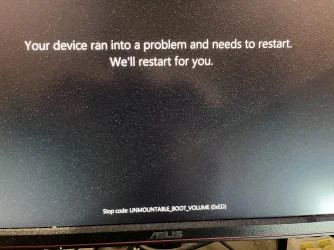
I’m not out of the woods yet. Just got this error.
 

Attachments

  • IMG_1434.webp
    IMG_1434.webp
    1.7 MB · Views: 1

My Computer My Computer

At a glance

Windows 1113th Gen Intel(R) Core(TM) i7-13700k (3.4 GHz)32.0 GBNVIDIA GeForce RTX 4070 Ti
OS
Windows 11
Computer type
PC/Desktop
Manufacturer/Model
self build
CPU
13th Gen Intel(R) Core(TM) i7-13700k (3.4 GHz)
Motherboard
ASUS ROG MAXIMUS Z790 HERO
Memory
32.0 GB
Graphics Card(s)
NVIDIA GeForce RTX 4070 Ti
Have you reconnected all your drives yet?
 

My Computer My Computer

At a glance

Windows 11 Pro 25H2Intel Alder lake i7 12700K32 Gb Corsair Vengeance LPX DDR4 3200 XMP2EVGA 3070ti FTW3 Ultra Gaming & Intel Arc
OS
Windows 11 Pro 25H2
Computer type
PC/Desktop
Manufacturer/Model
My Self
CPU
Intel Alder lake i7 12700K
Motherboard
Asus z690 Gaming WiFi D4, Bios Ver 4505
Memory
32 Gb Corsair Vengeance LPX DDR4 3200 XMP2
Graphics Card(s)
EVGA 3070ti FTW3 Ultra Gaming & Intel Arc
Sound Card
Via Display port
Monitor(s) Displays
Dell AW2723DF
Screen Resolution
2560 x 1440 @ 280Hz G-Sync mode
Hard Drives
WD Black SN850 1Tb NVME (Boot Drive)
WD BLACK SN850X + Heatsink 1Tb NVME
Samsung 870 Qvo 1Tb SSD,
Pioneer DVD-RW DVR-219L
WD Black SN850x NVME 2Tb x3
PSU
Corsair RM850
Case
Phanteks Enthoo Pro M Tempered Glass
Cooling
Be Quiet Shadow Rock 3
Keyboard
Logitech G Pro
Mouse
Logitech G903, Lightspeed + Powerplay Mat
Internet Speed
900Mb/900Mb Fritz!Box 7590ax v2
Browser
Firefox
Antivirus
MS Defender
Other Info
Logitech C930e webcam
Synology DS218 play 2 x 4Tb Synology HAT3300-4T
I’ve managed to boot into ‘Safe Mode’.

Any suggestions from here.
 

My Computer My Computer

At a glance

Windows 1113th Gen Intel(R) Core(TM) i7-13700k (3.4 GHz)32.0 GBNVIDIA GeForce RTX 4070 Ti
OS
Windows 11
Computer type
PC/Desktop
Manufacturer/Model
self build
CPU
13th Gen Intel(R) Core(TM) i7-13700k (3.4 GHz)
Motherboard
ASUS ROG MAXIMUS Z790 HERO
Memory
32.0 GB
Graphics Card(s)
NVIDIA GeForce RTX 4070 Ti
I’ve managed to boot into ‘Safe Mode’.

Any suggestions from here.
Apologies if I am a bit late to this thread, but what if anything did you have to disable to be able to boot into safe mode?
 

My Computer My Computer

At a glance

Windows 11 25H2Broadwell-e 6850K 4.5ghz @1.36v32GB Corsair LPM 3600 C16EVGA RTX 3080Ti FTW
OS
Windows 11 25H2
Computer type
PC/Desktop
Manufacturer/Model
EVGA home brew
CPU
Broadwell-e 6850K 4.5ghz @1.36v
Motherboard
EVGA X99 FTW K
Memory
32GB Corsair LPM 3600 C16
Graphics Card(s)
EVGA RTX 3080Ti FTW
Sound Card
Asus Centurion true 7.1 headset. (5 speakers in each earpeice)
Monitor(s) Displays
LG C4 55"
Screen Resolution
4K 144hz
Hard Drives
Various models of SSDs ~10TB No HDDs installed.
PSU
be quiet! BN516 Straight Power 12-1000w 80 Plus Platinum
Case
Corsair 780T modified to dual 200mm intake fans
Cooling
Corsair H110i
Keyboard
Corsair K95 Platinum
Mouse
Corsair M65 RGB Elite
Internet Speed
50Mbs
I’ve managed to boot into ‘Safe Mode’.

ChatGPT:

Good — the fact that Safe Mode works is useful.

First, while you are in Safe Mode, back up any important files from the Sabrent.

Then I would try removing the most recent Windows update, since this problem started immediately after an automatic update. Restart into the Windows Recovery Environment and go to:

Troubleshoot → Advanced options → Uninstall Updates → Uninstall latest quality update

If that does not help, try System Restore from the same Advanced options screen if a restore point is available.

If Windows still only works in Safe Mode, boot back into Safe Mode, open Command Prompt as administrator and run:

DISM.exe /Online /Cleanup-Image /RestoreHealth

sfc /scannow

Microsoft recommends DISM followed by SFC to repair damaged Windows components and system files.

Keep the other three NVMe drives disconnected for now, and don't reinstall Windows yet.

I would not yet suggest removing drivers manually, disabling random services, or reconnecting the other drives. Safe Mode working tells you that the bootloader repair succeeded far enough to load Windows, and the remaining problem is likely occurring later in normal startup.
 

My Computers My Computers

  • At a glance

    Windows 11 ProAMD Ryzen 9 9950X3DKingston FURY Beast 64GB (2x32GB) DDR5 6000MT/sASUS TUF Gaming Radeon RX 9070 OC Edition 16G...
    OS
    Windows 11 Pro
    Computer type
    PC/Desktop
    CPU
    AMD Ryzen 9 9950X3D
    Motherboard
    ASRock B650E Taichi Lite
    Memory
    Kingston FURY Beast 64GB (2x32GB) DDR5 6000MT/s
    Graphics Card(s)
    ASUS TUF Gaming Radeon RX 9070 OC Edition 16GB GDDR6
    Hard Drives
    Solidigm P44 Pro 2TB M.2 NVMe SSD
  • At a glance

    Windows 11 HomeIntel Core Ultra 9 275HX64GB (2x 32GB) DDR5-6400NVIDIA GeForce RTX 5080 16GB GDDR7 Laptop GPU
    Operating System
    Windows 11 Home
    Computer type
    Laptop
    Manufacturer/Model
    Lenovo Legion Pro 7i Gen 10 16"
    CPU
    Intel Core Ultra 9 275HX
    Memory
    64GB (2x 32GB) DDR5-6400
    Graphics card(s)
    NVIDIA GeForce RTX 5080 16GB GDDR7 Laptop GPU
    Hard Drives
    2x 1TB M.2 NVMe SSD (SK Hynix)
I’m not quite sure how I got here but I’ve shutdown the PC and rebooted without any USB drives installed and am getting straight back into windows.
Thanks @Celery et al for helping!!
I have seen it before. Windows fails to boot properly because some update or other process was interrupted and there are corrupt drivers or other files. But it can boot in Safe Mode where Windows somehow manage to repair the damage. One restart later it can now boot normally. So sometimes booting in Safe Mode and restart might be all that you need.
 

My Computers My Computers

  • At a glance

    Windows 11 Pro 23H2 (7582), 25H2 (9457)Mobile DualCore Intel Core 2 Duo T7250, 2000 MHz4GBMobile Intel(R) GMA 4500M (Mobile 4 series)
    OS
    Windows 11 Pro 23H2 (7582), 25H2 (9457)
    Computer type
    Laptop
    Manufacturer/Model
    Acer Extensa 5630EZ
    CPU
    Mobile DualCore Intel Core 2 Duo T7250, 2000 MHz
    Motherboard
    Acer Extensa 5630
    Memory
    4GB
    Graphics Card(s)
    Mobile Intel(R) GMA 4500M (Mobile 4 series)
    Sound Card
    Realtek ALC268 @ Intel 82801IB ICH9 - High Definition Audio Controller
    Monitor(s) Displays
    1
    Screen Resolution
    1280x800
    Hard Drives
    Samsung SSD 850 EVO 250GB SATA Device (250 GB, SATA-III)
    Internet Speed
    802.11g wireless 54 Mbps
    Browser
    MICROSOFT EDGE
    Antivirus
    WINDOWS DEFENDER
    Other Info
    Legacy MBR installation, no TPM, no Secure Boot, no WDDM 2.0 graphics drivers, no SSE4.2, cannot get more unsupported ;) This is only my test laptop. I had installed Windows 11 here before upgrading my main PC. For my main PC I use everyday see my 2nd system specs.
  • At a glance

    Windows 11 Pro 25H2 (build 26200.9457)Intel Core-i7 3770 3.40GHz s1155 (3rd generat...2x Kingston Hyper-X Blu 8GB DDR3-1600GIGABYTE GeForce RTX 3050 WINDFORCE OC V2 6GB...
    Operating System
    Windows 11 Pro 25H2 (build 26200.9457)
    Computer type
    PC/Desktop
    Manufacturer/Model
    Custom-built PC
    CPU
    Intel Core-i7 3770 3.40GHz s1155 (3rd generation)
    Motherboard
    Asus P8H61 s1155 ATX
    Memory
    2x Kingston Hyper-X Blu 8GB DDR3-1600
    Graphics card(s)
    GIGABYTE GeForce RTX 3050 WINDFORCE OC V2 6GB (GV-N3050WF2OCV2-6GD)
    Sound Card
    Realtek HD audio (ALC887)
    Monitor(s) Displays
    Sony Bravia KDL-19L4000 19" LCD TV via VGA
    Screen Resolution
    1440x900 32-bit 60Hz
    Hard Drives
    WD Blue SA510 2.5 1000GB SSD as system disk, Western Digital Caviar Purple 4TB SATA III (WD40PURZ) as second
    PSU
    Thermaltake Litepower RGB 550W Full Wired
    Case
    SUPERCASE MIDI-TOWER
    Cooling
    Deepcool Gamma Archer CPU cooler, 1x 8cm fan at the back
    Keyboard
    Mitsumi 101-key PS/2
    Mouse
    Microsoft Compact Optical Mouse
    Internet Speed
    802.11ac 5GHz wireless 260Mpbs
    Browser
    Microsoft Edge, Mozilla Firefox
    Antivirus
    Microsoft Windows Defender
    Other Info
    Legacy BIOS (MBR) installation, no TPM, no Secure Boot, WDDM 3.0 graphics drivers, WEI score 7.4
I’ve managed to boot into ‘Safe Mode’.

Any suggestions from here.
Do as AI suggests. Repair system files with sfc and dism. You can also initiate a disk scan to repair more files and Registry with this command:

chkdsk c: /f

You will see a warning that it cannot be done now and if you want to schedule it at next restart. Reply yes and restart the computer.
 

My Computers My Computers

  • At a glance

    Windows 11 Pro 23H2 (7582), 25H2 (9457)Mobile DualCore Intel Core 2 Duo T7250, 2000 MHz4GBMobile Intel(R) GMA 4500M (Mobile 4 series)
    OS
    Windows 11 Pro 23H2 (7582), 25H2 (9457)
    Computer type
    Laptop
    Manufacturer/Model
    Acer Extensa 5630EZ
    CPU
    Mobile DualCore Intel Core 2 Duo T7250, 2000 MHz
    Motherboard
    Acer Extensa 5630
    Memory
    4GB
    Graphics Card(s)
    Mobile Intel(R) GMA 4500M (Mobile 4 series)
    Sound Card
    Realtek ALC268 @ Intel 82801IB ICH9 - High Definition Audio Controller
    Monitor(s) Displays
    1
    Screen Resolution
    1280x800
    Hard Drives
    Samsung SSD 850 EVO 250GB SATA Device (250 GB, SATA-III)
    Internet Speed
    802.11g wireless 54 Mbps
    Browser
    MICROSOFT EDGE
    Antivirus
    WINDOWS DEFENDER
    Other Info
    Legacy MBR installation, no TPM, no Secure Boot, no WDDM 2.0 graphics drivers, no SSE4.2, cannot get more unsupported ;) This is only my test laptop. I had installed Windows 11 here before upgrading my main PC. For my main PC I use everyday see my 2nd system specs.
  • At a glance

    Windows 11 Pro 25H2 (build 26200.9457)Intel Core-i7 3770 3.40GHz s1155 (3rd generat...2x Kingston Hyper-X Blu 8GB DDR3-1600GIGABYTE GeForce RTX 3050 WINDFORCE OC V2 6GB...
    Operating System
    Windows 11 Pro 25H2 (build 26200.9457)
    Computer type
    PC/Desktop
    Manufacturer/Model
    Custom-built PC
    CPU
    Intel Core-i7 3770 3.40GHz s1155 (3rd generation)
    Motherboard
    Asus P8H61 s1155 ATX
    Memory
    2x Kingston Hyper-X Blu 8GB DDR3-1600
    Graphics card(s)
    GIGABYTE GeForce RTX 3050 WINDFORCE OC V2 6GB (GV-N3050WF2OCV2-6GD)
    Sound Card
    Realtek HD audio (ALC887)
    Monitor(s) Displays
    Sony Bravia KDL-19L4000 19" LCD TV via VGA
    Screen Resolution
    1440x900 32-bit 60Hz
    Hard Drives
    WD Blue SA510 2.5 1000GB SSD as system disk, Western Digital Caviar Purple 4TB SATA III (WD40PURZ) as second
    PSU
    Thermaltake Litepower RGB 550W Full Wired
    Case
    SUPERCASE MIDI-TOWER
    Cooling
    Deepcool Gamma Archer CPU cooler, 1x 8cm fan at the back
    Keyboard
    Mitsumi 101-key PS/2
    Mouse
    Microsoft Compact Optical Mouse
    Internet Speed
    802.11ac 5GHz wireless 260Mpbs
    Browser
    Microsoft Edge, Mozilla Firefox
    Antivirus
    Microsoft Windows Defender
    Other Info
    Legacy BIOS (MBR) installation, no TPM, no Secure Boot, WDDM 3.0 graphics drivers, WEI score 7.4
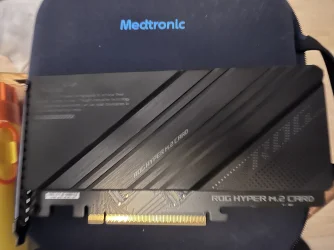
Things seem to be a bit more stable now that I have removed the ROG Hyper M.2 card that had my 2x4TB drives in a mirror raid controlled by windows.

@spapakons , I did the chkdsk c: /f which needed a reboot and took about 20 mins which seemed to be okay.
 

Attachments

  • IMG_1440.webp
    IMG_1440.webp
    1.2 MB · Views: 1

My Computer My Computer

At a glance

Windows 1113th Gen Intel(R) Core(TM) i7-13700k (3.4 GHz)32.0 GBNVIDIA GeForce RTX 4070 Ti
OS
Windows 11
Computer type
PC/Desktop
Manufacturer/Model
self build
CPU
13th Gen Intel(R) Core(TM) i7-13700k (3.4 GHz)
Motherboard
ASUS ROG MAXIMUS Z790 HERO
Memory
32.0 GB
Graphics Card(s)
NVIDIA GeForce RTX 4070 Ti
It still seems to get a few boots before Windows is stable.
 

My Computer My Computer

At a glance

Windows 1113th Gen Intel(R) Core(TM) i7-13700k (3.4 GHz)32.0 GBNVIDIA GeForce RTX 4070 Ti
OS
Windows 11
Computer type
PC/Desktop
Manufacturer/Model
self build
CPU
13th Gen Intel(R) Core(TM) i7-13700k (3.4 GHz)
Motherboard
ASUS ROG MAXIMUS Z790 HERO
Memory
32.0 GB
Graphics Card(s)
NVIDIA GeForce RTX 4070 Ti
I’ve now removed the hardwire to the internet and am wireless. First time it took a couple of reboots but now it seems stable.

What can I do to install my RAID array as the ASUS PCIe card?
 

My Computer My Computer

At a glance

Windows 1113th Gen Intel(R) Core(TM) i7-13700k (3.4 GHz)32.0 GBNVIDIA GeForce RTX 4070 Ti
OS
Windows 11
Computer type
PC/Desktop
Manufacturer/Model
self build
CPU
13th Gen Intel(R) Core(TM) i7-13700k (3.4 GHz)
Motherboard
ASUS ROG MAXIMUS Z790 HERO
Memory
32.0 GB
Graphics Card(s)
NVIDIA GeForce RTX 4070 Ti
I would wait until every thing is stable!! let it idle for a few hours... ;-)

Please fill out the section "My Computer".
 

My Computer My Computer

At a glance

Windows 11 Pro 25H2Intel Alder lake i7 12700K32 Gb Corsair Vengeance LPX DDR4 3200 XMP2EVGA 3070ti FTW3 Ultra Gaming & Intel Arc
OS
Windows 11 Pro 25H2
Computer type
PC/Desktop
Manufacturer/Model
My Self
CPU
Intel Alder lake i7 12700K
Motherboard
Asus z690 Gaming WiFi D4, Bios Ver 4505
Memory
32 Gb Corsair Vengeance LPX DDR4 3200 XMP2
Graphics Card(s)
EVGA 3070ti FTW3 Ultra Gaming & Intel Arc
Sound Card
Via Display port
Monitor(s) Displays
Dell AW2723DF
Screen Resolution
2560 x 1440 @ 280Hz G-Sync mode
Hard Drives
WD Black SN850 1Tb NVME (Boot Drive)
WD BLACK SN850X + Heatsink 1Tb NVME
Samsung 870 Qvo 1Tb SSD,
Pioneer DVD-RW DVR-219L
WD Black SN850x NVME 2Tb x3
PSU
Corsair RM850
Case
Phanteks Enthoo Pro M Tempered Glass
Cooling
Be Quiet Shadow Rock 3
Keyboard
Logitech G Pro
Mouse
Logitech G903, Lightspeed + Powerplay Mat
Internet Speed
900Mb/900Mb Fritz!Box 7590ax v2
Browser
Firefox
Antivirus
MS Defender
Other Info
Logitech C930e webcam
Synology DS218 play 2 x 4Tb Synology HAT3300-4T
 

Attachments

  • IMG_1442.webp
    IMG_1442.webp
    845.6 KB · Views: 1

My Computer My Computer

At a glance

Windows 1113th Gen Intel(R) Core(TM) i7-13700k (3.4 GHz)32.0 GBNVIDIA GeForce RTX 4070 Ti
OS
Windows 11
Computer type
PC/Desktop
Manufacturer/Model
self build
CPU
13th Gen Intel(R) Core(TM) i7-13700k (3.4 GHz)
Motherboard
ASUS ROG MAXIMUS Z790 HERO
Memory
32.0 GB
Graphics Card(s)
NVIDIA GeForce RTX 4070 Ti
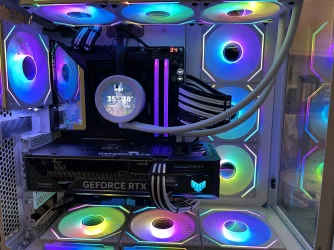
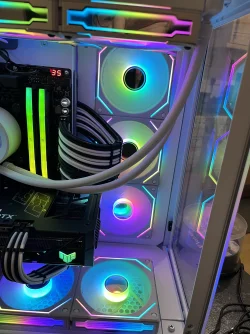
This is my machine in puke mode with a few simple pieces of board from a craft shop to cover parts of the case.
 

Attachments

  • IMG_1445.webp
    IMG_1445.webp
    985.2 KB · Views: 1
  • IMG_1444.webp
    IMG_1444.webp
    1.1 MB · Views: 1

My Computer My Computer

At a glance

Windows 1113th Gen Intel(R) Core(TM) i7-13700k (3.4 GHz)32.0 GBNVIDIA GeForce RTX 4070 Ti
OS
Windows 11
Computer type
PC/Desktop
Manufacturer/Model
self build
CPU
13th Gen Intel(R) Core(TM) i7-13700k (3.4 GHz)
Motherboard
ASUS ROG MAXIMUS Z790 HERO
Memory
32.0 GB
Graphics Card(s)
NVIDIA GeForce RTX 4070 Ti
What can I do to install my RAID array as the ASUS PCIe card?

ChatGPT:

Since Windows is now booting, I would first back up anything important before reconnecting the other drives.

Your ROG Hyper M.2 card isn't itself managing the RAID. From your earlier DiskPart output, the two 4 TB drives were dynamic disks and the mirror was being managed by Windows.

I would therefore leave Intel RST/VMD Off and do not create a RAID volume in the BIOS.

Power the PC off and reinstall both 4 TB NVMe drives on the ROG Hyper M.2 card together. On the Maximus Z790 Hero, ASUS recommends installing the Hyper M.2 card in the PCIEX16(G4) slot; that slot can run the two M.2 drives as x4/x4, which needs to be enabled in the BIOS.

Once Windows starts, open Disk Management and select Action → Rescan Disks. Don't initialise, format, convert or delete anything.

If both 4 TB disks appear normally and the mirror is Healthy, leave it alone. If one is still shown as Foreign, post a screenshot of Disk Management before making any changes. Windows does provide an Import Foreign Disks option for dynamic disks, and Microsoft recommends that all disks belonging to a mirrored volume be connected together before importing them.

Since the PC's stability also seemed to change when you disconnected Ethernet, I would keep the Ethernet cable disconnected while testing the Hyper M.2 card. That way we're only changing one thing at a time.

 

My Computers My Computers

  • At a glance

    Windows 11 ProAMD Ryzen 9 9950X3DKingston FURY Beast 64GB (2x32GB) DDR5 6000MT/sASUS TUF Gaming Radeon RX 9070 OC Edition 16G...
    OS
    Windows 11 Pro
    Computer type
    PC/Desktop
    CPU
    AMD Ryzen 9 9950X3D
    Motherboard
    ASRock B650E Taichi Lite
    Memory
    Kingston FURY Beast 64GB (2x32GB) DDR5 6000MT/s
    Graphics Card(s)
    ASUS TUF Gaming Radeon RX 9070 OC Edition 16GB GDDR6
    Hard Drives
    Solidigm P44 Pro 2TB M.2 NVMe SSD
  • At a glance

    Windows 11 HomeIntel Core Ultra 9 275HX64GB (2x 32GB) DDR5-6400NVIDIA GeForce RTX 5080 16GB GDDR7 Laptop GPU
    Operating System
    Windows 11 Home
    Computer type
    Laptop
    Manufacturer/Model
    Lenovo Legion Pro 7i Gen 10 16"
    CPU
    Intel Core Ultra 9 275HX
    Memory
    64GB (2x 32GB) DDR5-6400
    Graphics card(s)
    NVIDIA GeForce RTX 5080 16GB GDDR7 Laptop GPU
    Hard Drives
    2x 1TB M.2 NVMe SSD (SK Hynix)
As long as you didn't touch the RAID settings on the controller card and you connect both disks, the card should be able to read the disks and see the RAID configuration. You might need to rebuild the RAID (or whatever is the correct term) if the controller cannot identify the RAID configuration properly. For mirror, the disk order should not matter, but for stripe I think you must connect the disks at the correct order, don't swap them. As AI suggested, first check in Windows if they identify properly and then try to rebuild the RAID.
 

My Computers My Computers

  • At a glance

    Windows 11 Pro 23H2 (7582), 25H2 (9457)Mobile DualCore Intel Core 2 Duo T7250, 2000 MHz4GBMobile Intel(R) GMA 4500M (Mobile 4 series)
    OS
    Windows 11 Pro 23H2 (7582), 25H2 (9457)
    Computer type
    Laptop
    Manufacturer/Model
    Acer Extensa 5630EZ
    CPU
    Mobile DualCore Intel Core 2 Duo T7250, 2000 MHz
    Motherboard
    Acer Extensa 5630
    Memory
    4GB
    Graphics Card(s)
    Mobile Intel(R) GMA 4500M (Mobile 4 series)
    Sound Card
    Realtek ALC268 @ Intel 82801IB ICH9 - High Definition Audio Controller
    Monitor(s) Displays
    1
    Screen Resolution
    1280x800
    Hard Drives
    Samsung SSD 850 EVO 250GB SATA Device (250 GB, SATA-III)
    Internet Speed
    802.11g wireless 54 Mbps
    Browser
    MICROSOFT EDGE
    Antivirus
    WINDOWS DEFENDER
    Other Info
    Legacy MBR installation, no TPM, no Secure Boot, no WDDM 2.0 graphics drivers, no SSE4.2, cannot get more unsupported ;) This is only my test laptop. I had installed Windows 11 here before upgrading my main PC. For my main PC I use everyday see my 2nd system specs.
  • At a glance

    Windows 11 Pro 25H2 (build 26200.9457)Intel Core-i7 3770 3.40GHz s1155 (3rd generat...2x Kingston Hyper-X Blu 8GB DDR3-1600GIGABYTE GeForce RTX 3050 WINDFORCE OC V2 6GB...
    Operating System
    Windows 11 Pro 25H2 (build 26200.9457)
    Computer type
    PC/Desktop
    Manufacturer/Model
    Custom-built PC
    CPU
    Intel Core-i7 3770 3.40GHz s1155 (3rd generation)
    Motherboard
    Asus P8H61 s1155 ATX
    Memory
    2x Kingston Hyper-X Blu 8GB DDR3-1600
    Graphics card(s)
    GIGABYTE GeForce RTX 3050 WINDFORCE OC V2 6GB (GV-N3050WF2OCV2-6GD)
    Sound Card
    Realtek HD audio (ALC887)
    Monitor(s) Displays
    Sony Bravia KDL-19L4000 19" LCD TV via VGA
    Screen Resolution
    1440x900 32-bit 60Hz
    Hard Drives
    WD Blue SA510 2.5 1000GB SSD as system disk, Western Digital Caviar Purple 4TB SATA III (WD40PURZ) as second
    PSU
    Thermaltake Litepower RGB 550W Full Wired
    Case
    SUPERCASE MIDI-TOWER
    Cooling
    Deepcool Gamma Archer CPU cooler, 1x 8cm fan at the back
    Keyboard
    Mitsumi 101-key PS/2
    Mouse
    Microsoft Compact Optical Mouse
    Internet Speed
    802.11ac 5GHz wireless 260Mpbs
    Browser
    Microsoft Edge, Mozilla Firefox
    Antivirus
    Microsoft Windows Defender
    Other Info
    Legacy BIOS (MBR) installation, no TPM, no Secure Boot, WDDM 3.0 graphics drivers, WEI score 7.4
When I installed the Hyper M.2 card the PC failed to install Windows.
 

Attachments

  • IMG_1446.webp
    IMG_1446.webp
    2 MB · Views: 1

My Computer My Computer

At a glance

Windows 1113th Gen Intel(R) Core(TM) i7-13700k (3.4 GHz)32.0 GBNVIDIA GeForce RTX 4070 Ti
OS
Windows 11
Computer type
PC/Desktop
Manufacturer/Model
self build
CPU
13th Gen Intel(R) Core(TM) i7-13700k (3.4 GHz)
Motherboard
ASUS ROG MAXIMUS Z790 HERO
Memory
32.0 GB
Graphics Card(s)
NVIDIA GeForce RTX 4070 Ti
When I installed the Hyper M.2 card the PC failed to install Windows.

ChatGPT:

That UNMOUNTABLE_BOOT_VOLUME (0xED) error is significant. It means Windows was unable to mount the Windows boot volume.

Since Windows boots with the ROG Hyper M.2 card removed but fails when the card is installed, I wouldn't make any changes to the RAID/mirror yet.

First, remove the two 4 TB SSDs from the Hyper M.2 card and install the empty card in the motherboard. Then try booting Windows.

If Windows boots normally with the empty card installed, that would suggest that the problem is associated with one of the 4 TB drives or the existing Windows dynamic-disk mirror rather than the card itself.

If Windows still gives UNMOUNTABLE_BOOT_VOLUME with the empty Hyper M.2 card installed, we should look at the PCIe slot/bifurcation configuration before doing anything with the drives.

On the Maximus Z790 Hero, ASUS recommends installing the ROG Hyper M.2 card in PCIEX16(G4). For both M.2 sockets on the card to work, that slot should be configured for x4/x4 operation.

Also check that Intel Rapid Storage Technology is still Off after reinstalling the card.

Don't initialise, format, convert, import or recreate the two 4 TB disks yet.
 

My Computers My Computers

  • At a glance

    Windows 11 ProAMD Ryzen 9 9950X3DKingston FURY Beast 64GB (2x32GB) DDR5 6000MT/sASUS TUF Gaming Radeon RX 9070 OC Edition 16G...
    OS
    Windows 11 Pro
    Computer type
    PC/Desktop
    CPU
    AMD Ryzen 9 9950X3D
    Motherboard
    ASRock B650E Taichi Lite
    Memory
    Kingston FURY Beast 64GB (2x32GB) DDR5 6000MT/s
    Graphics Card(s)
    ASUS TUF Gaming Radeon RX 9070 OC Edition 16GB GDDR6
    Hard Drives
    Solidigm P44 Pro 2TB M.2 NVMe SSD
  • At a glance

    Windows 11 HomeIntel Core Ultra 9 275HX64GB (2x 32GB) DDR5-6400NVIDIA GeForce RTX 5080 16GB GDDR7 Laptop GPU
    Operating System
    Windows 11 Home
    Computer type
    Laptop
    Manufacturer/Model
    Lenovo Legion Pro 7i Gen 10 16"
    CPU
    Intel Core Ultra 9 275HX
    Memory
    64GB (2x 32GB) DDR5-6400
    Graphics card(s)
    NVIDIA GeForce RTX 5080 16GB GDDR7 Laptop GPU
    Hard Drives
    2x 1TB M.2 NVMe SSD (SK Hynix)

Latest Support Threads

Back
Top Bottom