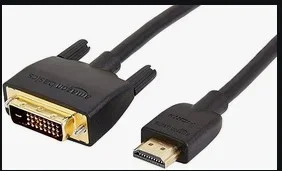
HDMI To DVI Cable Questions?


newmann

Well-known member
VIP
Local time
7:15 PM
Posts
598
OS
Windows 11 Pro
I use an Amazon Basics HDMI to DVI Adapter cable to connect from the HDMI port of laptop to an Asus 624BQ monitor's DVI port.

When I checked my purchase history on my Amazon account, this Adapter cable is bi-directional.

When a cable is called HDMI to DVI, the assumption is always the first part (HDMI) is connected from laptop/computer to the other end (monitor) right? I am aware no laptops have a dvi port.

Thus, you can't call this cable DVI to HDMI right? It has to be called HDMI to DVI cable?
 

My Computer My Computer

At a glance

Windows 11 Pro
OS
Windows 11 Pro
Bi-Directional: Because the link is passive and digital-only, the cable or adapter works in either direction (DVI source to HDMI display, or HDMI source to DVI display).

The one in the image should work

Screenshot 2026-09-19 183744.webp
 

My Computers My Computers

  • At a glance

    Windows11 Pro 26300.9539Intel Core i9 14900F (24 -Core, 68 MB Total C...32GB DDR5RTX 4080 Super w/610.74
    OS
    Windows11 Pro 26300.9539
    Computer type
    PC/Desktop
    Manufacturer/Model
    Dell Alienware Aurora R16
    CPU
    Intel Core i9 14900F (24 -Core, 68 MB Total Cache)
    Motherboard
    Dell Alienware
    Memory
    32GB DDR5
    Graphics Card(s)
    RTX 4080 Super w/610.74
    Sound Card
    Realtec
    Monitor(s) Displays
    Corsair XENEON 32QHD165
    Screen Resolution
    2560 X 1440
    Hard Drives
    1-2TB Samsung 990 Pro PCIe NVMe M2 SSD
    1-4TB Samsung 990 Pro PCIe NVMe M2 SSD
    PSU
    1000 Watt Platinum Dell
    Case
    Alienware
    Cooling
    Liquid Closed Loop
    Keyboard
    Corsair Strafe RGB
    Mouse
    Logitech MK270 Wireless
    Internet Speed
    100Gb's Down-20 Up
    Browser
    Firefox 156.0
    Antivirus
    Defender
    Other Info
    Very Quiet And Fast
    CyberPower UPS CP1500PFCLCD
  • At a glance

    MX-Linux13th Gen Inter(R) Core(TM) i3-1315U64 GB DDR4 @3200 MHz.Internal
    Operating System
    MX-Linux
    Computer type
    PC/Desktop
    Manufacturer/Model
    Intel
    CPU
    13th Gen Inter(R) Core(TM) i3-1315U
    Motherboard
    Intel
    Memory
    64 GB DDR4 @3200 MHz.
    Graphics card(s)
    Internal
    Sound Card
    None
    Monitor(s) Displays
    Dell 2419HGCF
    Screen Resolution
    1920 X 1080
    Hard Drives
    SAMSUNG 980 PRO SSD 2TB, PCIe 4.0 M.2 2280
    PSU
    Chicony 30 Watt
    Case
    Small
    Keyboard
    Dell
    Mouse
    Razor
    Internet Speed
    1GB
    Browser
    Slimjet
HDMI and DVI(-D) are equivalent in the video part (HDMI carries sound and DVI doesn't), so an adapter or cable between both will always be passive and bi-directional (and w/o sound; the same happens if the monitor doesn't have speakers even if you attach it through an HDMI-HDMI cable, that can carry sound).

Display Port (DP) carries extra video info. It can be adapted passively to HDMI or DVI losing that extra, but not the other way round. Conversion from DVI or HDMI to DP requires an active device and is "expensive". For this reason, I purchased an HDMI switch to connect two HDMI sources to a monitor that had 3 inputs: DP, HDMI and VGA. VGA is analog and using the DP input requires a DP source or an active converter. The switch was cheaper.

Yeah, maybe it's more frequent "HDMI to DVI" than "DVI to HDMI", but the cable is passive and bidirectional so...
 

My Computer My Computer

At a glance

Windows 11Celeron J4125 (10th gen)8GB DDR4
OS
Windows 11
Manufacturer/Model
MeLE Quieter 2Q (fanless miniPC)
CPU
Celeron J4125 (10th gen)
Memory
8GB DDR4
Monitor(s) Displays
Samsung SyncMaster T260
Screen Resolution
1920x1200
Hard Drives
256GB eMMC (Windows)
2TB USB3 HDD Toshiba (Data)

Latest Support Threads

Back
Top Bottom