I cannot put some old CA 2011 certificates under DBX list


suatcini54

Well-known member
Power User
VIP
Local time
5:34 AM
Posts
630
OS
Windows 11 Pro build 26200.8524
Hi.

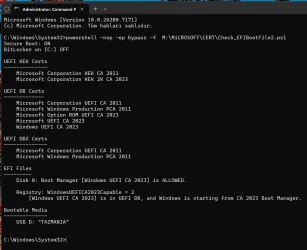
As can be seen from the below screenshot, which is from my PC, my system is booting from Windows UEFI CA 2023 certificate and Microsoft Windows Production PCA 2011 is not allowed because I put it under DBX list.

Then I searched for ways to place certificates "Microsoft Corporation KEK CA 2011" and "Microsoft Corporation UEFI CA 2011", indicated by red arrows in below screenshot, under the DBX list but I couldn't do it.

After reading several articles on the subject, I came to the understanding that these old certificates will be revoked automatically by Microsoft some time in or after June 2026 and my system will be left solely on CA 2023 certificates.

I hope my understanding is correct.

Have a nice weekend.


CA2023 CERT-2.webp
 

My Computers

System One System Two

  • OS
    Windows 11 Pro build 26200.8524
    Computer type
    PC/Desktop
    Manufacturer/Model
    Home Built
    CPU
    Intel i7-4790
    Motherboard
    Asus H97 Pro Gamer with add-on TPM1.2 module
    Memory
    Teams DDR3-1600 4x4 GB
    Graphics Card(s)
    MSI Nvidia GeForce GTX 1050Ti
    Sound Card
    Realtek ALC1150
    Monitor(s) Displays
    Dell P2425D
    Screen Resolution
    2560 by 1440 pixels
    Hard Drives
    Corsair NVMe M.2 Core XT 1000 GB (Windows 11 v.25H2); Samsung SATA Evo 870 500 GB (Windows 11 v.25H2);
    PSU
    Corsair HX850
    Case
    Gigabyte Solo 210
    Cooling
    Zalman CNPS7X Tower
    Keyboard
    Microsoft AIO Wireless (includes touchpad)
    Mouse
    HP S1000 Plus Wireless
    Internet Speed
    500 Mb fiber optic
    Browser
    Chrome; MS Edge
    Antivirus
    Windows Defender
  • Operating System
    MacOS 12 Monterey
    Computer type
    Laptop
    Manufacturer/Model
    Apple Macbook Air
    CPU
    Intel Core i5
    Memory
    8 GB
    Graphics card(s)
    Intel integrated
    Screen Resolution
    1440 by 900 pixels
    Hard Drives
    128 GB
    Keyboard
    Built-in
    Mouse
    Microsoft Wireless
    Internet Speed
    802.11 ac
    Browser
    Chrome; Safari
    Antivirus
    N/A
Hi.

As can be seen from the below screenshot, which is from my PC, my system is booting from Windows UEFI CA 2023 certificate and Microsoft Windows Production PCA 2011 is not allowed because I put it under DBX list.

Then I searched for ways to place certificates "Microsoft Corporation KEK CA 2011" and "Microsoft Corporation UEFI CA 2011", indicated by red arrows in below screenshot, under the DBX list but I couldn't do it.

After reading several articles on the subject, I came to the understanding that these old certificates will be revoked automatically by Microsoft some time in or after June 2026 and my system will be left solely on CA 2023 certificates.

I hope my understanding is correct.

Have a nice weekend.


View attachment 154012

Microsoft will revoke and remove the 2011 certs as and when they do the secure boot update
that is my understanding on the issue at this time.

best of luck Steve ..
 

My Computers

System One System Two

  • OS
    Debian 13 KDE .. Windows 11 Home
    Computer type
    PC/Desktop
    Manufacturer/Model
    HP 24" AiO
    CPU
    Ryzen 7 5825u
    Motherboard
    HP
    Memory
    64GB DDR4 3200
    Graphics Card(s)
    Ryzen 7 5825u
    Sound Card
    RealTek
    Monitor(s) Displays
    24" HP AiO
    Screen Resolution
    1920 x 1080 @60 Hz
    Hard Drives
    1TB WD Blue SN580 M2 SSD Partitioned.
    2x 1TB USB HDD External Backup/Storage.
    PSU
    90W external power brick
    Case
    24" All in One
    Cooling
    Default Air Cooling
    Keyboard
    HP WiFi UK extended
    Mouse
    HP WiFi 3 Button
    Internet Speed
    1GB full fibre
    Browser
    Edge & Firefox
    Antivirus
    AVG Internet Security/Windows Defender
    Other Info
    Mainly Open Source Software
  • Operating System
    Ubuntu 22.04.5 LTS
    Computer type
    Laptop
    Manufacturer/Model
    Dell 13" Latitude 2017
    CPU
    i5 7200u
    Motherboard
    Dell
    Memory
    16GB DDR4
    Graphics card(s)
    Intel
    Sound Card
    Intel
    Monitor(s) Displays
    13" Dell Laptop
    Hard Drives
    250GB Crucial 2.5" SSD
    Mouse
    Generic WiFi 3 button
    Internet Speed
    WiFi only
    Browser
    Firefox
    Antivirus
    ClamAV TK
    Other Info
    Mainly Open Source Software
You're not fully understanding the "chain of trust" in the UEFI certificate model.
  • Platform Key guarantees a pre-signed KEK cert is authentic
  • KEK cert guarantees a pre-signed DB or DBX cert is authentic
KEK certs are never cancelled. KEK CA 2011 needs to exist and confirm Production PCA 2011's authenticity, so it can be confirmed once more to be on the DBX list. You don't cancel the KEK, but you can add all the DB certs signed by that KEK to the DBX list.

Newer PC's can be optionally shipped (as outlined by MS) as a totally clean setup, where CA 2011 doesn't exist at all.

PKVendor PK
KEKKEK CA 2023
DBWindows UEFI CA 2023
DBMicrosoft UEFI CA 2023
DBOption ROM UEFI CA 2023
DBXNone, except for hash signatures of revoked EFI files

Because CA 2011 isn't even present on a post-CA 2011 PC shipped from the factory, it never trusted CA 2011 in the first place. Therefore it's deliberately not backwards compatible (so unpatched OS images cannot be booted).

"Windows CA" signs all Windows boot files.

"Microsoft CA" is a misnomer, what it really means is Secure Boot boot files for Linux are signed using the MS provided cert. A Linux distro can provide it's own independent KEK and DB certs, but some choose to ship a MS-signed boot loader out of the box to make first-time installation easier. Afterwards, the distro can add its own UEFI certs to make the install not rely on the "Microsoft CA".

The Windows revocation process isn't going to add UEFI CA 2011 to the DBX, since that be a bad neighbor if you had a dual-boot system with Linux. And it won't because they haven't included a pre-signed file under "\Windows\System32\SecureBootUpdates".

If you really need to do this manually:
1. Download a copy of "MicCorUEFCA2011_2011-06-27.der" from https://raw.githubusercontent.com/m...B/Certificates/MicCorUEFCA2011_2011-06-27.der

2. Copy the certificate file to a FAT32 volume on an USB drive.

3. Enter your UEFI's Secure Boot setup menu, and manually add the file under DBX key management.
 

My Computer

System One

  • OS
    Windows 7
Microsoft will revoke and remove the 2011 certs as and when they do the secure boot update
that is my understanding on the issue at this time.
The UEFI security model doesn't include removing revoked certs. They are left in place so you have positive proof that revocation has taken place.

If you perform a factory reset of the UEFI certs, then the 2011 will be reloaded. MS is advising some PC makers they have the option (on new PC's) to have the factory defaults only include 2023 certs (which means a reset never adds 2011 certs), or a combination of both 2011 and 2023 for backwards compatibility (someone is running an old OS which isn't patched).
 

My Computer

System One

  • OS
    Windows 7
You're not fully understanding the "chain of trust" in the UEFI certificate model.

Thank you for your detailed explanation on certificates chain of trust and I confirm that you’re right about your above statement, which I quoted.
 

My Computers

System One System Two

  • OS
    Windows 11 Pro build 26200.8524
    Computer type
    PC/Desktop
    Manufacturer/Model
    Home Built
    CPU
    Intel i7-4790
    Motherboard
    Asus H97 Pro Gamer with add-on TPM1.2 module
    Memory
    Teams DDR3-1600 4x4 GB
    Graphics Card(s)
    MSI Nvidia GeForce GTX 1050Ti
    Sound Card
    Realtek ALC1150
    Monitor(s) Displays
    Dell P2425D
    Screen Resolution
    2560 by 1440 pixels
    Hard Drives
    Corsair NVMe M.2 Core XT 1000 GB (Windows 11 v.25H2); Samsung SATA Evo 870 500 GB (Windows 11 v.25H2);
    PSU
    Corsair HX850
    Case
    Gigabyte Solo 210
    Cooling
    Zalman CNPS7X Tower
    Keyboard
    Microsoft AIO Wireless (includes touchpad)
    Mouse
    HP S1000 Plus Wireless
    Internet Speed
    500 Mb fiber optic
    Browser
    Chrome; MS Edge
    Antivirus
    Windows Defender
  • Operating System
    MacOS 12 Monterey
    Computer type
    Laptop
    Manufacturer/Model
    Apple Macbook Air
    CPU
    Intel Core i5
    Memory
    8 GB
    Graphics card(s)
    Intel integrated
    Screen Resolution
    1440 by 900 pixels
    Hard Drives
    128 GB
    Keyboard
    Built-in
    Mouse
    Microsoft Wireless
    Internet Speed
    802.11 ac
    Browser
    Chrome; Safari
    Antivirus
    N/A
After a manual update in the UEFI menu:
Code:
Secure Boot: OFF
BitLocker on (C:) ON

UEFI KEK Certs
--------------
    Microsoft Corporation KEK CA 2011
    Microsoft Corporation KEK 2K CA 2023

UEFI DB Certs
-------------
    Microsoft Corporation UEFI CA 2011
    Microsoft Windows Production PCA 2011
    Microsoft Option ROM UEFI CA 2023
    Microsoft UEFI CA 2023
    Windows UEFI CA 2023

UEFI DBX Certs
--------------
    Microsoft Corporation UEFI CA 2011
    Microsoft Windows Production PCA 2011

EFI Files
---------
    Disk 0: Windows Boot Manager [Windows UEFI CA 2023] is ALLOWED.

    Registry: WindowsUEFICA2023Capable = 2
        [Windows UEFI CA 2023] in UEFI DB, and Windows starting from CA 2023 Boot Manager.
 

My Computer

System One

  • OS
    Windows 7
@garlin how did you do that ? Put the Microsoft Corporation UEFI CA 2011 cert under DBX cert section ?
 

My Computers

System One System Two

  • OS
    Windows 11 Pro build 26200.8524
    Computer type
    PC/Desktop
    Manufacturer/Model
    Home Built
    CPU
    Intel i7-4790
    Motherboard
    Asus H97 Pro Gamer with add-on TPM1.2 module
    Memory
    Teams DDR3-1600 4x4 GB
    Graphics Card(s)
    MSI Nvidia GeForce GTX 1050Ti
    Sound Card
    Realtek ALC1150
    Monitor(s) Displays
    Dell P2425D
    Screen Resolution
    2560 by 1440 pixels
    Hard Drives
    Corsair NVMe M.2 Core XT 1000 GB (Windows 11 v.25H2); Samsung SATA Evo 870 500 GB (Windows 11 v.25H2);
    PSU
    Corsair HX850
    Case
    Gigabyte Solo 210
    Cooling
    Zalman CNPS7X Tower
    Keyboard
    Microsoft AIO Wireless (includes touchpad)
    Mouse
    HP S1000 Plus Wireless
    Internet Speed
    500 Mb fiber optic
    Browser
    Chrome; MS Edge
    Antivirus
    Windows Defender
  • Operating System
    MacOS 12 Monterey
    Computer type
    Laptop
    Manufacturer/Model
    Apple Macbook Air
    CPU
    Intel Core i5
    Memory
    8 GB
    Graphics card(s)
    Intel integrated
    Screen Resolution
    1440 by 900 pixels
    Hard Drives
    128 GB
    Keyboard
    Built-in
    Mouse
    Microsoft Wireless
    Internet Speed
    802.11 ac
    Browser
    Chrome; Safari
    Antivirus
    N/A
Read the last 3 steps I posted. You copy the .der file to a FAT32 drive, and have the UEFI's Secure Boot key management menu and enroll the cert file (from the FAT32 volume) into DBX.
 

My Computer

System One

  • OS
    Windows 7
Read the last 3 steps I posted. You copy the .der file to a FAT32 drive, and have the UEFI's Secure Boot key management menu and enroll the cert file (from the FAT32 volume) into DBX.
Thanks for the info.

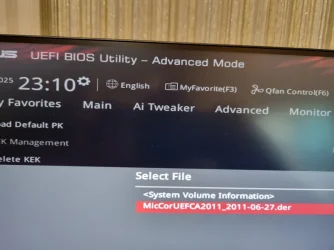
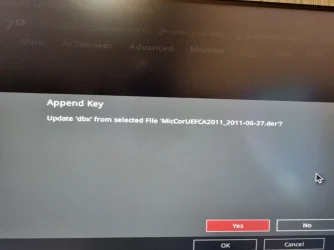
I tried to append the certificate into the dbx list but my BIOS does not accept the cert, although I see a message Success after I press Yes/O.K..

cert2.webp

cert4.webp
 

My Computers

System One System Two

  • OS
    Windows 11 Pro build 26200.8524
    Computer type
    PC/Desktop
    Manufacturer/Model
    Home Built
    CPU
    Intel i7-4790
    Motherboard
    Asus H97 Pro Gamer with add-on TPM1.2 module
    Memory
    Teams DDR3-1600 4x4 GB
    Graphics Card(s)
    MSI Nvidia GeForce GTX 1050Ti
    Sound Card
    Realtek ALC1150
    Monitor(s) Displays
    Dell P2425D
    Screen Resolution
    2560 by 1440 pixels
    Hard Drives
    Corsair NVMe M.2 Core XT 1000 GB (Windows 11 v.25H2); Samsung SATA Evo 870 500 GB (Windows 11 v.25H2);
    PSU
    Corsair HX850
    Case
    Gigabyte Solo 210
    Cooling
    Zalman CNPS7X Tower
    Keyboard
    Microsoft AIO Wireless (includes touchpad)
    Mouse
    HP S1000 Plus Wireless
    Internet Speed
    500 Mb fiber optic
    Browser
    Chrome; MS Edge
    Antivirus
    Windows Defender
  • Operating System
    MacOS 12 Monterey
    Computer type
    Laptop
    Manufacturer/Model
    Apple Macbook Air
    CPU
    Intel Core i5
    Memory
    8 GB
    Graphics card(s)
    Intel integrated
    Screen Resolution
    1440 by 900 pixels
    Hard Drives
    128 GB
    Keyboard
    Built-in
    Mouse
    Microsoft Wireless
    Internet Speed
    802.11 ac
    Browser
    Chrome; Safari
    Antivirus
    N/A
I don't have an ASUS. Maybe it's expecting another file format like .cer or .crt?

https://www.microsoft.com/pkiops/certs/MicCorUEFCA2011_2011-06-27.crt
Thanks a lot.

I was able to install the certificate with .crt extension successfully. After I restarted to apply the certificate installation, BIOS gave me several beeps and the option to enter BIOS setup (press F1 key) or to continue (press F2 key). I pressed F2 key to continue with normal boot sequence.

Now I have put Microsoft Corporation UEFI CA 2011 cert in a secured cage.

Thanks again for your taking the time to find the correct cert and to explain.

CA2023 CERT-3.webp
 

My Computers

System One System Two

  • OS
    Windows 11 Pro build 26200.8524
    Computer type
    PC/Desktop
    Manufacturer/Model
    Home Built
    CPU
    Intel i7-4790
    Motherboard
    Asus H97 Pro Gamer with add-on TPM1.2 module
    Memory
    Teams DDR3-1600 4x4 GB
    Graphics Card(s)
    MSI Nvidia GeForce GTX 1050Ti
    Sound Card
    Realtek ALC1150
    Monitor(s) Displays
    Dell P2425D
    Screen Resolution
    2560 by 1440 pixels
    Hard Drives
    Corsair NVMe M.2 Core XT 1000 GB (Windows 11 v.25H2); Samsung SATA Evo 870 500 GB (Windows 11 v.25H2);
    PSU
    Corsair HX850
    Case
    Gigabyte Solo 210
    Cooling
    Zalman CNPS7X Tower
    Keyboard
    Microsoft AIO Wireless (includes touchpad)
    Mouse
    HP S1000 Plus Wireless
    Internet Speed
    500 Mb fiber optic
    Browser
    Chrome; MS Edge
    Antivirus
    Windows Defender
  • Operating System
    MacOS 12 Monterey
    Computer type
    Laptop
    Manufacturer/Model
    Apple Macbook Air
    CPU
    Intel Core i5
    Memory
    8 GB
    Graphics card(s)
    Intel integrated
    Screen Resolution
    1440 by 900 pixels
    Hard Drives
    128 GB
    Keyboard
    Built-in
    Mouse
    Microsoft Wireless
    Internet Speed
    802.11 ac
    Browser
    Chrome; Safari
    Antivirus
    N/A
1. Download a copy of "MicCorUEFCA2011_2011-06-27.der" from https://raw.githubusercontent.com/m...B/Certificates/MicCorUEFCA2011_2011-06-27.der

2. Copy the certificate file to a FAT32 volume on an USB drive.

3. Enter your UEFI's Secure Boot setup menu, and manually add the file under DBX key management.

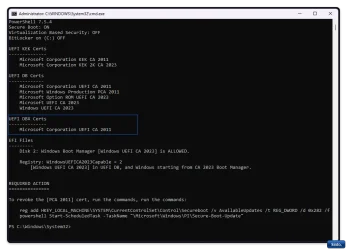
@garlin, this seems to have improved things, however in the DBX I am still missing "Microsoft Windows Production PCA 2011
" But those errors have gone so thanks for that:

Check_UEFI-CA2023.ps1​


Code:
PowerShell 7.5.4
Secure Boot: ON
Virtualization Based Security: OFF
BitLocker on (C:) OFF

UEFI KEK Certs
--------------
    Microsoft Corporation KEK CA 2011
    Microsoft Corporation KEK 2K CA 2023

UEFI DB Certs
-------------
    Microsoft Corporation UEFI CA 2011
    Microsoft Windows Production PCA 2011
    Microsoft Option ROM UEFI CA 2023
    Microsoft UEFI CA 2023
    Windows UEFI CA 2023

UEFI DBX Certs
--------------
    (NONE)
MethodInvocationException: C:\Check_UEFI-CA2023.ps1:441
Line |
 441 |      $SVN = '{0}.{1}' -f [int]::Parse($SignatureData.Substring(36,4),  …
     |      ~~~~~~~~~~~~~~~~~~~~~~~~~~~~~~~~~~~~~~~~~~~~~~~~~~~~~~~~~~~~~~~~~
     | Exception calling "Substring" with "2" argument(s): "startIndex cannot be larger than length of string. (Parameter 'startIndex')"

EFI Files
---------
    Disk 2: Windows Boot Manager [Windows UEFI CA 2023] is ALLOWED.

    Registry: WindowsUEFICA2023Capable = 2
        [Windows UEFI CA 2023] in UEFI DB, and Windows starting from CA 2023 Boot Manager.
MethodInvocationException: C:\Check_UEFI-CA2023.ps1:441
Line |

PowerShell 7.5.4
Secure Boot: ON
Virtualization Based Security: OFF
BitLocker on (C:) OFF

UEFI KEK Certs
--------------
Microsoft Corporation KEK CA 2011
Microsoft Corporation KEK 2K CA 2023

UEFI DB Certs
-------------
Microsoft Corporation UEFI CA 2011
Microsoft Windows Production PCA 2011
Microsoft Option ROM UEFI CA 2023
Microsoft UEFI CA 2023
Windows UEFI CA 2023

UEFI DBX Certs
--------------
Microsoft Corporation UEFI CA 2011

EFI Files
---------
Disk 2: Windows Boot Manager [Windows UEFI CA 2023] is ALLOWED.

Registry: WindowsUEFICA2023Capable = 2
[Windows UEFI CA 2023] in UEFI DB, and Windows starting from CA 2023 Boot Manager.


REQUIRED ACTION
===============

To revoke the [PCA 2011] cert, run the commands, run the commands:

reg add HKEY_LOCAL_MACHINE\SYSTEM\CurrentControlSet\Control\Secureboot /v AvailableUpdates /t REG_DWORD /d 0x282 /f
powershell Start-ScheduledTask -TaskName "\Microsoft\Windows\PI\Secure-Boot-Update"

PS C:\Windows\System32>

Result image:

Win-2032.webp


At the least, it looks better lol.
Until I run the Check DBX

Code:
PowerShell 7.5.4
FAILED: Missing 431/431 SVN signatures from "dbxupdate.bin"
FAILED: Missing 3/3 SVN signatures from "DBXUpdate2024.bin"
FAILED: Missing 3/3 SVN signatures from "DBXUpdateSVN.bin"

PS C:\Windows\System32>


So, at the end of the day, I am ecstatic to know that I am inadequate, but look good as a lampshade, regardless.
 
Last edited:

My Computers

System One System Two

  • OS
    Windows 11 Pro 25H2 Build 26200.8655
    Computer type
    PC/Desktop
    Manufacturer/Model
    Sin-built 2013
    CPU
    Intel(R) Core(TM) i7-4770K CPU @ 3.50GHz
    Motherboard
    ASUS ROG Maximus VI Formula
    Memory
    32.0 GB of I forget and the box is in storage.
    Graphics Card(s)
    Gigabyte nVidia GeForce GTX 1660 Super OC 6GB
    Sound Card
    Onboard thingy
    Monitor(s) Displays
    5 x LG 25MS500-B - 1 x 24MK430H-B - 1 x Wacom Pro 22" Touch Screen Tablet
    Screen Resolution
    All over the place
    Hard Drives
    Too many to list.
    OS on Samsung 1TB 870 QVO SATA
    PSU
    Silverstone 1500
    Case
    NZXT Phantom 820 Full-Tower Case
    Cooling
    Noctua NH-D15 Elite Class Dual Tower CPU Cooler / 6 x EziDIY 120mm / 2 x Corsair 140mm somethings / 1 x 140mm Thermaltake something / 2 x 200mm Corsair.
    Keyboard
    Corsair K95 / Logitech diNovo Edge Wireless
    Mouse
    Logitech: G402 / G502 / Mx Masters / Mx Air Cordless
    Internet Speed
    2000/500Mbps
    Browser
    All sorts
    Antivirus
    Kaspersky Premium
    Other Info
    ㅤㅤㅤㅤㅤㅤㅤㅤㅤㅤㅤㅤㅤㅤㅤㅤㅤㅤㅤㅤㅤㅤㅤㅤㅤㅤㅤㅤㅤㅤㅤㅤㅤㅤㅤㅤㅤㅤㅤㅤ⠀⠀⠀⠀⠀⠀⠀⠀⠀⠀
    TP-Link BE9300 WiFi 7 Bluetooth 5.4 (Archer TBE550E)
    TP-Link TX201 V1 2.5GB Lan

    Grandstream HT812 - VoIP
    ASUS DSL-AX82U - Mesh
    ASUS RT-AC68U - Mesh
    ASUS RT-BE88U Router

    Brother MFC-L2880DW Printer

    I’m on a horse.
  • Operating System
    Windows 11 Pro 25H2 Build 26200.8655
    Computer type
    Laptop
    Manufacturer/Model
    LENOVO Yoga 7 14IRL8 - 7i EVO OLED 14" Touchscreen i5 12 Core 16GB/512GB
    CPU
    Intel Core 12th Gen i5-1240P Processor (1.7 - 4.4GHz)
    Memory
    16GB LPDDR5 RAM
    Graphics card(s)
    Intel Iris Xe Graphics Processor
    Sound Card
    Optimized with Dolby Atmos®
    Screen Resolution
    QHD 2880 x 1800 OLED
    Hard Drives
    M.2 512GB
    Antivirus
    Defender / Malwarebytes
    Other Info
    …still on a horse.
This is major improvement. You're "missing" the DBXUpdate signatures because that's a considered a revoke step. Revoking means potentially you're blocking your Windows or a bootable device from booting (because it has the outdated boot files).

If you follow the recommended steps, it will run the revoke process Then the DBXUpdate signatures will be pushed out to the DBX variable, and everything will be populated.

My update process doesn't automatically call the revoke step, because some users get freaked out and they prefer to "wait it out" until MS makes everything mandatory this year. So the update script (or process) can be done in one continuous step or broken in half (update first, and revoke later).
 

My Computer

System One

  • OS
    Windows 7
If you follow the recommended steps, it will run the revoke process Then the DBXUpdate signatures will be pushed out to the DBX variable, and everything will be populated.


Legend

Check_UEFI-CA2023.ps1

Code:
Secure Boot: ON
BitLocker on (C:) OFF

UEFI KEK Certs
--------------
    Microsoft Corporation KEK CA 2011
    Microsoft Corporation KEK 2K CA 2023

UEFI DB Certs
-------------
    Microsoft Corporation UEFI CA 2011
    Microsoft Windows Production PCA 2011
    Microsoft Option ROM UEFI CA 2023
    Microsoft UEFI CA 2023
    Windows UEFI CA 2023

UEFI DBX Certs
--------------
    Microsoft Corporation UEFI CA 2011
    Microsoft Windows Production PCA 2011

EFI Files
---------
    Disk 2: Boot Manager [Windows UEFI CA 2023] is ALLOWED.

    Registry: WindowsUEFICA2023Capable = 2
        [Windows UEFI CA 2023] is in UEFI DB, and Windows is starting from CA 2023 Boot Manager.

Also:

Check_DBXUpdate.bin.ps1

Code:
PowerShell 7.5.4
SUCCESS: Matched 431/431 EFI signatures from "dbxupdate.bin"
SUCCESS: Matched 3/3 SVN signatures from "DBXUpdate2024.bin"
SUCCESS: Matched 3/3 SVN signatures from "DBXUpdateSVN.bin"

PS C:\Windows\System32>

There are certain topics I try not to enter into anymore, Outlook is one regardless that I am pretty handy with it. I find it all too tiring now.
Your entry into the can of worms that is the 2023 Cert update, has been most valuable.

Extremely complicated due to everyones systems being different. So you are appreciated, thanks.
 

My Computers

System One System Two

  • OS
    Windows 11 Pro 25H2 Build 26200.8655
    Computer type
    PC/Desktop
    Manufacturer/Model
    Sin-built 2013
    CPU
    Intel(R) Core(TM) i7-4770K CPU @ 3.50GHz
    Motherboard
    ASUS ROG Maximus VI Formula
    Memory
    32.0 GB of I forget and the box is in storage.
    Graphics Card(s)
    Gigabyte nVidia GeForce GTX 1660 Super OC 6GB
    Sound Card
    Onboard thingy
    Monitor(s) Displays
    5 x LG 25MS500-B - 1 x 24MK430H-B - 1 x Wacom Pro 22" Touch Screen Tablet
    Screen Resolution
    All over the place
    Hard Drives
    Too many to list.
    OS on Samsung 1TB 870 QVO SATA
    PSU
    Silverstone 1500
    Case
    NZXT Phantom 820 Full-Tower Case
    Cooling
    Noctua NH-D15 Elite Class Dual Tower CPU Cooler / 6 x EziDIY 120mm / 2 x Corsair 140mm somethings / 1 x 140mm Thermaltake something / 2 x 200mm Corsair.
    Keyboard
    Corsair K95 / Logitech diNovo Edge Wireless
    Mouse
    Logitech: G402 / G502 / Mx Masters / Mx Air Cordless
    Internet Speed
    2000/500Mbps
    Browser
    All sorts
    Antivirus
    Kaspersky Premium
    Other Info
    ㅤㅤㅤㅤㅤㅤㅤㅤㅤㅤㅤㅤㅤㅤㅤㅤㅤㅤㅤㅤㅤㅤㅤㅤㅤㅤㅤㅤㅤㅤㅤㅤㅤㅤㅤㅤㅤㅤㅤㅤ⠀⠀⠀⠀⠀⠀⠀⠀⠀⠀
    TP-Link BE9300 WiFi 7 Bluetooth 5.4 (Archer TBE550E)
    TP-Link TX201 V1 2.5GB Lan

    Grandstream HT812 - VoIP
    ASUS DSL-AX82U - Mesh
    ASUS RT-AC68U - Mesh
    ASUS RT-BE88U Router

    Brother MFC-L2880DW Printer

    I’m on a horse.
  • Operating System
    Windows 11 Pro 25H2 Build 26200.8655
    Computer type
    Laptop
    Manufacturer/Model
    LENOVO Yoga 7 14IRL8 - 7i EVO OLED 14" Touchscreen i5 12 Core 16GB/512GB
    CPU
    Intel Core 12th Gen i5-1240P Processor (1.7 - 4.4GHz)
    Memory
    16GB LPDDR5 RAM
    Graphics card(s)
    Intel Iris Xe Graphics Processor
    Sound Card
    Optimized with Dolby Atmos®
    Screen Resolution
    QHD 2880 x 1800 OLED
    Hard Drives
    M.2 512GB
    Antivirus
    Defender / Malwarebytes
    Other Info
    …still on a horse.

Latest Support Threads

Back
Top Bottom