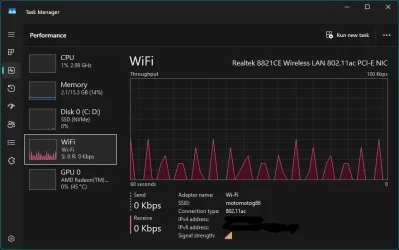
Need help identifying a constant network throughput as shown in the pic below. No apps are running that use the network yet there is always this background receive only activity. My laptop is connected to a mobile phone hotspot for its internet connection.
Most of the Microsoft telemetry has been disabled, Firewall is set to ask if apps want network access but doesn't notify anything is trying to make a connection so I am assuming it is a Microsoft service chewing up my data allowance. It was once quiet as a mouse when idle. Not sure what has changed and when.
What I am after is a way of identifying what service is causing the activity, no need for advice on basic stuff thanks.
* Thanks Ghot for pointing out that I had left the IP address exposed
Wireshark is good for packet level inspection but I would use tcpview to see which process is generating network traffic TCPView for Windows - Sysinternals
Thanks @neemobeer@dacrone I have solved the mystery. It was my TCL Smart TV on the same hotspot talking to my Laptop. Heaven know what they were talking about but TV got its WiFi turned off now and all is quiet. The TV is Chinese and a Google TV so not too surprising it wanted to make connections to upload my viewing habits, microphone audio etc.
I used Wireshark to identify the TV device causing the traffic, TCPView is much simpler to spot traffic but not so good at identifying the source of the traffic. Both are handy tools which I will add to my toolbox.