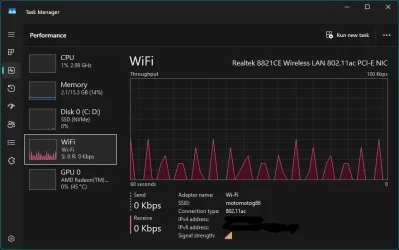
Solved Network activity when idle


jajk

Active member
Member
Local time
5:08 AM
Posts
28
OS
Win11 Home 25H2 26200.8328
Need help identifying a constant network throughput as shown in the pic below. No apps are running that use the network yet there is always this background receive only activity. My laptop is connected to a mobile phone hotspot for its internet connection.
Most of the Microsoft telemetry has been disabled, Firewall is set to ask if apps want network access but doesn't notify anything is trying to make a connection so I am assuming it is a Microsoft service chewing up my data allowance. It was once quiet as a mouse when idle. Not sure what has changed and when.
What I am after is a way of identifying what service is causing the activity, no need for advice on basic stuff thanks.
1781223075327.webp
* Thanks Ghot for pointing out that I had left the IP address exposed
 
Windows Build/Version
26H1 28000.2269
Last edited:

My Computers

System One System Two

  • OS
    Win11 Home 25H2 26200.8328
    Computer type
    Laptop
    Manufacturer/Model
    Asus E1504FA
    CPU
    Ryzen 5 7520U
    Memory
    16GB DDR5
    Graphics Card(s)
    Integrated graphics
    Screen Resolution
    1920
    Hard Drives
    1TB Crucial P3+ PCIE 4.0 (in a PCIE 3.0 slot)
    Browser
    Vivaldi
    Antivirus
    Nil
  • Operating System
    Linux Manjaro KDE
    Computer type
    Laptop
    Manufacturer/Model
    Asus A53E
    CPU
    2nd gen I5
    Memory
    8GB DDR3
    Graphics card(s)
    Integrated graphics
    Hard Drives
    256GB SATA SSD
    Browser
    Firefox
    Antivirus
    Nil
@jajk

Your IP address was showing.
Block it out then re-post your pic.
 

My Computers

System One System Two

  • OS
    Win 11 Home ♦♦♦26200.8655 ♦♦♦♦♦♦♦25H2
    Computer type
    PC/Desktop
    Manufacturer/Model
    Built by Ghot® [May 2020]
    CPU
    AMD Ryzen 7 3700X
    Motherboard
    Asus Pro WS X570-ACE (BIOS 5302)
    Memory
    G.Skill (F4-3200C14D-16GTZKW)
    Graphics Card(s)
    EVGA RTX 2070 (08G-P4-2171-KR)
    Sound Card
    Realtek ALC1220P / ALC S1220A
    Monitor(s) Displays
    Dell U3011 30"
    Screen Resolution
    2560 x 1600
    Hard Drives
    2x Samsung 860 EVO 500GB,
    WD 4TB Black FZBX - SATA III,
    WD 8TB Black FZBX - SATA III,
    DRW-24B1ST CD/DVD Burner
    PSU
    PC Power & Cooling 750W Quad EPS12V
    Case
    Cooler Master ATCS 840 Tower
    Cooling
    CM Hyper 212 EVO (push/pull)
    Keyboard
    Ducky DK9008 Shine II Blue LED
    Mouse
    Logitech Optical M-100
    Internet Speed
    300/300
    Browser
    Firefox (latest)
    Antivirus
    Bitdefender Total Security
    Other Info
    Speakers: Klipsch Pro Media 2.1
  • Operating System
    Windows XP Pro 32bit w/SP3
    Computer type
    PC/Desktop
    Manufacturer/Model
    Built by Ghot® (not in use)
    CPU
    AMD Athlon 64 X2 5000+ (OC'd @ 3.2Ghz)
    Motherboard
    ASUS M2N32-SLI Deluxe Wireless Edition
    Memory
    TWIN2X2048-6400C4DHX (2 x 1GB, DDR2 800)
    Graphics card(s)
    EVGA 256-P2-N758-TR GeForce 8600GT SSC
    Sound Card
    Onboard
    Monitor(s) Displays
    ViewSonic G90FB Black 19" Professional (CRT)
    Screen Resolution
    up to 2048 x 1536
    Hard Drives
    WD 36GB 10,000rpm Raptor SATA
    Seagate 80GB 7200rpm SATA
    Lite-On LTR-52246S CD/RW
    Lite-On LH-18A1P CD/DVD Burner
    PSU
    PC Power & Cooling Silencer 750 Quad EPS12V
    Case
    Generic Beige case, 80mm fans
    Cooling
    ZALMAN 9500A 92mm CPU Cooler
    Keyboard
    Logitech Classic Keybooard 200
    Mouse
    Logitech Optical M-BT96a
    Internet Speed
    300/300
    Browser
    Firefox 3.x ??
    Antivirus
    Symantec (Norton)
    Other Info
    Still assembled, still runs. Haven't turned it on for 15 years?
Thanks @neemobeer @dacrone I have solved the mystery. It was my TCL Smart TV on the same hotspot talking to my Laptop. Heaven know what they were talking about but TV got its WiFi turned off now and all is quiet. The TV is Chinese and a Google TV so not too surprising it wanted to make connections to upload my viewing habits, microphone audio etc.
I used Wireshark to identify the TV device causing the traffic, TCPView is much simpler to spot traffic but not so good at identifying the source of the traffic. Both are handy tools which I will add to my toolbox.

 

My Computers

System One System Two

  • OS
    Win11 Home 25H2 26200.8328
    Computer type
    Laptop
    Manufacturer/Model
    Asus E1504FA
    CPU
    Ryzen 5 7520U
    Memory
    16GB DDR5
    Graphics Card(s)
    Integrated graphics
    Screen Resolution
    1920
    Hard Drives
    1TB Crucial P3+ PCIE 4.0 (in a PCIE 3.0 slot)
    Browser
    Vivaldi
    Antivirus
    Nil
  • Operating System
    Linux Manjaro KDE
    Computer type
    Laptop
    Manufacturer/Model
    Asus A53E
    CPU
    2nd gen I5
    Memory
    8GB DDR3
    Graphics card(s)
    Integrated graphics
    Hard Drives
    256GB SATA SSD
    Browser
    Firefox
    Antivirus
    Nil

Latest Support Threads

Back
Top Bottom