- Local time
- 4:10 AM
- Posts
- 363
- OS
- Windows 11 25H2
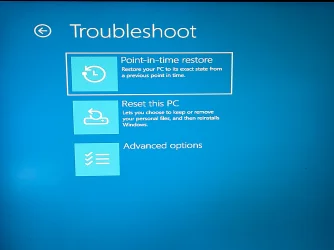
Frustrated with the restore option being missing from WinRE? This fixed it for me! 
1. Download or Mount the Windows ISO
2. Extract winre.wim
3. Place the File in Your System Directory
4. Re-enable WinRE in Command Prompt
1. Download or Mount the Windows ISO
- Go to the Microsoft Software Download site or UUPDUMP and download an ISO for your exact Windows version (Windows 10 or Windows 11).
- Once downloaded, right-click the ISO file and select Mount.
- Open the mounted drive, go into the Sources folder, and locate the install.wim (or install.esd) file.
2. Extract winre.wim
- Download and open the free 7-Zip utility.
- Use 7-Zip to open your install.wim file and navigate to the following path within the ISO:
\Windows\System32\Recovery\ - Extract the winre.wim file to a temporary location on your PC, like C:\.
3. Place the File in Your System Directory
- Open File Explorer, navigate to C:\Windows\System32\Recovery, and paste the winre.wim file you just extracted. (Note: You will need Administrator privileges to paste into this folder).
- Ensure you have unhidden system files and folders to view the contents properly.
4. Re-enable WinRE in Command Prompt
- Press Win + R, type cmd, and press Ctrl + Shift + Enter to open an Administrator Command Prompt.
- Run the following command to disable the recovery agent:
reagentc /disable - Point the system to your newly placed recovery image by running:
reagentc /setreimage /path C:\Windows\System32\Recovery - Re-enable the environment by running:
reagentc /enable - Verify that it was successfully restored by typing reagentc /info.
Attachments
My Computer
At a glance
Windows 11 25H2AMD 9950X3d264GB Corsair vengeance DDR5 (6000 MHz) CL30AMD 9070XT
- OS
- Windows 11 25H2
- Computer type
- PC/Desktop
- Manufacturer/Model
- N/A
- CPU
- AMD 9950X3d2
- Motherboard
- Asus x870E Extreme
- Memory
- 64GB Corsair vengeance DDR5 (6000 MHz) CL30
- Graphics Card(s)
- AMD 9070XT
- Sound Card
- Realtek
- Monitor(s) Displays
- N/A
- Screen Resolution
- 1440p
- PSU
- Thermaltake 1200w
- Case
- Asus View 71 TG RGB
- Cooling
- Custom Cooling loop With an Alphacool 13339 VPP Apex Pump and EK Quantum surface radiator
- Internet Speed
- Xfinity 2300 mbps
- Antivirus
- Norton