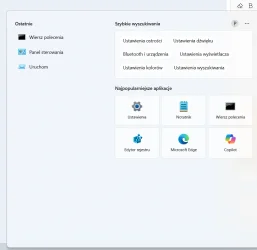
I'm still having problems with the search box image, which is causing widgets to lag or not refresh on the taskbar.


krzysiek

Well-known member
Local time
9:55 PM
Posts
103
OS
Windows 11
Hi everyone,

I'm still having problems with the search box image on the taskbar. Because the image isn't displayed, and because the image isn't present, the taskbar widgets take a very long time to refresh—and sometimes they simply don't refresh at all. It's the same regardless of the build, whether older or newer. It's really annoying. Is there really nothing I can do about it?

From what I can see, it might be caused by Bing. There's a problem in the system settings and that's the problem. I've contacted Microsoft about this, but so far I haven't received a response or a solution.

If anyone has found a workaround or solution, please share. This issue is seriously impeding the use of the taskbar and widgets.

Thanks.
 
Windows Build/Version
24H2 (26100.4767

Attachments

  • Zrzut ekranu 2025-07-20 124710.webp
    Zrzut ekranu 2025-07-20 124710.webp
    2.1 KB · Views: 2
  • Zrzut ekranu 2025-07-20 124956.webp
    Zrzut ekranu 2025-07-20 124956.webp
    3.5 KB · Views: 2
  • Zrzut ekranu 2025-07-20 135208.webp
    Zrzut ekranu 2025-07-20 135208.webp
    26.2 KB · Views: 2

My Computer

System One

  • OS
    Windows 11
    Computer type
    PC/Desktop
    CPU
    Intel Core i7-9700F, 4500 MHz
    Motherboard
    ASRock B365M-HDV
    Memory
    16 GB DDR4
    Graphics Card(s)
    GeForce GTX 1070 (8 GB)
    Sound Card
    Realtek ALC887 @ Intel Kaby Point PCH - High Definition Audio
    Monitor(s) Displays
    Samsung 32 cale
    Screen Resolution
    1680 x 1050
    Hard Drives
    Dysk nr 1 - Patriot Burst (B5950791083400100449) [894 GB] D: E:
    Dysk nr 2 - SAMSUNG MZVLB256HBHQ-000L2 (0025_3889_91CB_C6D1.) [238 GB] C: F: G:
    Keyboard
    roccat
If you have not done so already, right click on taskbar and select taskbar settings.
Select search and choose icon only to see if it matters.
 

My Computer

System One

  • OS
    Windows 11 Pro 64-bit
    Computer type
    PC/Desktop
    Manufacturer/Model
    Alienware Aurora R16
    CPU
    Intel Core i9-14900KF
    Motherboard
    Alienware 0RF96M (U3E1)
    Memory
    64 GB
    Graphics Card(s)
    4083MB NVIDIA GeForce RTX 4090
    Monitor(s) Displays
    ROG XG43UQ 43 inch monitor
    Screen Resolution
    (3840x2160@120Hz)
    Hard Drives
    Samsung SSD 870 EVO 2TB
    NVMe Samsung 2048GB
Well, since the screenshots are not in English, I can only go by my suspicion. Here are a few things to help get Search and start menu more manageable.

This makes Windows search more useable for me.

These make the start menu better for me.
Disable search highlights. Enable or Disable Search Highlights in Windows 11
Remove recommened from start Clear Start Menu Recommended Section in Windows 11
 

My Computers

System One System Two

  • OS
    Windows 11 Pro 25H2
    Computer type
    PC/Desktop
    Manufacturer/Model
    Dell Optiplex 7080
    CPU
    i9-10900 10 core 20 threads
    Motherboard
    DELL 0J37VM
    Memory
    32 gb
    Graphics Card(s)
    none-Intel UHD Graphics 630
    Sound Card
    Integrated Realtek
    Monitor(s) Displays
    Benq 27
    Screen Resolution
    2560x1440
    Hard Drives
    2x1tb Solidigm m.2 nvme /External drives 512gb Samsung m.2 sata+2tb Kingston m2.nvme
    PSU
    500w
    Case
    MT
    Cooling
    Dell Premium
    Keyboard
    Logitech wired
    Mouse
    Logitech wireless
    Internet Speed
    so slow I'm too embarrassed to tell
    Browser
    #1 Edge #2 Firefox
    Antivirus
    Defender+MWB Premium
  • Operating System
    Windows 11 Pro 24H2 26200.8457
    Computer type
    PC/Desktop
    Manufacturer/Model
    Beelink Mini PC SER5
    CPU
    AMD Ryzen 7 6800U
    Memory
    32 gb
    Graphics card(s)
    integrated
    Sound Card
    integrated
    Monitor(s) Displays
    Benq 27
    Screen Resolution
    2560x1440
    Hard Drives
    1TB Crucial nvme
    Keyboard
    Logitech wired
    Mouse
    Logitech wireless
    Internet Speed
    still too embarrassed to tell
    Browser
    Firefox
    Antivirus
    Defender
    Other Info
    System 3 is non compliant Dell 9020 i7-4770/24gb ram Win11 PRO 26200.8457
Hello, unfortunately I tried everything, nothing helps, as I wrote earlier, the Microsoft Bing application is interfering and there is no way to remove it.
 

Attachments

  • translate the image .webp
    translate the image .webp
    44.3 KB · Views: 2

My Computer

System One

  • OS
    Windows 11
    Computer type
    PC/Desktop
    CPU
    Intel Core i7-9700F, 4500 MHz
    Motherboard
    ASRock B365M-HDV
    Memory
    16 GB DDR4
    Graphics Card(s)
    GeForce GTX 1070 (8 GB)
    Sound Card
    Realtek ALC887 @ Intel Kaby Point PCH - High Definition Audio
    Monitor(s) Displays
    Samsung 32 cale
    Screen Resolution
    1680 x 1050
    Hard Drives
    Dysk nr 1 - Patriot Burst (B5950791083400100449) [894 GB] D: E:
    Dysk nr 2 - SAMSUNG MZVLB256HBHQ-000L2 (0025_3889_91CB_C6D1.) [238 GB] C: F: G:
    Keyboard
    roccat
All I can attest to is that option 2 step 3 in the above tutorial worked for me.
 

My Computers

System One System Two

  • OS
    Windows 11 Pro 25H2
    Computer type
    PC/Desktop
    Manufacturer/Model
    Dell Optiplex 7080
    CPU
    i9-10900 10 core 20 threads
    Motherboard
    DELL 0J37VM
    Memory
    32 gb
    Graphics Card(s)
    none-Intel UHD Graphics 630
    Sound Card
    Integrated Realtek
    Monitor(s) Displays
    Benq 27
    Screen Resolution
    2560x1440
    Hard Drives
    2x1tb Solidigm m.2 nvme /External drives 512gb Samsung m.2 sata+2tb Kingston m2.nvme
    PSU
    500w
    Case
    MT
    Cooling
    Dell Premium
    Keyboard
    Logitech wired
    Mouse
    Logitech wireless
    Internet Speed
    so slow I'm too embarrassed to tell
    Browser
    #1 Edge #2 Firefox
    Antivirus
    Defender+MWB Premium
  • Operating System
    Windows 11 Pro 24H2 26200.8457
    Computer type
    PC/Desktop
    Manufacturer/Model
    Beelink Mini PC SER5
    CPU
    AMD Ryzen 7 6800U
    Memory
    32 gb
    Graphics card(s)
    integrated
    Sound Card
    integrated
    Monitor(s) Displays
    Benq 27
    Screen Resolution
    2560x1440
    Hard Drives
    1TB Crucial nvme
    Keyboard
    Logitech wired
    Mouse
    Logitech wireless
    Internet Speed
    still too embarrassed to tell
    Browser
    Firefox
    Antivirus
    Defender
    Other Info
    System 3 is non compliant Dell 9020 i7-4770/24gb ram Win11 PRO 26200.8457
I am trying to work out how you’re concluding that the Search Highlights image or Bing is the cause of your problems with Widgets?
How did you conclude to that exactly?

You can remove the Search Highlights (the image in the Taskbar Search-bar):


I wrote earlier, the Microsoft Bing application is interfering and there is no way to remove it.

You can remove Bing:

Download Revo Uninstaller Free > Go to the Apps section > Select Bing > Uninstall


And if you’re interested:

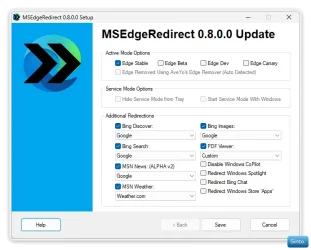
You can also stop Microsoft from hijacking your default browser preference and forcing you to use Edge (& Bing) with web search results in Taskbar Search, using Edge Redirect (Free) from GitHub​
MSEdgeRedirect, will prevent Edge/Bing from hijacking the default browser and search preferences and other scenarios by redirecting requests from Edge/Windows due to Edge Specific Links and disabling their ability to hijack your chosen default Browser or Search preferences.​

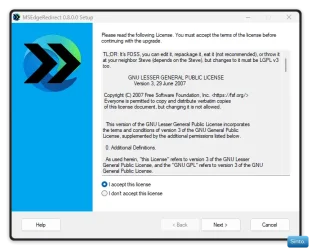
  • Download and install Edge Redirect from GitHub v0.8.0.0 (At the time of this post)
  • Agree & click Next
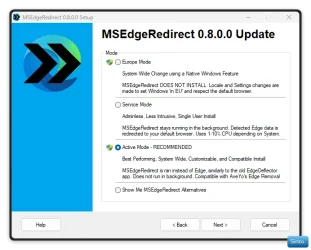
  • Select “Active Mode” (I would recommend)
  • Click “Next” It will require one time admin rights.

Win-1798.webp

Win-1799.webp


Select your preferred link/browser preferences:
  • Change the following to “Google”
    • Bing Discover
    • Bing Search
    • MSN News
    • Bing Images
  • Change MSN weather to “weather .com” - If you want to
  • Leave the PDF viewer as default. - If you want to
  • Check “Redirect Windows Spotlight” - If you want to
  • Uncheck “Redirect Windows Store Apps - If you want to

If you don’t use CoPilot, you can also disable it at the bottom. However, CoPilot is now an app now and should be uninstallable via Windows or Revo.​


Win-1800.webp

  • Click "Save"
 
Last edited:

My Computers

System One System Two

  • OS
    Windows 11 Pro 25H2 Build 26200.8524
    Computer type
    PC/Desktop
    Manufacturer/Model
    Sin-built 2013
    CPU
    Intel(R) Core(TM) i7-4770K CPU @ 3.50GHz
    Motherboard
    ASUS ROG Maximus VI Formula
    Memory
    32.0 GB of I forget and the box is in storage.
    Graphics Card(s)
    Gigabyte nVidia GeForce GTX 1660 Super OC 6GB
    Sound Card
    Onboard thingy
    Monitor(s) Displays
    5 x LG 25MS500-B - 1 x 24MK430H-B - 1 x Wacom Pro 22" Touch Screen Tablet
    Screen Resolution
    All over the place
    Hard Drives
    Too many to list.
    OS on Samsung 1TB 870 QVO SATA
    PSU
    Silverstone 1500
    Case
    NZXT Phantom 820 Full-Tower Case
    Cooling
    Noctua NH-D15 Elite Class Dual Tower CPU Cooler / 6 x EziDIY 120mm / 2 x Corsair 140mm somethings / 1 x 140mm Thermaltake something / 2 x 200mm Corsair.
    Keyboard
    Corsair K95 / Logitech diNovo Edge Wireless
    Mouse
    Logitech: G402 / G502 / Mx Masters / Mx Air Cordless
    Internet Speed
    2000/500Mbps
    Browser
    All sorts
    Antivirus
    Kaspersky Premium
    Other Info
    ㅤㅤㅤㅤㅤㅤㅤㅤㅤㅤㅤㅤㅤㅤㅤㅤㅤㅤㅤㅤㅤㅤㅤㅤㅤㅤㅤㅤㅤㅤㅤㅤㅤㅤㅤㅤㅤㅤㅤㅤ⠀⠀⠀⠀⠀⠀⠀⠀⠀⠀
    TP-Link BE9300 WiFi 7 Bluetooth 5.4 (Archer TBE550E)
    TP-Link TX201 V1 2.5GB Lan

    Grandstream HT812 - VoIP
    ASUS DSL-AX82U - Mesh
    ASUS RT-AC68U - Mesh
    ASUS RT-BE88U Router

    Brother MFC-L2880DW Printer

    I’m on a horse.
  • Operating System
    Windows 11 Pro 25H2 Build 26200.8524
    Computer type
    Laptop
    Manufacturer/Model
    LENOVO Yoga 7 14IRL8 - 7i EVO OLED 14" Touchscreen i5 12 Core 16GB/512GB
    CPU
    Intel Core 12th Gen i5-1240P Processor (1.7 - 4.4GHz)
    Memory
    16GB LPDDR5 RAM
    Graphics card(s)
    Intel Iris Xe Graphics Processor
    Sound Card
    Optimized with Dolby Atmos®
    Screen Resolution
    QHD 2880 x 1800 OLED
    Hard Drives
    M.2 512GB
    Antivirus
    Defender / Malwarebytes
    Other Info
    …still on a horse.
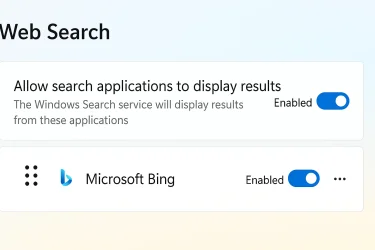
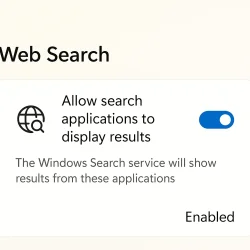
I managed to uninstall bing with the Revo Uninstaller application, but the settings that are visible in the picture are still there, unfortunately I don't know how to remove them. Does anyone know how to remove them?
 

Attachments

  • Create an image with.webp
    Create an image with.webp
    35.5 KB · Views: 1

My Computer

System One

  • OS
    Windows 11
    Computer type
    PC/Desktop
    CPU
    Intel Core i7-9700F, 4500 MHz
    Motherboard
    ASRock B365M-HDV
    Memory
    16 GB DDR4
    Graphics Card(s)
    GeForce GTX 1070 (8 GB)
    Sound Card
    Realtek ALC887 @ Intel Kaby Point PCH - High Definition Audio
    Monitor(s) Displays
    Samsung 32 cale
    Screen Resolution
    1680 x 1050
    Hard Drives
    Dysk nr 1 - Patriot Burst (B5950791083400100449) [894 GB] D: E:
    Dysk nr 2 - SAMSUNG MZVLB256HBHQ-000L2 (0025_3889_91CB_C6D1.) [238 GB] C: F: G:
    Keyboard
    roccat
Not at all sure what you’re asking for from simply showing that image. It’s a toggle, toggle it off?
 

My Computers

System One System Two

  • OS
    Windows 11 Pro 25H2 Build 26200.8524
    Computer type
    PC/Desktop
    Manufacturer/Model
    Sin-built 2013
    CPU
    Intel(R) Core(TM) i7-4770K CPU @ 3.50GHz
    Motherboard
    ASUS ROG Maximus VI Formula
    Memory
    32.0 GB of I forget and the box is in storage.
    Graphics Card(s)
    Gigabyte nVidia GeForce GTX 1660 Super OC 6GB
    Sound Card
    Onboard thingy
    Monitor(s) Displays
    5 x LG 25MS500-B - 1 x 24MK430H-B - 1 x Wacom Pro 22" Touch Screen Tablet
    Screen Resolution
    All over the place
    Hard Drives
    Too many to list.
    OS on Samsung 1TB 870 QVO SATA
    PSU
    Silverstone 1500
    Case
    NZXT Phantom 820 Full-Tower Case
    Cooling
    Noctua NH-D15 Elite Class Dual Tower CPU Cooler / 6 x EziDIY 120mm / 2 x Corsair 140mm somethings / 1 x 140mm Thermaltake something / 2 x 200mm Corsair.
    Keyboard
    Corsair K95 / Logitech diNovo Edge Wireless
    Mouse
    Logitech: G402 / G502 / Mx Masters / Mx Air Cordless
    Internet Speed
    2000/500Mbps
    Browser
    All sorts
    Antivirus
    Kaspersky Premium
    Other Info
    ㅤㅤㅤㅤㅤㅤㅤㅤㅤㅤㅤㅤㅤㅤㅤㅤㅤㅤㅤㅤㅤㅤㅤㅤㅤㅤㅤㅤㅤㅤㅤㅤㅤㅤㅤㅤㅤㅤㅤㅤ⠀⠀⠀⠀⠀⠀⠀⠀⠀⠀
    TP-Link BE9300 WiFi 7 Bluetooth 5.4 (Archer TBE550E)
    TP-Link TX201 V1 2.5GB Lan

    Grandstream HT812 - VoIP
    ASUS DSL-AX82U - Mesh
    ASUS RT-AC68U - Mesh
    ASUS RT-BE88U Router

    Brother MFC-L2880DW Printer

    I’m on a horse.
  • Operating System
    Windows 11 Pro 25H2 Build 26200.8524
    Computer type
    Laptop
    Manufacturer/Model
    LENOVO Yoga 7 14IRL8 - 7i EVO OLED 14" Touchscreen i5 12 Core 16GB/512GB
    CPU
    Intel Core 12th Gen i5-1240P Processor (1.7 - 4.4GHz)
    Memory
    16GB LPDDR5 RAM
    Graphics card(s)
    Intel Iris Xe Graphics Processor
    Sound Card
    Optimized with Dolby Atmos®
    Screen Resolution
    QHD 2880 x 1800 OLED
    Hard Drives
    M.2 512GB
    Antivirus
    Defender / Malwarebytes
    Other Info
    …still on a horse.
Hi everyone,

I'm still having problems with the search box image on the taskbar. Because the image isn't displayed, and because the image isn't present, the taskbar widgets take a very long time to refresh—and sometimes they simply don't refresh at all. It's the same regardless of the build, whether older or newer. It's really annoying. Is there really nothing I can do about it?

From what I can see, it might be caused by Bing. There's a problem in the system settings and that's the problem. I've contacted Microsoft about this, but so far I haven't received a response or a solution.

If anyone has found a workaround or solution, please share. This issue is seriously impeding the use of the taskbar and widgets.

Thanks.
Try this:

Shutdown Win11 by pressing (winkey+x) > Hover over Shutdown > in the popup menu, hold the shift key down and then click "Shutdown".

This will do a "complete" shutdown and power off. When you power on, it will do a "complete" boot into Win11. It solved my slow to display desktop icons problem.
 

My Computer

System One

  • OS
    Windows 11
    Computer type
    PC/Desktop
    Manufacturer/Model
    Self Built
    CPU
    Intel Core Ultra 7, 265K
    Motherboard
    MSI Pro Z890-P WiFi
    Memory
    32GB
    Graphics Card(s)
    Using integrated graphics
    Monitor(s) Displays
    LG
    Screen Resolution
    4K
    Hard Drives
    512 GB SSD, 2TB M.2 SSD and 2TB SATA SSD
    PSU
    Seasonic Modular 550 watt Focus Plus
    Case
    Corsair 4000D
    Cooling
    ThermalRight Phantom Sprit

Latest Support Threads

Back
Top Bottom