Increase Log Size For Event ID 4 Kernel-Event Tracing


idahosurge

Well-known member
Member
Local time
6:04 PM
Posts
58
OS
Windows 11
Win 11 Pro 24H2 OS Build 26100.3476

I get Event ID 4 logged every morning one hour after I start the PC.
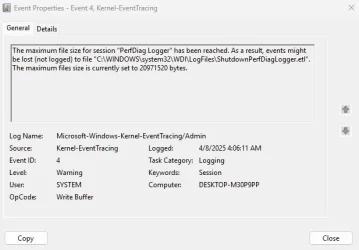
Screenshot 2025-04-08 163611.webp


How do I increase the log size so I can get rid of Event ID Error 4 and Event ID 3 that is also logged at the same time and with the same description "Kernel-EventTracing" with this reason for logging "Session "PerfDiag Logger" stopped due to the following error: 0xC0000188".
 

My Computer My Computer

At a glance

Windows 119800X3DGSkill Flare DDR5 64GB @ 30-40-40-96 @ 6000 MHzAsus TUF OC Edition RTX 5080
OS
Windows 11
Computer type
PC/Desktop
Manufacturer/Model
Custom
CPU
9800X3D
Motherboard
Asus Crosshair X870E Hero
Memory
GSkill Flare DDR5 64GB @ 30-40-40-96 @ 6000 MHz
Graphics Card(s)
Asus TUF OC Edition RTX 5080
Monitor(s) Displays
Samsung Odyessy G9 49" DQHD (VA Panel)
Screen Resolution
5120 * 1440
Hard Drives
Samsung 990Pro M.2 2280
PSU
Corsair HX 1000i
Case
Fractal Design Meshify 2XL
Cooling
Thermalright Peerless Assassin 140 Black
Keyboard
Corsair K100RGB
Mouse
Logitech G703
Internet Speed
1 GB
Browser
Firefox
Antivirus
ESET NOD32
From PowerShell as an Admin user:
Code:
Stop-EtwTraceSession -SessionName "PerfDiag Logger"
Update-EtwTraceSession -SessionName "PerfDiag Logger" -MaximumFileSize 512
Start-EtwTraceSession -SessionName "PerfDiag Logger"
 

My Computer My Computer

At a glance

Windows 7
OS
Windows 7
From PowerShell as an Admin user:
Code:
Stop-EtwTraceSession -SessionName "PerfDiag Logger"
Update-EtwTraceSession -SessionName "PerfDiag Logger" -MaximumFileSize 512
Start-EtwTraceSession -SessionName "PerfDiag Logger"

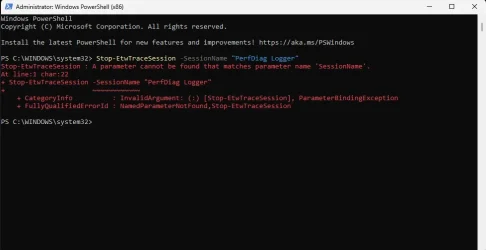
Hello Garlin,

I entered the first line and got this error message.

Screenshot 2025-04-09 114112.webp
 

My Computer My Computer

At a glance

Windows 119800X3DGSkill Flare DDR5 64GB @ 30-40-40-96 @ 6000 MHzAsus TUF OC Edition RTX 5080
OS
Windows 11
Computer type
PC/Desktop
Manufacturer/Model
Custom
CPU
9800X3D
Motherboard
Asus Crosshair X870E Hero
Memory
GSkill Flare DDR5 64GB @ 30-40-40-96 @ 6000 MHz
Graphics Card(s)
Asus TUF OC Edition RTX 5080
Monitor(s) Displays
Samsung Odyessy G9 49" DQHD (VA Panel)
Screen Resolution
5120 * 1440
Hard Drives
Samsung 990Pro M.2 2280
PSU
Corsair HX 1000i
Case
Fractal Design Meshify 2XL
Cooling
Thermalright Peerless Assassin 140 Black
Keyboard
Corsair K100RGB
Mouse
Logitech G703
Internet Speed
1 GB
Browser
Firefox
Antivirus
ESET NOD32
Try this reg setting instead:
Code:
 reg add HKEY_LOCAL_MACHINE\SYSTEM\CurrentControlSet\Control\Diagnostics\Performance\ShutdownCKCLSettings /v MaxFileSize /t REG_DWORD /d 250 /f

Restart Windows.
 

My Computer My Computer

At a glance

Windows 7
OS
Windows 7
Thank
Try this reg setting instead:
Code:
 reg add HKEY_LOCAL_MACHINE\SYSTEM\CurrentControlSet\Control\Diagnostics\Performance\ShutdownCKCLSettings /v MaxFileSize /t REG_DWORD /d 250 /f

Restart Windows.

Thanks for the replies Garlin.

I do not have "ShutdownCKCLSettings" in that location. I can add a new dword, but due to my limited experience I am going to need a more detailed explanation to be able to add "ShutdownCKCLSettings /v MaxFileSize /t REG_DWORD /d 250 /f" to "Performance".
Screenshot 2025-04-09 162052.webp
 

My Computer My Computer

At a glance

Windows 119800X3DGSkill Flare DDR5 64GB @ 30-40-40-96 @ 6000 MHzAsus TUF OC Edition RTX 5080
OS
Windows 11
Computer type
PC/Desktop
Manufacturer/Model
Custom
CPU
9800X3D
Motherboard
Asus Crosshair X870E Hero
Memory
GSkill Flare DDR5 64GB @ 30-40-40-96 @ 6000 MHz
Graphics Card(s)
Asus TUF OC Edition RTX 5080
Monitor(s) Displays
Samsung Odyessy G9 49" DQHD (VA Panel)
Screen Resolution
5120 * 1440
Hard Drives
Samsung 990Pro M.2 2280
PSU
Corsair HX 1000i
Case
Fractal Design Meshify 2XL
Cooling
Thermalright Peerless Assassin 140 Black
Keyboard
Corsair K100RGB
Mouse
Logitech G703
Internet Speed
1 GB
Browser
Firefox
Antivirus
ESET NOD32
I haven't used it myself, but I found some online discussion that suggest this error is caused by Windows shutdown, and there's not enough logging space to flush the buffered logs to disk. With some users suggesting 250 is the magic number.
 

My Computer My Computer

At a glance

Windows 7
OS
Windows 7
Actually I do have "ShutdownCKCLSettings" under "Performance". I just needed to expand the folder.

Even though I started Regedit to run as Admin I get an error message when trying to change the max file size.

After I figure out how to get full admin control over "ShutdownCKCLSettings" and change the max file size I will update this thread.
 

My Computer My Computer

At a glance

Windows 119800X3DGSkill Flare DDR5 64GB @ 30-40-40-96 @ 6000 MHzAsus TUF OC Edition RTX 5080
OS
Windows 11
Computer type
PC/Desktop
Manufacturer/Model
Custom
CPU
9800X3D
Motherboard
Asus Crosshair X870E Hero
Memory
GSkill Flare DDR5 64GB @ 30-40-40-96 @ 6000 MHz
Graphics Card(s)
Asus TUF OC Edition RTX 5080
Monitor(s) Displays
Samsung Odyessy G9 49" DQHD (VA Panel)
Screen Resolution
5120 * 1440
Hard Drives
Samsung 990Pro M.2 2280
PSU
Corsair HX 1000i
Case
Fractal Design Meshify 2XL
Cooling
Thermalright Peerless Assassin 140 Black
Keyboard
Corsair K100RGB
Mouse
Logitech G703
Internet Speed
1 GB
Browser
Firefox
Antivirus
ESET NOD32
Might want to solve the error that is filling up the eventlog instead of increasing the size of the logfile.

Can you show what errors that log is filled up with.
 

My Computer My Computer

At a glance

Windows 11
OS
Windows 11
Computer type
PC/Desktop
Might want to solve the error that is filling up the eventlog instead of increasing the size of the logfile.

Can you show what errors that log is filled up with.
How do I open "ShutdownPerfDiagLogger.etl" and see what is being logged in this file?
 

My Computer My Computer

At a glance

Windows 119800X3DGSkill Flare DDR5 64GB @ 30-40-40-96 @ 6000 MHzAsus TUF OC Edition RTX 5080
OS
Windows 11
Computer type
PC/Desktop
Manufacturer/Model
Custom
CPU
9800X3D
Motherboard
Asus Crosshair X870E Hero
Memory
GSkill Flare DDR5 64GB @ 30-40-40-96 @ 6000 MHz
Graphics Card(s)
Asus TUF OC Edition RTX 5080
Monitor(s) Displays
Samsung Odyessy G9 49" DQHD (VA Panel)
Screen Resolution
5120 * 1440
Hard Drives
Samsung 990Pro M.2 2280
PSU
Corsair HX 1000i
Case
Fractal Design Meshify 2XL
Cooling
Thermalright Peerless Assassin 140 Black
Keyboard
Corsair K100RGB
Mouse
Logitech G703
Internet Speed
1 GB
Browser
Firefox
Antivirus
ESET NOD32

Latest Support Threads

Back
Top Bottom