Increase Log Size For Event ID 4 Kernel-Event Tracing


idahosurge

Well-known member
Member
Local time
3:16 PM
Posts
53
OS
Windows 11
Win 11 Pro 24H2 OS Build 26100.3476

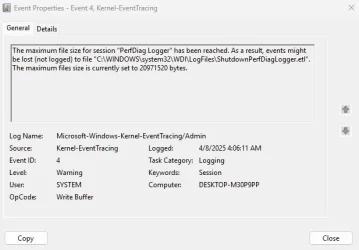
I get Event ID 4 logged every morning one hour after I start the PC.
Screenshot 2025-04-08 163611.webp


How do I increase the log size so I can get rid of Event ID Error 4 and Event ID 3 that is also logged at the same time and with the same description "Kernel-EventTracing" with this reason for logging "Session "PerfDiag Logger" stopped due to the following error: 0xC0000188".
 

My Computer

System One

  • OS
    Windows 11
    Computer type
    PC/Desktop
    Manufacturer/Model
    Custom
    CPU
    9800X3D
    Motherboard
    Asus Crosshair X870E Hero
    Memory
    GSkill Flare DDR5 64GB @ 30-40-40-96 @ 6000 MHz
    Graphics Card(s)
    Asus TUF OC Edition RTX 5080
    Monitor(s) Displays
    Samsung Odyessy G9 49" DQHD (VA Panel)
    Screen Resolution
    5120 * 1440
    Hard Drives
    Samsung 990Pro M.2 2280
    PSU
    Corsair HX 1000i
    Case
    Fractal Design Meshify 2XL
    Cooling
    Thermalright Peerless Assassin 140 Black
    Keyboard
    Corsair K100RGB
    Mouse
    Logitech G703
    Internet Speed
    1 GB
    Browser
    Firefox
    Antivirus
    ESET NOD32
From PowerShell as an Admin user:
Code:
Stop-EtwTraceSession -SessionName "PerfDiag Logger"
Update-EtwTraceSession -SessionName "PerfDiag Logger" -MaximumFileSize 512
Start-EtwTraceSession -SessionName "PerfDiag Logger"
 

My Computer

System One

  • OS
    Windows 7
From PowerShell as an Admin user:
Code:
Stop-EtwTraceSession -SessionName "PerfDiag Logger"
Update-EtwTraceSession -SessionName "PerfDiag Logger" -MaximumFileSize 512
Start-EtwTraceSession -SessionName "PerfDiag Logger"

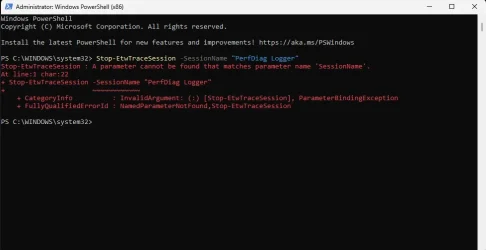
Hello Garlin,

I entered the first line and got this error message.

Screenshot 2025-04-09 114112.webp
 

My Computer

System One

  • OS
    Windows 11
    Computer type
    PC/Desktop
    Manufacturer/Model
    Custom
    CPU
    9800X3D
    Motherboard
    Asus Crosshair X870E Hero
    Memory
    GSkill Flare DDR5 64GB @ 30-40-40-96 @ 6000 MHz
    Graphics Card(s)
    Asus TUF OC Edition RTX 5080
    Monitor(s) Displays
    Samsung Odyessy G9 49" DQHD (VA Panel)
    Screen Resolution
    5120 * 1440
    Hard Drives
    Samsung 990Pro M.2 2280
    PSU
    Corsair HX 1000i
    Case
    Fractal Design Meshify 2XL
    Cooling
    Thermalright Peerless Assassin 140 Black
    Keyboard
    Corsair K100RGB
    Mouse
    Logitech G703
    Internet Speed
    1 GB
    Browser
    Firefox
    Antivirus
    ESET NOD32
Try this reg setting instead:
Code:
 reg add HKEY_LOCAL_MACHINE\SYSTEM\CurrentControlSet\Control\Diagnostics\Performance\ShutdownCKCLSettings /v MaxFileSize /t REG_DWORD /d 250 /f

Restart Windows.
 

My Computer

System One

  • OS
    Windows 7
Thank
Try this reg setting instead:
Code:
 reg add HKEY_LOCAL_MACHINE\SYSTEM\CurrentControlSet\Control\Diagnostics\Performance\ShutdownCKCLSettings /v MaxFileSize /t REG_DWORD /d 250 /f

Restart Windows.

Thanks for the replies Garlin.

I do not have "ShutdownCKCLSettings" in that location. I can add a new dword, but due to my limited experience I am going to need a more detailed explanation to be able to add "ShutdownCKCLSettings /v MaxFileSize /t REG_DWORD /d 250 /f" to "Performance".
Screenshot 2025-04-09 162052.webp
 

My Computer

System One

  • OS
    Windows 11
    Computer type
    PC/Desktop
    Manufacturer/Model
    Custom
    CPU
    9800X3D
    Motherboard
    Asus Crosshair X870E Hero
    Memory
    GSkill Flare DDR5 64GB @ 30-40-40-96 @ 6000 MHz
    Graphics Card(s)
    Asus TUF OC Edition RTX 5080
    Monitor(s) Displays
    Samsung Odyessy G9 49" DQHD (VA Panel)
    Screen Resolution
    5120 * 1440
    Hard Drives
    Samsung 990Pro M.2 2280
    PSU
    Corsair HX 1000i
    Case
    Fractal Design Meshify 2XL
    Cooling
    Thermalright Peerless Assassin 140 Black
    Keyboard
    Corsair K100RGB
    Mouse
    Logitech G703
    Internet Speed
    1 GB
    Browser
    Firefox
    Antivirus
    ESET NOD32
I haven't used it myself, but I found some online discussion that suggest this error is caused by Windows shutdown, and there's not enough logging space to flush the buffered logs to disk. With some users suggesting 250 is the magic number.
 

My Computer

System One

  • OS
    Windows 7
Actually I do have "ShutdownCKCLSettings" under "Performance". I just needed to expand the folder.

Even though I started Regedit to run as Admin I get an error message when trying to change the max file size.

After I figure out how to get full admin control over "ShutdownCKCLSettings" and change the max file size I will update this thread.
 

My Computer

System One

  • OS
    Windows 11
    Computer type
    PC/Desktop
    Manufacturer/Model
    Custom
    CPU
    9800X3D
    Motherboard
    Asus Crosshair X870E Hero
    Memory
    GSkill Flare DDR5 64GB @ 30-40-40-96 @ 6000 MHz
    Graphics Card(s)
    Asus TUF OC Edition RTX 5080
    Monitor(s) Displays
    Samsung Odyessy G9 49" DQHD (VA Panel)
    Screen Resolution
    5120 * 1440
    Hard Drives
    Samsung 990Pro M.2 2280
    PSU
    Corsair HX 1000i
    Case
    Fractal Design Meshify 2XL
    Cooling
    Thermalright Peerless Assassin 140 Black
    Keyboard
    Corsair K100RGB
    Mouse
    Logitech G703
    Internet Speed
    1 GB
    Browser
    Firefox
    Antivirus
    ESET NOD32
Might want to solve the error that is filling up the eventlog instead of increasing the size of the logfile.

Can you show what errors that log is filled up with.
 

My Computer

System One

  • OS
    Windows 11
    Computer type
    PC/Desktop
Might want to solve the error that is filling up the eventlog instead of increasing the size of the logfile.

Can you show what errors that log is filled up with.
How do I open "ShutdownPerfDiagLogger.etl" and see what is being logged in this file?
 

My Computer

System One

  • OS
    Windows 11
    Computer type
    PC/Desktop
    Manufacturer/Model
    Custom
    CPU
    9800X3D
    Motherboard
    Asus Crosshair X870E Hero
    Memory
    GSkill Flare DDR5 64GB @ 30-40-40-96 @ 6000 MHz
    Graphics Card(s)
    Asus TUF OC Edition RTX 5080
    Monitor(s) Displays
    Samsung Odyessy G9 49" DQHD (VA Panel)
    Screen Resolution
    5120 * 1440
    Hard Drives
    Samsung 990Pro M.2 2280
    PSU
    Corsair HX 1000i
    Case
    Fractal Design Meshify 2XL
    Cooling
    Thermalright Peerless Assassin 140 Black
    Keyboard
    Corsair K100RGB
    Mouse
    Logitech G703
    Internet Speed
    1 GB
    Browser
    Firefox
    Antivirus
    ESET NOD32

Latest Support Threads

Back
Top Bottom