- Local time
- 3:05 AM
- Posts
- 292
- OS
- Window 11 v24H2 Build 26100.2033
Hello everyone,
Thanks @hsehestedt for your invented tool/software Wim Tools v24.3.0.268.
1. Download WIM Tools v24.3.0.268 from this link
https://github.com/hsehestedt/WIM-Tools/archive/refs/tags/v24.3.0.268.zip
2. Download Windows 11 Insider Preview 27802.1000 (rs_prerelease) amd64 from link category:canary - Browse known builds
3. The cmd file using internet makes iso 27802.1000.250222-1646.RS_PRERELEASE_CLIENTPRO_OEMRET_X64FRE_EN-US
I have selected Windows 11 Pro insider preview for inplace upgrade.
4. Now install The Windows ADK 10.1.26100.2454 (December 2024) and the Windows PE add-on for Windows 11 from link Download and install the Windows ADK
5. Run Wim Tools as administrator. Type 4 to bypass requirements of Windows 11 by mentioning path and file name of iso prepared by uupdump .
6. Lastly after patching boot.wim we are asked to save the modified iso. You may replace original iso with this modified iso.
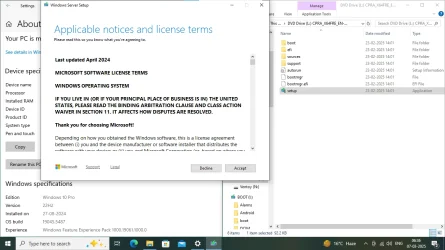
7. Run setup as administrator to inplace upgrade. {In my case upgradation was from windows 11 pro v24H2 os build 26100.1742 to canary channel 27802.1000}
Thanks for reading.
Device and windows specifications are as following;-
Device name SHARMA
Processor Intel(R) Core(TM) i3-2100 CPU @ 3.10GHz 3.10 GHz
Installed RAM 4.00 GB (3.89 GB usable)
Device ID 79C34D67-694C-4F4A-89B6-D48D33027046
Product ID 00330-80000-00000-AA236
System type 64-bit operating system, x64-based processor
Pen and touch No pen or touch input is available for this display
Edition Windows 11 Pro Insider Preview
Version Dev
Installed on 07-03-2025
Evaluation expires on 16-09-2025 02:46
OS build 27802.1000
Experience Windows Feature Experience Pack 1000.26100.54.0
Thanks @hsehestedt for your invented tool/software Wim Tools v24.3.0.268.
1. Download WIM Tools v24.3.0.268 from this link
https://github.com/hsehestedt/WIM-Tools/archive/refs/tags/v24.3.0.268.zip
2. Download Windows 11 Insider Preview 27802.1000 (rs_prerelease) amd64 from link category:canary - Browse known builds
3. The cmd file using internet makes iso 27802.1000.250222-1646.RS_PRERELEASE_CLIENTPRO_OEMRET_X64FRE_EN-US
I have selected Windows 11 Pro insider preview for inplace upgrade.
4. Now install The Windows ADK 10.1.26100.2454 (December 2024) and the Windows PE add-on for Windows 11 from link Download and install the Windows ADK
5. Run Wim Tools as administrator. Type 4 to bypass requirements of Windows 11 by mentioning path and file name of iso prepared by uupdump .
6. Lastly after patching boot.wim we are asked to save the modified iso. You may replace original iso with this modified iso.
7. Run setup as administrator to inplace upgrade. {In my case upgradation was from windows 11 pro v24H2 os build 26100.1742 to canary channel 27802.1000}
Thanks for reading.
Device and windows specifications are as following;-
Device name SHARMA
Processor Intel(R) Core(TM) i3-2100 CPU @ 3.10GHz 3.10 GHz
Installed RAM 4.00 GB (3.89 GB usable)
Device ID 79C34D67-694C-4F4A-89B6-D48D33027046
Product ID 00330-80000-00000-AA236
System type 64-bit operating system, x64-based processor
Pen and touch No pen or touch input is available for this display
Edition Windows 11 Pro Insider Preview
Version Dev
Installed on 07-03-2025
Evaluation expires on 16-09-2025 02:46
OS build 27802.1000
Experience Windows Feature Experience Pack 1000.26100.54.0
Attachments


My Computer
At a glance
Window 11 v24H2 Build 26100.2033Intel(R) Core(TM) i3-2100 CPU @ 3.10GHz 3.10 GHz4.00 GB (3.89 GB usable)Onboard
- OS
- Window 11 v24H2 Build 26100.2033
- Computer type
- PC/Desktop
- Manufacturer/Model
- ASSEMMBLED
- CPU
- Intel(R) Core(TM) i3-2100 CPU @ 3.10GHz 3.10 GHz
- Motherboard
- ZEBRONICS
- Memory
- 4.00 GB (3.89 GB usable)
- Graphics Card(s)
- Onboard
- Sound Card
- Onboard
- Monitor(s) Displays
- LG
- Screen Resolution
- 1366x768
- Hard Drives
- Toshiba HDD 1 TB
- Keyboard
- Mechanical
- Mouse
- Mechanical
- Internet Speed
- 700 kb/s
- Browser
- Microsoft EDGE, CHROME
- Antivirus
- Microsoft Defender