iPhotron — a local photo manager with non-destructive editing and map view (Windows, offline)


GitHub-banner-new.webp

Release​

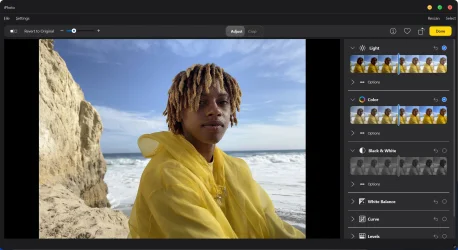
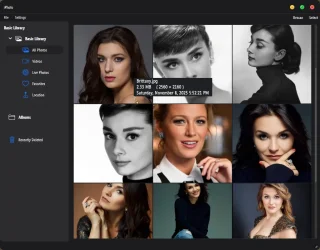
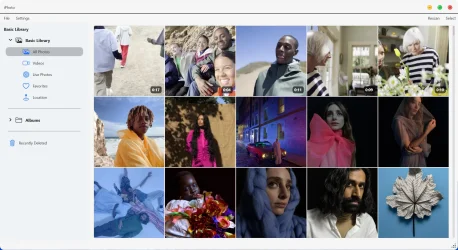
I’ve just released iPhotron, a desktop photo manager that brings a macOS Photos–like experience to Windows—focused on local libraries, non-destructive editing, and long-term photo ownership.

iPhoto is built for people who want to browse, organize, and edit their photos locally, without cloud services, subscriptions, or accounts.

This release improves overall responsiveness and completes a more coherent workflow across browsing, editing, and location-based exploration—while always keeping your original files untouched.
mainview.webpeditview.webp

What the app does​

  • Browses photos directly from your existing folders (no import step)
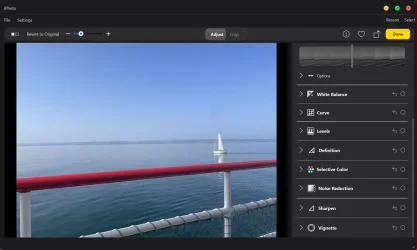
  • Non-destructive photo editing (all edits are reversible, originals stay unchanged)
  • Map view that shows where photos were taken using GPS metadata
  • Smart library views like All Photos, Videos, and Favorites
  • Supports paired photo/video assets (e.g. Live Photo–style files)
Everything runs fully offline:

  • No AI
  • No cloud services
  • No accounts or telemetry

Platforms​

  • Windows: ready to use
  • Linux: supported, but currently requires manual build
The project is open source, free to use, and still evolving.

I’d love feedback from people who want a local alternative to cloud photo apps, especially those who care about editing, organization, and long-term photo storage.

Links​

GitHub:
GitHub - OliverZhaohaibin/iPhotron-LocalPhotoAlbumManager: A macOS Photos–style photo manager for Windows — folder-native, non-destructive, with HEIC/MOV Live Photo, map view, and GPU-accelerated browsing.
 
Windows Build/Version
Windows11
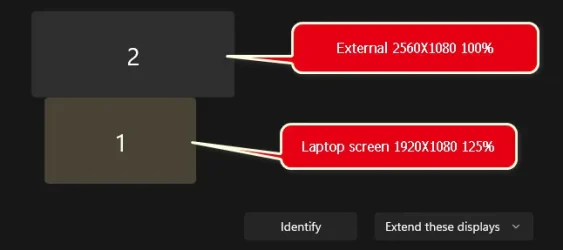
There's something wrong with the UI. It opens on Laptop screen, but, if I drag the UI over to my external ultrawide monitor, it goes berserk and blows up real huge, as if it's not dpi aware. Then, if I double click to go full screen, it gets worse..., I have to kill the task in Task Manager.
 

My Computers

System One System Two

  • OS
    Windows 11 Pro
    Computer type
    PC/Desktop
    Manufacturer/Model
    ASUS ROG Strix
  • Operating System
    Windows 11 Pro
    Computer type
    Laptop
    Manufacturer/Model
    ASUS VivoBook
There's something wrong with the UI. It opens on Laptop screen, but, if I drag the UI over to my external ultrawide monitor, it goes berserk and blows up real huge, as if it's not dpi aware. Then, if I double click to go full screen, it gets worse..., I have to kill the task in Task Manager.
Received. I shall investigate. Thank you for your feedback. Additionally, if possible, could you inform me of your computer and monitor's resolution?
 

My Computer

System One

  • OS
    Windows 11
    Computer type
    Laptop
    Manufacturer/Model
    Dell
    CPU
    13900H
    Memory
    64 G
    Graphics Card(s)
    RTX 4000 laptop 12g

My Computers

System One System Two

  • OS
    Windows 11 Pro
    Computer type
    PC/Desktop
    Manufacturer/Model
    ASUS ROG Strix
  • Operating System
    Windows 11 Pro
    Computer type
    Laptop
    Manufacturer/Model
    ASUS VivoBook
• Needs better sorting
• Info hover tips would be nice
• No support for webp, jxl, etc.?
• Zoom percentage indicator
 

My Computers

System One System Two

  • OS
    Windows 11 Pro
    Computer type
    PC/Desktop
    Manufacturer/Model
    ASUS ROG Strix
  • Operating System
    Windows 11 Pro
    Computer type
    Laptop
    Manufacturer/Model
    ASUS VivoBook
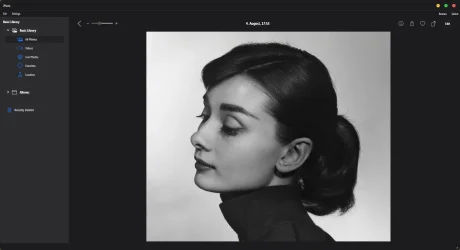
Nice clean UI, but, it lacks a lot of normal features. Good job so far though! (y)

0008607.webp
 

My Computers

System One System Two

  • OS
    Windows 11 Pro
    Computer type
    PC/Desktop
    Manufacturer/Model
    ASUS ROG Strix
  • Operating System
    Windows 11 Pro
    Computer type
    Laptop
    Manufacturer/Model
    ASUS VivoBook
• Needs better sorting
• Info hover tips would be nice
• No support for webp, jxl, etc.?
• Zoom percentage indicator
I shall incorporate support for additional formats in forthcoming releases, most notably RAW file support (currently under development).Thank you for your appreciation of the UI.
 

My Computer

System One

  • OS
    Windows 11
    Computer type
    Laptop
    Manufacturer/Model
    Dell
    CPU
    13900H
    Memory
    64 G
    Graphics Card(s)
    RTX 4000 laptop 12g
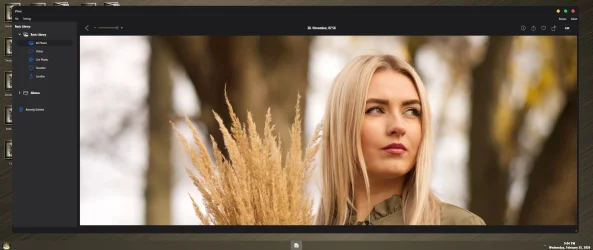
The base rendering and zoom are quite impressive, especially with hi-res images! (y)

0008608.webp
 

My Computers

System One System Two

  • OS
    Windows 11 Pro
    Computer type
    PC/Desktop
    Manufacturer/Model
    ASUS ROG Strix
  • Operating System
    Windows 11 Pro
    Computer type
    Laptop
    Manufacturer/Model
    ASUS VivoBook
Its a replacement for Picasa. People hated Google for discontinuing it.
 

My Computers

System One System Two

  • OS
    Windows 11 Education For 25H2
    Computer type
    Laptop
    Manufacturer/Model
    HP ZBook G2
    CPU
    Intel® Core i7 5500u
    Motherboard
    HP
    Memory
    8 GB
    Graphics Card(s)
    Intel HD Family Graphics 5500 AMD Firepro 4150M
    Sound Card
    Realtek High Audio
    Hard Drives
    1 TB SSD
    Mouse
    HP USB Mouse
    Antivirus
    Windows Defender
  • Operating System
    Windows 11 Pro For Workstations 25H2
    Computer type
    Laptop
    Manufacturer/Model
    HP Zbook G4
    CPU
    Xeon 1535m v6
    Motherboard
    HP
    Memory
    32 GB
    Graphics card(s)
    AMD Quadro Pro 4100
    Sound Card
    Bang and Olufson Audio
    Hard Drives
    1TB SSD
    Mouse
    HP USB Mouse
    Antivirus
    Windows Defender
It would be nice if the Gallery had mouse hover info tips..., either that or captions below...

0008612.webp

@NormanF is correct, there was a lot of excellent features in Picasa!
 

My Computers

System One System Two

  • OS
    Windows 11 Pro
    Computer type
    PC/Desktop
    Manufacturer/Model
    ASUS ROG Strix
  • Operating System
    Windows 11 Pro
    Computer type
    Laptop
    Manufacturer/Model
    ASUS VivoBook

My Computers

System One System Two

  • OS
    Windows 11 Workstation
    Computer type
    PC/Desktop
    Manufacturer/Model
    doofenshmirtz evil incorporated
    CPU
    Ryzen 9 5950X
    Motherboard
    Asus ROG Crosshair VIII Formula
    Memory
    Corsair Vengeance RGB PRO Black 64GB (4x16GB) 3600MHz AMD Ryzen Tuned DDR4
    Graphics Card(s)
    ASUS AMD Radeon RX 6900 XT 16GB ROG Strix LC OC
    Sound Card
    Sound BlasterX Katana
    Monitor(s) Displays
    3 x27" Dell U2724D & 1 x 34" Dell U3415W
    Hard Drives
    Samsung 980 Pro 1TB M.2 2280 PCI-e 4.0 x4 NVMe Solid State
    Drive
    PSU
    ASUS ROG THOR 850W 80 Plus Platinum
    Case
    ASUS ROG Strix Helios Midi-Tower ARGB Gaming Case
    Cooling
    ASUS ROG Strix LC Performance RGB AIO CPU Liquid Cooler - 360mm
    Keyboard
    Logi Ergo
    Mouse
    Logitech MX Vertical
    Internet Speed
    900/100 Mbps
    Browser
    Chrome
    Antivirus
    Windows Defender, Malwarebytes Pro
    Other Info
    HP M281 Printer
    Logitech Brio Stream webcam
    Yeti X mic
  • Operating System
    Windows 10
    Computer type
    Laptop
    Manufacturer/Model
    Surface Laptop
    CPU
    i7
The wife wont use anything else
I have yet to come across anything that was as feature rich yet user friendly as Picasa was!
 

My Computers

System One System Two

  • OS
    Windows 11 Pro
    Computer type
    PC/Desktop
    Manufacturer/Model
    ASUS ROG Strix
  • Operating System
    Windows 11 Pro
    Computer type
    Laptop
    Manufacturer/Model
    ASUS VivoBook
Received. I shall investigate. Thank you for your feedback. Additionally, if possible, could you inform me of your computer and monitor's resolution?
I have successfully reproduced this issue on my dual-monitor setup with different resolutions. It has now been largely resolved. You may download this release to test it.
 

My Computer

System One

  • OS
    Windows 11
    Computer type
    Laptop
    Manufacturer/Model
    Dell
    CPU
    13900H
    Memory
    64 G
    Graphics Card(s)
    RTX 4000 laptop 12g

My Computers

System One System Two

  • OS
    Windows 11 Pro
    Computer type
    PC/Desktop
    Manufacturer/Model
    ASUS ROG Strix
  • Operating System
    Windows 11 Pro
    Computer type
    Laptop
    Manufacturer/Model
    ASUS VivoBook
Naw! It's all over the place! Doesn't allow snapping either.
Understood. I shall undertake further optimisation, specifically implementing a system-level snapping solution on Windows. However, achieving system snapping for borderless windows appears challenging. I shall consult the documentation to identify a solution and shall notify you should any updates arise.
 

My Computer

System One

  • OS
    Windows 11
    Computer type
    Laptop
    Manufacturer/Model
    Dell
    CPU
    13900H
    Memory
    64 G
    Graphics Card(s)
    RTX 4000 laptop 12g
Naw! It's all over the place! Doesn't allow snapping either.
Version 4.5 has been released. I’ve added native snapping and a number of other important feature updates.
 

My Computer

System One

  • OS
    Windows 11
    Computer type
    Laptop
    Manufacturer/Model
    Dell
    CPU
    13900H
    Memory
    64 G
    Graphics Card(s)
    RTX 4000 laptop 12g
1774599297874.webp

This release brings a richer and more intuitive editing workflow, with new tools like Definition, Noise Reduction, Sharpen, and Vignette to give creators more control and precision. Sharpen now includes Intensity, Edges, and Falloff controls, while Vignette adds Strength, Radius, and Softness for more flexible finishing touches.

We also improved video preview and playback by fixing black borders in preview mode and enhancing support for HEVC and HDR formats, delivering more reliable rendering across modern media types.

On Linux, video thumbnail generation is now more stable, with fixes for incorrect thumbnail rotation on metadata-sensitive and rotated video sources.

In addition, native window snapping is now supported, making desktop window behavior feel more natural and aligned with each platform’s built-in experience.

v4.5.0 is all about giving you a smoother creative workflow, stronger media handling, and a more polished desktop experience.

Github release:Release v4.5.0 · OliverZhaohaibin/iPhotron-LocalPhotoAlbumManager
Github repo:GitHub - OliverZhaohaibin/iPhotron-LocalPhotoAlbumManager: A macOS Photos–style photo manager for Windows — folder-native, non-destructive, with HEIC/MOV Live Photo, map view, and GPU-accelerated browsing.
 

My Computer

System One

  • OS
    Windows 11
    Computer type
    Laptop
    Manufacturer/Model
    Dell
    CPU
    13900H
    Memory
    64 G
    Graphics Card(s)
    RTX 4000 laptop 12g
I have one question about this app:
Did you get permission from Apple to use the name iPhoto for your app?
Even if obsolete now, the registration still will exist!
Otherwise you might risk an enormous claim that you used their registered trademark for your software!
 

My Computer

System One

  • OS
    Windows 11 Pro 25H2 26200.8457
    Computer type
    PC/Desktop
    Manufacturer/Model
    Build by vendor to my specs
    CPU
    AMD Ryzen 7 5700G
    Motherboard
    MSI PRO B550M-P Gen3
    Memory
    Kingston FURY Beast 2x16GB DIMM DDR4 2666 CL16
    Graphics Card(s)
    MSI GeForce GT 730 2GB LP V1
    Sound Card
    Creative Sound Blaster Audigy FX
    Monitor(s) Displays
    Samsung S24E450F 24"
    Screen Resolution
    1920 x 1080
    Hard Drives
    1. SSD Crucial P5 Plus 500GB PCIe M.2
    2. SSD-SATA Crucial MX500-2TB
    PSU
    Corsair CV650W
    Case
    Cooler Master Silencio S400
    Cooling
    Cooler Master Hyper H412R with Be Quiet Pure Wings 2 PWM BL038 fan
    Keyboard
    Cherry Stream (wired, scissor keys)
    Mouse
    Asus WT465 (wireless)
    Internet Speed
    70 Mbps down / 80 Mbps up
    Browser
    Firefox 130.0
    Antivirus
    F-Secure (Internetprovider version)
    Other Info
    Router: FRITZBox 7490
    Oracle VirtualBox 7 for testing software on Win 10 or 11
I have one question about this app:
Did you get permission from Apple to use the name iPhoto for your app?
Even if obsolete now, the registration still will exist!
Otherwise you might risk an enormous claim that you used their registered trademark for your software!
The software has now been renamed iphotron; the name change took place several versions ago.
 

My Computer

System One

  • OS
    Windows 11
    Computer type
    Laptop
    Manufacturer/Model
    Dell
    CPU
    13900H
    Memory
    64 G
    Graphics Card(s)
    RTX 4000 laptop 12g
Back
Top Bottom