Is Hotcleaner malware


Logical Ron

Well-known member
Member
Local time
8:30 AM
Posts
176
OS
Windows 11 Pro version 25H2 build 26200.7840
I keep getting a Chrome page that opens with a warning and has links to click. I deleted them as soon as they pop up.

Wondering if anyone knows what this is, Maybe malware or virus??

Any help is appreciated
 

My Computer My Computer

At a glance

Windows 11 Pro version 25H2 build 26200.7840Intel Core i7-12700KF Desktop Processor 12 (8...CORSAIR VENGEANCE DDR5 RAM 32GB (2x16GB) 6000...Gigabyte GeForce RTX™ 3060 GAMING OC 12G (rev...
OS
Windows 11 Pro version 25H2 build 26200.7840
Computer type
PC/Desktop
Manufacturer/Model
I built my system
CPU
Intel Core i7-12700KF Desktop Processor 12 (8P+4E) Core
Motherboard
MSI MAG Z790 Tomahawk WiFi Gaming Motherboard
Memory
CORSAIR VENGEANCE DDR5 RAM 32GB (2x16GB) 6000MHz CL36 Intel XMP iCUE
Graphics Card(s)
Gigabyte GeForce RTX™ 3060 GAMING OC 12G (rev. 2.0)
Sound Card
onboard
Monitor(s) Displays
(2) Samsung S24E310HL 23.6-Inch Screen LED-Lit Monitors
Screen Resolution
1920 x 1080
Hard Drives
(3) SAMSUNG Electronics 870 EVO 2TB 2.5 Inch SATA III Internal SSD for storage
(1) Samsung 850 EVO 500GB 2.5-Inch SATA III Internal SSD for OS
PSU
Corsair RM750e Fully Modular Low-Noise ATX Power Supply
Case
Carbide Series™ Air 540 High Airflow ATX Cube Case
Cooling
Thermalright Peerless Assassin 120 SE CPU Air Cooler
Keyboard
Logitech K800
Mouse
Logitech MX Master
Internet Speed
680 Mbps
Browser
Chrome as default with Firefox as well
Antivirus
Avira Pro

My Computers My Computers

  • At a glance

    Windows11 Pro 26200.8655Intel Core i9 14900F (24 -Core, 68 MB Total C...32GB DDR5RTX 4080 Super w/581.95
    OS
    Windows11 Pro 26200.8655
    Computer type
    PC/Desktop
    Manufacturer/Model
    Dell Alienware Aurora R16
    CPU
    Intel Core i9 14900F (24 -Core, 68 MB Total Cache)
    Motherboard
    Dell Alienware
    Memory
    32GB DDR5
    Graphics Card(s)
    RTX 4080 Super w/581.95
    Sound Card
    Realtec
    Monitor(s) Displays
    Corsair XENEON 32QHD165
    Screen Resolution
    2560 X 1440
    Hard Drives
    1-2TB Samsung 990 Pro PCIe NVMe M2 SSD
    1-4TB Samsung 990 Pro PCIe NVMe M2 SSD
    PSU
    1000 Watt Platinum Dell
    Case
    Alienware
    Cooling
    Liquid Closed Loop
    Keyboard
    Corsair Strafe RGB
    Mouse
    Logitech MK270 Wireless
    Internet Speed
    100Gb's Down-20 Up
    Browser
    Firefox 152.0
    Antivirus
    Defender
    Other Info
    Very Quiet And Fast
    CyberPower UPS CP1500PFCLCD
  • At a glance

    PClinuxOS Mate (2025.7)13th Gen Inter(R) Core(TM) i3-1315U64 GB DDR4 @3200 MHz.Internal
    Operating System
    PClinuxOS Mate (2025.7)
    Computer type
    PC/Desktop
    Manufacturer/Model
    Intel
    CPU
    13th Gen Inter(R) Core(TM) i3-1315U
    Motherboard
    Intel
    Memory
    64 GB DDR4 @3200 MHz.
    Graphics card(s)
    Internal
    Sound Card
    None
    Monitor(s) Displays
    Dell 2419HGCF
    Screen Resolution
    1920 X 1080
    Hard Drives
    SAMSUNG 980 PRO SSD 2TB, PCIe 4.0 M.2 2280
    PSU
    Chicony 30 Watt
    Case
    Small
    Keyboard
    Dell
    Mouse
    Razor
    Internet Speed
    1GB
    Browser
    Slimjet
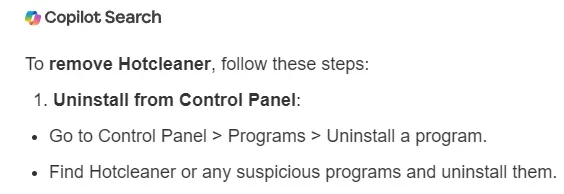
Hotcleaner is classed as a browser hijacker, This is courtesy of co-pilot:

How to Get Rid of It (Chrome)​

Here’s the clean, reliable removal path:

1. Check your Chrome extensions

  1. Open Chrome
  2. Go to: chrome://extensions/
  3. Look for anything suspicious:
    • “Privacy Test”
    • “Hotcleaner”
    • Anything you don’t recognize. Anything related to "cleaner"
  4. Remove the extension (not just disable)

2. Reset Chrome settings

This removes hijacker changes without wiping bookmarks.

  1. Chrome menu → Settings
  2. Reset settings
  3. Choose Restore settings to their original defaults

3. Remove startup pages

  1. Chrome Settings → On startup
  2. Make sure nothing like hotcleaner.com/... is listed
  3. Set it to Open the New Tab page

4. Clear site data

  1. Chrome Settings → Privacy and security
  2. Clear browsing data
  3. Select:
    • Cookies
    • Cached files

5. Check Windows startup (optional but smart)

Sometimes hijackers add scheduled tasks.

  1. Press Ctrl+Shift+Esc → Task Manager
  2. Go to Startup apps
  3. Disable anything unfamiliar

This is from me: Also go to settings>apps>installed apps
Check you installed apps for anything suspicious.
Run a full scan with Malwarebytes. Virus Scanner Online virus scanner - check for malware and threats for free
Run a scan with Adwarecleaner. AdwCleaner 2026 - Free Adware Cleaner & Removal Tool | Malwarebytes
 

My Computers My Computers

  • At a glance

    Windows 11 Pro 25H2 26200.8655i9-10900 10 core 20 threads32 gbnone-Intel UHD Graphics 630
    OS
    Windows 11 Pro 25H2 26200.8655
    Computer type
    PC/Desktop
    Manufacturer/Model
    Dell Optiplex 7080
    CPU
    i9-10900 10 core 20 threads
    Motherboard
    DELL 0J37VM
    Memory
    32 gb
    Graphics Card(s)
    none-Intel UHD Graphics 630
    Sound Card
    Integrated Realtek
    Monitor(s) Displays
    Benq 27
    Screen Resolution
    2560x1440
    Hard Drives
    2x1tb Solidigm m.2 nvme /External drives 512gb Samsung m.2 sata+2tb Kingston m2.nvme
    PSU
    500w
    Case
    MT
    Cooling
    Dell Premium
    Keyboard
    Logitech wired
    Mouse
    Logitech wireless
    Internet Speed
    so slow I'm too embarrassed to tell
    Browser
    #1 Edge #2 Firefox
    Antivirus
    Defender+MWB Premium
  • At a glance

    Windows 11 Pro 24H2 26200.8457AMD Ryzen 7 6800U32 gbintegrated
    Operating System
    Windows 11 Pro 24H2 26200.8457
    Computer type
    PC/Desktop
    Manufacturer/Model
    Beelink Mini PC SER5
    CPU
    AMD Ryzen 7 6800U
    Memory
    32 gb
    Graphics card(s)
    integrated
    Sound Card
    integrated
    Monitor(s) Displays
    Benq 27
    Screen Resolution
    2560x1440
    Hard Drives
    1TB Crucial nvme
    Keyboard
    Logitech wired
    Mouse
    Logitech wireless
    Internet Speed
    still too embarrassed to tell
    Browser
    Firefox
    Antivirus
    Defender
    Other Info
    System 3 is non compliant Dell 9020 i7-4770/24gb ram Win11 PRO 26200.8457

My Computers My Computers

  • At a glance

    Windows 11 Home 25H2 26200.8524AMD Ryzen 3 5300G8gbRadeon Graphics 4.00GHZ
    OS
    Windows 11 Home 25H2 26200.8524
    Computer type
    PC/Desktop
    Manufacturer/Model
    HP Pavilion TP01-2xxx
    CPU
    AMD Ryzen 3 5300G
    Memory
    8gb
    Graphics Card(s)
    Radeon Graphics 4.00GHZ
    Monitor(s) Displays
    ViewSonic
    Keyboard
    HP
    Mouse
    wireless Microsoft
    Browser
    FireFox
    Antivirus
    Avira
  • At a glance

    Updated Windows 10 to 11 25H2 26200.8655Intel Core i3 8100 @3.60 GHz8.GBIntel UHD 360 (HP)
    Operating System
    Updated Windows 10 to 11 25H2 26200.8655
    Computer type
    PC/Desktop
    Manufacturer/Model
    HP
    CPU
    Intel Core i3 8100 @3.60 GHz
    Motherboard
    HP 8653 (U3E1)
    Memory
    8.GB
    Graphics card(s)
    Intel UHD 360 (HP)
    Sound Card
    Realtek High Def
    Monitor(s) Displays
    ViewSonic
    Other Info
    #3 System: HP laptop Windows 25H2 11Pro 26200.8524
This reply is for both Glasskuter and jacee.

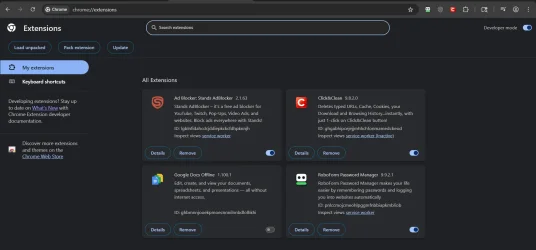
I would rather not have to reset chrome if it is avoidable. When I search for extensions I only have 3 I have had for years and 1 ( Click and Clean ) I added about a week ago.

Once again I do not see anything about hotcleaner or it's ID with this info what would you suggest is the best way to get rid of this?
 

My Computer My Computer

At a glance

Windows 11 Pro version 25H2 build 26200.7840Intel Core i7-12700KF Desktop Processor 12 (8...CORSAIR VENGEANCE DDR5 RAM 32GB (2x16GB) 6000...Gigabyte GeForce RTX™ 3060 GAMING OC 12G (rev...
OS
Windows 11 Pro version 25H2 build 26200.7840
Computer type
PC/Desktop
Manufacturer/Model
I built my system
CPU
Intel Core i7-12700KF Desktop Processor 12 (8P+4E) Core
Motherboard
MSI MAG Z790 Tomahawk WiFi Gaming Motherboard
Memory
CORSAIR VENGEANCE DDR5 RAM 32GB (2x16GB) 6000MHz CL36 Intel XMP iCUE
Graphics Card(s)
Gigabyte GeForce RTX™ 3060 GAMING OC 12G (rev. 2.0)
Sound Card
onboard
Monitor(s) Displays
(2) Samsung S24E310HL 23.6-Inch Screen LED-Lit Monitors
Screen Resolution
1920 x 1080
Hard Drives
(3) SAMSUNG Electronics 870 EVO 2TB 2.5 Inch SATA III Internal SSD for storage
(1) Samsung 850 EVO 500GB 2.5-Inch SATA III Internal SSD for OS
PSU
Corsair RM750e Fully Modular Low-Noise ATX Power Supply
Case
Carbide Series™ Air 540 High Airflow ATX Cube Case
Cooling
Thermalright Peerless Assassin 120 SE CPU Air Cooler
Keyboard
Logitech K800
Mouse
Logitech MX Master
Internet Speed
680 Mbps
Browser
Chrome as default with Firefox as well
Antivirus
Avira Pro
1770864384530.webp
 

My Computer My Computer

At a glance

Windows 11
OS
Windows 11
Computer type
PC/Desktop
Manufacturer/Model
Custom Built

My Computer My Computer

At a glance

Windows 11 Pro version 25H2 build 26200.7840Intel Core i7-12700KF Desktop Processor 12 (8...CORSAIR VENGEANCE DDR5 RAM 32GB (2x16GB) 6000...Gigabyte GeForce RTX™ 3060 GAMING OC 12G (rev...
OS
Windows 11 Pro version 25H2 build 26200.7840
Computer type
PC/Desktop
Manufacturer/Model
I built my system
CPU
Intel Core i7-12700KF Desktop Processor 12 (8P+4E) Core
Motherboard
MSI MAG Z790 Tomahawk WiFi Gaming Motherboard
Memory
CORSAIR VENGEANCE DDR5 RAM 32GB (2x16GB) 6000MHz CL36 Intel XMP iCUE
Graphics Card(s)
Gigabyte GeForce RTX™ 3060 GAMING OC 12G (rev. 2.0)
Sound Card
onboard
Monitor(s) Displays
(2) Samsung S24E310HL 23.6-Inch Screen LED-Lit Monitors
Screen Resolution
1920 x 1080
Hard Drives
(3) SAMSUNG Electronics 870 EVO 2TB 2.5 Inch SATA III Internal SSD for storage
(1) Samsung 850 EVO 500GB 2.5-Inch SATA III Internal SSD for OS
PSU
Corsair RM750e Fully Modular Low-Noise ATX Power Supply
Case
Carbide Series™ Air 540 High Airflow ATX Cube Case
Cooling
Thermalright Peerless Assassin 120 SE CPU Air Cooler
Keyboard
Logitech K800
Mouse
Logitech MX Master
Internet Speed
680 Mbps
Browser
Chrome as default with Firefox as well
Antivirus
Avira Pro

My Computers My Computers

  • At a glance

    Windows 11 Pro 25H2 26200.8655i9-10900 10 core 20 threads32 gbnone-Intel UHD Graphics 630
    OS
    Windows 11 Pro 25H2 26200.8655
    Computer type
    PC/Desktop
    Manufacturer/Model
    Dell Optiplex 7080
    CPU
    i9-10900 10 core 20 threads
    Motherboard
    DELL 0J37VM
    Memory
    32 gb
    Graphics Card(s)
    none-Intel UHD Graphics 630
    Sound Card
    Integrated Realtek
    Monitor(s) Displays
    Benq 27
    Screen Resolution
    2560x1440
    Hard Drives
    2x1tb Solidigm m.2 nvme /External drives 512gb Samsung m.2 sata+2tb Kingston m2.nvme
    PSU
    500w
    Case
    MT
    Cooling
    Dell Premium
    Keyboard
    Logitech wired
    Mouse
    Logitech wireless
    Internet Speed
    so slow I'm too embarrassed to tell
    Browser
    #1 Edge #2 Firefox
    Antivirus
    Defender+MWB Premium
  • At a glance

    Windows 11 Pro 24H2 26200.8457AMD Ryzen 7 6800U32 gbintegrated
    Operating System
    Windows 11 Pro 24H2 26200.8457
    Computer type
    PC/Desktop
    Manufacturer/Model
    Beelink Mini PC SER5
    CPU
    AMD Ryzen 7 6800U
    Memory
    32 gb
    Graphics card(s)
    integrated
    Sound Card
    integrated
    Monitor(s) Displays
    Benq 27
    Screen Resolution
    2560x1440
    Hard Drives
    1TB Crucial nvme
    Keyboard
    Logitech wired
    Mouse
    Logitech wireless
    Internet Speed
    still too embarrassed to tell
    Browser
    Firefox
    Antivirus
    Defender
    Other Info
    System 3 is non compliant Dell 9020 i7-4770/24gb ram Win11 PRO 26200.8457
Using the same idea of arranging programs by install date, with most recent on top, see if you can find anything suspicious that you don't know about. And remove what you aren't aware of on the computer.


My Computer My Computer

At a glance

Windows 11
OS
Windows 11
Computer type
PC/Desktop
Manufacturer/Model
Custom Built
And clear cookies and cache in Chrome.
 

My Computers My Computers

  • At a glance

    Windows 11 Pro 25H2 26200.8655i9-10900 10 core 20 threads32 gbnone-Intel UHD Graphics 630
    OS
    Windows 11 Pro 25H2 26200.8655
    Computer type
    PC/Desktop
    Manufacturer/Model
    Dell Optiplex 7080
    CPU
    i9-10900 10 core 20 threads
    Motherboard
    DELL 0J37VM
    Memory
    32 gb
    Graphics Card(s)
    none-Intel UHD Graphics 630
    Sound Card
    Integrated Realtek
    Monitor(s) Displays
    Benq 27
    Screen Resolution
    2560x1440
    Hard Drives
    2x1tb Solidigm m.2 nvme /External drives 512gb Samsung m.2 sata+2tb Kingston m2.nvme
    PSU
    500w
    Case
    MT
    Cooling
    Dell Premium
    Keyboard
    Logitech wired
    Mouse
    Logitech wireless
    Internet Speed
    so slow I'm too embarrassed to tell
    Browser
    #1 Edge #2 Firefox
    Antivirus
    Defender+MWB Premium
  • At a glance

    Windows 11 Pro 24H2 26200.8457AMD Ryzen 7 6800U32 gbintegrated
    Operating System
    Windows 11 Pro 24H2 26200.8457
    Computer type
    PC/Desktop
    Manufacturer/Model
    Beelink Mini PC SER5
    CPU
    AMD Ryzen 7 6800U
    Memory
    32 gb
    Graphics card(s)
    integrated
    Sound Card
    integrated
    Monitor(s) Displays
    Benq 27
    Screen Resolution
    2560x1440
    Hard Drives
    1TB Crucial nvme
    Keyboard
    Logitech wired
    Mouse
    Logitech wireless
    Internet Speed
    still too embarrassed to tell
    Browser
    Firefox
    Antivirus
    Defender
    Other Info
    System 3 is non compliant Dell 9020 i7-4770/24gb ram Win11 PRO 26200.8457

My Computers My Computers

  • At a glance

    Windows 11 Pro 25H2 26200.8655i9-10900 10 core 20 threads32 gbnone-Intel UHD Graphics 630
    OS
    Windows 11 Pro 25H2 26200.8655
    Computer type
    PC/Desktop
    Manufacturer/Model
    Dell Optiplex 7080
    CPU
    i9-10900 10 core 20 threads
    Motherboard
    DELL 0J37VM
    Memory
    32 gb
    Graphics Card(s)
    none-Intel UHD Graphics 630
    Sound Card
    Integrated Realtek
    Monitor(s) Displays
    Benq 27
    Screen Resolution
    2560x1440
    Hard Drives
    2x1tb Solidigm m.2 nvme /External drives 512gb Samsung m.2 sata+2tb Kingston m2.nvme
    PSU
    500w
    Case
    MT
    Cooling
    Dell Premium
    Keyboard
    Logitech wired
    Mouse
    Logitech wireless
    Internet Speed
    so slow I'm too embarrassed to tell
    Browser
    #1 Edge #2 Firefox
    Antivirus
    Defender+MWB Premium
  • At a glance

    Windows 11 Pro 24H2 26200.8457AMD Ryzen 7 6800U32 gbintegrated
    Operating System
    Windows 11 Pro 24H2 26200.8457
    Computer type
    PC/Desktop
    Manufacturer/Model
    Beelink Mini PC SER5
    CPU
    AMD Ryzen 7 6800U
    Memory
    32 gb
    Graphics card(s)
    integrated
    Sound Card
    integrated
    Monitor(s) Displays
    Benq 27
    Screen Resolution
    2560x1440
    Hard Drives
    1TB Crucial nvme
    Keyboard
    Logitech wired
    Mouse
    Logitech wireless
    Internet Speed
    still too embarrassed to tell
    Browser
    Firefox
    Antivirus
    Defender
    Other Info
    System 3 is non compliant Dell 9020 i7-4770/24gb ram Win11 PRO 26200.8457
That's it!!!! Remove it.
Just to clearify, you are saying Click and clean is malware? so many on this forum suggested it to me when I wanted to get rid of Ccleaner
 

My Computer My Computer

At a glance

Windows 11 Pro version 25H2 build 26200.7840Intel Core i7-12700KF Desktop Processor 12 (8...CORSAIR VENGEANCE DDR5 RAM 32GB (2x16GB) 6000...Gigabyte GeForce RTX™ 3060 GAMING OC 12G (rev...
OS
Windows 11 Pro version 25H2 build 26200.7840
Computer type
PC/Desktop
Manufacturer/Model
I built my system
CPU
Intel Core i7-12700KF Desktop Processor 12 (8P+4E) Core
Motherboard
MSI MAG Z790 Tomahawk WiFi Gaming Motherboard
Memory
CORSAIR VENGEANCE DDR5 RAM 32GB (2x16GB) 6000MHz CL36 Intel XMP iCUE
Graphics Card(s)
Gigabyte GeForce RTX™ 3060 GAMING OC 12G (rev. 2.0)
Sound Card
onboard
Monitor(s) Displays
(2) Samsung S24E310HL 23.6-Inch Screen LED-Lit Monitors
Screen Resolution
1920 x 1080
Hard Drives
(3) SAMSUNG Electronics 870 EVO 2TB 2.5 Inch SATA III Internal SSD for storage
(1) Samsung 850 EVO 500GB 2.5-Inch SATA III Internal SSD for OS
PSU
Corsair RM750e Fully Modular Low-Noise ATX Power Supply
Case
Carbide Series™ Air 540 High Airflow ATX Cube Case
Cooling
Thermalright Peerless Assassin 120 SE CPU Air Cooler
Keyboard
Logitech K800
Mouse
Logitech MX Master
Internet Speed
680 Mbps
Browser
Chrome as default with Firefox as well
Antivirus
Avira Pro
Hotcleaner itself isn’t malware, but the pop‑ups and forced redirects are caused by the unwanted extension or hijacker using the Hotcleaner domain. It is well documented all over the web.
so many on this forum suggested it to me
Who exactly? Forum search found no mention of it. Seems to me the most logical thing to do is remove the extension, clear cache and cookies, change any highjacked Chrome settings for startup, new tab, and home page in chrome, then close chrome. Reopen it to see if your issue is fixed. If it is, you know it has something to do with the extension.

Whether I wanted to or not I would reset Chrome as was advised. But that's just me.
 

My Computers My Computers

  • At a glance

    Windows 11 Pro 25H2 26200.8655i9-10900 10 core 20 threads32 gbnone-Intel UHD Graphics 630
    OS
    Windows 11 Pro 25H2 26200.8655
    Computer type
    PC/Desktop
    Manufacturer/Model
    Dell Optiplex 7080
    CPU
    i9-10900 10 core 20 threads
    Motherboard
    DELL 0J37VM
    Memory
    32 gb
    Graphics Card(s)
    none-Intel UHD Graphics 630
    Sound Card
    Integrated Realtek
    Monitor(s) Displays
    Benq 27
    Screen Resolution
    2560x1440
    Hard Drives
    2x1tb Solidigm m.2 nvme /External drives 512gb Samsung m.2 sata+2tb Kingston m2.nvme
    PSU
    500w
    Case
    MT
    Cooling
    Dell Premium
    Keyboard
    Logitech wired
    Mouse
    Logitech wireless
    Internet Speed
    so slow I'm too embarrassed to tell
    Browser
    #1 Edge #2 Firefox
    Antivirus
    Defender+MWB Premium
  • At a glance

    Windows 11 Pro 24H2 26200.8457AMD Ryzen 7 6800U32 gbintegrated
    Operating System
    Windows 11 Pro 24H2 26200.8457
    Computer type
    PC/Desktop
    Manufacturer/Model
    Beelink Mini PC SER5
    CPU
    AMD Ryzen 7 6800U
    Memory
    32 gb
    Graphics card(s)
    integrated
    Sound Card
    integrated
    Monitor(s) Displays
    Benq 27
    Screen Resolution
    2560x1440
    Hard Drives
    1TB Crucial nvme
    Keyboard
    Logitech wired
    Mouse
    Logitech wireless
    Internet Speed
    still too embarrassed to tell
    Browser
    Firefox
    Antivirus
    Defender
    Other Info
    System 3 is non compliant Dell 9020 i7-4770/24gb ram Win11 PRO 26200.8457
What do you think Click & Clean is doing for you? It doesn't look harmful from what I see, but I try to minimize adding extensions unless they do something that isn't offered natively by the browser.
 

My Computers My Computers

  • At a glance

    Win 11 Pro 25H2, Build 26200.8655Intel Core i5 1450064GB DDR4GeForce RTX 4060
    OS
    Win 11 Pro 25H2, Build 26200.8655
    Computer type
    PC/Desktop
    Manufacturer/Model
    Home Brew
    CPU
    Intel Core i5 14500
    Motherboard
    Gigabyte B760M G P WIFI
    Memory
    64GB DDR4
    Graphics Card(s)
    GeForce RTX 4060
    Sound Card
    Chipset Realtek
    Monitor(s) Displays
    LG 45" Ultragear, Acer 24" 1080p
    Screen Resolution
    5120x1440, 1920x1080
    Hard Drives
    Crucial P310 2TB 2280 PCIe Gen4 3D NAND NVMe M.2 SSD (O/S)
    Silicon Power 2TB US75 NVMe PCIe Gen4 M.2 2280 SSD (backup)
    Crucial BX500 2TB 3D NAND (2nd backup)
    Seagate 4TB Ironwolf, rotating HDD archive files
    External off-line backup Drives: 2 NVMe 4TB drives in external enclosures
    PSU
    Thermaltake Toughpower GF3 750W
    Case
    LIAN LI LANCOOL 216 E-ATX PC Case
    Cooling
    Lots of fans!
    Keyboard
    Microsoft Comfort Curve 2000
    Mouse
    Logitech G305
    Internet Speed
    Verizon FiOS 1GB
    Browser
    Firefox
    Antivirus
    Malware Bytes & Windows Defender Security
  • At a glance

    Win 11 Pro 25H2, Build 26200.8524Intel Core i5 1440032GB DDR5Intel 700 Embedded GPU
    Operating System
    Win 11 Pro 25H2, Build 26200.8524
    Computer type
    PC/Desktop
    Manufacturer/Model
    Home Brew
    CPU
    Intel Core i5 14400
    Motherboard
    Gigabyte B760M DS3H AX
    Memory
    32GB DDR5
    Graphics card(s)
    Intel 700 Embedded GPU
    Sound Card
    Realtek Embedded
    Monitor(s) Displays
    27" HP 1080p
    Screen Resolution
    1920x1080
    Hard Drives
    Crucial P310 2TB 2280 PCIe Gen4 eD NAND PCIe SSD
    Samsung EVO 990 2TB NVMe Gen4 SSD
    Samsung 2TB SATA SSD
    PSU
    Thermaltake Smart BM3 650W
    Case
    Okinos Micro ATX Case
    Cooling
    Fans
    Keyboard
    Microsoft Comfort Curve 2000
    Mouse
    Logitech G305
    Internet Speed
    Verizon FiOS 1GB
    Browser
    Firefox
    Antivirus
    Malware Bytes & Windows Defender Security
Who exactly? Forum search found no mention of it. Seems to me the most logical thing to do is remove the extension, clear cache and cookies, change any highjacked Chrome settings for startup, new tab, and home page in chrome, then close chrome. Reopen it to see if your issue is fixed. If it is, you know it has something to do with the extension.
I've looked through all the threads that I was in and can't find any on Click and Clean although I know that I brought it up in this forum when I wanted to not use Ccleaner any longer and after going back and forth on what hsitory cleaner for Win 11 and Chrome several mentioned Click and Clean. Now why I can't find any posts and I know I wasn't dreaming about it.............I can't explain. Also the method you suggest to get rid of this problem as I read more about it says to delete any extensions I don't know, I only have 4 extensions and Click and Clean is the only one I have had for years. If I go through all the steps you suggested and still don't see any extentsions that are suspect and only see the 4 I have installed, then what?? I will add a screenshot of my extensions.
extensions.webp

I do have a question about part of your reply. You said "highjacked Chrome settings for startup, new tab, and home page in chrome, then close chrome"
I know nothing about highjacking Chrome settingsfor startup. I'm willing to do everything you said to Chrome but if you can explain a little more about how I deal with the highjacked chrome settings

Thanks
What do you think Click & Clean is doing for you? It doesn't look harmful from what I see, but I try to minimize adding extensions unless they do something that isn't offered natively by the browser.
Is this a trick question...........lol I think Click and Clean will do the following for me. Click&Clean is a free, popular browser extension for Chrome and Edge that It enhances privacy by removing digital footprints, improves browser performance by clearing clutter, and can be configured to automatically clean data when you close the browser. I used Ccleaner for years but wanted something better that Instantly deletes browsing history, cookies, cache, and other temporary data with one click.


To both of you I never got the email that tells us when someone replied to my thread. Sorry for the delay in replying back
 
Last edited:

My Computer My Computer

At a glance

Windows 11 Pro version 25H2 build 26200.7840Intel Core i7-12700KF Desktop Processor 12 (8...CORSAIR VENGEANCE DDR5 RAM 32GB (2x16GB) 6000...Gigabyte GeForce RTX™ 3060 GAMING OC 12G (rev...
OS
Windows 11 Pro version 25H2 build 26200.7840
Computer type
PC/Desktop
Manufacturer/Model
I built my system
CPU
Intel Core i7-12700KF Desktop Processor 12 (8P+4E) Core
Motherboard
MSI MAG Z790 Tomahawk WiFi Gaming Motherboard
Memory
CORSAIR VENGEANCE DDR5 RAM 32GB (2x16GB) 6000MHz CL36 Intel XMP iCUE
Graphics Card(s)
Gigabyte GeForce RTX™ 3060 GAMING OC 12G (rev. 2.0)
Sound Card
onboard
Monitor(s) Displays
(2) Samsung S24E310HL 23.6-Inch Screen LED-Lit Monitors
Screen Resolution
1920 x 1080
Hard Drives
(3) SAMSUNG Electronics 870 EVO 2TB 2.5 Inch SATA III Internal SSD for storage
(1) Samsung 850 EVO 500GB 2.5-Inch SATA III Internal SSD for OS
PSU
Corsair RM750e Fully Modular Low-Noise ATX Power Supply
Case
Carbide Series™ Air 540 High Airflow ATX Cube Case
Cooling
Thermalright Peerless Assassin 120 SE CPU Air Cooler
Keyboard
Logitech K800
Mouse
Logitech MX Master
Internet Speed
680 Mbps
Browser
Chrome as default with Firefox as well
Antivirus
Avira Pro
The screenshot from the Chrome web store shows specifically that Click&Clean is developed by hotcleaner. If you aren't willing to remove the extension and follow the instructions to clear cache and cookies to see if it fixes your problem, what can I say.

Screenshot 2026-02-16 182600.webp
 

My Computers My Computers

  • At a glance

    Windows 11 Pro 25H2 26200.8655i9-10900 10 core 20 threads32 gbnone-Intel UHD Graphics 630
    OS
    Windows 11 Pro 25H2 26200.8655
    Computer type
    PC/Desktop
    Manufacturer/Model
    Dell Optiplex 7080
    CPU
    i9-10900 10 core 20 threads
    Motherboard
    DELL 0J37VM
    Memory
    32 gb
    Graphics Card(s)
    none-Intel UHD Graphics 630
    Sound Card
    Integrated Realtek
    Monitor(s) Displays
    Benq 27
    Screen Resolution
    2560x1440
    Hard Drives
    2x1tb Solidigm m.2 nvme /External drives 512gb Samsung m.2 sata+2tb Kingston m2.nvme
    PSU
    500w
    Case
    MT
    Cooling
    Dell Premium
    Keyboard
    Logitech wired
    Mouse
    Logitech wireless
    Internet Speed
    so slow I'm too embarrassed to tell
    Browser
    #1 Edge #2 Firefox
    Antivirus
    Defender+MWB Premium
  • At a glance

    Windows 11 Pro 24H2 26200.8457AMD Ryzen 7 6800U32 gbintegrated
    Operating System
    Windows 11 Pro 24H2 26200.8457
    Computer type
    PC/Desktop
    Manufacturer/Model
    Beelink Mini PC SER5
    CPU
    AMD Ryzen 7 6800U
    Memory
    32 gb
    Graphics card(s)
    integrated
    Sound Card
    integrated
    Monitor(s) Displays
    Benq 27
    Screen Resolution
    2560x1440
    Hard Drives
    1TB Crucial nvme
    Keyboard
    Logitech wired
    Mouse
    Logitech wireless
    Internet Speed
    still too embarrassed to tell
    Browser
    Firefox
    Antivirus
    Defender
    Other Info
    System 3 is non compliant Dell 9020 i7-4770/24gb ram Win11 PRO 26200.8457
The screenshot from the Chrome web store shows specifically that Click&Clean is developed by hotcleaner. If you aren't willing to remove the extension and follow the instructions to clear cache and cookies to see if it fixes your problem, what can I say.

View attachment 163527
Okay, I will reset chrome to see if it fixes my issues in Chrome. Since in my extensions I only have 4, I know what each one is. Once I reset Chrome and then only see the same 4 extensions besides having just reset Chrome how do I know if I fixed my issue. I'm not debating your suggestions I understand things better when they are discussed rather than just have someone say do this or that.

The thing that is most confusing to me is Click and Clean is made by a company named Hotcleaner, the warning page that popped up the url was from Hotcleaner. but some in this thread suggested removing Click and Clean. if it is a good utility my question is are you saying that Click and Clean is installing malware that has something to do with Chrome Extension but I see nothing in extension. if you can explain this to me it will go a long way in helping me understand this whole issue.
 

My Computer My Computer

At a glance

Windows 11 Pro version 25H2 build 26200.7840Intel Core i7-12700KF Desktop Processor 12 (8...CORSAIR VENGEANCE DDR5 RAM 32GB (2x16GB) 6000...Gigabyte GeForce RTX™ 3060 GAMING OC 12G (rev...
OS
Windows 11 Pro version 25H2 build 26200.7840
Computer type
PC/Desktop
Manufacturer/Model
I built my system
CPU
Intel Core i7-12700KF Desktop Processor 12 (8P+4E) Core
Motherboard
MSI MAG Z790 Tomahawk WiFi Gaming Motherboard
Memory
CORSAIR VENGEANCE DDR5 RAM 32GB (2x16GB) 6000MHz CL36 Intel XMP iCUE
Graphics Card(s)
Gigabyte GeForce RTX™ 3060 GAMING OC 12G (rev. 2.0)
Sound Card
onboard
Monitor(s) Displays
(2) Samsung S24E310HL 23.6-Inch Screen LED-Lit Monitors
Screen Resolution
1920 x 1080
Hard Drives
(3) SAMSUNG Electronics 870 EVO 2TB 2.5 Inch SATA III Internal SSD for storage
(1) Samsung 850 EVO 500GB 2.5-Inch SATA III Internal SSD for OS
PSU
Corsair RM750e Fully Modular Low-Noise ATX Power Supply
Case
Carbide Series™ Air 540 High Airflow ATX Cube Case
Cooling
Thermalright Peerless Assassin 120 SE CPU Air Cooler
Keyboard
Logitech K800
Mouse
Logitech MX Master
Internet Speed
680 Mbps
Browser
Chrome as default with Firefox as well
Antivirus
Avira Pro
A complete reset of Chrome is not the FIRST troubleshooting step to try and may be unnecessary. I said:
Seems to me the most logical thing to do is remove the extension, clear cache and cookies, change any highjacked Chrome settings for startup, new tab, and home page in chrome, then close chrome. Reopen it to see if your issue is fixed. If it is, you know it has something to do with the extension.

If that doesn't do it, the next step would be to reset Chrome which will reset it to default settings with NO extensions. In this case you would have to reinstall the other 3 extensions.
 

My Computers My Computers

  • At a glance

    Windows 11 Pro 25H2 26200.8655i9-10900 10 core 20 threads32 gbnone-Intel UHD Graphics 630
    OS
    Windows 11 Pro 25H2 26200.8655
    Computer type
    PC/Desktop
    Manufacturer/Model
    Dell Optiplex 7080
    CPU
    i9-10900 10 core 20 threads
    Motherboard
    DELL 0J37VM
    Memory
    32 gb
    Graphics Card(s)
    none-Intel UHD Graphics 630
    Sound Card
    Integrated Realtek
    Monitor(s) Displays
    Benq 27
    Screen Resolution
    2560x1440
    Hard Drives
    2x1tb Solidigm m.2 nvme /External drives 512gb Samsung m.2 sata+2tb Kingston m2.nvme
    PSU
    500w
    Case
    MT
    Cooling
    Dell Premium
    Keyboard
    Logitech wired
    Mouse
    Logitech wireless
    Internet Speed
    so slow I'm too embarrassed to tell
    Browser
    #1 Edge #2 Firefox
    Antivirus
    Defender+MWB Premium
  • At a glance

    Windows 11 Pro 24H2 26200.8457AMD Ryzen 7 6800U32 gbintegrated
    Operating System
    Windows 11 Pro 24H2 26200.8457
    Computer type
    PC/Desktop
    Manufacturer/Model
    Beelink Mini PC SER5
    CPU
    AMD Ryzen 7 6800U
    Memory
    32 gb
    Graphics card(s)
    integrated
    Sound Card
    integrated
    Monitor(s) Displays
    Benq 27
    Screen Resolution
    2560x1440
    Hard Drives
    1TB Crucial nvme
    Keyboard
    Logitech wired
    Mouse
    Logitech wireless
    Internet Speed
    still too embarrassed to tell
    Browser
    Firefox
    Antivirus
    Defender
    Other Info
    System 3 is non compliant Dell 9020 i7-4770/24gb ram Win11 PRO 26200.8457
A complete reset of Chrome is not the FIRST troubleshooting step to try and may be unnecessary. I said:
Seems to me the most logical thing to do is remove the extension, clear cache and cookies, change any highjacked Chrome settings for startup, new tab, and home page in chrome, then close chrome. Reopen it to see if your issue is fixed. If it is, you know it has something to do with the extension.

If that doesn't do it, the next step would be to reset Chrome which will reset it to default settings with NO extensions. In this case you would have to reinstall the other 3 extensions.
When you say "remove extension" do you mean remove Click and Clean ? as far as highjacked Chrome settings I have asked to explain that a bit more, at the same time I have been searching and reading about that. everything I read about highjacking Chrome settings say that somehow a extension could have been added without me knowing. Wouldn't that extension show up in my extensions??
 

My Computer My Computer

At a glance

Windows 11 Pro version 25H2 build 26200.7840Intel Core i7-12700KF Desktop Processor 12 (8...CORSAIR VENGEANCE DDR5 RAM 32GB (2x16GB) 6000...Gigabyte GeForce RTX™ 3060 GAMING OC 12G (rev...
OS
Windows 11 Pro version 25H2 build 26200.7840
Computer type
PC/Desktop
Manufacturer/Model
I built my system
CPU
Intel Core i7-12700KF Desktop Processor 12 (8P+4E) Core
Motherboard
MSI MAG Z790 Tomahawk WiFi Gaming Motherboard
Memory
CORSAIR VENGEANCE DDR5 RAM 32GB (2x16GB) 6000MHz CL36 Intel XMP iCUE
Graphics Card(s)
Gigabyte GeForce RTX™ 3060 GAMING OC 12G (rev. 2.0)
Sound Card
onboard
Monitor(s) Displays
(2) Samsung S24E310HL 23.6-Inch Screen LED-Lit Monitors
Screen Resolution
1920 x 1080
Hard Drives
(3) SAMSUNG Electronics 870 EVO 2TB 2.5 Inch SATA III Internal SSD for storage
(1) Samsung 850 EVO 500GB 2.5-Inch SATA III Internal SSD for OS
PSU
Corsair RM750e Fully Modular Low-Noise ATX Power Supply
Case
Carbide Series™ Air 540 High Airflow ATX Cube Case
Cooling
Thermalright Peerless Assassin 120 SE CPU Air Cooler
Keyboard
Logitech K800
Mouse
Logitech MX Master
Internet Speed
680 Mbps
Browser
Chrome as default with Firefox as well
Antivirus
Avira Pro
When you say "remove extension" do you mean remove Click and Clean
Yes.

as far as highjacked Chrome settings I ahve asked to explain that a bit more
I said to change any of those Chrome browser settings (startup, new tab, and home page ) IF they had been changed. It's a known fact some browser extensions can change those settings without your knowledge.
 

My Computers My Computers

  • At a glance

    Windows 11 Pro 25H2 26200.8655i9-10900 10 core 20 threads32 gbnone-Intel UHD Graphics 630
    OS
    Windows 11 Pro 25H2 26200.8655
    Computer type
    PC/Desktop
    Manufacturer/Model
    Dell Optiplex 7080
    CPU
    i9-10900 10 core 20 threads
    Motherboard
    DELL 0J37VM
    Memory
    32 gb
    Graphics Card(s)
    none-Intel UHD Graphics 630
    Sound Card
    Integrated Realtek
    Monitor(s) Displays
    Benq 27
    Screen Resolution
    2560x1440
    Hard Drives
    2x1tb Solidigm m.2 nvme /External drives 512gb Samsung m.2 sata+2tb Kingston m2.nvme
    PSU
    500w
    Case
    MT
    Cooling
    Dell Premium
    Keyboard
    Logitech wired
    Mouse
    Logitech wireless
    Internet Speed
    so slow I'm too embarrassed to tell
    Browser
    #1 Edge #2 Firefox
    Antivirus
    Defender+MWB Premium
  • At a glance

    Windows 11 Pro 24H2 26200.8457AMD Ryzen 7 6800U32 gbintegrated
    Operating System
    Windows 11 Pro 24H2 26200.8457
    Computer type
    PC/Desktop
    Manufacturer/Model
    Beelink Mini PC SER5
    CPU
    AMD Ryzen 7 6800U
    Memory
    32 gb
    Graphics card(s)
    integrated
    Sound Card
    integrated
    Monitor(s) Displays
    Benq 27
    Screen Resolution
    2560x1440
    Hard Drives
    1TB Crucial nvme
    Keyboard
    Logitech wired
    Mouse
    Logitech wireless
    Internet Speed
    still too embarrassed to tell
    Browser
    Firefox
    Antivirus
    Defender
    Other Info
    System 3 is non compliant Dell 9020 i7-4770/24gb ram Win11 PRO 26200.8457
Back
Top Bottom