Is KB5068861 a “bad” patch?


likerain

Active member
Local time
10:48 AM
Posts
40
OS
Windows 11
Hello,
Some users have reported various issues with the recently released update KB5068861, including installation failures and problems occurring after installation. I also wasn’t able to install it myself (error 0x800F0983).
(And for some reason, when I tried to restart my PC afterward, it showed “Updates are in progress... Please do not turn off your computer.”)


Since this update may be unstable on certain systems, I’m thinking of pausing Windows Update for a while to see how things develop.
Has anyone else encountered trouble with this patch?
 

My Computer

System One

  • OS
    Windows 11
    Computer type
    Laptop
    Manufacturer/Model
    GF63-10UC
    CPU
    i7-10750H
    Memory
    16GB
    Graphics Card(s)
    RTX3050Laptop

My Computers

System One System Two

  • OS
    Windows 11 Home
    Computer type
    PC/Desktop
    Manufacturer/Model
    HP 24" AiO
    CPU
    Ryzen 7 5825u
    Motherboard
    HP
    Memory
    64GB DDR4 3200
    Graphics Card(s)
    Ryzen 7 5825u
    Sound Card
    RealTek
    Monitor(s) Displays
    24" HP AiO
    Screen Resolution
    1920 x 1080 @60 Hz
    Hard Drives
    1TB WD Blue SN580 M2 SSD Partitioned.
    2x 1TB USB HDD External Backup/Storage.
    PSU
    90W external power brick
    Case
    24" All in One
    Cooling
    Default Air Cooling
    Keyboard
    HP WiFi UK extended
    Mouse
    HP WiFi 3 Button
    Internet Speed
    1GB full fibre
    Browser
    Edge & Firefox
    Antivirus
    AVG Internet Security/Windows Defender
    Other Info
    Mainly Open Source Software
  • Operating System
    Ubuntu 22.04.5 LTS
    Computer type
    Laptop
    Manufacturer/Model
    Dell 13" Latitude 2017
    CPU
    i5 7200u
    Motherboard
    Dell
    Memory
    16GB DDR4
    Graphics card(s)
    Intel
    Sound Card
    Intel
    Monitor(s) Displays
    13" Dell Laptop
    Hard Drives
    250GB Crucial 2.5" SSD
    Mouse
    Generic WiFi 3 button
    Internet Speed
    WiFi only
    Browser
    Firefox
    Antivirus
    ClamAV TK
    Other Info
    Mainly Open Source Software
I installed it on my unsupported PC (see 2nd system specs), I reached build 26200.7171 and haven't seen anything out of the ordinary.
 

My Computers

System One System Two

  • OS
    Windows 11 Pro 23H2 (5699), 25H2 (8457)
    Computer type
    Laptop
    Manufacturer/Model
    Acer Extensa 5630EZ
    CPU
    Mobile DualCore Intel Core 2 Duo T7250, 2000 MHz
    Motherboard
    Acer Extensa 5630
    Memory
    4GB
    Graphics Card(s)
    Mobile Intel(R) GMA 4500M (Mobile 4 series)
    Sound Card
    Realtek ALC268 @ Intel 82801IB ICH9 - High Definition Audio Controller
    Monitor(s) Displays
    1
    Screen Resolution
    1280x800
    Hard Drives
    Samsung SSD 850 EVO 250GB SATA Device (250 GB, SATA-III)
    Internet Speed
    VDSL 50 Mbps
    Browser
    MICROSOFT EDGE
    Antivirus
    WINDOWS DEFENDER
    Other Info
    Legacy MBR installation, no TPM, no Secure Boot, no WDDM 2.0 graphics drivers, no SSE4.2, cannot get more unsupported ;) This is only my test laptop. I had installed Windows 11 here before upgrading my main PC. For my main PC I use everyday see my 2nd system specs.
  • Operating System
    Windows 11 Pro v25H2 (build 26200.8457)
    Computer type
    PC/Desktop
    Manufacturer/Model
    Custom-built PC
    CPU
    Intel Core-i7 3770 3.40GHz s1155 (3rd generation)
    Motherboard
    Asus P8H61 s1155 ATX
    Memory
    2x Kingston Hyper-X Blu 8GB DDR3-1600
    Graphics card(s)
    GIGABYTE GeForce RTX 3050 WINDFORCE OC V2 6GB (GV-N3050WF2OCV2-6GD)
    Sound Card
    Realtek HD audio (ALC887)
    Monitor(s) Displays
    Sony Bravia KDL-19L4000 19" LCD TV via VGA
    Screen Resolution
    1440x900 32-bit 60Hz
    Hard Drives
    WD Blue SA510 2.5 1000GB SSD as system disk, Western Digital Caviar Purple 4TB SATA III (WD40PURZ) as second
    PSU
    Thermaltake Litepower RGB 550W Full Wired
    Case
    SUPERCASE MIDI-TOWER
    Cooling
    Deepcool Gamma Archer CPU cooler, 1x 8cm fan at the back
    Keyboard
    Mitsumi 101-key PS/2
    Mouse
    Sunnyline OptiEye PS/2
    Internet Speed
    100Mbps
    Browser
    Microsoft Edge, Mozilla Firefox
    Antivirus
    Microsoft Windows Defender
    Other Info
    Legacy BIOS (MBR) installation, no TPM, no Secure Boot, WDDM 3.0 graphics drivers, WEI score 7.4
Patch was installed on my PC on 11/11/25; no issues whatsoever.
 

My Computer

System One

  • OS
    Windows 11 Professional 25H2
    Computer type
    PC/Desktop
    Manufacturer/Model
    Digital Storm VELOX
    CPU
    Intel Core i9 11900K
    Motherboard
    ASUS PRIME Z590-P
    Memory
    64GB
    Graphics Card(s)
    NVIDIA GeForce GTX 1650
    Sound Card
    Realtek onboard
    Monitor(s) Displays
    Acer R221Q 21.5"
    Screen Resolution
    1920 x 1080
    Hard Drives
    2 x Samsung SSD 990 EVO Plus (1 TB)
    2 x Seagate ST4000NE001 (4 TB)
    PSU
    None
    Case
    VELOX
    Cooling
    Cooler Master
    Keyboard
    Logitech
    Mouse
    Kensington trackball
    Browser
    Firefox, Chrome
    Antivirus
    Windows Defender, Malwarebytes
Yes, exactly the same issue, 10 tries failed which include getting it from MS update catalogue. DISM, SFC checks were done etc.

I have not done a repair install, mine is a working PC/Laptop that must be kept working and that should not be necessary. MS needs to put this right without overly complex measures prone to user errors.

Also looked at the totally non-understandable error logs, 200-400 MB of text, got nowhere unsurprisingly.
A ton of Diagnostic data has been sent, I see it in the Diagnostic Data Viewer.
Been sent to Feedback though I have never got anything back from that route.

So I have paused updates, initially for a week.
 

My Computer

System One

  • OS
    Windows 11
Just for the record, I couldn't install the previous cumulative update on my unsupported computer (2nd system specs), so I just ignored it. Now I have installed the latest cumulative update and I am at build 26200.7171. I suggest you do the same. Just wait for the next one.
 

My Computers

System One System Two

  • OS
    Windows 11 Pro 23H2 (5699), 25H2 (8457)
    Computer type
    Laptop
    Manufacturer/Model
    Acer Extensa 5630EZ
    CPU
    Mobile DualCore Intel Core 2 Duo T7250, 2000 MHz
    Motherboard
    Acer Extensa 5630
    Memory
    4GB
    Graphics Card(s)
    Mobile Intel(R) GMA 4500M (Mobile 4 series)
    Sound Card
    Realtek ALC268 @ Intel 82801IB ICH9 - High Definition Audio Controller
    Monitor(s) Displays
    1
    Screen Resolution
    1280x800
    Hard Drives
    Samsung SSD 850 EVO 250GB SATA Device (250 GB, SATA-III)
    Internet Speed
    VDSL 50 Mbps
    Browser
    MICROSOFT EDGE
    Antivirus
    WINDOWS DEFENDER
    Other Info
    Legacy MBR installation, no TPM, no Secure Boot, no WDDM 2.0 graphics drivers, no SSE4.2, cannot get more unsupported ;) This is only my test laptop. I had installed Windows 11 here before upgrading my main PC. For my main PC I use everyday see my 2nd system specs.
  • Operating System
    Windows 11 Pro v25H2 (build 26200.8457)
    Computer type
    PC/Desktop
    Manufacturer/Model
    Custom-built PC
    CPU
    Intel Core-i7 3770 3.40GHz s1155 (3rd generation)
    Motherboard
    Asus P8H61 s1155 ATX
    Memory
    2x Kingston Hyper-X Blu 8GB DDR3-1600
    Graphics card(s)
    GIGABYTE GeForce RTX 3050 WINDFORCE OC V2 6GB (GV-N3050WF2OCV2-6GD)
    Sound Card
    Realtek HD audio (ALC887)
    Monitor(s) Displays
    Sony Bravia KDL-19L4000 19" LCD TV via VGA
    Screen Resolution
    1440x900 32-bit 60Hz
    Hard Drives
    WD Blue SA510 2.5 1000GB SSD as system disk, Western Digital Caviar Purple 4TB SATA III (WD40PURZ) as second
    PSU
    Thermaltake Litepower RGB 550W Full Wired
    Case
    SUPERCASE MIDI-TOWER
    Cooling
    Deepcool Gamma Archer CPU cooler, 1x 8cm fan at the back
    Keyboard
    Mitsumi 101-key PS/2
    Mouse
    Sunnyline OptiEye PS/2
    Internet Speed
    100Mbps
    Browser
    Microsoft Edge, Mozilla Firefox
    Antivirus
    Microsoft Windows Defender
    Other Info
    Legacy BIOS (MBR) installation, no TPM, no Secure Boot, WDDM 3.0 graphics drivers, WEI score 7.4
That is what I thought, however it has been same error code for the last 2 cumulative/security updates, the latest being KB5068861 26200.7171

Some parts have been installed for sure, but have no idea what exactly, and they deleted the failures from Update history for the 1st one. Just looked, the 2nd (current) one failures as well, error code has changed.

Installation Failure: Windows failed to install the following update with error 0x800704C7: 2025-11 Security Update (KB5068861) (26200.7171).
 

My Computer

System One

  • OS
    Windows 11
That is what I thought, however it has been same error code for the last 2 cumulative/security updates, the latest being KB5068861 26200.7171

Some parts have been installed for sure, but have no idea what exactly, and they deleted the failures from Update history for the 1st one. Just looked, the 2nd (current) one failures as well, error code has changed.

Installation Failure: Windows failed to install the following update with error 0x800704C7: 2025-11 Security Update (KB5068861) (26200.7171).

I've had the same issue with multiple PCs only on the last two updates, as well. MS has broken something with the servicing and they just don't know how to fix it. I posted yesterday that I had two PCs that the November update wouldn't install on, but it's actually three. I just did an 'upgrade' reinstall to fix one, and I'm doing a second one now. I suspect I'll be doing the same next month.

They need to hire proper QA folks instead of relying on public beta testers.
 

My Computers

System One System Two

  • OS
    Windows 11 Pro
    Computer type
    PC/Desktop
    Manufacturer/Model
    built myself
    CPU
    Intel Core i7 10700K
    Motherboard
    MSI Z490-A Pro
    Graphics Card(s)
    Intel UHD Graphics 630
    Antivirus
    Microsoft Defender
    Other Info
    TPM 2.0
  • Operating System
    Windows 11 Pro
    Computer type
    PC/Desktop
    Manufacturer/Model
    built myself
    CPU
    Intel Core i7 6800K
    Motherboard
    Asus X99-E
    Graphics card(s)
    NVIDIA GeForce GTX 1050 Ti
    Antivirus
    Microsoft Defender
    Other Info
    no TPM
Installed KB5068861 on my two computers without any issues.
 

My Computers

System One System Two

  • OS
    Windows 11 Pro 25H2
    Computer type
    PC/Desktop
    Manufacturer/Model
    Homebuilt
    CPU
    Intel Core i9 13900K
    Motherboard
    Asus ProArt Z790 Creator WiFi - Bios 3107
    Memory
    Corsair Dominator Platinum 64gb 5600MT/s DDR5 Dual Channel
    Graphics Card(s)
    Sapphire NITRO+ AMD Radeon RX 7900 XTX Vapor-X 24GB
    Sound Card
    External DAC: Cambridge Audio DACMagic200M - Headphone Amp: Topping L50
    Monitor(s) Displays
    Panasonic MX950 Mini LED 55" TV 120hz
    Screen Resolution
    3840 x 2160 120hz
    Hard Drives
    Samsung 980 Pro 2TB (OS)
    Samsung 980 Pro 1TB (Files)
    Lexar NZ790 4TB
    LaCie d2 Professional 6TB external - USB 3.1
    Seagate Expansion 16TB external - USB 3.2
    Seagate One Touch 18TB external HD - USB 3.0
    PSU
    Corsair RM1200x Shift
    Case
    Corsair RGB Smart Case 5000x (white)
    Cooling
    Corsair iCue H150i Elite Capellix XT
    Keyboard
    Incase Ergonomic USB (Microsoft clone)
    Mouse
    Logitech MX Master 3S
    Internet Speed
    Fibre 900/500 Mbps
    Browser
    Microsoft Edge Chromium
    Antivirus
    Bitdefender Total Security
    Other Info
    AMD Radeon Software & Drivers 26.1.1
    Hasleo Backup Suite
    Dashlane password manager
    Kensington Verimark fingerprint reader
    Logitech Brio 4K webcam
    Orico 10-port powered USB 3.0 hub
  • Operating System
    Windows 11 Pro 25H2
    Computer type
    Laptop
    Manufacturer/Model
    Asus Vivobook X1605VA
    CPU
    Intel® Core™ i9-13900H
    Motherboard
    Asus X1605VA bios 309
    Memory
    32GB DDR4-3200 Dual channel
    Graphics card(s)
    *Intel Iris Xᵉ Graphics G7
    Sound Card
    Realtek | Intel SST Bluetooth & USB
    Monitor(s) Displays
    16.0-inch, WUXGA 16:10 aspect ratio, IPS-level Panel
    Screen Resolution
    1920 x 1200 60hz
    Hard Drives
    512GB M.2 NVMe™ PCIe® 3.0 SSD
    Mouse
    Logitech MX Ergo Trackball
    Antivirus
    Bitdefender Total Security
    Other Info
    720p Webcam
    WiFi & USB to ethernet
Exactly same problem brand new machine
Error 0x800f0983
Sfc and Dism done
Antivirus off
Softwaredistribution cleared
Troubleshooter: no errors/ violations
All other updates went through
Also tried with the standalone installer from MS update catalogue
This kb5068861 always interrupts install at around 60%!
 
Last edited:

My Computer

System One

  • OS
    W11 pro, 25h2
    Computer type
    Laptop
    Manufacturer/Model
    HP
That is what I thought, however it has been same error code for the last 2 cumulative/security updates, the latest being KB5068861 26200.7171

Some parts have been installed for sure, but have no idea what exactly, and they deleted the failures from Update history for the 1st one. Just looked, the 2nd (current) one failures as well, error code has changed.

Installation Failure: Windows failed to install the following update with error 0x800704C7: 2025-11 Security Update (KB5068861) (26200.7171).
I'm glad to have found someone who’s dealing with the same issue as I am.
I'm not very familiar with how Windows Update works, so I'm not sure about this, but if you know, could you tell me?
If Microsoft acknowledges that this patch has a problem, will a “fixed version of KB5068861” become available in the future?
 

My Computer

System One

  • OS
    Windows 11
    Computer type
    Laptop
    Manufacturer/Model
    GF63-10UC
    CPU
    i7-10750H
    Memory
    16GB
    Graphics Card(s)
    RTX3050Laptop
If Microsoft acknowledges that this patch has a problem, will a “fixed version of KB5068861” become available in the future?

Neither am I familiar with details of how Windows update works. I have just left it as paused for 4 weeks.
I did everything as listed in post #10.
Cumulative updates are roughly monthly, so you will get another in a month, hopefully with fixes.

As far as I can tell there is no acknowledgement from Microsoft of this wide spread problem.
 

My Computer

System One

  • OS
    Windows 11
I'm glad to have found someone who’s dealing with the same issue as I am.
I'm not very familiar with how Windows Update works, so I'm not sure about this, but if you know, could you tell me?
If Microsoft acknowledges that this patch has a problem, will a “fixed version of KB5068861” become available in the future?
They usually issue a new cumulative update which renders the previous obsolete. This happened in my case. I couldn't install the previous one, but then I installed that one and reached build 26200.7171. Just wait for the next cumulative update, probably Tuesday, install that instead and you should have no issues.
 

My Computers

System One System Two

  • OS
    Windows 11 Pro 23H2 (5699), 25H2 (8457)
    Computer type
    Laptop
    Manufacturer/Model
    Acer Extensa 5630EZ
    CPU
    Mobile DualCore Intel Core 2 Duo T7250, 2000 MHz
    Motherboard
    Acer Extensa 5630
    Memory
    4GB
    Graphics Card(s)
    Mobile Intel(R) GMA 4500M (Mobile 4 series)
    Sound Card
    Realtek ALC268 @ Intel 82801IB ICH9 - High Definition Audio Controller
    Monitor(s) Displays
    1
    Screen Resolution
    1280x800
    Hard Drives
    Samsung SSD 850 EVO 250GB SATA Device (250 GB, SATA-III)
    Internet Speed
    VDSL 50 Mbps
    Browser
    MICROSOFT EDGE
    Antivirus
    WINDOWS DEFENDER
    Other Info
    Legacy MBR installation, no TPM, no Secure Boot, no WDDM 2.0 graphics drivers, no SSE4.2, cannot get more unsupported ;) This is only my test laptop. I had installed Windows 11 here before upgrading my main PC. For my main PC I use everyday see my 2nd system specs.
  • Operating System
    Windows 11 Pro v25H2 (build 26200.8457)
    Computer type
    PC/Desktop
    Manufacturer/Model
    Custom-built PC
    CPU
    Intel Core-i7 3770 3.40GHz s1155 (3rd generation)
    Motherboard
    Asus P8H61 s1155 ATX
    Memory
    2x Kingston Hyper-X Blu 8GB DDR3-1600
    Graphics card(s)
    GIGABYTE GeForce RTX 3050 WINDFORCE OC V2 6GB (GV-N3050WF2OCV2-6GD)
    Sound Card
    Realtek HD audio (ALC887)
    Monitor(s) Displays
    Sony Bravia KDL-19L4000 19" LCD TV via VGA
    Screen Resolution
    1440x900 32-bit 60Hz
    Hard Drives
    WD Blue SA510 2.5 1000GB SSD as system disk, Western Digital Caviar Purple 4TB SATA III (WD40PURZ) as second
    PSU
    Thermaltake Litepower RGB 550W Full Wired
    Case
    SUPERCASE MIDI-TOWER
    Cooling
    Deepcool Gamma Archer CPU cooler, 1x 8cm fan at the back
    Keyboard
    Mitsumi 101-key PS/2
    Mouse
    Sunnyline OptiEye PS/2
    Internet Speed
    100Mbps
    Browser
    Microsoft Edge, Mozilla Firefox
    Antivirus
    Microsoft Windows Defender
    Other Info
    Legacy BIOS (MBR) installation, no TPM, no Secure Boot, WDDM 3.0 graphics drivers, WEI score 7.4
Neither am I familiar with details of how Windows update works. I have just left it as paused for 4 weeks.
I did everything as listed in post #10.
Cumulative updates are roughly monthly, so you will get another in a month, hopefully with fixes.

As far as I can tell there is no acknowledgement from Microsoft of this wide spread problem.
They usually issue a new cumulative update which renders the previous obsolete. This happened in my case. I couldn't install the previous one, but then I installed that one and reached build 26200.7171. Just wait for the next cumulative update, probably Tuesday, install that instead and you should have no issues.
Thank you both for the information.
I think I’ll pause updates for a while and wait for the cumulative update.
 

My Computer

System One

  • OS
    Windows 11
    Computer type
    Laptop
    Manufacturer/Model
    GF63-10UC
    CPU
    i7-10750H
    Memory
    16GB
    Graphics Card(s)
    RTX3050Laptop
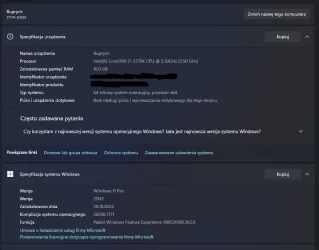
.7171 installed for me with no issues on "unsupported" machine (see my specs)

refresh your system (in-place upgrade with apps and settings retained) with official iso (start the installer from under the working system, you will revert to earlier build .65whatever)
then try windows update again immediately after the above finishes to install
this worked for me when the previous preview update .7019 initially failed to install
the install date 29.10.2025 comes from that refresh
 

Attachments

  • Zrzut ekranu 2025-11-20 190735.webp
    Zrzut ekranu 2025-11-20 190735.webp
    43.2 KB · Views: 1

My Computer

System One

  • OS
    Windows 11 Pro 25H2
    Computer type
    PC/Desktop
    Manufacturer/Model
    custom
    CPU
    intel i7-3770k
    Motherboard
    MSI Z77A-GD55
    Memory
    16GB 4x Crucial 1600 MHz
    Graphics Card(s)
    MSI GTX 1070 AERO ITX OC
    Sound Card
    inbuilt
    Monitor(s) Displays
    1x Kruger&Matz
    Screen Resolution
    1920x1080
    Hard Drives
    1x system SSD Kioxia Exceria, 3x HDD Toshiba, 1x HDD WD, 6.5 TB total storage
    Case
    modecom
    Browser
    Edge, Chrome
    Antivirus
    Windows inbuilt
    Other Info
    GPT, UEFI, Secure Boot, no TPM
This has been fixed on 19.11.25 with Windows updates "version 25H2 (repair version)"
That gets you to build 26200.7171
 

My Computer

System One

  • OS
    Windows 11
.7171 installed for me with no issues on "unsupported" machine (see my specs)

refresh your system (in-place upgrade with apps and settings retained) with official iso (start the installer from under the working system, you will revert to earlier build .65whatever)
then try windows update again immediately after the above finishes to install
this worked for me when the previous preview update .7019 initially failed to install
the install date 29.10.2025 comes from that refresh
For some reason I could not install the update to build 7019, but I installed the latest update to build 7171, so I don't care. I guess some minor incompatibility since my system is unsupported. I would start to worry if I could not install any more updates, but for a single one, I will just ignore the issue. I suggest you also wait for the next one.
 

My Computers

System One System Two

  • OS
    Windows 11 Pro 23H2 (5699), 25H2 (8457)
    Computer type
    Laptop
    Manufacturer/Model
    Acer Extensa 5630EZ
    CPU
    Mobile DualCore Intel Core 2 Duo T7250, 2000 MHz
    Motherboard
    Acer Extensa 5630
    Memory
    4GB
    Graphics Card(s)
    Mobile Intel(R) GMA 4500M (Mobile 4 series)
    Sound Card
    Realtek ALC268 @ Intel 82801IB ICH9 - High Definition Audio Controller
    Monitor(s) Displays
    1
    Screen Resolution
    1280x800
    Hard Drives
    Samsung SSD 850 EVO 250GB SATA Device (250 GB, SATA-III)
    Internet Speed
    VDSL 50 Mbps
    Browser
    MICROSOFT EDGE
    Antivirus
    WINDOWS DEFENDER
    Other Info
    Legacy MBR installation, no TPM, no Secure Boot, no WDDM 2.0 graphics drivers, no SSE4.2, cannot get more unsupported ;) This is only my test laptop. I had installed Windows 11 here before upgrading my main PC. For my main PC I use everyday see my 2nd system specs.
  • Operating System
    Windows 11 Pro v25H2 (build 26200.8457)
    Computer type
    PC/Desktop
    Manufacturer/Model
    Custom-built PC
    CPU
    Intel Core-i7 3770 3.40GHz s1155 (3rd generation)
    Motherboard
    Asus P8H61 s1155 ATX
    Memory
    2x Kingston Hyper-X Blu 8GB DDR3-1600
    Graphics card(s)
    GIGABYTE GeForce RTX 3050 WINDFORCE OC V2 6GB (GV-N3050WF2OCV2-6GD)
    Sound Card
    Realtek HD audio (ALC887)
    Monitor(s) Displays
    Sony Bravia KDL-19L4000 19" LCD TV via VGA
    Screen Resolution
    1440x900 32-bit 60Hz
    Hard Drives
    WD Blue SA510 2.5 1000GB SSD as system disk, Western Digital Caviar Purple 4TB SATA III (WD40PURZ) as second
    PSU
    Thermaltake Litepower RGB 550W Full Wired
    Case
    SUPERCASE MIDI-TOWER
    Cooling
    Deepcool Gamma Archer CPU cooler, 1x 8cm fan at the back
    Keyboard
    Mitsumi 101-key PS/2
    Mouse
    Sunnyline OptiEye PS/2
    Internet Speed
    100Mbps
    Browser
    Microsoft Edge, Mozilla Firefox
    Antivirus
    Microsoft Windows Defender
    Other Info
    Legacy BIOS (MBR) installation, no TPM, no Secure Boot, WDDM 3.0 graphics drivers, WEI score 7.4
This has been fixed on 19.11.25 with Windows updates "version 25H2 (repair version)"
That gets you to build 26200.7171
Yes i confirm. >Windows update >Recovery >Fix problems using Windows Update
will install Windows Version 25H2 build 26200.7171; which includes the KB5068861...
But its a very lengthy process at least all the settings remain! but its done.
Thanks to all also for support!
 

My Computer

System One

  • OS
    W11 pro, 25h2
    Computer type
    Laptop
    Manufacturer/Model
    HP
I read elsewhere that Microsoft admitted there are some bugs in Windows 11 affecting some users and they will fix them in a future update.
 

My Computers

System One System Two

  • OS
    Windows 11 Pro 23H2 (5699), 25H2 (8457)
    Computer type
    Laptop
    Manufacturer/Model
    Acer Extensa 5630EZ
    CPU
    Mobile DualCore Intel Core 2 Duo T7250, 2000 MHz
    Motherboard
    Acer Extensa 5630
    Memory
    4GB
    Graphics Card(s)
    Mobile Intel(R) GMA 4500M (Mobile 4 series)
    Sound Card
    Realtek ALC268 @ Intel 82801IB ICH9 - High Definition Audio Controller
    Monitor(s) Displays
    1
    Screen Resolution
    1280x800
    Hard Drives
    Samsung SSD 850 EVO 250GB SATA Device (250 GB, SATA-III)
    Internet Speed
    VDSL 50 Mbps
    Browser
    MICROSOFT EDGE
    Antivirus
    WINDOWS DEFENDER
    Other Info
    Legacy MBR installation, no TPM, no Secure Boot, no WDDM 2.0 graphics drivers, no SSE4.2, cannot get more unsupported ;) This is only my test laptop. I had installed Windows 11 here before upgrading my main PC. For my main PC I use everyday see my 2nd system specs.
  • Operating System
    Windows 11 Pro v25H2 (build 26200.8457)
    Computer type
    PC/Desktop
    Manufacturer/Model
    Custom-built PC
    CPU
    Intel Core-i7 3770 3.40GHz s1155 (3rd generation)
    Motherboard
    Asus P8H61 s1155 ATX
    Memory
    2x Kingston Hyper-X Blu 8GB DDR3-1600
    Graphics card(s)
    GIGABYTE GeForce RTX 3050 WINDFORCE OC V2 6GB (GV-N3050WF2OCV2-6GD)
    Sound Card
    Realtek HD audio (ALC887)
    Monitor(s) Displays
    Sony Bravia KDL-19L4000 19" LCD TV via VGA
    Screen Resolution
    1440x900 32-bit 60Hz
    Hard Drives
    WD Blue SA510 2.5 1000GB SSD as system disk, Western Digital Caviar Purple 4TB SATA III (WD40PURZ) as second
    PSU
    Thermaltake Litepower RGB 550W Full Wired
    Case
    SUPERCASE MIDI-TOWER
    Cooling
    Deepcool Gamma Archer CPU cooler, 1x 8cm fan at the back
    Keyboard
    Mitsumi 101-key PS/2
    Mouse
    Sunnyline OptiEye PS/2
    Internet Speed
    100Mbps
    Browser
    Microsoft Edge, Mozilla Firefox
    Antivirus
    Microsoft Windows Defender
    Other Info
    Legacy BIOS (MBR) installation, no TPM, no Secure Boot, WDDM 3.0 graphics drivers, WEI score 7.4

Latest Support Threads

Back
Top Bottom