Solved Is there a way to disable 'quick searches'


zooburner

I really don't burn zoos !
Member
Local time
10:36 AM
Posts
114
OS
Windows 11
Okay I fully installed windows 11, mostly I have to say I like it, I'm in the process of customising it, and there is one thing that has me stumped. I'm talking about the 'quick searches' on the start/search menu, mostly it lists things i have absolutely no interest in whatsoever. Is there a way to disable, or at least customise what appears there? I've included a picture of what I mean
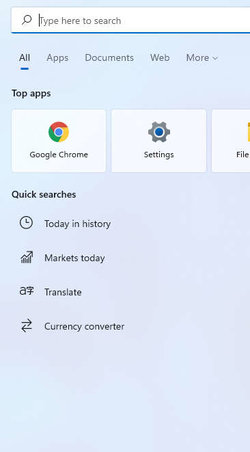
startmenu.jpg
 

My Computer My Computer

At a glance

Windows 11Intel(R) Core(TM) i7-14700F (2.10 to 5.7 GHz)...32 GB Corsair Vengeance DDR5Nvidia 5060Ti 16GB
OS
Windows 11
Computer type
PC/Desktop
Manufacturer/Model
Scan
CPU
Intel(R) Core(TM) i7-14700F (2.10 to 5.7 GHz) 20 cores
Motherboard
ASUS Prime H610M-A WiFi D5
Memory
32 GB Corsair Vengeance DDR5
Graphics Card(s)
Nvidia 5060Ti 16GB
Sound Card
Onboard / Realtek
Monitor(s) Displays
Samsung 2K QHD
Screen Resolution
2560 × 1440
Hard Drives
1TB Crucial P310 (Heatsink) M.2
1TB Samsung 990Pro M.2
1 x Crucial SSD 480gb
1 x Crucial SSD 1TB
PSU
Corsair 650 w
Case
Coolmaster
Cooling
Scan Pro Glacier Liquid Cooling
Keyboard
HP keyboard and mouse combo
Mouse
HP keyboard and mouse combo
Internet Speed
900mbs
Browser
Vivaldi
Antivirus
Microsoft
Other Info
Using a WI-FI 7 Ugreen USB 3.2 Add-On Dongle, as the built in WiFi is a bit deaf.
@zooburner

This will take care of that issue...


1. Go to: HKEY_CURRENT_USER\SOFTWARE\Policies\Microsoft\Windows\Explorer
2. On the right side, create a new 32-bit DWORD and name it: DisableSearchBoxSuggestions
3. Double click the DWORD you just created and set it's value to 1.
4. Sign out, then sign back in (or reboot) to apply the changes.


Image1.png


Both the Start menu and Taskbar search boxes, also do what is called a Web Search.
So... instead of just getting local results when you perform a search, it also gives you web results.
This is what you're seeing under the Quick Searches heading.

The registry edit above, will stop the web search. Then you will only see the local results.


Here... I've exported this key for you. In case you don't feel comfortable with registry edits.
Just place this on your desktop and double click it, and answer YES and then OK.
That will edit the registry for you.
 

Attachments

Last edited:

My Computers My Computers

  • At a glance

    Win 11 Home ♦♦♦26300.9550 ♦♦♦♦♦♦♦26H2AMD Ryzen 7 3700XG.Skill (F4-3200C14D-16GTZKW)EVGA RTX 2070 (08G-P4-2171-KR)
    OS
    Win 11 Home ♦♦♦26300.9550 ♦♦♦♦♦♦♦26H2
    Computer type
    PC/Desktop
    Manufacturer/Model
    Built by Ghot® [May 2020]
    CPU
    AMD Ryzen 7 3700X
    Motherboard
    Asus Pro WS X570-ACE (BIOS 5302)
    Memory
    G.Skill (F4-3200C14D-16GTZKW)
    Graphics Card(s)
    EVGA RTX 2070 (08G-P4-2171-KR)
    Sound Card
    Realtek ALC1220P / ALC S1220A
    Monitor(s) Displays
    Dell U3011 30"
    Screen Resolution
    2560 x 1600
    Hard Drives
    2x Samsung 860 EVO 500GB,
    WD 4TB Black FZBX - SATA III,
    WD 8TB Black FZBX - SATA III,
    DRW-24B1ST CD/DVD Burner
    PSU
    PC Power & Cooling 750W Quad EPS12V
    Case
    Cooler Master ATCS 840 Tower
    Cooling
    CM Hyper 212 EVO (push/pull)
    Keyboard
    Ducky DK9008 Shine II Blue LED
    Mouse
    Logitech Optical M-100
    Internet Speed
    300/300
    Browser
    Firefox (latest)
    Antivirus
    Bitdefender Total Security
    Other Info
    Speakers: Klipsch Pro Media 2.1
  • At a glance

    Windows XP Pro 32bit w/SP3AMD Athlon 64 X2 5000+ (OC'd @ 3.2Ghz)TWIN2X2048-6400C4DHX (2 x 1GB, DDR2 800)EVGA 256-P2-N758-TR GeForce 8600GT SSC
    Operating System
    Windows XP Pro 32bit w/SP3
    Computer type
    PC/Desktop
    Manufacturer/Model
    Built by Ghot® (not in use)
    CPU
    AMD Athlon 64 X2 5000+ (OC'd @ 3.2Ghz)
    Motherboard
    ASUS M2N32-SLI Deluxe Wireless Edition
    Memory
    TWIN2X2048-6400C4DHX (2 x 1GB, DDR2 800)
    Graphics card(s)
    EVGA 256-P2-N758-TR GeForce 8600GT SSC
    Sound Card
    Onboard
    Monitor(s) Displays
    ViewSonic G90FB Black 19" Professional (CRT)
    Screen Resolution
    up to 2048 x 1536
    Hard Drives
    WD 36GB 10,000rpm Raptor SATA
    Seagate 80GB 7200rpm SATA
    Lite-On LTR-52246S CD/RW
    Lite-On LH-18A1P CD/DVD Burner
    PSU
    PC Power & Cooling Silencer 750 Quad EPS12V
    Case
    Generic Beige case, 80mm fans
    Cooling
    ZALMAN 9500A 92mm CPU Cooler
    Keyboard
    Logitech Classic Keybooard 200
    Mouse
    Logitech Optical M-BT96a
    Internet Speed
    300/300
    Browser
    Firefox 3.x ??
    Antivirus
    Symantec (Norton)
    Other Info
    Still assembled, still runs. Haven't turned it on for 15 years?
@zooburner

This will take care of that issue...


1. Go to: HKEY_CURRENT_USER\SOFTWARE\Policies\Microsoft\Windows\Explorer
2. On the right side, create a new 32-bit DWORD and name it: DisableSearchBoxSuggestions
3. Double click the DWORD you just created and set it's value to 1.
4. Sign out, then sign back in (or reboot) to apply the changes.


View attachment 9532


Both the Start menu and Taskbar search boxes, also do what is called a Web Search.
So... instead of just getting local results when you perform a search, it also gives you web results.
This is what you're seeing under the Quick Searches heading.

The registry edit above, will stop the web search. Then you will only see the local results.


Here... I've exported this key for you. In case you don't feel comfortable with registry edits.
Just place this on your desktop and double click it, and answer YES and then OK.
That will edit the registry for you.
Hi there Ghot, thanks so much for your reply
regshot.jpg

I couldn't find it at the location listed above but found it here

Computer\HKEY_LOCAL_MACHINE\SOFTWARE\Microsoft\PolicyManager\default\ADMX_WindowsExplorer\DisableSearchBoxSuggestions

Is that the same thing ?
 

My Computer My Computer

At a glance

Windows 11Intel(R) Core(TM) i7-14700F (2.10 to 5.7 GHz)...32 GB Corsair Vengeance DDR5Nvidia 5060Ti 16GB
OS
Windows 11
Computer type
PC/Desktop
Manufacturer/Model
Scan
CPU
Intel(R) Core(TM) i7-14700F (2.10 to 5.7 GHz) 20 cores
Motherboard
ASUS Prime H610M-A WiFi D5
Memory
32 GB Corsair Vengeance DDR5
Graphics Card(s)
Nvidia 5060Ti 16GB
Sound Card
Onboard / Realtek
Monitor(s) Displays
Samsung 2K QHD
Screen Resolution
2560 × 1440
Hard Drives
1TB Crucial P310 (Heatsink) M.2
1TB Samsung 990Pro M.2
1 x Crucial SSD 480gb
1 x Crucial SSD 1TB
PSU
Corsair 650 w
Case
Coolmaster
Cooling
Scan Pro Glacier Liquid Cooling
Keyboard
HP keyboard and mouse combo
Mouse
HP keyboard and mouse combo
Internet Speed
900mbs
Browser
Vivaldi
Antivirus
Microsoft
Other Info
Using a WI-FI 7 Ugreen USB 3.2 Add-On Dongle, as the built in WiFi is a bit deaf.
Hi there Ghot, thanks so much for your reply

I couldn't find it at the location listed above but found it here

Computer\HKEY_LOCAL_MACHINE\SOFTWARE\Microsoft\PolicyManager\default\ADMX_WindowsExplorer\DisableSearchBoxSuggestions

Is that the same thing ?


Probably not.
The registry is VERY specific. I have both. You should have the registry location that I posted.

HKEY_CURRENT_USER\SOFTWARE\Policies\Microsoft\Windows\Explorer


If you can't find it... use the registry patch, that I posted above.
Remember to reboot to apply the changes.
 

My Computers My Computers

  • At a glance

    Win 11 Home ♦♦♦26300.9550 ♦♦♦♦♦♦♦26H2AMD Ryzen 7 3700XG.Skill (F4-3200C14D-16GTZKW)EVGA RTX 2070 (08G-P4-2171-KR)
    OS
    Win 11 Home ♦♦♦26300.9550 ♦♦♦♦♦♦♦26H2
    Computer type
    PC/Desktop
    Manufacturer/Model
    Built by Ghot® [May 2020]
    CPU
    AMD Ryzen 7 3700X
    Motherboard
    Asus Pro WS X570-ACE (BIOS 5302)
    Memory
    G.Skill (F4-3200C14D-16GTZKW)
    Graphics Card(s)
    EVGA RTX 2070 (08G-P4-2171-KR)
    Sound Card
    Realtek ALC1220P / ALC S1220A
    Monitor(s) Displays
    Dell U3011 30"
    Screen Resolution
    2560 x 1600
    Hard Drives
    2x Samsung 860 EVO 500GB,
    WD 4TB Black FZBX - SATA III,
    WD 8TB Black FZBX - SATA III,
    DRW-24B1ST CD/DVD Burner
    PSU
    PC Power & Cooling 750W Quad EPS12V
    Case
    Cooler Master ATCS 840 Tower
    Cooling
    CM Hyper 212 EVO (push/pull)
    Keyboard
    Ducky DK9008 Shine II Blue LED
    Mouse
    Logitech Optical M-100
    Internet Speed
    300/300
    Browser
    Firefox (latest)
    Antivirus
    Bitdefender Total Security
    Other Info
    Speakers: Klipsch Pro Media 2.1
  • At a glance

    Windows XP Pro 32bit w/SP3AMD Athlon 64 X2 5000+ (OC'd @ 3.2Ghz)TWIN2X2048-6400C4DHX (2 x 1GB, DDR2 800)EVGA 256-P2-N758-TR GeForce 8600GT SSC
    Operating System
    Windows XP Pro 32bit w/SP3
    Computer type
    PC/Desktop
    Manufacturer/Model
    Built by Ghot® (not in use)
    CPU
    AMD Athlon 64 X2 5000+ (OC'd @ 3.2Ghz)
    Motherboard
    ASUS M2N32-SLI Deluxe Wireless Edition
    Memory
    TWIN2X2048-6400C4DHX (2 x 1GB, DDR2 800)
    Graphics card(s)
    EVGA 256-P2-N758-TR GeForce 8600GT SSC
    Sound Card
    Onboard
    Monitor(s) Displays
    ViewSonic G90FB Black 19" Professional (CRT)
    Screen Resolution
    up to 2048 x 1536
    Hard Drives
    WD 36GB 10,000rpm Raptor SATA
    Seagate 80GB 7200rpm SATA
    Lite-On LTR-52246S CD/RW
    Lite-On LH-18A1P CD/DVD Burner
    PSU
    PC Power & Cooling Silencer 750 Quad EPS12V
    Case
    Generic Beige case, 80mm fans
    Cooling
    ZALMAN 9500A 92mm CPU Cooler
    Keyboard
    Logitech Classic Keybooard 200
    Mouse
    Logitech Optical M-BT96a
    Internet Speed
    300/300
    Browser
    Firefox 3.x ??
    Antivirus
    Symantec (Norton)
    Other Info
    Still assembled, still runs. Haven't turned it on for 15 years?
Probably not.
The registry is VERY specific. I have both. You should have the registry location that I posted.

HKEY_CURRENT_USER\SOFTWARE\Policies\Microsoft\Windows\Explorer
That's strange then, i don't have the 'explorer' folder, if it helps this is a clean install of windows 11 ?
regshot.jpg
 

My Computer My Computer

At a glance

Windows 11Intel(R) Core(TM) i7-14700F (2.10 to 5.7 GHz)...32 GB Corsair Vengeance DDR5Nvidia 5060Ti 16GB
OS
Windows 11
Computer type
PC/Desktop
Manufacturer/Model
Scan
CPU
Intel(R) Core(TM) i7-14700F (2.10 to 5.7 GHz) 20 cores
Motherboard
ASUS Prime H610M-A WiFi D5
Memory
32 GB Corsair Vengeance DDR5
Graphics Card(s)
Nvidia 5060Ti 16GB
Sound Card
Onboard / Realtek
Monitor(s) Displays
Samsung 2K QHD
Screen Resolution
2560 × 1440
Hard Drives
1TB Crucial P310 (Heatsink) M.2
1TB Samsung 990Pro M.2
1 x Crucial SSD 480gb
1 x Crucial SSD 1TB
PSU
Corsair 650 w
Case
Coolmaster
Cooling
Scan Pro Glacier Liquid Cooling
Keyboard
HP keyboard and mouse combo
Mouse
HP keyboard and mouse combo
Internet Speed
900mbs
Browser
Vivaldi
Antivirus
Microsoft
Other Info
Using a WI-FI 7 Ugreen USB 3.2 Add-On Dongle, as the built in WiFi is a bit deaf.
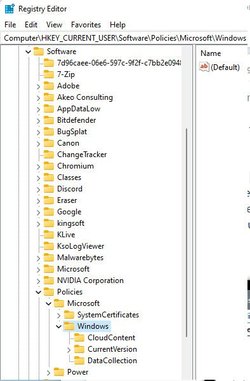
Just use the registry patch I posted above... that will "create" that key.

Here's the source. It even says... "If this path is missing, then create the missing parts manually". This patch will do that for you...

How to disable web search in Windows 10 taskbar


This tweak was originally made for Windows 10, but it works on Windows 11.
I did an In-Place upgrade from Win 10 to Win 11, not a clean install.
That may be why I already have that key and you don't.

You can create the Explorer key yourself, or let the patch do it for you. :)


Image1.png
 

Attachments

Last edited:

My Computers My Computers

  • At a glance

    Win 11 Home ♦♦♦26300.9550 ♦♦♦♦♦♦♦26H2AMD Ryzen 7 3700XG.Skill (F4-3200C14D-16GTZKW)EVGA RTX 2070 (08G-P4-2171-KR)
    OS
    Win 11 Home ♦♦♦26300.9550 ♦♦♦♦♦♦♦26H2
    Computer type
    PC/Desktop
    Manufacturer/Model
    Built by Ghot® [May 2020]
    CPU
    AMD Ryzen 7 3700X
    Motherboard
    Asus Pro WS X570-ACE (BIOS 5302)
    Memory
    G.Skill (F4-3200C14D-16GTZKW)
    Graphics Card(s)
    EVGA RTX 2070 (08G-P4-2171-KR)
    Sound Card
    Realtek ALC1220P / ALC S1220A
    Monitor(s) Displays
    Dell U3011 30"
    Screen Resolution
    2560 x 1600
    Hard Drives
    2x Samsung 860 EVO 500GB,
    WD 4TB Black FZBX - SATA III,
    WD 8TB Black FZBX - SATA III,
    DRW-24B1ST CD/DVD Burner
    PSU
    PC Power & Cooling 750W Quad EPS12V
    Case
    Cooler Master ATCS 840 Tower
    Cooling
    CM Hyper 212 EVO (push/pull)
    Keyboard
    Ducky DK9008 Shine II Blue LED
    Mouse
    Logitech Optical M-100
    Internet Speed
    300/300
    Browser
    Firefox (latest)
    Antivirus
    Bitdefender Total Security
    Other Info
    Speakers: Klipsch Pro Media 2.1
  • At a glance

    Windows XP Pro 32bit w/SP3AMD Athlon 64 X2 5000+ (OC'd @ 3.2Ghz)TWIN2X2048-6400C4DHX (2 x 1GB, DDR2 800)EVGA 256-P2-N758-TR GeForce 8600GT SSC
    Operating System
    Windows XP Pro 32bit w/SP3
    Computer type
    PC/Desktop
    Manufacturer/Model
    Built by Ghot® (not in use)
    CPU
    AMD Athlon 64 X2 5000+ (OC'd @ 3.2Ghz)
    Motherboard
    ASUS M2N32-SLI Deluxe Wireless Edition
    Memory
    TWIN2X2048-6400C4DHX (2 x 1GB, DDR2 800)
    Graphics card(s)
    EVGA 256-P2-N758-TR GeForce 8600GT SSC
    Sound Card
    Onboard
    Monitor(s) Displays
    ViewSonic G90FB Black 19" Professional (CRT)
    Screen Resolution
    up to 2048 x 1536
    Hard Drives
    WD 36GB 10,000rpm Raptor SATA
    Seagate 80GB 7200rpm SATA
    Lite-On LTR-52246S CD/RW
    Lite-On LH-18A1P CD/DVD Burner
    PSU
    PC Power & Cooling Silencer 750 Quad EPS12V
    Case
    Generic Beige case, 80mm fans
    Cooling
    ZALMAN 9500A 92mm CPU Cooler
    Keyboard
    Logitech Classic Keybooard 200
    Mouse
    Logitech Optical M-BT96a
    Internet Speed
    300/300
    Browser
    Firefox 3.x ??
    Antivirus
    Symantec (Norton)
    Other Info
    Still assembled, still runs. Haven't turned it on for 15 years?
Just use the registry patch I posted above... that will "create" that key.

Here's the source. It even says... "If this path is missing, then create the missing parts manually". This patch will do that for you...

How to disable web search in Windows 10 taskbar


This tweak was originally made for Windows 10, but it works on Windows 11.
I did an In-Place upgrade from Win 10 to Win 11, not a clean install.
That may be why I already have that key and you don't.


View attachment 9538
Thanks Ghot, that did the trick :)
 

My Computer My Computer

At a glance

Windows 11Intel(R) Core(TM) i7-14700F (2.10 to 5.7 GHz)...32 GB Corsair Vengeance DDR5Nvidia 5060Ti 16GB
OS
Windows 11
Computer type
PC/Desktop
Manufacturer/Model
Scan
CPU
Intel(R) Core(TM) i7-14700F (2.10 to 5.7 GHz) 20 cores
Motherboard
ASUS Prime H610M-A WiFi D5
Memory
32 GB Corsair Vengeance DDR5
Graphics Card(s)
Nvidia 5060Ti 16GB
Sound Card
Onboard / Realtek
Monitor(s) Displays
Samsung 2K QHD
Screen Resolution
2560 × 1440
Hard Drives
1TB Crucial P310 (Heatsink) M.2
1TB Samsung 990Pro M.2
1 x Crucial SSD 480gb
1 x Crucial SSD 1TB
PSU
Corsair 650 w
Case
Coolmaster
Cooling
Scan Pro Glacier Liquid Cooling
Keyboard
HP keyboard and mouse combo
Mouse
HP keyboard and mouse combo
Internet Speed
900mbs
Browser
Vivaldi
Antivirus
Microsoft
Other Info
Using a WI-FI 7 Ugreen USB 3.2 Add-On Dongle, as the built in WiFi is a bit deaf.
Thanks Ghot, that did the trick :)


Here's a couple more, that will probably make your day...


Gets the Windows 10 context menus, back...


Gets the Windows 10 File Explorer ribbon bar, back...


Image1.png


And these registry patch(es) will get rid of some or all of those excess folders in File Explorer...
 

Attachments

My Computers My Computers

  • At a glance

    Win 11 Home ♦♦♦26300.9550 ♦♦♦♦♦♦♦26H2AMD Ryzen 7 3700XG.Skill (F4-3200C14D-16GTZKW)EVGA RTX 2070 (08G-P4-2171-KR)
    OS
    Win 11 Home ♦♦♦26300.9550 ♦♦♦♦♦♦♦26H2
    Computer type
    PC/Desktop
    Manufacturer/Model
    Built by Ghot® [May 2020]
    CPU
    AMD Ryzen 7 3700X
    Motherboard
    Asus Pro WS X570-ACE (BIOS 5302)
    Memory
    G.Skill (F4-3200C14D-16GTZKW)
    Graphics Card(s)
    EVGA RTX 2070 (08G-P4-2171-KR)
    Sound Card
    Realtek ALC1220P / ALC S1220A
    Monitor(s) Displays
    Dell U3011 30"
    Screen Resolution
    2560 x 1600
    Hard Drives
    2x Samsung 860 EVO 500GB,
    WD 4TB Black FZBX - SATA III,
    WD 8TB Black FZBX - SATA III,
    DRW-24B1ST CD/DVD Burner
    PSU
    PC Power & Cooling 750W Quad EPS12V
    Case
    Cooler Master ATCS 840 Tower
    Cooling
    CM Hyper 212 EVO (push/pull)
    Keyboard
    Ducky DK9008 Shine II Blue LED
    Mouse
    Logitech Optical M-100
    Internet Speed
    300/300
    Browser
    Firefox (latest)
    Antivirus
    Bitdefender Total Security
    Other Info
    Speakers: Klipsch Pro Media 2.1
  • At a glance

    Windows XP Pro 32bit w/SP3AMD Athlon 64 X2 5000+ (OC'd @ 3.2Ghz)TWIN2X2048-6400C4DHX (2 x 1GB, DDR2 800)EVGA 256-P2-N758-TR GeForce 8600GT SSC
    Operating System
    Windows XP Pro 32bit w/SP3
    Computer type
    PC/Desktop
    Manufacturer/Model
    Built by Ghot® (not in use)
    CPU
    AMD Athlon 64 X2 5000+ (OC'd @ 3.2Ghz)
    Motherboard
    ASUS M2N32-SLI Deluxe Wireless Edition
    Memory
    TWIN2X2048-6400C4DHX (2 x 1GB, DDR2 800)
    Graphics card(s)
    EVGA 256-P2-N758-TR GeForce 8600GT SSC
    Sound Card
    Onboard
    Monitor(s) Displays
    ViewSonic G90FB Black 19" Professional (CRT)
    Screen Resolution
    up to 2048 x 1536
    Hard Drives
    WD 36GB 10,000rpm Raptor SATA
    Seagate 80GB 7200rpm SATA
    Lite-On LTR-52246S CD/RW
    Lite-On LH-18A1P CD/DVD Burner
    PSU
    PC Power & Cooling Silencer 750 Quad EPS12V
    Case
    Generic Beige case, 80mm fans
    Cooling
    ZALMAN 9500A 92mm CPU Cooler
    Keyboard
    Logitech Classic Keybooard 200
    Mouse
    Logitech Optical M-BT96a
    Internet Speed
    300/300
    Browser
    Firefox 3.x ??
    Antivirus
    Symantec (Norton)
    Other Info
    Still assembled, still runs. Haven't turned it on for 15 years?
Here's a couple more, that will probably make your day...


Gets the Windows 10 context menus, back...


Gets the Windows 10 File Explorer ribbon bar, back...

Yes, they are helpful, thanks so much for your help :)
 

My Computer My Computer

At a glance

Windows 11Intel(R) Core(TM) i7-14700F (2.10 to 5.7 GHz)...32 GB Corsair Vengeance DDR5Nvidia 5060Ti 16GB
OS
Windows 11
Computer type
PC/Desktop
Manufacturer/Model
Scan
CPU
Intel(R) Core(TM) i7-14700F (2.10 to 5.7 GHz) 20 cores
Motherboard
ASUS Prime H610M-A WiFi D5
Memory
32 GB Corsair Vengeance DDR5
Graphics Card(s)
Nvidia 5060Ti 16GB
Sound Card
Onboard / Realtek
Monitor(s) Displays
Samsung 2K QHD
Screen Resolution
2560 × 1440
Hard Drives
1TB Crucial P310 (Heatsink) M.2
1TB Samsung 990Pro M.2
1 x Crucial SSD 480gb
1 x Crucial SSD 1TB
PSU
Corsair 650 w
Case
Coolmaster
Cooling
Scan Pro Glacier Liquid Cooling
Keyboard
HP keyboard and mouse combo
Mouse
HP keyboard and mouse combo
Internet Speed
900mbs
Browser
Vivaldi
Antivirus
Microsoft
Other Info
Using a WI-FI 7 Ugreen USB 3.2 Add-On Dongle, as the built in WiFi is a bit deaf.
And if you really hate the Quick Access (folder) in File Explorer, like I do...


1. Open the Windows Registry as an administrator by launching the Run command using the Windows + R keyboard shortcut, typing "regedit", and hitting Enter.

2. Navigate to the following registry path: HKEY_CLASSES_ROOT\CLSID{679f85cb-0220-4080-b29b-5540cc05aab6}

3. Now you need to change the permissions of ShellFolder, right-click ShellFolder, select Permissions, then click the Advanced button.

4. At the top of Advanced Security Settings for ShellFolder, change the ownership of the folder to "Administrators".

5. To do this, click Change, click Advanced, click the Find Now button, and from "search results" select "Administrators", then click OK, OK again, then Apply, hit OK, and hit OK one last time to close the ShellFolder Permissions box.

6. Now... Under "Group or User Names", choose: Administrators and put a check mark in... "Full Control"
Then click Apply and OK.

7. With that completed, we can now change the settings to remove Quick Access from File Explorer.

8. Inside "ShellFolder", double-click Attributes, and change data value from a0100000 to a0600000, and click OK.

9. You can now either restart Windows 10 or open the Task Manager, find and select Windows Explorer, and click Restart from bottom-right corner.


That's about all I have... so far. :D

Make sure you check the tutorials on this site. There's loads of tweaks in there as well.
 

My Computers My Computers

  • At a glance

    Win 11 Home ♦♦♦26300.9550 ♦♦♦♦♦♦♦26H2AMD Ryzen 7 3700XG.Skill (F4-3200C14D-16GTZKW)EVGA RTX 2070 (08G-P4-2171-KR)
    OS
    Win 11 Home ♦♦♦26300.9550 ♦♦♦♦♦♦♦26H2
    Computer type
    PC/Desktop
    Manufacturer/Model
    Built by Ghot® [May 2020]
    CPU
    AMD Ryzen 7 3700X
    Motherboard
    Asus Pro WS X570-ACE (BIOS 5302)
    Memory
    G.Skill (F4-3200C14D-16GTZKW)
    Graphics Card(s)
    EVGA RTX 2070 (08G-P4-2171-KR)
    Sound Card
    Realtek ALC1220P / ALC S1220A
    Monitor(s) Displays
    Dell U3011 30"
    Screen Resolution
    2560 x 1600
    Hard Drives
    2x Samsung 860 EVO 500GB,
    WD 4TB Black FZBX - SATA III,
    WD 8TB Black FZBX - SATA III,
    DRW-24B1ST CD/DVD Burner
    PSU
    PC Power & Cooling 750W Quad EPS12V
    Case
    Cooler Master ATCS 840 Tower
    Cooling
    CM Hyper 212 EVO (push/pull)
    Keyboard
    Ducky DK9008 Shine II Blue LED
    Mouse
    Logitech Optical M-100
    Internet Speed
    300/300
    Browser
    Firefox (latest)
    Antivirus
    Bitdefender Total Security
    Other Info
    Speakers: Klipsch Pro Media 2.1
  • At a glance

    Windows XP Pro 32bit w/SP3AMD Athlon 64 X2 5000+ (OC'd @ 3.2Ghz)TWIN2X2048-6400C4DHX (2 x 1GB, DDR2 800)EVGA 256-P2-N758-TR GeForce 8600GT SSC
    Operating System
    Windows XP Pro 32bit w/SP3
    Computer type
    PC/Desktop
    Manufacturer/Model
    Built by Ghot® (not in use)
    CPU
    AMD Athlon 64 X2 5000+ (OC'd @ 3.2Ghz)
    Motherboard
    ASUS M2N32-SLI Deluxe Wireless Edition
    Memory
    TWIN2X2048-6400C4DHX (2 x 1GB, DDR2 800)
    Graphics card(s)
    EVGA 256-P2-N758-TR GeForce 8600GT SSC
    Sound Card
    Onboard
    Monitor(s) Displays
    ViewSonic G90FB Black 19" Professional (CRT)
    Screen Resolution
    up to 2048 x 1536
    Hard Drives
    WD 36GB 10,000rpm Raptor SATA
    Seagate 80GB 7200rpm SATA
    Lite-On LTR-52246S CD/RW
    Lite-On LH-18A1P CD/DVD Burner
    PSU
    PC Power & Cooling Silencer 750 Quad EPS12V
    Case
    Generic Beige case, 80mm fans
    Cooling
    ZALMAN 9500A 92mm CPU Cooler
    Keyboard
    Logitech Classic Keybooard 200
    Mouse
    Logitech Optical M-BT96a
    Internet Speed
    300/300
    Browser
    Firefox 3.x ??
    Antivirus
    Symantec (Norton)
    Other Info
    Still assembled, still runs. Haven't turned it on for 15 years?
 

My Computers My Computers

  • At a glance

    Win 11 Home ♦♦♦26300.9550 ♦♦♦♦♦♦♦26H2AMD Ryzen 7 3700XG.Skill (F4-3200C14D-16GTZKW)EVGA RTX 2070 (08G-P4-2171-KR)
    OS
    Win 11 Home ♦♦♦26300.9550 ♦♦♦♦♦♦♦26H2
    Computer type
    PC/Desktop
    Manufacturer/Model
    Built by Ghot® [May 2020]
    CPU
    AMD Ryzen 7 3700X
    Motherboard
    Asus Pro WS X570-ACE (BIOS 5302)
    Memory
    G.Skill (F4-3200C14D-16GTZKW)
    Graphics Card(s)
    EVGA RTX 2070 (08G-P4-2171-KR)
    Sound Card
    Realtek ALC1220P / ALC S1220A
    Monitor(s) Displays
    Dell U3011 30"
    Screen Resolution
    2560 x 1600
    Hard Drives
    2x Samsung 860 EVO 500GB,
    WD 4TB Black FZBX - SATA III,
    WD 8TB Black FZBX - SATA III,
    DRW-24B1ST CD/DVD Burner
    PSU
    PC Power & Cooling 750W Quad EPS12V
    Case
    Cooler Master ATCS 840 Tower
    Cooling
    CM Hyper 212 EVO (push/pull)
    Keyboard
    Ducky DK9008 Shine II Blue LED
    Mouse
    Logitech Optical M-100
    Internet Speed
    300/300
    Browser
    Firefox (latest)
    Antivirus
    Bitdefender Total Security
    Other Info
    Speakers: Klipsch Pro Media 2.1
  • At a glance

    Windows XP Pro 32bit w/SP3AMD Athlon 64 X2 5000+ (OC'd @ 3.2Ghz)TWIN2X2048-6400C4DHX (2 x 1GB, DDR2 800)EVGA 256-P2-N758-TR GeForce 8600GT SSC
    Operating System
    Windows XP Pro 32bit w/SP3
    Computer type
    PC/Desktop
    Manufacturer/Model
    Built by Ghot® (not in use)
    CPU
    AMD Athlon 64 X2 5000+ (OC'd @ 3.2Ghz)
    Motherboard
    ASUS M2N32-SLI Deluxe Wireless Edition
    Memory
    TWIN2X2048-6400C4DHX (2 x 1GB, DDR2 800)
    Graphics card(s)
    EVGA 256-P2-N758-TR GeForce 8600GT SSC
    Sound Card
    Onboard
    Monitor(s) Displays
    ViewSonic G90FB Black 19" Professional (CRT)
    Screen Resolution
    up to 2048 x 1536
    Hard Drives
    WD 36GB 10,000rpm Raptor SATA
    Seagate 80GB 7200rpm SATA
    Lite-On LTR-52246S CD/RW
    Lite-On LH-18A1P CD/DVD Burner
    PSU
    PC Power & Cooling Silencer 750 Quad EPS12V
    Case
    Generic Beige case, 80mm fans
    Cooling
    ZALMAN 9500A 92mm CPU Cooler
    Keyboard
    Logitech Classic Keybooard 200
    Mouse
    Logitech Optical M-BT96a
    Internet Speed
    300/300
    Browser
    Firefox 3.x ??
    Antivirus
    Symantec (Norton)
    Other Info
    Still assembled, still runs. Haven't turned it on for 15 years?
@zooburner

This will take care of that issue...


1. Go to: HKEY_CURRENT_USER\SOFTWARE\Policies\Microsoft\Windows\Explorer
2. On the right side, create a new 32-bit DWORD and name it: DisableSearchBoxSuggestions
3. Double click the DWORD you just created and set it's value to 1.
4. Sign out, then sign back in (or reboot) to apply the changes.


View attachment 9532


Both the Start menu and Taskbar search boxes, also do what is called a Web Search.
So... instead of just getting local results when you perform a search, it also gives you web results.
This is what you're seeing under the Quick Searches heading.

The registry edit above, will stop the web search. Then you will only see the local results.


Here... I've exported this key for you. In case you don't feel comfortable with registry edits.
Just place this on your desktop and double click it, and answer YES and then OK.
That will edit the registry for you.
Hey Ghot,
I appreciate the info and patches you have posted to make Win 11 better. I am not as tech savvy as you and have a question. I didn't make a backup when I first did a fresh install of Win 11 and used your patch to disable web searches, which is what I want. I was getting ready to make my backup with Macrium Reflect and thought it may be best to undo that registry change for the backup but not sure how to do that. My question is, do you think it is necessary to change it back to how Win 11 came and if so, do you have a patch to undo the "web search " changes I made? I know I have a couple of other patches you posted and they have both, Enable and Disable so it's easy to undo a change you make. Do you happen to have a patch to undo this change ? I appreciate your help for a noob like me.
Thanks !!!
 

My Computers My Computers

  • At a glance

    Windows 11 x64, Ver 22H2 Build 22621.819AMD Ryzen 7 5700U16.0 GBRadeon Graphics
    OS
    Windows 11 x64, Ver 22H2 Build 22621.819
    Computer type
    Laptop
    Manufacturer/Model
    Acer Aspire A515-45
    CPU
    AMD Ryzen 7 5700U
    Motherboard
    LN Motherboard Calla_LC V1.12
    Memory
    16.0 GB
    Graphics Card(s)
    Radeon Graphics
    Screen Resolution
    1920 x 1080
    Hard Drives
    SK Hynix BC711 512GB, M.2 2280, NVMe PCIe 3.0 x4 (Operating System)
    T-FORCE 1TB ( Stock HDD 1 TB used for Data storage)
    Mouse
    Logitech M385
    Browser
    Mozilla Firefox
    Antivirus
    Windows Defender
  • At a glance

    Windows 11 Home, 22H2, OS Build 22621.1105Intel(R) Core(TM) i7-6700 CPU @ 3.40GHz 3.41 GHz16.0 GB
    Operating System
    Windows 11 Home, 22H2, OS Build 22621.1105
    Computer type
    PC/Desktop
    Manufacturer/Model
    HP ENVY 750-124
    CPU
    Intel(R) Core(TM) i7-6700 CPU @ 3.40GHz 3.41 GHz
    Motherboard
    Odense SSID: 2B47
    Memory
    16.0 GB
    Screen Resolution
    1920 x 1080
    Hard Drives
    Samsung SSD 870 EVO 1 TB (OS)
    SD2000DM008-2FR102 2 TB (Data)
Hey Ghot,
I appreciate the info and patches you have posted to make Win 11 better. I am not as tech savvy as you and have a question. I didn't make a backup when I first did a fresh install of Win 11 and used your patch to disable web searches, which is what I want. I was getting ready to make my backup with Macrium Reflect and thought it may be best to undo that registry change for the backup but not sure how to do that. My question is, do you think it is necessary to change it back to how Win 11 came and if so, do you have a patch to undo the "web search " changes I made? I know I have a couple of other patches you posted and they have both, Enable and Disable so it's easy to undo a change you make. Do you happen to have a patch to undo this change ? I appreciate your help for a noob like me.
Thanks !!!


It doesn't matter if you leave it or set it back to how it was.

To "undo" the change, just set the value of DisableSearchBoxSuggestions, to... 0
 

My Computers My Computers

  • At a glance

    Win 11 Home ♦♦♦26300.9550 ♦♦♦♦♦♦♦26H2AMD Ryzen 7 3700XG.Skill (F4-3200C14D-16GTZKW)EVGA RTX 2070 (08G-P4-2171-KR)
    OS
    Win 11 Home ♦♦♦26300.9550 ♦♦♦♦♦♦♦26H2
    Computer type
    PC/Desktop
    Manufacturer/Model
    Built by Ghot® [May 2020]
    CPU
    AMD Ryzen 7 3700X
    Motherboard
    Asus Pro WS X570-ACE (BIOS 5302)
    Memory
    G.Skill (F4-3200C14D-16GTZKW)
    Graphics Card(s)
    EVGA RTX 2070 (08G-P4-2171-KR)
    Sound Card
    Realtek ALC1220P / ALC S1220A
    Monitor(s) Displays
    Dell U3011 30"
    Screen Resolution
    2560 x 1600
    Hard Drives
    2x Samsung 860 EVO 500GB,
    WD 4TB Black FZBX - SATA III,
    WD 8TB Black FZBX - SATA III,
    DRW-24B1ST CD/DVD Burner
    PSU
    PC Power & Cooling 750W Quad EPS12V
    Case
    Cooler Master ATCS 840 Tower
    Cooling
    CM Hyper 212 EVO (push/pull)
    Keyboard
    Ducky DK9008 Shine II Blue LED
    Mouse
    Logitech Optical M-100
    Internet Speed
    300/300
    Browser
    Firefox (latest)
    Antivirus
    Bitdefender Total Security
    Other Info
    Speakers: Klipsch Pro Media 2.1
  • At a glance

    Windows XP Pro 32bit w/SP3AMD Athlon 64 X2 5000+ (OC'd @ 3.2Ghz)TWIN2X2048-6400C4DHX (2 x 1GB, DDR2 800)EVGA 256-P2-N758-TR GeForce 8600GT SSC
    Operating System
    Windows XP Pro 32bit w/SP3
    Computer type
    PC/Desktop
    Manufacturer/Model
    Built by Ghot® (not in use)
    CPU
    AMD Athlon 64 X2 5000+ (OC'd @ 3.2Ghz)
    Motherboard
    ASUS M2N32-SLI Deluxe Wireless Edition
    Memory
    TWIN2X2048-6400C4DHX (2 x 1GB, DDR2 800)
    Graphics card(s)
    EVGA 256-P2-N758-TR GeForce 8600GT SSC
    Sound Card
    Onboard
    Monitor(s) Displays
    ViewSonic G90FB Black 19" Professional (CRT)
    Screen Resolution
    up to 2048 x 1536
    Hard Drives
    WD 36GB 10,000rpm Raptor SATA
    Seagate 80GB 7200rpm SATA
    Lite-On LTR-52246S CD/RW
    Lite-On LH-18A1P CD/DVD Burner
    PSU
    PC Power & Cooling Silencer 750 Quad EPS12V
    Case
    Generic Beige case, 80mm fans
    Cooling
    ZALMAN 9500A 92mm CPU Cooler
    Keyboard
    Logitech Classic Keybooard 200
    Mouse
    Logitech Optical M-BT96a
    Internet Speed
    300/300
    Browser
    Firefox 3.x ??
    Antivirus
    Symantec (Norton)
    Other Info
    Still assembled, still runs. Haven't turned it on for 15 years?
It doesn't matter if you leave it or set it back to how it was.

To "undo" the change, just set the value of DisableSearchBoxSuggestions, to... 0
Thanks for the quick reply. I do like better with the search disable so will just leave it and make my backup.
 

My Computers My Computers

  • At a glance

    Windows 11 x64, Ver 22H2 Build 22621.819AMD Ryzen 7 5700U16.0 GBRadeon Graphics
    OS
    Windows 11 x64, Ver 22H2 Build 22621.819
    Computer type
    Laptop
    Manufacturer/Model
    Acer Aspire A515-45
    CPU
    AMD Ryzen 7 5700U
    Motherboard
    LN Motherboard Calla_LC V1.12
    Memory
    16.0 GB
    Graphics Card(s)
    Radeon Graphics
    Screen Resolution
    1920 x 1080
    Hard Drives
    SK Hynix BC711 512GB, M.2 2280, NVMe PCIe 3.0 x4 (Operating System)
    T-FORCE 1TB ( Stock HDD 1 TB used for Data storage)
    Mouse
    Logitech M385
    Browser
    Mozilla Firefox
    Antivirus
    Windows Defender
  • At a glance

    Windows 11 Home, 22H2, OS Build 22621.1105Intel(R) Core(TM) i7-6700 CPU @ 3.40GHz 3.41 GHz16.0 GB
    Operating System
    Windows 11 Home, 22H2, OS Build 22621.1105
    Computer type
    PC/Desktop
    Manufacturer/Model
    HP ENVY 750-124
    CPU
    Intel(R) Core(TM) i7-6700 CPU @ 3.40GHz 3.41 GHz
    Motherboard
    Odense SSID: 2B47
    Memory
    16.0 GB
    Screen Resolution
    1920 x 1080
    Hard Drives
    Samsung SSD 870 EVO 1 TB (OS)
    SD2000DM008-2FR102 2 TB (Data)
I'm having a similar problem: on a clean install of Windows 11 Pro, I run a batch file to configure it the way I want. Among other things, I turn off web search and set the registry value listed in this tut. But when I hover the mouse over the search icon on the taskbar it offers me "news" and "time in Madrid".
If I ever wanted to read the news on my computer I would open a web browser and browse to a trustworthy news site. I don't want News "in my face" when I'm trying to search for something on my computer such as regedit or task scheduler.
As for the time in some other continent, I live in the USA and have absolutely no interest in knowing what time it is in Europe.
How do I remove these very annoying and even idiotic distractions from Search, using a batch file?
 

My Computer My Computer

At a glance

Win 10 proseveral
OS
Win 10 pro
Computer type
PC/Desktop
Manufacturer/Model
several (Dell, HP, custom build, Lenovo, ASUS, etc.)
CPU
several
Motherboard
several
Browser
Firefox
Other Info
I have many computers, mostly Dell and HP.
I'm having a similar problem:
See if this works for you. Use option 2 step 3. Option 1 is for Insider Dev channel
 

My Computers My Computers

  • At a glance

    Windows 11 Pro 25H2 26200.9457i9-10900 10 core 20 threads32 gbnone-Intel UHD Graphics 630
    OS
    Windows 11 Pro 25H2 26200.9457
    Computer type
    PC/Desktop
    Manufacturer/Model
    Dell Optiplex 7080
    CPU
    i9-10900 10 core 20 threads
    Motherboard
    DELL 0J37VM
    Memory
    32 gb
    Graphics Card(s)
    none-Intel UHD Graphics 630
    Sound Card
    Integrated Realtek
    Monitor(s) Displays
    Benq 27
    Screen Resolution
    2560x1440
    Hard Drives
    2x1tb Solidigm m.2 nvme /External drives 512gb Samsung m.2 sata+2tb Kingston m2.nvme
    PSU
    500w
    Case
    MT
    Cooling
    Dell Premium
    Keyboard
    Logitech wired
    Mouse
    Logitech wireless
    Internet Speed
    so slow I'm too embarrassed to tell
    Browser
    #1 Edge #2 Firefox
    Antivirus
    Defender+MWB Premium
  • At a glance

    Windows 11 Pro 24H2 26200.9457AMD Ryzen 7 6800U32 gbintegrated
    Operating System
    Windows 11 Pro 24H2 26200.9457
    Computer type
    PC/Desktop
    Manufacturer/Model
    Beelink Mini PC SER5
    CPU
    AMD Ryzen 7 6800U
    Memory
    32 gb
    Graphics card(s)
    integrated
    Sound Card
    integrated
    Monitor(s) Displays
    Benq 27
    Screen Resolution
    2560x1440
    Hard Drives
    1TB Crucial nvme
    Keyboard
    Logitech wired
    Mouse
    Logitech wireless
    Internet Speed
    still too embarrassed to tell
    Browser
    Firefox
    Antivirus
    Defender
  • System 3 is non compliant Dell 9020 i7-4770/24gb ram Win11 PRO 26200.9457
I have the same issue when I hover over the taskbar search icon. It did remove the "Quick Searches" in start and I have tried both reg edits mentioned and also tried disabling "search" with Winaero but it still shows over the taskbar search icon.
 

My Computers My Computers

  • At a glance

    Windows 11 x64, Ver 22H2 Build 22621.819AMD Ryzen 7 5700U16.0 GBRadeon Graphics
    OS
    Windows 11 x64, Ver 22H2 Build 22621.819
    Computer type
    Laptop
    Manufacturer/Model
    Acer Aspire A515-45
    CPU
    AMD Ryzen 7 5700U
    Motherboard
    LN Motherboard Calla_LC V1.12
    Memory
    16.0 GB
    Graphics Card(s)
    Radeon Graphics
    Screen Resolution
    1920 x 1080
    Hard Drives
    SK Hynix BC711 512GB, M.2 2280, NVMe PCIe 3.0 x4 (Operating System)
    T-FORCE 1TB ( Stock HDD 1 TB used for Data storage)
    Mouse
    Logitech M385
    Browser
    Mozilla Firefox
    Antivirus
    Windows Defender
  • At a glance

    Windows 11 Home, 22H2, OS Build 22621.1105Intel(R) Core(TM) i7-6700 CPU @ 3.40GHz 3.41 GHz16.0 GB
    Operating System
    Windows 11 Home, 22H2, OS Build 22621.1105
    Computer type
    PC/Desktop
    Manufacturer/Model
    HP ENVY 750-124
    CPU
    Intel(R) Core(TM) i7-6700 CPU @ 3.40GHz 3.41 GHz
    Motherboard
    Odense SSID: 2B47
    Memory
    16.0 GB
    Screen Resolution
    1920 x 1080
    Hard Drives
    Samsung SSD 870 EVO 1 TB (OS)
    SD2000DM008-2FR102 2 TB (Data)
I have the same issue when I hover over the taskbar search icon
If you are running Dev channel then option one in the tutorial should work.
If you are running release build, then option 2
 

My Computers My Computers

  • At a glance

    Windows 11 Pro 25H2 26200.9457i9-10900 10 core 20 threads32 gbnone-Intel UHD Graphics 630
    OS
    Windows 11 Pro 25H2 26200.9457
    Computer type
    PC/Desktop
    Manufacturer/Model
    Dell Optiplex 7080
    CPU
    i9-10900 10 core 20 threads
    Motherboard
    DELL 0J37VM
    Memory
    32 gb
    Graphics Card(s)
    none-Intel UHD Graphics 630
    Sound Card
    Integrated Realtek
    Monitor(s) Displays
    Benq 27
    Screen Resolution
    2560x1440
    Hard Drives
    2x1tb Solidigm m.2 nvme /External drives 512gb Samsung m.2 sata+2tb Kingston m2.nvme
    PSU
    500w
    Case
    MT
    Cooling
    Dell Premium
    Keyboard
    Logitech wired
    Mouse
    Logitech wireless
    Internet Speed
    so slow I'm too embarrassed to tell
    Browser
    #1 Edge #2 Firefox
    Antivirus
    Defender+MWB Premium
  • At a glance

    Windows 11 Pro 24H2 26200.9457AMD Ryzen 7 6800U32 gbintegrated
    Operating System
    Windows 11 Pro 24H2 26200.9457
    Computer type
    PC/Desktop
    Manufacturer/Model
    Beelink Mini PC SER5
    CPU
    AMD Ryzen 7 6800U
    Memory
    32 gb
    Graphics card(s)
    integrated
    Sound Card
    integrated
    Monitor(s) Displays
    Benq 27
    Screen Resolution
    2560x1440
    Hard Drives
    1TB Crucial nvme
    Keyboard
    Logitech wired
    Mouse
    Logitech wireless
    Internet Speed
    still too embarrassed to tell
    Browser
    Firefox
    Antivirus
    Defender
  • System 3 is non compliant Dell 9020 i7-4770/24gb ram Win11 PRO 26200.9457
If you are running Dev channel then option one in the tutorial should work.
If you are running release build, then option 2
I tried option 2 and it still shows when hovering the search icon in the taskbar. It does remove the quick search in Start which is the same as the reg edit @Ghot posted or the Winaero tweak.
 

My Computers My Computers

  • At a glance

    Windows 11 x64, Ver 22H2 Build 22621.819AMD Ryzen 7 5700U16.0 GBRadeon Graphics
    OS
    Windows 11 x64, Ver 22H2 Build 22621.819
    Computer type
    Laptop
    Manufacturer/Model
    Acer Aspire A515-45
    CPU
    AMD Ryzen 7 5700U
    Motherboard
    LN Motherboard Calla_LC V1.12
    Memory
    16.0 GB
    Graphics Card(s)
    Radeon Graphics
    Screen Resolution
    1920 x 1080
    Hard Drives
    SK Hynix BC711 512GB, M.2 2280, NVMe PCIe 3.0 x4 (Operating System)
    T-FORCE 1TB ( Stock HDD 1 TB used for Data storage)
    Mouse
    Logitech M385
    Browser
    Mozilla Firefox
    Antivirus
    Windows Defender
  • At a glance

    Windows 11 Home, 22H2, OS Build 22621.1105Intel(R) Core(TM) i7-6700 CPU @ 3.40GHz 3.41 GHz16.0 GB
    Operating System
    Windows 11 Home, 22H2, OS Build 22621.1105
    Computer type
    PC/Desktop
    Manufacturer/Model
    HP ENVY 750-124
    CPU
    Intel(R) Core(TM) i7-6700 CPU @ 3.40GHz 3.41 GHz
    Motherboard
    Odense SSID: 2B47
    Memory
    16.0 GB
    Screen Resolution
    1920 x 1080
    Hard Drives
    Samsung SSD 870 EVO 1 TB (OS)
    SD2000DM008-2FR102 2 TB (Data)

Latest Support Threads

Back
Top Bottom