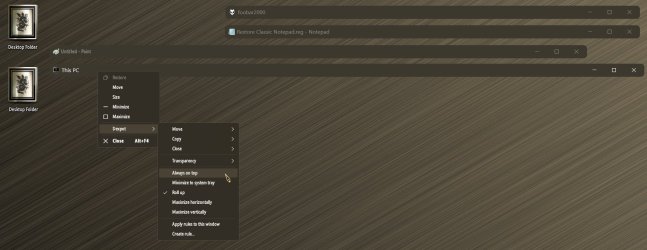
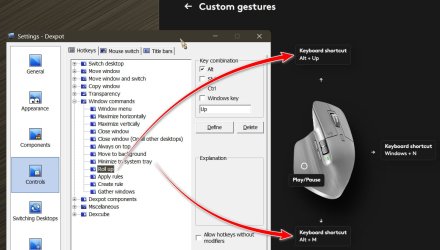
Years ago I stumbled upon a developer company who designed a program that ran in the SysTray & tweaked Windows 7/10 by adding two more functions onto each new window opened. A PIN icon to allow me to pin that window on top of all other windows & an icon that would (no matter how big the window size was) collapse that window, like pulling up/down a blind shade, under its header.
This way when you were working with multiple windows you could move around the collapsed windows while you worked & still saw the Windows title while they were pinned on top of other windows.
Is there a way via an app or Windows tweak that could bring that feature back?
O,n a side note: I do have a SysTray utility called Monitor, that when you press [WIN + L] to lock Windows, it immediately locks your computer & starts the screensaver. As long as you had the .SCReensaver & delayed idle time setup already.
Cheers!
This way when you were working with multiple windows you could move around the collapsed windows while you worked & still saw the Windows title while they were pinned on top of other windows.
Is there a way via an app or Windows tweak that could bring that feature back?
O,n a side note: I do have a SysTray utility called Monitor, that when you press [WIN + L] to lock Windows, it immediately locks your computer & starts the screensaver. As long as you had the .SCReensaver & delayed idle time setup already.
Cheers!
My Computer
At a glance
Windows 11 Pro Version 23H2 (Build: 22631.4317)7th gen Intel® Core™ i5 - 7200U (3MB Cache, 2...16GB => 8GB [on-board] & 8GB Kingston HyperX ...Intel® HD Graphics 620
- OS
- Windows 11 Pro Version 23H2 (Build: 22631.4317)
- Computer type
- Laptop
- Manufacturer/Model
- Asus Flipbook Q504UAK - BHI5T13 [ Hybrid (2-in-1) Touch ]
- CPU
- 7th gen Intel® Core™ i5 - 7200U (3MB Cache, 2.5GHz)
- Motherboard
- ASUS UX560A
- Memory
- 16GB => 8GB [on-board] & 8GB Kingston HyperX DDR4 2666MHZ SoDIMM
- Graphics Card(s)
- Intel® HD Graphics 620
- Sound Card
- Harmon/Kardon built-in
- Monitor(s) Displays
- 1
- Screen Resolution
- Touchscreen: 39.6 cm (15.6") Full HD 1920 x 1080 pixels Matt 16:9
- Hard Drives
- Samsung 2TB SSD 870 EVO [SATA]; Samsung 1TB SSD 980 PRO [NVMe Gen3];
Samsung 4TB SSD T7 Shield [Portable]
- PSU
- 19v@2.36A 45W - 20v@5.0A 65W PD (USB-C to Barrel plug 4.0mm x 1.35mm)
- Case
- Aluminum
- Cooling
- Standard cooling fan
- Keyboard
- Backlit, built-in keyboard
- Mouse
- Logitech Mice: G502X & G602
- Internet Speed
- 802.11ac
- Browser
- Firefox v131.0.2
- Other Info
- Card Reader, WLAN, 802.11a, 802.11b, 802.11g, Wi-Fi 4 (802.11n), Wi-Fi 5 (802.11ac) , Webcam, HDMI x1