Is there a way to speed local wifi network file transfer ?


William654

Well-known member
Member
VIP
Local time
7:57 AM
Posts
857
OS
Windows 11
Hi

I have tested USB 3 cable transfer to my android phone and I found it at 30 mb/s avg then I tested my wifi transfer I found it at 20 mb/s avg. I have a router that support b/g/n , My PC support Wifi 6E. My phone support Wi-Fi 802.11 a/b/g/n/ac, Wi-Fi Direct so is the router who need to be upgraded ?

I found this in search. Can I reach 200mbps ?

1696191978526.png


Thanks
 

My Computer My Computer

At a glance

Windows 115900x32 GB G.SkillRX 9070 XT
OS
Windows 11
Computer type
PC/Desktop
CPU
5900x
Motherboard
Asus TUF GAMING B550 PLUS WIFI II
Memory
32 GB G.Skill
Graphics Card(s)
RX 9070 XT
Sound Card
Creative Sound Blaster Z
Monitor(s) Displays
BENQ and AOC QHD 120Hz
Screen Resolution
QHD
Hard Drives
2TB Intel 660p and 2TB Sabrent Rokect 4 plus nvme, 4TB HDD HGST
PSU
Corsair RM750
Case
Bloody rage
Cooling
Water cooling gamdias 240
Keyboard
razer ornata
Mouse
razer da v2
Browser
FF and Chrome
Antivirus
Malwarebytes
As you noted, your PC supports WiFi6e which is far faster than N. Since the router only supports N at the most, it is the bottleneck and it is the router that needs to be updated. BTW, 6e is pretty sweet. I get slightly better than Gigabit Ethernet speeds using 6e in the real world.
 

My Computers My Computers

  • At a glance

    Win11 Pro 26H2 (Release Preview)Intel i7-14650HX32 GBNo GPU - Built-in Intel Graphics
    OS
    Win11 Pro 26H2 (Release Preview)
    Computer type
    PC/Desktop
    Manufacturer/Model
    Acemagic Matrix M5
    CPU
    Intel i7-14650HX
    Memory
    32 GB
    Graphics Card(s)
    No GPU - Built-in Intel Graphics
    Sound Card
    Integrated
    Monitor(s) Displays
    Varies as machine will often be moved to locations with different monitors
    Screen Resolution
    Varies
    Hard Drives
    1 x 1TB Gen 4 NVMe SSD
    PSU
    120W Power Brick
    Keyboard
    Corsair K70 Max RGB Magnetic Keyboard
    Mouse
    Logitech MX Master 3
    Internet Speed
    1Gb Up / 1 Gb Down
    Browser
    Edge
    Antivirus
    Windows Defender
  • At a glance

    Win11 Pro 26H2 (Release Preview)Intel i7-1255U16 GBIntel Iris Xe Graphics
    Operating System
    Win11 Pro 26H2 (Release Preview)
    Computer type
    Laptop
    Manufacturer/Model
    Lenovo ThinkBook 13x Gen 2
    CPU
    Intel i7-1255U
    Memory
    16 GB
    Graphics card(s)
    Intel Iris Xe Graphics
    Sound Card
    Realtek® ALC3306-CG codec
    Monitor(s) Displays
    13.3-inch IPS Display
    Screen Resolution
    WQXGA (2560 x 1600)
    Hard Drives
    4 TB 4 x 4 NVMe SSD
    PSU
    USB-C / Thunderbolt 4 Power / Charging Using an Anker 160W Charger
    Keyboard
    Backlit, spill resistant keyboard
    Mouse
    Buttonless Glass Precision Touchpad
    Internet Speed
    1Gb Up / 1Gb Down
    Browser
    Edge
    Antivirus
    Windows Defender
    Other Info
    WiFi 6e / Bluetooth 5.1 / Facial Recognition / Fingerprint Sensor / ToF (Time of Flight) Human Presence Sensor
As you noted, your PC supports WiFi6e which is far faster than N. Since the router only supports N at the most, it is the bottleneck and it is the router that needs to be updated. BTW, 6e is pretty sweet. I get slightly better than Gigabit Ethernet speeds using 6e in the real world.
If you can use full duplex then that's better than typical wifi default of half duplex. Another trick is to use a decent usb->lan bit of cable to a cheap switch with a cable attached to something like a decent wifi NightHawk extender or similar to one of its lan ports. These can use concurrently both 2.4 and 5 GHZ bands for the wifi to the router giving (depending on your ISP) a maximum theoretical speed of 1.3 Gbps probably decently fast enough for most people these days. Remember old wifi cards probably still won't work faster than 54 Mbps. USB->LAN with the cheap switch and lan into the wifi extender beats most bog standard wifi hands down.

Even if you have a slowish router the fact that you can use concurrently both 2.4 and 5 GHZ bands and at full duplex will improve throughput.

Cheers
jimbo
 

My Computer My Computer

At a glance

Windows XP,11 Linux Fedora Rawhide pre-releas...2 X Intel i7
OS
Windows XP,11 Linux Fedora Rawhide pre-release 46
Computer type
PC/Desktop
CPU
2 X Intel i7
Screen Resolution
4KUHD X 2
Even if you have a slowish router the fact that you can use concurrently both 2.4 and 5 GHZ bands and at full duplex will improve throughput.
How I know if router can work at full duplex ? and how to enable ?
 

My Computer My Computer

At a glance

Windows 115900x32 GB G.SkillRX 9070 XT
OS
Windows 11
Computer type
PC/Desktop
CPU
5900x
Motherboard
Asus TUF GAMING B550 PLUS WIFI II
Memory
32 GB G.Skill
Graphics Card(s)
RX 9070 XT
Sound Card
Creative Sound Blaster Z
Monitor(s) Displays
BENQ and AOC QHD 120Hz
Screen Resolution
QHD
Hard Drives
2TB Intel 660p and 2TB Sabrent Rokect 4 plus nvme, 4TB HDD HGST
PSU
Corsair RM750
Case
Bloody rage
Cooling
Water cooling gamdias 240
Keyboard
razer ornata
Mouse
razer da v2
Browser
FF and Chrome
Antivirus
Malwarebytes

My Computers My Computers

  • At a glance

    11 Homei7 13650HX16GB DDR5GeForce RTX 4060 Mobile
    OS
    11 Home
    Computer type
    Laptop
    Manufacturer/Model
    Asus TUF Gaming F16 (2024)
    CPU
    i7 13650HX
    Memory
    16GB DDR5
    Graphics Card(s)
    GeForce RTX 4060 Mobile
    Sound Card
    Eastern Electric MiniMax DAC Supreme; Emotiva UMC-200; Astell & Kern AK240
    Monitor(s) Displays
    Sony Bravia XR-55X90J
    Screen Resolution
    3840×2160
    Hard Drives
    512GB SSD internal
    37TB external
    PSU
    Li-ion
    Cooling
    2× Arc Flow Fans, 4× exhaust vents, 5× heatpipes
    Keyboard
    Logitech K800
    Mouse
    Logitech G402
    Internet Speed
    30Mbit/s up, 500Mbit/s down
    Browser
    FF
    Antivirus
    What's an antivirus?
  • At a glance

    11 Homei5 1135G716GB DDR4Intel Iris Xe
    Operating System
    11 Home
    Computer type
    Laptop
    Manufacturer/Model
    Medion S15450
    CPU
    i5 1135G7
    Memory
    16GB DDR4
    Graphics card(s)
    Intel Iris Xe
    Sound Card
    Eastern Electric MiniMax DAC Supreme; Emotiva UMC-200; Astell & Kern AK240
    Monitor(s) Displays
    Sony Bravia XR-55X90J
    Screen Resolution
    3840×2160
    Hard Drives
    2TB SSD internal
    37TB external
    PSU
    Li-ion
    Keyboard
    Logitech K800
    Mouse
    Logitech G402
    Internet Speed
    30Mbit/s up, 500Mbit/s down
    Browser
    FF


@William654

That's why the switch thing with a Nethawk wifi extender can work better - using concurrent 2.4 and 5 GHZ streams from router into the extender will increase traffic throughput plus full duplex from usb_>lan to computer.

It's like a big river plus a small one flowing into the sea - the volume of water per sec increases compared with a single source.

Running short bit of LAN cable to the switch allows your computer to connect to a LAN port on the extender and take advantage of the concurrent wifi streams arriving from the router to the wifi extender and usb is far faster than typical computer wifi cards anyway. Most decent modern fibre ISP connections wil allow the router to xmit wifi on both bands concurrently.

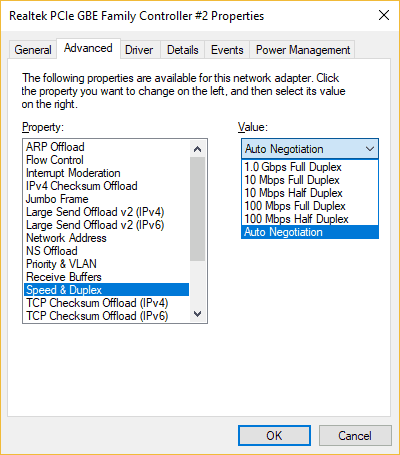
To select full duplex choose in the ethernet properties the network card properties in Device hardware section (system->hardware-> device manager). Won't be available though for wifi cards.

Cheers
jimbo
 

My Computer My Computer

At a glance

Windows XP,11 Linux Fedora Rawhide pre-releas...2 X Intel i7
OS
Windows XP,11 Linux Fedora Rawhide pre-release 46
Computer type
PC/Desktop
CPU
2 X Intel i7
Screen Resolution
4KUHD X 2
Running short bit of LAN cable to the switch allows your computer to connect to a LAN port on the extender and take advantage of the concurrent wifi streams arriving from the router to the wifi extender and usb is far faster than typical computer wifi cards anyway. Most decent modern fibre ISP connections wil allow the router to xmit wifi on both bands concurrently.
Dont understand completely. For learning do you know a youtube explain this ?

To select full duplex choose in the ethernet properties the network card properties in Device hardware section (system->hardware-> device manager). Won't be available though for wifi cards.
I opened device manager then I found this , which one ?

1696251912912.png
 

My Computer My Computer

At a glance

Windows 115900x32 GB G.SkillRX 9070 XT
OS
Windows 11
Computer type
PC/Desktop
CPU
5900x
Motherboard
Asus TUF GAMING B550 PLUS WIFI II
Memory
32 GB G.Skill
Graphics Card(s)
RX 9070 XT
Sound Card
Creative Sound Blaster Z
Monitor(s) Displays
BENQ and AOC QHD 120Hz
Screen Resolution
QHD
Hard Drives
2TB Intel 660p and 2TB Sabrent Rokect 4 plus nvme, 4TB HDD HGST
PSU
Corsair RM750
Case
Bloody rage
Cooling
Water cooling gamdias 240
Keyboard
razer ornata
Mouse
razer da v2
Browser
FF and Chrome
Antivirus
Malwarebytes
"I have a router that support b/g/n"
"so is the router who need to be upgraded ?"

Yes, The Wireless Access Point part of the Router that needs updating.
It is very old, it needs to be updated ideally to WiFi 6/6E standard.

A simple explanation is that the latest Wireless Access Points support:
1) more Bands.
2) more Channels.
3) more Modulation systems.

They are backwards compatible with older hardware. For optimum performance all hardware of a wireless link should be of the same standard otherwise the lowest is used.
Does not matter what the links are WiFi Direct or via your Router it is the lowest spec hardware that is the limit.

The table you show is too simplified, the 802.11g is roughly right, the others much less so.
The actual max is very roughly half the link speed(theoretical).


My Computer My Computer

At a glance

Windows 11
OS
Windows 11
From the peanut gallery, Yes, new Router. I got an improvement going from an 802.11n to an 802.11ac. Downside is that ALL other wireless devices need to be the same to get the same benefit. I recently junked an old ACER Aspire Notebook [for other issues, lid hinges breaking case mounting] with an 802.11g Wireless that did work but speed of data copy to a NAS drive was horrible in comparison to n and ac.
 

My Computers My Computers

  • At a glance

    Win11 Pro RTM Version 24H2 Build 26100.4202Intel Core i5 11th Gen. 2.40GHz12GB
    OS
    Win11 Pro RTM Version 24H2 Build 26100.4202
    Computer type
    Laptop
    Manufacturer/Model
    Dell Vostro 3400
    CPU
    Intel Core i5 11th Gen. 2.40GHz
    Memory
    12GB
    Hard Drives
    256GB SSD NVMe M.2
  • At a glance

    Win11 Pro RTM Version 24H2 Build 26100.4202Intel Core i5 10th Gen. 2.90GHz16GBOnboard, no VGA, using a DisplayPort-to-VGA a...
    Operating System
    Win11 Pro RTM Version 24H2 Build 26100.4202
    Computer type
    PC/Desktop
    Manufacturer/Model
    Dell Vostro 5890
    CPU
    Intel Core i5 10th Gen. 2.90GHz
    Memory
    16GB
    Graphics card(s)
    Onboard, no VGA, using a DisplayPort-to-VGA adapter
    Monitor(s) Displays
    24" Dell
    Hard Drives
    512GB SSD NVMe, 4TB Seagate HDD
    Browser
    Firefox, Edge
    Antivirus
    Windows Defender/Microsoft Security
I opened device manager then I found this , which one ?

View attachment 72802
Those are the Advanced properties for the Intel AX210 WiFi card. Your motherboard has a Realtek L8200A onboard Gigabit Ethernet adapter, as a general rule the Speed & Duplex setting is best left at its default (Auto Negotiation).

duplex_settings.png
 

My Computers My Computers

  • At a glance

    11 Homei7 13650HX16GB DDR5GeForce RTX 4060 Mobile
    OS
    11 Home
    Computer type
    Laptop
    Manufacturer/Model
    Asus TUF Gaming F16 (2024)
    CPU
    i7 13650HX
    Memory
    16GB DDR5
    Graphics Card(s)
    GeForce RTX 4060 Mobile
    Sound Card
    Eastern Electric MiniMax DAC Supreme; Emotiva UMC-200; Astell & Kern AK240
    Monitor(s) Displays
    Sony Bravia XR-55X90J
    Screen Resolution
    3840×2160
    Hard Drives
    512GB SSD internal
    37TB external
    PSU
    Li-ion
    Cooling
    2× Arc Flow Fans, 4× exhaust vents, 5× heatpipes
    Keyboard
    Logitech K800
    Mouse
    Logitech G402
    Internet Speed
    30Mbit/s up, 500Mbit/s down
    Browser
    FF
    Antivirus
    What's an antivirus?
  • At a glance

    11 Homei5 1135G716GB DDR4Intel Iris Xe
    Operating System
    11 Home
    Computer type
    Laptop
    Manufacturer/Model
    Medion S15450
    CPU
    i5 1135G7
    Memory
    16GB DDR4
    Graphics card(s)
    Intel Iris Xe
    Sound Card
    Eastern Electric MiniMax DAC Supreme; Emotiva UMC-200; Astell & Kern AK240
    Monitor(s) Displays
    Sony Bravia XR-55X90J
    Screen Resolution
    3840×2160
    Hard Drives
    2TB SSD internal
    37TB external
    PSU
    Li-ion
    Keyboard
    Logitech K800
    Mouse
    Logitech G402
    Internet Speed
    30Mbit/s up, 500Mbit/s down
    Browser
    FF
@hdmi sorry this is old board had a problem and changed to MSI. I updated spec now
 

My Computer My Computer

At a glance

Windows 115900x32 GB G.SkillRX 9070 XT
OS
Windows 11
Computer type
PC/Desktop
CPU
5900x
Motherboard
Asus TUF GAMING B550 PLUS WIFI II
Memory
32 GB G.Skill
Graphics Card(s)
RX 9070 XT
Sound Card
Creative Sound Blaster Z
Monitor(s) Displays
BENQ and AOC QHD 120Hz
Screen Resolution
QHD
Hard Drives
2TB Intel 660p and 2TB Sabrent Rokect 4 plus nvme, 4TB HDD HGST
PSU
Corsair RM750
Case
Bloody rage
Cooling
Water cooling gamdias 240
Keyboard
razer ornata
Mouse
razer da v2
Browser
FF and Chrome
Antivirus
Malwarebytes
@hdmi sorry this is old board had a problem and changed to MSI. I updated spec now
Realtek 8125B (2.5G) then. Same deal... you don't normally need to touch the Speed & Duplex setting, as Auto Negotiation should work perfectly fine.

That said, what you can do if you have two devices both of which can support faster WiFi speeds than the router is use WiFi Direct as a means to bypass the slow router (until you get a faster router at least). Another possible benefit of using WiFi Direct can be (in a few specific situations, and also regardless of whether you have replaced the router with a really very fast one) that it can help to increase the total combined throughput. Throughput = the amount of data transferred per unit time. Combined = all the WiFi connections that use the router combined with all the WiFi connections that use WiFi Direct.

However, you also need to factor in things like the limited range and signal stability (and also the loss in performance that tends to go with that) that very often are associated with choosing to use WiFi Direct as opposed to choosing the router to connect through WiFi, if we can assume that the router is still capable enough to put out a fairly decent level of signal quality.

Using the 2.4GHz band, my old Asus RT-N66U went through multiple solid brick walls like a knife goes through butter, but the same cannot be said about WiFi AC routers that are a lot more modern-advanced than it. That in fact is one of the main reasons why I had decided to keep using my Asus RT-N66U until finally, at very long last, I was able to grab the Asus RT-AX92U 2 Pack (WiFi 6 mesh system) at a very reasonable price.

Using the wired backhaul option, this mesh system makes the problem of WiFi routers having disappointingly limited range if you want them to be reliable, affordable and fast a real thing of the past. It doesn't have WiFi 6E, but then, it still fetches transfer speeds way over 900Mbps using the AX band, and, I got it over 2 years and 2 months ago for just 279 Euros.
 

My Computers My Computers

  • At a glance

    11 Homei7 13650HX16GB DDR5GeForce RTX 4060 Mobile
    OS
    11 Home
    Computer type
    Laptop
    Manufacturer/Model
    Asus TUF Gaming F16 (2024)
    CPU
    i7 13650HX
    Memory
    16GB DDR5
    Graphics Card(s)
    GeForce RTX 4060 Mobile
    Sound Card
    Eastern Electric MiniMax DAC Supreme; Emotiva UMC-200; Astell & Kern AK240
    Monitor(s) Displays
    Sony Bravia XR-55X90J
    Screen Resolution
    3840×2160
    Hard Drives
    512GB SSD internal
    37TB external
    PSU
    Li-ion
    Cooling
    2× Arc Flow Fans, 4× exhaust vents, 5× heatpipes
    Keyboard
    Logitech K800
    Mouse
    Logitech G402
    Internet Speed
    30Mbit/s up, 500Mbit/s down
    Browser
    FF
    Antivirus
    What's an antivirus?
  • At a glance

    11 Homei5 1135G716GB DDR4Intel Iris Xe
    Operating System
    11 Home
    Computer type
    Laptop
    Manufacturer/Model
    Medion S15450
    CPU
    i5 1135G7
    Memory
    16GB DDR4
    Graphics card(s)
    Intel Iris Xe
    Sound Card
    Eastern Electric MiniMax DAC Supreme; Emotiva UMC-200; Astell & Kern AK240
    Monitor(s) Displays
    Sony Bravia XR-55X90J
    Screen Resolution
    3840×2160
    Hard Drives
    2TB SSD internal
    37TB external
    PSU
    Li-ion
    Keyboard
    Logitech K800
    Mouse
    Logitech G402
    Internet Speed
    30Mbit/s up, 500Mbit/s down
    Browser
    FF

My Computer My Computer

At a glance

Windows 115900x32 GB G.SkillRX 9070 XT
OS
Windows 11
Computer type
PC/Desktop
CPU
5900x
Motherboard
Asus TUF GAMING B550 PLUS WIFI II
Memory
32 GB G.Skill
Graphics Card(s)
RX 9070 XT
Sound Card
Creative Sound Blaster Z
Monitor(s) Displays
BENQ and AOC QHD 120Hz
Screen Resolution
QHD
Hard Drives
2TB Intel 660p and 2TB Sabrent Rokect 4 plus nvme, 4TB HDD HGST
PSU
Corsair RM750
Case
Bloody rage
Cooling
Water cooling gamdias 240
Keyboard
razer ornata
Mouse
razer da v2
Browser
FF and Chrome
Antivirus
Malwarebytes
what retailer was than ?
www.alternate.be and, as an extra gift from Asus back then, they had additionally included free shipping to Belgian customers with this product (which has a 3-year warranty period from Asus also).
 

My Computers My Computers

  • At a glance

    11 Homei7 13650HX16GB DDR5GeForce RTX 4060 Mobile
    OS
    11 Home
    Computer type
    Laptop
    Manufacturer/Model
    Asus TUF Gaming F16 (2024)
    CPU
    i7 13650HX
    Memory
    16GB DDR5
    Graphics Card(s)
    GeForce RTX 4060 Mobile
    Sound Card
    Eastern Electric MiniMax DAC Supreme; Emotiva UMC-200; Astell & Kern AK240
    Monitor(s) Displays
    Sony Bravia XR-55X90J
    Screen Resolution
    3840×2160
    Hard Drives
    512GB SSD internal
    37TB external
    PSU
    Li-ion
    Cooling
    2× Arc Flow Fans, 4× exhaust vents, 5× heatpipes
    Keyboard
    Logitech K800
    Mouse
    Logitech G402
    Internet Speed
    30Mbit/s up, 500Mbit/s down
    Browser
    FF
    Antivirus
    What's an antivirus?
  • At a glance

    11 Homei5 1135G716GB DDR4Intel Iris Xe
    Operating System
    11 Home
    Computer type
    Laptop
    Manufacturer/Model
    Medion S15450
    CPU
    i5 1135G7
    Memory
    16GB DDR4
    Graphics card(s)
    Intel Iris Xe
    Sound Card
    Eastern Electric MiniMax DAC Supreme; Emotiva UMC-200; Astell & Kern AK240
    Monitor(s) Displays
    Sony Bravia XR-55X90J
    Screen Resolution
    3840×2160
    Hard Drives
    2TB SSD internal
    37TB external
    PSU
    Li-ion
    Keyboard
    Logitech K800
    Mouse
    Logitech G402
    Internet Speed
    30Mbit/s up, 500Mbit/s down
    Browser
    FF
Back
Top Bottom