
Solved Is There An App That Will Scan a P.C. and Link You To Drivers Manufacturer's Download Pages?


AllenChicago

Well-known member
Member
Local time
10:14 AM
Posts
84
OS
Windows 11 64-bit
Greetings P.C. Experts!

IS THERE A PROGRAM that will scan the P.C. and provide a link to each manufacturer's page where the latest driver is located? This new H.P. OmniDesk P.C. is like a Borg creation. It's has drivers from HP, Microsoft, Intel, Realtek, and Nvidia. My CrapCleaner program says there are 9 drivers out of date, but I'm not comfortable retrieving them from the CCleaner company. I prefer to be linked to the page at each manufacturer's site, where those 9 drivers can be downloaded.

I realize this is a long-shot question, but if members in this forum don't know of a program with this capability, it's almost guaranteed that no program like it exists. As always, thanks for any good suggestions! 👍

-Allen
 
Windows Build/Version
Windows 11 - 25H2

My Computer My Computer

At a glance

Windows 11 64-bitIntel® Core™ i7-1065G7 CPU @ 1.30GHz12GBIntel Iris Graphics
OS
Windows 11 64-bit
Computer type
Laptop
Manufacturer/Model
Samsung
CPU
Intel® Core™ i7-1065G7 CPU @ 1.30GHz
Motherboard
SAMSUNG ELECTRONICS CO., LTD. Model NP950QCG-K01US
Memory
12GB
Graphics Card(s)
Intel Iris Graphics
Hard Drives
SAMSUNG MZVLB512HBJQ-000 SSD 476.94 GB
Mouse
Logitech MX Mobile BlueTooth
Internet Speed
686.6 Mbps download 23.6 Mbps upload Latency: 8 ms Server: Chicago
Browser
Edge (Default) and FireFox installed.
HP should have an app that will keep all the drivers updated that are applicable for your device, no matter the vendor. It used to be called HP Support assistant but I haven't owned an HP in years so don't know what it's called these days. Should be listed on the application and driver support page for your device. Also should have been pre-installed on your device by HP.
 

My Computers My Computers

  • At a glance

    Windows 11 Pro 25H2 26200.8655i9-10900 10 core 20 threads32 gbnone-Intel UHD Graphics 630
    OS
    Windows 11 Pro 25H2 26200.8655
    Computer type
    PC/Desktop
    Manufacturer/Model
    Dell Optiplex 7080
    CPU
    i9-10900 10 core 20 threads
    Motherboard
    DELL 0J37VM
    Memory
    32 gb
    Graphics Card(s)
    none-Intel UHD Graphics 630
    Sound Card
    Integrated Realtek
    Monitor(s) Displays
    Benq 27
    Screen Resolution
    2560x1440
    Hard Drives
    2x1tb Solidigm m.2 nvme /External drives 512gb Samsung m.2 sata+2tb Kingston m2.nvme
    PSU
    500w
    Case
    MT
    Cooling
    Dell Premium
    Keyboard
    Logitech wired
    Mouse
    Logitech wireless
    Internet Speed
    so slow I'm too embarrassed to tell
    Browser
    #1 Edge #2 Firefox
    Antivirus
    Defender+MWB Premium
  • At a glance

    Windows 11 Pro 24H2 26200.8457AMD Ryzen 7 6800U32 gbintegrated
    Operating System
    Windows 11 Pro 24H2 26200.8457
    Computer type
    PC/Desktop
    Manufacturer/Model
    Beelink Mini PC SER5
    CPU
    AMD Ryzen 7 6800U
    Memory
    32 gb
    Graphics card(s)
    integrated
    Sound Card
    integrated
    Monitor(s) Displays
    Benq 27
    Screen Resolution
    2560x1440
    Hard Drives
    1TB Crucial nvme
    Keyboard
    Logitech wired
    Mouse
    Logitech wireless
    Internet Speed
    still too embarrassed to tell
    Browser
    Firefox
    Antivirus
    Defender
    Other Info
    System 3 is non compliant Dell 9020 i7-4770/24gb ram Win11 PRO 26200.8457
I personally recommend to stay away from programs like CCleaner. For HP computers and mfg drivers, find HP Support Assistant which should already be installed on a new HP. Do a scan and it will show you available driver updates. If this PC is out of warranty, tread carefully. I caution against fixing things that aren't broke. Especially a BIOS update.

But knowing people... they like to tinker with things that don't need tinkering on. If something tells them that there is a hardware update, they are drawn to it like sea sirens. We all did it though and this is how a lot of us became quasi-experts.

But seriously... your PC doesn't need a 3rd party cleaner and esecially one that wants to monkey with your hardware drivers. Is it running OK? That's the question.
 

My Computers My Computers

  • At a glance

    Windows 11 25H2Intel Core™ i7-1165G7 (4C / 8T, 2.8 / 4.7GHz,...12GB Soldered DDR4-3200Integrated Intel® Iris® Xe Graphics
    OS
    Windows 11 25H2
    Computer type
    Laptop
    Manufacturer/Model
    Lenovo Yoga 7 14ITL5 (82BH00DLUS)
    CPU
    Intel Core™ i7-1165G7 (4C / 8T, 2.8 / 4.7GHz, 12MB)
    Memory
    12GB Soldered DDR4-3200
    Graphics Card(s)
    Integrated Intel® Iris® Xe Graphics
    Monitor(s) Displays
    14" FHD (1920x1080) IPS 300nits Glossy, 72% NTSC, AGC Dragontrail™ Glass, Touch
    Screen Resolution
    1920x1080
    Hard Drives
    500 GB SSD
    Case
    Aluminum
    Cooling
    Single-fan
    Keyboard
    Backlit, internal
    Mouse
    Logitech M535
    Internet Speed
    With this laptop I usually test around 200/200 connected to UniFi UAP-AC-PRO ceiling units.
    Browser
    Chrome
    Antivirus
    Windows Security and my brain.
    Other Info
    I use this laptop mainly from my recliner. It's purpose is scheduling computer and TV services, closing TV work orders, remote customer support, research and recreation.

    Printers in the office room on my main floor were both acquired from business customers who upgraded equipment, had me handle the upgrade and then haul away the replaced hardware. I have not purchased a printer for myself in 15 years.

    Main: HP LaserJet P3010 (black & white, hardwired, networked)
    Aux: HP Color LaserJet MFP M281fdw (color laser, fax, hardwired, networked)

    Internet in my house is routed through a TP-Link AC3200 with radios disabled. Wireless access points are two (2) strategically-located UniFi UAP-AC-PRO ceiling units which cover my whole house including basement and front/back yards. Netgear gigabit switches and CAT6 cabling are used for wired purposes.
  • At a glance

    Windows 10 22H2Intel(R) Core(TM) i5-3470 CPU @ 3.20GHz 3.20 GHz16 GB DDR3Intel(R) HD Graphics 2500
    Operating System
    Windows 10 22H2
    Computer type
    PC/Desktop
    Manufacturer/Model
    Dell Optiplex 3010
    CPU
    Intel(R) Core(TM) i5-3470 CPU @ 3.20GHz 3.20 GHz
    Memory
    16 GB DDR3
    Graphics card(s)
    Intel(R) HD Graphics 2500
    Sound Card
    Onboard
    Monitor(s) Displays
    ACER KG271 (x2)
    Screen Resolution
    1920x1080
    Hard Drives
    WD 500GB SSD
    Keyboard
    Old Dell wireless
    Mouse
    Old Dell wired
    Internet Speed
    500/500
    Browser
    Chrome
    Antivirus
    Windows Security and my brain
    Other Info
    This computer was acquired from a customer who cleaned out her office. I upgraded it and now use it in my downstairs computer-repair office.

    My home office printer is an old HP LaserJet 3015. I acquired this after a customer passed away and his wife sold their house and downsized. She gave me all his equipment. I still help her with her tech issues.
See if the device has a QR Code attached, it may bring you straight to the support site and provide a One Click Driver update.

Q.webp D.webp
 

My Computers My Computers

  • At a glance

    Windows 11 Pro
    OS
    Windows 11 Pro
    Computer type
    PC/Desktop
    Manufacturer/Model
    ASUS ROG Strix
  • At a glance

    Windows 11 Pro
    Operating System
    Windows 11 Pro
    Computer type
    Laptop
    Manufacturer/Model
    ASUS VivoBook
  • ASUS VivoBook 'Lite' ~ Windows 11 Home
i gave sdi snappy driver installer a chance and tried it out, so far i love it, esp. on older hardware like AM3 LGA775 etc. i am not a friend of such software but SDI really impressed me in a very positive way.
 

My Computers My Computers

  • At a glance

    Windows 11 24h2 ltsci7 377024 GB 1700 mHz with tighter timingsGT 710 with fan mod
    OS
    Windows 11 24h2 ltsc
    Computer type
    PC/Desktop
    Manufacturer/Model
    Gigabyte/Intel
    CPU
    i7 3770
    Motherboard
    Gigabyte
    Memory
    24 GB 1700 mHz with tighter timings
    Graphics Card(s)
    GT 710 with fan mod
    Hard Drives
    many, 2xSSD and 13xHDD
    PSU
    some EVGA
    Cooling
    old Corsair Fan double side taped on top of stock cooler
    Internet Speed
    300 down/75 up
    Browser
    Firefox
    Antivirus
    Defender
  • At a glance

    Win 11 24h2 ltscPentium G20306Gb 1333mhz with much tighter timingsHD 5450
    Operating System
    Win 11 24h2 ltsc
    Computer type
    PC/Desktop
    Manufacturer/Model
    ECS/Intel
    CPU
    Pentium G2030
    Motherboard
    ECS
    Memory
    6Gb 1333mhz with much tighter timings
    Graphics card(s)
    HD 5450
    Monitor(s) Displays
    LG
    Screen Resolution
    1600x900
    Hard Drives
    128gb SSD, 150GB Stripeset from 2 HDDs 7200 rpm
    PSU
    Gigabyte
    Cooling
    Stock cooler from i7
    Keyboard
    Genius
    Mouse
    x-tech Stauros
    Browser
    Firefox
    Antivirus
    Defender
    Other Info
    i always try to get the most/best out of "older" hardware
You could also check Settings/System/About for an online support link...

12724.webp
 

My Computers My Computers

  • At a glance

    Windows 11 Pro
    OS
    Windows 11 Pro
    Computer type
    PC/Desktop
    Manufacturer/Model
    ASUS ROG Strix
  • At a glance

    Windows 11 Pro
    Operating System
    Windows 11 Pro
    Computer type
    Laptop
    Manufacturer/Model
    ASUS VivoBook
  • ASUS VivoBook 'Lite' ~ Windows 11 Home
HP should have an app that will keep all the drivers updated that are applicable for your device, no matter the vendor. It used to be called HP Support assistant but I haven't owned an HP in years so don't know what it's called these days. Should be listed on the application and driver support page for your device. Also should have been pre-installed on your device by HP.
Thanks for replying. The on-device app, HP Support Assistant, scans my PC then says, "You're all up to date!". I visit the HP's support website, where it scans the PC, then shows several updates, with all of them labeled as "optional". It shows INTEL updates for Sound, but I have REALTEK sound drivers. It shows INTEL updates for Bluetooth, but the driver for Bluetooth is Microsoft. The page shows an INTEL download for my WirelessLAN driver, but it's actually a REALTEK driver. The HP website displays an INTEL, RADEON, and NIVIDIA, Graphics driver download for my P.C.. It scanned my P.C. internals and offered all 3 drivers, even though the only one I can see on my System Info page is the NIVIDIA Graphics driver. Crazy, isn't it?

I just want a simple Third party program (Paid is OK) that will show me updated versions of drivers I currently have, if an updated version of any particular driver exists, and give me a link I can click on to take me to that manufacturer's driver download page.
 

My Computer My Computer

At a glance

Windows 11 64-bitIntel® Core™ i7-1065G7 CPU @ 1.30GHz12GBIntel Iris Graphics
OS
Windows 11 64-bit
Computer type
Laptop
Manufacturer/Model
Samsung
CPU
Intel® Core™ i7-1065G7 CPU @ 1.30GHz
Motherboard
SAMSUNG ELECTRONICS CO., LTD. Model NP950QCG-K01US
Memory
12GB
Graphics Card(s)
Intel Iris Graphics
Hard Drives
SAMSUNG MZVLB512HBJQ-000 SSD 476.94 GB
Mouse
Logitech MX Mobile BlueTooth
Internet Speed
686.6 Mbps download 23.6 Mbps upload Latency: 8 ms Server: Chicago
Browser
Edge (Default) and FireFox installed.
I personally recommend to stay away from programs like CCleaner. For HP computers and mfg drivers, find HP Support Assistant which should already be installed on a new HP. Do a scan and it will show you available driver updates. If this PC is out of warranty, tread carefully. I caution against fixing things that aren't broke. Especially a BIOS update.

But knowing people... they like to tinker with things that don't need tinkering on. If something tells them that there is a hardware update, they are drawn to it like sea sirens. We all did it though and this is how a lot of us became quasi-experts.

But seriously... your PC doesn't need a 3rd party cleaner and esecially one that wants to monkey with your hardware drivers. Is it running OK? That's the question.
I've run CrapCleaner for maybe 15 years. But you're right. Overall, these programs are becoming more intrusive. I had to set CCleaner Service to "Manual" start (vs Automatic) to keep it from starting up with the P.C.. As for Driver Updaters, I used I/O Bit driver updater for years on my Windows 7 and Windows 10 machines. Never had a problem. BUT...Since I'm a "tweaker" by nature (House, Cars, PC, etc.,) I just like tweaking for tweaking's sake, and willfully pay the price if I do something wrong...which isn't often. ALL I WANT RIGHT NOW IS A PROGRAM TO SCAN MY PC AND GIVE ME A LINK TO THE DRIVER's WEBSITES.
 

My Computer My Computer

At a glance

Windows 11 64-bitIntel® Core™ i7-1065G7 CPU @ 1.30GHz12GBIntel Iris Graphics
OS
Windows 11 64-bit
Computer type
Laptop
Manufacturer/Model
Samsung
CPU
Intel® Core™ i7-1065G7 CPU @ 1.30GHz
Motherboard
SAMSUNG ELECTRONICS CO., LTD. Model NP950QCG-K01US
Memory
12GB
Graphics Card(s)
Intel Iris Graphics
Hard Drives
SAMSUNG MZVLB512HBJQ-000 SSD 476.94 GB
Mouse
Logitech MX Mobile BlueTooth
Internet Speed
686.6 Mbps download 23.6 Mbps upload Latency: 8 ms Server: Chicago
Browser
Edge (Default) and FireFox installed.
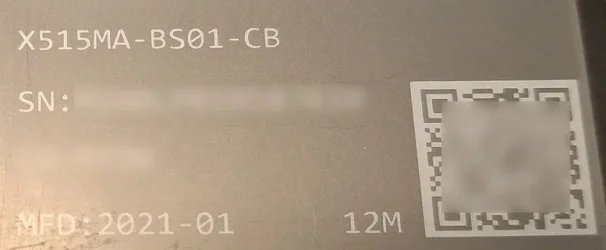
See if the device has a QR Code attached, it may bring you straight to the support site and provide a One Click Driver update.

View attachment 165621 View attachment 165622
Hello. I don't see a QR Code, but the HP Website scans my P.C. and tells me the Drivers I can download. Most are not what I currently have installed however. For instance, it shows an INTEL BlueTooth and Wireless Driver, but what arrived with the PC is a Microsoft BlueTooth hardware/Driver and a REALTEK Wireless hardware/Driver. Interestingly, CrapCleaner shows correct drivers and even a couple of newer versions to download, but I don't trust them enough to get my drivers there. CCleaner has become a little too intrusive over recent years.
 

My Computer My Computer

At a glance

Windows 11 64-bitIntel® Core™ i7-1065G7 CPU @ 1.30GHz12GBIntel Iris Graphics
OS
Windows 11 64-bit
Computer type
Laptop
Manufacturer/Model
Samsung
CPU
Intel® Core™ i7-1065G7 CPU @ 1.30GHz
Motherboard
SAMSUNG ELECTRONICS CO., LTD. Model NP950QCG-K01US
Memory
12GB
Graphics Card(s)
Intel Iris Graphics
Hard Drives
SAMSUNG MZVLB512HBJQ-000 SSD 476.94 GB
Mouse
Logitech MX Mobile BlueTooth
Internet Speed
686.6 Mbps download 23.6 Mbps upload Latency: 8 ms Server: Chicago
Browser
Edge (Default) and FireFox installed.

i gave sdi snappy driver installer a chance and tried it out, so far i love it, esp. on older hardware like AM3 LGA775 etc. i am not a friend of such software but SDI really impressed me in a very positive way.
The https://sdi-tool.org/ website must be based in Russia. I click on changelog and it's in Russian. Not that I have anything against the people there, but Russia is famous for mining data, even before the Chinese started doing so. What they do with it, I have no idea. My data is boring, LOL.
 

My Computer My Computer

At a glance

Windows 11 64-bitIntel® Core™ i7-1065G7 CPU @ 1.30GHz12GBIntel Iris Graphics
OS
Windows 11 64-bit
Computer type
Laptop
Manufacturer/Model
Samsung
CPU
Intel® Core™ i7-1065G7 CPU @ 1.30GHz
Motherboard
SAMSUNG ELECTRONICS CO., LTD. Model NP950QCG-K01US
Memory
12GB
Graphics Card(s)
Intel Iris Graphics
Hard Drives
SAMSUNG MZVLB512HBJQ-000 SSD 476.94 GB
Mouse
Logitech MX Mobile BlueTooth
Internet Speed
686.6 Mbps download 23.6 Mbps upload Latency: 8 ms Server: Chicago
Browser
Edge (Default) and FireFox installed.

My Computer My Computer

At a glance

Windows 11 64-bitIntel® Core™ i7-1065G7 CPU @ 1.30GHz12GBIntel Iris Graphics
OS
Windows 11 64-bit
Computer type
Laptop
Manufacturer/Model
Samsung
CPU
Intel® Core™ i7-1065G7 CPU @ 1.30GHz
Motherboard
SAMSUNG ELECTRONICS CO., LTD. Model NP950QCG-K01US
Memory
12GB
Graphics Card(s)
Intel Iris Graphics
Hard Drives
SAMSUNG MZVLB512HBJQ-000 SSD 476.94 GB
Mouse
Logitech MX Mobile BlueTooth
Internet Speed
686.6 Mbps download 23.6 Mbps upload Latency: 8 ms Server: Chicago
Browser
Edge (Default) and FireFox installed.
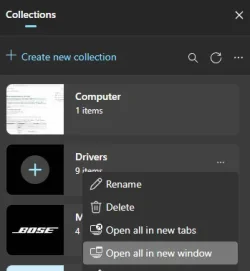
Motherboard manufacturers like Asus provide a program for that, and Intel has its Driver & Support Assistant, but I don't use any of them. I find the driver pages and add them to an Edge Collection. When I want to check for updates, I do an "Open All in New Window".

1773288445686.webp

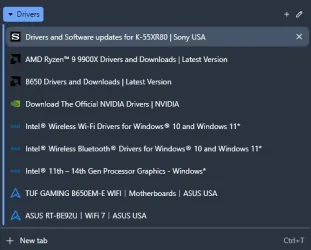
It opens into a new window with the following tabs:

1773288360051.webp

For at least half of these, I hear about updates from the forums I frequent and tech news. (The Intel graphics tab is a leftover from a mini PC I no longer run Windows on. I should get rid of it.)
 

My Computer My Computer

At a glance

Windows 11
OS
Windows 11
Motherboard manufacturers like Asus provide a program for that, and Intel has its Driver & Support Assistant, but I don't use any of them. I find the driver pages and add them to an Edge Collection. When I want to check for updates, I do an "Open All in New Window".

View attachment 165634

It opens into a new window with the following tabs:

View attachment 165633

For at least half of these, I hear about updates from the forums I frequent and tech news. (The Intel graphics tab is a leftover from a mini PC I no longer run Windows on. I should get rid of it.)
That is a great system you're using for your driver updates! I do have an Intel driver update program installed. On my Samsung Laptop, all most all the main device drivers are INTEL. The Intel Driver/Support Assistant snags a lot of updates on that computer. On this one, it only lists 3 Intel drivers (A.I. Boost Driver/Motherboard Driver/ Smart Sound Driver).

But I downloaded/installed a Driver updater I used to regularly use 5 years ago named I/O Bit Driver updater. It found 9 updates available, but I'm going to do like you did and locate the Hardware manufacturer's driver page, download from there (if the update is worthwhile), and bookmark the page for future visitations. Thankyou for sharing your method, Barreleye! -Allen
 

My Computer My Computer

At a glance

Windows 11 64-bitIntel® Core™ i7-1065G7 CPU @ 1.30GHz12GBIntel Iris Graphics
OS
Windows 11 64-bit
Computer type
Laptop
Manufacturer/Model
Samsung
CPU
Intel® Core™ i7-1065G7 CPU @ 1.30GHz
Motherboard
SAMSUNG ELECTRONICS CO., LTD. Model NP950QCG-K01US
Memory
12GB
Graphics Card(s)
Intel Iris Graphics
Hard Drives
SAMSUNG MZVLB512HBJQ-000 SSD 476.94 GB
Mouse
Logitech MX Mobile BlueTooth
Internet Speed
686.6 Mbps download 23.6 Mbps upload Latency: 8 ms Server: Chicago
Browser
Edge (Default) and FireFox installed.
Latest Support Threads

Back
Top Bottom




