is there any way to remove "undo move" "undo rename" "undo copy" from context menu?


rsoyxihnark

Well-known member
Member
Local time
8:27 AM
Posts
26
OS
Windows 10 Enterprise LTSC 2021
is there any way to remove "undo move" "undo rename" "undo copy" from context menus?

most times I click them accidentally and I have no idea what I have just undone.
 

My Computer My Computer

At a glance

Windows 10 Enterprise LTSC 2021
OS
Windows 10 Enterprise LTSC 2021
Exactly when and where do you see those entries. I do not see them.
 

My Computers My Computers

  • At a glance

    Windows 11 Pro 25H2 26200.9168i9-10900 10 core 20 threads32 gbnone-Intel UHD Graphics 630
    OS
    Windows 11 Pro 25H2 26200.9168
    Computer type
    PC/Desktop
    Manufacturer/Model
    Dell Optiplex 7080
    CPU
    i9-10900 10 core 20 threads
    Motherboard
    DELL 0J37VM
    Memory
    32 gb
    Graphics Card(s)
    none-Intel UHD Graphics 630
    Sound Card
    Integrated Realtek
    Monitor(s) Displays
    Benq 27
    Screen Resolution
    2560x1440
    Hard Drives
    2x1tb Solidigm m.2 nvme /External drives 512gb Samsung m.2 sata+2tb Kingston m2.nvme
    PSU
    500w
    Case
    MT
    Cooling
    Dell Premium
    Keyboard
    Logitech wired
    Mouse
    Logitech wireless
    Internet Speed
    so slow I'm too embarrassed to tell
    Browser
    #1 Edge #2 Firefox
    Antivirus
    Defender+MWB Premium
  • At a glance

    Windows 11 Pro 24H2 26200.9168AMD Ryzen 7 6800U32 gbintegrated
    Operating System
    Windows 11 Pro 24H2 26200.9168
    Computer type
    PC/Desktop
    Manufacturer/Model
    Beelink Mini PC SER5
    CPU
    AMD Ryzen 7 6800U
    Memory
    32 gb
    Graphics card(s)
    integrated
    Sound Card
    integrated
    Monitor(s) Displays
    Benq 27
    Screen Resolution
    2560x1440
    Hard Drives
    1TB Crucial nvme
    Keyboard
    Logitech wired
    Mouse
    Logitech wireless
    Internet Speed
    still too embarrassed to tell
    Browser
    Firefox
    Antivirus
    Defender
  • System 3 is non compliant Dell 9020 i7-4770/24gb ram Win11 PRO 26200.9168
Do you have a 3rd party customised right click context menu?
I am the same as @glasskuter on that one
 

My Computers My Computers

  • At a glance

    Windows 11 Pro13th Gen Core i9 13900HX32GB DDR5 @4800MHz 2x16GBGeforce RTX 4090HX 16GB
    OS
    Windows 11 Pro
    Computer type
    Laptop
    Manufacturer/Model
    Alienware M18 R1
    CPU
    13th Gen Core i9 13900HX
    Memory
    32GB DDR5 @4800MHz 2x16GB
    Graphics Card(s)
    Geforce RTX 4090HX 16GB
    Sound Card
    Nvidia HD / Realtek ALC3254
    Monitor(s) Displays
    18" QHD+
    Screen Resolution
    25660 X 1600
    Hard Drives
    C: KIOXIA (Toshiba) 2TB KXG80ZNV2T04 NVMe PCIe M.2 SSD
    D: KIOXIA (Toshiba) 2TB KXG80ZNV2T04 NVMe PCIe M.2 SSD
    Case
    Dark Metallic Moon
    Keyboard
    Alienware M Series per-key AlienFX RGB
    Mouse
    Alienware AW610M
    Browser
    Chrome and Firefox
    Antivirus
    Norton
    Other Info
    Killer E3000 Ethernet Controller
    Killer Killer AX1690 Wi-Fi Network Adaptor Wi-Fi 6E
    Bluetooth 5.2
    Alienware Z01G Graphic Amplifier
  • At a glance

    Windows 11 Pro10th Gen i-9 10900 K32Gb Dual Channel DDR4 @ 8843MHzNvidia RTX 2080 Super
    Operating System
    Windows 11 Pro
    Computer type
    Laptop
    Manufacturer/Model
    Alienware Area 51m R2
    CPU
    10th Gen i-9 10900 K
    Memory
    32Gb Dual Channel DDR4 @ 8843MHz
    Graphics card(s)
    Nvidia RTX 2080 Super
    Sound Card
    Nvidia
    Screen Resolution
    1920 x 1080
    Hard Drives
    Hard Drive C: Samsung 2TB SSD PM981a NVMe
    Hard Drive D:Samsung 2TB SSD 970 EVO Plus
    Mouse
    Alienware 610M
    Browser
    Chrome
    Antivirus
    Norton
To reproduce:
Rename a folder in File Explorer.
Right-click>More Options (old context menu)

Same with copy and move.
 

My Computer My Computer

At a glance

Windows 11 RPAMD Ryzen 5 Pro 3400GE @3.30 GHz (4.0 GHz Turbo)20 GB DDR4 2666 (1x16GB + 1x4GB)AMD Radeon Vega 11
OS
Windows 11 RP
Computer type
PC/Desktop
Manufacturer/Model
Lenovo ThinkCentre M75Q-1
CPU
AMD Ryzen 5 Pro 3400GE @3.30 GHz (4.0 GHz Turbo)
Motherboard
Lenovo 3151
Memory
20 GB DDR4 2666 (1x16GB + 1x4GB)
Graphics Card(s)
AMD Radeon Vega 11
Sound Card
Integrated
Monitor(s) Displays
AOC 2369
Screen Resolution
1920 x 1080
Hard Drives
WD 512 GB NVME + SPCC 240GB SATA SSD
PSU
External 65W
Case
Mini (1L)
I don't have that option, by old context menu do you mean like windows 10? as that doesn't have the more options, post a picture or image with snipping tool or similar
 

My Computers My Computers

  • At a glance

    Windows 11 Pro13th Gen Core i9 13900HX32GB DDR5 @4800MHz 2x16GBGeforce RTX 4090HX 16GB
    OS
    Windows 11 Pro
    Computer type
    Laptop
    Manufacturer/Model
    Alienware M18 R1
    CPU
    13th Gen Core i9 13900HX
    Memory
    32GB DDR5 @4800MHz 2x16GB
    Graphics Card(s)
    Geforce RTX 4090HX 16GB
    Sound Card
    Nvidia HD / Realtek ALC3254
    Monitor(s) Displays
    18" QHD+
    Screen Resolution
    25660 X 1600
    Hard Drives
    C: KIOXIA (Toshiba) 2TB KXG80ZNV2T04 NVMe PCIe M.2 SSD
    D: KIOXIA (Toshiba) 2TB KXG80ZNV2T04 NVMe PCIe M.2 SSD
    Case
    Dark Metallic Moon
    Keyboard
    Alienware M Series per-key AlienFX RGB
    Mouse
    Alienware AW610M
    Browser
    Chrome and Firefox
    Antivirus
    Norton
    Other Info
    Killer E3000 Ethernet Controller
    Killer Killer AX1690 Wi-Fi Network Adaptor Wi-Fi 6E
    Bluetooth 5.2
    Alienware Z01G Graphic Amplifier
  • At a glance

    Windows 11 Pro10th Gen i-9 10900 K32Gb Dual Channel DDR4 @ 8843MHzNvidia RTX 2080 Super
    Operating System
    Windows 11 Pro
    Computer type
    Laptop
    Manufacturer/Model
    Alienware Area 51m R2
    CPU
    10th Gen i-9 10900 K
    Memory
    32Gb Dual Channel DDR4 @ 8843MHz
    Graphics card(s)
    Nvidia RTX 2080 Super
    Sound Card
    Nvidia
    Screen Resolution
    1920 x 1080
    Hard Drives
    Hard Drive C: Samsung 2TB SSD PM981a NVMe
    Hard Drive D:Samsung 2TB SSD 970 EVO Plus
    Mouse
    Alienware 610M
    Browser
    Chrome
    Antivirus
    Norton
Unfortunately, the context menu disappears if I click or press a key.
But I get the option even in the new Win 11 context menu. You just have to right -click a blank spot.
 

My Computer My Computer

At a glance

Windows 11 RPAMD Ryzen 5 Pro 3400GE @3.30 GHz (4.0 GHz Turbo)20 GB DDR4 2666 (1x16GB + 1x4GB)AMD Radeon Vega 11
OS
Windows 11 RP
Computer type
PC/Desktop
Manufacturer/Model
Lenovo ThinkCentre M75Q-1
CPU
AMD Ryzen 5 Pro 3400GE @3.30 GHz (4.0 GHz Turbo)
Motherboard
Lenovo 3151
Memory
20 GB DDR4 2666 (1x16GB + 1x4GB)
Graphics Card(s)
AMD Radeon Vega 11
Sound Card
Integrated
Monitor(s) Displays
AOC 2369
Screen Resolution
1920 x 1080
Hard Drives
WD 512 GB NVME + SPCC 240GB SATA SSD
PSU
External 65W
Case
Mini (1L)

My Computers My Computers

  • At a glance

    Windows 11 Pro 25H2 26200.9168i9-10900 10 core 20 threads32 gbnone-Intel UHD Graphics 630
    OS
    Windows 11 Pro 25H2 26200.9168
    Computer type
    PC/Desktop
    Manufacturer/Model
    Dell Optiplex 7080
    CPU
    i9-10900 10 core 20 threads
    Motherboard
    DELL 0J37VM
    Memory
    32 gb
    Graphics Card(s)
    none-Intel UHD Graphics 630
    Sound Card
    Integrated Realtek
    Monitor(s) Displays
    Benq 27
    Screen Resolution
    2560x1440
    Hard Drives
    2x1tb Solidigm m.2 nvme /External drives 512gb Samsung m.2 sata+2tb Kingston m2.nvme
    PSU
    500w
    Case
    MT
    Cooling
    Dell Premium
    Keyboard
    Logitech wired
    Mouse
    Logitech wireless
    Internet Speed
    so slow I'm too embarrassed to tell
    Browser
    #1 Edge #2 Firefox
    Antivirus
    Defender+MWB Premium
  • At a glance

    Windows 11 Pro 24H2 26200.9168AMD Ryzen 7 6800U32 gbintegrated
    Operating System
    Windows 11 Pro 24H2 26200.9168
    Computer type
    PC/Desktop
    Manufacturer/Model
    Beelink Mini PC SER5
    CPU
    AMD Ryzen 7 6800U
    Memory
    32 gb
    Graphics card(s)
    integrated
    Sound Card
    integrated
    Monitor(s) Displays
    Benq 27
    Screen Resolution
    2560x1440
    Hard Drives
    1TB Crucial nvme
    Keyboard
    Logitech wired
    Mouse
    Logitech wireless
    Internet Speed
    still too embarrassed to tell
    Browser
    Firefox
    Antivirus
    Defender
  • System 3 is non compliant Dell 9020 i7-4770/24gb ram Win11 PRO 26200.9168

My Computer My Computer

At a glance

Windows 11 RPAMD Ryzen 5 Pro 3400GE @3.30 GHz (4.0 GHz Turbo)20 GB DDR4 2666 (1x16GB + 1x4GB)AMD Radeon Vega 11
OS
Windows 11 RP
Computer type
PC/Desktop
Manufacturer/Model
Lenovo ThinkCentre M75Q-1
CPU
AMD Ryzen 5 Pro 3400GE @3.30 GHz (4.0 GHz Turbo)
Motherboard
Lenovo 3151
Memory
20 GB DDR4 2666 (1x16GB + 1x4GB)
Graphics Card(s)
AMD Radeon Vega 11
Sound Card
Integrated
Monitor(s) Displays
AOC 2369
Screen Resolution
1920 x 1080
Hard Drives
WD 512 GB NVME + SPCC 240GB SATA SSD
PSU
External 65W
Case
Mini (1L)
That's the new context menu which I don't use.
Me neither, but I can reproduce it in several ways. For instance:
- create a new folder
- move this folder, for instance by moving it into an existing folder
- now right click an empty spot -> you will see the "undo move" option now
 

My Computer My Computer

At a glance

Windows 11Intel(R) Core(TM) i5-1035G1
OS
Windows 11
Computer type
Laptop
Manufacturer/Model
HP
CPU
Intel(R) Core(TM) i5-1035G1
Motherboard
HP 86C9 56.33 AMI F.22

My Computers My Computers

  • At a glance

    Windows 11 Pro 25H2 26200.9168i9-10900 10 core 20 threads32 gbnone-Intel UHD Graphics 630
    OS
    Windows 11 Pro 25H2 26200.9168
    Computer type
    PC/Desktop
    Manufacturer/Model
    Dell Optiplex 7080
    CPU
    i9-10900 10 core 20 threads
    Motherboard
    DELL 0J37VM
    Memory
    32 gb
    Graphics Card(s)
    none-Intel UHD Graphics 630
    Sound Card
    Integrated Realtek
    Monitor(s) Displays
    Benq 27
    Screen Resolution
    2560x1440
    Hard Drives
    2x1tb Solidigm m.2 nvme /External drives 512gb Samsung m.2 sata+2tb Kingston m2.nvme
    PSU
    500w
    Case
    MT
    Cooling
    Dell Premium
    Keyboard
    Logitech wired
    Mouse
    Logitech wireless
    Internet Speed
    so slow I'm too embarrassed to tell
    Browser
    #1 Edge #2 Firefox
    Antivirus
    Defender+MWB Premium
  • At a glance

    Windows 11 Pro 24H2 26200.9168AMD Ryzen 7 6800U32 gbintegrated
    Operating System
    Windows 11 Pro 24H2 26200.9168
    Computer type
    PC/Desktop
    Manufacturer/Model
    Beelink Mini PC SER5
    CPU
    AMD Ryzen 7 6800U
    Memory
    32 gb
    Graphics card(s)
    integrated
    Sound Card
    integrated
    Monitor(s) Displays
    Benq 27
    Screen Resolution
    2560x1440
    Hard Drives
    1TB Crucial nvme
    Keyboard
    Logitech wired
    Mouse
    Logitech wireless
    Internet Speed
    still too embarrassed to tell
    Browser
    Firefox
    Antivirus
    Defender
  • System 3 is non compliant Dell 9020 i7-4770/24gb ram Win11 PRO 26200.9168
Well, I must be blind because I have no "more" or "undo" options in mine.
You won't have the "more options" option. However, the "undo move", "undo rename", etcetera options should be there immediately after you have moved, renamed, etcetera something.
 

My Computer My Computer

At a glance

Windows 11Intel(R) Core(TM) i5-1035G1
OS
Windows 11
Computer type
Laptop
Manufacturer/Model
HP
CPU
Intel(R) Core(TM) i5-1035G1
Motherboard
HP 86C9 56.33 AMI F.22

My Computers My Computers

  • At a glance

    Windows 11 Pro 25H2 26200.9168i9-10900 10 core 20 threads32 gbnone-Intel UHD Graphics 630
    OS
    Windows 11 Pro 25H2 26200.9168
    Computer type
    PC/Desktop
    Manufacturer/Model
    Dell Optiplex 7080
    CPU
    i9-10900 10 core 20 threads
    Motherboard
    DELL 0J37VM
    Memory
    32 gb
    Graphics Card(s)
    none-Intel UHD Graphics 630
    Sound Card
    Integrated Realtek
    Monitor(s) Displays
    Benq 27
    Screen Resolution
    2560x1440
    Hard Drives
    2x1tb Solidigm m.2 nvme /External drives 512gb Samsung m.2 sata+2tb Kingston m2.nvme
    PSU
    500w
    Case
    MT
    Cooling
    Dell Premium
    Keyboard
    Logitech wired
    Mouse
    Logitech wireless
    Internet Speed
    so slow I'm too embarrassed to tell
    Browser
    #1 Edge #2 Firefox
    Antivirus
    Defender+MWB Premium
  • At a glance

    Windows 11 Pro 24H2 26200.9168AMD Ryzen 7 6800U32 gbintegrated
    Operating System
    Windows 11 Pro 24H2 26200.9168
    Computer type
    PC/Desktop
    Manufacturer/Model
    Beelink Mini PC SER5
    CPU
    AMD Ryzen 7 6800U
    Memory
    32 gb
    Graphics card(s)
    integrated
    Sound Card
    integrated
    Monitor(s) Displays
    Benq 27
    Screen Resolution
    2560x1440
    Hard Drives
    1TB Crucial nvme
    Keyboard
    Logitech wired
    Mouse
    Logitech wireless
    Internet Speed
    still too embarrassed to tell
    Browser
    Firefox
    Antivirus
    Defender
  • System 3 is non compliant Dell 9020 i7-4770/24gb ram Win11 PRO 26200.9168
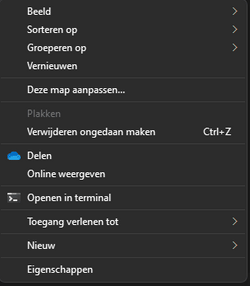
If you delete a folder, and right click an empty spot (i.e. not on a folder or file) immediately afterwards, you don't see an option to undo? I do. My Windows is in Dutch, but after I have deleted a folder I get the option to undo this ("Verwijderen ongedaan maken") in my right click menu:

1651253927535.png

And similar items appear after moving, renaming, etcetera. This is not new to Windows 11, has been this way in previous Windows versions as well.

I have no desire at all to remove these items, by the way.
 

My Computer My Computer

At a glance

Windows 11Intel(R) Core(TM) i5-1035G1
OS
Windows 11
Computer type
Laptop
Manufacturer/Model
HP
CPU
Intel(R) Core(TM) i5-1035G1
Motherboard
HP 86C9 56.33 AMI F.22

Attachments

  • UndoRename.png
    UndoRename.png
    9.6 KB · Views: 3

My Computer My Computer

At a glance

Windows 11 RPAMD Ryzen 5 Pro 3400GE @3.30 GHz (4.0 GHz Turbo)20 GB DDR4 2666 (1x16GB + 1x4GB)AMD Radeon Vega 11
OS
Windows 11 RP
Computer type
PC/Desktop
Manufacturer/Model
Lenovo ThinkCentre M75Q-1
CPU
AMD Ryzen 5 Pro 3400GE @3.30 GHz (4.0 GHz Turbo)
Motherboard
Lenovo 3151
Memory
20 GB DDR4 2666 (1x16GB + 1x4GB)
Graphics Card(s)
AMD Radeon Vega 11
Sound Card
Integrated
Monitor(s) Displays
AOC 2369
Screen Resolution
1920 x 1080
Hard Drives
WD 512 GB NVME + SPCC 240GB SATA SSD
PSU
External 65W
Case
Mini (1L)
I do see the undo rename in this scenario.
Right click file-rename-type in new file name-BUT DO NOT CLICK ENTER which would apply the rename-right click again-the undo rename option is there, but the file hasn't actually been renamed at this point. It just undoes what I typed as new file name. Does anyone use that??
 

My Computers My Computers

  • At a glance

    Windows 11 Pro 25H2 26200.9168i9-10900 10 core 20 threads32 gbnone-Intel UHD Graphics 630
    OS
    Windows 11 Pro 25H2 26200.9168
    Computer type
    PC/Desktop
    Manufacturer/Model
    Dell Optiplex 7080
    CPU
    i9-10900 10 core 20 threads
    Motherboard
    DELL 0J37VM
    Memory
    32 gb
    Graphics Card(s)
    none-Intel UHD Graphics 630
    Sound Card
    Integrated Realtek
    Monitor(s) Displays
    Benq 27
    Screen Resolution
    2560x1440
    Hard Drives
    2x1tb Solidigm m.2 nvme /External drives 512gb Samsung m.2 sata+2tb Kingston m2.nvme
    PSU
    500w
    Case
    MT
    Cooling
    Dell Premium
    Keyboard
    Logitech wired
    Mouse
    Logitech wireless
    Internet Speed
    so slow I'm too embarrassed to tell
    Browser
    #1 Edge #2 Firefox
    Antivirus
    Defender+MWB Premium
  • At a glance

    Windows 11 Pro 24H2 26200.9168AMD Ryzen 7 6800U32 gbintegrated
    Operating System
    Windows 11 Pro 24H2 26200.9168
    Computer type
    PC/Desktop
    Manufacturer/Model
    Beelink Mini PC SER5
    CPU
    AMD Ryzen 7 6800U
    Memory
    32 gb
    Graphics card(s)
    integrated
    Sound Card
    integrated
    Monitor(s) Displays
    Benq 27
    Screen Resolution
    2560x1440
    Hard Drives
    1TB Crucial nvme
    Keyboard
    Logitech wired
    Mouse
    Logitech wireless
    Internet Speed
    still too embarrassed to tell
    Browser
    Firefox
    Antivirus
    Defender
  • System 3 is non compliant Dell 9020 i7-4770/24gb ram Win11 PRO 26200.9168
I do see the undo rename in this scenario.
Right click file-rename-type in new file name-BUT DO NOT CLICK ENTER which would apply the rename-right click again-the undo rename option is there, but the file hasn't actually been renamed at this point. It just undoes what I typed as new file name. Does anyone use that??
The Undo Rename option is there for me even after I press enter, or otherwise allow the rename operation to complete. Even if I close Explorer, and right click the desktop, it is still there. It goes away after a while, but I have never bothered to test how long. I believe it's after another file operation.
 

My Computer My Computer

At a glance

Windows 11 RPAMD Ryzen 5 Pro 3400GE @3.30 GHz (4.0 GHz Turbo)20 GB DDR4 2666 (1x16GB + 1x4GB)AMD Radeon Vega 11
OS
Windows 11 RP
Computer type
PC/Desktop
Manufacturer/Model
Lenovo ThinkCentre M75Q-1
CPU
AMD Ryzen 5 Pro 3400GE @3.30 GHz (4.0 GHz Turbo)
Motherboard
Lenovo 3151
Memory
20 GB DDR4 2666 (1x16GB + 1x4GB)
Graphics Card(s)
AMD Radeon Vega 11
Sound Card
Integrated
Monitor(s) Displays
AOC 2369
Screen Resolution
1920 x 1080
Hard Drives
WD 512 GB NVME + SPCC 240GB SATA SSD
PSU
External 65W
Case
Mini (1L)
Is that a dev build maybe and we are in the release build, I will check my other machine
 

My Computers My Computers

  • At a glance

    Windows 11 Pro13th Gen Core i9 13900HX32GB DDR5 @4800MHz 2x16GBGeforce RTX 4090HX 16GB
    OS
    Windows 11 Pro
    Computer type
    Laptop
    Manufacturer/Model
    Alienware M18 R1
    CPU
    13th Gen Core i9 13900HX
    Memory
    32GB DDR5 @4800MHz 2x16GB
    Graphics Card(s)
    Geforce RTX 4090HX 16GB
    Sound Card
    Nvidia HD / Realtek ALC3254
    Monitor(s) Displays
    18" QHD+
    Screen Resolution
    25660 X 1600
    Hard Drives
    C: KIOXIA (Toshiba) 2TB KXG80ZNV2T04 NVMe PCIe M.2 SSD
    D: KIOXIA (Toshiba) 2TB KXG80ZNV2T04 NVMe PCIe M.2 SSD
    Case
    Dark Metallic Moon
    Keyboard
    Alienware M Series per-key AlienFX RGB
    Mouse
    Alienware AW610M
    Browser
    Chrome and Firefox
    Antivirus
    Norton
    Other Info
    Killer E3000 Ethernet Controller
    Killer Killer AX1690 Wi-Fi Network Adaptor Wi-Fi 6E
    Bluetooth 5.2
    Alienware Z01G Graphic Amplifier
  • At a glance

    Windows 11 Pro10th Gen i-9 10900 K32Gb Dual Channel DDR4 @ 8843MHzNvidia RTX 2080 Super
    Operating System
    Windows 11 Pro
    Computer type
    Laptop
    Manufacturer/Model
    Alienware Area 51m R2
    CPU
    10th Gen i-9 10900 K
    Memory
    32Gb Dual Channel DDR4 @ 8843MHz
    Graphics card(s)
    Nvidia RTX 2080 Super
    Sound Card
    Nvidia
    Screen Resolution
    1920 x 1080
    Hard Drives
    Hard Drive C: Samsung 2TB SSD PM981a NVMe
    Hard Drive D:Samsung 2TB SSD 970 EVO Plus
    Mouse
    Alienware 610M
    Browser
    Chrome
    Antivirus
    Norton
Is that a dev build maybe and we are in the release build, I will check my other machine
Its been around since Windows 95, I believe. I certainly had it on Windows 7.
 

My Computer My Computer

At a glance

Windows 11 RPAMD Ryzen 5 Pro 3400GE @3.30 GHz (4.0 GHz Turbo)20 GB DDR4 2666 (1x16GB + 1x4GB)AMD Radeon Vega 11
OS
Windows 11 RP
Computer type
PC/Desktop
Manufacturer/Model
Lenovo ThinkCentre M75Q-1
CPU
AMD Ryzen 5 Pro 3400GE @3.30 GHz (4.0 GHz Turbo)
Motherboard
Lenovo 3151
Memory
20 GB DDR4 2666 (1x16GB + 1x4GB)
Graphics Card(s)
AMD Radeon Vega 11
Sound Card
Integrated
Monitor(s) Displays
AOC 2369
Screen Resolution
1920 x 1080
Hard Drives
WD 512 GB NVME + SPCC 240GB SATA SSD
PSU
External 65W
Case
Mini (1L)
Its been around since Windows 95, I believe. I certainly had it on Windows 7.
I can't find it, if it's been around that long you should have learned not to accidentally click it :ROFLMAO: Only joking my friend
 

My Computers My Computers

  • At a glance

    Windows 11 Pro13th Gen Core i9 13900HX32GB DDR5 @4800MHz 2x16GBGeforce RTX 4090HX 16GB
    OS
    Windows 11 Pro
    Computer type
    Laptop
    Manufacturer/Model
    Alienware M18 R1
    CPU
    13th Gen Core i9 13900HX
    Memory
    32GB DDR5 @4800MHz 2x16GB
    Graphics Card(s)
    Geforce RTX 4090HX 16GB
    Sound Card
    Nvidia HD / Realtek ALC3254
    Monitor(s) Displays
    18" QHD+
    Screen Resolution
    25660 X 1600
    Hard Drives
    C: KIOXIA (Toshiba) 2TB KXG80ZNV2T04 NVMe PCIe M.2 SSD
    D: KIOXIA (Toshiba) 2TB KXG80ZNV2T04 NVMe PCIe M.2 SSD
    Case
    Dark Metallic Moon
    Keyboard
    Alienware M Series per-key AlienFX RGB
    Mouse
    Alienware AW610M
    Browser
    Chrome and Firefox
    Antivirus
    Norton
    Other Info
    Killer E3000 Ethernet Controller
    Killer Killer AX1690 Wi-Fi Network Adaptor Wi-Fi 6E
    Bluetooth 5.2
    Alienware Z01G Graphic Amplifier
  • At a glance

    Windows 11 Pro10th Gen i-9 10900 K32Gb Dual Channel DDR4 @ 8843MHzNvidia RTX 2080 Super
    Operating System
    Windows 11 Pro
    Computer type
    Laptop
    Manufacturer/Model
    Alienware Area 51m R2
    CPU
    10th Gen i-9 10900 K
    Memory
    32Gb Dual Channel DDR4 @ 8843MHz
    Graphics card(s)
    Nvidia RTX 2080 Super
    Sound Card
    Nvidia
    Screen Resolution
    1920 x 1080
    Hard Drives
    Hard Drive C: Samsung 2TB SSD PM981a NVMe
    Hard Drive D:Samsung 2TB SSD 970 EVO Plus
    Mouse
    Alienware 610M
    Browser
    Chrome
    Antivirus
    Norton
I can't find it, if it's been around that long you should have learned not to accidentally click it :ROFLMAO: Only joking my friend
It's cool. It's the OP who seems to have a problem with it.
 

My Computer My Computer

At a glance

Windows 11 RPAMD Ryzen 5 Pro 3400GE @3.30 GHz (4.0 GHz Turbo)20 GB DDR4 2666 (1x16GB + 1x4GB)AMD Radeon Vega 11
OS
Windows 11 RP
Computer type
PC/Desktop
Manufacturer/Model
Lenovo ThinkCentre M75Q-1
CPU
AMD Ryzen 5 Pro 3400GE @3.30 GHz (4.0 GHz Turbo)
Motherboard
Lenovo 3151
Memory
20 GB DDR4 2666 (1x16GB + 1x4GB)
Graphics Card(s)
AMD Radeon Vega 11
Sound Card
Integrated
Monitor(s) Displays
AOC 2369
Screen Resolution
1920 x 1080
Hard Drives
WD 512 GB NVME + SPCC 240GB SATA SSD
PSU
External 65W
Case
Mini (1L)

Latest Support Threads

Back
Top Bottom