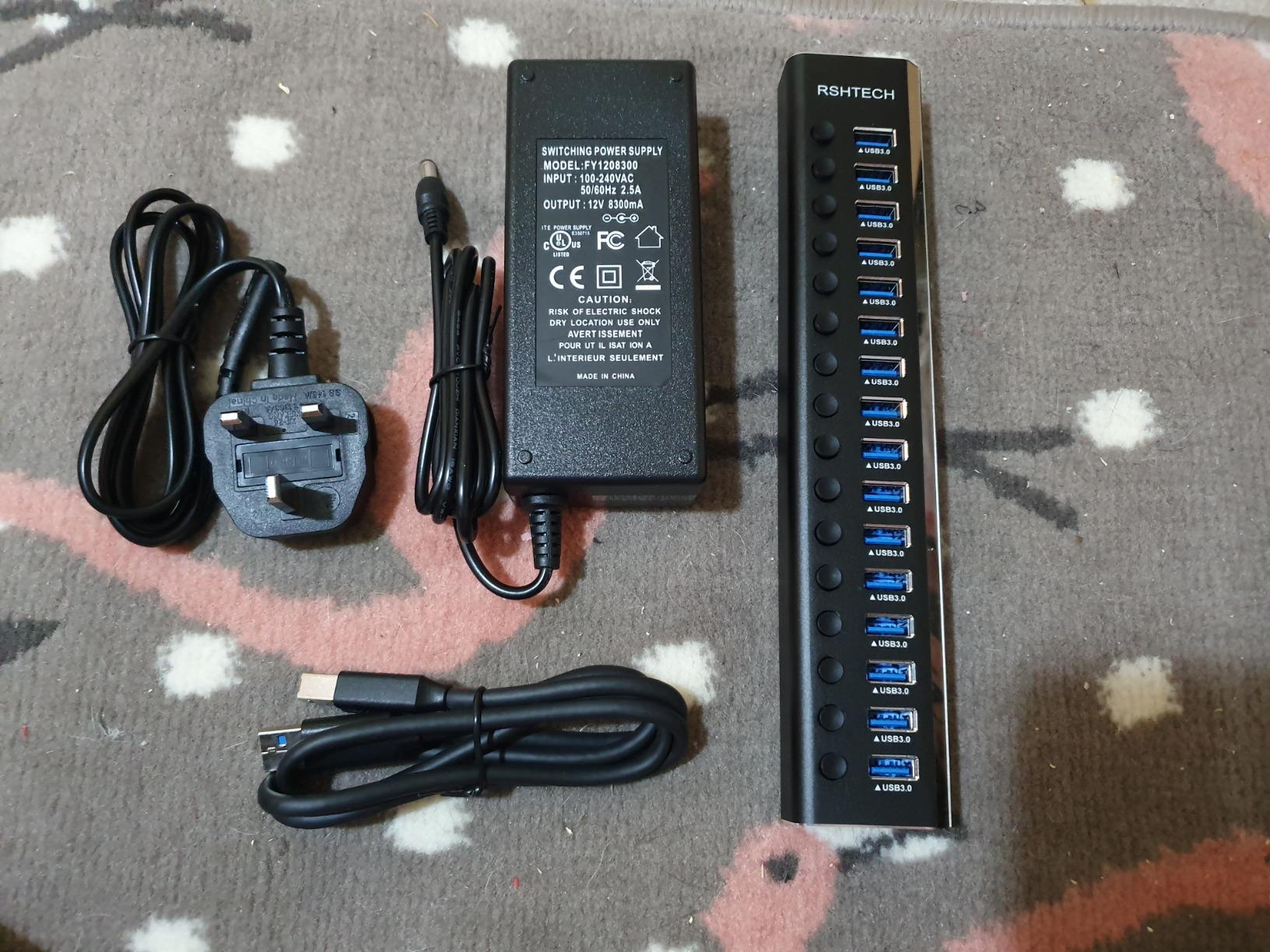
Is this normal about usb hub with external power


vsub

Active member
Member
VIP
Local time
2:17 PM
Posts
220
OS
Windows 11
I have been using one that gets powered by the laptop only for a long time but I had to replace it(the usb connectors did not make a good connection anymore)
I switch to this one but since I have never used this kind of usb hub before(with a power supply),I don't know if this is normal or I have to change something in windows


If the power suddenly goes off(the laptop switches to battery),the usb devices get disconnected(wifi mouse for example)until I disconnect the hub from the laptop and connect it again(even if there is still no power)

If I don't connect the power supply(even if the laptop is not running on battery),then it works like my old usb hub(almost)but I don't know if it's safe to use it this way
My old usb hub had 4 ports and this one have 7 and it is like more "advanced" than my old one

I have 2 hard drives connected to it
If I put the laptop to sleep and the hub charger is not connected,usb devices loose power(I cannot change them)
When I do the same thing with my old usb hub,there is no problem,I can charge my usb devices while the laptop is in sleep mode(even shut down)
 

My Computer My Computer

At a glance

Windows 1114700HX64GBRTX 4070
OS
Windows 11
Computer type
Laptop
Manufacturer/Model
MSI Sword 17 HX
CPU
14700HX
Memory
64GB
Graphics Card(s)
RTX 4070
If I put the laptop to sleep and the hub charger is not connected,usb devices loose power(I cannot change them)
When I do the same thing with my old usb hub,there is no problem,I can charge my usb devices while the laptop is in sleep mode(even shut down)
In power settings, check what happens with the USB ports when the laptop enters sleep mode. Note that different USB ports may behave differently.

I don´t think the new hub is more advanced that the old one. It may be that it just operates differently.

A powered hub can be used without the power adapter connected, if the USB port can supply the current the connected devices draw from it. If the devices don´t work properly, you need to connect the power adapter.
 

My Computer My Computer

At a glance

Windows 10
OS
Windows 10
Do you mean this
1755806670630.webp
 

My Computer My Computer

At a glance

Windows 1114700HX64GBRTX 4070
OS
Windows 11
Computer type
Laptop
Manufacturer/Model
MSI Sword 17 HX
CPU
14700HX
Memory
64GB
Graphics Card(s)
RTX 4070
Is there a reason you are using a USB Hub all the time? Do you have a lot of devices connected?

My laptop has: 2 x USB-A 3.0 and 2 x USB-C 3.0 ports. I always plug the Logitech USB dongle into one of the built-in USB-A ports. The other three USB ports are only used if I plug in an external drive. Which is not very often. If need any more USB ports I use a powered USB Hub.

For me it makes sense to plug the mouse dongle into a built-in USB port because that makes the laptop more portable. BTW, I back up my laptop every day but that is done using WiFi.
 

My Computers My Computers

  • At a glance

    Windows 11 Pro 25H2 (26200.6901)AMD Ryzen 7 6800H with Radeon 680M GPU (486MB...Crucial DDR5-4800 (2400MHz) 32GB (2 x 16GB)NVIDIA RTX 3060 Laptop (6GB RAM)
    OS
    Windows 11 Pro 25H2 (26200.6901)
    Computer type
    Laptop
    Manufacturer/Model
    ASUS TUF Gaming A15 (2022)
    CPU
    AMD Ryzen 7 6800H with Radeon 680M GPU (486MB RAM)
    Memory
    Crucial DDR5-4800 (2400MHz) 32GB (2 x 16GB)
    Graphics Card(s)
    NVIDIA RTX 3060 Laptop (6GB RAM)
    Sound Card
    n/a
    Monitor(s) Displays
    15.6-inch
    Screen Resolution
    1920x1080 300Hz
    Hard Drives
    2 x Samsung 990 Evo Plus (2TB M.2 NVME SSD)
    PSU
    n/a
    Mouse
    Wireless Mouse M510
    Internet Speed
    2100Mbps/300Mbps
    Browser
    Firefox
    Antivirus
    Malwarebytes
  • At a glance

    Windows 11 Pro 25H2 (26200.8246)AMD Ryzen 7 5700X3DG.SKILL Flare X 32GB (2x16GB) DDR4ASUS ROG-STRIX-RTX3060TI-08G-V2-GAMING (RTX 3...
    Operating System
    Windows 11 Pro 25H2 (26200.8246)
    Computer type
    PC/Desktop
    Manufacturer/Model
    Custom build
    CPU
    AMD Ryzen 7 5700X3D
    Motherboard
    ASUS ROG Strix B550-F Gaming WiFi II
    Memory
    G.SKILL Flare X 32GB (2x16GB) DDR4
    Graphics card(s)
    ASUS ROG-STRIX-RTX3060TI-08G-V2-GAMING (RTX 3060-Ti, 8GB RAM)
    Monitor(s) Displays
    Samsung G50D IPS 27"
    Screen Resolution
    1440p/180Hz
    Hard Drives
    SAMSUNG 990 EVO Plus (2TB] M.2 NVME SSD
    SAMSUNG 990 EVO Plus (4TB) M.2 NVME SSD
    PSU
    Corsair RM750x (750 watts)
    Case
    Cooler Master MasterCase 5
    Cooling
    Scythe Mugen 6
    Keyboard
    Logitech K520 (MK540 keyboard/mouse combo)
    Mouse
    Logitech M310 (MK540 keyboard/mouse combo)
    Internet Speed
    2100 Mbps down / 300 Mbps up
    Browser
    Firefox, Edge, Chrome
    Antivirus
    Malwarebytes (Premium)
    Other Info
    ASUS Blu-ray Burner BW-16D1HT (SATA) || Western Digital Easystore 20TB USB 3.0 external hard drive used with Acronis True Image 2025 backup software || HP OfficeJet Pro 6975 Printer/Scanner
Is there a reason you are using a USB Hub all the time? Do you have a lot of devices connected?

My laptop has: 2 x USB-A 3.0 and 2 x USB-C 3.0 ports. I always plug the Logitech USB dongle into one of the built-in USB-A ports. The other three USB ports are only used if I plug in an external drive. Which is not very often. If need any more USB ports I use a powered USB Hub.

For me it makes sense to plug the mouse dongle into a built-in USB port because that makes the laptop more portable. BTW, I back up my laptop every day but that is done using WiFi.
I have multiple usb devices and I have only 3 usb ports
I prefer using a usb hub so the usb ports of the laptop don't wear out overtime
It's much cheaper to get a usb hub than replacing a usb port

I don't really use the laptop as a laptop but as a desktop(I don't move it)
 

My Computer My Computer

At a glance

Windows 1114700HX64GBRTX 4070
OS
Windows 11
Computer type
Laptop
Manufacturer/Model
MSI Sword 17 HX
CPU
14700HX
Memory
64GB
Graphics Card(s)
RTX 4070
I have multiple usb devices and I have only 3 usb ports
I prefer using a usb hub so the usb ports of the laptop don't wear out overtime
It's much cheaper to get a usb hub than replacing a usb port

I don't really use the laptop as a laptop but as a desktop(I don't move it)
Some high end laptops can't run very long on their batteries but that is OK because they are being used as a desktop replacement. In other words they are usually used in one place and powered by their AC adapter.

You use a powered USB hub for two reasons:
  • A USB device requires more power than the built-in USB ports can provide
  • You require more USB ports than the computer has
You won't wear out a USB port normally. However, if the devices are using much power then out of caution then I could see using a powered USB hub.
 

My Computers My Computers

  • At a glance

    Windows 11 Pro 25H2 (26200.6901)AMD Ryzen 7 6800H with Radeon 680M GPU (486MB...Crucial DDR5-4800 (2400MHz) 32GB (2 x 16GB)NVIDIA RTX 3060 Laptop (6GB RAM)
    OS
    Windows 11 Pro 25H2 (26200.6901)
    Computer type
    Laptop
    Manufacturer/Model
    ASUS TUF Gaming A15 (2022)
    CPU
    AMD Ryzen 7 6800H with Radeon 680M GPU (486MB RAM)
    Memory
    Crucial DDR5-4800 (2400MHz) 32GB (2 x 16GB)
    Graphics Card(s)
    NVIDIA RTX 3060 Laptop (6GB RAM)
    Sound Card
    n/a
    Monitor(s) Displays
    15.6-inch
    Screen Resolution
    1920x1080 300Hz
    Hard Drives
    2 x Samsung 990 Evo Plus (2TB M.2 NVME SSD)
    PSU
    n/a
    Mouse
    Wireless Mouse M510
    Internet Speed
    2100Mbps/300Mbps
    Browser
    Firefox
    Antivirus
    Malwarebytes
  • At a glance

    Windows 11 Pro 25H2 (26200.8246)AMD Ryzen 7 5700X3DG.SKILL Flare X 32GB (2x16GB) DDR4ASUS ROG-STRIX-RTX3060TI-08G-V2-GAMING (RTX 3...
    Operating System
    Windows 11 Pro 25H2 (26200.8246)
    Computer type
    PC/Desktop
    Manufacturer/Model
    Custom build
    CPU
    AMD Ryzen 7 5700X3D
    Motherboard
    ASUS ROG Strix B550-F Gaming WiFi II
    Memory
    G.SKILL Flare X 32GB (2x16GB) DDR4
    Graphics card(s)
    ASUS ROG-STRIX-RTX3060TI-08G-V2-GAMING (RTX 3060-Ti, 8GB RAM)
    Monitor(s) Displays
    Samsung G50D IPS 27"
    Screen Resolution
    1440p/180Hz
    Hard Drives
    SAMSUNG 990 EVO Plus (2TB] M.2 NVME SSD
    SAMSUNG 990 EVO Plus (4TB) M.2 NVME SSD
    PSU
    Corsair RM750x (750 watts)
    Case
    Cooler Master MasterCase 5
    Cooling
    Scythe Mugen 6
    Keyboard
    Logitech K520 (MK540 keyboard/mouse combo)
    Mouse
    Logitech M310 (MK540 keyboard/mouse combo)
    Internet Speed
    2100 Mbps down / 300 Mbps up
    Browser
    Firefox, Edge, Chrome
    Antivirus
    Malwarebytes (Premium)
    Other Info
    ASUS Blu-ray Burner BW-16D1HT (SATA) || Western Digital Easystore 20TB USB 3.0 external hard drive used with Acronis True Image 2025 backup software || HP OfficeJet Pro 6975 Printer/Scanner
I don't know how many watts your old hub's power supply had, but 20W on a 7 port USB3 hub still isn't always enough to power a lot of devices. It could be running out of power even if you only have 4 devices plugged in to it, as there are ample USB3/USB2 devices out there that do not have their own dedicated external power supply and that can attain well over 5W of power consumption depending on use. I find that the underpowered-ness of many affordable (cheap) USB3 hubs usually tends to be an obvious sign of being "less advanced", or skimped upon. So, with these hubs you can expect to see various additional limitations not all of which necessarily need to be sought in the area of experiencing slower transfer speeds or unstable data connections. It's one of those common reasons why so many YouTube reviews don't tell you about subtle details like losing connections when the laptop shifts to battery power.

Personally, I, have the 100W (pre-2024) version of this RSHTECH 16 port hub: Amazon.co.uk With a EU-style power plug, that is, as I am in Belgium. The AC power cord is detachable also. Last year they changed the design from 100W to just 96W it seems, but 96W divided by 16 ports still gives you up to 6W (1,200mA at 5V) on each port regardless of what you have plugged in to the other 15 ports. Here is a pic from someone who bought this hub on Amazon UK:

819JEyYOaUL.jpg
 

My Computers My Computers

  • At a glance

    11 Homei7 13650HX16GB DDR5GeForce RTX 4060 Mobile
    OS
    11 Home
    Computer type
    Laptop
    Manufacturer/Model
    Asus TUF Gaming F16 (2024)
    CPU
    i7 13650HX
    Memory
    16GB DDR5
    Graphics Card(s)
    GeForce RTX 4060 Mobile
    Sound Card
    Eastern Electric MiniMax DAC Supreme; Emotiva UMC-200; Astell & Kern AK240
    Monitor(s) Displays
    Sony Bravia XR-55X90J
    Screen Resolution
    3840×2160
    Hard Drives
    512GB SSD internal
    37TB external
    PSU
    Li-ion
    Cooling
    2× Arc Flow Fans, 4× exhaust vents, 5× heatpipes
    Keyboard
    Logitech K800
    Mouse
    Logitech G402
    Internet Speed
    30Mbit/s up, 500Mbit/s down
    Browser
    FF
    Antivirus
    What's an antivirus?
  • At a glance

    11 Homei5 1135G716GB DDR4Intel Iris Xe
    Operating System
    11 Home
    Computer type
    Laptop
    Manufacturer/Model
    Medion S15450
    CPU
    i5 1135G7
    Memory
    16GB DDR4
    Graphics card(s)
    Intel Iris Xe
    Sound Card
    Eastern Electric MiniMax DAC Supreme; Emotiva UMC-200; Astell & Kern AK240
    Monitor(s) Displays
    Sony Bravia XR-55X90J
    Screen Resolution
    3840×2160
    Hard Drives
    2TB SSD internal
    37TB external
    PSU
    Li-ion
    Keyboard
    Logitech K800
    Mouse
    Logitech G402
    Internet Speed
    30Mbit/s up, 500Mbit/s down
    Browser
    FF
Those may be alright for charging devices but all share only one port for data bandwidth, plug in 2 or 3 and everything slows down considerably or grind to a stop.
 

My Computer My Computer

At a glance

W11 Pro and Insider DevAMD Ryzen 9 7900x2x16GB Kingston 6000MHz, Cl 32 @ 6200MHz Cl30Gigabyte Rx 6600XT Gaming OC 8G Pro
OS
W11 Pro and Insider Dev
Computer type
PC/Desktop
Manufacturer/Model
Home brewed
CPU
AMD Ryzen 9 7900x
Motherboard
ASROCK b650 PRO RS
Memory
2x16GB Kingston 6000MHz, Cl 32 @ 6200MHz Cl30
Graphics Card(s)
Gigabyte Rx 6600XT Gaming OC 8G Pro
Sound Card
MB, Realtek Ac1220p
Monitor(s) Displays
3 x 27"
Screen Resolution
1080p
Hard Drives
Kingston KC3000. 1TBSamsung 970 evo Plus 500GB, Crucial P1 NVMe 1TB, Lexar NVMe 2 TB, Silicon Power M.2 SATA 500GB
PSU
Seasonic 750W
Case
Custom Raidmax
Cooling
Arctic Liquid Freezer III 360mm
Internet Speed
20/19 mbps
Those may be alright for charging devices but all share only one port for data bandwidth, plug in 2 or 3 and everything slows down considerably or grind to a stop.
It allows me to keep more than just a few storage devices (plus several other devices) plugged in for prolonged periods of time. At the same time it also allows me to choose individually which of my external HDDs I want to either 1/ keep spun down such a way that effectively prevents Windows from spinning them up again frequently when I don't want that or 2/ keep spinning for instant accessibility whenever I want, as long as I want, and precisely as long as I want. It matters to me because I have a large collection of (mostly) media files. It's this:

hdds-webp.117953
 

My Computers My Computers

  • At a glance

    11 Homei7 13650HX16GB DDR5GeForce RTX 4060 Mobile
    OS
    11 Home
    Computer type
    Laptop
    Manufacturer/Model
    Asus TUF Gaming F16 (2024)
    CPU
    i7 13650HX
    Memory
    16GB DDR5
    Graphics Card(s)
    GeForce RTX 4060 Mobile
    Sound Card
    Eastern Electric MiniMax DAC Supreme; Emotiva UMC-200; Astell & Kern AK240
    Monitor(s) Displays
    Sony Bravia XR-55X90J
    Screen Resolution
    3840×2160
    Hard Drives
    512GB SSD internal
    37TB external
    PSU
    Li-ion
    Cooling
    2× Arc Flow Fans, 4× exhaust vents, 5× heatpipes
    Keyboard
    Logitech K800
    Mouse
    Logitech G402
    Internet Speed
    30Mbit/s up, 500Mbit/s down
    Browser
    FF
    Antivirus
    What's an antivirus?
  • At a glance

    11 Homei5 1135G716GB DDR4Intel Iris Xe
    Operating System
    11 Home
    Computer type
    Laptop
    Manufacturer/Model
    Medion S15450
    CPU
    i5 1135G7
    Memory
    16GB DDR4
    Graphics card(s)
    Intel Iris Xe
    Sound Card
    Eastern Electric MiniMax DAC Supreme; Emotiva UMC-200; Astell & Kern AK240
    Monitor(s) Displays
    Sony Bravia XR-55X90J
    Screen Resolution
    3840×2160
    Hard Drives
    2TB SSD internal
    37TB external
    PSU
    Li-ion
    Keyboard
    Logitech K800
    Mouse
    Logitech G402
    Internet Speed
    30Mbit/s up, 500Mbit/s down
    Browser
    FF
I use a powered hub all the time. It sits on my desk so I don't have to go under my desk to plug in my stuff. I use a USB oscilloscope that requires a lot of power and I don't want to tax the motherboard's USB regulators too much. If I put my PC to sleep, I lose USB, obviously, but any device I have plugged into it (like my phone) will still charge. Just no data.

Most of the time, I just use it to plug in thumb drives and external USB drives temporarily. Much more conveinient that climbing and doing acrobatics under my desk. I can run a USB extension cable, but sometimes I have to use more than one port. Like for my 'scope and DVD writer.
 

My Computer My Computer

At a glance

Win 11 Pro 25H2Intel i7 13700KF32 GB Team Group DDR5 - 6000 CL 30ASUS TUF GAMING RTX 3070 Ti
OS
Win 11 Pro 25H2
Computer type
PC/Desktop
Manufacturer/Model
Self build
CPU
Intel i7 13700KF
Motherboard
Gigabyte Z790 UD AC
Memory
32 GB Team Group DDR5 - 6000 CL 30
Graphics Card(s)
ASUS TUF GAMING RTX 3070 Ti
Sound Card
On board Realtek
Monitor(s) Displays
ACER 34 inch
Screen Resolution
Not 4K like I thought. 35" wide though.
Hard Drives
1 TB Samsung 980 Pro Nvme, 1 TB Samsung 970 EVO Nvme, 2 x Samsung 970 2TB SSD SATA
PSU
EVGA 1000Q
Case
Rosewill something or other
Cooling
Noctua NH-D15. A whole schwak of Noctua case fans. $$$
Keyboard
Logitech G815
Mouse
Logitech G502 Hero
Internet Speed
700 up, 600 down
Browser
Firefox
Antivirus
MalwareBytes

Latest Support Threads

Back
Top Bottom