Is "\Windows.old\" definitely stored at "C:\"?


_william

Member
Member
Local time
5:09 AM
Posts
148
OS
Windows 11
A question about the "Windows.old" folder, that is generated after a Windows installation that is not a Clean-Install; i.e., the notice seen in the fist image attached below.

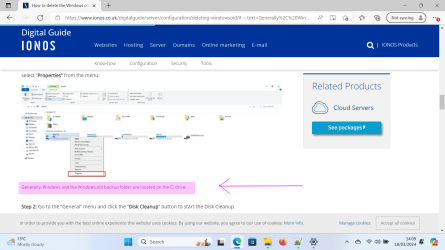
I understand from this article that this folder is usually given the directory of "C:\Windows.old\"--please see the second attached image below. In the highlighted section of that second image, the wording used is "Generally [...]", implying that sometimes the "Windows.old" folder may not be stored at that directory. My question is, if this "Windows.old" folder is not found at that directory, where else may it be placed?

My own computer only has two other partitions besides "C:\" currently, i.e., one called "EFI System Partition" and one called "Recovery Partition".

Just want to make sure my computer hasn't generated a "Windows.old" folder without my knowledge.

1.jpg

2.png
 
Windows Build/Version
W11 23H2

My Computer My Computer

At a glance

Windows 11
OS
Windows 11
Computer type
Laptop
Manufacturer/Model
Dell Latitude 7430

It would be on %systemdrive% for most people it is C

%systemdrive% doesnt have to be C some people prefer a different letter.
 

My Computers My Computers

  • At a glance

    Win7,Win11i7-97002x16gb 3600mhz
    OS
    Win7,Win11
    Computer type
    PC/Desktop
    CPU
    i7-9700
    Motherboard
    gigabyte b365m ds3h
    Memory
    2x16gb 3600mhz
    Monitor(s) Displays
    benq gw2480
    PSU
    bequiet pure power 11 400CM
    Cooling
    cryorig m9i
  • At a glance

    win7,win11i5-84002x8gb 3200
    Operating System
    win7,win11
    Computer type
    PC/Desktop
    CPU
    i5-8400
    Motherboard
    gigabyte b365m ds3h
    Memory
    2x8gb 3200
    PSU
    xfx pro 450
A computer can have multiple Windows.old when performing custom installations.

Windows.old
Windows.old.000
Windows.old.001


The Windows.old that is created during upgrades is subject to automatic deletion (10 days).
This is the default 10 day go back.


My Computer My Computer

At a glance

Windows 10Intel(R) Core(TM) i7-4800MQ CPU @ 2.70GHz16 GB Total: Manufacturer : Samsung MemoryTyp...NVIDIA Quadro K3100M; Intel(R) HD Graphics 4600
OS
Windows 10
Computer type
Laptop
Manufacturer/Model
HP
CPU
Intel(R) Core(TM) i7-4800MQ CPU @ 2.70GHz
Motherboard
Product : 190A Version : KBC Version 94.56
Memory
16 GB Total: Manufacturer : Samsung MemoryType : DDR3 FormFactor : SODIMM Capacity : 8GB Speed : 1600
Graphics Card(s)
NVIDIA Quadro K3100M; Intel(R) HD Graphics 4600
Sound Card
IDT High Definition Audio CODEC; PNP Device ID HDAUDIO\FUNC_01&VEN_111D&DEV_76E0
Hard Drives
Model Hitachi HTS727575A9E364
Antivirus
Microsoft Defender
Other Info
Mobile Workstation
My own computer only has two other partitions besides "C:\" currently, i.e., one called "EFI System Partition" and one called "Recovery Partition".

Disk management does not display hidden partitions.

Unless it was manually deleted there are 4 default partitions:


My Computer My Computer

At a glance

Windows 10Intel(R) Core(TM) i7-4800MQ CPU @ 2.70GHz16 GB Total: Manufacturer : Samsung MemoryTyp...NVIDIA Quadro K3100M; Intel(R) HD Graphics 4600
OS
Windows 10
Computer type
Laptop
Manufacturer/Model
HP
CPU
Intel(R) Core(TM) i7-4800MQ CPU @ 2.70GHz
Motherboard
Product : 190A Version : KBC Version 94.56
Memory
16 GB Total: Manufacturer : Samsung MemoryType : DDR3 FormFactor : SODIMM Capacity : 8GB Speed : 1600
Graphics Card(s)
NVIDIA Quadro K3100M; Intel(R) HD Graphics 4600
Sound Card
IDT High Definition Audio CODEC; PNP Device ID HDAUDIO\FUNC_01&VEN_111D&DEV_76E0
Hard Drives
Model Hitachi HTS727575A9E364
Antivirus
Microsoft Defender
Other Info
Mobile Workstation
Windows won't willy-nilly write its .old folder to some place other than C: (or whatever drive letter is assigned as the system drive)Through several hundred upgrades and repair installs over the years I ran into Windows.old not being at the root of C: one time. It was a cheap, cheap windows 10 laptop that had eMMC storage that was too small for an upgrade to complete. I had to connect a removable drive and direct the upgrade process to it. That's where windows. old was written, but only because I told Windows to write it there.
 
Last edited:

My Computers My Computers

  • At a glance

    Windows 11 Pro 25H2 26200.9457i9-10900 10 core 20 threads32 gbnone-Intel UHD Graphics 630
    OS
    Windows 11 Pro 25H2 26200.9457
    Computer type
    PC/Desktop
    Manufacturer/Model
    Dell Optiplex 7080
    CPU
    i9-10900 10 core 20 threads
    Motherboard
    DELL 0J37VM
    Memory
    32 gb
    Graphics Card(s)
    none-Intel UHD Graphics 630
    Sound Card
    Integrated Realtek
    Monitor(s) Displays
    Benq 27
    Screen Resolution
    2560x1440
    Hard Drives
    2x1tb Solidigm m.2 nvme /External drives 512gb Samsung m.2 sata+2tb Kingston m2.nvme
    PSU
    500w
    Case
    MT
    Cooling
    Dell Premium
    Keyboard
    Logitech wired
    Mouse
    Logitech wireless
    Internet Speed
    so slow I'm too embarrassed to tell
    Browser
    #1 Edge #2 Firefox
    Antivirus
    Defender+MWB Premium
  • At a glance

    Windows 11 Pro 24H2 26200.9457AMD Ryzen 7 6800U32 gbintegrated
    Operating System
    Windows 11 Pro 24H2 26200.9457
    Computer type
    PC/Desktop
    Manufacturer/Model
    Beelink Mini PC SER5
    CPU
    AMD Ryzen 7 6800U
    Memory
    32 gb
    Graphics card(s)
    integrated
    Sound Card
    integrated
    Monitor(s) Displays
    Benq 27
    Screen Resolution
    2560x1440
    Hard Drives
    1TB Crucial nvme
    Keyboard
    Logitech wired
    Mouse
    Logitech wireless
    Internet Speed
    still too embarrassed to tell
    Browser
    Firefox
    Antivirus
    Defender
  • System 3 is non compliant Dell 9020 i7-4770/24gb ram Win11 PRO 26200.9457
@glasskuter Great. Thanks. It's not there, and I guess it shouldn't exist for me in any case seeing as though I just Clean-Installed. And I understand that it's deleted after 10 days anyway, so no problem.
 

My Computer My Computer

At a glance

Windows 11
OS
Windows 11
Computer type
Laptop
Manufacturer/Model
Dell Latitude 7430

Whether you get a windows.old partition depends on how you do a clean install.

If you clean install to unallocated space, you do not get a windows.old.

If you clean install to a partition containing windows, you will get windows.old.

So if you do not want windows.old, delete existing partitions (except any data partitions you wish to keep).
 

My Computer My Computer

At a glance

Windows 11 Pro + Win11 Canary VM.I9 13th gen i9-13900H 2.60 GHZ16 GB solderedIntegrated Intel Iris XE
OS
Windows 11 Pro + Win11 Canary VM.
Computer type
Laptop
Manufacturer/Model
ASUS Zenbook 14
CPU
I9 13th gen i9-13900H 2.60 GHZ
Motherboard
Yep, Laptop has one.
Memory
16 GB soldered
Graphics Card(s)
Integrated Intel Iris XE
Sound Card
Realtek built in
Monitor(s) Displays
laptop OLED screen
Screen Resolution
2880x1800 touchscreen
Hard Drives
1 TB NVME SSD (only weakness is only one slot)
PSU
Internal + 65W thunderbolt USB4 charger
Case
Yep, got one
Cooling
Stella Artois (UK pint cans - 568 ml) - extra cost.
Keyboard
Built in UK keybd
Mouse
Bluetooth , wireless dongled, wired
Internet Speed
900 mbs (ethernet), wifi 6 typical 350-450 mb/s both up and down
Browser
Edge
Antivirus
Defender
Other Info
TPM 2.0, 2xUSB4 thunderbolt, 1xUsb3 (usb a), 1xUsb-c, hdmi out, 3.5 mm audio out/in combo, ASUS backlit trackpad (inc. switchable number pad)

Macrium Reflect Home V8
Office 365 Family (6 users each 1TB onedrive space)
Hyper-V (a vm runs almost as fast as my older laptop)
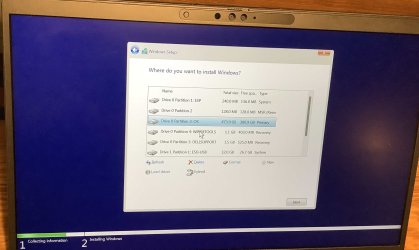
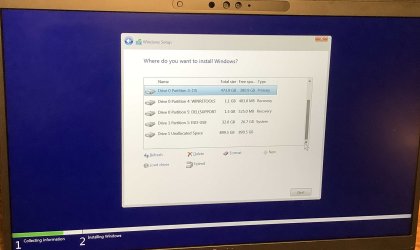
@zbook I'm just curious about these "hidden partitions" in general. I recently Clean-Installed W11, attached are two pictures of the partitions that the system displayed to me before executing that process--were any of those partitions "hidden" (ignore the ones indexed as "Drive 1")? I didn't see anything while researching Clean-Installation prior to performing that to indicate that any care for any "hidden partitions" needed to be taken.

1.jpg

2.jpg
 

My Computer My Computer

At a glance

Windows 11
OS
Windows 11
Computer type
Laptop
Manufacturer/Model
Dell Latitude 7430

My Computer My Computer

At a glance

Windows 11
OS
Windows 11
Computer type
Laptop
Manufacturer/Model
Dell Latitude 7430

A clean install is an installation of an operating system on a computer where the hard drive is formatted and completely erased.
 

My Computers My Computers

  • At a glance

    Win7,Win11i7-97002x16gb 3600mhz
    OS
    Win7,Win11
    Computer type
    PC/Desktop
    CPU
    i7-9700
    Motherboard
    gigabyte b365m ds3h
    Memory
    2x16gb 3600mhz
    Monitor(s) Displays
    benq gw2480
    PSU
    bequiet pure power 11 400CM
    Cooling
    cryorig m9i
  • At a glance

    win7,win11i5-84002x8gb 3200
    Operating System
    win7,win11
    Computer type
    PC/Desktop
    CPU
    i5-8400
    Motherboard
    gigabyte b365m ds3h
    Memory
    2x8gb 3200
    PSU
    xfx pro 450
@zbook I'm just curious about these "hidden partitions" in general. I recently Clean-Installed W11, attached are two pictures of the partitions that the system displayed to me before executing that process--were any of those partitions "hidden" (ignore the ones indexed as "Drive 1")? I didn't see anything while researching Clean-Installation prior to performing that to indicate that any care for any "hidden partitions" needed to be taken.

View attachment 91310

View attachment 91309

Dis 0 par 2 reserved is a partition that is typically hidden when viewing disk management.

To view whether it is or is not configured to be hidden open administrative command prompt and copy and paste these diagnostic commands: (all commands at one time)

Code:
diskpart
sel dis 0
lis par
sel par 1
det par
sel par 2
det par
sel par 3
det par
sel par 4
det par
sel par 5
det par
 

My Computer My Computer

At a glance

Windows 10Intel(R) Core(TM) i7-4800MQ CPU @ 2.70GHz16 GB Total: Manufacturer : Samsung MemoryTyp...NVIDIA Quadro K3100M; Intel(R) HD Graphics 4600
OS
Windows 10
Computer type
Laptop
Manufacturer/Model
HP
CPU
Intel(R) Core(TM) i7-4800MQ CPU @ 2.70GHz
Motherboard
Product : 190A Version : KBC Version 94.56
Memory
16 GB Total: Manufacturer : Samsung MemoryType : DDR3 FormFactor : SODIMM Capacity : 8GB Speed : 1600
Graphics Card(s)
NVIDIA Quadro K3100M; Intel(R) HD Graphics 4600
Sound Card
IDT High Definition Audio CODEC; PNP Device ID HDAUDIO\FUNC_01&VEN_111D&DEV_76E0
Hard Drives
Model Hitachi HTS727575A9E364
Antivirus
Microsoft Defender
Other Info
Mobile Workstation
Whether you get a windows.old partition depends on how you do a clean install.
windows.old is not a partition. It is just a file folder (previously called directories in the good old days.)
 

My Computers My Computers

  • At a glance

    Windows 11AMD Ryzen 7 3800XT32GBEVGA GeForce GTX 1080 Ti
    OS
    Windows 11
    Computer type
    PC/Desktop
    Manufacturer/Model
    Homebuilt
    CPU
    AMD Ryzen 7 3800XT
    Motherboard
    ASUS ROG Crosshair VII Hero (WiFi)
    Memory
    32GB
    Graphics Card(s)
    EVGA GeForce GTX 1080 Ti
  • At a glance

    Windows 11 EducationIntel i7-8550U32GBNvidia Geforce MX150
    Operating System
    Windows 11 Education
    Computer type
    Laptop
    Manufacturer/Model
    Dell Inspiron 7773
    CPU
    Intel i7-8550U
    Memory
    32GB
    Graphics card(s)
    Nvidia Geforce MX150
    Sound Card
    Realtek
    Monitor(s) Displays
    17"
    Screen Resolution
    1920 x 1080
    Hard Drives
    Toshiba 512GB NVMe SSD
    SK Hynix 512GB SATA SSD
    Internet Speed
    Fast!

My Computer My Computer

At a glance

Windows 11 ProIntel 113700H16GBNVIDIA RTX 3050 ti
OS
Windows 11 Pro
Computer type
Laptop
Manufacturer/Model
HP Pavilion 17 cd2205nw
CPU
Intel 113700H
Memory
16GB
Graphics Card(s)
NVIDIA RTX 3050 ti
Screen Resolution
1980x1020
Hard Drives
Micron 512GB
Mouse
Logitech
Internet Speed
100Mbs
Browser
Vivaldi , Edge
Antivirus
Windows defender
If setup.exe is used to install windows to a partition that already has the windows namespace folders, space permitting they will be moved into a folder called Windows.old

Other files/folders on the partition remain where they were.

Unless the behaviour of setup.exe has changed in the most recent builds.

Obviously that won't happen if the partition is formatted beforehand.

The Windows.old folder can be useful if you want fish stuff out of it, or if you want to do a rollback.
 
Last edited:

My Computers My Computers

  • At a glance

    Win7,Win11i7-97002x16gb 3600mhz
    OS
    Win7,Win11
    Computer type
    PC/Desktop
    CPU
    i7-9700
    Motherboard
    gigabyte b365m ds3h
    Memory
    2x16gb 3600mhz
    Monitor(s) Displays
    benq gw2480
    PSU
    bequiet pure power 11 400CM
    Cooling
    cryorig m9i
  • At a glance

    win7,win11i5-84002x8gb 3200
    Operating System
    win7,win11
    Computer type
    PC/Desktop
    CPU
    i5-8400
    Motherboard
    gigabyte b365m ds3h
    Memory
    2x8gb 3200
    PSU
    xfx pro 450
Back
Top Bottom