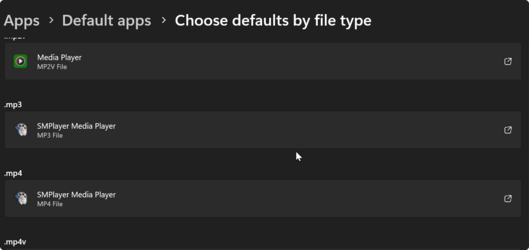
Issue with media files displaying weirdly in Windows 11


I would uninstall all programs/codecs for checking videos.

Maybe you checked a box somewhere.

Then from default thumbnails. If it is still doing it, then. We must check the thumbnail options in and around Windows, I do not know them, but I can't really think of what special magic this really is. Seems something like a registry option/link that seems to be recreated/broken.
 

My Computer My Computer

At a glance

Windows 11i5-1145G716GBIGP Iris
OS
Windows 11
Computer type
Laptop
Manufacturer/Model
Dell Lattitude 5320
CPU
i5-1145G7
Motherboard
Dell 0Y7GXY
Memory
16GB
Graphics Card(s)
IGP Iris
Sound Card
Realtek/Intel
Monitor(s) Displays
14" Laptop, 27" Main
Screen Resolution
1080p
Hard Drives
120gbx3 + 320gb + 500gb + 1T + 2TB + 3 TB + 4 TB + 1TB SSD + 512gb NVME
Keyboard
Rogueware GK200
Mouse
Razer Mini Deathadder v2
Internet Speed
60Mbps
Browser
Edge
Antivirus
Defender
Other Info
Windows 11 was useless. Spent weeks hacking at it.

Beyond sick and tired.

I was supposed to work a month ago... That was then...

When you reinstalled Windows did you also re-install your apps? It works ok for a time then gets corrupted again. That's why I'm thinking it's something installed that's doing it. Try testing out with a clean boot for a while.

The reset thing never has and I assume never will work for me. I will never try again.

Another issue. If some applications are not on C:/ . Forget it. No matter what you do, it CANNOT work.
 

My Computer My Computer

At a glance

Windows 11i5-1145G716GBIGP Iris
OS
Windows 11
Computer type
Laptop
Manufacturer/Model
Dell Lattitude 5320
CPU
i5-1145G7
Motherboard
Dell 0Y7GXY
Memory
16GB
Graphics Card(s)
IGP Iris
Sound Card
Realtek/Intel
Monitor(s) Displays
14" Laptop, 27" Main
Screen Resolution
1080p
Hard Drives
120gbx3 + 320gb + 500gb + 1T + 2TB + 3 TB + 4 TB + 1TB SSD + 512gb NVME
Keyboard
Rogueware GK200
Mouse
Razer Mini Deathadder v2
Internet Speed
60Mbps
Browser
Edge
Antivirus
Defender
Other Info
Windows 11 was useless. Spent weeks hacking at it.

Beyond sick and tired.

I was supposed to work a month ago... That was then...
Another thing that makes me think it's an app doing it is that it was also happening in Windows 10 prior to upgrading.
 

My Computers My Computers

  • At a glance

    Win 11 ProAMD Ryzen™ 7 7730U24GB Dual-Channel DDR4 @ 1596MHz (22-22-22-52)512MB ATI AMD Radeon Graphics (ASUStek Comput...
    OS
    Win 11 Pro
    Computer type
    Laptop
    Manufacturer/Model
    ASUS Vivobook
    CPU
    AMD Ryzen™ 7 7730U
    Motherboard
    M1605YA
    Memory
    24GB Dual-Channel DDR4 @ 1596MHz (22-22-22-52)
    Graphics Card(s)
    512MB ATI AMD Radeon Graphics (ASUStek Computer Inc)
    Monitor(s) Displays
    Generic PnP Monitor (1920x1200@60Hz) - P1 PLUS (1920x1080@59Hz)
    Screen Resolution
    1920 X 1200
    Hard Drives
    953GB Western Digital WD
    PSU
    45 Watts
    Mouse
    Lenovo Bluetooth.
    Internet Speed
    500 Mbps
    Browser
    Edge
    Antivirus
    Defender
  • At a glance

    Windows 11AMD Ryzen 7 5800H / 3.2 GHz32 GB DDR4 SDRAM 3200 MHzNVIDIA GeForce RTX 3060 6 GB GDDR6 SDRAM
    Operating System
    Windows 11
    Computer type
    Laptop
    Manufacturer/Model
    ACER NITRO
    CPU
    AMD Ryzen 7 5800H / 3.2 GHz
    Motherboard
    CZ Scala_CAS (FP6)
    Memory
    32 GB DDR4 SDRAM 3200 MHz
    Graphics card(s)
    NVIDIA GeForce RTX 3060 6 GB GDDR6 SDRAM
    Sound Card
    Realtek Audio. NVIDIA High Definition Audio
    Monitor(s) Displays
    15.6" LED backlight 1920 x 1080 (Full HD) 144 Hz
    Screen Resolution
    1920 x 1080 (Full HD)
    Hard Drives
    Samsung 970 Evo Plus 2TB NVMe M.2
    PSU
    180 Watt, 19.5 V
    Mouse
    Lenovo Bluetooth
    Internet Speed
    500 Mbps
    Browser
    Edge
    Antivirus
    Defender

My Computer My Computer

At a glance

Windows 11i7-11700K32GBRTX 3090 FOUNDERS EDITION
OS
Windows 11
Computer type
PC/Desktop
Manufacturer/Model
ASUS
CPU
i7-11700K
Motherboard
ROG STRIX B560G GAMING WIFI
Memory
32GB
Graphics Card(s)
RTX 3090 FOUNDERS EDITION
Sound Card
SOUND BLASTERX AE-5 PLUS
Monitor(s) Displays
OMEN 28INCH
Screen Resolution
2560 X 1440
Hard Drives
WD_BLACK SN850 1TB M.2 2280
PSU
Corsair CP-9020072-UK Professional Platinum Series HX750i
When you reinstalled Windows did you also re-install your apps? It works ok for a time then gets corrupted again. That's why I'm thinking it's something installed that's doing it. Try testing out with a clean boot for a while.

Thanks I will try that in the coming days (y)
 

My Computer My Computer

At a glance

Windows 11i7-11700K32GBRTX 3090 FOUNDERS EDITION
OS
Windows 11
Computer type
PC/Desktop
Manufacturer/Model
ASUS
CPU
i7-11700K
Motherboard
ROG STRIX B560G GAMING WIFI
Memory
32GB
Graphics Card(s)
RTX 3090 FOUNDERS EDITION
Sound Card
SOUND BLASTERX AE-5 PLUS
Monitor(s) Displays
OMEN 28INCH
Screen Resolution
2560 X 1440
Hard Drives
WD_BLACK SN850 1TB M.2 2280
PSU
Corsair CP-9020072-UK Professional Platinum Series HX750i
UPDATE - so I did a clean boot as per the advice of another forum member Fabler2. It still persists :( latest screenshot attached. Any other thoughts?
 

Attachments

  • Screenshot 2023-11-13 154138.png
    Screenshot 2023-11-13 154138.png
    6.3 KB · Views: 1

My Computer My Computer

At a glance

Windows 11i7-11700K32GBRTX 3090 FOUNDERS EDITION
OS
Windows 11
Computer type
PC/Desktop
Manufacturer/Model
ASUS
CPU
i7-11700K
Motherboard
ROG STRIX B560G GAMING WIFI
Memory
32GB
Graphics Card(s)
RTX 3090 FOUNDERS EDITION
Sound Card
SOUND BLASTERX AE-5 PLUS
Monitor(s) Displays
OMEN 28INCH
Screen Resolution
2560 X 1440
Hard Drives
WD_BLACK SN850 1TB M.2 2280
PSU
Corsair CP-9020072-UK Professional Platinum Series HX750i
Download k-lite mega codec pack. Install it and deselect everything except the codec tweak tool. Once the tweak tool is installed, launch it. You can edit video thumbnails and remove the icon and reel outline.
 

My Computer My Computer

At a glance

Windows 11 Pro
OS
Windows 11 Pro
UPDATE - so I did a clean boot as per the advice of another forum member Fabler2. It still persists :( latest screenshot attached. Any other thoughts?
While you were in clean boot did you re-associate your files with the player and run like that for an hour or so? I can't think that it's just a Windows issue as it only happens over time and it's not a common issue that I can find.
Sorry but I can't think of anything else to help.

2023_11_14_0841_%pn.png

2023_11_14_0848_%pn.png
 

My Computers My Computers

  • At a glance

    Win 11 ProAMD Ryzen™ 7 7730U24GB Dual-Channel DDR4 @ 1596MHz (22-22-22-52)512MB ATI AMD Radeon Graphics (ASUStek Comput...
    OS
    Win 11 Pro
    Computer type
    Laptop
    Manufacturer/Model
    ASUS Vivobook
    CPU
    AMD Ryzen™ 7 7730U
    Motherboard
    M1605YA
    Memory
    24GB Dual-Channel DDR4 @ 1596MHz (22-22-22-52)
    Graphics Card(s)
    512MB ATI AMD Radeon Graphics (ASUStek Computer Inc)
    Monitor(s) Displays
    Generic PnP Monitor (1920x1200@60Hz) - P1 PLUS (1920x1080@59Hz)
    Screen Resolution
    1920 X 1200
    Hard Drives
    953GB Western Digital WD
    PSU
    45 Watts
    Mouse
    Lenovo Bluetooth.
    Internet Speed
    500 Mbps
    Browser
    Edge
    Antivirus
    Defender
  • At a glance

    Windows 11AMD Ryzen 7 5800H / 3.2 GHz32 GB DDR4 SDRAM 3200 MHzNVIDIA GeForce RTX 3060 6 GB GDDR6 SDRAM
    Operating System
    Windows 11
    Computer type
    Laptop
    Manufacturer/Model
    ACER NITRO
    CPU
    AMD Ryzen 7 5800H / 3.2 GHz
    Motherboard
    CZ Scala_CAS (FP6)
    Memory
    32 GB DDR4 SDRAM 3200 MHz
    Graphics card(s)
    NVIDIA GeForce RTX 3060 6 GB GDDR6 SDRAM
    Sound Card
    Realtek Audio. NVIDIA High Definition Audio
    Monitor(s) Displays
    15.6" LED backlight 1920 x 1080 (Full HD) 144 Hz
    Screen Resolution
    1920 x 1080 (Full HD)
    Hard Drives
    Samsung 970 Evo Plus 2TB NVMe M.2
    PSU
    180 Watt, 19.5 V
    Mouse
    Lenovo Bluetooth
    Internet Speed
    500 Mbps
    Browser
    Edge
    Antivirus
    Defender
Download k-lite mega codec pack. Install it and deselect everything except the codec tweak tool. Once the tweak tool is installed, launch it. You can edit video thumbnails and remove the icon and reel outline.
Hi, I tried your method of hiding the overlay. At least it won't annoy me as much now. Thank you. Still a mystery to me.
 

My Computer My Computer

At a glance

Windows 11i7-11700K32GBRTX 3090 FOUNDERS EDITION
OS
Windows 11
Computer type
PC/Desktop
Manufacturer/Model
ASUS
CPU
i7-11700K
Motherboard
ROG STRIX B560G GAMING WIFI
Memory
32GB
Graphics Card(s)
RTX 3090 FOUNDERS EDITION
Sound Card
SOUND BLASTERX AE-5 PLUS
Monitor(s) Displays
OMEN 28INCH
Screen Resolution
2560 X 1440
Hard Drives
WD_BLACK SN850 1TB M.2 2280
PSU
Corsair CP-9020072-UK Professional Platinum Series HX750i
Back
Top Bottom