Issues with Ethernet Disconnecting


pikminpedia

Member
Local time
8:36 AM
Posts
13
OS
Windows 11
My ethernet keeps disconnecting. Simply put, it will, at random times/intervals disconnect. I haven't been able to find the cause/source of this. As the disconnects will persist until I physically unplug and replug the cable from the wall outlet. Otherwise, the Windows 11's network connecting says "Ethernet cable isn't plugged in".

This problem started to happen around January of this year. I only noticed it happening after a set of Windows updating my PC every day for five days straight. However, I could not find any information on if the updates changed how my computer handles ethernet and, unfortunately, didn't have a proper way to revert the changes. I have spent months trying to troubleshoot this issue and I am slamming my head against the wall at this point. The fixes I have attempted thus far:

1. Edit the power saver settings for Windows
2. Updated BIOS
3. Edit the advanced settings of the device's driver (Realtek Gaming 2.5 GbE Family Controller)
4. Changed the Automatic IP assignment to Manual and gave my computer a static IP Address
5. Checked both the computer and the wall outlet connections
6. Replaced the ethernet cable
7. Disabled the onboard ethernet card in lieu of a TP-Link 2.5GB PCIe Network Card (With the Realtek PCIe 2.5GbE Family Controller driver that it made me install)
8. Checked the router ports for faulty wiring
9. Checked the modem ports for faulty wiring
10. Switched around the cables of the network (every other member of my family says their internet doesn't drop (yet, I haven't been able to test it myself, since these problems happen randomly))
11 (In Progress) Factory reset modem and updated firmware upon complete wipe.

I'm legitimately at a loss and am unsure what I'm supposed to do next. The problem isn't horribly life-changing, but it does get annoying to be midproject, midgame, or midconversation with people only to have my ethernet connection drop and say there is no cable connected.

Is it a software issue? Is it a hardware issue? Is there a possibility multiple device drivers are somehow installed on my computer and causing the weird disconnects?

I could really use some assistance in figuring this out as the issue has gone far beyond my expertise and limited knowledge of computers, and every time I think I've figured out why it's causing a problem, it shows itself again and I don't know why. What else may I provide for assistance?

Thank you for taking your time to read this.
 
Windows Build/Version
Windows 11
Last edited:

My Computer My Computer

At a glance

Windows 1113th Gen Intel Core i5-13600KF, 14 Core32 GB Patriot Memory (PDP SystemsNVIDIA GeForce RTX3060
OS
Windows 11
Computer type
PC/Desktop
Manufacturer/Model
CLX
CPU
13th Gen Intel Core i5-13600KF, 14 Core
Motherboard
Micro-Star International PRO @690-P DDR4 (MS-7D36)
Memory
32 GB Patriot Memory (PDP Systems
Graphics Card(s)
NVIDIA GeForce RTX3060
Sound Card
Realtek High Definition Audio
Monitor(s) Displays
ASUS and ONN
Screen Resolution
1920x1080
Hard Drives
2x Kingston 1 TB SSD, 4 TB HDD
Browser
Opera
Antivirus
Windows Defender / Malwarebytes
The problem should be with the modem or router, not Windows....
 

My Computer My Computer

At a glance

Windows 11 Home X-lite versionIntel Core i5 (3rd Gen) 3570 / 3.4 GHz32 GB of 1600 MHz non-ECC DDR3 SDRAMIntel HD Graphics 2500 Dynamic Video Memory
OS
Windows 11 Home X-lite version
Computer type
PC/Desktop
Manufacturer/Model
Dell OptiPlex 9010
CPU
Intel Core i5 (3rd Gen) 3570 / 3.4 GHz
Motherboard
Intel Q77 Express
Memory
32 GB of 1600 MHz non-ECC DDR3 SDRAM
Graphics Card(s)
Intel HD Graphics 2500 Dynamic Video Memory
Monitor(s) Displays
22" veiwsonic

My Computers My Computers

  • At a glance

    Windows 11 Pro build 26200.8524Intel i7-4790Teams DDR3-1600 4x4 GBMSI Nvidia GeForce GTX 1050Ti
    OS
    Windows 11 Pro build 26200.8524
    Computer type
    PC/Desktop
    Manufacturer/Model
    Home Built
    CPU
    Intel i7-4790
    Motherboard
    Asus H97 Pro Gamer with add-on TPM1.2 module
    Memory
    Teams DDR3-1600 4x4 GB
    Graphics Card(s)
    MSI Nvidia GeForce GTX 1050Ti
    Sound Card
    Realtek ALC1150
    Monitor(s) Displays
    Dell P2425D
    Screen Resolution
    2560 by 1440 pixels
    Hard Drives
    Corsair NVMe M.2 Core XT 1000 GB (Windows 11 v.25H2); Samsung SATA Evo 870 500 GB (Windows 11 v.25H2);
    PSU
    Corsair HX850
    Case
    Gigabyte Solo 210
    Cooling
    Zalman CNPS7X Tower
    Keyboard
    Microsoft AIO Wireless (includes touchpad)
    Mouse
    HP S1000 Plus Wireless
    Internet Speed
    500 Mb fiber optic
    Browser
    Chrome; MS Edge
    Antivirus
    Windows Defender
  • At a glance

    MacOS 12 MontereyIntel Core i58 GBIntel integrated
    Operating System
    MacOS 12 Monterey
    Computer type
    Laptop
    Manufacturer/Model
    Apple Macbook Air
    CPU
    Intel Core i5
    Memory
    8 GB
    Graphics card(s)
    Intel integrated
    Screen Resolution
    1440 by 900 pixels
    Hard Drives
    128 GB
    Keyboard
    Built-in
    Mouse
    Microsoft Wireless
    Internet Speed
    802.11 ac
    Browser
    Chrome; Safari
    Antivirus
    N/A
Did you run the Network Troubleshooter ?

I have tried running the network diagnostics tests, but it can't pick up on any issues when my internet is normally plugged in, and it doesn't allow a diagnostic test when it says "the ethernet cable isn't plugged in". So the diagnostics has been severely ineffective.
 

My Computer My Computer

At a glance

Windows 1113th Gen Intel Core i5-13600KF, 14 Core32 GB Patriot Memory (PDP SystemsNVIDIA GeForce RTX3060
OS
Windows 11
Computer type
PC/Desktop
Manufacturer/Model
CLX
CPU
13th Gen Intel Core i5-13600KF, 14 Core
Motherboard
Micro-Star International PRO @690-P DDR4 (MS-7D36)
Memory
32 GB Patriot Memory (PDP Systems
Graphics Card(s)
NVIDIA GeForce RTX3060
Sound Card
Realtek High Definition Audio
Monitor(s) Displays
ASUS and ONN
Screen Resolution
1920x1080
Hard Drives
2x Kingston 1 TB SSD, 4 TB HDD
Browser
Opera
Antivirus
Windows Defender / Malwarebytes
The problem should be with the modem or router, not Windows....
Is there a possibility that doing a factory reset of the modem would fix the issue?
 

My Computer My Computer

At a glance

Windows 1113th Gen Intel Core i5-13600KF, 14 Core32 GB Patriot Memory (PDP SystemsNVIDIA GeForce RTX3060
OS
Windows 11
Computer type
PC/Desktop
Manufacturer/Model
CLX
CPU
13th Gen Intel Core i5-13600KF, 14 Core
Motherboard
Micro-Star International PRO @690-P DDR4 (MS-7D36)
Memory
32 GB Patriot Memory (PDP Systems
Graphics Card(s)
NVIDIA GeForce RTX3060
Sound Card
Realtek High Definition Audio
Monitor(s) Displays
ASUS and ONN
Screen Resolution
1920x1080
Hard Drives
2x Kingston 1 TB SSD, 4 TB HDD
Browser
Opera
Antivirus
Windows Defender / Malwarebytes
As the disconnects will persist until I physically unplug and replug the cable from the wall outlet.

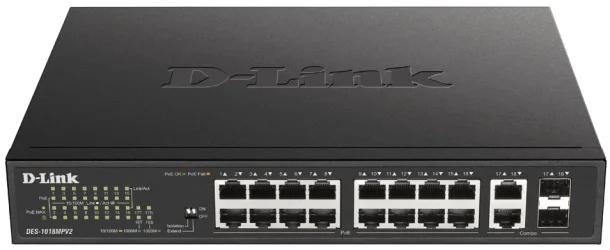
As you’re using a wall outlet, I take it that your house is networked throughout? If this is the case, do you use a Network Switch that the Modem/Router distributes the internet though??

If so, unplug it from the wall for a minute and plug it back in. Even if it’s a non managed switch (Plug & Play), it can still need a reset by cutting power to it. I have had this happen twice in the last 10 years.

Otherwise, as mentioned, a factory reset of both the Modem/Router, in fact, do all 3. Try the switch first.


A switch like or similar to this:


IMG_5450.webp
 

My Computers My Computers

  • At a glance

    Windows 11 Pro 25H2 Build 26200.9168Intel(R) Core(TM) i7-4770K CPU @ 3.50GHz32.0 GB of I forget and the box is in storage.Gigabyte nVidia GeForce GTX 1660 Super OC 6GB
    OS
    Windows 11 Pro 25H2 Build 26200.9168
    Computer type
    PC/Desktop
    Manufacturer/Model
    Sin-built 2013
    CPU
    Intel(R) Core(TM) i7-4770K CPU @ 3.50GHz
    Motherboard
    ASUS ROG Maximus VI Formula
    Memory
    32.0 GB of I forget and the box is in storage.
    Graphics Card(s)
    Gigabyte nVidia GeForce GTX 1660 Super OC 6GB
    Sound Card
    ROG SupremeFX Formula 8-Channel High Definition Audio
    Monitor(s) Displays
    5 x LG 25MS500-B - 1 x 24MK430H-B - 1 x Wacom Pro 22" Touch Screen Tablet
    Screen Resolution
    All over the place
    Hard Drives
    Too many to list. OS on Samsung 1TB 870 QVO SATA
    PSU
    Silverstone 1500
    Case
    NZXT Phantom 820 Full-Tower Case
    Cooling
    Noctua NH-D15 Elite Class Dual Tower CPU Cooler / 6 x EziDIY 120mm / 2 x Corsair 140mm somethings / 1 x 140mm Thermaltake something / 2 x 200mm Corsair.
    Keyboard
    Corsair K95 / Logitech diNovo Edge Wireless
    Mouse
    Logitech: G402 / G502 / Mx Masters / Mx Air Cordless
    Internet Speed
    2000/500Mbps
    Browser
    All sorts
    Antivirus
    Kaspersky Premium
    Other Info
    ㅤㅤㅤㅤㅤㅤㅤㅤㅤㅤㅤㅤㅤㅤㅤㅤㅤㅤㅤㅤㅤㅤㅤㅤㅤㅤㅤㅤㅤㅤㅤㅤㅤㅤㅤㅤㅤㅤㅤㅤ⠀⠀⠀⠀⠀⠀⠀⠀⠀⠀
    TP-Link BE9300 WiFi 7 Bluetooth 5.4 (Archer TBE550E)
    TP-Link TX201 V1 2.5GB Lan

    Grandstream HT812 - VoIP
    ASUS DSL-AX82U - Mesh
    ASUS RT-AC68U - Mesh
    ASUS RT-BE88U Router

    Brother MFC-L2880DW Printer

    I’m on a horse.
  • At a glance

    Windows 11 Pro 25H2 Build 26200.9168 (Wifes)13th Generation Intel® Core™ i5-1340P Process...16GB LPDDR5-52001x Intel® Iris® Xe Graphics
    Operating System
    Windows 11 Pro 25H2 Build 26200.9168 (Wifes)
    Computer type
    Laptop
    Manufacturer/Model
    LENOVO Yoga 7 14IRL8 - Type 82YL
    CPU
    13th Generation Intel® Core™ i5-1340P Processor(Core™ i5-1340P)
    Memory
    16GB LPDDR5-5200
    Graphics card(s)
    1x Intel® Iris® Xe Graphics
    Sound Card
    Optimized with Dolby Atmos®
    Screen Resolution
    QHD 2880 x 1800 OLED
    Hard Drives
    M.2 512 GB SSD PCIe
    Mouse
    Logiteck MX Master 3S
    Internet Speed
    2000/500
    Antivirus
    Defender / Malwarebytes
    Other Info
    …still on a horse.


    Wireless Network: Wi-Fi 6E 2x2 AX; Bluetooth® 5.1 or above
    Ports: 1x 1 Novo button; 2 in 1 Audio Combo jack; Micro SD Card Reader; HDMI 1.4b; 2 x USB Type-C (TBT4)
    USB 3.2 Gen 2 DP 1.4a
    PD 3.0); 1 x USB 3.2 Gen1 Type A
    Camera
    1x 1080P FHD IR/RGB Hybrid with Privacy Shutter and Dual Array Microphone
    Graphics
    1x Intel® Iris® Xe Graphics
    Monitor
    14" WUXGA
    Form Factor
    Convertible Notebook
  • Windows 11 Pro 25H2 Build 26200.9168 (Wifes)

    Yoga 7 2-in-1 14IML9 - Type 83DJ

    Processor: Intel® Core™ Ultra 7 155H Processor(Core™ Ultra 7 155H)

    Memory: 32GB LPD5X-7467

    Hard Drive: 1 TB SSD PCIe

    Wireless Network: 1x Wi-Fi 6E 2x2 AX; Bluetooth® 5.1 or above

    Ports: 1 x HDMI 2.1 TMDS; 1 x Novo Button; 1 x Combo Audio Jack
    2 x USB-C (USB 4.0)
    1 x USB-A 3.2 Gen 1

    Camera: 1080P FHD IR Hybrid with Dual Microphone

    Graphics: Intel® Arc™ Graphics

    Monitor: 14" 2.8K

    ...Where's my horse?
Is there a possibility that doing a factory reset of the modem would fix the issue?
Can you get into your modem ? It should have an IP address, something like 192.168.1.1. Check your modem/router manual to see what IP address it uses. By the way, did you set a strong password for your modem/router ?
 

My Computers My Computers

  • At a glance

    Windows 11 Pro build 26200.8524Intel i7-4790Teams DDR3-1600 4x4 GBMSI Nvidia GeForce GTX 1050Ti
    OS
    Windows 11 Pro build 26200.8524
    Computer type
    PC/Desktop
    Manufacturer/Model
    Home Built
    CPU
    Intel i7-4790
    Motherboard
    Asus H97 Pro Gamer with add-on TPM1.2 module
    Memory
    Teams DDR3-1600 4x4 GB
    Graphics Card(s)
    MSI Nvidia GeForce GTX 1050Ti
    Sound Card
    Realtek ALC1150
    Monitor(s) Displays
    Dell P2425D
    Screen Resolution
    2560 by 1440 pixels
    Hard Drives
    Corsair NVMe M.2 Core XT 1000 GB (Windows 11 v.25H2); Samsung SATA Evo 870 500 GB (Windows 11 v.25H2);
    PSU
    Corsair HX850
    Case
    Gigabyte Solo 210
    Cooling
    Zalman CNPS7X Tower
    Keyboard
    Microsoft AIO Wireless (includes touchpad)
    Mouse
    HP S1000 Plus Wireless
    Internet Speed
    500 Mb fiber optic
    Browser
    Chrome; MS Edge
    Antivirus
    Windows Defender
  • At a glance

    MacOS 12 MontereyIntel Core i58 GBIntel integrated
    Operating System
    MacOS 12 Monterey
    Computer type
    Laptop
    Manufacturer/Model
    Apple Macbook Air
    CPU
    Intel Core i5
    Memory
    8 GB
    Graphics card(s)
    Intel integrated
    Screen Resolution
    1440 by 900 pixels
    Hard Drives
    128 GB
    Keyboard
    Built-in
    Mouse
    Microsoft Wireless
    Internet Speed
    802.11 ac
    Browser
    Chrome; Safari
    Antivirus
    N/A
I too had Ethernet connection issues, slightly different from yours but I could only resolve by a reboot of the router.
Tried everything, finally resolved it>>> replaced the router.
Borrow a router and try....
 

My Computer My Computer

At a glance

windows 11AMD Ryzen 5 5600G16GAMD Cezzane
OS
windows 11
Computer type
PC/Desktop
Manufacturer/Model
Generic
CPU
AMD Ryzen 5 5600G
Motherboard
Gigabyte A520M DS3H AC
Memory
16G
Graphics Card(s)
AMD Cezzane
As you’re using a wall outlet, I take it that your house is networked throughout? If this is the case, do you use a Network Switch that the Modem/Router distributes the internet though??

If so, unplug it from the wall for a minute and plug it back in. Even if it’s a non managed switch (Plug & Play), it can still need a reset by cutting power to it. I have had this happen twice in the last 10 years.

Otherwise, as mentioned, a factory reset of both the Modem/Router, in fact, do all 3. Try the switch first.


A switch like or similar to this:


View attachment 133411
I suppose I never thought about disconnecting the network switch. I'll give this a try.
 

My Computer My Computer

At a glance

Windows 1113th Gen Intel Core i5-13600KF, 14 Core32 GB Patriot Memory (PDP SystemsNVIDIA GeForce RTX3060
OS
Windows 11
Computer type
PC/Desktop
Manufacturer/Model
CLX
CPU
13th Gen Intel Core i5-13600KF, 14 Core
Motherboard
Micro-Star International PRO @690-P DDR4 (MS-7D36)
Memory
32 GB Patriot Memory (PDP Systems
Graphics Card(s)
NVIDIA GeForce RTX3060
Sound Card
Realtek High Definition Audio
Monitor(s) Displays
ASUS and ONN
Screen Resolution
1920x1080
Hard Drives
2x Kingston 1 TB SSD, 4 TB HDD
Browser
Opera
Antivirus
Windows Defender / Malwarebytes
Can you get into your modem ? It should have an IP address, something like 192.168.1.1. Check your modem/router manual to see what IP address it uses. By the way, did you set a strong password for your modem/router ?
I did a factory reset on it and was able to access it. Based off the date of the last firmware update, I doubt the modem was actually, properly up-to-date until I did the reset. I do hope this may fix it.
 

My Computer My Computer

At a glance

Windows 1113th Gen Intel Core i5-13600KF, 14 Core32 GB Patriot Memory (PDP SystemsNVIDIA GeForce RTX3060
OS
Windows 11
Computer type
PC/Desktop
Manufacturer/Model
CLX
CPU
13th Gen Intel Core i5-13600KF, 14 Core
Motherboard
Micro-Star International PRO @690-P DDR4 (MS-7D36)
Memory
32 GB Patriot Memory (PDP Systems
Graphics Card(s)
NVIDIA GeForce RTX3060
Sound Card
Realtek High Definition Audio
Monitor(s) Displays
ASUS and ONN
Screen Resolution
1920x1080
Hard Drives
2x Kingston 1 TB SSD, 4 TB HDD
Browser
Opera
Antivirus
Windows Defender / Malwarebytes
I too had Ethernet connection issues, slightly different from yours but I could only resolve by a reboot of the router.
Tried everything, finally resolved it>>> replaced the router.
Borrow a router and try....
That was something I thought was a possibility. That would be the ultimate "last resort" for me, since it'd be the most costly outside of a new modem/new motherboard.
 

My Computer My Computer

At a glance

Windows 1113th Gen Intel Core i5-13600KF, 14 Core32 GB Patriot Memory (PDP SystemsNVIDIA GeForce RTX3060
OS
Windows 11
Computer type
PC/Desktop
Manufacturer/Model
CLX
CPU
13th Gen Intel Core i5-13600KF, 14 Core
Motherboard
Micro-Star International PRO @690-P DDR4 (MS-7D36)
Memory
32 GB Patriot Memory (PDP Systems
Graphics Card(s)
NVIDIA GeForce RTX3060
Sound Card
Realtek High Definition Audio
Monitor(s) Displays
ASUS and ONN
Screen Resolution
1920x1080
Hard Drives
2x Kingston 1 TB SSD, 4 TB HDD
Browser
Opera
Antivirus
Windows Defender / Malwarebytes
I think the smart thing to do would of been to try these things one at a time and reboot. If it happens again, it could give you an idea of what to do next time. That’s of course is if there is a next time. Let us know how you go.
 

My Computers My Computers

  • At a glance

    Windows 11 Pro 25H2 Build 26200.9168Intel(R) Core(TM) i7-4770K CPU @ 3.50GHz32.0 GB of I forget and the box is in storage.Gigabyte nVidia GeForce GTX 1660 Super OC 6GB
    OS
    Windows 11 Pro 25H2 Build 26200.9168
    Computer type
    PC/Desktop
    Manufacturer/Model
    Sin-built 2013
    CPU
    Intel(R) Core(TM) i7-4770K CPU @ 3.50GHz
    Motherboard
    ASUS ROG Maximus VI Formula
    Memory
    32.0 GB of I forget and the box is in storage.
    Graphics Card(s)
    Gigabyte nVidia GeForce GTX 1660 Super OC 6GB
    Sound Card
    ROG SupremeFX Formula 8-Channel High Definition Audio
    Monitor(s) Displays
    5 x LG 25MS500-B - 1 x 24MK430H-B - 1 x Wacom Pro 22" Touch Screen Tablet
    Screen Resolution
    All over the place
    Hard Drives
    Too many to list. OS on Samsung 1TB 870 QVO SATA
    PSU
    Silverstone 1500
    Case
    NZXT Phantom 820 Full-Tower Case
    Cooling
    Noctua NH-D15 Elite Class Dual Tower CPU Cooler / 6 x EziDIY 120mm / 2 x Corsair 140mm somethings / 1 x 140mm Thermaltake something / 2 x 200mm Corsair.
    Keyboard
    Corsair K95 / Logitech diNovo Edge Wireless
    Mouse
    Logitech: G402 / G502 / Mx Masters / Mx Air Cordless
    Internet Speed
    2000/500Mbps
    Browser
    All sorts
    Antivirus
    Kaspersky Premium
    Other Info
    ㅤㅤㅤㅤㅤㅤㅤㅤㅤㅤㅤㅤㅤㅤㅤㅤㅤㅤㅤㅤㅤㅤㅤㅤㅤㅤㅤㅤㅤㅤㅤㅤㅤㅤㅤㅤㅤㅤㅤㅤ⠀⠀⠀⠀⠀⠀⠀⠀⠀⠀
    TP-Link BE9300 WiFi 7 Bluetooth 5.4 (Archer TBE550E)
    TP-Link TX201 V1 2.5GB Lan

    Grandstream HT812 - VoIP
    ASUS DSL-AX82U - Mesh
    ASUS RT-AC68U - Mesh
    ASUS RT-BE88U Router

    Brother MFC-L2880DW Printer

    I’m on a horse.
  • At a glance

    Windows 11 Pro 25H2 Build 26200.9168 (Wifes)13th Generation Intel® Core™ i5-1340P Process...16GB LPDDR5-52001x Intel® Iris® Xe Graphics
    Operating System
    Windows 11 Pro 25H2 Build 26200.9168 (Wifes)
    Computer type
    Laptop
    Manufacturer/Model
    LENOVO Yoga 7 14IRL8 - Type 82YL
    CPU
    13th Generation Intel® Core™ i5-1340P Processor(Core™ i5-1340P)
    Memory
    16GB LPDDR5-5200
    Graphics card(s)
    1x Intel® Iris® Xe Graphics
    Sound Card
    Optimized with Dolby Atmos®
    Screen Resolution
    QHD 2880 x 1800 OLED
    Hard Drives
    M.2 512 GB SSD PCIe
    Mouse
    Logiteck MX Master 3S
    Internet Speed
    2000/500
    Antivirus
    Defender / Malwarebytes
    Other Info
    …still on a horse.


    Wireless Network: Wi-Fi 6E 2x2 AX; Bluetooth® 5.1 or above
    Ports: 1x 1 Novo button; 2 in 1 Audio Combo jack; Micro SD Card Reader; HDMI 1.4b; 2 x USB Type-C (TBT4)
    USB 3.2 Gen 2 DP 1.4a
    PD 3.0); 1 x USB 3.2 Gen1 Type A
    Camera
    1x 1080P FHD IR/RGB Hybrid with Privacy Shutter and Dual Array Microphone
    Graphics
    1x Intel® Iris® Xe Graphics
    Monitor
    14" WUXGA
    Form Factor
    Convertible Notebook
  • Windows 11 Pro 25H2 Build 26200.9168 (Wifes)

    Yoga 7 2-in-1 14IML9 - Type 83DJ

    Processor: Intel® Core™ Ultra 7 155H Processor(Core™ Ultra 7 155H)

    Memory: 32GB LPD5X-7467

    Hard Drive: 1 TB SSD PCIe

    Wireless Network: 1x Wi-Fi 6E 2x2 AX; Bluetooth® 5.1 or above

    Ports: 1 x HDMI 2.1 TMDS; 1 x Novo Button; 1 x Combo Audio Jack
    2 x USB-C (USB 4.0)
    1 x USB-A 3.2 Gen 1

    Camera: 1080P FHD IR Hybrid with Dual Microphone

    Graphics: Intel® Arc™ Graphics

    Monitor: 14" 2.8K

    ...Where's my horse?
The problem was likely solved. Just short of two days ago I encountered the same issue. I hit the reset on the router and everything came back. So far there hasn't been a problem. I run about six switches in the house in addition to my main. The price of opting out of WiFi.
 

My Computer My Computer

At a glance

WIN 11, WIN 10, WIN 8.1, WIN 7 U, WIN 7 PRO, ...Intel i7 6900K and i9-7960X / AMD 3800X (8 core)128 GB CORSAIR DOMINATOR PLATINUM (B DIE)NVIDIA 1070 and RTX 3070
OS
WIN 11, WIN 10, WIN 8.1, WIN 7 U, WIN 7 PRO, WIN 7 HOME (32 Bit), LINUX MINT
Computer type
PC/Desktop
Manufacturer/Model
DIY, ASUS, and DELL
CPU
Intel i7 6900K and i9-7960X / AMD 3800X (8 core)
Motherboard
ASUS X99E-WS USB 3.1 and ASUS X299 SAGE
Memory
128 GB CORSAIR DOMINATOR PLATINUM (B DIE)
Graphics Card(s)
NVIDIA 1070 and RTX 3070
Sound Card
Crystal Sound (onboard)
Monitor(s) Displays
single Samsung 30" 4K and 8" aux monitor
Screen Resolution
4K and something equally attrocious. I'll be working on this.
Hard Drives
A, B, C, D, E, F, G, H, I, J, K, L, M, N, O, P, Q, R, S, T, U, V, W

Ports X, Y, and Z are reserved for USB access and removable drives.

Drive types consist of the following: Various mechanical hard drives bearing the brand names, Seagate, Toshiba, and Western Digital. Various NVMe drives bearing the brand names Kingston, Intel, Silicon Power, Crucial, Western Digital, and Team Group. Various SATA SSDs bearing various different brand names.

RAID arrays included:

LSI RAID 10 (WD Velociraptors) 1115.72 GB
LSI RAID 10 (WD SSDS) 463.80 GB

INTEL RAID 0 (KINGSTON HYPER X) System 447.14 GB
INTEL RAID 1 TOSHIBA ENTERPRIZE class Data 2794.52 GB
INTEL RAID 1 SEAGATE HYBRID 931.51 GB
PSU
SEVERAL. I prefer my Corsair Platinum HX1000i but I also like EVGA power supplies
Case
ThermalTake Level 10 GT (among others)
Cooling
Noctua is my favorite and I use it in my main. I also own various other coolers.
Keyboard
all kinds.
Mouse
all kinds
Internet Speed
360 mbps - 1 gbps (depending)
Browser
FIREFOX
Antivirus
KASPERSKY (no apologies)
Other Info
Gave Dell touch screen with Windows 11 to daughter and got me an OTVOC. Being a PC builder I own many desktop PCs as well. I am a father of five providing PCs, laptops, and tablets for all my family, most of which I have modified, rebuilt, or simply built from scratch. I do not own a cell phone, never have, never will.
I don't know whether the problem of internet connectivity is due to IP conflict or not. But every device connecting to internet at a location, home for example, should be assigned a static IP address outside of DHCP pool range. At my home TVs, desktop PC, router, etc. are given static IP addresses outside of DHCP pool.

Another option is using MAC-IP reservation table of modem/router. If a device is registered at the IP reservation table using its MAC address, no other device can be assigned that IP address. Therefore, no conflict arises.

Hope this helps.
 

My Computers My Computers

  • At a glance

    Windows 11 Pro build 26200.8524Intel i7-4790Teams DDR3-1600 4x4 GBMSI Nvidia GeForce GTX 1050Ti
    OS
    Windows 11 Pro build 26200.8524
    Computer type
    PC/Desktop
    Manufacturer/Model
    Home Built
    CPU
    Intel i7-4790
    Motherboard
    Asus H97 Pro Gamer with add-on TPM1.2 module
    Memory
    Teams DDR3-1600 4x4 GB
    Graphics Card(s)
    MSI Nvidia GeForce GTX 1050Ti
    Sound Card
    Realtek ALC1150
    Monitor(s) Displays
    Dell P2425D
    Screen Resolution
    2560 by 1440 pixels
    Hard Drives
    Corsair NVMe M.2 Core XT 1000 GB (Windows 11 v.25H2); Samsung SATA Evo 870 500 GB (Windows 11 v.25H2);
    PSU
    Corsair HX850
    Case
    Gigabyte Solo 210
    Cooling
    Zalman CNPS7X Tower
    Keyboard
    Microsoft AIO Wireless (includes touchpad)
    Mouse
    HP S1000 Plus Wireless
    Internet Speed
    500 Mb fiber optic
    Browser
    Chrome; MS Edge
    Antivirus
    Windows Defender
  • At a glance

    MacOS 12 MontereyIntel Core i58 GBIntel integrated
    Operating System
    MacOS 12 Monterey
    Computer type
    Laptop
    Manufacturer/Model
    Apple Macbook Air
    CPU
    Intel Core i5
    Memory
    8 GB
    Graphics card(s)
    Intel integrated
    Screen Resolution
    1440 by 900 pixels
    Hard Drives
    128 GB
    Keyboard
    Built-in
    Mouse
    Microsoft Wireless
    Internet Speed
    802.11 ac
    Browser
    Chrome; Safari
    Antivirus
    N/A
make sure it is not the browser giving issues,, try using Chrome if it is edge. I got the same issues with an ASUS motherboard. Never found out why but did find out my new Nvidia 5070 ti gets throttled back by the horrible drivers, causes computer to act like a network issue. Chrome does not throttle back for some reason. My issues does not happen while gaming. Just browsing. BTW, does it come back after a few seconds, or disconnecting and reconnecting ethernet?
 

My Computer My Computer

At a glance

Win11i9-1390064 GBNvidia RTX 5070 TI OC
OS
Win11
Computer type
PC/Desktop
Manufacturer/Model
Asus Home built
CPU
i9-13900
Motherboard
ASUS Strix Z790-H
Memory
64 GB
Graphics Card(s)
Nvidia RTX 5070 TI OC
Monitor(s) Displays
Sony 55"
Hard Drives
SSD
PSU
850 watt EVGA
Case
Cooler Master Haf 932
Cooling
CoolerMaster
Keyboard
RedDragon
Mouse
CoolerMaster
Internet Speed
300/300
Antivirus
Defender
Other Info
VR, Virtual Reality
I think the smart thing to do would of been to try these things one at a time and reboot. If it happens again, it could give you an idea of what to do next time. That’s of course is if there is a next time. Let us know how you go.
That's the process I've been going through, yeah. I haven't disconnected the switch yet and am still testing out the modem reset. If the issue persists, the switch disconnect is the next step I'll take.

The processes listed in my original post above are the steps I took between these weird disconnects. It's very hard to do this in a timely manner since some days, there isn't an issue, and it can be fine for almost a week, but then, one day, it will just disconnect willy-nilly.

That's why it's taken me several months, because I keep going another step up the ladder each time the previous fails.
 

My Computer My Computer

At a glance

Windows 1113th Gen Intel Core i5-13600KF, 14 Core32 GB Patriot Memory (PDP SystemsNVIDIA GeForce RTX3060
OS
Windows 11
Computer type
PC/Desktop
Manufacturer/Model
CLX
CPU
13th Gen Intel Core i5-13600KF, 14 Core
Motherboard
Micro-Star International PRO @690-P DDR4 (MS-7D36)
Memory
32 GB Patriot Memory (PDP Systems
Graphics Card(s)
NVIDIA GeForce RTX3060
Sound Card
Realtek High Definition Audio
Monitor(s) Displays
ASUS and ONN
Screen Resolution
1920x1080
Hard Drives
2x Kingston 1 TB SSD, 4 TB HDD
Browser
Opera
Antivirus
Windows Defender / Malwarebytes
The problem was likely solved. Just short of two days ago I encountered the same issue. I hit the reset on the router and everything came back. So far there hasn't been a problem. I run about six switches in the house in addition to my main. The price of opting out of WiFi.
Yeah, the modem reset is hopefully promising. I'm keeping my fingers crossed.
 

My Computer My Computer

At a glance

Windows 1113th Gen Intel Core i5-13600KF, 14 Core32 GB Patriot Memory (PDP SystemsNVIDIA GeForce RTX3060
OS
Windows 11
Computer type
PC/Desktop
Manufacturer/Model
CLX
CPU
13th Gen Intel Core i5-13600KF, 14 Core
Motherboard
Micro-Star International PRO @690-P DDR4 (MS-7D36)
Memory
32 GB Patriot Memory (PDP Systems
Graphics Card(s)
NVIDIA GeForce RTX3060
Sound Card
Realtek High Definition Audio
Monitor(s) Displays
ASUS and ONN
Screen Resolution
1920x1080
Hard Drives
2x Kingston 1 TB SSD, 4 TB HDD
Browser
Opera
Antivirus
Windows Defender / Malwarebytes

I don't know whether the problem of internet connectivity is due to IP conflict or not. But every device connecting to internet at a location, home for example, should be assigned a static IP address outside of DHCP pool range. At my home TVs, desktop PC, router, etc. are given static IP addresses outside of DHCP pool.

Another option is using MAC-IP reservation table of modem/router. If a device is registered at the IP reservation table using its MAC address, no other device can be assigned that IP address. Therefore, no conflict arises.

Hope this helps.
I was theorizing it could be an IP conflict where the router and/or modem are trying to give out the same IP to different devices. Though, admittedly, I didn't know the range for the DHCP. Is it different from modem to modem?
 

My Computer My Computer

At a glance

Windows 1113th Gen Intel Core i5-13600KF, 14 Core32 GB Patriot Memory (PDP SystemsNVIDIA GeForce RTX3060
OS
Windows 11
Computer type
PC/Desktop
Manufacturer/Model
CLX
CPU
13th Gen Intel Core i5-13600KF, 14 Core
Motherboard
Micro-Star International PRO @690-P DDR4 (MS-7D36)
Memory
32 GB Patriot Memory (PDP Systems
Graphics Card(s)
NVIDIA GeForce RTX3060
Sound Card
Realtek High Definition Audio
Monitor(s) Displays
ASUS and ONN
Screen Resolution
1920x1080
Hard Drives
2x Kingston 1 TB SSD, 4 TB HDD
Browser
Opera
Antivirus
Windows Defender / Malwarebytes

make sure it is not the browser giving issues,, try using Chrome if it is edge. I got the same issues with an ASUS motherboard. Never found out why but did find out my new Nvidia 5070 ti gets throttled back by the horrible drivers, causes computer to act like a network issue. Chrome does not throttle back for some reason. My issues does not happen while gaming. Just browsing. BTW, does it come back after a few seconds, or disconnecting and reconnecting ethernet?
I'm currently using Opera. I haven't seen any network issues noted on Opera yet, but I'll look around if my problem persists.
 

My Computer My Computer

At a glance

Windows 1113th Gen Intel Core i5-13600KF, 14 Core32 GB Patriot Memory (PDP SystemsNVIDIA GeForce RTX3060
OS
Windows 11
Computer type
PC/Desktop
Manufacturer/Model
CLX
CPU
13th Gen Intel Core i5-13600KF, 14 Core
Motherboard
Micro-Star International PRO @690-P DDR4 (MS-7D36)
Memory
32 GB Patriot Memory (PDP Systems
Graphics Card(s)
NVIDIA GeForce RTX3060
Sound Card
Realtek High Definition Audio
Monitor(s) Displays
ASUS and ONN
Screen Resolution
1920x1080
Hard Drives
2x Kingston 1 TB SSD, 4 TB HDD
Browser
Opera
Antivirus
Windows Defender / Malwarebytes

I have many computers (3 PC, 1 laptop, 2 phones..) on my router... the only computer that does with the edge browser with the 5070 ti video card. I live with it, it seemed to get better the drivers before this last video driver. (2 of the PC's are almost identical components, except the other pc with win11 has a different video card). The other pc is linux. 3 of the computers are lan, ethernet. 1 PC is wireless. Phones wireless. Have Been working with computers, since the 1980's and a degree in electronics, and many years in engineering and tech work). Then Business work, before very early retirement. Disabled Vet. Networking has always been a pia, but plug and play got better with time. I forgot, I have many wireless cameras outside , some on my network, and some on their own hub.
 

My Computer My Computer

At a glance

Win11i9-1390064 GBNvidia RTX 5070 TI OC
OS
Win11
Computer type
PC/Desktop
Manufacturer/Model
Asus Home built
CPU
i9-13900
Motherboard
ASUS Strix Z790-H
Memory
64 GB
Graphics Card(s)
Nvidia RTX 5070 TI OC
Monitor(s) Displays
Sony 55"
Hard Drives
SSD
PSU
850 watt EVGA
Case
Cooler Master Haf 932
Cooling
CoolerMaster
Keyboard
RedDragon
Mouse
CoolerMaster
Internet Speed
300/300
Antivirus
Defender
Other Info
VR, Virtual Reality

Latest Support Threads

Back
Top Bottom