
KB4052623 Confusion ?


Stupsi

Well-known member
Member
Local time
12:59 AM
Posts
117
OS
Windows 11 Pro 64 Bit 25H2 26200 8246
KB4052623 Microsoft Defender Antivirus Antimalware platform 4.1825050.5 update appeared in Windows Update today on one of my computers. The installation process was completed successfully. However, this update did not appear on another one of my computers. Both systems are running Windows 11 64-bit version 26100.4351 with Norton 360 Deluxe 360 installed.

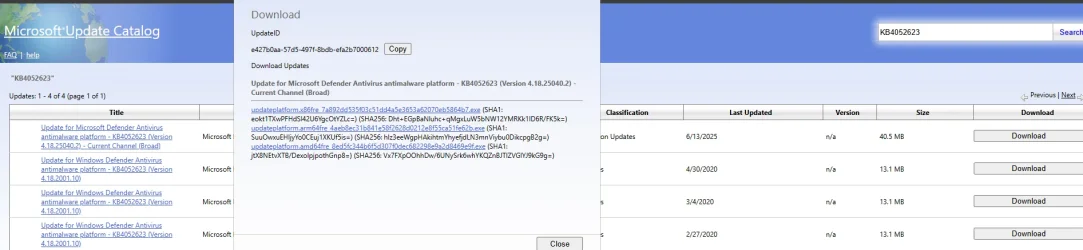
The update KB4052623 is listed in the Windows Update Catalog but when I click on download, a popup appears that has three different lines to click on, making it unclear which one I need to click on to install the update or how. So, I’m unclear how to get this update installed as it’s not showing up in windows update on my other computer? I have gone through all checks and balance i.e: sfc, restore health as well as checked windows update several times. When trying to check for updates through the Windows Security dashboard, it defaults to my Norton 360. If windows update is not showing this update, should I even be concerned? Any ideas would be appreciated.
 

Attachments
  • Screenshot 2025-06-13 140603.webp
    Screenshot 2025-06-13 140603.webp
    75.8 KB · Views: 1

My Computer My Computer

At a glance

Windows 11 Pro 64 Bit 25H2 26200 8246Intel Core I5-8250U 1.80 GHZ16 GBIntel UHD Graphics 620
OS
Windows 11 Pro 64 Bit 25H2 26200 8246
Computer type
Laptop
Manufacturer/Model
Asus X510UAR
CPU
Intel Core I5-8250U 1.80 GHZ
Memory
16 GB
Graphics Card(s)
Intel UHD Graphics 620
Sound Card
Conexant
Monitor(s) Displays
Dell 24" ST2420
Screen Resolution
1920x1080
Hard Drives
ADATA SU635 DDS
Keyboard
Logitech
Mouse
Logitech
Internet Speed
465
Browser
Google Chrome, MS Edge
Antivirus
Norton 360
Other Info
Windows Feature Experience Pack 1000.26100.297
When you install 3rd party AV most will register with WSC and Defender will disable itself which is likely why you're not offered this update on the systems with Norton.

Also the three links are for 3 different architectures that Windows supports
x86 = 32 bit (very uncommon)
amd64 = 64 bit intel/amd(most likely what you have)
arm64 = 64 bit arm cpus (less common)
 

My Computer My Computer

At a glance

Linux Mint
OS
Linux Mint
Computer type
Laptop
Manufacturer/Model
System76 Lemur Pro
If windows update is not showing this update, should I even be concerned? Any ideas would be appreciated.
No need for concern since you use Norton security. Windows will take care of any Defender updates in its own time, as required.
 

My Computer My Computer

At a glance

Windows 11 Pro 25H2 26200.7840Intel Core i3-8145U16GB
OS
Windows 11 Pro 25H2 26200.7840
Computer type
Laptop
Manufacturer/Model
Lenovo IdeaPad L340
CPU
Intel Core i3-8145U
Memory
16GB
Hard Drives
500 GB M2 1 TB HDD
Internet Speed
400 MB
Browser
Chrome | Edge
Antivirus
Microsoft Defender | Block unknown executables | Various ASR rules enabled | Smart App Control
Definition updates are usually released daily and every time it is assigned KB4052623. You will see that if you go to settings>windows update>update history>
expand 'definition updates' category
 

My Computers My Computers

  • At a glance

    Windows 11 Pro 25H2 26200.8875i9-10900 10 core 20 threads32 gbnone-Intel UHD Graphics 630
    OS
    Windows 11 Pro 25H2 26200.8875
    Computer type
    PC/Desktop
    Manufacturer/Model
    Dell Optiplex 7080
    CPU
    i9-10900 10 core 20 threads
    Motherboard
    DELL 0J37VM
    Memory
    32 gb
    Graphics Card(s)
    none-Intel UHD Graphics 630
    Sound Card
    Integrated Realtek
    Monitor(s) Displays
    Benq 27
    Screen Resolution
    2560x1440
    Hard Drives
    2x1tb Solidigm m.2 nvme /External drives 512gb Samsung m.2 sata+2tb Kingston m2.nvme
    PSU
    500w
    Case
    MT
    Cooling
    Dell Premium
    Keyboard
    Logitech wired
    Mouse
    Logitech wireless
    Internet Speed
    so slow I'm too embarrassed to tell
    Browser
    #1 Edge #2 Firefox
    Antivirus
    Defender+MWB Premium
  • At a glance

    Windows 11 Pro 24H2 26200.8875AMD Ryzen 7 6800U32 gbintegrated
    Operating System
    Windows 11 Pro 24H2 26200.8875
    Computer type
    PC/Desktop
    Manufacturer/Model
    Beelink Mini PC SER5
    CPU
    AMD Ryzen 7 6800U
    Memory
    32 gb
    Graphics card(s)
    integrated
    Sound Card
    integrated
    Monitor(s) Displays
    Benq 27
    Screen Resolution
    2560x1440
    Hard Drives
    1TB Crucial nvme
    Keyboard
    Logitech wired
    Mouse
    Logitech wireless
    Internet Speed
    still too embarrassed to tell
    Browser
    Firefox
    Antivirus
    Defender
    Other Info
    System 3 is non compliant Dell 9020 i7-4770/24gb ram Win11 PRO 26200.8875
Thanks to all-will close this then
 

My Computer My Computer

At a glance

Windows 11 Pro 64 Bit 25H2 26200 8246Intel Core I5-8250U 1.80 GHZ16 GBIntel UHD Graphics 620
OS
Windows 11 Pro 64 Bit 25H2 26200 8246
Computer type
Laptop
Manufacturer/Model
Asus X510UAR
CPU
Intel Core I5-8250U 1.80 GHZ
Memory
16 GB
Graphics Card(s)
Intel UHD Graphics 620
Sound Card
Conexant
Monitor(s) Displays
Dell 24" ST2420
Screen Resolution
1920x1080
Hard Drives
ADATA SU635 DDS
Keyboard
Logitech
Mouse
Logitech
Internet Speed
465
Browser
Google Chrome, MS Edge
Antivirus
Norton 360
Other Info
Windows Feature Experience Pack 1000.26100.297

Latest Support Threads

Back
Top Bottom





