KB5007651 update


I tried your code in powershell and it says it downloaded it to C/Program Files/Windows Apps (a hidden folder with access denied).
I rebooted my PC and it is still showing up every time I check Windows Update. It says competed, but it doesn't install. It does flash up for less than a second 'installing', but it doesn't. :oops:

View attachment 131627

View attachment 131628
Well that's odd because it worked for me. I didn't even have to reboot. I did notice that your version appears to be lower than mine.

I did try a few things before this but none of them worked. I deleted everything in the SoftwareDistribution folder and everything in the Catroot2 (NOT the catroot folder...do NOT delete that under any circumstances as it will cause your PC to not boot) folder. I also did a DISM startcomponentcleanup. So maybe it's a combination of all of this but mine is working flawlessly now.

1745079958804.webp

1745079985670.webp

1745080082851.webp


Also worth noting is that the Windows Update Troubleshooter fails to run on this version (perhaps it's related to the WinRe issue) but I DID download an older standalone version of the troubleshooter for Windows 10 from here (Major Geeks) and ran it. It said it "fixed" something.

1745080933659.webp
 
Last edited:

My Computer My Computer

At a glance

Windows 11 25H2AMD 9950X3d264GB Corsair vengeance DDR5 (6000 MHz) CL30AMD 9070XT
OS
Windows 11 25H2
Computer type
PC/Desktop
Manufacturer/Model
N/A
CPU
AMD 9950X3d2
Motherboard
Asus x870E Extreme
Memory
64GB Corsair vengeance DDR5 (6000 MHz) CL30
Graphics Card(s)
AMD 9070XT
Sound Card
Realtek
Monitor(s) Displays
N/A
Screen Resolution
1440p
PSU
Thermaltake 1200w
Case
Asus View 71 TG RGB
Cooling
Custom Cooling loop With an Alphacool 13339 VPP Apex Pump and EK Quantum surface radiator
Internet Speed
Xfinity 2300 mbps
Antivirus
Norton
KB5007651 is a newer version of SecHealthUI, more commonly known as the Windows Security app. Which is the UI for Defender and Firewall.

This is separate from the monthly update for Defender Platform, and daily updates for Defender Definitions (signatures).
 

My Computer My Computer

At a glance

Windows 7
OS
Windows 7

My Computer My Computer

At a glance

Windows 11 Pro 25H2 26200.7922Intel Core i9 13900F2 x Kingston Fury 32gb DDR5 5600 BeastGigabyte Eagle (Nvidia) RTX 3060
OS
Windows 11 Pro 25H2 26200.7922
Computer type
PC/Desktop
Manufacturer/Model
Local shop built (KC Computers Ltd)
CPU
Intel Core i9 13900F
Motherboard
Gigabyte Z690 Gaming X (rev. 1.0/1.1) - (BIOS: F32 09 18 2025)
Memory
2 x Kingston Fury 32gb DDR5 5600 Beast
Graphics Card(s)
Gigabyte Eagle (Nvidia) RTX 3060
Sound Card
Chord Async USB 44.1kHz - 384kHz 2Qute DAC
Monitor(s) Displays
Gigabyte AORUS FO32U2 32” OLED Flat Gaming Monitor, 0.03ms, KVM, 250 cd/m2, FreeSync Premium Pro, HDR True Black 400
Screen Resolution
3840 x 2160 (UHD), 240Hz
Hard Drives
1 x KINGSTON NVMe M.2 SSDSKC3000D2048G 2TB
1 x Samsung SSD 870 EVO 250GB
2 x Crucial CT4000MX500SSD1 4TB
2 x Crucial CT2000MX500SSD1 2TB
1 x Crucial CT250MX500SSD1 250.0 GB
PSU
Gigabyte 750w
Case
Fractal Torrent
Cooling
Stock Intel CPU, 2 x Fractal 180mm PWM (front), 3 x Fractal 140mm PWM (bottom)
Keyboard
Logitech MX Mechanical Wireless Illuminated Performance Keyboard
Mouse
Logitech MX Master 3S Wireless Performance Mouse
Internet Speed
900 Mbps/900 Mbps Trooli FTTP
Browser
Firefox
Antivirus
Eset Nod32
Thanks. I installed the latest one (there were 2 listed) as administrator but it hasn't fixed it. Thanks for trying.
I edited my response to your post with literally everything I've tried. I'm hoping it was a combination of everything I did to correct this issue but, as I said none of them worked until I issued the Get-AppPackage Microsoft.SecHealthUI command.
 

My Computer My Computer

At a glance

Windows 11 25H2AMD 9950X3d264GB Corsair vengeance DDR5 (6000 MHz) CL30AMD 9070XT
OS
Windows 11 25H2
Computer type
PC/Desktop
Manufacturer/Model
N/A
CPU
AMD 9950X3d2
Motherboard
Asus x870E Extreme
Memory
64GB Corsair vengeance DDR5 (6000 MHz) CL30
Graphics Card(s)
AMD 9070XT
Sound Card
Realtek
Monitor(s) Displays
N/A
Screen Resolution
1440p
PSU
Thermaltake 1200w
Case
Asus View 71 TG RGB
Cooling
Custom Cooling loop With an Alphacool 13339 VPP Apex Pump and EK Quantum surface radiator
Internet Speed
Xfinity 2300 mbps
Antivirus
Norton
I edited my response to your post with literally everything I've tried. I'm hoping it was a combination of everything I did to correct this issue but, as I said none of them worked until I issued the Get-AppPackage Microsoft.SecHealthUI command.

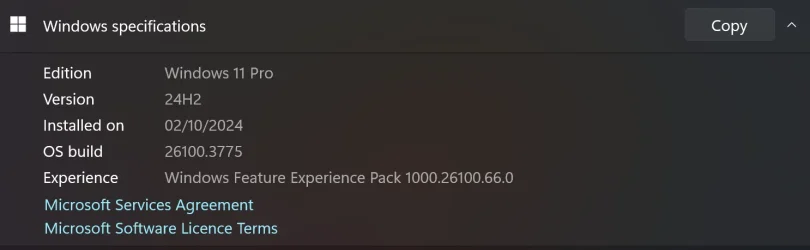
I noticed that your build of Windows 11 Pro is newer than mine. Would that make any difference? You have version 21600 3909 mine is 21600.3775. Am I missing a feature Experience update somewhere? Yours ends with 83.0 and mine ends with 66.0


Screenshot 2025-04-19 181046.webp
 

My Computer My Computer

At a glance

Windows 11 Pro 25H2 26200.7922Intel Core i9 13900F2 x Kingston Fury 32gb DDR5 5600 BeastGigabyte Eagle (Nvidia) RTX 3060
OS
Windows 11 Pro 25H2 26200.7922
Computer type
PC/Desktop
Manufacturer/Model
Local shop built (KC Computers Ltd)
CPU
Intel Core i9 13900F
Motherboard
Gigabyte Z690 Gaming X (rev. 1.0/1.1) - (BIOS: F32 09 18 2025)
Memory
2 x Kingston Fury 32gb DDR5 5600 Beast
Graphics Card(s)
Gigabyte Eagle (Nvidia) RTX 3060
Sound Card
Chord Async USB 44.1kHz - 384kHz 2Qute DAC
Monitor(s) Displays
Gigabyte AORUS FO32U2 32” OLED Flat Gaming Monitor, 0.03ms, KVM, 250 cd/m2, FreeSync Premium Pro, HDR True Black 400
Screen Resolution
3840 x 2160 (UHD), 240Hz
Hard Drives
1 x KINGSTON NVMe M.2 SSDSKC3000D2048G 2TB
1 x Samsung SSD 870 EVO 250GB
2 x Crucial CT4000MX500SSD1 4TB
2 x Crucial CT2000MX500SSD1 2TB
1 x Crucial CT250MX500SSD1 250.0 GB
PSU
Gigabyte 750w
Case
Fractal Torrent
Cooling
Stock Intel CPU, 2 x Fractal 180mm PWM (front), 3 x Fractal 140mm PWM (bottom)
Keyboard
Logitech MX Mechanical Wireless Illuminated Performance Keyboard
Mouse
Logitech MX Master 3S Wireless Performance Mouse
Internet Speed
900 Mbps/900 Mbps Trooli FTTP
Browser
Firefox
Antivirus
Eset Nod32
I noticed that your build of Windows 11 Pro is newer than mine. Would that make any difference? You have version 21600 3909 mine is 21600.3775. Am I missing a feature Experience update somewhere? Yours ends with 83.0 and mine ends with 66.0


View attachment 131636
Well I noticed this issue began for me with version 26100.3902 but when @Brink alerted us to a slightly newer one (26100.3909) I downloaded the ISO from UUPDUMP and hoped it would fix it. It did not so that's when I began to do everything I listed. I also have a Powershell script I picked up somewhere (I honestly cannot remember where, but there are links to the developer's site in the comments in the script) that I ran, but none of it worked util I issued that Get-AppPackage Microsoft.SecHealthUI command.

If you want to try the script I'll post the code here. I saved it as Reset-WindowsUpdate.ps1.

Code:
<#
.SYNOPSIS
Reset-WindowsUpdate.ps1 - Resets the Windows Update components
 
.DESCRIPTION 
This script will reset all of the Windows Updates components to DEFAULT SETTINGS.
 
.OUTPUTS
Results are printed to the console. Future releases will support outputting to a log file. 
 
.NOTES
Written by: Ryan Nemeth
 
Find me on:
 
* My Blog:    http://www.geekyryan.com
* Twitter:    https://twitter.com/geeky_ryan
* LinkedIn:    https://www.linkedin.com/in/ryan-nemeth-b0b1504b/
* Github:    https://github.com/rnemeth90
* TechNet:  https://social.technet.microsoft.com/profile/ryan%20nemeth/
 
Change Log
V1.00, 05/21/2015 - Initial version
V1.10, 09/22/2016 - Fixed bug with call to sc.exe
V1.20, 11/13/2017 - Fixed environment variables
#>
 
 
$arch = Get-WMIObject -Class Win32_Processor -ComputerName LocalHost | Select-Object AddressWidth
 
Write-Host "1. Stopping Windows Update Services..."
Stop-Service -Name BITS
Stop-Service -Name wuauserv
Stop-Service -Name appidsvc
Stop-Service -Name cryptsvc
 
Write-Host "2. Remove QMGR Data file..."
Remove-Item "$env:allusersprofile\Application Data\Microsoft\Network\Downloader\qmgr*.dat" -ErrorAction SilentlyContinue
 
Write-Host "3. Renaming the Software Distribution and CatRoot Folder..."
Rename-Item $env:systemroot\SoftwareDistribution SoftwareDistribution.bak -ErrorAction SilentlyContinue
Rename-Item $env:systemroot\System32\Catroot2 catroot2.bak -ErrorAction SilentlyContinue
 
Write-Host "4. Removing old Windows Update log..."
Remove-Item $env:systemroot\WindowsUpdate.log -ErrorAction SilentlyContinue
 
Write-Host "5. Resetting the Windows Update Services to defualt settings..."
"sc.exe sdset bits D:(A;;CCLCSWRPWPDTLOCRRC;;;SY)(A;;CCDCLCSWRPWPDTLOCRSDRCWDWO;;;BA)(A;;CCLCSWLOCRRC;;;AU)(A;;CCLCSWRPWPDTLOCRRC;;;PU)"
"sc.exe sdset wuauserv D:(A;;CCLCSWRPWPDTLOCRRC;;;SY)(A;;CCDCLCSWRPWPDTLOCRSDRCWDWO;;;BA)(A;;CCLCSWLOCRRC;;;AU)(A;;CCLCSWRPWPDTLOCRRC;;;PU)"
 
Set-Location $env:systemroot\system32
 
Write-Host "6. Registering some DLLs..."
regsvr32.exe /s atl.dll
regsvr32.exe /s urlmon.dll
regsvr32.exe /s mshtml.dll
regsvr32.exe /s shdocvw.dll
regsvr32.exe /s browseui.dll
regsvr32.exe /s jscript.dll
regsvr32.exe /s vbscript.dll
regsvr32.exe /s scrrun.dll
regsvr32.exe /s msxml.dll
regsvr32.exe /s msxml3.dll
regsvr32.exe /s msxml6.dll
regsvr32.exe /s actxprxy.dll
regsvr32.exe /s softpub.dll
regsvr32.exe /s wintrust.dll
regsvr32.exe /s dssenh.dll
regsvr32.exe /s rsaenh.dll
regsvr32.exe /s gpkcsp.dll
regsvr32.exe /s sccbase.dll
regsvr32.exe /s slbcsp.dll
regsvr32.exe /s cryptdlg.dll
regsvr32.exe /s oleaut32.dll
regsvr32.exe /s ole32.dll
regsvr32.exe /s shell32.dll
regsvr32.exe /s initpki.dll
regsvr32.exe /s wuapi.dll
regsvr32.exe /s wuaueng.dll
regsvr32.exe /s wuaueng1.dll
regsvr32.exe /s wucltui.dll
regsvr32.exe /s wups.dll
regsvr32.exe /s wups2.dll
regsvr32.exe /s wuweb.dll
regsvr32.exe /s qmgr.dll
regsvr32.exe /s qmgrprxy.dll
regsvr32.exe /s wucltux.dll
regsvr32.exe /s muweb.dll
regsvr32.exe /s wuwebv.dll
 
Write-Host "7) Removing WSUS client settings..."
REG DELETE "HKLM\SOFTWARE\Microsoft\Windows\CurrentVersion\WindowsUpdate" /v AccountDomainSid /f
REG DELETE "HKLM\SOFTWARE\Microsoft\Windows\CurrentVersion\WindowsUpdate" /v PingID /f
REG DELETE "HKLM\SOFTWARE\Microsoft\Windows\CurrentVersion\WindowsUpdate" /v SusClientId /f
 
Write-Host "8) Resetting the WinSock..."
netsh winsock reset
netsh winhttp reset proxy
 
Write-Host "9) Delete all BITS jobs..."
Get-BitsTransfer | Remove-BitsTransfer
 
Write-Host "10) Attempting to install the Windows Update Agent..."
if($arch -eq 64){
    wusa Windows8-RT-KB2937636-x64 /quiet
}
else{
    wusa Windows8-RT-KB2937636-x86 /quiet
}
 
Write-Host "11) Starting Windows Update Services..."
Start-Service -Name BITS
Start-Service -Name wuauserv
Start-Service -Name appidsvc
Start-Service -Name cryptsvc
 
Write-Host "12) Forcing discovery..."
wuauclt /resetauthorization /detectnow
 
Write-Host "Process complete. Please reboot your computer."

 

My Computer My Computer

At a glance

Windows 11 25H2AMD 9950X3d264GB Corsair vengeance DDR5 (6000 MHz) CL30AMD 9070XT
OS
Windows 11 25H2
Computer type
PC/Desktop
Manufacturer/Model
N/A
CPU
AMD 9950X3d2
Motherboard
Asus x870E Extreme
Memory
64GB Corsair vengeance DDR5 (6000 MHz) CL30
Graphics Card(s)
AMD 9070XT
Sound Card
Realtek
Monitor(s) Displays
N/A
Screen Resolution
1440p
PSU
Thermaltake 1200w
Case
Asus View 71 TG RGB
Cooling
Custom Cooling loop With an Alphacool 13339 VPP Apex Pump and EK Quantum surface radiator
Internet Speed
Xfinity 2300 mbps
Antivirus
Norton
Well I noticed this issue began for me with version 26100.3902 but when @Brink alerted us to a slightly newer one (26100.3909) I downloaded the ISO from UUPDUMP and hoped it would fix it. It did not so that's when I began to do everything I listed. I also have a Powershell script I picked up somewhere (I honestly cannot remember where, but there are links to the developer's site in the comments in the script) that I ran, but none of it worked util I issued that Get-AppPackage Microsoft.SecHealthUI command.

If you want to try the script I'll post the code here. I saved it as Reset-WindowsUpdate.ps1.

Code:
<#
.SYNOPSIS
Reset-WindowsUpdate.ps1 - Resets the Windows Update components
 
.DESCRIPTION
This script will reset all of the Windows Updates components to DEFAULT SETTINGS.
 
.OUTPUTS
Results are printed to the console. Future releases will support outputting to a log file.
 
.NOTES
Written by: Ryan Nemeth
 
Find me on:
 
* My Blog:    http://www.geekyryan.com
* Twitter:    https://twitter.com/geeky_ryan
* LinkedIn:    https://www.linkedin.com/in/ryan-nemeth-b0b1504b/
* Github:    https://github.com/rnemeth90
* TechNet:  https://social.technet.microsoft.com/profile/ryan%20nemeth/
 
Change Log
V1.00, 05/21/2015 - Initial version
V1.10, 09/22/2016 - Fixed bug with call to sc.exe
V1.20, 11/13/2017 - Fixed environment variables
#>
 
 
$arch = Get-WMIObject -Class Win32_Processor -ComputerName LocalHost | Select-Object AddressWidth
 
Write-Host "1. Stopping Windows Update Services..."
Stop-Service -Name BITS
Stop-Service -Name wuauserv
Stop-Service -Name appidsvc
Stop-Service -Name cryptsvc
 
Write-Host "2. Remove QMGR Data file..."
Remove-Item "$env:allusersprofile\Application Data\Microsoft\Network\Downloader\qmgr*.dat" -ErrorAction SilentlyContinue
 
Write-Host "3. Renaming the Software Distribution and CatRoot Folder..."
Rename-Item $env:systemroot\SoftwareDistribution SoftwareDistribution.bak -ErrorAction SilentlyContinue
Rename-Item $env:systemroot\System32\Catroot2 catroot2.bak -ErrorAction SilentlyContinue
 
Write-Host "4. Removing old Windows Update log..."
Remove-Item $env:systemroot\WindowsUpdate.log -ErrorAction SilentlyContinue
 
Write-Host "5. Resetting the Windows Update Services to defualt settings..."
"sc.exe sdset bits D:(A;;CCLCSWRPWPDTLOCRRC;;;SY)(A;;CCDCLCSWRPWPDTLOCRSDRCWDWO;;;BA)(A;;CCLCSWLOCRRC;;;AU)(A;;CCLCSWRPWPDTLOCRRC;;;PU)"
"sc.exe sdset wuauserv D:(A;;CCLCSWRPWPDTLOCRRC;;;SY)(A;;CCDCLCSWRPWPDTLOCRSDRCWDWO;;;BA)(A;;CCLCSWLOCRRC;;;AU)(A;;CCLCSWRPWPDTLOCRRC;;;PU)"
 
Set-Location $env:systemroot\system32
 
Write-Host "6. Registering some DLLs..."
regsvr32.exe /s atl.dll
regsvr32.exe /s urlmon.dll
regsvr32.exe /s mshtml.dll
regsvr32.exe /s shdocvw.dll
regsvr32.exe /s browseui.dll
regsvr32.exe /s jscript.dll
regsvr32.exe /s vbscript.dll
regsvr32.exe /s scrrun.dll
regsvr32.exe /s msxml.dll
regsvr32.exe /s msxml3.dll
regsvr32.exe /s msxml6.dll
regsvr32.exe /s actxprxy.dll
regsvr32.exe /s softpub.dll
regsvr32.exe /s wintrust.dll
regsvr32.exe /s dssenh.dll
regsvr32.exe /s rsaenh.dll
regsvr32.exe /s gpkcsp.dll
regsvr32.exe /s sccbase.dll
regsvr32.exe /s slbcsp.dll
regsvr32.exe /s cryptdlg.dll
regsvr32.exe /s oleaut32.dll
regsvr32.exe /s ole32.dll
regsvr32.exe /s shell32.dll
regsvr32.exe /s initpki.dll
regsvr32.exe /s wuapi.dll
regsvr32.exe /s wuaueng.dll
regsvr32.exe /s wuaueng1.dll
regsvr32.exe /s wucltui.dll
regsvr32.exe /s wups.dll
regsvr32.exe /s wups2.dll
regsvr32.exe /s wuweb.dll
regsvr32.exe /s qmgr.dll
regsvr32.exe /s qmgrprxy.dll
regsvr32.exe /s wucltux.dll
regsvr32.exe /s muweb.dll
regsvr32.exe /s wuwebv.dll
 
Write-Host "7) Removing WSUS client settings..."
REG DELETE "HKLM\SOFTWARE\Microsoft\Windows\CurrentVersion\WindowsUpdate" /v AccountDomainSid /f
REG DELETE "HKLM\SOFTWARE\Microsoft\Windows\CurrentVersion\WindowsUpdate" /v PingID /f
REG DELETE "HKLM\SOFTWARE\Microsoft\Windows\CurrentVersion\WindowsUpdate" /v SusClientId /f
 
Write-Host "8) Resetting the WinSock..."
netsh winsock reset
netsh winhttp reset proxy
 
Write-Host "9) Delete all BITS jobs..."
Get-BitsTransfer | Remove-BitsTransfer
 
Write-Host "10) Attempting to install the Windows Update Agent..."
if($arch -eq 64){
    wusa Windows8-RT-KB2937636-x64 /quiet
}
else{
    wusa Windows8-RT-KB2937636-x86 /quiet
}
 
Write-Host "11) Starting Windows Update Services..."
Start-Service -Name BITS
Start-Service -Name wuauserv
Start-Service -Name appidsvc
Start-Service -Name cryptsvc
 
Write-Host "12) Forcing discovery..."
wuauclt /resetauthorization /detectnow
 
Write-Host "Process complete. Please reboot your computer."
I ran it as a .bat file (admin). Was that correct? It didn't seem to do anything.
 

My Computer My Computer

At a glance

Windows 11 Pro 25H2 26200.7922Intel Core i9 13900F2 x Kingston Fury 32gb DDR5 5600 BeastGigabyte Eagle (Nvidia) RTX 3060
OS
Windows 11 Pro 25H2 26200.7922
Computer type
PC/Desktop
Manufacturer/Model
Local shop built (KC Computers Ltd)
CPU
Intel Core i9 13900F
Motherboard
Gigabyte Z690 Gaming X (rev. 1.0/1.1) - (BIOS: F32 09 18 2025)
Memory
2 x Kingston Fury 32gb DDR5 5600 Beast
Graphics Card(s)
Gigabyte Eagle (Nvidia) RTX 3060
Sound Card
Chord Async USB 44.1kHz - 384kHz 2Qute DAC
Monitor(s) Displays
Gigabyte AORUS FO32U2 32” OLED Flat Gaming Monitor, 0.03ms, KVM, 250 cd/m2, FreeSync Premium Pro, HDR True Black 400
Screen Resolution
3840 x 2160 (UHD), 240Hz
Hard Drives
1 x KINGSTON NVMe M.2 SSDSKC3000D2048G 2TB
1 x Samsung SSD 870 EVO 250GB
2 x Crucial CT4000MX500SSD1 4TB
2 x Crucial CT2000MX500SSD1 2TB
1 x Crucial CT250MX500SSD1 250.0 GB
PSU
Gigabyte 750w
Case
Fractal Torrent
Cooling
Stock Intel CPU, 2 x Fractal 180mm PWM (front), 3 x Fractal 140mm PWM (bottom)
Keyboard
Logitech MX Mechanical Wireless Illuminated Performance Keyboard
Mouse
Logitech MX Master 3S Wireless Performance Mouse
Internet Speed
900 Mbps/900 Mbps Trooli FTTP
Browser
Firefox
Antivirus
Eset Nod32
I ran it as a .bat file (admin). Was that correct? It didn't seem to do anything.
No. you have to save it as a *.ps1 file. The ps1 is powershell script exclusively for powershell.
 

My Computer My Computer

At a glance

Windows 11 25H2AMD 9950X3d264GB Corsair vengeance DDR5 (6000 MHz) CL30AMD 9070XT
OS
Windows 11 25H2
Computer type
PC/Desktop
Manufacturer/Model
N/A
CPU
AMD 9950X3d2
Motherboard
Asus x870E Extreme
Memory
64GB Corsair vengeance DDR5 (6000 MHz) CL30
Graphics Card(s)
AMD 9070XT
Sound Card
Realtek
Monitor(s) Displays
N/A
Screen Resolution
1440p
PSU
Thermaltake 1200w
Case
Asus View 71 TG RGB
Cooling
Custom Cooling loop With an Alphacool 13339 VPP Apex Pump and EK Quantum surface radiator
Internet Speed
Xfinity 2300 mbps
Antivirus
Norton
Here is what it should look like:

1745183603958.webp

And this is the output once it's run. You then need to reboot.

1745183661425.webp
 

My Computer My Computer

At a glance

Windows 11 25H2AMD 9950X3d264GB Corsair vengeance DDR5 (6000 MHz) CL30AMD 9070XT
OS
Windows 11 25H2
Computer type
PC/Desktop
Manufacturer/Model
N/A
CPU
AMD 9950X3d2
Motherboard
Asus x870E Extreme
Memory
64GB Corsair vengeance DDR5 (6000 MHz) CL30
Graphics Card(s)
AMD 9070XT
Sound Card
Realtek
Monitor(s) Displays
N/A
Screen Resolution
1440p
PSU
Thermaltake 1200w
Case
Asus View 71 TG RGB
Cooling
Custom Cooling loop With an Alphacool 13339 VPP Apex Pump and EK Quantum surface radiator
Internet Speed
Xfinity 2300 mbps
Antivirus
Norton
Sorry to be thick, how do I get powershell to start with Users/name folder? It normally opens with Windows/System32
 

My Computer My Computer

At a glance

Windows 11 Pro 25H2 26200.7922Intel Core i9 13900F2 x Kingston Fury 32gb DDR5 5600 BeastGigabyte Eagle (Nvidia) RTX 3060
OS
Windows 11 Pro 25H2 26200.7922
Computer type
PC/Desktop
Manufacturer/Model
Local shop built (KC Computers Ltd)
CPU
Intel Core i9 13900F
Motherboard
Gigabyte Z690 Gaming X (rev. 1.0/1.1) - (BIOS: F32 09 18 2025)
Memory
2 x Kingston Fury 32gb DDR5 5600 Beast
Graphics Card(s)
Gigabyte Eagle (Nvidia) RTX 3060
Sound Card
Chord Async USB 44.1kHz - 384kHz 2Qute DAC
Monitor(s) Displays
Gigabyte AORUS FO32U2 32” OLED Flat Gaming Monitor, 0.03ms, KVM, 250 cd/m2, FreeSync Premium Pro, HDR True Black 400
Screen Resolution
3840 x 2160 (UHD), 240Hz
Hard Drives
1 x KINGSTON NVMe M.2 SSDSKC3000D2048G 2TB
1 x Samsung SSD 870 EVO 250GB
2 x Crucial CT4000MX500SSD1 4TB
2 x Crucial CT2000MX500SSD1 2TB
1 x Crucial CT250MX500SSD1 250.0 GB
PSU
Gigabyte 750w
Case
Fractal Torrent
Cooling
Stock Intel CPU, 2 x Fractal 180mm PWM (front), 3 x Fractal 140mm PWM (bottom)
Keyboard
Logitech MX Mechanical Wireless Illuminated Performance Keyboard
Mouse
Logitech MX Master 3S Wireless Performance Mouse
Internet Speed
900 Mbps/900 Mbps Trooli FTTP
Browser
Firefox
Antivirus
Eset Nod32
Sorry to be thick, how do I get powershell to start with Users/name folder? It normally opens with Windows/System32
I just changed the directory to where I had the script saved. Example, mine is saved on my desktop so I issued the command: cd c:\users\rawintellect\desktop

1745186076975.webp
 

My Computer My Computer

At a glance

Windows 11 25H2AMD 9950X3d264GB Corsair vengeance DDR5 (6000 MHz) CL30AMD 9070XT
OS
Windows 11 25H2
Computer type
PC/Desktop
Manufacturer/Model
N/A
CPU
AMD 9950X3d2
Motherboard
Asus x870E Extreme
Memory
64GB Corsair vengeance DDR5 (6000 MHz) CL30
Graphics Card(s)
AMD 9070XT
Sound Card
Realtek
Monitor(s) Displays
N/A
Screen Resolution
1440p
PSU
Thermaltake 1200w
Case
Asus View 71 TG RGB
Cooling
Custom Cooling loop With an Alphacool 13339 VPP Apex Pump and EK Quantum surface radiator
Internet Speed
Xfinity 2300 mbps
Antivirus
Norton
Sorry to be thick, how do I get powershell to start with Users/name folder? It normally opens with Windows/System32
As for where the directory starts from you can change that in settings > defaults > starting directory

1745186283774.webp


1745186365618.webp
 

My Computer My Computer

At a glance

Windows 11 25H2AMD 9950X3d264GB Corsair vengeance DDR5 (6000 MHz) CL30AMD 9070XT
OS
Windows 11 25H2
Computer type
PC/Desktop
Manufacturer/Model
N/A
CPU
AMD 9950X3d2
Motherboard
Asus x870E Extreme
Memory
64GB Corsair vengeance DDR5 (6000 MHz) CL30
Graphics Card(s)
AMD 9070XT
Sound Card
Realtek
Monitor(s) Displays
N/A
Screen Resolution
1440p
PSU
Thermaltake 1200w
Case
Asus View 71 TG RGB
Cooling
Custom Cooling loop With an Alphacool 13339 VPP Apex Pump and EK Quantum surface radiator
Internet Speed
Xfinity 2300 mbps
Antivirus
Norton
I'm not having much luck. Firstly, the Defaults page you show is nothing like what I see. But I did manage to get it to point to my desktop. But it won't run.

Screenshot 2025-04-20 230918.webp
 

My Computer My Computer

At a glance

Windows 11 Pro 25H2 26200.7922Intel Core i9 13900F2 x Kingston Fury 32gb DDR5 5600 BeastGigabyte Eagle (Nvidia) RTX 3060
OS
Windows 11 Pro 25H2 26200.7922
Computer type
PC/Desktop
Manufacturer/Model
Local shop built (KC Computers Ltd)
CPU
Intel Core i9 13900F
Motherboard
Gigabyte Z690 Gaming X (rev. 1.0/1.1) - (BIOS: F32 09 18 2025)
Memory
2 x Kingston Fury 32gb DDR5 5600 Beast
Graphics Card(s)
Gigabyte Eagle (Nvidia) RTX 3060
Sound Card
Chord Async USB 44.1kHz - 384kHz 2Qute DAC
Monitor(s) Displays
Gigabyte AORUS FO32U2 32” OLED Flat Gaming Monitor, 0.03ms, KVM, 250 cd/m2, FreeSync Premium Pro, HDR True Black 400
Screen Resolution
3840 x 2160 (UHD), 240Hz
Hard Drives
1 x KINGSTON NVMe M.2 SSDSKC3000D2048G 2TB
1 x Samsung SSD 870 EVO 250GB
2 x Crucial CT4000MX500SSD1 4TB
2 x Crucial CT2000MX500SSD1 2TB
1 x Crucial CT250MX500SSD1 250.0 GB
PSU
Gigabyte 750w
Case
Fractal Torrent
Cooling
Stock Intel CPU, 2 x Fractal 180mm PWM (front), 3 x Fractal 140mm PWM (bottom)
Keyboard
Logitech MX Mechanical Wireless Illuminated Performance Keyboard
Mouse
Logitech MX Master 3S Wireless Performance Mouse
Internet Speed
900 Mbps/900 Mbps Trooli FTTP
Browser
Firefox
Antivirus
Eset Nod32
I'm not having much luck. Firstly, the Defaults page you show is nothing like what I see. But I did manage to get it to point to my desktop. But it won't run.

View attachment 131707
1. Make sure you're running the latest version of Powershell (terminal) You can download it here.

2. To enable scripts in powershel (admin) type: Set-ExecutionPolicy Unrestricted -Scope CurrentUser
 

My Computer My Computer

At a glance

Windows 11 25H2AMD 9950X3d264GB Corsair vengeance DDR5 (6000 MHz) CL30AMD 9070XT
OS
Windows 11 25H2
Computer type
PC/Desktop
Manufacturer/Model
N/A
CPU
AMD 9950X3d2
Motherboard
Asus x870E Extreme
Memory
64GB Corsair vengeance DDR5 (6000 MHz) CL30
Graphics Card(s)
AMD 9070XT
Sound Card
Realtek
Monitor(s) Displays
N/A
Screen Resolution
1440p
PSU
Thermaltake 1200w
Case
Asus View 71 TG RGB
Cooling
Custom Cooling loop With an Alphacool 13339 VPP Apex Pump and EK Quantum surface radiator
Internet Speed
Xfinity 2300 mbps
Antivirus
Norton
Thank you. I installed the latest version of Powershell and got it to run. I rebooted my PC and checked for Windows Updates, but alas, it is still trying to install on every check.

I'm going to call it a day now. Basic users should not have to jump through hoops to fix issues introduced by MS. Thanks again for your patience with me rawintellect. ;-)
 

My Computer My Computer

At a glance

Windows 11 Pro 25H2 26200.7922Intel Core i9 13900F2 x Kingston Fury 32gb DDR5 5600 BeastGigabyte Eagle (Nvidia) RTX 3060
OS
Windows 11 Pro 25H2 26200.7922
Computer type
PC/Desktop
Manufacturer/Model
Local shop built (KC Computers Ltd)
CPU
Intel Core i9 13900F
Motherboard
Gigabyte Z690 Gaming X (rev. 1.0/1.1) - (BIOS: F32 09 18 2025)
Memory
2 x Kingston Fury 32gb DDR5 5600 Beast
Graphics Card(s)
Gigabyte Eagle (Nvidia) RTX 3060
Sound Card
Chord Async USB 44.1kHz - 384kHz 2Qute DAC
Monitor(s) Displays
Gigabyte AORUS FO32U2 32” OLED Flat Gaming Monitor, 0.03ms, KVM, 250 cd/m2, FreeSync Premium Pro, HDR True Black 400
Screen Resolution
3840 x 2160 (UHD), 240Hz
Hard Drives
1 x KINGSTON NVMe M.2 SSDSKC3000D2048G 2TB
1 x Samsung SSD 870 EVO 250GB
2 x Crucial CT4000MX500SSD1 4TB
2 x Crucial CT2000MX500SSD1 2TB
1 x Crucial CT250MX500SSD1 250.0 GB
PSU
Gigabyte 750w
Case
Fractal Torrent
Cooling
Stock Intel CPU, 2 x Fractal 180mm PWM (front), 3 x Fractal 140mm PWM (bottom)
Keyboard
Logitech MX Mechanical Wireless Illuminated Performance Keyboard
Mouse
Logitech MX Master 3S Wireless Performance Mouse
Internet Speed
900 Mbps/900 Mbps Trooli FTTP
Browser
Firefox
Antivirus
Eset Nod32
Thank you. I installed the latest version of Powershell and got it to run. I rebooted my PC and checked for Windows Updates, but alas, it is still trying to install on every check.

I'm going to call it a day now. Basic users should not have to jump through hoops to fix issues introduced by MS. Thanks again for your patience with me rawintellect. ;-)
No worries at all. Try the Get-AppPackage Microsoft.SecHealthUI command one last time to see if it takes a combination to fix it :) Also try to pause/resume the updates as well.
 

My Computer My Computer

At a glance

Windows 11 25H2AMD 9950X3d264GB Corsair vengeance DDR5 (6000 MHz) CL30AMD 9070XT
OS
Windows 11 25H2
Computer type
PC/Desktop
Manufacturer/Model
N/A
CPU
AMD 9950X3d2
Motherboard
Asus x870E Extreme
Memory
64GB Corsair vengeance DDR5 (6000 MHz) CL30
Graphics Card(s)
AMD 9070XT
Sound Card
Realtek
Monitor(s) Displays
N/A
Screen Resolution
1440p
PSU
Thermaltake 1200w
Case
Asus View 71 TG RGB
Cooling
Custom Cooling loop With an Alphacool 13339 VPP Apex Pump and EK Quantum surface radiator
Internet Speed
Xfinity 2300 mbps
Antivirus
Norton
Just a final note, I did an in-place install of Windows 11 24H2 (keeping my files and programs) and you know what... It still keeps popping up every time I check for Windows Update.

I shall stop beating myself up and wearing out my NVMe M.2 drive which has now dropped to 96% health. I doubt even a clean fresh install of windows would fix this issue. Thanks for putting up with me rawintellect :rolleyes:
 

My Computer My Computer

At a glance

Windows 11 Pro 25H2 26200.7922Intel Core i9 13900F2 x Kingston Fury 32gb DDR5 5600 BeastGigabyte Eagle (Nvidia) RTX 3060
OS
Windows 11 Pro 25H2 26200.7922
Computer type
PC/Desktop
Manufacturer/Model
Local shop built (KC Computers Ltd)
CPU
Intel Core i9 13900F
Motherboard
Gigabyte Z690 Gaming X (rev. 1.0/1.1) - (BIOS: F32 09 18 2025)
Memory
2 x Kingston Fury 32gb DDR5 5600 Beast
Graphics Card(s)
Gigabyte Eagle (Nvidia) RTX 3060
Sound Card
Chord Async USB 44.1kHz - 384kHz 2Qute DAC
Monitor(s) Displays
Gigabyte AORUS FO32U2 32” OLED Flat Gaming Monitor, 0.03ms, KVM, 250 cd/m2, FreeSync Premium Pro, HDR True Black 400
Screen Resolution
3840 x 2160 (UHD), 240Hz
Hard Drives
1 x KINGSTON NVMe M.2 SSDSKC3000D2048G 2TB
1 x Samsung SSD 870 EVO 250GB
2 x Crucial CT4000MX500SSD1 4TB
2 x Crucial CT2000MX500SSD1 2TB
1 x Crucial CT250MX500SSD1 250.0 GB
PSU
Gigabyte 750w
Case
Fractal Torrent
Cooling
Stock Intel CPU, 2 x Fractal 180mm PWM (front), 3 x Fractal 140mm PWM (bottom)
Keyboard
Logitech MX Mechanical Wireless Illuminated Performance Keyboard
Mouse
Logitech MX Master 3S Wireless Performance Mouse
Internet Speed
900 Mbps/900 Mbps Trooli FTTP
Browser
Firefox
Antivirus
Eset Nod32
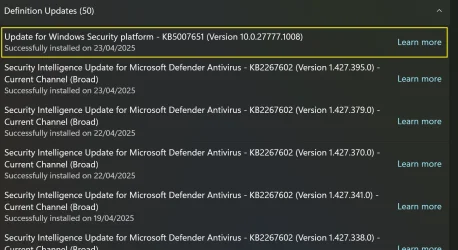
I've finally fixed the issue. I use Eset NOD32 antivirus software (AV). After reading a post from Google from a chap with a different AV, he uninstalled his AV and it fixed the reinstalling issue. So, I paused my NOD32 and the update said complete and it has not returned. It looks like AV was preventing it from being installed correctly. The odd thing is, KB5007651 isn't listed in the update history as being installed. But I am glad to see the back of it.

EDIT: It is listed in the update history under definition updates.

Screenshot 2025-04-23 082551.webp

I've let Eset know:

Thank you for contacting ESET Customer Support. This is an automatic reply to confirm that we have received your query regarding "KB5007651", and assigned a case number. A member of our team will respond to your case shortly.

I just wish to let you know I've been struggling with installing Windows Update "Update for Windows Security platform - KB5007651 (Version 10.0.27777.1008)" constantly installing every time I check for Windows Updates. However, I have solved it by pausing NOD32 protection. The update then installed correctly and doesn't show up anymore. For some reason, NOD32 is preventing this update from installing. You may wish to get your tech team to correct this issue in NOD32.
 
Last edited:

My Computer My Computer

At a glance

Windows 11 Pro 25H2 26200.7922Intel Core i9 13900F2 x Kingston Fury 32gb DDR5 5600 BeastGigabyte Eagle (Nvidia) RTX 3060
OS
Windows 11 Pro 25H2 26200.7922
Computer type
PC/Desktop
Manufacturer/Model
Local shop built (KC Computers Ltd)
CPU
Intel Core i9 13900F
Motherboard
Gigabyte Z690 Gaming X (rev. 1.0/1.1) - (BIOS: F32 09 18 2025)
Memory
2 x Kingston Fury 32gb DDR5 5600 Beast
Graphics Card(s)
Gigabyte Eagle (Nvidia) RTX 3060
Sound Card
Chord Async USB 44.1kHz - 384kHz 2Qute DAC
Monitor(s) Displays
Gigabyte AORUS FO32U2 32” OLED Flat Gaming Monitor, 0.03ms, KVM, 250 cd/m2, FreeSync Premium Pro, HDR True Black 400
Screen Resolution
3840 x 2160 (UHD), 240Hz
Hard Drives
1 x KINGSTON NVMe M.2 SSDSKC3000D2048G 2TB
1 x Samsung SSD 870 EVO 250GB
2 x Crucial CT4000MX500SSD1 4TB
2 x Crucial CT2000MX500SSD1 2TB
1 x Crucial CT250MX500SSD1 250.0 GB
PSU
Gigabyte 750w
Case
Fractal Torrent
Cooling
Stock Intel CPU, 2 x Fractal 180mm PWM (front), 3 x Fractal 140mm PWM (bottom)
Keyboard
Logitech MX Mechanical Wireless Illuminated Performance Keyboard
Mouse
Logitech MX Master 3S Wireless Performance Mouse
Internet Speed
900 Mbps/900 Mbps Trooli FTTP
Browser
Firefox
Antivirus
Eset Nod32
I've finally fixed the issue. I use Eset NOD32 antivirus software (AV). After reading a post from Google from a chap with a different AV, he uninstalled his AV and it fixed the reinstalling issue. So, I paused my NOD32 and the update said complete and it has not returned. It looks like AV was preventing it from being installed correctly. The odd thing is, KB5007651 isn't listed in the update history as being installed. But I am glad to see the back of it.

EDIT: It is listed in the update history under definition updates.

I've let Eset know:

Thank you for contacting ESET Customer Support. This is an automatic reply to confirm that we have received your query regarding "KB5007651", and assigned a case number. A member of our team will respond to your case shortly.

I just wish to let you know I've been struggling with installing Windows Update "Update for Windows Security platform - KB5007651 (Version 10.0.27777.1008)" constantly installing every time I check for Windows Updates. However, I have solved it by pausing NOD32 protection. The update then installed correctly and doesn't show up anymore. For some reason, NOD32 is preventing this update from installing. You may wish to get your tech team to correct this issue in NOD32.

As of Oct 7, 2025 I had the same problem with this update "installing" over and over again, for about 4 days straight.
I took your advice and (while posting this) turned off my AV software, ran Windows Update 4 times (2 times with the AV off and 2 with it on), and it seems this is the solution. I will post here if the update shows up, again, tomorrow.
 

My Computer My Computer

At a glance

Windows 11 25H2 Pro (RP Build 26200.8737)
OS
Windows 11 25H2 Pro (RP Build 26200.8737)
Computer type
PC/Desktop
Manufacturer/Model
Alienware
As of Oct 7, 2025 I had the same problem with this update "installing" over and over again, for about 4 days straight.
I took your advice and (while posting this) turned off my AV software, ran Windows Update 4 times (2 times with the AV off and 2 with it on), and it seems this is the solution. I will post here if the update shows up, again, tomorrow.

RESOLVED!
 

My Computer My Computer

At a glance

Windows 11 25H2 Pro (RP Build 26200.8737)
OS
Windows 11 25H2 Pro (RP Build 26200.8737)
Computer type
PC/Desktop
Manufacturer/Model
Alienware

Latest Support Threads

Back
Top Bottom