Insider KB5016159 Windows 11 Insider Dev Build 25145.1011 (rs_prerelease) - June 24


UPDATE 6/29:


UPDATE 6/24: We are starting to roll out Cumulative Update Build 25145.1011 (KB5016159). This update does not include anything new and is designed to test our servicing pipeline for builds in the Dev Channel.

Hello Windows Insiders, today we are releasing Windows 11 Insider Preview Build 25145 to the Dev Channel.

TL;DR

  • This build includes a few new features rolling out including an update for Narrator Braille driver support, OneDrive storage alert and subscription management in Settings, and Local Administrator Password Solution.
  • As always, the build includes a good set of fixes that improve the overall experience for Insiders on their PCs.
  • We also fixed the issue causing Surface Pro X devices to hit a black screen when attempting to resume from hibernate.

What’s new in Build 25145

Narrator Braille Driver Solution

Braille devices will continue working while switching between Narrator and third-party screen readers as narrator will automatically change Braille drivers.

Prerequisites:

You must remove Narrator’s current braille support if it is already installed by following the steps below:
  1. Open Settings.
  2. Go to Apps > Optional features > Installed features.
  3. Search for Accessibility – Braille support.
  4. Expand Accessibility – Braille support and uninstall the feature.
Install new narrator braille support:
  1. Go to Settings > Accessibility > Narrator > Braille.
  2. Select the more button.
  3. Download braille from this new window by selecting the Download and install braille button.
  4. After braille is installed, then return to Settings > Accessibility > Narrator > Braille.
  5. Select the braille display driver used by your third-party screen reader from the “Braille display driver” option. This only needs to be done once.
Refer to the detailed documentation to learn more about the braille driver solution.

Additional Resources:
Please refer to the Narrator User Guide for additional information on supported braille displays and braille functionality in Narrator.

FEEDBACK: Please file feedback in Feedback Hub (WIN + F) under Accessibility > Narrator.

Bringing OneDrive storage alert and subscription management in Settings

In March, we enhanced the Microsoft 365 subscription management experience in Windows 11 Settings and added the ability to view your payment method on your Microsoft 365 subscription in Accounts within Settings.

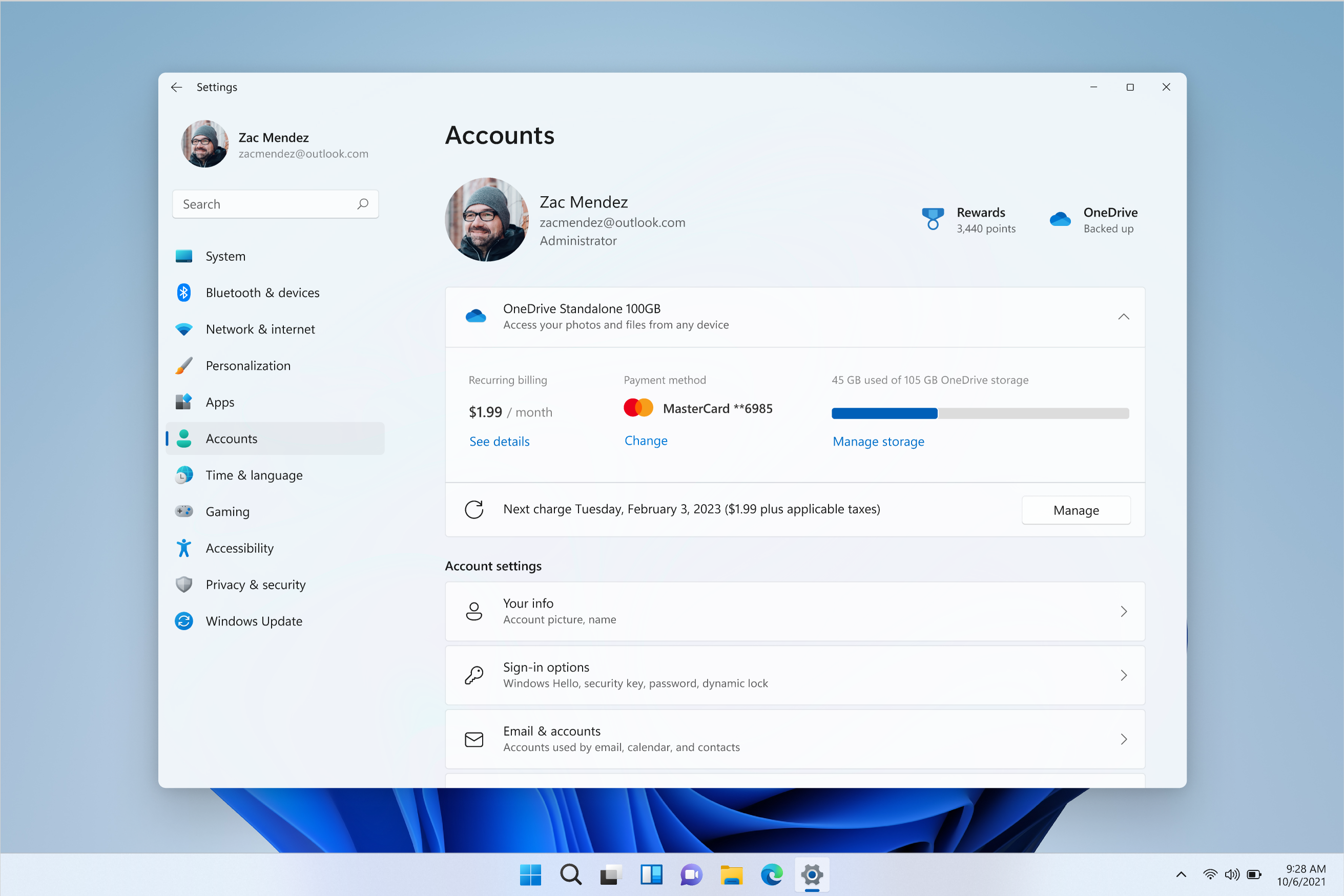
The OneDrive Standalone 100GB subscription management experience is live on Accounts page in Settings.

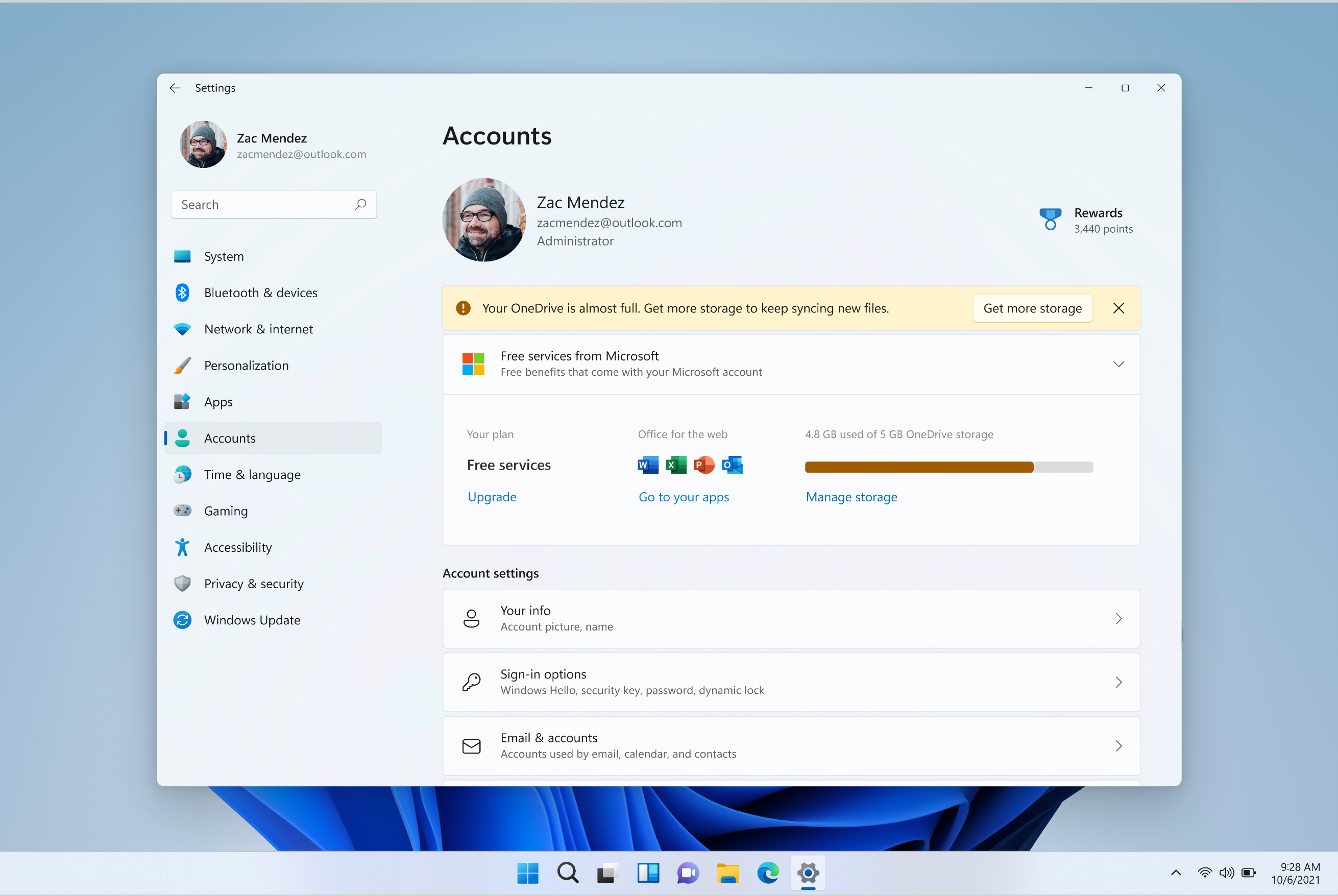
Starting with today’s build, we have begun enabling OneDrive Standalone 100GB subscriptions in the Accounts page within Settings, similar to the Microsoft 365 subscriptions. This will allow you to view your recurring billing, payment method, and OneDrive storage usage within Windows 11. Additionally, if you are close to or above your OneDrive storage limit, you will be informed on the same page.

Banner shown on Account settings page alerting you about your storage usage.

[We are beginning to roll those features out, so the experience isn’t available to all Insiders just yet as we plan to monitor feedback and see how it lands before pushing it out to everyone.]

FEEDBACK: Please file feedback in Feedback Hub (WIN + F) under Settings > Settings Homepage.

Local Administrator Password Solution

The legacy Local Administrator Password Solution product (aka “LAPS”) is now a native part of Windows and includes many new features:

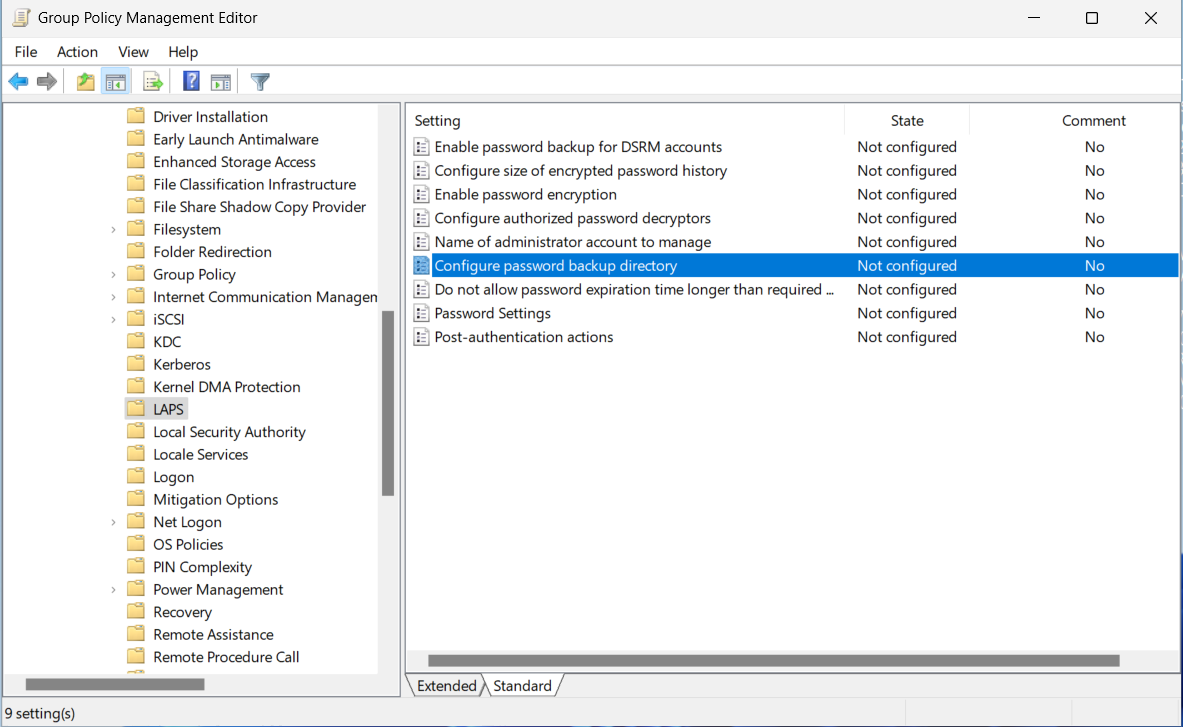
Easily manage the new LAPS group policy settings via Group Policy Editor.

Feature documentation is not yet available, however if you have used the legacy LAPS product then many of the features in this new version will be familiar to you. Here is a short how-to to help you get started on the basic Active Directory domain-joined client scenario:
  1. Extend your Active Directory schema by running the Update-LapsADSchema cmdlet in the new LAPS PowerShell module.
  2. Add the necessary permissions on your computer’s OU by running the Set-LapsADComputerSelfPermission cmdlet.
  3. Add a new LAPS Group Policy object and enable the “Configure password backup directory” setting and configure it to backup the password to “Active Directory”.
  4. The domain-joined client will process the policy at the next GPO refresh interval. Run “gpupdate /target:computer /force” to avoid waiting. (The Invoke-LapsPolicyProcessing cmdlet may be used for this same purpose.)
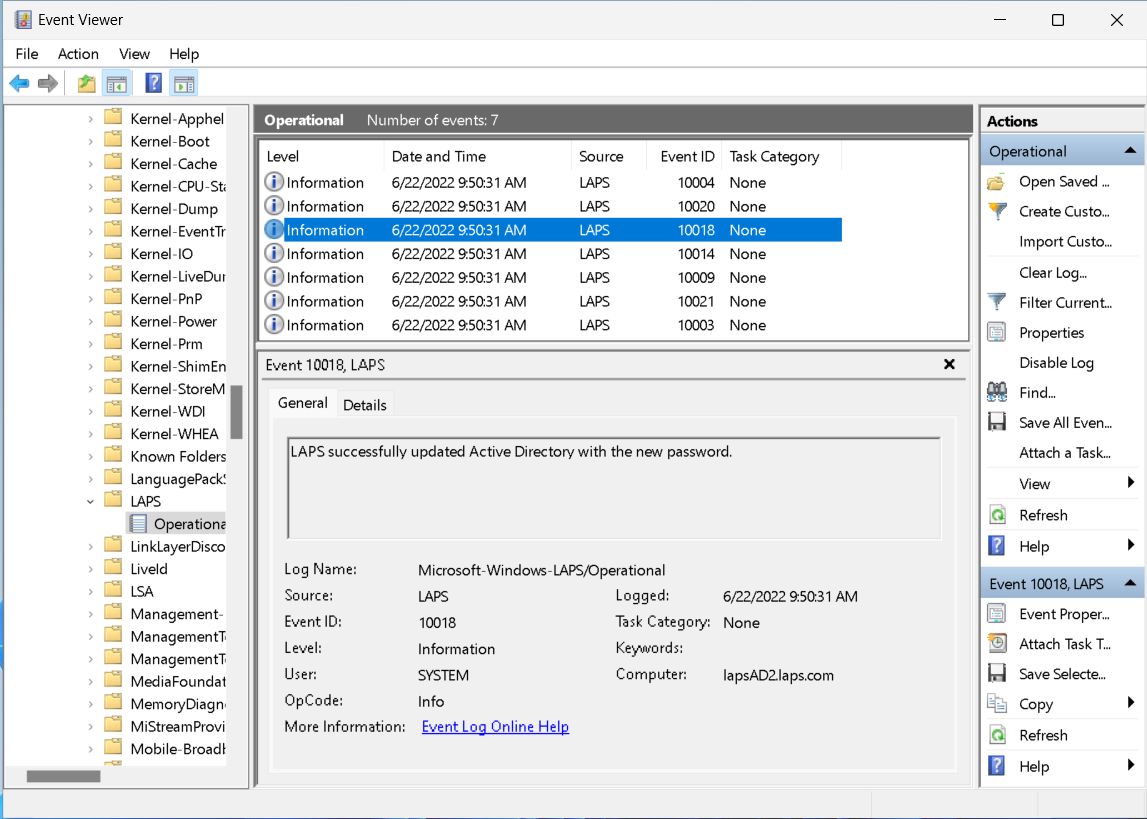
  5. Once the domain-joined client has backed up a new password (look for the 10018 event in the event log – see below screenshot), run the Get-LapsADPassword cmdlet to retrieve the newly stored password (by default you must be running as a domain administrator).
To get to this new Group Policy, open the Group Policy editor and navigate to Computer Configuration > Administrative Templates > System > LAPS.

You can retrieve detailed status via the new built in event logging:

Easily track the outcome of all LAPS operations in the event log.

Note: the feature is fully functional for Active Directory domain-joined clients, but Azure Active Directory support is limited for now to a small set of Insiders. We will make an announcement once Azure Active Directory support is more broadly available.

FEEDBACK: Please file feedback in Feedback Hub (WIN + F) under Security and Privacy > Attack Surface Reduction.

Changes and Improvements

[General]

  • Every Microsoft customer should be able to use our products knowing we will protect their privacy and give them the information and tools needed to easily make privacy decisions with confidence. The new App usage history features, which began rolling out to Insiders with Build 25140, gives users a 7-day history of resource access for Location, Camera, Microphone, Phone Calls, Messaging, Contacts, Pictures, Videos, Music library, Screenshots and apps through the Settings experience. You can find this new information under Settings > Privacy & security > App permissions (simply click on one of the app permissions categories such as microphone and look at “Recent activity”).

[Suggested Actions]

  • Suggested Actions, which began rolling out with Build 25115, is now available to all Windows Insiders in the U.S., Canada, and Mexico.

[File Explorer]

  • Middle clicking a folder in the body of File Explorer will now open it in a new tab.

Fixes

[General]

  • Fixed an issue causing Windows Insiders on Surface Pro X devices to hit a black screen when attempting to resume from hibernate.
  • Fixed a bugcheck that some Insiders were experiencing with SYSTEM_THREAD_EXCEPTION_NOT_HANDLED related to USBs.
  • Fixed a bugcheck with error 0x1CA SYNTHETIC_WATCHDOG_TIMEOUT that could happen sporadically on some PCs after left idling for some time. This could happen when a laptop lid was closed, making it appear that the laptop had rebooted while sleeping.
  • Fixed an issue from the last two builds that was leading to InventorySvc consuming an unexpectedly high volume of memory the longer it was running.

[File Explorer]

  • The row of tabs should now be included in the keyboard focus cycle when pressing Tab or F6. Once focus is in the tab row, you can use left or right arrow keys to navigate through them.
  • Fixed an issue where the tab order when using CTRL + Tab would be wrong if you’d rearranged the tabs in File Explorer.

[Start]

  • Narrator will now read the dialog that opens when uninstalling an app from its context menu in Start and those options correctly.
  • The animation when selecting the More button in Start’s Recommended section in right-to-left (RTL) languages should now appear correctly.

[Taskbar]

  • When dismissing notification center using your keyboard, its closing animation will now show correctly.

[Settings]

  • Typing a number in the Settings search box when using an Arabic display language should no longer show boxes.
  • Fixed an issue causing Settings to crash when going to Bluetooth & Devices > Printers & Scanners in the last few builds.
  • Fixed a couple crashes that some Insiders were experiencing in the last few builds when opening the Wi-Fi section of Quick Settings, or after connecting or disconnecting from networks in the Wi-Fi section in Quick Settings.
  • Fixed an issue that was causing the Wi-Fi option in Quick Settings and the Wi-Fi section in Settings to sometimes take a few seconds to appear.
  • Using touch to rearrange the items in Quick Settings when in edit mode should no longer lead to Quick Settings unexpectedly dismissing sometimes.

[Input]

  • Added the SOM currency sign (U+20C0) to the Courier New font family.

[Task Manager]

  • Pressing CTRL + Page Up and CTRL + Page Down should work again now to navigate through pages in Task Manager.

[Other]

  • Fixed a rare issue that could lead to certain apps to sporadically crash on launch.
NOTE: Some fixes noted here in Insider Preview builds from the Dev Channel may make their way into the servicing updates for the released version of Windows 11.

Known issues

[General]

  • We are investigating reports that the Mica material and Acrylic blur effect is not rendering correct in OS surfaces like the Start menu, Notification Center and other areas.
  • We’re investigating reports that shutting down via the Start menu isn’t working for some Insiders and is unexpectedly rebooting instead.

  • Some games that use Easy Anti-Cheat may crash or cause your PC to bugcheck.

[File Explorer]

  • The up arrow is misaligned in File Explorer tabs. This will be fixed in a future update.
  • We’re investigating reports that launching File Explorer in certain ways when using dark mode (for example, from the command line) is showing the body of File Explorer unexpectedly in light mode.

[Widgets]

  • We’re working on the fix for an issue causing Widgets preferences (temperature units and pinned widgets) to unexpectedly get reset to default.

[Live captions]

  • Certain apps in full screen (e.g., video players) prevent live captions from being visible.
  • Certain apps positioned near the top of the screen and closed before live captions is run will re-launch behind the live captions window positioned at top. Use the system menu (ALT + Spacebar) while the app has focus to move the app’s window further down.

Changes for IT administrators

We’re making changes to how IT admins enroll devices in the Windows diagnostic data processor configuration option. In a future Insider Preview build in the Dev Channel, devices with diagnostic data turned on and joined to an AAD tenant with billing address in the EU or EFTA, will be enrolled in the Windows diagnostic data processor configuration. During this initial rollout, the following conditions apply to devices in the Dev Channel that are joined to an Azure AD tenant with a billing address outside of the EU or EFTA:
  • Devices can’t be enabled for the Windows diagnostic data processor configuration at this time.
  • The processor configuration will be disabled in any devices that were previously enabled.
  • Microsoft will act as the controller for Windows diagnostic data in accordance with the Microsoft Privacy Statement and the Data Protection Addendumterms won’t apply.
It’s recommended Insiders on these devices pause flighting if these changes aren’t acceptable. Learn more at https://aka.ms/configwddenterprise.

For developers

You can download the latest Windows Insider SDK at aka.ms/windowsinsidersdk.

SDK NuGet packages are now also flighting at NuGet Gallery | WindowsSDK which include:
These NuGet packages provide more granular access to the SDK and better integrate in CI/CD pipelines.

About the Dev Channel

The Dev Channel receives builds that represent long lead work from our engineers with features and experiences that may never get released as we try out different concepts and get feedback. It is important to remember that the builds we release to the Dev Channel should not be seen as matched to any specific release of Windows and the features included may change over time, be removed, or replaced in Insider builds or may never be released beyond Windows Insiders to general customers. For more information, please read this blog post about how we plan to use the Dev Channel to incubate new ideas, work on long lead items, and control the states of individual features.

These aren’t always stable builds, and sometimes you will see issues that block key activities or require workarounds. It is important to make sure you read the known issues listed in our blog posts as we document many of these issues with each flight.

Build numbers are higher in the Dev Channel than the Windows 11 preview builds in the Beta and Release Preview Channels. You will not be able to switch from the Dev Channel to the Beta or Release Preview Channels without doing a clean install back to the released version of Windows 11 currently.

ALSO: Because the Dev and Beta Channels represent parallel development paths from our engineers, there may be cases where features and experiences show up in the Beta Channel first.

The desktop watermark you see at the lower right corner of your desktop is normal for these pre-release builds.

Important Insider Links

Thanks,
Amanda & Brandon

Source:

Check Windows Updates

UUP Dump:

64-bit ISO download:
Select language for Windows 11 Insider Preview 10.0.25145.1011 (rs_prerelease) amd64

ARM64 ISO download: Select language for Windows 11 Insider Preview 10.0.25145.1011 (rs_prerelease) arm64

 
Last edited:
I suspect there was a bug in compilation of iso then - unfortunately we do not have an official iso for this version.
Or it could be to do with Smart App control? That was a available for me after the repair. 🤷‍♂️
 

My Computers My Computers

  • At a glance

    Win 11 ProAMD Ryzen™ 7 7730U24GB Dual-Channel DDR4 @ 1596MHz (22-22-22-52)512MB ATI AMD Radeon Graphics (ASUStek Comput...
    OS
    Win 11 Pro
    Computer type
    Laptop
    Manufacturer/Model
    ASUS Vivobook
    CPU
    AMD Ryzen™ 7 7730U
    Motherboard
    M1605YA
    Memory
    24GB Dual-Channel DDR4 @ 1596MHz (22-22-22-52)
    Graphics Card(s)
    512MB ATI AMD Radeon Graphics (ASUStek Computer Inc)
    Monitor(s) Displays
    Generic PnP Monitor (1920x1200@60Hz) - P1 PLUS (1920x1080@59Hz)
    Screen Resolution
    1920 X 1200
    Hard Drives
    953GB Western Digital WD
    PSU
    45 Watts
    Mouse
    Lenovo Bluetooth.
    Internet Speed
    500 Mbps
    Browser
    Edge
    Antivirus
    Defender
  • At a glance

    Windows 11AMD Ryzen 7 5800H / 3.2 GHz32 GB DDR4 SDRAM 3200 MHzNVIDIA GeForce RTX 3060 6 GB GDDR6 SDRAM
    Operating System
    Windows 11
    Computer type
    Laptop
    Manufacturer/Model
    ACER NITRO
    CPU
    AMD Ryzen 7 5800H / 3.2 GHz
    Motherboard
    CZ Scala_CAS (FP6)
    Memory
    32 GB DDR4 SDRAM 3200 MHz
    Graphics card(s)
    NVIDIA GeForce RTX 3060 6 GB GDDR6 SDRAM
    Sound Card
    Realtek Audio. NVIDIA High Definition Audio
    Monitor(s) Displays
    15.6" LED backlight 1920 x 1080 (Full HD) 144 Hz
    Screen Resolution
    1920 x 1080 (Full HD)
    Hard Drives
    Samsung 970 Evo Plus 2TB NVMe M.2
    PSU
    180 Watt, 19.5 V
    Mouse
    Lenovo Bluetooth
    Internet Speed
    500 Mbps
    Browser
    Edge
    Antivirus
    Defender
Well just an update, everything worked fine but back to errors again on these monitoring softwares :ffs:
 

My Computers My Computers

  • At a glance

    Win 11 ProAMD Ryzen™ 7 7730U24GB Dual-Channel DDR4 @ 1596MHz (22-22-22-52)512MB ATI AMD Radeon Graphics (ASUStek Comput...
    OS
    Win 11 Pro
    Computer type
    Laptop
    Manufacturer/Model
    ASUS Vivobook
    CPU
    AMD Ryzen™ 7 7730U
    Motherboard
    M1605YA
    Memory
    24GB Dual-Channel DDR4 @ 1596MHz (22-22-22-52)
    Graphics Card(s)
    512MB ATI AMD Radeon Graphics (ASUStek Computer Inc)
    Monitor(s) Displays
    Generic PnP Monitor (1920x1200@60Hz) - P1 PLUS (1920x1080@59Hz)
    Screen Resolution
    1920 X 1200
    Hard Drives
    953GB Western Digital WD
    PSU
    45 Watts
    Mouse
    Lenovo Bluetooth.
    Internet Speed
    500 Mbps
    Browser
    Edge
    Antivirus
    Defender
  • At a glance

    Windows 11AMD Ryzen 7 5800H / 3.2 GHz32 GB DDR4 SDRAM 3200 MHzNVIDIA GeForce RTX 3060 6 GB GDDR6 SDRAM
    Operating System
    Windows 11
    Computer type
    Laptop
    Manufacturer/Model
    ACER NITRO
    CPU
    AMD Ryzen 7 5800H / 3.2 GHz
    Motherboard
    CZ Scala_CAS (FP6)
    Memory
    32 GB DDR4 SDRAM 3200 MHz
    Graphics card(s)
    NVIDIA GeForce RTX 3060 6 GB GDDR6 SDRAM
    Sound Card
    Realtek Audio. NVIDIA High Definition Audio
    Monitor(s) Displays
    15.6" LED backlight 1920 x 1080 (Full HD) 144 Hz
    Screen Resolution
    1920 x 1080 (Full HD)
    Hard Drives
    Samsung 970 Evo Plus 2TB NVMe M.2
    PSU
    180 Watt, 19.5 V
    Mouse
    Lenovo Bluetooth
    Internet Speed
    500 Mbps
    Browser
    Edge
    Antivirus
    Defender
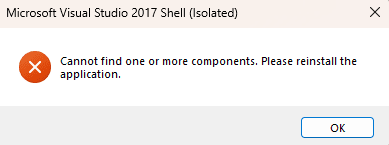
Been happy using Insiders for a while, new File Explorer tabbing works great. No issues here. However, as of 25140 and still in 25145, I can no longer open SQL Server Management Studio. I get a VS Shell error. And I can't seem to install anything new which requires the C++ redistributable. Therefore new features are really good and working well, but backwards compatibility seems to have regressed for me at least.

This is the error when I try to launch SSMS (I've reinstalled SSMS, the VS Shell, the C++ redistributables, and all in varying orders)

1655995716188.png

Example of an attempted install of another application:

1655995936962.png

Neither of these were issues prior to 25140 and they continue in 25145. Any advice appreciated.
 

My Computer My Computer

At a glance

Windows 11Ryzen 9 5950X64GBNVidia GeForce GTX 980 Ti
OS
Windows 11
Computer type
PC/Desktop
CPU
Ryzen 9 5950X
Motherboard
Gigabyte X570
Memory
64GB
Graphics Card(s)
NVidia GeForce GTX 980 Ti
Monitor(s) Displays
3 x Samsung 24" curved
Screen Resolution
1080p
Hard Drives
1 x Corsair MP600 Pro 2TB NVMe, 2 x Corsair MP600 Pro 1TB NVMe
Internet Speed
90Mbps
Browser
Chrome
I got the same error when I tried to run HWiNFO64.
Hi, just found the culprit- it's core isolation memory integrity :woozy:


My Computers My Computers

  • At a glance

    Win 11 ProAMD Ryzen™ 7 7730U24GB Dual-Channel DDR4 @ 1596MHz (22-22-22-52)512MB ATI AMD Radeon Graphics (ASUStek Comput...
    OS
    Win 11 Pro
    Computer type
    Laptop
    Manufacturer/Model
    ASUS Vivobook
    CPU
    AMD Ryzen™ 7 7730U
    Motherboard
    M1605YA
    Memory
    24GB Dual-Channel DDR4 @ 1596MHz (22-22-22-52)
    Graphics Card(s)
    512MB ATI AMD Radeon Graphics (ASUStek Computer Inc)
    Monitor(s) Displays
    Generic PnP Monitor (1920x1200@60Hz) - P1 PLUS (1920x1080@59Hz)
    Screen Resolution
    1920 X 1200
    Hard Drives
    953GB Western Digital WD
    PSU
    45 Watts
    Mouse
    Lenovo Bluetooth.
    Internet Speed
    500 Mbps
    Browser
    Edge
    Antivirus
    Defender
  • At a glance

    Windows 11AMD Ryzen 7 5800H / 3.2 GHz32 GB DDR4 SDRAM 3200 MHzNVIDIA GeForce RTX 3060 6 GB GDDR6 SDRAM
    Operating System
    Windows 11
    Computer type
    Laptop
    Manufacturer/Model
    ACER NITRO
    CPU
    AMD Ryzen 7 5800H / 3.2 GHz
    Motherboard
    CZ Scala_CAS (FP6)
    Memory
    32 GB DDR4 SDRAM 3200 MHz
    Graphics card(s)
    NVIDIA GeForce RTX 3060 6 GB GDDR6 SDRAM
    Sound Card
    Realtek Audio. NVIDIA High Definition Audio
    Monitor(s) Displays
    15.6" LED backlight 1920 x 1080 (Full HD) 144 Hz
    Screen Resolution
    1920 x 1080 (Full HD)
    Hard Drives
    Samsung 970 Evo Plus 2TB NVMe M.2
    PSU
    180 Watt, 19.5 V
    Mouse
    Lenovo Bluetooth
    Internet Speed
    500 Mbps
    Browser
    Edge
    Antivirus
    Defender
I did lose the ability to switch to the Win10 Ribbon and the Win7 Command Bar. I did gain the ability to test the tabbed File Explorer so I can give feedback on it. :)
Winuser, you had networking issues. What did you do to get your computers to talk to one another again? I keep getting this password dialog even though I have requirements for password turned off. Any ideas or solutions would be greatly appreciated.
 

My Computers My Computers

  • At a glance

    windows 10 & 11AMD Ryzen 7X64GbRadeon RX 480 8Gb
    OS
    windows 10 & 11
    Computer type
    PC/Desktop
    Manufacturer/Model
    iBuyPower (special build)
    CPU
    AMD Ryzen 7X
    Motherboard
    Asus Prime x370 Pro
    Memory
    64Gb
    Graphics Card(s)
    Radeon RX 480 8Gb
    Monitor(s) Displays
    Samsung UHD 27 inch
    Screen Resolution
    UHD
    Hard Drives
    3 Samsung 1 TB SSD each; 1 Samsung PCIe M.2 at 2 TB
  • At a glance

    Windows 11 proAMD 9 5900X32 GbNvidia GeForce RTX 3080 Ti 12 GB GDDR6X
    Operating System
    Windows 11 pro
    Computer type
    PC/Desktop
    Manufacturer/Model
    IBuyPower
    CPU
    AMD 9 5900X
    Motherboard
    Asus x570 ROG Crosshair VIII Dark Hero WI-FI 6E ARGB
    Memory
    32 Gb
    Graphics card(s)
    Nvidia GeForce RTX 3080 Ti 12 GB GDDR6X
    Sound Card
    3D PREMIUM surround sound onboard
    Monitor(s) Displays
    Samsung 32 inch UHD curved monitor
    Screen Resolution
    UHD
    Hard Drives
    Samsung 980 pro 2 tb gen 4 NVMe ssd
    PSU
    850 watt consair RM850X
    Case
    Lian Li LANCOOL ONE tempered glass RGB gaming case
    Cooling
    DEEPCOOL GAMERSTORM RGB 240 mm CASTLE 240EX liquid cooler
    Keyboard
    Ares m.2 gaming keyboard
    Mouse
    Ares m.2 gaming optical mouse
    Internet Speed
    450
    Browser
    Firefox / Edge
    Antivirus
    Windows defender
    Other Info
    With all this gaming rig I am not a gamer!
Although not specifically part of this build, I notice Dev version downloads a different driver for my ASUS.

I have been on Asus sight and cannot find this on their site.

I do not see this on latest RTM, RP 21H2, RP 22H2 or Beta builds.

So are Intel using Dev builds to test drivers as well, or did build come from ASUS testing their version of an Intel driver?

It is not causing any issue but I also have Intel driver (not the latest though which is .1994) which I probably do not need as it takes 1.5 GB.

Ah well here goes - .1960 Intel driver is now in the bit bucket of history.

1656008058743.png
 

My Computer My Computer

At a glance

Windows 11 Pro + Win11 Canary VM.I9 13th gen i9-13900H 2.60 GHZ16 GB solderedIntegrated Intel Iris XE
OS
Windows 11 Pro + Win11 Canary VM.
Computer type
Laptop
Manufacturer/Model
ASUS Zenbook 14
CPU
I9 13th gen i9-13900H 2.60 GHZ
Motherboard
Yep, Laptop has one.
Memory
16 GB soldered
Graphics Card(s)
Integrated Intel Iris XE
Sound Card
Realtek built in
Monitor(s) Displays
laptop OLED screen
Screen Resolution
2880x1800 touchscreen
Hard Drives
1 TB NVME SSD (only weakness is only one slot)
PSU
Internal + 65W thunderbolt USB4 charger
Case
Yep, got one
Cooling
Stella Artois (UK pint cans - 568 ml) - extra cost.
Keyboard
Built in UK keybd
Mouse
Bluetooth , wireless dongled, wired
Internet Speed
900 mbs (ethernet), wifi 6 typical 350-450 mb/s both up and down
Browser
Edge
Antivirus
Defender
Other Info
TPM 2.0, 2xUSB4 thunderbolt, 1xUsb3 (usb a), 1xUsb-c, hdmi out, 3.5 mm audio out/in combo, ASUS backlit trackpad (inc. switchable number pad)

Macrium Reflect Home V8
Office 365 Family (6 users each 1TB onedrive space)
Hyper-V (a vm runs almost as fast as my older laptop)
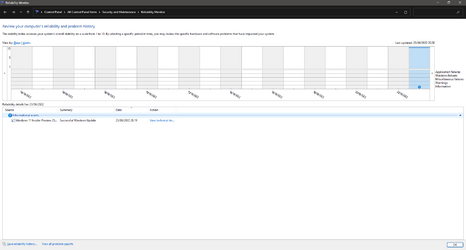
🤔 The mandatory 2 Errors are not present in this build upgrade on my laptop:
1656009182355.png
 

My Computers My Computers

  • At a glance

    Win 11 Pro 25H2 26200.8894 / Linux Mint 22.3Ryzen 7 2700U Pro32GBiGPU Vega 10
    OS
    Win 11 Pro 25H2 26200.8894 / Linux Mint 22.3
    Computer type
    Laptop
    Manufacturer/Model
    Lenovo A485
    CPU
    Ryzen 7 2700U Pro
    Motherboard
    Lenovo (WiFi/BT module upgraded to Intel Wireless-AC-9260)
    Memory
    32GB
    Graphics Card(s)
    iGPU Vega 10
    Sound Card
    Realtek
    Monitor(s) Displays
    14" FHD (built-in) + 14" Lenovo Thinkvision M14t (touch+pen) + 32" Asus PB328
    Screen Resolution
    FHD + FHD + 1440p
    Hard Drives
    Intel 660p m.2 nVME PCIe3.0 x2 512GB
    PSU
    125W(Dock)/65W(Travel Adapter)
    Keyboard
    Thinkpad / Logitech MX Keys
    Mouse
    Logitech MX Master 2S
    Internet Speed
    1/1Gbit
    Browser
    Firefox
    Antivirus
    Windows Defender
    Other Info
    SecureBoot: Enabled
    TPM2.0: Enabled
    AMD-V: Enabled
  • At a glance

    Win 11 Pro 25H2 26200.8968(RP)i7-7700k @4.8GHz32GB 2x16GB 2133MHz CL15EVGA GTX1080Ti FTW 11GB
    Operating System
    Win 11 Pro 25H2 26200.8968(RP)
    Computer type
    PC/Desktop
    Manufacturer/Model
    Custom
    CPU
    i7-7700k @4.8GHz
    Motherboard
    Asus PRIME Z270-A
    Memory
    32GB 2x16GB 2133MHz CL15
    Graphics card(s)
    EVGA GTX1080Ti FTW 11GB
    Sound Card
    Integrated
    Monitor(s) Displays
    32" 10-bit Asus PB328Q
    Screen Resolution
    WQHD 2560x1440
    Hard Drives
    512GB ADATA SX8000NP NVMe PCIe Gen 3 x4
    PSU
    850W
    Case
    Fractal Design Define 7
    Cooling
    Noctua NH-D15 chromax.black
    Keyboard
    Logitech MX Keys
    Mouse
    Logitech MX Master 2S
    Internet Speed
    1/1Gbit
    Browser
    Firefox
    Antivirus
    Windows Defender
    Other Info
    AC WiFi Card
  • Asus U46SV (laptop), i5-2410M, 8GB RAM, 500GB SSD, 750GB HDD, Windows 10. (used as a local Minecraft server and data dump)
The + and x in Tabs in File Explorer not working good.
 

My Computer My Computer

At a glance

26200.8037i5-11400F32GBGeforce GT-1030
OS
26200.8037
Computer type
PC/Desktop
CPU
i5-11400F
Motherboard
Gigabyte
Memory
32GB
Graphics Card(s)
Geforce GT-1030
Keyboard
Logitech K400
Mouse
Logitech M720
Internet Speed
600 Mb
Browser
Edge
I slow click on a file name to rename. I type the new name and press enter. If the pointer happens to still be anywhere along the fine/properties/date line, the file will go right back into rename. It as never done this before.
 

My Computer My Computer

At a glance

Windows 11I7 870016gbMSI 1050t
OS
Windows 11
Computer type
PC/Desktop
Manufacturer/Model
HP Pavilion Gaming 790-0077c
CPU
I7 8700
Motherboard
Berks Form factor: ATX, 36.45 x 24.88 cm (15.35 x 9.79 in)
Memory
16gb
Graphics Card(s)
MSI 1050t
Sound Card
Creative SoundBlaster AE-9
Monitor(s) Displays
Twin Samsung 27" curved
Screen Resolution
1920 x 1080
Hard Drives
512Gb and 1Tb
Hi, just found the culprit- it's core isolation memory integrity :woozy:

Did you find a way to enable HWInfo while core isolation is on?
 

My Computer My Computer

At a glance

windows 11 proI7-7700k Intel32gbNvidia 1080
OS
windows 11 pro
Computer type
PC/Desktop
Manufacturer/Model
Home Built
CPU
I7-7700k Intel
Motherboard
MSI Z170A
Memory
32gb
Graphics Card(s)
Nvidia 1080
Sound Card
Built in
Monitor(s) Displays
dual LG
Screen Resolution
4K
Hard Drives
500 m2 and 1tb ssd
PSU
800 watt
Case
full size
Cooling
liquid
Keyboard
Razer gaming
Mouse
Logitech G903
Internet Speed
1Gb
Browser
Edge Canary
Antivirus
Malwarebytes and defender
Other Info
Vive headset

My Computers My Computers

  • At a glance

    Windows 11 Pro for WorkstationsIntel i7-8700K 5 GHz64 GB (4x16GB) G.SKILL TridentZ RGB DDR4 3600...ASUS ROG-STRIX-GTX1080TI-O11G-GAMING (11GB GD...
    OS
    Windows 11 Pro for Workstations
    Computer type
    PC/Desktop
    Manufacturer/Model
    Custom self build
    CPU
    Intel i7-8700K 5 GHz
    Motherboard
    ASUS ROG Maximus XI Formula Z390
    Memory
    64 GB (4x16GB) G.SKILL TridentZ RGB DDR4 3600 MHz (F4-3600C18D-32GTZR)
    Graphics Card(s)
    ASUS ROG-STRIX-GTX1080TI-O11G-GAMING (11GB GDDR5X)
    Sound Card
    Integrated Digital Audio (S/PDIF)
    Monitor(s) Displays
    2 x Samsung Odyssey G75 27"
    Screen Resolution
    2560x1440
    Hard Drives
    1TB Samsung 990 PRO M.2,
    4TB Samsung 990 PRO M.2,
    TerraMaster F8 SSD Plus NAS
    PSU
    Seasonic Prime Titanium 850W
    Case
    Thermaltake Core P3 wall mounted
    Cooling
    Corsair Hydro H115i
    Keyboard
    Amazon Basics Wired Full Keyboard MD005
    Mouse
    Logitech MX Master 4
    Internet Speed
    2 Gbps Download and 100 Mbps Upload
    Browser
    Chrome and Edge
    Antivirus
    Microsoft Defender
    Other Info
    Logitech Z625 speaker system,
    Logitech BRIO 4K Pro webcam,
    HP Color LaserJet Pro MFP M477fdn,
    CyberPower CP1500PFCLCD
    Galaxy S23 Plus phone
  • At a glance

    Windows 11 ProSnapdragon X Elite (12 core) 3.42 GHz16 GB LPDDR5x-7467 MHz
    Operating System
    Windows 11 Pro
    Computer type
    Laptop
    Manufacturer/Model
    Surface Laptop 7 Copilot+ PC
    CPU
    Snapdragon X Elite (12 core) 3.42 GHz
    Memory
    16 GB LPDDR5x-7467 MHz
    Monitor(s) Displays
    15" HDR
    Screen Resolution
    2496 x 1664
    Hard Drives
    1 TB SSD
    Internet Speed
    Wi-Fi 7 and Bluetooth 5.4
    Browser
    Chrome and Edge
    Antivirus
    Microsoft Defender
I don't understand why Microsoft hates my Creative Audigy Rx audio board :) Tons of issues with Windows 10 and now this build doesn't let me use the Creative control panel to lower volume and so on. It says "can't find audio device" but the audio device is regularly working and fonctioning, so a really weird bug on the 25145 build. Rolling back to 25140 solves it.
 

My Computer My Computer

At a glance

Windows 11
OS
Windows 11
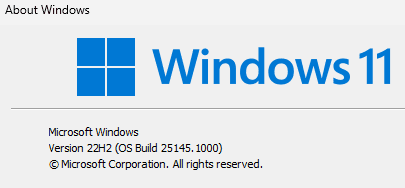
Edition Windows 11 Pro Insider Preview
Version 22H2
Installed on ‎6/‎22/‎2022
OS build 25145.1000
Experience Windows Feature Experience Pack 1000.25145.1000.0
 

My Computers My Computers

  • At a glance

    11 Pro5950XCORSAIR Vengeance RGB RT 32GB (4x16GB) DDR4 3...Zotac AMP Extreme Airo 4090/ Lian Li Vertical...
    OS
    11 Pro
    Computer type
    PC/Desktop
    Manufacturer/Model
    Me
    CPU
    5950X
    Motherboard
    ASUS DARK HERO X570
    Memory
    CORSAIR Vengeance RGB RT 32GB (4x16GB) DDR4 3733CL14x16GB
    Graphics Card(s)
    Zotac AMP Extreme Airo 4090/ Lian Li Vertical GPU PCI-E 5.0 v4
    Monitor(s) Displays
    TCL 55"646 Class 6-Series 4K QLED Dolby Vision HDR
    Screen Resolution
    4K
    Hard Drives
    SAMSUNG 980 PRO SSD 1TB/500GB M.2 and 2TB M.2
    PSU
    Seasonic Prime TX-1600 ATX3.1
    Case
    Fractal Meshify 2 XL /3-140X38 Silverstone/3 140x38 BGear
    Cooling
    The Arctic Liquid Freezer III 420 Push/pull x6 Noctua 14 3000rpm
    Mouse
    G502 HERO
    Internet Speed
    Mbps 350.00
    Other Info
    Two CyberPower CP1500PFCLCD PFC Sinewave UPS Battery Backup and Surge Protector, 1500VA/1000W
  • At a glance

    Win 11 pro2700XTRIDENT Z F-43600V15D-16GTZ /G.SKILL DDR4 380...1080Ti
    Operating System
    Win 11 pro
    Computer type
    PC/Desktop
    Manufacturer/Model
    Me
    CPU
    2700X
    Motherboard
    ASUS Prime 450M
    Memory
    TRIDENT Z F-43600V15D-16GTZ /G.SKILL DDR4 3800CL14 FASTEST PRESET 16GB /G-skill16Gb cl16/3600
    Graphics card(s)
    1080Ti
    Monitor(s) Displays
    50'
    Screen Resolution
    4K HDR
    Hard Drives
    M.2 500GB SABRENT / 3TB and 250GB SSD
    PSU
    FSP Hydro PTM PRO 1200W ATX 3.0 PCI-E GEN-5 80 Plus Platinum=EVGA 1300G2 /Corsairs 750w
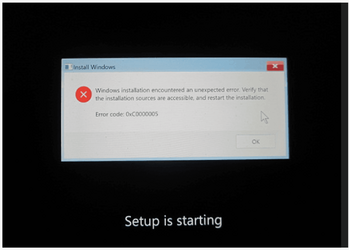
Downloaded ISO 25145 and tried clean install.
It worked fine on 2 Desktops XPS 8930 and XPS 8940 but fails solid on my Lenovo Yoga 920 laptop with this error showing below.
This has also been reported by other users.
Error code: 0xC0000005 a few seconds after clicking on "Install now" when "Setup is starting" message shows up.
This laptop meets all the requirements for Windows 11 and is currently running Build 22000.739 (Public Build).

Looks like it may fail on some machines, but not all.
Build 25140 ISO works fine on the same machines where 25145 gets this error. 🤷‍♂️

1656038261033.png
1656038383572.png
 

My Computer My Computer

At a glance

Windows 11 Pro 25H2Intel I9-9900K64GBNVIDIA RTX 2060
OS
Windows 11 Pro 25H2
Computer type
PC/Desktop
Manufacturer/Model
Dell XPS 8930
CPU
Intel I9-9900K
Memory
64GB
Graphics Card(s)
NVIDIA RTX 2060
Sound Card
NVIDIA High Definition Audio
Monitor(s) Displays
4k Samsung
Screen Resolution
3840 x 2160
Hard Drives
512GB NVMe, ADATA SU 800, 2TB HDD
Updated, thank you

1656047172710.png
 

My Computer My Computer

At a glance

Windows 11 Proi7 8550U16gbonboard
OS
Windows 11 Pro
Computer type
Laptop
Manufacturer/Model
HP X360 Envy
CPU
i7 8550U
Memory
16gb
Graphics Card(s)
onboard
Screen Resolution
FHD
Hard Drives
128GB SSD / 2TB HDD
Mouse
Logitech
Internet Speed
40mbps
Browser
Chrome
Antivirus
Norton 360
Did you find a way to enable HWInfo while core isolation is on?
I'm afraid not. Hopefully next update will fix it.
 

My Computers My Computers

  • At a glance

    Win 11 ProAMD Ryzen™ 7 7730U24GB Dual-Channel DDR4 @ 1596MHz (22-22-22-52)512MB ATI AMD Radeon Graphics (ASUStek Comput...
    OS
    Win 11 Pro
    Computer type
    Laptop
    Manufacturer/Model
    ASUS Vivobook
    CPU
    AMD Ryzen™ 7 7730U
    Motherboard
    M1605YA
    Memory
    24GB Dual-Channel DDR4 @ 1596MHz (22-22-22-52)
    Graphics Card(s)
    512MB ATI AMD Radeon Graphics (ASUStek Computer Inc)
    Monitor(s) Displays
    Generic PnP Monitor (1920x1200@60Hz) - P1 PLUS (1920x1080@59Hz)
    Screen Resolution
    1920 X 1200
    Hard Drives
    953GB Western Digital WD
    PSU
    45 Watts
    Mouse
    Lenovo Bluetooth.
    Internet Speed
    500 Mbps
    Browser
    Edge
    Antivirus
    Defender
  • At a glance

    Windows 11AMD Ryzen 7 5800H / 3.2 GHz32 GB DDR4 SDRAM 3200 MHzNVIDIA GeForce RTX 3060 6 GB GDDR6 SDRAM
    Operating System
    Windows 11
    Computer type
    Laptop
    Manufacturer/Model
    ACER NITRO
    CPU
    AMD Ryzen 7 5800H / 3.2 GHz
    Motherboard
    CZ Scala_CAS (FP6)
    Memory
    32 GB DDR4 SDRAM 3200 MHz
    Graphics card(s)
    NVIDIA GeForce RTX 3060 6 GB GDDR6 SDRAM
    Sound Card
    Realtek Audio. NVIDIA High Definition Audio
    Monitor(s) Displays
    15.6" LED backlight 1920 x 1080 (Full HD) 144 Hz
    Screen Resolution
    1920 x 1080 (Full HD)
    Hard Drives
    Samsung 970 Evo Plus 2TB NVMe M.2
    PSU
    180 Watt, 19.5 V
    Mouse
    Lenovo Bluetooth
    Internet Speed
    500 Mbps
    Browser
    Edge
    Antivirus
    Defender
Been happy using Insiders for a while, new File Explorer tabbing works great. No issues here. However, as of 25140 and still in 25145, I can no longer open SQL Server Management Studio. I get a VS Shell error. And I can't seem to install anything new which requires the C++ redistributable. Therefore new features are really good and working well, but backwards compatibility seems to have regressed for me at least.

This is the error when I try to launch SSMS (I've reinstalled SSMS, the VS Shell, the C++ redistributables, and all in varying orders)

View attachment 32112

Example of an attempted install of another application:

View attachment 32113

Neither of these were issues prior to 25140 and they continue in 25145. Any advice appreciated.
I started getting crashes in module msvcrt.dll for some utilities from Nirsoft in build 25140. Might be related to your problems ??
 

My Computer My Computer

At a glance

Windows 10 , Windows 11i7-970032gbRTX2060S
OS
Windows 10 , Windows 11
Computer type
PC/Desktop
CPU
i7-9700
Motherboard
Asus ROG Strix Z-390e
Memory
32gb
Graphics Card(s)
RTX2060S
Still no Windows Spotlight on my lock screen, kind of sad but I miss it!!
 

My Computer My Computer

At a glance

Windows 11AMD Ryzen 9 5950XCorsair Vengeance RGB PRO SL 32GBAMD Radeon RX6900XT
OS
Windows 11
Computer type
PC/Desktop
Manufacturer/Model
MI5
CPU
AMD Ryzen 9 5950X
Motherboard
ASUS ROG Strix X570-F Gaming
Memory
Corsair Vengeance RGB PRO SL 32GB
Graphics Card(s)
AMD Radeon RX6900XT
Sound Card
Auzentech X-Fi Prelude 7.1
Monitor(s) Displays
GIGABYTE AORUS FV43U
Screen Resolution
3840x2160
Hard Drives
4 x 2TB 990 Pro SSD
PSU
Corsair
Case
Corsair
Cooling
Liquid
Keyboard
Corsair K95
Mouse
Two buttons
Internet Speed
As quick as I need
Browser
FireFox Nightly
Antivirus
Default
Downloaded ISO 25145 and tried clean install.
It worked fine on 2 Desktops XPS 8930 and XPS 8940 but fails solid on my Lenovo Yoga 920 laptop with this error showing below.
This has also been reported by other users.
Error code: 0xC0000005 a few seconds after clicking on "Install now" when "Setup is starting" message shows up.
This laptop meets all the requirements for Windows 11 and is currently running Build 22000.739 (Public Build).

Looks like it may fail on some machines, but not all.
Build 25140 ISO works fine on the same machines where 25145 gets this error. 🤷‍♂️

View attachment 32163
View attachment 32164

There is no connection between the error message to Windows 11 requirment check. I got this error too and I upgrade from previous build to this and it took 2.5 hours. This is why clean install is better than upgrade.
 

My Computer My Computer

At a glance

26200.8037i5-11400F32GBGeforce GT-1030
OS
26200.8037
Computer type
PC/Desktop
CPU
i5-11400F
Motherboard
Gigabyte
Memory
32GB
Graphics Card(s)
Geforce GT-1030
Keyboard
Logitech K400
Mouse
Logitech M720
Internet Speed
600 Mb
Browser
Edge
There is no connection between the error message to Windows 11 requirment check. I got this error too and I upgrade from previous build to this and it took 2.5 hours. This is why clean install is better than upgrade.
Too bad clean install does not work with 25145. 🤣🤣🤣
 

My Computer My Computer

At a glance

Windows 11 Pro 25H2Intel I9-9900K64GBNVIDIA RTX 2060
OS
Windows 11 Pro 25H2
Computer type
PC/Desktop
Manufacturer/Model
Dell XPS 8930
CPU
Intel I9-9900K
Memory
64GB
Graphics Card(s)
NVIDIA RTX 2060
Sound Card
NVIDIA High Definition Audio
Monitor(s) Displays
4k Samsung
Screen Resolution
3840 x 2160
Hard Drives
512GB NVMe, ADATA SU 800, 2TB HDD
Back
Top Bottom