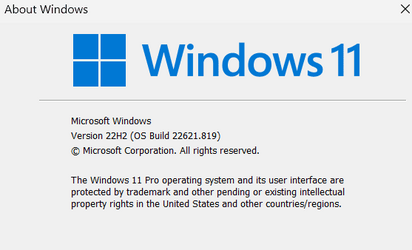
Win Update KB5019980 Cumulative Update for Windows 11 Build 22621.819 (22H2) - Nov. 8


UPDATE 11/29:


November 8, 2022 - KB5019980 (OS Build 22621.819)​


NEW 11/8/22
IMPORTANT
Because of minimal operations during the holidays and the upcoming Western new year, there won’t be a preview release (known as a “C” release) for the month of December 2022. There will be a monthly security release (known as a “B” release) for December 2022. Normal monthly servicing for both B and C releases will resume in January 2023.

For information about Windows update terminology, see the article about the types of Windows updates and the monthly quality update types. For an overview of Windows 11, version 22H2, see its update history page.

Note Follow @WindowsUpdate to find out when new content is published to the Windows release health dashboard.


Highlights​

  • It addresses an issue that affects File Explorer. It fails to localize folders.
  • It addresses security issues for your Windows operating system.

Improvements​

This security update includes improvements that were a part of update KB5018483 (released October 25, 2022). When you install this KB:
  • It addresses an issue that affects File Explorer. It fails to localize folders.
If you installed earlier updates, only the new updates contained in this package will be downloaded and installed on your device.

For more information about security vulnerabilities, please refer to the Security Update Guide website and the November 2022 Security Updates.

Windows 11 servicing stack update - 22000.754​

This update makes quality improvements to the servicing stack, which is the component that installs Windows updates. Servicing stack updates (SSU) ensure that you have a robust and reliable servicing stack so that your devices can receive and install Microsoft updates.

Known issues in this update​

Applies toSymptomWorkaround
IT adminsUsing provisioning packages on Windows 11, version 22H2 (also called Windows 11 2022 Update) might not work as expected. Windows might only be partially configured, and the Out Of Box Experience might not finish or might restart unexpectedly. Provisioning packages are .PPKG files which are used to help configure new devices for use on business or school networks. Provisioning packages which are applied during initial setup are most likely to be impacted by this issue. For more information on provisioning packages, please see Provisioning packages for Windows.

Note Provisioning Windows devices using Windows Autopilot is not affected by this issue.

Windows devices used by consumers in their home or small offices are not likely to be affected by this issue.
If you can provision the Windows device before upgrading to Windows 11, version 22H2, this will prevent the issue.

We are presently investigating and will provide an update in an upcoming release.
IT adminsCopying large multiple gigabyte (GB) files might take longer than expected to finish on Windows 11, version 22H2. You are more likely to experience this issue copying files to Windows 11, version 22H2 from a network share via Server Message Block (SMB) but local file copy might also be affected.Windows devices used by consumers in their home or small offices are not likely to be affected by this issue.To mitigate this issue, you can use file copy tools that do not use cache manager (buffered I/O). This can be done by using the built-in command-line tools listed below:

robocopy \\someserver\someshare c:\somefolder somefile.img /J

or

xcopy \\someserver\someshare c:\somefolder /J

We are working on a resolution and will provide an update in an upcoming release.
IT adminsAfter installing updates released on November 8, 2022 or later on Windows Servers with the Domain Controller role, you might have issues with Kerberos authentication. This issue might affect any Kerberos authentication in your environment. Some scenarios that might be affected:
When this issue is encountered you might receive a Microsoft-Windows-Kerberos-Key-Distribution-Center Event ID 14 error event in the System section of Event Log on your Domain Controller with the below text. Note: affected events will have "the missing key has an ID of 1":

While processing an AS request for target service <service>, the account <account name> did not have a suitable key for generating a Kerberos ticket (the missing key has an ID of 1). The requested etypes : 18 3. The accounts available etypes : 23 18 17. Changing or resetting the password of <account name> will generate a proper key.

Note This issue is not an expected part of the security hardening for Netlogon and Kerberos starting with November 2022 security update. You will still need to follow the guidance in these articles even after this issue is resolved.

Windows devices used at home by consumers or devices that are not part of a on-premises domain are not affected by this issue. Azure Active Directory environments that are not hybrid and do not have any on premises Active Directory servers are not affected.
We are working on a resolution and estimate a solution will be ready in the coming weeks. This known issue will be updated with more information when it is available.
IT adminsAfter you install this or later updates, you might be unable to reconnect to Direct Access after temporarily losing network connectivity or transitioning between Wi-Fi networks or access points.

Note This issue should not affect other remote access solutions such as VPN (sometimes called Remote Access Server or RAS) and Always On VPN (AOVPN).

Windows devices used at home by consumers or devices in organizations which are not using Direct Access to remotely access the organization's network resources are not affected.
If you cannot use the resolution below, you can mitigate this issue by restarting your Windows device.

This issue is resolved using Known Issue Rollback (KIR). Please note that it might take up to 24 hours for the resolution to propagate automatically to consumer devices and non-managed business devices. Restarting your Windows device might help the resolution apply to your device faster. For enterprise-managed devices that have installed an affected update and encountered this issue can be resolved by installing and configuring a special Group Policy. The special Group Policy can be found in Computer Configuration -> Administrative Templates -> <Group Policy name listed below>.

For information on deploying and configuring these special Group Policy, please see How to use Group Policy to deploy a Known Issue Rollback.
Group Policy downloads with Group Policy name:
Important You will need to install and configure the Group Policy for your version of Windows to resolve this issue.

How to get this update​

Before installing this update

Microsoft combines the latest servicing stack update (SSU) for your operating system with the latest cumulative update (LCU). For general information about SSUs, see Servicing stack updates and Servicing Stack Updates (SSU): Frequently Asked Questions.


Install this update

Release ChannelAvailableNext Step
Windows Update and Microsoft UpdateYesNone. This update will be downloaded and installed automatically from Windows Update.
Windows Update for BusinessYesNone. This update will be downloaded and installed automatically from Windows Update in accordance with configured policies.
Microsoft Update CatalogYesTo get the standalone package for this update, go to the Microsoft Update Catalog website.
Windows Server Update Services (WSUS)YesThis update will automatically sync with WSUS if you configure Products and Classifications as follows:
Product: Windows 11
Classification: Security Updates

If you want to remove the LCU

To remove the LCU after installing the combined SSU and LCU package, use the DISM/Remove-Package command line option with the LCU package name as the argument. You can find the package name by using this command: DISM /online /get-packages.

Running Windows Update Standalone Installer (wusa.exe) with the /uninstall switch on the combined package will not work because the combined package contains the SSU. You cannot remove the SSU from the system after installation.

File information

For a list of the files that are provided in this update, download the file information for cumulative update 5019980.

For a list of the files that are provided in the servicing stack update, download the file information for the SSU - version 22621.754.

Source:

Check Windows Updates

Direct download links for KB5019980 MSU file from Microsoft Update Catalog:

[fa]fas fa-download[/fa] Download KB5019980 MSU for Windows 11 v22H2 64-bit (x64) - 252.1 MB

[fa]fas fa-download[/fa] Download KB5019980 MSU for Windows 11 v22H2 ARM64 - 349.7 MB


UUP Dump:

64-bit ISO download:
Select language for Windows 11, version 22H2 (22621.819) amd64

ARM64 ISO download: Select language for Windows 11, version 22H2 (22621.819) arm64

 
Last edited:

Very easy and nice Windows Update
Thanks Shawn!
1668021211427.png
 

My Computer My Computer

At a glance

Windows 11 ProIntel Core i7 @ 1.80GHz16gbIntel UHD Graphics 620 and NVIDIA GeForce MX150
OS
Windows 11 Pro
Computer type
Laptop
Manufacturer/Model
HP/Envy-17T
CPU
Intel Core i7 @ 1.80GHz
Motherboard
HP - 8485 (U3E1)
Memory
16gb
Graphics Card(s)
Intel UHD Graphics 620 and NVIDIA GeForce MX150
Sound Card
Realtek High Definition Audio / Intel Display Audio / NVIDIA Virtual Audio Device (Wave Extensible) (WDM)
Monitor(s) Displays
Generic PnP Monitor on Intel UHD Graphics 620
Screen Resolution
1536x864 pixels
Hard Drives
KBG30ZMV256G TOSHIBA (SSD)
ST1000LM049-2GH172 (SSD)
PSU
HP Standard
Cooling
HP CoolSense
Keyboard
Standard PS/2 Keyboard
Mouse
Anker
Internet Speed
95Mbps
Browser
FireFox
Antivirus
WebRoot
This CU or something killed my sound. Getting message from my player (PotPlayer) "DirectX audio driver is not installed or not installed correctly." No sound from there or anywhere else, neither speakers nor headphones. Realtek audio driver is working correctly according to Device Manager. The DirectX Diagnostic Tool reports an error: "Problem getting extra sound info," but it reports no problems in areas it was able to check.

EDIT: Fixed! I substituted the Microsoft HD Audio driver for the Realtek driver. All working perfectly now.
 
Last edited:

My Computer My Computer

At a glance

Windows 11 ProIntel Core Ultra 265KTeamGroup T-Force Vulcan DDR5 6400MHz 32GBMSI GeForce RTX 3050
OS
Windows 11 Pro
Computer type
PC/Desktop
Manufacturer/Model
Self Build
CPU
Intel Core Ultra 265K
Motherboard
Gigabyte Z890 AOROS Elite
Memory
TeamGroup T-Force Vulcan DDR5 6400MHz 32GB
Graphics Card(s)
MSI GeForce RTX 3050
Sound Card
GPU NVIDIA High Definition Audio via HDMI to Denon AVR-S670BT Receiver
Monitor(s) Displays
LG 32UN650 32" 4k
Screen Resolution
3840x2160 @ 60Hz (175% scaling)
Hard Drives
Samsung 980 Pro NVMe 1TB x2
PSU
Corsair RM850x
Case
be quiet! Pure Base 600
Cooling
Thermalright Phantom Spirit 120SE & be quiet! Silent Wings Pro x3 case fans
Keyboard
Arteck Backlit USB Wired
Mouse
Logitech M510
Internet Speed
500Mb down/12Mb up
Browser
Firefox & Edge
Antivirus
Windows Defender & Free MBAM
Other Info
Main PC
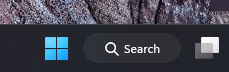
This changed the Taskbar Search icon to a long button on the Taskbar, per Microsoft "New! It enhances search visual treatments on the taskbar to improve discoverability." I liked the simple icon Microsoft.

New
1668039335442.png


Old
1668040017959.png
 

My Computers My Computers

  • At a glance

    Windows 11 Pro 25H2Core i7 10700K 3.8 GHzCorsair Vengeance LPX DDR4 128 GB 3000MHzAsus ProArt GeForce RTX 4070 Ti Super 16 GB
    OS
    Windows 11 Pro 25H2
    Computer type
    PC/Desktop
    Manufacturer/Model
    Wordsworth 10000
    CPU
    Core i7 10700K 3.8 GHz
    Motherboard
    Asus ROG Strix Z590-A Gaming Wifi
    Memory
    Corsair Vengeance LPX DDR4 128 GB 3000MHz
    Graphics Card(s)
    Asus ProArt GeForce RTX 4070 Ti Super 16 GB
    Sound Card
    Asus Xonar DSX
    Monitor(s) Displays
    HP 2709m
    Screen Resolution
    1920x1080
    Hard Drives
    Samsung 990 Pro M.2 SSD 2 TB; Samsung 990 Pro M.2 SSD 4 TB
    PSU
    Thermaltake Toughpower GF3 1350W
    Case
    Fractal Design Meshify 2
    Cooling
    CPU-Noctua NH D15 Chromax, GPU-Stock, Case-Noctua Chromax 3x140
    Keyboard
    Microsoft Natural Ergo 4000
    Mouse
    HP X500
    Internet Speed
    Cable
    Browser
    Vivaldi, MS Edge
    Antivirus
    Malwarebytes 5.2.4, Windows Defender
    Other Info
    Klipsch Promedia 5.1 THX
    Asus External Blu-Ray 16D1X-USB 3.0
  • At a glance

    Windows 11 Pro 25H2Core i7 6700K 4.0 GHzCorsair Vengeance LPX DDR4 32 GB 3000MHzAsus GeForce GTX 1050 Ti
    Operating System
    Windows 11 Pro 25H2
    Computer type
    PC/Desktop
    Manufacturer/Model
    Wordsworth 6000
    CPU
    Core i7 6700K 4.0 GHz
    Motherboard
    Asus Z170 Pro
    Memory
    Corsair Vengeance LPX DDR4 32 GB 3000MHz
    Graphics card(s)
    Asus GeForce GTX 1050 Ti
    Sound Card
    Asus Xonar SE
    Monitor(s) Displays
    HP X24ih
    Screen Resolution
    1920x1080
    Hard Drives
    Intel 760p M.2 SSD 500 GB; Intel 540 SSD 480 GB; Intel 335 SSD 240 GB
    PSU
    Thermaltake Toughpower GF1 750W
    Case
    Lian Li PC-B70
    Cooling
    CPU- Noctua NH-D15; GPU-Stock; Case-Noctua Chromax 2x140, 2x120
    Keyboard
    Microsoft Wireless Comfort 5050
    Mouse
    Microsoft Wireless Comfort 5050
    Internet Speed
    Cable
    Browser
    Vivaldi, MS Edge
    Antivirus
    Malwarebytes 4.4.3, Windows Defender
    Other Info
    HP bd 340
    HP bd 240
    Denon DRA-800H
    Klipsch RP-600M
    Klipsch R-100SW (2)

    System 3 Specs
    Windows 11 Pro 25H2
    Core i7 10700K 3.8 GHz
    Asus ROG Strix Z590-A Gaming Wifi
    Corsair Vengeance LPX DDR4 32 GB 3200MHz
    Asus Radeon RX560 Dual 4 GB
    Xonar SE
    Samsung 980 Pro M.2 SSD 1 TB (2)
    Thermaltake Toughpower GF3 850W
    Fractal Design Meshify 2
    CPU-Noctua NH D15 Chromax, GPU-Stock, Case-Noctua Chromax 2x140,1x120
This changed the Taskbar Search icon to a long button on the Taskbar, per Microsoft "New! It enhances search visual treatments on the taskbar to improve discoverability." I liked the simple icon Microsoft.

New
View attachment 44741


Old
View attachment 44742
Updated 2 laptops, one got the new button the other not. Is there a setting allowing to switch from one Search button to the other??
Thanks!!
 

My Computer My Computer

At a glance

Windows 11 24H2 LTSC IoT x64
OS
Windows 11 24H2 LTSC IoT x64
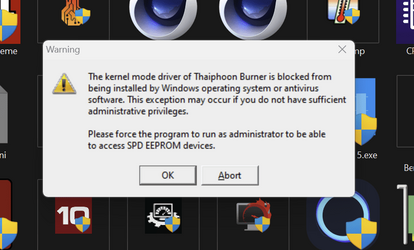
Cant run Thaiphoon Burner any more not even as Administrator as it suggests. Wouldn't be much of problem but I'm in the middle of experimenting with RAM memory and it's great program to gat and transfer details of RAM
1668063522114.png
Same in Insider dev and all stated after last security updates.
 

My Computer My Computer

At a glance

W11 Pro and Insider DevAMD Ryzen 9 7900x2x16GB Kingston 6000MHz, Cl 32 @ 6200MHz Cl30Gigabyte Rx 6600XT Gaming OC 8G Pro
OS
W11 Pro and Insider Dev
Computer type
PC/Desktop
Manufacturer/Model
Home brewed
CPU
AMD Ryzen 9 7900x
Motherboard
ASROCK b650 PRO RS
Memory
2x16GB Kingston 6000MHz, Cl 32 @ 6200MHz Cl30
Graphics Card(s)
Gigabyte Rx 6600XT Gaming OC 8G Pro
Sound Card
MB, Realtek Ac1220p
Monitor(s) Displays
3 x 27"
Screen Resolution
1080p
Hard Drives
Kingston KC3000. 1TBSamsung 970 evo Plus 500GB, Crucial P1 NVMe 1TB, Lexar NVMe 2 TB, Silicon Power M.2 SATA 500GB
PSU
Seasonic 750W
Case
Custom Raidmax
Cooling
Arctic Liquid Freezer III 360mm
Internet Speed
20/19 mbps
Hi folks
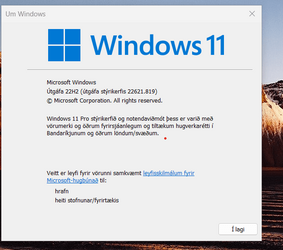
All working correctly for me -- I had though to re-install my OPENVPN client again - no problems though -- this was the VPN that I've created on my own server. The commercial VPN : NordVPN that I have had no issues - that still worked although had to re-enter credentials again. the ist time I tried to use it.

I notice also on these builds no expiry or watermark.

Skjámynd 2022-11-10 093351.png

cheers
jimbo
 

My Computer My Computer

At a glance

Windows XP,11 Linux Fedora Rawhide pre-releas...2 X Intel i7
OS
Windows XP,11 Linux Fedora Rawhide pre-release 45
Computer type
PC/Desktop
CPU
2 X Intel i7
Screen Resolution
4KUHD X 2
Updated 2 laptops, one got the new button the other not. Is there a setting allowing to switch from one Search button to the other??
Thanks!!
I got the new search icon on my laptop but I've noticed that it no longer shows the last searches when you hover over the icon. I have not found a way to revert it back to the previous style.
 

My Computers My Computers

  • At a glance

    Windows 11Intel Core i58GB
    OS
    Windows 11
    Computer type
    Laptop
    Manufacturer/Model
    Microsoft Surface
    CPU
    Intel Core i5
    Memory
    8GB
    Internet Speed
    900MB/s
    Browser
    MS Edge
    Antivirus
    Microsoft Defender
  • At a glance

    Win 11Intel i5 - 10th gen8GBIntel Iris plus
    Operating System
    Win 11
    Computer type
    Laptop
    Manufacturer/Model
    Microsoft Surface 3
    CPU
    Intel i5 - 10th gen
    Memory
    8GB
    Graphics card(s)
    Intel Iris plus
@philc43

not quite sure what you mean

Just click on the bar and it shows recent searches . That's fine for me.

Skjámynd 2022-11-10 102022.png


Cheers
jimbo
 

My Computer My Computer

At a glance

Windows XP,11 Linux Fedora Rawhide pre-releas...2 X Intel i7
OS
Windows XP,11 Linux Fedora Rawhide pre-release 45
Computer type
PC/Desktop
CPU
2 X Intel i7
Screen Resolution
4KUHD X 2
@philc43

not quite sure what you mean

Just click on the bar and it shows recent searches . That's fine for me.

View attachment 44770


Cheers
jimbo
I get that but some searches I have just done such as Winver do not show up there for me. Before they appeared when I hovered over the icon and I could select it - so one click instead of two.
 

My Computers My Computers

  • At a glance

    Windows 11Intel Core i58GB
    OS
    Windows 11
    Computer type
    Laptop
    Manufacturer/Model
    Microsoft Surface
    CPU
    Intel Core i5
    Memory
    8GB
    Internet Speed
    900MB/s
    Browser
    MS Edge
    Antivirus
    Microsoft Defender
  • At a glance

    Win 11Intel i5 - 10th gen8GBIntel Iris plus
    Operating System
    Win 11
    Computer type
    Laptop
    Manufacturer/Model
    Microsoft Surface 3
    CPU
    Intel i5 - 10th gen
    Memory
    8GB
    Graphics card(s)
    Intel Iris plus
I get that but some searches I have just done such as Winver do not show up there for me. Before they appeared when I hovered over the icon and I could select it - so one click instead of two.

I'll see what that's like on another build -- I've got about 5 Windows builds of various flavours -- all W11 Pro though.

Cheers
jimbo
 

My Computer My Computer

At a glance

Windows XP,11 Linux Fedora Rawhide pre-releas...2 X Intel i7
OS
Windows XP,11 Linux Fedora Rawhide pre-release 45
Computer type
PC/Desktop
CPU
2 X Intel i7
Screen Resolution
4KUHD X 2
Hi there @philc43

I've seen it -- on the insider build 25236 I see what you mean about the hover -- can't say it bothers me a lot though.

Cheers
jimbo
 

My Computer My Computer

At a glance

Windows XP,11 Linux Fedora Rawhide pre-releas...2 X Intel i7
OS
Windows XP,11 Linux Fedora Rawhide pre-release 45
Computer type
PC/Desktop
CPU
2 X Intel i7
Screen Resolution
4KUHD X 2
Thanks @jimbo45 for taking a look - I agree it's not a big deal. I've reported it in the Feedback Hub and see that a few folks have given similar feedback and many do not like the new icon.
 

My Computers My Computers

  • At a glance

    Windows 11Intel Core i58GB
    OS
    Windows 11
    Computer type
    Laptop
    Manufacturer/Model
    Microsoft Surface
    CPU
    Intel Core i5
    Memory
    8GB
    Internet Speed
    900MB/s
    Browser
    MS Edge
    Antivirus
    Microsoft Defender
  • At a glance

    Win 11Intel i5 - 10th gen8GBIntel Iris plus
    Operating System
    Win 11
    Computer type
    Laptop
    Manufacturer/Model
    Microsoft Surface 3
    CPU
    Intel i5 - 10th gen
    Memory
    8GB
    Graphics card(s)
    Intel Iris plus
Updated 2 laptops, one got the new button the other not. Is there a setting allowing to switch from one Search button to the other??
Thanks!!
I don't find a setting to switch between the button and icon, no. My System 2, an incompatible, I've not yet installed this update and it still has the icon, and it still shows Recent searches if you only hover over the icon where the button does not show Recent searches by hovering over it and you must click it to see them. I don't like the looks nor the behavior; Microsoft went backwards here IMO and the stated reason being "to improve discoverability." Appears some could not find the Search icon on the Taskbar. :(
 

My Computers My Computers

  • At a glance

    Windows 11 Pro 25H2Core i7 10700K 3.8 GHzCorsair Vengeance LPX DDR4 128 GB 3000MHzAsus ProArt GeForce RTX 4070 Ti Super 16 GB
    OS
    Windows 11 Pro 25H2
    Computer type
    PC/Desktop
    Manufacturer/Model
    Wordsworth 10000
    CPU
    Core i7 10700K 3.8 GHz
    Motherboard
    Asus ROG Strix Z590-A Gaming Wifi
    Memory
    Corsair Vengeance LPX DDR4 128 GB 3000MHz
    Graphics Card(s)
    Asus ProArt GeForce RTX 4070 Ti Super 16 GB
    Sound Card
    Asus Xonar DSX
    Monitor(s) Displays
    HP 2709m
    Screen Resolution
    1920x1080
    Hard Drives
    Samsung 990 Pro M.2 SSD 2 TB; Samsung 990 Pro M.2 SSD 4 TB
    PSU
    Thermaltake Toughpower GF3 1350W
    Case
    Fractal Design Meshify 2
    Cooling
    CPU-Noctua NH D15 Chromax, GPU-Stock, Case-Noctua Chromax 3x140
    Keyboard
    Microsoft Natural Ergo 4000
    Mouse
    HP X500
    Internet Speed
    Cable
    Browser
    Vivaldi, MS Edge
    Antivirus
    Malwarebytes 5.2.4, Windows Defender
    Other Info
    Klipsch Promedia 5.1 THX
    Asus External Blu-Ray 16D1X-USB 3.0
  • At a glance

    Windows 11 Pro 25H2Core i7 6700K 4.0 GHzCorsair Vengeance LPX DDR4 32 GB 3000MHzAsus GeForce GTX 1050 Ti
    Operating System
    Windows 11 Pro 25H2
    Computer type
    PC/Desktop
    Manufacturer/Model
    Wordsworth 6000
    CPU
    Core i7 6700K 4.0 GHz
    Motherboard
    Asus Z170 Pro
    Memory
    Corsair Vengeance LPX DDR4 32 GB 3000MHz
    Graphics card(s)
    Asus GeForce GTX 1050 Ti
    Sound Card
    Asus Xonar SE
    Monitor(s) Displays
    HP X24ih
    Screen Resolution
    1920x1080
    Hard Drives
    Intel 760p M.2 SSD 500 GB; Intel 540 SSD 480 GB; Intel 335 SSD 240 GB
    PSU
    Thermaltake Toughpower GF1 750W
    Case
    Lian Li PC-B70
    Cooling
    CPU- Noctua NH-D15; GPU-Stock; Case-Noctua Chromax 2x140, 2x120
    Keyboard
    Microsoft Wireless Comfort 5050
    Mouse
    Microsoft Wireless Comfort 5050
    Internet Speed
    Cable
    Browser
    Vivaldi, MS Edge
    Antivirus
    Malwarebytes 4.4.3, Windows Defender
    Other Info
    HP bd 340
    HP bd 240
    Denon DRA-800H
    Klipsch RP-600M
    Klipsch R-100SW (2)

    System 3 Specs
    Windows 11 Pro 25H2
    Core i7 10700K 3.8 GHz
    Asus ROG Strix Z590-A Gaming Wifi
    Corsair Vengeance LPX DDR4 32 GB 3200MHz
    Asus Radeon RX560 Dual 4 GB
    Xonar SE
    Samsung 980 Pro M.2 SSD 1 TB (2)
    Thermaltake Toughpower GF3 850W
    Fractal Design Meshify 2
    CPU-Noctua NH D15 Chromax, GPU-Stock, Case-Noctua Chromax 2x140,1x120
Hi guys,

KB5019980 is giving me a bit of a headache :(

I tried to install it via Windows Update and it failed (install/reboot/fail/reboot/fail) so I downloaded the stand-alone installer from #1 in this thread but it tells me the update is already installed. Windows Update says it's "pending restart".

Windows tells me I'm running W11 Home, Version 22H2, Installed on 05/10/22, OS build 22621.521

I'm unsure whether the update installed, or not, and what to do next.
 

My Computers My Computers

  • At a glance

    Windows 11 Home (64 bit) 23H2; Build 22621.2715Intel i5-840032GBNVIDIA GeForce RTX3060
    OS
    Windows 11 Home (64 bit) 23H2; Build 22621.2715
    Computer type
    PC/Desktop
    Manufacturer/Model
    N/A
    CPU
    Intel i5-8400
    Motherboard
    ASUS PRIME Z370-P
    Memory
    32GB
    Graphics Card(s)
    NVIDIA GeForce RTX3060
    Sound Card
    NVIDIA High Definition Audio
    Monitor(s) Displays
    Samsung LU28R55
    Screen Resolution
    3840 x 2160
    Hard Drives
    C:/ KINGSTON SA400M8480G (410GB)
    D:/ Samsung SSD 850 EVO (250GB)
    E:/ Samsung 3.5" Internal HDD (2TB)
    H:/ 3.5" External USB HDD (2TB)
    J:/ Samsung 3.5" Internal HDD (2TB)
    PSU
    N/K
    Case
    N/K
    Cooling
    N/K
    Keyboard
    Bluetooth wireless
    Mouse
    Bluetooth wireless
    Internet Speed
    1Gb/s
    Browser
    Brave
    Antivirus
    Windows Defender
    Other Info
    4TB Synology NAS (SHR)
    Upgraded from W10 Home on 29/04/2022
  • At a glance

    Windows 11 Home (64 bit) 23H2; Build 22631.2861Intel i5-10210U16MBNVIDIA GeForce MX350
    Operating System
    Windows 11 Home (64 bit) 23H2; Build 22631.2861
    Computer type
    Laptop
    Manufacturer/Model
    Huawei Honor MagicBook Pro
    CPU
    Intel i5-10210U
    Motherboard
    Huawei HBB-WX9-PCB M1010
    Memory
    16MB
    Graphics card(s)
    NVIDIA GeForce MX350
    Sound Card
    Intel
    Monitor(s) Displays
    Inbuilt 16.2" CMN PnP Monitor
    Screen Resolution
    1920 x 1080
    Hard Drives
    410GB HDD (manufacturer not known)
    PSU
    External 65W USB-C
    Case
    Aluminium
    Cooling
    Dual coolers
    Keyboard
    Std QWERTY
    Mouse
    Huawei HID compliant
    Internet Speed
    1Gb/s
    Browser
    Brave
    Antivirus
    Windows Defender
    Other Info
    Upgraded from W10 on 28/04/2022
    Upgraded to 23H2 on 28/12/2023
Hi guys,

KB5019980 is giving me a bit of a headache :(

I tried to install it via Windows Update and it failed (install/reboot/fail/reboot/fail) so I downloaded the stand-alone installer from #1 in this thread but it tells me the update is already installed. Windows Update says it's "pending restart".

Windows tells me I'm running W11 Home, Version 22H2, Installed on 05/10/22, OS build 22621.521

I'm unsure whether the update installed, or not, and what to do next.
Look in Update History
1668093380136.png
 

My Computer My Computer

At a glance

W11 Pro and Insider DevAMD Ryzen 9 7900x2x16GB Kingston 6000MHz, Cl 32 @ 6200MHz Cl30Gigabyte Rx 6600XT Gaming OC 8G Pro
OS
W11 Pro and Insider Dev
Computer type
PC/Desktop
Manufacturer/Model
Home brewed
CPU
AMD Ryzen 9 7900x
Motherboard
ASROCK b650 PRO RS
Memory
2x16GB Kingston 6000MHz, Cl 32 @ 6200MHz Cl30
Graphics Card(s)
Gigabyte Rx 6600XT Gaming OC 8G Pro
Sound Card
MB, Realtek Ac1220p
Monitor(s) Displays
3 x 27"
Screen Resolution
1080p
Hard Drives
Kingston KC3000. 1TBSamsung 970 evo Plus 500GB, Crucial P1 NVMe 1TB, Lexar NVMe 2 TB, Silicon Power M.2 SATA 500GB
PSU
Seasonic 750W
Case
Custom Raidmax
Cooling
Arctic Liquid Freezer III 360mm
Internet Speed
20/19 mbps
Look in Update History
View attachment 44790
Hi CountMike,

The update shows as being installed in Update History, which I guess is a good thing.

Any idea how I stop Windows Update from wanting to try to restart the computer to complete the update? Currently I have just postponed the restart for a couple of days but I'd like to stop it wanting to do it anyway.
 

My Computers My Computers

  • At a glance

    Windows 11 Home (64 bit) 23H2; Build 22621.2715Intel i5-840032GBNVIDIA GeForce RTX3060
    OS
    Windows 11 Home (64 bit) 23H2; Build 22621.2715
    Computer type
    PC/Desktop
    Manufacturer/Model
    N/A
    CPU
    Intel i5-8400
    Motherboard
    ASUS PRIME Z370-P
    Memory
    32GB
    Graphics Card(s)
    NVIDIA GeForce RTX3060
    Sound Card
    NVIDIA High Definition Audio
    Monitor(s) Displays
    Samsung LU28R55
    Screen Resolution
    3840 x 2160
    Hard Drives
    C:/ KINGSTON SA400M8480G (410GB)
    D:/ Samsung SSD 850 EVO (250GB)
    E:/ Samsung 3.5" Internal HDD (2TB)
    H:/ 3.5" External USB HDD (2TB)
    J:/ Samsung 3.5" Internal HDD (2TB)
    PSU
    N/K
    Case
    N/K
    Cooling
    N/K
    Keyboard
    Bluetooth wireless
    Mouse
    Bluetooth wireless
    Internet Speed
    1Gb/s
    Browser
    Brave
    Antivirus
    Windows Defender
    Other Info
    4TB Synology NAS (SHR)
    Upgraded from W10 Home on 29/04/2022
  • At a glance

    Windows 11 Home (64 bit) 23H2; Build 22631.2861Intel i5-10210U16MBNVIDIA GeForce MX350
    Operating System
    Windows 11 Home (64 bit) 23H2; Build 22631.2861
    Computer type
    Laptop
    Manufacturer/Model
    Huawei Honor MagicBook Pro
    CPU
    Intel i5-10210U
    Motherboard
    Huawei HBB-WX9-PCB M1010
    Memory
    16MB
    Graphics card(s)
    NVIDIA GeForce MX350
    Sound Card
    Intel
    Monitor(s) Displays
    Inbuilt 16.2" CMN PnP Monitor
    Screen Resolution
    1920 x 1080
    Hard Drives
    410GB HDD (manufacturer not known)
    PSU
    External 65W USB-C
    Case
    Aluminium
    Cooling
    Dual coolers
    Keyboard
    Std QWERTY
    Mouse
    Huawei HID compliant
    Internet Speed
    1Gb/s
    Browser
    Brave
    Antivirus
    Windows Defender
    Other Info
    Upgraded from W10 on 28/04/2022
    Upgraded to 23H2 on 28/12/2023
Hi CountMike,

The update shows as being installed in Update History, which I guess is a good thing.

Any idea how I stop Windows Update from wanting to try to restart the computer to complete the update? Currently I have just postponed the restart for a couple of days but I'd like to stop it wanting to do it anyway.
A restart will always be required as system files can't be updated while they're in use
 

My Computer My Computer

At a glance

Windows 11 Pro 25H2 (RP channel)AMD Ryzen 7 9800X3D 8-core64GB Corsair Titanium 6000/CL30MSI Suprim 5080 SOC
OS
Windows 11 Pro 25H2 (RP channel)
Computer type
PC/Desktop
Manufacturer/Model
MSI
CPU
AMD Ryzen 7 9800X3D 8-core
Motherboard
MEG X870E Godlike
Memory
64GB Corsair Titanium 6000/CL30
Graphics Card(s)
MSI Suprim 5080 SOC
Sound Card
Soundblaster AE-9
Monitor(s) Displays
ASUS TUF Gaming VG289Q
Screen Resolution
3840x2160
Hard Drives
Samsung 9100 Pro 4TB (gen 5 x4, system drive/games)
Samsung 990 Pro 2TB
Samsung 980 Pro 2TB
Samsung 870 Evo 4TB
Samsung 870 Evo 2TB
Samsung T9 4TB
PSU
Seasonic PX-2200
Case
Bequiet! Dark Base Pro 901
Cooling
Noctua NH-D15S Chromax black
Keyboard
Logitech G915 X (wired)
Mouse
Logitech G903 with PowerPlay charger
Internet Speed
900Mb/sec
Browser
Microsoft Edge
Antivirus
Windows Defender
A restart will always be required as system files can't be updated while they're in use
The problem is it restarts and reports the update failed, then tries to restart a second time ... and fails, then tries to restart a third time ... and fails. At this point it gives up and just says it needs to restart to complete the update. It's like groundhog day :boom:
 

My Computers My Computers

  • At a glance

    Windows 11 Home (64 bit) 23H2; Build 22621.2715Intel i5-840032GBNVIDIA GeForce RTX3060
    OS
    Windows 11 Home (64 bit) 23H2; Build 22621.2715
    Computer type
    PC/Desktop
    Manufacturer/Model
    N/A
    CPU
    Intel i5-8400
    Motherboard
    ASUS PRIME Z370-P
    Memory
    32GB
    Graphics Card(s)
    NVIDIA GeForce RTX3060
    Sound Card
    NVIDIA High Definition Audio
    Monitor(s) Displays
    Samsung LU28R55
    Screen Resolution
    3840 x 2160
    Hard Drives
    C:/ KINGSTON SA400M8480G (410GB)
    D:/ Samsung SSD 850 EVO (250GB)
    E:/ Samsung 3.5" Internal HDD (2TB)
    H:/ 3.5" External USB HDD (2TB)
    J:/ Samsung 3.5" Internal HDD (2TB)
    PSU
    N/K
    Case
    N/K
    Cooling
    N/K
    Keyboard
    Bluetooth wireless
    Mouse
    Bluetooth wireless
    Internet Speed
    1Gb/s
    Browser
    Brave
    Antivirus
    Windows Defender
    Other Info
    4TB Synology NAS (SHR)
    Upgraded from W10 Home on 29/04/2022
  • At a glance

    Windows 11 Home (64 bit) 23H2; Build 22631.2861Intel i5-10210U16MBNVIDIA GeForce MX350
    Operating System
    Windows 11 Home (64 bit) 23H2; Build 22631.2861
    Computer type
    Laptop
    Manufacturer/Model
    Huawei Honor MagicBook Pro
    CPU
    Intel i5-10210U
    Motherboard
    Huawei HBB-WX9-PCB M1010
    Memory
    16MB
    Graphics card(s)
    NVIDIA GeForce MX350
    Sound Card
    Intel
    Monitor(s) Displays
    Inbuilt 16.2" CMN PnP Monitor
    Screen Resolution
    1920 x 1080
    Hard Drives
    410GB HDD (manufacturer not known)
    PSU
    External 65W USB-C
    Case
    Aluminium
    Cooling
    Dual coolers
    Keyboard
    Std QWERTY
    Mouse
    Huawei HID compliant
    Internet Speed
    1Gb/s
    Browser
    Brave
    Antivirus
    Windows Defender
    Other Info
    Upgraded from W10 on 28/04/2022
    Upgraded to 23H2 on 28/12/2023
I got the new search icon on taskbar after second reboot today. It's nice to see changing in Desktop.
 

My Computer My Computer

At a glance

26200.8037i5-11400F32GBGeforce GT-1030
OS
26200.8037
Computer type
PC/Desktop
CPU
i5-11400F
Motherboard
Gigabyte
Memory
32GB
Graphics Card(s)
Geforce GT-1030
Keyboard
Logitech K400
Mouse
Logitech M720
Internet Speed
600 Mb
Browser
Edge
This changed the Taskbar Search icon to a long button on the Taskbar, per Microsoft "New! It enhances search visual treatments on the taskbar to improve discoverability." I liked the simple icon Microsoft.

New
View attachment 44741


Old
View attachment 44742
Hi everyone!

I've got the same problem with this search icon. I don't want to have the new one. I'd like to have the old back but cannot find any solution to revert it back. Probably it can be changed in the registry. Any help, please?
 

My Computer My Computer

At a glance

Windows 11 Pro x64 22H2AMD Ryzen 9 5900XKingston FURY 32GB (2x16GB) 3200MHz CL16 Beas...Asus Dual Radeon RX 6700 XT 12GB GDDR6
OS
Windows 11 Pro x64 22H2
Computer type
PC/Desktop
Manufacturer/Model
DIY
CPU
AMD Ryzen 9 5900X
Motherboard
Gigabyte X570S AORUS ELITE AX
Memory
Kingston FURY 32GB (2x16GB) 3200MHz CL16 Beast Black
Graphics Card(s)
Asus Dual Radeon RX 6700 XT 12GB GDDR6
Sound Card
Realtek
Monitor(s) Displays
MSI G27C6
Screen Resolution
1080p
Hard Drives
3x Gigabyte 1TB M.2 PCIe Gen4 NVMe AORUS 7000s
PSU
MSI MPG A850GF 850W
Case
COOLER MASTER Force 500
Cooling
BE QUIET! Dark Rock PRO 4
Keyboard
Logitech Internet 1500 Laser Cordless
Mouse
Logitech Internet 1500 Laser Cordless
Browser
Opera
Antivirus
Norton

Latest Support Threads

Back
Top Bottom