Insider KB5032106 Windows 11 Insider Canary Build 25967.1010 (23H2) - Oct. 10


UPDATE 10/18:


 Windows Blogs:

UPDATE 10/10: We are starting to roll out Cumulative Update Build 25967.1010 (KB5032106). This update does not include anything new and is designed to test our servicing pipeline for builds in the Canary Channel.

Hello Windows Insiders, today we are releasing Windows 11 Insider Preview Build 25967 to the Canary Channel.

REMINDER: As builds released to the Canary Channel are “hot off the presses,” we will offer limited documentation for builds flighted to the Canary Channel including documenting only the most significant and highly impactful known issues. Please note that we will not publish a blog post for every flight – only when new features are available in a build.

What’s new in Build 25967

Introducing the new Settings homepage

We’re introducing a new homepage in Settings that offers you a dynamic and personalized experience. It provides an overview of your device, quick access to key settings, and helps manage your Microsoft account.


settings-homepage-1024x758.jpg
New Settings homepage.

We created interactive cards that represent various device and account related settings, grouped by commonly accessed functions. Each card is optimized to offer the most relevant information and controls at your fingertips. In this release, you’ll see up to seven cards, with more coming soon.

Here’s an overview of each card:
  1. Recommended settings: This card adapts to your specific usage patterns, providing timely and relevant settings options. It’s designed to streamline your settings management and save you time.
  2. Cloud storage: Gives you an overview of your cloud storage use and lets you know when you’re nearing capacity.
  3. Account recovery: Helps keep your Microsoft account more secure by helping you add additional recovery info so you never get locked out of your account, even if you forget your password.
  4. Personalization: Brings customization to the forefront by offering one-click access to update your background theme or change your color mode.
  5. Microsoft 365: Provides a quick glimpse of your subscription status and benefits, along with the ability to take some key actions right in Settings instead of going to the web.
  6. Xbox: Similar to the Microsoft 365 card, you’ll be able to view your subscription status and manage the subscription from the Settings app.
  7. Bluetooth Devices: To simplify your Bluetooth device management experience, we’ve brought this to the forefront so you can quickly access and connect to your favorite Bluetooth-enabled devices.
You can take swift actions directly from this page with just a click, making device and account management seamless and efficient. What sets the homepage apart even further is that it’s more than just a landing page—it evolves and learns with you. As you use your device, it’ll adjust to provide the most relevant and useful information based on your usage and preferences.

NOTE: This experience will only be available on Windows 11 Home and Pro editions and not on devices managed by organizations.

FEEDBACK: Please file feedback in Feedback Hub (WIN + F) under Settings > Settings Homepage.

Changes and Improvements

[General]

  • The Cortana app is removed after updating to this build. We have ended support for Cortana – see this page for more information.

[Quick Settings]

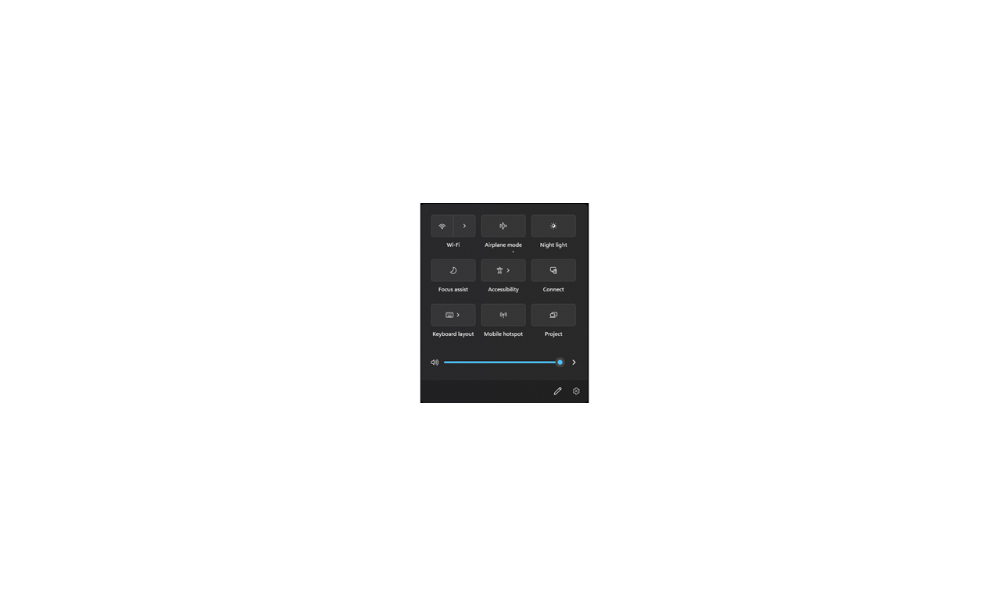
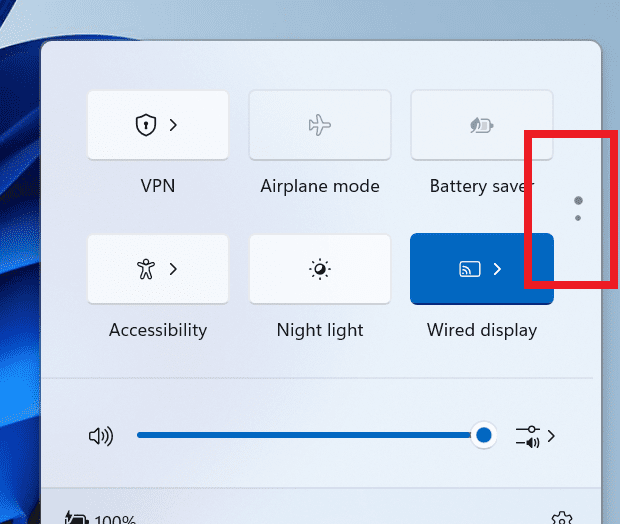
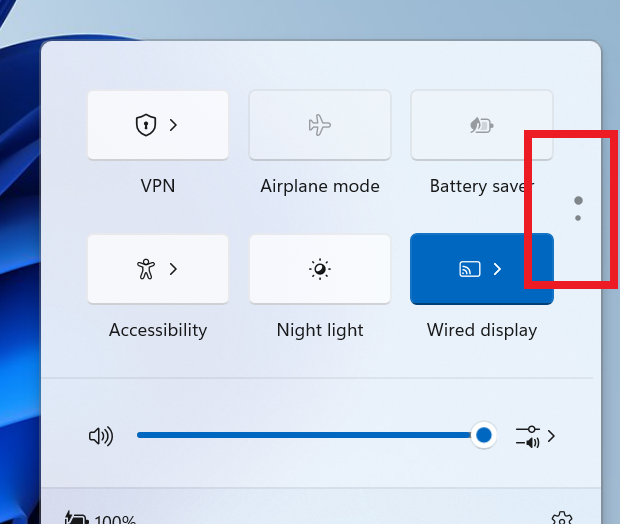
  • We are trying out a scrollable view of quick settings to some Windows Insiders in the Canary Channel as part of evaluating effectiveness of different layouts. As part of the change, rather than having to edit the list to add new quick actions, the user now has a scrollable list of quick actions that can be rearranged.


    A scrollable view of quick settings.
    A scrollable view of quick settings.

[Settings]

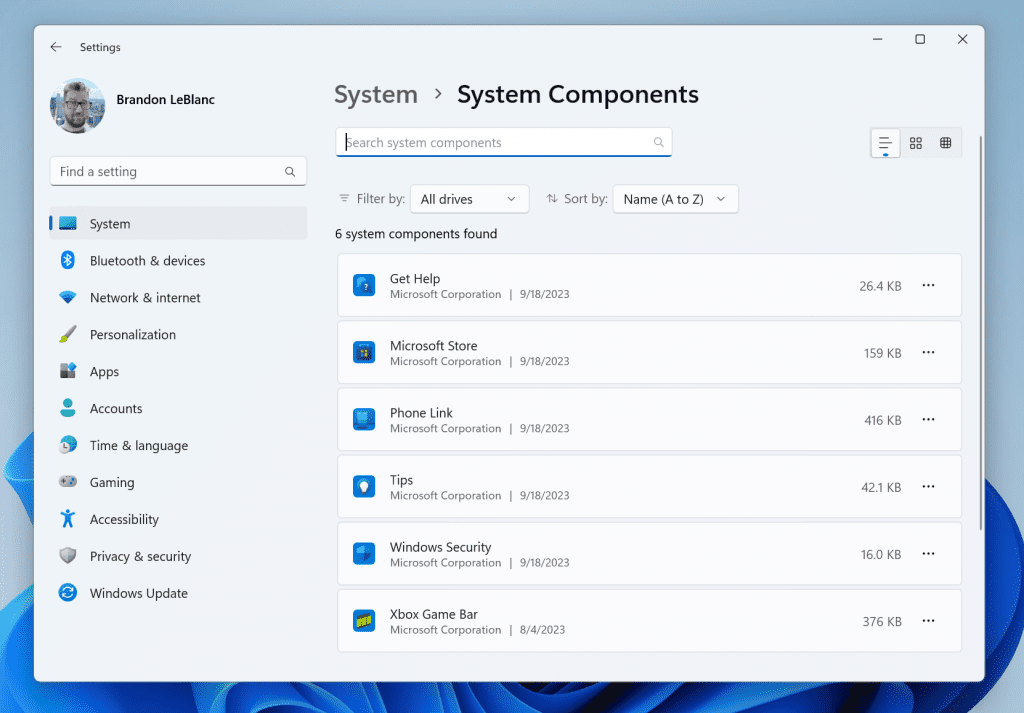
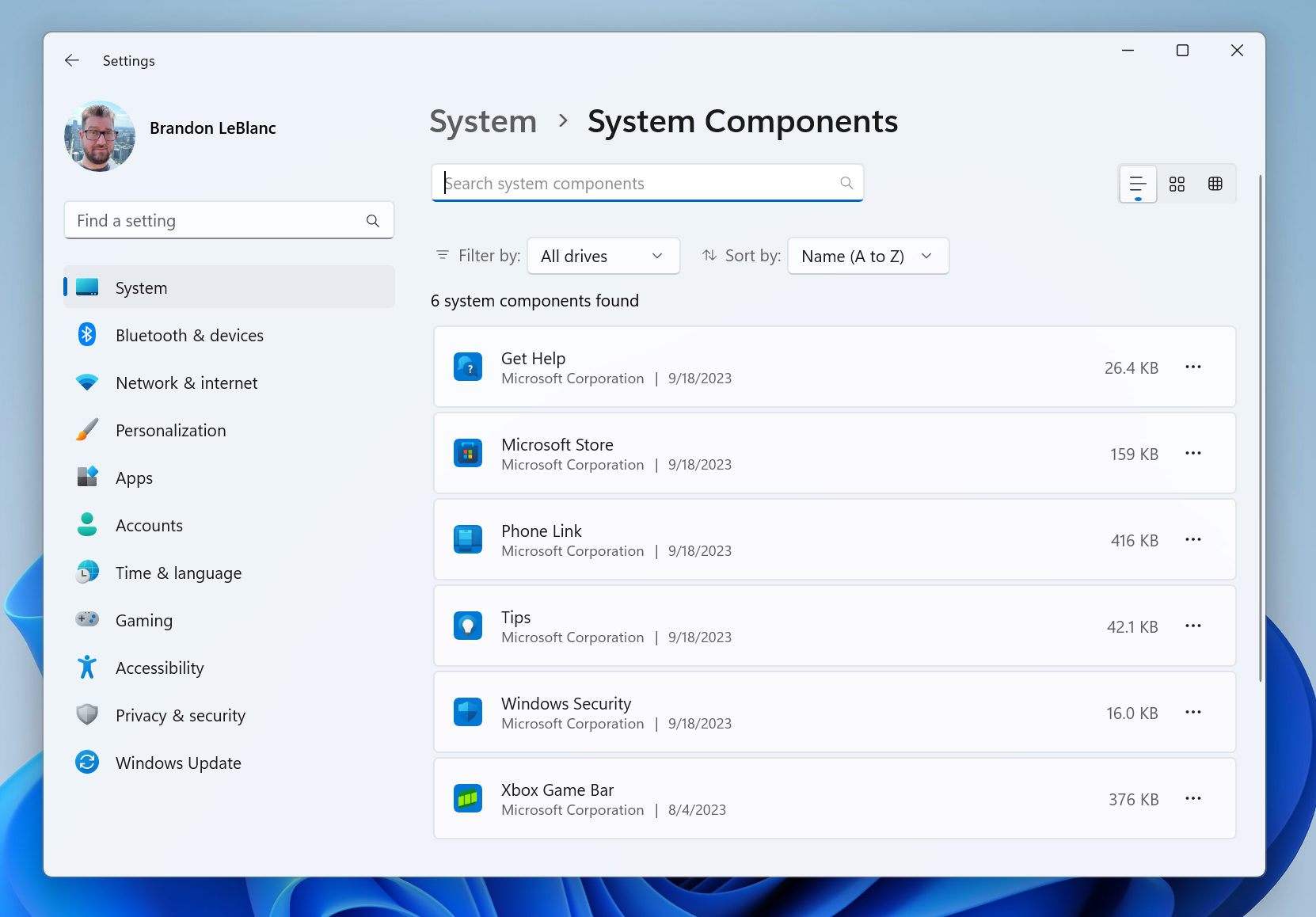
  • System Components currently listed in Settings > Apps > Installed Apps page, have moved to its own page under Settings > System > System Components.

    New System Components Settings page.
    New System Components Settings page.
  • Xbox Game Bar is now Game Bar under Settings > Gaming.

[Windows Subsystem for Linux]

  • The September 2023 update for the Windows Subsystem for Linux (WSL) has been rolled out and includes networking improvements in the latest Insider Preview builds. See this blog post for more details.

Fixes for known issues

  • Fixed an issue which was causing Insiders to see bugchecks (green screens) in recent Canary Channel builds when shutting down, logging out, or restarting.
  • Fixed a white flash when opening File Explorer in dark mode, as well as an issue where File Explorer could get stuck with the wrong colors after switching between light and dark mode.
  • Fixed a few issues that were leading to explorer.exe crashes.
  • Fixed an issue where File Explorer sorting changes wouldn’t persist in folders after you navigated away and back.
  • Fixed an issue which was causing icons on the desktop to turn into white generic icons until you refreshed the desktop.
  • Did some work to help improve File Explorer performance, including fixing a memory leak which would impact performance over time, and fixing an issue where the tab would get stuck with a loading icon even though loading was finished.

Known issues

  • [NEW] If you need to roll back to the previous build (Build 25951) if this build has issues, you may experience an issue where the Start menu or Settings do not work. See this forum post on how to get out of this state. After updating to the next set of builds in the Canary Channel, this issue will be resolved for rolling back.
  • We’re investigating reports that the print queue is no longer accessible.
  • Some popular games may not work correctly on the most recent Insider Preview builds in the Canary Channel. Please be sure to submit feedback in Feedback Hub on any issues you see with playing games on these builds.

Microsoft Store Update

Windows Insiders in the Canary and Dev Channels running version 22309.xxxx.x of the Microsoft Store and higher will see the following improvement rolling out:

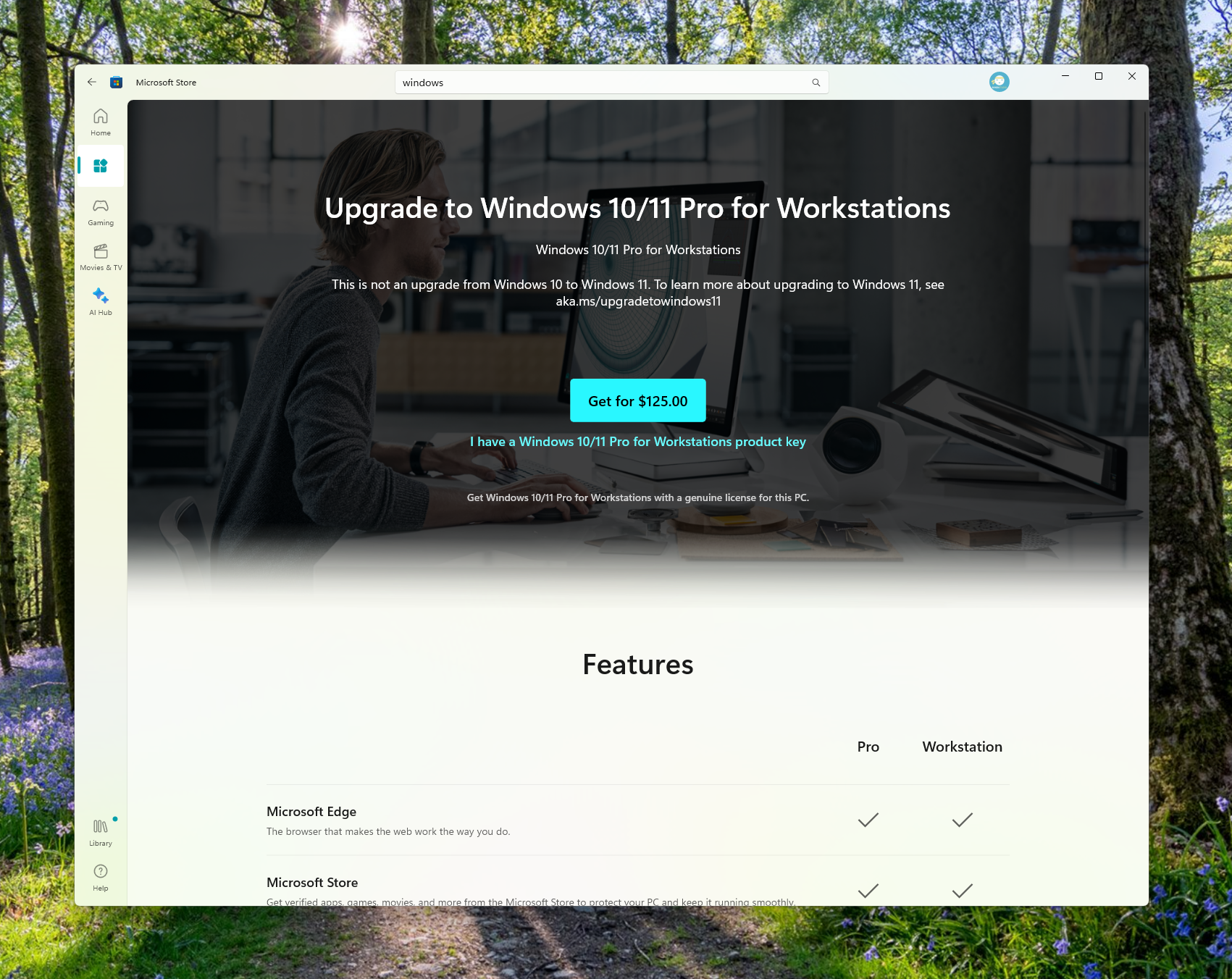
Visual refresh of Windows license pages: We’ve improved the look and feel of Windows license pages in the Microsoft Store to be consistent with Windows 11. The pages provide comparison tables between Windows editions to help make it easier to choose what license is best for you.
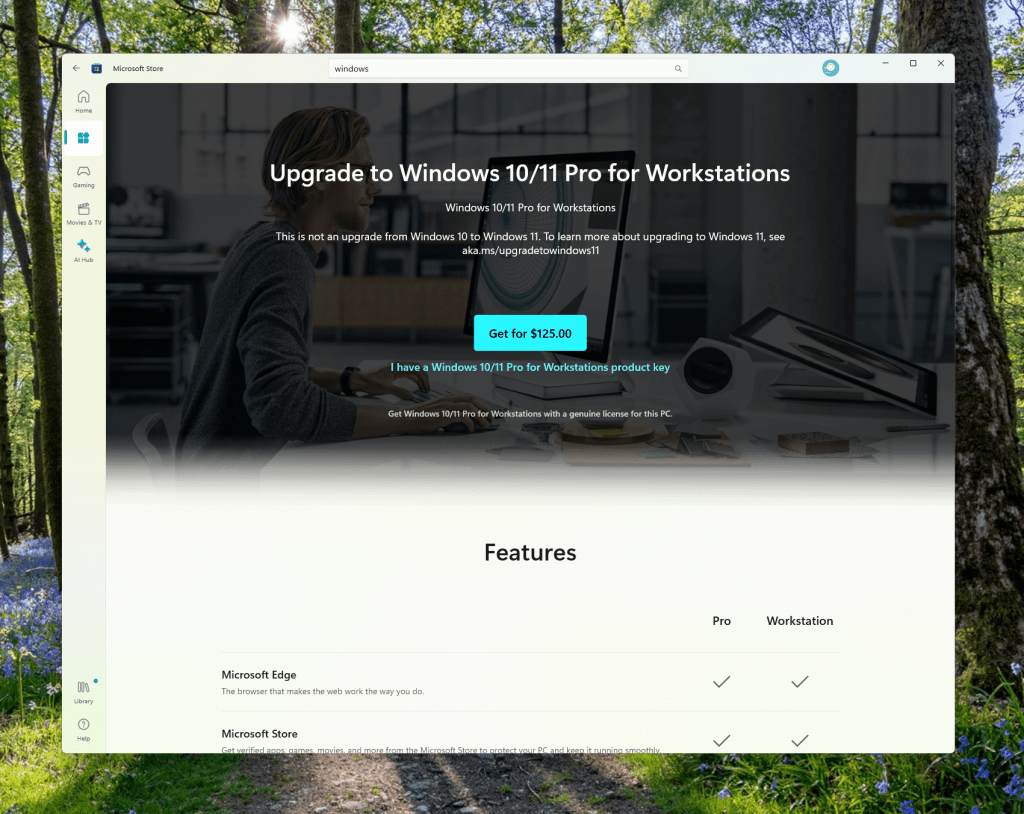
Redesigned Windows license page in the Microsoft Store.

FEEDBACK: Please file feedback in Feedback Hub (WIN + F) under Microsoft Store.

For developers

You can download the latest Windows Insider SDK at aka.ms/windowsinsidersdk.

SDK NuGet packages are now also flighting at NuGet Gallery | WindowsSDK which include:
These NuGet packages provide more granular access to the SDK and better integration in CI/CD pipelines.

SDK flights are now published for both the Canary and Dev Channels, so be sure to choose the right version for your Insider Channel.

Remember to use adaptive code when targeting new APIs to make sure your app runs on all customer machines, particularly when building against the Dev Channel SDK. Feature detection is recommended over OS version checks, as OS version checks are unreliable and will not work as expected in all cases.

About the Canary Channel

The Canary Channel is the place to preview platform changes that require longer-lead time before getting released to customers. Some examples of this include major changes to the Windows kernel, new APIs, etc. Builds that we release to the Canary Channel should not be seen as matched to any specific release of Windows and some of the changes we try out in the Canary Channel will never ship, and others could show up in future Windows releases when they’re ready.

The builds that will be flighted to the Canary Channel are “hot off the presses,” flighting very soon after they are built, which means very little validation and documentation will be done before they are offered to Insiders. These builds could include major issues that could result in not being able to use your PC correctly or even in some rare cases require you to reinstall Windows. We will offer limited documentation for the Canary Channel, but we will not publish a blog post for every flight – only when new features are available in a build.

Our Canary Channel won’t receive daily builds; however, we may ramp up releasing builds more frequently in the future.

The desktop watermark you see at the lower right corner of your desktop is normal for these pre-release builds.

Important Insider Links

Thanks,
Amanda & Brandon


 Source:


Check Windows Updates


UUP Dump:

64-bit ISO download:

ARM64 ISO download:

 
Last edited:
I am on a laptop so I don't have the display options as those are part of the Intel CPU built-in graphics so can't fully help as others could who have the settings...

1697530885150.png
 

My Computer My Computer

At a glance

WindowsXP/7/8/8.1/10/11,Linux,Android,FreeBSD...Intel® Core™ i7-8750H 8th Gen 2.2Ghz up to 4....64GB using 2x32GB CL16 Mushkin redLine modulesIntel UHD 630 & NVIDIA GeForce GTX 1050 Ti wi...
OS
WindowsXP/7/8/8.1/10/11,Linux,Android,FreeBSD Unix
Computer type
Laptop
Manufacturer/Model
Dell XPS 15 9570
CPU
Intel® Core™ i7-8750H 8th Gen 2.2Ghz up to 4.1Ghz
Motherboard
Dell XPS 15 9570
Memory
64GB using 2x32GB CL16 Mushkin redLine modules
Graphics Card(s)
Intel UHD 630 & NVIDIA GeForce GTX 1050 Ti with 4GB DDR5
Sound Card
Realtek ALC3266-CG
Monitor(s) Displays
15.6" 4K Touch UltraHD 3840x2160 made by Sharp
Screen Resolution
3840x2160 4K UltraHD
Hard Drives
Samsung MZ-V9P4T0B/AM 990 PRO 4TB PCIe®4.0 NVMe™ M.2 SSD was Toshiba KXG60ZNV1T02 NVMe 1TB SSD
PSU
Dell XPS 15 9570
Case
Dell XPS 15 9570
Cooling
Stock
Keyboard
Stock
Mouse
SwitftPoint ProPoint
Internet Speed
Comcast/XFinity 1.44Gbps/42.5Mbps
Browser
Microsoft EDGE (Chromium based) & Google Chrome
Antivirus
Windows Defender that came with Windows
Does the GIGABYTE G24F have it's own software installed? Might be Defender blocking it and Nvidia CP not recognising the monitor?
 

My Computers My Computers

  • At a glance

    Win 11 ProAMD Ryzen™ 7 7730U24GB Dual-Channel DDR4 @ 1596MHz (22-22-22-52)512MB ATI AMD Radeon Graphics (ASUStek Comput...
    OS
    Win 11 Pro
    Computer type
    Laptop
    Manufacturer/Model
    ASUS Vivobook
    CPU
    AMD Ryzen™ 7 7730U
    Motherboard
    M1605YA
    Memory
    24GB Dual-Channel DDR4 @ 1596MHz (22-22-22-52)
    Graphics Card(s)
    512MB ATI AMD Radeon Graphics (ASUStek Computer Inc)
    Monitor(s) Displays
    Generic PnP Monitor (1920x1200@60Hz) - P1 PLUS (1920x1080@59Hz)
    Screen Resolution
    1920 X 1200
    Hard Drives
    953GB Western Digital WD
    PSU
    45 Watts
    Mouse
    Lenovo Bluetooth.
    Internet Speed
    500 Mbps
    Browser
    Edge
    Antivirus
    Defender
  • At a glance

    Windows 11AMD Ryzen 7 5800H / 3.2 GHz32 GB DDR4 SDRAM 3200 MHzNVIDIA GeForce RTX 3060 6 GB GDDR6 SDRAM
    Operating System
    Windows 11
    Computer type
    Laptop
    Manufacturer/Model
    ACER NITRO
    CPU
    AMD Ryzen 7 5800H / 3.2 GHz
    Motherboard
    CZ Scala_CAS (FP6)
    Memory
    32 GB DDR4 SDRAM 3200 MHz
    Graphics card(s)
    NVIDIA GeForce RTX 3060 6 GB GDDR6 SDRAM
    Sound Card
    Realtek Audio. NVIDIA High Definition Audio
    Monitor(s) Displays
    15.6" LED backlight 1920 x 1080 (Full HD) 144 Hz
    Screen Resolution
    1920 x 1080 (Full HD)
    Hard Drives
    Samsung 970 Evo Plus 2TB NVMe M.2
    PSU
    180 Watt, 19.5 V
    Mouse
    Lenovo Bluetooth
    Internet Speed
    500 Mbps
    Browser
    Edge
    Antivirus
    Defender
This is problem version of Windows. New drivers Nvidia - this same, no display in Nvidia panel
 

My Computer My Computer

At a glance

WIN1113900K32GB 6800CL32RTX 4090
OS
WIN11
Computer type
PC/Desktop
CPU
13900K
Motherboard
Z790 Aorus Elite AX
Memory
32GB 6800CL32
Graphics Card(s)
RTX 4090
Sound Card
SB AE-7
Does the GIGABYTE G24F have it's own software installed? Might be Defender blocking it and Nvidia CP not recognising the monitor?
I suspected that initially, that's why I deleted the drivers and removed them/excluded them from the defender. I reinstalled them as well. It is showing the model as it is supposed to.
 

My Computer My Computer

At a glance

Windows 11 Insider Preview (Canary Channel)AMD Ryzen 7 7800X3DG.SKILL Trident Z5 RGB Series 6000 MHzZOTAC GAMING GeForce RTX 5070 SOLID 12G
OS
Windows 11 Insider Preview (Canary Channel)
Computer type
PC/Desktop
Manufacturer/Model
American Megatrends
CPU
AMD Ryzen 7 7800X3D
Motherboard
MSI Pro B650M-B
Memory
G.SKILL Trident Z5 RGB Series 6000 MHz
Graphics Card(s)
ZOTAC GAMING GeForce RTX 5070 SOLID 12G
Sound Card
Focusrite Scarlett 2i2
Monitor(s) Displays
Samsung 32" Odyssey G5 QHD Gaming Monitor ,GIGABYTE G24F
Screen Resolution
2560 x 1440, 1920x1080
Hard Drives
Seagate, Crucial
Case
Thermal Take
Cooling
Thermal Right
Keyboard
Hyper X Alloy Origin
Mouse
Glorious Model O
Internet Speed
100 MBPS
Browser
Google Chrome
Antivirus
Windows Defender
Have you checked device manager? Are ALL drivers working properly? And while there check what kind of display is configured there...
 

My Computers My Computers

  • At a glance

    Win 11 Pro 25H2 26200.8894 / Linux Mint 22.3Ryzen 7 2700U Pro32GBiGPU Vega 10
    OS
    Win 11 Pro 25H2 26200.8894 / Linux Mint 22.3
    Computer type
    Laptop
    Manufacturer/Model
    Lenovo A485
    CPU
    Ryzen 7 2700U Pro
    Motherboard
    Lenovo (WiFi/BT module upgraded to Intel Wireless-AC-9260)
    Memory
    32GB
    Graphics Card(s)
    iGPU Vega 10
    Sound Card
    Realtek
    Monitor(s) Displays
    14" FHD (built-in) + 14" Lenovo Thinkvision M14t (touch+pen) + 32" Asus PB328
    Screen Resolution
    FHD + FHD + 1440p
    Hard Drives
    Intel 660p m.2 nVME PCIe3.0 x2 512GB
    PSU
    125W(Dock)/65W(Travel Adapter)
    Keyboard
    Thinkpad / Logitech MX Keys
    Mouse
    Logitech MX Master 2S
    Internet Speed
    1/1Gbit
    Browser
    Firefox
    Antivirus
    Windows Defender
    Other Info
    SecureBoot: Enabled
    TPM2.0: Enabled
    AMD-V: Enabled
  • At a glance

    Win 11 Pro 25H2 26200.8968(RP)i7-7700k @4.8GHz32GB 2x16GB 2133MHz CL15EVGA GTX1080Ti FTW 11GB
    Operating System
    Win 11 Pro 25H2 26200.8968(RP)
    Computer type
    PC/Desktop
    Manufacturer/Model
    Custom
    CPU
    i7-7700k @4.8GHz
    Motherboard
    Asus PRIME Z270-A
    Memory
    32GB 2x16GB 2133MHz CL15
    Graphics card(s)
    EVGA GTX1080Ti FTW 11GB
    Sound Card
    Integrated
    Monitor(s) Displays
    32" 10-bit Asus PB328Q
    Screen Resolution
    WQHD 2560x1440
    Hard Drives
    512GB ADATA SX8000NP NVMe PCIe Gen 3 x4
    PSU
    850W
    Case
    Fractal Design Define 7
    Cooling
    Noctua NH-D15 chromax.black
    Keyboard
    Logitech MX Keys
    Mouse
    Logitech MX Master 2S
    Internet Speed
    1/1Gbit
    Browser
    Firefox
    Antivirus
    Windows Defender
    Other Info
    AC WiFi Card
  • Asus U46SV (laptop), i5-2410M, 8GB RAM, 500GB SSD, 750GB HDD, Windows 10. (used as a local Minecraft server and data dump)
@SFaizi - There is a new NVIDIA driver released today, have you tried it yet to see if it fixes the problem?
 

My Computer My Computer

At a glance

WindowsXP/7/8/8.1/10/11,Linux,Android,FreeBSD...Intel® Core™ i7-8750H 8th Gen 2.2Ghz up to 4....64GB using 2x32GB CL16 Mushkin redLine modulesIntel UHD 630 & NVIDIA GeForce GTX 1050 Ti wi...
OS
WindowsXP/7/8/8.1/10/11,Linux,Android,FreeBSD Unix
Computer type
Laptop
Manufacturer/Model
Dell XPS 15 9570
CPU
Intel® Core™ i7-8750H 8th Gen 2.2Ghz up to 4.1Ghz
Motherboard
Dell XPS 15 9570
Memory
64GB using 2x32GB CL16 Mushkin redLine modules
Graphics Card(s)
Intel UHD 630 & NVIDIA GeForce GTX 1050 Ti with 4GB DDR5
Sound Card
Realtek ALC3266-CG
Monitor(s) Displays
15.6" 4K Touch UltraHD 3840x2160 made by Sharp
Screen Resolution
3840x2160 4K UltraHD
Hard Drives
Samsung MZ-V9P4T0B/AM 990 PRO 4TB PCIe®4.0 NVMe™ M.2 SSD was Toshiba KXG60ZNV1T02 NVMe 1TB SSD
PSU
Dell XPS 15 9570
Case
Dell XPS 15 9570
Cooling
Stock
Keyboard
Stock
Mouse
SwitftPoint ProPoint
Internet Speed
Comcast/XFinity 1.44Gbps/42.5Mbps
Browser
Microsoft EDGE (Chromium based) & Google Chrome
Antivirus
Windows Defender that came with Windows
@SFaizi - There is a new NVIDIA driver released today, have you tried it yet to see if it fixes the problem?
I just installed that driver 545.84 and it screwed up my desktop layout, had to restore with reicon_x64. 😂🤷‍♂️
 

My Computer My Computer

At a glance

Windows 11 Pro 25H2Intel I9-9900K64GBNVIDIA RTX 2060
OS
Windows 11 Pro 25H2
Computer type
PC/Desktop
Manufacturer/Model
Dell XPS 8930
CPU
Intel I9-9900K
Memory
64GB
Graphics Card(s)
NVIDIA RTX 2060
Sound Card
NVIDIA High Definition Audio
Monitor(s) Displays
4k Samsung
Screen Resolution
3840 x 2160
Hard Drives
512GB NVMe, ADATA SU 800, 2TB HDD
I just installed that driver 545.84 and it screwed up my desktop layout, had to restore with reicon_x64. 😂🤷‍♂️
I had bigger problems than that. During the installation process, it completely froze Windows as even the clock on the taskbar froze and only the mouse cursor was alive. After 30+ minutes of waiting, I was going to do a force powerdown as I held down the power button on the notebook but I released it in 2-3 seconds instead of 10 and apparently, it took me back to the lock screen so I resumed the session. So I don't know if it was the install process that caused it or not as I did have the freezing problem in the same session for a few a minute or so a few hours on the same windows session.
 

My Computer My Computer

At a glance

WindowsXP/7/8/8.1/10/11,Linux,Android,FreeBSD...Intel® Core™ i7-8750H 8th Gen 2.2Ghz up to 4....64GB using 2x32GB CL16 Mushkin redLine modulesIntel UHD 630 & NVIDIA GeForce GTX 1050 Ti wi...
OS
WindowsXP/7/8/8.1/10/11,Linux,Android,FreeBSD Unix
Computer type
Laptop
Manufacturer/Model
Dell XPS 15 9570
CPU
Intel® Core™ i7-8750H 8th Gen 2.2Ghz up to 4.1Ghz
Motherboard
Dell XPS 15 9570
Memory
64GB using 2x32GB CL16 Mushkin redLine modules
Graphics Card(s)
Intel UHD 630 & NVIDIA GeForce GTX 1050 Ti with 4GB DDR5
Sound Card
Realtek ALC3266-CG
Monitor(s) Displays
15.6" 4K Touch UltraHD 3840x2160 made by Sharp
Screen Resolution
3840x2160 4K UltraHD
Hard Drives
Samsung MZ-V9P4T0B/AM 990 PRO 4TB PCIe®4.0 NVMe™ M.2 SSD was Toshiba KXG60ZNV1T02 NVMe 1TB SSD
PSU
Dell XPS 15 9570
Case
Dell XPS 15 9570
Cooling
Stock
Keyboard
Stock
Mouse
SwitftPoint ProPoint
Internet Speed
Comcast/XFinity 1.44Gbps/42.5Mbps
Browser
Microsoft EDGE (Chromium based) & Google Chrome
Antivirus
Windows Defender that came with Windows
Have you checked device manager? Are ALL drivers working properly? And while there check what kind of display is configured there..
All is looking fine in device manager
 

My Computer My Computer

At a glance

Windows 11 Insider Preview (Canary Channel)AMD Ryzen 7 7800X3DG.SKILL Trident Z5 RGB Series 6000 MHzZOTAC GAMING GeForce RTX 5070 SOLID 12G
OS
Windows 11 Insider Preview (Canary Channel)
Computer type
PC/Desktop
Manufacturer/Model
American Megatrends
CPU
AMD Ryzen 7 7800X3D
Motherboard
MSI Pro B650M-B
Memory
G.SKILL Trident Z5 RGB Series 6000 MHz
Graphics Card(s)
ZOTAC GAMING GeForce RTX 5070 SOLID 12G
Sound Card
Focusrite Scarlett 2i2
Monitor(s) Displays
Samsung 32" Odyssey G5 QHD Gaming Monitor ,GIGABYTE G24F
Screen Resolution
2560 x 1440, 1920x1080
Hard Drives
Seagate, Crucial
Case
Thermal Take
Cooling
Thermal Right
Keyboard
Hyper X Alloy Origin
Mouse
Glorious Model O
Internet Speed
100 MBPS
Browser
Google Chrome
Antivirus
Windows Defender
@SFaizi - There is a new NVIDIA driver released today, have you tried it yet to see if it fixes the problem?
I just installed it and it didn't fix it
 

My Computer My Computer

At a glance

Windows 11 Insider Preview (Canary Channel)AMD Ryzen 7 7800X3DG.SKILL Trident Z5 RGB Series 6000 MHzZOTAC GAMING GeForce RTX 5070 SOLID 12G
OS
Windows 11 Insider Preview (Canary Channel)
Computer type
PC/Desktop
Manufacturer/Model
American Megatrends
CPU
AMD Ryzen 7 7800X3D
Motherboard
MSI Pro B650M-B
Memory
G.SKILL Trident Z5 RGB Series 6000 MHz
Graphics Card(s)
ZOTAC GAMING GeForce RTX 5070 SOLID 12G
Sound Card
Focusrite Scarlett 2i2
Monitor(s) Displays
Samsung 32" Odyssey G5 QHD Gaming Monitor ,GIGABYTE G24F
Screen Resolution
2560 x 1440, 1920x1080
Hard Drives
Seagate, Crucial
Case
Thermal Take
Cooling
Thermal Right
Keyboard
Hyper X Alloy Origin
Mouse
Glorious Model O
Internet Speed
100 MBPS
Browser
Google Chrome
Antivirus
Windows Defender
Have you checked device manager? Are ALL drivers working properly? And while there check what kind of display is configured there...
Here you can see:

1697574485980.png
 

My Computer My Computer

At a glance

Windows 11 Insider Preview (Canary Channel)AMD Ryzen 7 7800X3DG.SKILL Trident Z5 RGB Series 6000 MHzZOTAC GAMING GeForce RTX 5070 SOLID 12G
OS
Windows 11 Insider Preview (Canary Channel)
Computer type
PC/Desktop
Manufacturer/Model
American Megatrends
CPU
AMD Ryzen 7 7800X3D
Motherboard
MSI Pro B650M-B
Memory
G.SKILL Trident Z5 RGB Series 6000 MHz
Graphics Card(s)
ZOTAC GAMING GeForce RTX 5070 SOLID 12G
Sound Card
Focusrite Scarlett 2i2
Monitor(s) Displays
Samsung 32" Odyssey G5 QHD Gaming Monitor ,GIGABYTE G24F
Screen Resolution
2560 x 1440, 1920x1080
Hard Drives
Seagate, Crucial
Case
Thermal Take
Cooling
Thermal Right
Keyboard
Hyper X Alloy Origin
Mouse
Glorious Model O
Internet Speed
100 MBPS
Browser
Google Chrome
Antivirus
Windows Defender
I just installed it and it didn't fix it
Hopefully you chose the custom option and checked clean install instead of the default Express option. Also, another thought. Did you try uninstalling the monitor in Device Manager and let Windows redeetect it and see if it makes a difference?
 

My Computer My Computer

At a glance

WindowsXP/7/8/8.1/10/11,Linux,Android,FreeBSD...Intel® Core™ i7-8750H 8th Gen 2.2Ghz up to 4....64GB using 2x32GB CL16 Mushkin redLine modulesIntel UHD 630 & NVIDIA GeForce GTX 1050 Ti wi...
OS
WindowsXP/7/8/8.1/10/11,Linux,Android,FreeBSD Unix
Computer type
Laptop
Manufacturer/Model
Dell XPS 15 9570
CPU
Intel® Core™ i7-8750H 8th Gen 2.2Ghz up to 4.1Ghz
Motherboard
Dell XPS 15 9570
Memory
64GB using 2x32GB CL16 Mushkin redLine modules
Graphics Card(s)
Intel UHD 630 & NVIDIA GeForce GTX 1050 Ti with 4GB DDR5
Sound Card
Realtek ALC3266-CG
Monitor(s) Displays
15.6" 4K Touch UltraHD 3840x2160 made by Sharp
Screen Resolution
3840x2160 4K UltraHD
Hard Drives
Samsung MZ-V9P4T0B/AM 990 PRO 4TB PCIe®4.0 NVMe™ M.2 SSD was Toshiba KXG60ZNV1T02 NVMe 1TB SSD
PSU
Dell XPS 15 9570
Case
Dell XPS 15 9570
Cooling
Stock
Keyboard
Stock
Mouse
SwitftPoint ProPoint
Internet Speed
Comcast/XFinity 1.44Gbps/42.5Mbps
Browser
Microsoft EDGE (Chromium based) & Google Chrome
Antivirus
Windows Defender that came with Windows
Hopefully you chose the custom option and checked clean install instead of the default Express option. Also, another thought. Did you try uninstalling the monitor in Device Manager and let Windows redeetect it and see if it makes a difference?
Yes I always select custom and clean install.

Tried removing monitor driver and stuff, still not working :(
 

My Computer My Computer

At a glance

Windows 11 Insider Preview (Canary Channel)AMD Ryzen 7 7800X3DG.SKILL Trident Z5 RGB Series 6000 MHzZOTAC GAMING GeForce RTX 5070 SOLID 12G
OS
Windows 11 Insider Preview (Canary Channel)
Computer type
PC/Desktop
Manufacturer/Model
American Megatrends
CPU
AMD Ryzen 7 7800X3D
Motherboard
MSI Pro B650M-B
Memory
G.SKILL Trident Z5 RGB Series 6000 MHz
Graphics Card(s)
ZOTAC GAMING GeForce RTX 5070 SOLID 12G
Sound Card
Focusrite Scarlett 2i2
Monitor(s) Displays
Samsung 32" Odyssey G5 QHD Gaming Monitor ,GIGABYTE G24F
Screen Resolution
2560 x 1440, 1920x1080
Hard Drives
Seagate, Crucial
Case
Thermal Take
Cooling
Thermal Right
Keyboard
Hyper X Alloy Origin
Mouse
Glorious Model O
Internet Speed
100 MBPS
Browser
Google Chrome
Antivirus
Windows Defender
I have same problem, no display in control panel. This is error of Windows release.
 

My Computer My Computer

At a glance

WIN1113900K32GB 6800CL32RTX 4090
OS
WIN11
Computer type
PC/Desktop
CPU
13900K
Motherboard
Z790 Aorus Elite AX
Memory
32GB 6800CL32
Graphics Card(s)
RTX 4090
Sound Card
SB AE-7
Here you can see:


Same RTX 3060 Ti with latest driver and no problem with Control Panel. 🤷‍♂️
Tried a second machine with RTX 3060 (not Ti) same driver same windows Build 25967.1010, no problem with Nvidia control Panel. 🤷‍♂️
1697583304717.png

1697583423729.png
 
Last edited:

My Computer My Computer

At a glance

Windows 11 Pro 25H2Intel I9-9900K64GBNVIDIA RTX 2060
OS
Windows 11 Pro 25H2
Computer type
PC/Desktop
Manufacturer/Model
Dell XPS 8930
CPU
Intel I9-9900K
Memory
64GB
Graphics Card(s)
NVIDIA RTX 2060
Sound Card
NVIDIA High Definition Audio
Monitor(s) Displays
4k Samsung
Screen Resolution
3840 x 2160
Hard Drives
512GB NVMe, ADATA SU 800, 2TB HDD
Yes I always select custom and clean install.

Tried removing monitor driver and stuff, still not working :(
I guess if all else fails, you might want to contact NVIDIA for support since they should be able to figure out why you aren't seeing the options as they can pull the logs since NVIDIA Control Panel does have a Debug mode under the Help menu.
 

My Computer My Computer

At a glance

WindowsXP/7/8/8.1/10/11,Linux,Android,FreeBSD...Intel® Core™ i7-8750H 8th Gen 2.2Ghz up to 4....64GB using 2x32GB CL16 Mushkin redLine modulesIntel UHD 630 & NVIDIA GeForce GTX 1050 Ti wi...
OS
WindowsXP/7/8/8.1/10/11,Linux,Android,FreeBSD Unix
Computer type
Laptop
Manufacturer/Model
Dell XPS 15 9570
CPU
Intel® Core™ i7-8750H 8th Gen 2.2Ghz up to 4.1Ghz
Motherboard
Dell XPS 15 9570
Memory
64GB using 2x32GB CL16 Mushkin redLine modules
Graphics Card(s)
Intel UHD 630 & NVIDIA GeForce GTX 1050 Ti with 4GB DDR5
Sound Card
Realtek ALC3266-CG
Monitor(s) Displays
15.6" 4K Touch UltraHD 3840x2160 made by Sharp
Screen Resolution
3840x2160 4K UltraHD
Hard Drives
Samsung MZ-V9P4T0B/AM 990 PRO 4TB PCIe®4.0 NVMe™ M.2 SSD was Toshiba KXG60ZNV1T02 NVMe 1TB SSD
PSU
Dell XPS 15 9570
Case
Dell XPS 15 9570
Cooling
Stock
Keyboard
Stock
Mouse
SwitftPoint ProPoint
Internet Speed
Comcast/XFinity 1.44Gbps/42.5Mbps
Browser
Microsoft EDGE (Chromium based) & Google Chrome
Antivirus
Windows Defender that came with Windows
Same RTX 3060 Ti with latest driver and no problem with Control Panel. 🤷‍♂️
Tried a second machine with RTX 3060 (not Ti) same driver same windows Build 25967.1010, no problem with Nvidia control Panel. 🤷‍♂️
View attachment 74553

View attachment 74554
I think you are on the laptop that's why it's working fine. in this build, monitor drivers might have issues that's why it's not getting recognized.
 

My Computer My Computer

At a glance

Windows 11 Insider Preview (Canary Channel)AMD Ryzen 7 7800X3DG.SKILL Trident Z5 RGB Series 6000 MHzZOTAC GAMING GeForce RTX 5070 SOLID 12G
OS
Windows 11 Insider Preview (Canary Channel)
Computer type
PC/Desktop
Manufacturer/Model
American Megatrends
CPU
AMD Ryzen 7 7800X3D
Motherboard
MSI Pro B650M-B
Memory
G.SKILL Trident Z5 RGB Series 6000 MHz
Graphics Card(s)
ZOTAC GAMING GeForce RTX 5070 SOLID 12G
Sound Card
Focusrite Scarlett 2i2
Monitor(s) Displays
Samsung 32" Odyssey G5 QHD Gaming Monitor ,GIGABYTE G24F
Screen Resolution
2560 x 1440, 1920x1080
Hard Drives
Seagate, Crucial
Case
Thermal Take
Cooling
Thermal Right
Keyboard
Hyper X Alloy Origin
Mouse
Glorious Model O
Internet Speed
100 MBPS
Browser
Google Chrome
Antivirus
Windows Defender
I guess if all else fails, you might want to contact NVIDIA for support since they should be able to figure out why you aren't seeing the options as they can pull the logs since NVIDIA Control Panel does have a Debug mode under the Help menu.
Will try today, Thanks man!
 

My Computer My Computer

At a glance

Windows 11 Insider Preview (Canary Channel)AMD Ryzen 7 7800X3DG.SKILL Trident Z5 RGB Series 6000 MHzZOTAC GAMING GeForce RTX 5070 SOLID 12G
OS
Windows 11 Insider Preview (Canary Channel)
Computer type
PC/Desktop
Manufacturer/Model
American Megatrends
CPU
AMD Ryzen 7 7800X3D
Motherboard
MSI Pro B650M-B
Memory
G.SKILL Trident Z5 RGB Series 6000 MHz
Graphics Card(s)
ZOTAC GAMING GeForce RTX 5070 SOLID 12G
Sound Card
Focusrite Scarlett 2i2
Monitor(s) Displays
Samsung 32" Odyssey G5 QHD Gaming Monitor ,GIGABYTE G24F
Screen Resolution
2560 x 1440, 1920x1080
Hard Drives
Seagate, Crucial
Case
Thermal Take
Cooling
Thermal Right
Keyboard
Hyper X Alloy Origin
Mouse
Glorious Model O
Internet Speed
100 MBPS
Browser
Google Chrome
Antivirus
Windows Defender
Microsoft says "is problem in Windows." I next compliation it was be fix.
 

My Computer My Computer

At a glance

WIN1113900K32GB 6800CL32RTX 4090
OS
WIN11
Computer type
PC/Desktop
CPU
13900K
Motherboard
Z790 Aorus Elite AX
Memory
32GB 6800CL32
Graphics Card(s)
RTX 4090
Sound Card
SB AE-7
No issues here with an RTX 3080 Ti and dual 4K monitors on Windows 11 latest. Is it only affecting a few people?

Where did Microsoft say this?
 

My Computers My Computers

  • At a glance

    Windows 11 23H2 Current buildAMD Ryzen 9 3950X4 * 32 GB - Corsair Vengeance 3600 MHzEVGA GeForce RTX 3080 Ti XC3 ULTRA GAMING (12...
    OS
    Windows 11 23H2 Current build
    Computer type
    PC/Desktop
    Manufacturer/Model
    HomeBrew
    CPU
    AMD Ryzen 9 3950X
    Motherboard
    MSI MEG X570 GODLIKE
    Memory
    4 * 32 GB - Corsair Vengeance 3600 MHz
    Graphics Card(s)
    EVGA GeForce RTX 3080 Ti XC3 ULTRA GAMING (12G-P5-3955-KR)
    Sound Card
    Realtek® ALC1220 Codec
    Monitor(s) Displays
    2x Eve Spectrum ES07D03 4K Gaming Monitor (Matte) | Eve Spectrum ES07DC9 4K Gaming Monitor (Glossy)
    Screen Resolution
    3x 3840 x 2160
    Hard Drives
    3x Samsung 980 Pro NVMe PCIe 4 M.2 2 TB SSD (MZ-V8P2T0B/AM) } 3x Sabrent Rocket NVMe 4.0 1 TB SSD (USB)
    PSU
    PC Power & Cooling’s Silencer Series 1050 Watt, 80 Plus Platinum
    Case
    Fractal Design Define 7 XL Dark ATX Full Tower Case
    Cooling
    Arctic Liquid Freezer III 420 RGB + Air 3x 140mm case fans (pull front) + 1x 120 mm (push back) and 1 x 120 mm (pull bottom)
    Keyboard
    SteelSeries Apex Pro Wired Gaming Keyboard
    Mouse
    Logitech MX Master 3S | MX Master 3 for Business
    Internet Speed
    AT&T LightSpeed Gigabit Duplex Ftth
    Browser
    Nightly (default) + Firefox (stable), Chrome, Edge , Arc
    Antivirus
    Defender + MB 5 Beta
  • At a glance

    ChromeOS Flex Dev Channel (current)Intel(R) Core(TM) i5-6300U CPU @ 2.40GHz, 250...16 GBIntel(R) HD Graphics 520
    Operating System
    ChromeOS Flex Dev Channel (current)
    Computer type
    Laptop
    Manufacturer/Model
    Dell Latitude E5470
    CPU
    Intel(R) Core(TM) i5-6300U CPU @ 2.40GHz, 2501 Mhz, 2 Core(s), 4 Logical Processor(s)
    Motherboard
    Dell
    Memory
    16 GB
    Graphics card(s)
    Intel(R) HD Graphics 520
    Sound Card
    Intel(R) HD Graphics 520 + RealTek Audio
    Monitor(s) Displays
    Dell laptop display 15"
    Screen Resolution
    1920 * 1080
    Hard Drives
    Toshiba 128GB M.2 22300 drive
    INTEL Cherryville 520 Series SSDSC2CW180A 180 GB SATA III SSD
    PSU
    Dell
    Case
    Dell
    Cooling
    Dell
    Keyboard
    Dell
    Mouse
    Logitech MX Master 3S (shared w. Sys 1) | Dell TouchPad
    Internet Speed
    AT&T LightSpeed Gigabit Duplex Ftth
Back
Top Bottom