Insider KB5036980 Windows 11 Insider RP Build 22621.3520 (22H2) and 22631.3520 (23H2) - April 11


UPDATE 5/16:


 Windows Blogs:

Hello Windows Insiders, today we’re releasing Windows 11 Builds 22621.3520 and 22631.3520 (KB5036980) to Insiders in the Release Preview Channel on Windows 11, version 22H2 (Build 22621) and version 23H2 (Build 22631).

This update includes the following features and improvements:
  • [ADDED] New! This update improves the Widgets icons on the taskbar. They are no longer pixelated or fuzzy. This update also starts the rollout of a larger set of animated icons.
  • This update adds a new mobile device management (MDM) policy called “AllowScreenRecorder.” It affects the Snipping Tool. IT admins can use this policy to turn off screen recording in the app.

  • This update adds support for Arm64 .msi files using a Group Policy Object (GPO). You can now use the Group Policy Management Console (GPMC) to add Arm64 .msi files. You can also use a GPO to install these files on Arm64 machines.
  • This update addresses an issue that affects the netstat -c command. It fails to perform effective port exhaustion troubleshooting.
  • This update addresses an issue that affects a low latency network. The speed of data on the network degrades significantly. This occurs when you turn on timestamps for a Transmission Control Protocol (TCP) connection.
  • This update addresses a race condition that might stop a machine from starting up. This occurs when you set up a bootloader to start up multiple OSes.
  • This update addresses an issue that affects an accelerator backing store management path. A memory leak occurs that affects some devices.
  • This update affects media allocations. It improves their memory granularity for some hardware setups. This lowers overcommitment. Also, performance is more efficient.
  • This update affects Windows Subsystem for Linux 2 (WSL2). Intermittent name resolution fails in a split DNS setup.
  • This update affects the touch keyboard. It makes the Japanese 106 keyboard layout appear as expected when you sign in.
  • This update addresses an issue that affects universal printers. The system creates duplicate print queues for them.
  • This update makes Country and Operator Settings Asset (COSA) profiles up to date for some mobile operators.
  • This update addresses an issue that affects the container networking Address Resolution Protocol (ARP). It returns the wrong Virtual Subnet ID (VSID) for external ports.
  • This update addresses a memory allocation issue in the Host Networking Service (HNS). The issue causes high memory consumption. It also affects service and pod deployment and scaling.
  • This update addresses an issue that occurs when you elevate from a normal user to an Administrator to run an application. When you use a PIN to sign in, the app will not run.
  • This update affects hypervisor-protected code integrity (HVCI). It accepts drivers that are now compatible.
  • This update includes quarterly changes to the Windows Kernel Vulnerable Driver Blocklist file, DriverSiPolicy.p7b. It adds to the list of drivers that are at risk for Bring Your Own Vulnerable Driver (BYOVD) attacks.
  • This update addresses an issue that affects Protected Process Light (PPL) protections. You can bypass them.
  • This update addresses an issue that affects Bluetooth Advanced Audio Distribution Profile (A2DP) hardware offload. A stop error occurs on PCs that support it.
  • This update addresses an issue that affects Settings. It stops responding when you dismiss a flyout menu.
  • This update addresses an issue that affects the Distributed Transaction Coordinator (DTC). A memory leak occurs when it retrieves mappings.
  • This update addresses an issue that affects Windows Local Administrator Password Solution (LAPS). Its Post Authentication Actions (PAA) do not occur at the end of the grace period. Instead, they occur at restart.
  • This update addresses an issue that affects the Resilient File System (ReFS). A high load might make the system unresponsive. Also, signing in might be slow.
Thanks,
Windows Insider Program Team


 Source:


Check Windows Updates


UUP Dump:

64-bit ISO download:

ARM64 ISO download:

 
Last edited:
Yes. Just might do that. Thanks.
Here, back to R.P. I just uninstalled the Beta enablement pack and then switched back to R.P. channel. 😉

Edition Windows 11 Pro
Version 23H2
Installed on ‎6/‎6/‎2023
OS build 22631.3520
Experience Windows Feature Experience Pack 1000.22700.1003.0
 

My Computer My Computer

At a glance

Windows 11 Pro 25H2Intel I9-9900K64GBNVIDIA RTX 2060
OS
Windows 11 Pro 25H2
Computer type
PC/Desktop
Manufacturer/Model
Dell XPS 8930
CPU
Intel I9-9900K
Memory
64GB
Graphics Card(s)
NVIDIA RTX 2060
Sound Card
NVIDIA High Definition Audio
Monitor(s) Displays
4k Samsung
Screen Resolution
3840 x 2160
Hard Drives
512GB NVMe, ADATA SU 800, 2TB HDD
KB5035942 introduced fixes the sizing issues of the ungrouped taskbar broken in Windows 11 Builds 22621.3520 and 22631.3520 updates.
 

My Computer My Computer

At a glance

Windows 11, version 25H2 (26200)AMD Ryzen 9 9950X 16-Core ProcessorDDR5-6000 (CL36) 64.0 GBNVIDIA GeForce RTX 4090
OS
Windows 11, version 25H2 (26200)
Computer type
PC/Desktop
CPU
AMD Ryzen 9 9950X 16-Core Processor
Motherboard
ASRock B650M PG Riptide
Memory
DDR5-6000 (CL36) 64.0 GB
Graphics Card(s)
NVIDIA GeForce RTX 4090
PSU
1200W
Case
Phanteks Enthoo Pro 2
Cooling
Noctua NH-D12L
This update introduces an updated version of SSU - 10.0.22621.3519.1.5
 

My Computer My Computer

At a glance

Windows 11 Pro 25H2 (Build 26200.8973)Intel Core Ultra 9 285 5.6 GHz32.00 GBIntel Integrated Graphics (128 MB)
OS
Windows 11 Pro 25H2 (Build 26200.8973)
Computer type
PC/Desktop
Manufacturer/Model
Dell Pro Max Tower T2 FCT2250
CPU
Intel Core Ultra 9 285 5.6 GHz
Motherboard
64-bit operating system, x64-based processor
Memory
32.00 GB
Graphics Card(s)
Intel Integrated Graphics (128 MB)
Sound Card
Realtek Audio
Monitor(s) Displays
Dell P2714H Monitor
Screen Resolution
1920 x 1080
Hard Drives
1 x 512GB M.2 XG10d SED KIOXIA PCIe solid state drive (Internal)
1 x 2TB Seagate ST2000DM008-2UB102 HDD (Internal)
1 x 4TB Seagate STGX4000400 External HDD
1 x 6TB WD Elements AE 2689 External HDD
PSU
500 Watts
Cooling
Air
Keyboard
Microsoft Wired Keyboard 600
Mouse
Microsoft USB Basic Optical Mouse v2.0
Browser
Firefox
Antivirus
Windows Defender + Malwarebytes Premium
Other Info
BaseBoard Manufacturer Dell Inc.
BaseBoard Product 022RY57
BaseBoard Version A01
[ADDED] New! This update improves the Widgets icons on the taskbar. They are no longer pixelated or fuzzy. This update also starts the rollout of a larger set of animated icons.
 

My Computers My Computers

  • At a glance

    Windows 11 Pro for WorkstationsIntel i7-8700K 5 GHz64 GB (4x16GB) G.SKILL TridentZ RGB DDR4 3600...ASUS ROG-STRIX-GTX1080TI-O11G-GAMING (11GB GD...
    OS
    Windows 11 Pro for Workstations
    Computer type
    PC/Desktop
    Manufacturer/Model
    Custom self build
    CPU
    Intel i7-8700K 5 GHz
    Motherboard
    ASUS ROG Maximus XI Formula Z390
    Memory
    64 GB (4x16GB) G.SKILL TridentZ RGB DDR4 3600 MHz (F4-3600C18D-32GTZR)
    Graphics Card(s)
    ASUS ROG-STRIX-GTX1080TI-O11G-GAMING (11GB GDDR5X)
    Sound Card
    Integrated Digital Audio (S/PDIF)
    Monitor(s) Displays
    2 x Samsung Odyssey G75 27"
    Screen Resolution
    2560x1440
    Hard Drives
    1TB Samsung 990 PRO M.2,
    4TB Samsung 990 PRO M.2,
    TerraMaster F8 SSD Plus NAS
    PSU
    Seasonic Prime Titanium 850W
    Case
    Thermaltake Core P3 wall mounted
    Cooling
    Corsair Hydro H115i
    Keyboard
    Amazon Basics Wired Full Keyboard MD005
    Mouse
    Logitech MX Master 4
    Internet Speed
    2 Gbps Download and 100 Mbps Upload
    Browser
    Chrome and Edge
    Antivirus
    Microsoft Defender
    Other Info
    Logitech Z625 speaker system,
    Logitech BRIO 4K Pro webcam,
    HP Color LaserJet Pro MFP M477fdn,
    CyberPower CP1500PFCLCD
    Galaxy S23 Plus phone
  • At a glance

    Windows 11 ProSnapdragon X Elite (12 core) 3.42 GHz16 GB LPDDR5x-7467 MHz
    Operating System
    Windows 11 Pro
    Computer type
    Laptop
    Manufacturer/Model
    Surface Laptop 7 Copilot+ PC
    CPU
    Snapdragon X Elite (12 core) 3.42 GHz
    Memory
    16 GB LPDDR5x-7467 MHz
    Monitor(s) Displays
    15" HDR
    Screen Resolution
    2496 x 1664
    Hard Drives
    1 TB SSD
    Internet Speed
    Wi-Fi 7 and Bluetooth 5.4
    Browser
    Chrome and Edge
    Antivirus
    Microsoft Defender
Nice, now my address bar doesn't show anything and makes explorer crash every time I click on it.
 

My Computer My Computer

At a glance

Windows 11 Pro 24H2 26100.1150i7 6700K32GB DDR4@3200AMD RX5500XT
OS
Windows 11 Pro 24H2 26100.1150
Computer type
PC/Desktop
Manufacturer/Model
ASUS
CPU
i7 6700K
Motherboard
ASUS Z170-DELUXE
Memory
32GB DDR4@3200
Graphics Card(s)
AMD RX5500XT
Sound Card
ASUS Xonar DSX
Monitor(s) Displays
AOC 27G2HE5
PSU
XPG Pylon 550B
Case
Carbide 500R

My Computer My Computer

At a glance

26200.8037i5-11400F32GBGeforce GT-1030
OS
26200.8037
Computer type
PC/Desktop
CPU
i5-11400F
Motherboard
Gigabyte
Memory
32GB
Graphics Card(s)
Geforce GT-1030
Keyboard
Logitech K400
Mouse
Logitech M720
Internet Speed
600 Mb
Browser
Edge
How do you see it ?
I download the UPP for this build - see post #1 in this thread - and built a customised .iso for my configuration.

You can see the feature being incorporated into this .iso as part of the generation process.

If you want to try it (again see post #1), allow yourself plenty of time - <= 2 hrs - and, preferably, don't be running anything else while the build is running.
 

My Computer My Computer

At a glance

Windows 11 Pro 25H2 (Build 26200.8973)Intel Core Ultra 9 285 5.6 GHz32.00 GBIntel Integrated Graphics (128 MB)
OS
Windows 11 Pro 25H2 (Build 26200.8973)
Computer type
PC/Desktop
Manufacturer/Model
Dell Pro Max Tower T2 FCT2250
CPU
Intel Core Ultra 9 285 5.6 GHz
Motherboard
64-bit operating system, x64-based processor
Memory
32.00 GB
Graphics Card(s)
Intel Integrated Graphics (128 MB)
Sound Card
Realtek Audio
Monitor(s) Displays
Dell P2714H Monitor
Screen Resolution
1920 x 1080
Hard Drives
1 x 512GB M.2 XG10d SED KIOXIA PCIe solid state drive (Internal)
1 x 2TB Seagate ST2000DM008-2UB102 HDD (Internal)
1 x 4TB Seagate STGX4000400 External HDD
1 x 6TB WD Elements AE 2689 External HDD
PSU
500 Watts
Cooling
Air
Keyboard
Microsoft Wired Keyboard 600
Mouse
Microsoft USB Basic Optical Mouse v2.0
Browser
Firefox
Antivirus
Windows Defender + Malwarebytes Premium
Other Info
BaseBoard Manufacturer Dell Inc.
BaseBoard Product 022RY57
BaseBoard Version A01
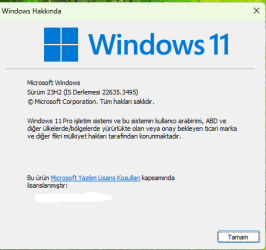
I am in this now , I really don't see anything newer than what was on 22631.3447??

Edition Windows 11 Pro
Version 23H2
Installed on ?4/?13/?2024
OS build 22631.3520
Experience Windows Feature Experience Pack 1000.22700.1003.0
 

My Computers My Computers

  • At a glance

    Windows11 Pro 26200.9128Intel Core i9 14900F (24 -Core, 68 MB Total C...32GB DDR5RTX 4080 Super w/610.74
    OS
    Windows11 Pro 26200.9128
    Computer type
    PC/Desktop
    Manufacturer/Model
    Dell Alienware Aurora R16
    CPU
    Intel Core i9 14900F (24 -Core, 68 MB Total Cache)
    Motherboard
    Dell Alienware
    Memory
    32GB DDR5
    Graphics Card(s)
    RTX 4080 Super w/610.74
    Sound Card
    Realtec
    Monitor(s) Displays
    Corsair XENEON 32QHD165
    Screen Resolution
    2560 X 1440
    Hard Drives
    1-2TB Samsung 990 Pro PCIe NVMe M2 SSD
    1-4TB Samsung 990 Pro PCIe NVMe M2 SSD
    PSU
    1000 Watt Platinum Dell
    Case
    Alienware
    Cooling
    Liquid Closed Loop
    Keyboard
    Corsair Strafe RGB
    Mouse
    Logitech MK270 Wireless
    Internet Speed
    100Gb's Down-20 Up
    Browser
    Firefox 153.0.1
    Antivirus
    Defender
    Other Info
    Very Quiet And Fast
    CyberPower UPS CP1500PFCLCD
  • At a glance

    PClinuxOS Mate (2025.7)13th Gen Inter(R) Core(TM) i3-1315U64 GB DDR4 @3200 MHz.Internal
    Operating System
    PClinuxOS Mate (2025.7)
    Computer type
    PC/Desktop
    Manufacturer/Model
    Intel
    CPU
    13th Gen Inter(R) Core(TM) i3-1315U
    Motherboard
    Intel
    Memory
    64 GB DDR4 @3200 MHz.
    Graphics card(s)
    Internal
    Sound Card
    None
    Monitor(s) Displays
    Dell 2419HGCF
    Screen Resolution
    1920 X 1080
    Hard Drives
    SAMSUNG 980 PRO SSD 2TB, PCIe 4.0 M.2 2280
    PSU
    Chicony 30 Watt
    Case
    Small
    Keyboard
    Dell
    Mouse
    Razor
    Internet Speed
    1GB
    Browser
    Slimjet
I am in this now , I really don't see anything newer than what was on 22631.3447??

Edition Windows 11 Pro
Version 23H2
Installed on ?4/?13/?2024
OS build 22631.3520
Experience Windows Feature Experience Pack 1000.22700.1003.0
Here is the list of what they changed. 😎


My Computer My Computer

At a glance

Windows 11 Pro 25H2Intel I9-9900K64GBNVIDIA RTX 2060
OS
Windows 11 Pro 25H2
Computer type
PC/Desktop
Manufacturer/Model
Dell XPS 8930
CPU
Intel I9-9900K
Memory
64GB
Graphics Card(s)
NVIDIA RTX 2060
Sound Card
NVIDIA High Definition Audio
Monitor(s) Displays
4k Samsung
Screen Resolution
3840 x 2160
Hard Drives
512GB NVMe, ADATA SU 800, 2TB HDD
(y)
Ekran görüntüsü 2024-04-14 043741.png
No problem.
 

My Computer My Computer

At a glance

Windows 11 Insider BetaRyzen 5 560016 GB DDR4 3200 MHzXFX RX 6700
OS
Windows 11 Insider Beta
Computer type
PC/Desktop
Manufacturer/Model
Gigabyte Aorus Elite B550M
CPU
Ryzen 5 5600
Motherboard
Gigabyte Aorus Elite B550M
Memory
16 GB DDR4 3200 MHz
Graphics Card(s)
XFX RX 6700
Monitor(s) Displays
Asus VX229
Screen Resolution
1920*1080
Hard Drives
Adata SU650 + Apacer SSD + WD Blue 1TB
PSU
High Power Element Bronze 80+ 600 Watt
Case
Phanteks P400
Cooling
Zigmatek CPU cooler
Keyboard
Logitech MK 235
Mouse
Logitech MK 235
Internet Speed
16 Mb
Browser
Yandex
Should be on this other thread. 😎


My Computer My Computer

At a glance

Windows 11 Pro 25H2Intel I9-9900K64GBNVIDIA RTX 2060
OS
Windows 11 Pro 25H2
Computer type
PC/Desktop
Manufacturer/Model
Dell XPS 8930
CPU
Intel I9-9900K
Memory
64GB
Graphics Card(s)
NVIDIA RTX 2060
Sound Card
NVIDIA High Definition Audio
Monitor(s) Displays
4k Samsung
Screen Resolution
3840 x 2160
Hard Drives
512GB NVMe, ADATA SU 800, 2TB HDD
Shoot, I just noticed my start menu is broken on both my machines. One with this RP build and the other with the latest Beta build. Anytime I click the search window on the start menu the menu turns completely transparent then closes. The taskbar search box is also broken if I enable it. Rebooting doesn't help. Anybody else?
 
Last edited:

My Computers My Computers

  • At a glance

    Windows 11 25H2Intel Core Ultra 9 275HX (24-Core)64GB DDR5 6400MT/sNVIDIA GeForce RTX 5080 and Intel UHD Graphics
    OS
    Windows 11 25H2
    Computer type
    Laptop
    Manufacturer/Model
    Alienware 18 Area-51
    CPU
    Intel Core Ultra 9 275HX (24-Core)
    Motherboard
    Alienware
    Memory
    64GB DDR5 6400MT/s
    Graphics Card(s)
    NVIDIA GeForce RTX 5080 and Intel UHD Graphics
    Sound Card
    Onboard, Realtek high-performance Audio chips (ALC3329 & ALC1708))
    Monitor(s) Displays
    300HZ 18-inch QHD 500 nit Comfort View+
    Screen Resolution
    2560 x 1600
    Hard Drives
    2TB NVMe M.2 PCIe Gen 5 SSD
    Case
    Magnesium Alloy
    Cooling
    Advanced Cryo-Tech Quad-Fan Cooling system & large vapor chamber
    Keyboard
    Cherry MX ultra low profile mechanical keyboard with per key AlienFX RGB lighting
    Mouse
    Logitech MX Master 4
    Browser
    Vivaldi (main), Firefox, Chrome, Edge
    Antivirus
    MS Defender and Malwarebytes Free
  • At a glance

    Windows 11 25H2Qualcomm Snapdragon X Elite (12 Core) ARM bas...16GB LPDDR5Qualcomm Adreno X1-85
    Operating System
    Windows 11 25H2
    Computer type
    Laptop
    Manufacturer/Model
    Microsoft Surface Laptop 7
    CPU
    Qualcomm Snapdragon X Elite (12 Core) ARM based CPU
    Motherboard
    Microsoft Corp.
    Memory
    16GB LPDDR5
    Graphics card(s)
    Qualcomm Adreno X1-85
    Sound Card
    Omnisonic speakers with Dolby Atmos spatial sound
    Monitor(s) Displays
    120 Hz 13.8-inch 600 nit PixelSense Flow touchscreen
    Screen Resolution
    2304x1536
    Hard Drives
    1TB NVMe Gen 4 SSD
    Case
    Anodized Aluminum
    Cooling
    Traditional active cooling fan system
    Keyboard
    Mechanical QWERTY, backlit when in use
    Mouse
    Logitech MX Master 4 and Surface Arc Mouse
    Browser
    Vivaldi (main), Firefox, Chrome, Edge
    Antivirus
    MS Defender and Malwarebytes Free
Shoot, I just noticed my start menu is broken on both my machines. One with this RP build and the other with the latest Beta build. Anytime I click the search window on the start menu the menu turns completely transparent then closes. The taskbar search box is also broken if I enable it. Rebooting doesn't help. Anybody else?
Mine does the same but I don't use windows search.
 

My Computers My Computers

  • At a glance

    Windows11 Pro 26200.9128Intel Core i9 14900F (24 -Core, 68 MB Total C...32GB DDR5RTX 4080 Super w/610.74
    OS
    Windows11 Pro 26200.9128
    Computer type
    PC/Desktop
    Manufacturer/Model
    Dell Alienware Aurora R16
    CPU
    Intel Core i9 14900F (24 -Core, 68 MB Total Cache)
    Motherboard
    Dell Alienware
    Memory
    32GB DDR5
    Graphics Card(s)
    RTX 4080 Super w/610.74
    Sound Card
    Realtec
    Monitor(s) Displays
    Corsair XENEON 32QHD165
    Screen Resolution
    2560 X 1440
    Hard Drives
    1-2TB Samsung 990 Pro PCIe NVMe M2 SSD
    1-4TB Samsung 990 Pro PCIe NVMe M2 SSD
    PSU
    1000 Watt Platinum Dell
    Case
    Alienware
    Cooling
    Liquid Closed Loop
    Keyboard
    Corsair Strafe RGB
    Mouse
    Logitech MK270 Wireless
    Internet Speed
    100Gb's Down-20 Up
    Browser
    Firefox 153.0.1
    Antivirus
    Defender
    Other Info
    Very Quiet And Fast
    CyberPower UPS CP1500PFCLCD
  • At a glance

    PClinuxOS Mate (2025.7)13th Gen Inter(R) Core(TM) i3-1315U64 GB DDR4 @3200 MHz.Internal
    Operating System
    PClinuxOS Mate (2025.7)
    Computer type
    PC/Desktop
    Manufacturer/Model
    Intel
    CPU
    13th Gen Inter(R) Core(TM) i3-1315U
    Motherboard
    Intel
    Memory
    64 GB DDR4 @3200 MHz.
    Graphics card(s)
    Internal
    Sound Card
    None
    Monitor(s) Displays
    Dell 2419HGCF
    Screen Resolution
    1920 X 1080
    Hard Drives
    SAMSUNG 980 PRO SSD 2TB, PCIe 4.0 M.2 2280
    PSU
    Chicony 30 Watt
    Case
    Small
    Keyboard
    Dell
    Mouse
    Razor
    Internet Speed
    1GB
    Browser
    Slimjet
Mine does the same but I don't use windows search.
Well I just solved the problem this morning. It seems if you use Winaero Tweaker to select a custom system font it breaks the search function so FYI you have to stick with the default system font.
 

My Computers My Computers

  • At a glance

    Windows 11 25H2Intel Core Ultra 9 275HX (24-Core)64GB DDR5 6400MT/sNVIDIA GeForce RTX 5080 and Intel UHD Graphics
    OS
    Windows 11 25H2
    Computer type
    Laptop
    Manufacturer/Model
    Alienware 18 Area-51
    CPU
    Intel Core Ultra 9 275HX (24-Core)
    Motherboard
    Alienware
    Memory
    64GB DDR5 6400MT/s
    Graphics Card(s)
    NVIDIA GeForce RTX 5080 and Intel UHD Graphics
    Sound Card
    Onboard, Realtek high-performance Audio chips (ALC3329 & ALC1708))
    Monitor(s) Displays
    300HZ 18-inch QHD 500 nit Comfort View+
    Screen Resolution
    2560 x 1600
    Hard Drives
    2TB NVMe M.2 PCIe Gen 5 SSD
    Case
    Magnesium Alloy
    Cooling
    Advanced Cryo-Tech Quad-Fan Cooling system & large vapor chamber
    Keyboard
    Cherry MX ultra low profile mechanical keyboard with per key AlienFX RGB lighting
    Mouse
    Logitech MX Master 4
    Browser
    Vivaldi (main), Firefox, Chrome, Edge
    Antivirus
    MS Defender and Malwarebytes Free
  • At a glance

    Windows 11 25H2Qualcomm Snapdragon X Elite (12 Core) ARM bas...16GB LPDDR5Qualcomm Adreno X1-85
    Operating System
    Windows 11 25H2
    Computer type
    Laptop
    Manufacturer/Model
    Microsoft Surface Laptop 7
    CPU
    Qualcomm Snapdragon X Elite (12 Core) ARM based CPU
    Motherboard
    Microsoft Corp.
    Memory
    16GB LPDDR5
    Graphics card(s)
    Qualcomm Adreno X1-85
    Sound Card
    Omnisonic speakers with Dolby Atmos spatial sound
    Monitor(s) Displays
    120 Hz 13.8-inch 600 nit PixelSense Flow touchscreen
    Screen Resolution
    2304x1536
    Hard Drives
    1TB NVMe Gen 4 SSD
    Case
    Anodized Aluminum
    Cooling
    Traditional active cooling fan system
    Keyboard
    Mechanical QWERTY, backlit when in use
    Mouse
    Logitech MX Master 4 and Surface Arc Mouse
    Browser
    Vivaldi (main), Firefox, Chrome, Edge
    Antivirus
    MS Defender and Malwarebytes Free
I tried to add two Steam Games and MS Politely gave me:
This which removed me from the RP and place me back in The Stable build.Untitled.jpg
 

My Computers My Computers

  • At a glance

    Windows11 Pro 26200.9128Intel Core i9 14900F (24 -Core, 68 MB Total C...32GB DDR5RTX 4080 Super w/610.74
    OS
    Windows11 Pro 26200.9128
    Computer type
    PC/Desktop
    Manufacturer/Model
    Dell Alienware Aurora R16
    CPU
    Intel Core i9 14900F (24 -Core, 68 MB Total Cache)
    Motherboard
    Dell Alienware
    Memory
    32GB DDR5
    Graphics Card(s)
    RTX 4080 Super w/610.74
    Sound Card
    Realtec
    Monitor(s) Displays
    Corsair XENEON 32QHD165
    Screen Resolution
    2560 X 1440
    Hard Drives
    1-2TB Samsung 990 Pro PCIe NVMe M2 SSD
    1-4TB Samsung 990 Pro PCIe NVMe M2 SSD
    PSU
    1000 Watt Platinum Dell
    Case
    Alienware
    Cooling
    Liquid Closed Loop
    Keyboard
    Corsair Strafe RGB
    Mouse
    Logitech MK270 Wireless
    Internet Speed
    100Gb's Down-20 Up
    Browser
    Firefox 153.0.1
    Antivirus
    Defender
    Other Info
    Very Quiet And Fast
    CyberPower UPS CP1500PFCLCD
  • At a glance

    PClinuxOS Mate (2025.7)13th Gen Inter(R) Core(TM) i3-1315U64 GB DDR4 @3200 MHz.Internal
    Operating System
    PClinuxOS Mate (2025.7)
    Computer type
    PC/Desktop
    Manufacturer/Model
    Intel
    CPU
    13th Gen Inter(R) Core(TM) i3-1315U
    Motherboard
    Intel
    Memory
    64 GB DDR4 @3200 MHz.
    Graphics card(s)
    Internal
    Sound Card
    None
    Monitor(s) Displays
    Dell 2419HGCF
    Screen Resolution
    1920 X 1080
    Hard Drives
    SAMSUNG 980 PRO SSD 2TB, PCIe 4.0 M.2 2280
    PSU
    Chicony 30 Watt
    Case
    Small
    Keyboard
    Dell
    Mouse
    Razor
    Internet Speed
    1GB
    Browser
    Slimjet
I tried to add two Steam Games and MS Politely gave me:
This which removed me from the RP and place me back in The Stable build.View attachment 93449
That Repair version through W.U. was originally only available on Canary, now they made it available on every build including public build,
I just tried it now in R.P. to see what happens after it is done.

Here what it shows, in my case it is still in R.P. 🤷‍♂️

1713122071974.png

1713122178565.png

1713121787788.png
 

My Computer My Computer

At a glance

Windows 11 Pro 25H2Intel I9-9900K64GBNVIDIA RTX 2060
OS
Windows 11 Pro 25H2
Computer type
PC/Desktop
Manufacturer/Model
Dell XPS 8930
CPU
Intel I9-9900K
Memory
64GB
Graphics Card(s)
NVIDIA RTX 2060
Sound Card
NVIDIA High Definition Audio
Monitor(s) Displays
4k Samsung
Screen Resolution
3840 x 2160
Hard Drives
512GB NVMe, ADATA SU 800, 2TB HDD

My Computer My Computer

At a glance

26200.8037i5-11400F32GBGeforce GT-1030
OS
26200.8037
Computer type
PC/Desktop
CPU
i5-11400F
Motherboard
Gigabyte
Memory
32GB
Graphics Card(s)
Geforce GT-1030
Keyboard
Logitech K400
Mouse
Logitech M720
Internet Speed
600 Mb
Browser
Edge
Hello, I'm on Release Preview Channel (Windows Insider), but my version is still 22H2 (22621.3520). Is this right, or am I missing something? Cheers!
 

My Computer My Computer

At a glance

Windows 11
OS
Windows 11
Hello, I'm on Release Preview Channel (Windows Insider), but my version is still 22H2 (22621.3520). Is this right, or am I missing something? Cheers!
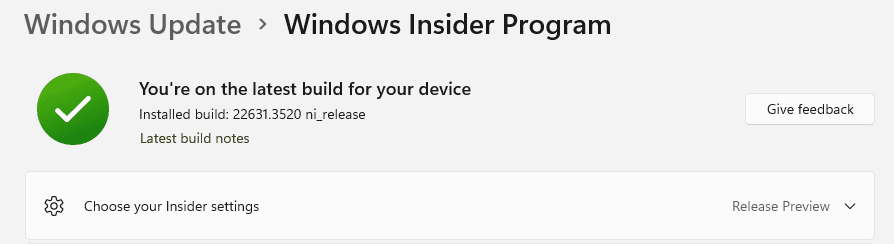
have you tried manually tried 'Check for Updates'? 'Choose your insider settings'?

Build(22621.3520) is the latest 22H2 RP release. Build(22631.3520) is the latest 23H2 RP release.

If you click on "My Computer" below, you can see my full system spec. On your own original post, if you click on your own "My Computer" you can fill out your own system specs. That way the forum members can know exactly what you're using.
 

My Computer My Computer

At a glance

Windows 11 Pro 25H2 (Build 26200.8973)Intel Core Ultra 9 285 5.6 GHz32.00 GBIntel Integrated Graphics (128 MB)
OS
Windows 11 Pro 25H2 (Build 26200.8973)
Computer type
PC/Desktop
Manufacturer/Model
Dell Pro Max Tower T2 FCT2250
CPU
Intel Core Ultra 9 285 5.6 GHz
Motherboard
64-bit operating system, x64-based processor
Memory
32.00 GB
Graphics Card(s)
Intel Integrated Graphics (128 MB)
Sound Card
Realtek Audio
Monitor(s) Displays
Dell P2714H Monitor
Screen Resolution
1920 x 1080
Hard Drives
1 x 512GB M.2 XG10d SED KIOXIA PCIe solid state drive (Internal)
1 x 2TB Seagate ST2000DM008-2UB102 HDD (Internal)
1 x 4TB Seagate STGX4000400 External HDD
1 x 6TB WD Elements AE 2689 External HDD
PSU
500 Watts
Cooling
Air
Keyboard
Microsoft Wired Keyboard 600
Mouse
Microsoft USB Basic Optical Mouse v2.0
Browser
Firefox
Antivirus
Windows Defender + Malwarebytes Premium
Other Info
BaseBoard Manufacturer Dell Inc.
BaseBoard Product 022RY57
BaseBoard Version A01
Hello, I'm on Release Preview Channel (Windows Insider), but my version is still 22H2 (22621.3520). Is this right, or am I missing something? Cheers!
Hello, :alien:

You can install the enablement package below to move to 23H2 (22631.3520) instead.


My Computers My Computers

  • At a glance

    Windows 11 Pro for WorkstationsIntel i7-8700K 5 GHz64 GB (4x16GB) G.SKILL TridentZ RGB DDR4 3600...ASUS ROG-STRIX-GTX1080TI-O11G-GAMING (11GB GD...
    OS
    Windows 11 Pro for Workstations
    Computer type
    PC/Desktop
    Manufacturer/Model
    Custom self build
    CPU
    Intel i7-8700K 5 GHz
    Motherboard
    ASUS ROG Maximus XI Formula Z390
    Memory
    64 GB (4x16GB) G.SKILL TridentZ RGB DDR4 3600 MHz (F4-3600C18D-32GTZR)
    Graphics Card(s)
    ASUS ROG-STRIX-GTX1080TI-O11G-GAMING (11GB GDDR5X)
    Sound Card
    Integrated Digital Audio (S/PDIF)
    Monitor(s) Displays
    2 x Samsung Odyssey G75 27"
    Screen Resolution
    2560x1440
    Hard Drives
    1TB Samsung 990 PRO M.2,
    4TB Samsung 990 PRO M.2,
    TerraMaster F8 SSD Plus NAS
    PSU
    Seasonic Prime Titanium 850W
    Case
    Thermaltake Core P3 wall mounted
    Cooling
    Corsair Hydro H115i
    Keyboard
    Amazon Basics Wired Full Keyboard MD005
    Mouse
    Logitech MX Master 4
    Internet Speed
    2 Gbps Download and 100 Mbps Upload
    Browser
    Chrome and Edge
    Antivirus
    Microsoft Defender
    Other Info
    Logitech Z625 speaker system,
    Logitech BRIO 4K Pro webcam,
    HP Color LaserJet Pro MFP M477fdn,
    CyberPower CP1500PFCLCD
    Galaxy S23 Plus phone
  • At a glance

    Windows 11 ProSnapdragon X Elite (12 core) 3.42 GHz16 GB LPDDR5x-7467 MHz
    Operating System
    Windows 11 Pro
    Computer type
    Laptop
    Manufacturer/Model
    Surface Laptop 7 Copilot+ PC
    CPU
    Snapdragon X Elite (12 core) 3.42 GHz
    Memory
    16 GB LPDDR5x-7467 MHz
    Monitor(s) Displays
    15" HDR
    Screen Resolution
    2496 x 1664
    Hard Drives
    1 TB SSD
    Internet Speed
    Wi-Fi 7 and Bluetooth 5.4
    Browser
    Chrome and Edge
    Antivirus
    Microsoft Defender

Latest Support Threads

Back
Top Bottom