Insider KB5041873 Windows 11 Insider Beta build 22635.4076 (23H2) - Aug. 19


UPDATE 8/26:


 Windows Blogs:

Hello Windows Insiders, today we are releasing Windows 11 Insider Preview Build 22635.4076 (KB5041873) to the Beta Channel.

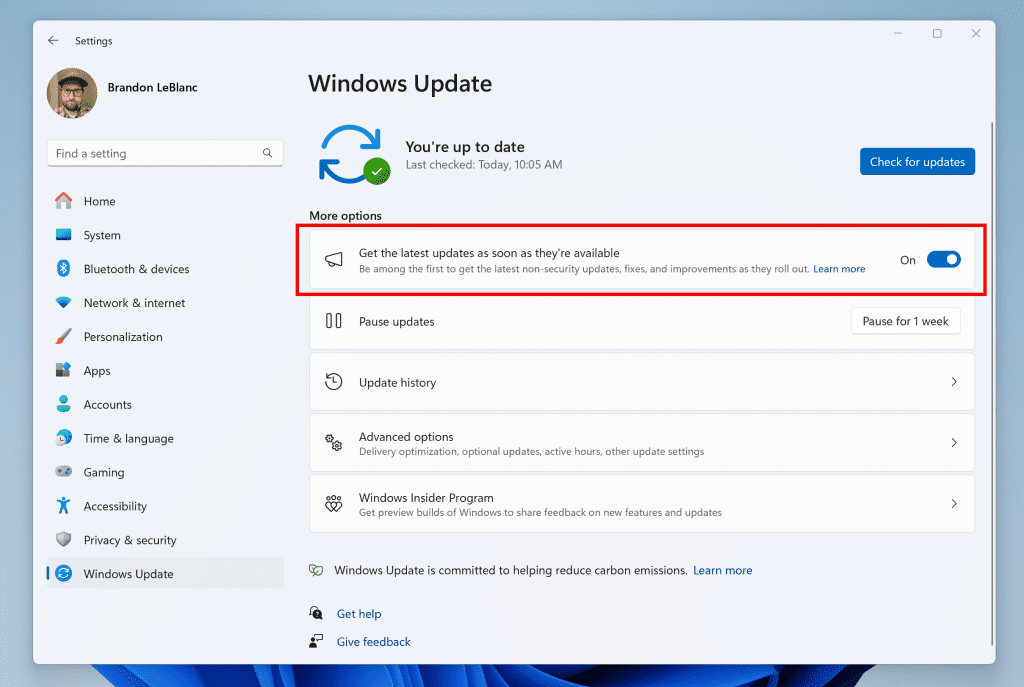
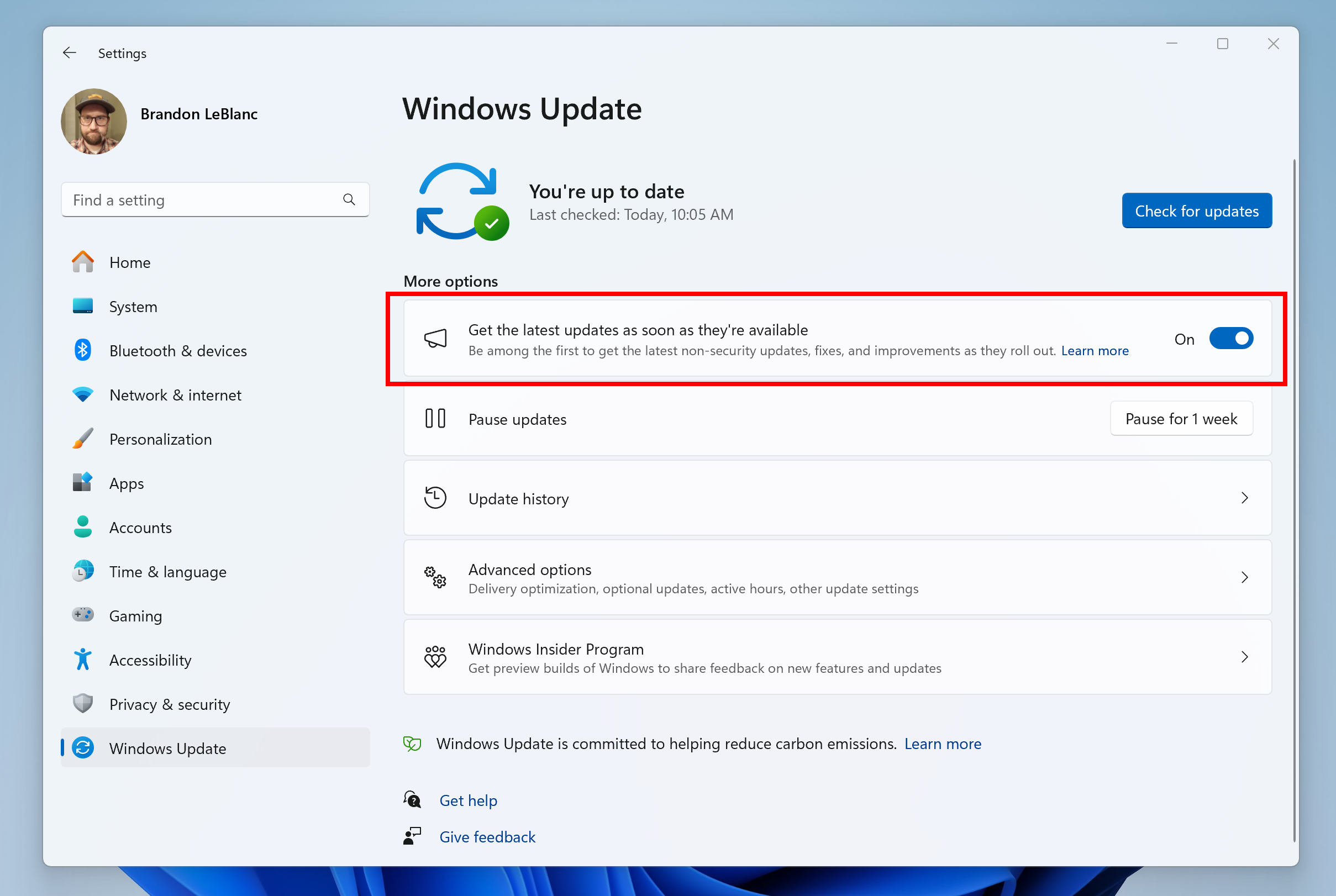
REMINDER: Windows Insiders in the Beta Channel will receive updates based on Windows 11, version 23H2 via an enablement package (Build 22635.xxxx). For Insiders in the Beta Channel who want to be the first to get features gradually rolled out to you, you can turn ON the toggle (shown in the image below) to get the latest updates as they are available via Settings > Windows Update. Over time, we will increase the rollouts of features to everyone with the toggle turned on. Should you keep this toggle off, new features will gradually be rolled out to your device over time once they are ready.


Turn on the toggle to get the latest updates as they are available to get new features rolled out to you.

Going forward, we will document changes in Beta Channel builds in two buckets: new features, improvements, and fixes that are being gradually rolled out for Insiders who have turned on the toggle to get the latest updates as they are available and then new features, improvements, and fixes available to everyone in the Beta Channel.

Changes and Improvements gradually being rolled out to the Beta Channel with toggle on*

[Windows Studio Effects]

  • The improvement introduced with Build 22635.3930 that introduces a Studio Effects icon in the system tray when using any application with a Studio Effects-enabled camera has temporarily been disabled with this build. We plan to re-enable this feature in a future flight.

Fixes gradually being rolled out to the Beta Channel with toggle on*

[File Explorer]

  • Fixed an issue where keyboard focus might get lost on selection of an unselected tab item.

[Voice Access]

[Input]

  • Fixed an issue causing the emoji panel to close when trying to switch to the kaomoji and symbols sections, or after selecting an emoji.

[Other]

  • Fixed an issue in Registry Editor where when editing a DWORD or QWORD if you pasted in a HEX value into the text box and saved it, the value saved might not be the one you had entered (for example, pasting 0x1 would become 0x411).

Fixes for everyone in the Beta Channel

  • [NetAdapterCx module] A system stops responding when large amounts of data travel over Wi-Fi. This issue occurs on devices that have certain wireless network cards.
  • [Windows Kernel Vulnerable Driver Blocklist file (DriverSiPolicy.p7b)] This update adds to the list of drivers that are at risk for Bring Your Own Vulnerable Driver (BYOVD) attacks.
  • [Windows Defender Application Control (WDAC)]
    • When you apply WDAC Application ID policies, some apps might fail.
    • A memory leak occurs that might exhaust system memory as time goes by. This issue occurs when you provision a device.
  • [Group Policy Preferences Item Level Targeting (ILT) and Local Users and Groups] You cannot choose a group from the target domain for ILT. Also, you cannot choose an account from Local Users and Groups. The forest does not appear. This issue occurs when you deploy multiple forests, and the target domain has a one-way trust with the domain of the admin. This issue affects Enhanced Security Admin Environment (ESAE), Hardened Forests (HF), or Privileged Access Management (PAM) deployments.
  • [Autopilot] Using it to provision Surface Laptop SE devices fails.
  • [FrameShutdownDelay] The browser ignores its value in the “HKLM\SOFTWARE\Microsoft\Internet Explorer\Main” registry key.
  • [Transmission Control Protocol/Internet Protocol (TCPIP)] The issue causes high CPU usage and loss of packets. It also affects TCP connection success rates.
  • [Cache manager] It might stop responding. This occurs when you use Hyperthreading on Windows Server 2022.
  • [Print Support App] When you use the app with a USB device, the app stops responding and does not print. This issue also limits the functions of the user interface.
  • [Universal Print clients] They fail to communicate with the Universal Print service. This affects printing functions. This issue occurs when you turn on Web Proxy Auto Discovery (WPAD).
  • [NetJoinLegacyAccountReuse] This update removes this registry key. For more information refer to KB5020276—Netjoin: Domain join hardening changes.
  • [Windows Backup] Backup sometimes fails. This occurs when a device has an Extensible Firmware Interface (EFI) system partition (ESP).
  • [PowerShell and VBScript] The issue stops you from using Windows Update Agent (WUA) APIs in your scripts.

Known issues

[Taskbar]

  • We’re working on the fix for an issue causing explorer.exe to crash for some Insiders when closing apps from the taskbar in the latest builds.

[File Explorer]

  • [NEW] We’re working on the fix for an issue causing explorer.exe to crash when interacting with archive files starting with the previous flight.

Reminders for Windows Insiders in the Beta Channel

  • Updates released to the Beta Channel are based off Windows 11, version 23H2.
  • Features and experiences included in these builds may never get released as we try out different concepts and get feedback. Features may change over time, be removed, or replaced and never get released beyond Windows Insiders. Some of these features and experiences could show up in future Windows releases when they’re ready.
  • Many features in the Beta Channel are rolled out using Control Feature Rollout technology, starting with a subset of Insiders and ramping up over time as we monitor feedback to see how they land before pushing them out to everyone in this channel.
  • Some features in active development we preview with Windows Insiders may not be fully localized and localization will happen over time as features are finalized. As you see issues with localization in your language, please report those issues to us via Feedback Hub.
  • Windows Insiders in the Beta Channel who want to be the first to get features gradually rolled out to you*, you can turn ON the toggle to get the latest updates as they are available via Settings > Windows Update. Over time, we will increase the rollouts of features to everyone with the toggle turned on. Should you keep this toggle off, new features will gradually be rolled out to your device over time once they are ready.
  • Because the Dev and Beta Channels represent parallel development paths from our engineers, there may be cases where features and experiences show up in the Beta Channel first.
  • Check out Flight Hub for a complete look at what build is in which Insider channel.
Thanks,
Amanda & Brandon


 Source:


Check Windows Updates


UUP Dump:

64-bit ISO download:

ARM64 ISO download:

 
Last edited:
Thanks Brink. This is odd a 2:00 PM (PST). Usually at 10:00.
Anyway.........:hug::thumbsup:
 

My Computer My Computer

At a glance

Win 11 Insider Release Preview and Beta chann...i5 Core [email protected] (Unsupported for Win 11)12GBGeneric PnP Monitor (1920x1080@60Hz) Intel HD...
OS
Win 11 Insider Release Preview and Beta channels.
Computer type
Laptop
Manufacturer/Model
HP ENVY Bought: March 2017
CPU
i5 Core [email protected] (Unsupported for Win 11)
Motherboard
HP 81AD (U3E1)
Memory
12GB
Graphics Card(s)
Generic PnP Monitor (1920x1080@60Hz) Intel HD Graphics 620 (HP)
Sound Card
Conexant ISST audio
Monitor(s) Displays
Generic PnP Monitor
Screen Resolution
1536x864 pixels
Hard Drives
HGST HTS721010A9E630
PSU
Well...PSU you too!! What's this mean?
Case
HP ENVY SILVER
Cooling
A fan.
Keyboard
USA
Mouse
Logitec Anywhere 2
Internet Speed
Good enough for me! Fast!
Browser
Edge/Waterfox
Antivirus
Windows Defender
Other Info
No 'mo.
KB5041873.jpg
 

My Computers My Computers

  • At a glance

    Windows 11 Pro for WorkstationsIntel i7-8700K 5 GHz64 GB (4x16GB) G.SKILL TridentZ RGB DDR4 3600...ASUS ROG-STRIX-GTX1080TI-O11G-GAMING (11GB GD...
    OS
    Windows 11 Pro for Workstations
    Computer type
    PC/Desktop
    Manufacturer/Model
    Custom self build
    CPU
    Intel i7-8700K 5 GHz
    Motherboard
    ASUS ROG Maximus XI Formula Z390
    Memory
    64 GB (4x16GB) G.SKILL TridentZ RGB DDR4 3600 MHz (F4-3600C18D-32GTZR)
    Graphics Card(s)
    ASUS ROG-STRIX-GTX1080TI-O11G-GAMING (11GB GDDR5X)
    Sound Card
    Integrated Digital Audio (S/PDIF)
    Monitor(s) Displays
    2 x Samsung Odyssey G75 27"
    Screen Resolution
    2560x1440
    Hard Drives
    1TB Samsung 990 PRO M.2,
    4TB Samsung 990 PRO M.2,
    TerraMaster F8 SSD Plus NAS
    PSU
    Seasonic Prime Titanium 850W
    Case
    Thermaltake Core P3 wall mounted
    Cooling
    Corsair Hydro H115i
    Keyboard
    Amazon Basics Wired Full Keyboard MD005
    Mouse
    Logitech MX Master 4
    Internet Speed
    2 Gbps Download and 100 Mbps Upload
    Browser
    Chrome and Edge
    Antivirus
    Microsoft Defender
    Other Info
    Logitech Z625 speaker system,
    Logitech BRIO 4K Pro webcam,
    HP Color LaserJet Pro MFP M477fdn,
    CyberPower CP1500PFCLCD
    Galaxy S23 Plus phone
  • At a glance

    Windows 11 ProSnapdragon X Elite (12 core) 3.42 GHz16 GB LPDDR5x-7467 MHz
    Operating System
    Windows 11 Pro
    Computer type
    Laptop
    Manufacturer/Model
    Surface Laptop 7 Copilot+ PC
    CPU
    Snapdragon X Elite (12 core) 3.42 GHz
    Memory
    16 GB LPDDR5x-7467 MHz
    Monitor(s) Displays
    15" HDR
    Screen Resolution
    2496 x 1664
    Hard Drives
    1 TB SSD
    Internet Speed
    Wi-Fi 7 and Bluetooth 5.4
    Browser
    Chrome and Edge
    Antivirus
    Microsoft Defender
Downloading 22635.4076...No problems thus far.
 
Last edited:

My Computer My Computer

At a glance

Win11 Experimental Channel for 26H2 buildsAMD R7 7800X3DGSkill 2x16GB @ 6400MT/sXFX 9070 XT SWIFT tri-fan (PCIe5.0)
OS
Win11 Experimental Channel for 26H2 builds
Computer type
PC/Desktop
Manufacturer/Model
a cherry-picked assembly
CPU
AMD R7 7800X3D
Motherboard
MSI x870 Tomahawk Wi-Fi, 8-layer, 2 oz copper, server PCB
Memory
GSkill 2x16GB @ 6400MT/s
Graphics Card(s)
XFX 9070 XT SWIFT tri-fan (PCIe5.0)
Sound Card
Creative Labs G8 USB External Sound device, Gaming DAC, Sound Card & Earphone AMP.. HIGHLY RECOMMENDED, btw. Totally changed my opinion of external USB sound. I like!...;)
Monitor(s) Displays
Philips 42" OLED @ 4k
Screen Resolution
3840x2160
Hard Drives
*Boot: Samsung 980 Pro 2 TB NVMe (PCIe4x4)
*Samsung 980 EVO NVMe 500GB (PCIe 4x4)
*Kingston SNV3S2000G 2TB NVMe (PCIe4x4)
*Samsung 960 EVO 250GB NVMe(PCIe3x2)
*8TB Toshiba x300 HDD
*ST4000DM004 S3 4TB HDD
PSU
Gigabyte 850W Gold, Rev 2
Case
Lian Li Lancool 217, white, with wood trim, very nice looking--tired of black, 5-fans standard
Cooling
Air coutesy Lian Li
Keyboard
Cherry MX 2.0S RGB
Mouse
Razer Basilisk V3 24k DPI
Internet Speed
~950Mbps down and up!
Browser
Firefox x64 DE
Antivirus
Defender
Other Info
Great New system. Exceeds my expectations by quite a bit, btw. I love the USB G8 SoundBlaster, it's quite an improvement over the G6!
Downloading now...

1724109314961.png
 

My Computer My Computer

At a glance

Windows 11Intel® Xeon® X5690 3.47GHz Six-CoreG.Skill PC3-12800 1600MHz 24GBNVIDIA GeForce GTX 1050
OS
Windows 11
Computer type
PC/Desktop
Manufacturer/Model
Asus/Custom Build
CPU
Intel® Xeon® X5690 3.47GHz Six-Core
Motherboard
Asus P6T Deluxe v2
Memory
G.Skill PC3-12800 1600MHz 24GB
Graphics Card(s)
NVIDIA GeForce GTX 1050
Sound Card
SoundMAX ADI AD2000B HD Audio
Monitor(s) Displays
Acer T232HL Touch Screen
Screen Resolution
1920 x 1080 @ 60Hz
Hard Drives
6 Crucial MX500 SSD 1TB each.
PSU
Thermaltake Toughpower Gold 850W
Case
Thermaltake Armor VA8000SWA
Cooling
Thermaltake Air Cooling System
Keyboard
Illuminated Multimedia LED Keyboard
Mouse
M16 Dual Mode Illuminated Mouse - Bluetooth / 2.4 GHz Mode
Internet Speed
800 Mbps
Browser
Edge / Opera / Vivaldi / Chrome / Firefox / Brave
Antivirus
Windows Defender Security
Updated ok.
 

My Computers My Computers

  • At a glance

    Win 11 Pro 25H2 Beta 26220.8925AMD Ryzen 7 5700UCrucial 64GB DDR4 SDRAM PC4-25600AMD Radeon Vega Graphics 1.80 GHz - Adrenalin...
    OS
    Win 11 Pro 25H2 Beta 26220.8925
    Computer type
    PC/Desktop
    Manufacturer/Model
    Asus MiniPC PN51-E1
    CPU
    AMD Ryzen 7 5700U
    Motherboard
    Asus PN51-E1 - Bios Version 0505
    Memory
    Crucial 64GB DDR4 SDRAM PC4-25600
    Graphics Card(s)
    AMD Radeon Vega Graphics 1.80 GHz - Adrenalin Edition 23.9.2
    Sound Card
    USB to Sound Blaster Live (24bit External) to Firestone DAC to Event Studio Monitors
    Monitor(s) Displays
    Gigabyte 27" 165 hertz
    Screen Resolution
    2560 x 1440
    Hard Drives
    Samsung SSD 970 EVO Plus 2TB PCIE NVME
    PSU
    65 Watt
    Case
    Asus Mini
    Cooling
    Air
    Keyboard
    Logitech K810
    Mouse
    Logitech MX Master 2S
    Internet Speed
    Telstra Modem Wifi - NBN 50/18
    Browser
    Firefox
    Antivirus
    Microsoft
    Other Info
    This replaced my Linux Notebook. I've used Windows since V2, tried various Linux distros but Windows continues to win for me.
  • At a glance

    Win 11 Home 26H2 26300.8935Core i7-7700HQ @2.8 Ghz16.0 GBNVIDIA GeForce GTX 1060 (6 GB)
    Operating System
    Win 11 Home 26H2 26300.8935
    Computer type
    Laptop
    Manufacturer/Model
    Resistance
    CPU
    Core i7-7700HQ @2.8 Ghz
    Motherboard
    Resistance
    Memory
    16.0 GB
    Graphics card(s)
    NVIDIA GeForce GTX 1060 (6 GB)
    Screen Resolution
    4k
    Hard Drives
    1.8tb
Done here!

1724111513537.png
 

My Computer My Computer

At a glance

Windows 11Intel® Xeon® X5690 3.47GHz Six-CoreG.Skill PC3-12800 1600MHz 24GBNVIDIA GeForce GTX 1050
OS
Windows 11
Computer type
PC/Desktop
Manufacturer/Model
Asus/Custom Build
CPU
Intel® Xeon® X5690 3.47GHz Six-Core
Motherboard
Asus P6T Deluxe v2
Memory
G.Skill PC3-12800 1600MHz 24GB
Graphics Card(s)
NVIDIA GeForce GTX 1050
Sound Card
SoundMAX ADI AD2000B HD Audio
Monitor(s) Displays
Acer T232HL Touch Screen
Screen Resolution
1920 x 1080 @ 60Hz
Hard Drives
6 Crucial MX500 SSD 1TB each.
PSU
Thermaltake Toughpower Gold 850W
Case
Thermaltake Armor VA8000SWA
Cooling
Thermaltake Air Cooling System
Keyboard
Illuminated Multimedia LED Keyboard
Mouse
M16 Dual Mode Illuminated Mouse - Bluetooth / 2.4 GHz Mode
Internet Speed
800 Mbps
Browser
Edge / Opera / Vivaldi / Chrome / Firefox / Brave
Antivirus
Windows Defender Security
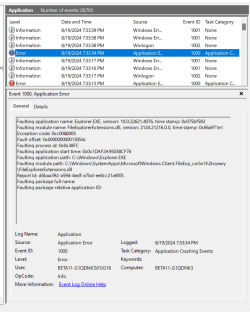
I updated two computers to beta 4076. On one of the two, File Explorer crashes every time I run it. The events log info is below. I ran all this list, all was fine:

sfc /scannow
Dism /Online /Cleanup-Image /CheckHealth
Dism /Online /Cleanup-Image /ScanHealth
Dism /Online /Cleanup-Image /RestoreHealth
Dism /online /cleanup-image /analyzecomponentstore
Dism /online /cleanup-image /startcomponentcleanup

Any ideas what I should try? everything else seems fine so far.

Log:
Faulting application name: Explorer.EXE, version: 10.0.22621.4076, time stamp: 0x9f649b21
Faulting module name: FileExplorerExtensions.dll, version: 2124.21216.0.0, time stamp: 0x66a9715a
Exception code: 0xc0000005
Fault offset: 0x00000000000d3bf0
Faulting process id: 0x0x2F10
Faulting application start time: 0x0x1DAF291F493B839
Faulting application path: C:\WINDOWS\Explorer.EXE
Faulting module path: C:\WINDOWS\SystemApps\MicrosoftWindows.Client.FileExp_cw5n1h2txyewy\FileExplorerExtensions.dll
 

My Computer My Computer

At a glance

Windows 11Apple M1 Max 10 core/4 CPU assigned to Parall...64GB/24GB assigned to Parallels 17 VMApple 32 core GPU
OS
Windows 11
Computer type
Laptop
Manufacturer/Model
Apple MacBook Pro 16" 2021
CPU
Apple M1 Max 10 core/4 CPU assigned to Parallels 17 VM
Motherboard
Apple Silicon M1 Max
Memory
64GB/24GB assigned to Parallels 17 VM
Graphics Card(s)
Apple 32 core GPU
Sound Card
Apple
Monitor(s) Displays
16.2" Liquid Retina XDR
Screen Resolution
3456-by-2234 native resolution at 254 psi
Hard Drives
4TB SSD
PSU
Apple
Case
Apple
Cooling
Apple
Keyboard
Apple
Mouse
N/A; Apple Trackpad
Internet Speed
1.2Gb/42Gb
Browser
Parallels 17 VM: MS Edge
Antivirus
Parallels 17 VM: MS Defender
Ran the usual SFC and DISM scans and so far, so good. :thumbsup:

Screen Shot 08-19-24 at 06.01 PM.JPG
 

My Computer My Computer

At a glance

Windows 11 25H2 Pro (RP Build 26200.8968)
OS
Windows 11 25H2 Pro (RP Build 26200.8968)
Computer type
PC/Desktop
Manufacturer/Model
Alienware
The new mouse options (scrolling direction, enhance pointer precision toggle) in Settings from recent Insider builds will be coming not just to version 24H2, but to 23H2/22H2 as well - they are present in today's Beta build (22635.4076) but not rolling out just yet.

vivetool /enable /id:51900073


My Computers My Computers

  • At a glance

    Windows 11 Pro for WorkstationsIntel i7-8700K 5 GHz64 GB (4x16GB) G.SKILL TridentZ RGB DDR4 3600...ASUS ROG-STRIX-GTX1080TI-O11G-GAMING (11GB GD...
    OS
    Windows 11 Pro for Workstations
    Computer type
    PC/Desktop
    Manufacturer/Model
    Custom self build
    CPU
    Intel i7-8700K 5 GHz
    Motherboard
    ASUS ROG Maximus XI Formula Z390
    Memory
    64 GB (4x16GB) G.SKILL TridentZ RGB DDR4 3600 MHz (F4-3600C18D-32GTZR)
    Graphics Card(s)
    ASUS ROG-STRIX-GTX1080TI-O11G-GAMING (11GB GDDR5X)
    Sound Card
    Integrated Digital Audio (S/PDIF)
    Monitor(s) Displays
    2 x Samsung Odyssey G75 27"
    Screen Resolution
    2560x1440
    Hard Drives
    1TB Samsung 990 PRO M.2,
    4TB Samsung 990 PRO M.2,
    TerraMaster F8 SSD Plus NAS
    PSU
    Seasonic Prime Titanium 850W
    Case
    Thermaltake Core P3 wall mounted
    Cooling
    Corsair Hydro H115i
    Keyboard
    Amazon Basics Wired Full Keyboard MD005
    Mouse
    Logitech MX Master 4
    Internet Speed
    2 Gbps Download and 100 Mbps Upload
    Browser
    Chrome and Edge
    Antivirus
    Microsoft Defender
    Other Info
    Logitech Z625 speaker system,
    Logitech BRIO 4K Pro webcam,
    HP Color LaserJet Pro MFP M477fdn,
    CyberPower CP1500PFCLCD
    Galaxy S23 Plus phone
  • At a glance

    Windows 11 ProSnapdragon X Elite (12 core) 3.42 GHz16 GB LPDDR5x-7467 MHz
    Operating System
    Windows 11 Pro
    Computer type
    Laptop
    Manufacturer/Model
    Surface Laptop 7 Copilot+ PC
    CPU
    Snapdragon X Elite (12 core) 3.42 GHz
    Memory
    16 GB LPDDR5x-7467 MHz
    Monitor(s) Displays
    15" HDR
    Screen Resolution
    2496 x 1664
    Hard Drives
    1 TB SSD
    Internet Speed
    Wi-Fi 7 and Bluetooth 5.4
    Browser
    Chrome and Edge
    Antivirus
    Microsoft Defender
I updated two computers to beta 4076. On one of the two, File Explorer crashes every time I run it. The events log info is below. I ran all this list, all was fine:

sfc /scannow
Dism /Online /Cleanup-Image /CheckHealth
Dism /Online /Cleanup-Image /ScanHealth
Dism /Online /Cleanup-Image /RestoreHealth
Dism /online /cleanup-image /analyzecomponentstore
Dism /online /cleanup-image /startcomponentcleanup

Any ideas what I should try? everything else seems fine so far.

Log:
Faulting application name: Explorer.EXE, version: 10.0.22621.4076, time stamp: 0x9f649b21
Faulting module name: FileExplorerExtensions.dll, version: 2124.21216.0.0, time stamp: 0x66a9715a
Exception code: 0xc0000005
Fault offset: 0x00000000000d3bf0
Faulting process id: 0x0x2F10
Faulting application start time: 0x0x1DAF291F493B839
Faulting application path: C:\WINDOWS\Explorer.EXE
Faulting module path: C:\WINDOWS\SystemApps\MicrosoftWindows.Client.FileExp_cw5n1h2txyewy\FileExplorerExtensions.dll
Just update the 1st one here, and File explorer keeps crashing with exception code 0xc000005.
This makes the PC pretty unusable.

1724122653073.png
 

My Computer My Computer

At a glance

Windows 11 Pro 25H2Intel I9-9900K64GBNVIDIA RTX 2060
OS
Windows 11 Pro 25H2
Computer type
PC/Desktop
Manufacturer/Model
Dell XPS 8930
CPU
Intel I9-9900K
Memory
64GB
Graphics Card(s)
NVIDIA RTX 2060
Sound Card
NVIDIA High Definition Audio
Monitor(s) Displays
4k Samsung
Screen Resolution
3840 x 2160
Hard Drives
512GB NVMe, ADATA SU 800, 2TB HDD
Just updated and File Explorer is crashing on me too. I've noticed that if you open file explorer by using the "Download" option it will not crash, once you click on "Home" within file explorer it will instantly crash. So it seems like it's crashing when file explorer is focused on "Home".
 

My Computer My Computer

At a glance

Windows 11
OS
Windows 11
Computer type
Laptop
Manufacturer/Model
Dell XPS 17 9730
Just updated and File Explorer is crashing on me too. I've noticed that if you open file explorer by using the "Download" option it will not crash, once you click on "Home" within file explorer it will instantly crash. So it seems like it's crashing when file explorer is focused on "Home".
It crashes here every time I try to open it.
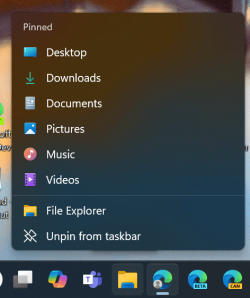
Yes, you are right, if I open with the Downloads folder that is pinned in the context menu from the taskbar it is not crashing. 😂
1724125630931.png

I'm reinstalling using the repair option, we'll see how that goes. 🤷‍♂️
1724124556074.png
That gave me a GSOD. Undoing the changes. 🤬


Last edited:

My Computer My Computer

At a glance

Windows 11 Pro 25H2Intel I9-9900K64GBNVIDIA RTX 2060
OS
Windows 11 Pro 25H2
Computer type
PC/Desktop
Manufacturer/Model
Dell XPS 8930
CPU
Intel I9-9900K
Memory
64GB
Graphics Card(s)
NVIDIA RTX 2060
Sound Card
NVIDIA High Definition Audio
Monitor(s) Displays
4k Samsung
Screen Resolution
3840 x 2160
Hard Drives
512GB NVMe, ADATA SU 800, 2TB HDD
It crashes here every time I try to open it. Which download option? How do you open with "Download" option?
I reinstalling using the repair option, we'll see how that goes. 🤷‍♂️
View attachment 105512

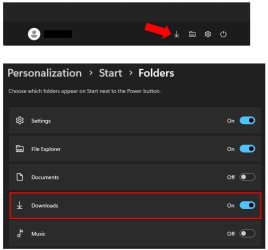
I was referring to the download shortcut on the bottom on your start window, if you don't have it enabled you can enable in Personalization > Start > Folders.

See snippet below.

File Explorer Download.jpg
 

My Computer My Computer

At a glance

Windows 11
OS
Windows 11
Computer type
Laptop
Manufacturer/Model
Dell XPS 17 9730
I was referring to the download shortcut on the bottom on your start window, if you don't have it enabled you can enable in Personalization > Start > Folders.

See snippet below.

View attachment 105513
Thanks for that explanation, I can do the same using the context menu of file explorer on the taskbar.
As long as I don't open the default Home, it does not crash. 👍
1724129600400.png
 

My Computer My Computer

At a glance

Windows 11 Pro 25H2Intel I9-9900K64GBNVIDIA RTX 2060
OS
Windows 11 Pro 25H2
Computer type
PC/Desktop
Manufacturer/Model
Dell XPS 8930
CPU
Intel I9-9900K
Memory
64GB
Graphics Card(s)
NVIDIA RTX 2060
Sound Card
NVIDIA High Definition Audio
Monitor(s) Displays
4k Samsung
Screen Resolution
3840 x 2160
Hard Drives
512GB NVMe, ADATA SU 800, 2TB HDD
I was referring to the download shortcut on the bottom on your start window, if you don't have it enabled you can enable in Personalization > Start > Folders.

See snippet below.

View attachment 105513

Mine wont' crash if I open it here:

1724133089076.png

Or any other place for that matter.
 

My Computer My Computer

At a glance

Windows 11Intel® Xeon® X5690 3.47GHz Six-CoreG.Skill PC3-12800 1600MHz 24GBNVIDIA GeForce GTX 1050
OS
Windows 11
Computer type
PC/Desktop
Manufacturer/Model
Asus/Custom Build
CPU
Intel® Xeon® X5690 3.47GHz Six-Core
Motherboard
Asus P6T Deluxe v2
Memory
G.Skill PC3-12800 1600MHz 24GB
Graphics Card(s)
NVIDIA GeForce GTX 1050
Sound Card
SoundMAX ADI AD2000B HD Audio
Monitor(s) Displays
Acer T232HL Touch Screen
Screen Resolution
1920 x 1080 @ 60Hz
Hard Drives
6 Crucial MX500 SSD 1TB each.
PSU
Thermaltake Toughpower Gold 850W
Case
Thermaltake Armor VA8000SWA
Cooling
Thermaltake Air Cooling System
Keyboard
Illuminated Multimedia LED Keyboard
Mouse
M16 Dual Mode Illuminated Mouse - Bluetooth / 2.4 GHz Mode
Internet Speed
800 Mbps
Browser
Edge / Opera / Vivaldi / Chrome / Firefox / Brave
Antivirus
Windows Defender Security
Mine wont' crash if I open it here:

View attachment 105516

Or any other place for that matter.
As long as it does not open the default "Home" folder, it does not crash. 🤞
I just updated a second machine, and that does not crash at all, even if I click on Home. 😂🤷‍♂️
These bugs are never consistent. 😵‍💫🤬
The one that fails is a DELL XPS 8940, the one that does not fail is a DELL XPS 8930.
No idea why one fails and the other doesn't. 🤷‍♂️
 
Last edited:

My Computer My Computer

At a glance

Windows 11 Pro 25H2Intel I9-9900K64GBNVIDIA RTX 2060
OS
Windows 11 Pro 25H2
Computer type
PC/Desktop
Manufacturer/Model
Dell XPS 8930
CPU
Intel I9-9900K
Memory
64GB
Graphics Card(s)
NVIDIA RTX 2060
Sound Card
NVIDIA High Definition Audio
Monitor(s) Displays
4k Samsung
Screen Resolution
3840 x 2160
Hard Drives
512GB NVMe, ADATA SU 800, 2TB HDD
Download went ok ran SFC and DISM scans With no problem. :-)
 

My Computers My Computers

  • At a glance

    Windows 11 Pro build 26.200.8894Intel Core i7-11700KFKingston FURY Beast RGB DDR4 16GB 3200MHz 2x8...ASUS GeForce RTX3060Ti Dual Mini V2, PCI Expr...
    OS
    Windows 11 Pro build 26.200.8894
    Computer type
    PC/Desktop
    Manufacturer/Model
    HomeBrew
    CPU
    Intel Core i7-11700KF
    Motherboard
    ASUS ROG Strix B560-F GAMING WIFI
    Memory
    Kingston FURY Beast RGB DDR4 16GB 3200MHz 2x8GB, DDR4, 3200MHz
    Graphics Card(s)
    ASUS GeForce RTX3060Ti Dual Mini V2, PCI Express 4.0, 8GB GDDR6
    Sound Card
    Asus Essence STX II 7.1
    Monitor(s) Displays
    2X BenQ GL2460
    Screen Resolution
    1920 X 1080
    Hard Drives
    Kingston A2000 1TB NVMe M.2 SSD - Samsung SSD 850 2.5 500 GB SATA 3 6/GB/s. Samsung SSD 850 2.5 250 GB SATA 3 6/GB/s. Seagate® Backup Plus Desktop 4TB USB3.0 3.5", SuperSpeed USB 3.0.
    PSU
    Corsair TX650M, 650W
    Case
    Corsair Carbide Series SPEC-DELTA RGB
    Cooling
    Cool Master ML240L V2 ARGB
    Keyboard
    Asus TUF Gaming K5 Cable USB / Logitech G213 Prodigy Gaming Keyboard.
    Mouse
    Asus TUF Gaming M5 Cable USB / Logitech G903 Ligthspeed Gaming Mouse.
    Internet Speed
    750 mbps Down / 25 mbps Up
    Browser
    Firefox
    Antivirus
    Microsoft Defender
    Other Info
    Cerwin-Vega Speakers - HP Deskjet 3060 Series - ED 3.1 Wireless Modem - Samsung S20 Plus 5G Smartphone
  • At a glance

    Windows 10 64 Bit 21H2Intel Core i5-6600 SkylakeCrucial Ballistix Sport 2400MHz 16GB DDR4,2x8...MSI GeForce GTX 1070 Gaming X 8GB
    Operating System
    Windows 10 64 Bit 21H2
    Computer type
    PC/Desktop
    Manufacturer/Model
    HomeBrew
    CPU
    Intel Core i5-6600 Skylake
    Motherboard
    ASRock Z170 Pro4
    Memory
    Crucial Ballistix Sport 2400MHz 16GB DDR4,2x8GB, 2400MHz
    Graphics card(s)
    MSI GeForce GTX 1070 Gaming X 8GB
    Sound Card
    7.1 CH HD Audio with Content Protection (Realtek ALC892 Audio Codec)
    Monitor(s) Displays
    Samsung 24" 24A312
    Screen Resolution
    1920 X 1080
    Hard Drives
    Samsung SSD 950 PRO 512GB M.2 PCIe M.2 - OCZ SSD 250GB, SATA3 6GB/s -ICY BOX 3,5" SATA 3Gb/s External Cabinet USB3.0
    PSU
    Fortron Source HyperM 600w
    Case
    Fractal Design Define R5 Black Pearl
    Cooling
    Cooler Master Hyper 212 Evo
    Keyboard
    Logitech
    Mouse
    Logitech
    Internet Speed
    750 mbps Down / 25 mbps Up
    Browser
    Firefox
    Antivirus
    Microsoft Defender
I updated two computers to beta 4076. On one of the two, File Explorer crashes every time I run it. The events log info is below. I ran all this list, all was fine:

sfc /scannow
Dism /Online /Cleanup-Image /CheckHealth
Dism /Online /Cleanup-Image /ScanHealth
Dism /Online /Cleanup-Image /RestoreHealth
Dism /online /cleanup-image /analyzecomponentstore
Dism /online /cleanup-image /startcomponentcleanup

Any ideas what I should try? everything else seems fine so far.
I was the first I think to report the Explorer crashes. So reading everyone's posts, this morning I restored to a previous backup of Windows, ran all the disk and scanned on it, and updated to 4076 again. No Explorer crashes! It seems to be random as someone mentioned - I have another Win 11 install that did not have the problem.
 

My Computer My Computer

At a glance

Windows 11Apple M1 Max 10 core/4 CPU assigned to Parall...64GB/24GB assigned to Parallels 17 VMApple 32 core GPU
OS
Windows 11
Computer type
Laptop
Manufacturer/Model
Apple MacBook Pro 16" 2021
CPU
Apple M1 Max 10 core/4 CPU assigned to Parallels 17 VM
Motherboard
Apple Silicon M1 Max
Memory
64GB/24GB assigned to Parallels 17 VM
Graphics Card(s)
Apple 32 core GPU
Sound Card
Apple
Monitor(s) Displays
16.2" Liquid Retina XDR
Screen Resolution
3456-by-2234 native resolution at 254 psi
Hard Drives
4TB SSD
PSU
Apple
Case
Apple
Cooling
Apple
Keyboard
Apple
Mouse
N/A; Apple Trackpad
Internet Speed
1.2Gb/42Gb
Browser
Parallels 17 VM: MS Edge
Antivirus
Parallels 17 VM: MS Defender
All is well here... SFC and DISM scans passed without issues. Home folder works fine.
 

My Computer My Computer

At a glance

WindowsXP/7/8/8.1/10/11,Linux,Android,FreeBSD...Intel® Core™ i7-8750H 8th Gen 2.2Ghz up to 4....64GB using 2x32GB CL16 Mushkin redLine modulesIntel UHD 630 & NVIDIA GeForce GTX 1050 Ti wi...
OS
WindowsXP/7/8/8.1/10/11,Linux,Android,FreeBSD Unix
Computer type
Laptop
Manufacturer/Model
Dell XPS 15 9570
CPU
Intel® Core™ i7-8750H 8th Gen 2.2Ghz up to 4.1Ghz
Motherboard
Dell XPS 15 9570
Memory
64GB using 2x32GB CL16 Mushkin redLine modules
Graphics Card(s)
Intel UHD 630 & NVIDIA GeForce GTX 1050 Ti with 4GB DDR5
Sound Card
Realtek ALC3266-CG
Monitor(s) Displays
15.6" 4K Touch UltraHD 3840x2160 made by Sharp
Screen Resolution
3840x2160 4K UltraHD
Hard Drives
Samsung MZ-V9P4T0B/AM 990 PRO 4TB PCIe®4.0 NVMe™ M.2 SSD was Toshiba KXG60ZNV1T02 NVMe 1TB SSD
PSU
Dell XPS 15 9570
Case
Dell XPS 15 9570
Cooling
Stock
Keyboard
Stock
Mouse
SwitftPoint ProPoint
Internet Speed
Comcast/XFinity 1.44Gbps/42.5Mbps
Browser
Microsoft EDGE (Chromium based) & Google Chrome
Antivirus
Windows Defender that came with Windows
Back
Top Bottom