UPDATE 10/8:
 www.elevenforum.com
 www.elevenforum.com
For information about Windows update terminology, see the article about the types of Windows updates and the monthly quality update types. For an overview of Windows 11, version 23H2, see its update history page.
Note Follow @WindowsUpdate to find out when new content is published to the Windows release health dashboard.
This non-security update includes quality improvements. Key changes include:
Microsoft combines the latest servicing stack update (SSU) for your operating system with the latest cumulative update (LCU). For general information about SSUs, see Servicing stack updates and Servicing Stack Updates (SSU): Frequently Asked Questions.
Install this update
To install this update, use one of the following Windows and Microsoft release channels.
If you want to remove the LCU
To remove the LCU after installing the combined SSU and LCU package, use the DISM/Remove-Package command line option with the LCU package name as the argument. You can find the package name by using this command: DISM /online /get-packages.
Running Windows Update Standalone Installer (wusa.exe) with the /uninstall switch on the combined package will not work because the combined package contains the SSU. You cannot remove the SSU from the system after installation.
File information
For a list of the files that are provided in this update, download the file information for cumulative update 5043145.
For a list of the files that are provided in the servicing stack update, download the file information for the SSU (KB5043143) - versions 22621.4245 and 22631.4245.
 support.microsoft.com
Check Windows Updates
UUP Dump:
64-bit ISO download:

ARM64 ISO download:
 www.elevenforum.com
KB5044285 Windows 11 Cumulative Update Build 22621.4317 (22H2) and 22631.4317 (23H2) - Oct. 8
Microsoft Support: Release notes will be posted when made available by Microsoft at 12PM CDT. Source: Check Windows Updates UUP Dump: 64-bit ISO download: x ARM64 ISO download: x https://www.elevenforum.com/t/uup-dump-download-windows-insider-iso.344/
www.elevenforum.com
Microsoft Support:
September 26, 2024 - KB5043145 (OS Builds 22621.4249 and 22631.4249) Preview
07/09/24---END OF SERVICE NOTICE---
IMPORTANT Home and Pro editions of Windows 11, version 22H2 will reach end of service on October 8, 2024. Until then, these editions will only receive security updates. They will not receive non-security, preview updates. To continue receiving security and non-security updates after October 8, 2024, we recommend that you update to the latest version of Windows.
Note We will continue to support Enterprise and Education editions after October 8, 2024.
Windows 11 version 22H2 End of Servicing on October 08, 2024
On October 8, 2024, Windows 11, version 21H2 (Enterprise, Education, and IoT Enterprise editions) and Windows 11, version 22H2 (Home and Pro editions) will reach end of servicing. The upcoming October 2024 security update, to be released on October 8, 2024, will be the last update available for...
www.elevenforum.com
For information about Windows update terminology, see the article about the types of Windows updates and the monthly quality update types. For an overview of Windows 11, version 23H2, see its update history page.
Note Follow @WindowsUpdate to find out when new content is published to the Windows release health dashboard.
Highlights
Note: Below is a summary of the key issues that this update addresses when you install this KB. If there are new features, it lists them as well. The bold text within the brackets indicates the item or area of the change we are documenting.Gradual rollout
These might not be available to all users because they will roll out gradually.- [Taskbar] New! You can now share local files directly from the search results that appear in the Search box on the taskbar.

Share Files with Nearby Devices in Windows 11
This tutorial will show you how to share files with nearby devices using Nearby Sharing in Windows 11. Windows Share in Windows 11 allows you to share file(s) using Nearby Sharing. Nearby sharing in Windows lets you share documents, photos, links to websites, and more with nearby devices by...
www.elevenforum.com

Share Files to Android Mobile Device from Windows 11 PC
This tutorial will show you how to share files from your Windows 11 PC to your linked Android mobile device using Windows Share. Starting with Windows 11 build 22631.4112, you can seamlessly share files between your PC and mobile device when they are connected via Phone Link and the Link to...
www.elevenforum.com

Share File with Email Contact in Windows 11
This tutorial will show you how to send an email to share file(s) with a contact in Windows 11. Windows Share in Windows 11 allows you to share file(s) with an email contact. If you have a desktop mail app (ex: "Outlook for Windows") installed, you can select to send an email to yourself or...
www.elevenforum.com

Share File with App in Windows 11
This tutorial will show you how to share a file with an app in Windows 11. Windows Share in Windows 11 allows you to share file(s) with an app to send from. Starting with Windows 11 build 22631.3810, Microsoft is rolling out the ability to copy files from the Windows share window. Just click...
www.elevenforum.com
- [Settings] New! The Delivery Optimization Settings page now matches the Windows 11 design. See Settings > Windows Update > Advanced options > Delivery Optimization.

Turn On or Off Windows Update Delivery Optimization in Windows 11
This tutorial will show you how to turn on or off allow downloads from other PCs for Delivery Optimization in Windows 11. Windows Update Delivery Optimization helps you get Windows updates and Microsoft Store apps more quickly and reliably. Windows Update Delivery Optimization works by letting...
www.elevenforum.com
- [Windows Share] New! This update removes the search box from the Windows Share window.
- [Lock screen] New! Media controls now show in the lower part of the lock screen at its center when media is playing.
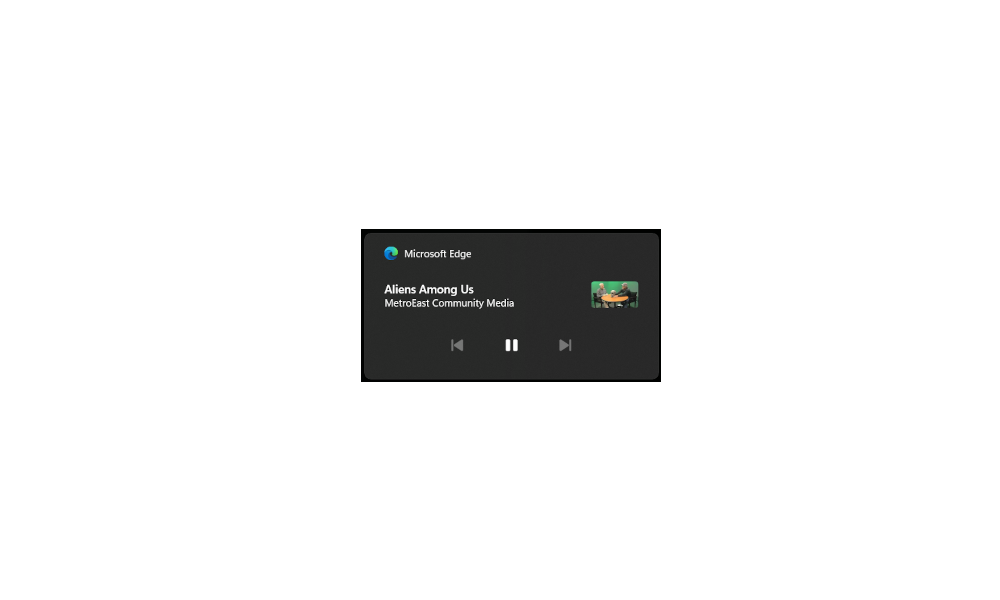
Enable or Disable Media Controls in Windows 11
This tutorial will show you how to enable or disable media controls from Google Chrome, Microsoft Edge, and/or Mozilla Firefox for your account in Windows 11. The Media controls OSD (On Screen Display) appears in Quick Settings (Win+A) and on the Lock screen (Win+L) when playing media (ex...
www.elevenforum.com
- [Start menu] New! The "Sign out" option is now on the account manager when you open the Start menu. To change to a different user, select the ellipses (...). A list of other users appears to make it easier to switch.

Sign out of Windows 11
This tutorial will show you different ways to sign out of your account or other users in Windows 11. When you sign out of Windows, all your open windows and apps are closed, but the computer is not turned off. Another user can sign in without needing to restart the computer. Reference...
www.elevenforum.com
Normal rollout
- [Microsoft Edge] It sometimes stops responding when you use IE mode.
- [Windows identity protection] Users no longer need to enter their credentials more than once for Outlook or another encrypted email app. A user will be prompted for their PIN one time only.
- [Copilot Pro subscription] New! You can now manage your Copilot Pro subscription in Settings. Sign in to your Microsoft account and go to Settings>Accounts.
- [Task Manager] It stops responding when you switch from a high contrast theme to a normal theme.
Improvements
Note: To view the list of addressed issues, click or tap the OS name to expand the collapsible section.Windows 11, version 23H2
Important: Use EKB KB5027397 to update to Windows 11, version 23H2.This non-security update includes quality improvements. Key changes include:
- This build includes all the improvements in Windows 11, version 22H2.
- No additional issues are documented for this release.
Windows 11, version 22H2: Enterprise and Education editions
This non-security update includes quality improvements. Below is a summary of the key issues that this update addresses when you install this KB. If there are new features, it lists them as well. The bold text within the brackets indicates the item or area of the change we are documenting.- [IE mode] Microsoft Edge sometimes stops responding when you use IE mode.
- [Transmission Control Protocol (TCP)] There is inconsistent data between TCP_INFO_v1 and GetPerTcpConnectionEstats. File synchronization services use TCP connection performance analysis tools. This issue affects how accurate those tools are.
- [Country and Operator Settings Asset] This update brings COSA profiles up to date for certain mobile operators.
- [Outlook and other encrypted email apps] This issue prompts for your PIN each time you open an encrypted email.
- [Microsoft Defender for Endpoint] Work Folders files fail to sync when Defender for Endpoint is on.
Windows 11 servicing stack update (KB5043143) - 22621.4245 and 22631.4245
This update makes quality improvements to the servicing stack, which is the component that installs Windows updates. Servicing stack updates (SSU) ensure that you have a robust and reliable servicing stack so that your devices can receive and install Microsoft updates.Known issues in this update
| Applies to | Symptom | Workaround |
|---|---|---|
| All users | After installing this update, some customers have reported that their device reboots multiple times or becomes irresponsive with blue or green screens. According to the reports, some devices automatically open the Automatic Repair tool after repeated reboot attempts. In some cases, BitLocker recovery can also be triggered. | We are currently investigating this issue. We will provide an update when more information is available. |
How to get this update
Before you install this updateMicrosoft combines the latest servicing stack update (SSU) for your operating system with the latest cumulative update (LCU). For general information about SSUs, see Servicing stack updates and Servicing Stack Updates (SSU): Frequently Asked Questions.
Install this update
To install this update, use one of the following Windows and Microsoft release channels.
| Available | Next Step |
|---|---|
| Yes (Windows Update) | Go to Settings > Update & Security > Windows Update. In the Optional updates available area, you will find the link to download and install the update. |
| Yes (MSU) | To get the standalone package for this update, go to the Microsoft Update Catalog website. |
If you want to remove the LCU
To remove the LCU after installing the combined SSU and LCU package, use the DISM/Remove-Package command line option with the LCU package name as the argument. You can find the package name by using this command: DISM /online /get-packages.
Running Windows Update Standalone Installer (wusa.exe) with the /uninstall switch on the combined package will not work because the combined package contains the SSU. You cannot remove the SSU from the system after installation.
File information
For a list of the files that are provided in this update, download the file information for cumulative update 5043145.
For a list of the files that are provided in the servicing stack update, download the file information for the SSU (KB5043143) - versions 22621.4245 and 22631.4245.
Source:
September 26, 2024—KB5043145 (OS Builds 22621.4249 and 22631.4249) Preview | Microsoft Support
September 26, 2024—KB5043145 (OS Builds 22621.4249 and 22631.4249) Preview
support.microsoft.com
Check Windows Updates
UUP Dump:
64-bit ISO download:
Select language for Windows 11, version 23H2 (22631.4249) amd64
Select language for Windows 11, version 23H2 (22631.4249) amd64 on UUP dump. UUP dump lets you download Unified Update Platform files, like Windows Insider updates, directly from Windows Update.
uupdump.net
ARM64 ISO download:
Select language for Windows 11, version 23H2 (22631.4249) arm64
Select language for Windows 11, version 23H2 (22631.4249) arm64 on UUP dump. UUP dump lets you download Unified Update Platform files, like Windows Insider updates, directly from Windows Update.
uupdump.net
UUP Dump - Download Windows Insider ISO
UUP Dump is the most practical and easy way to get ISO images of any Insider Windows 10 or Windows 11 version, as soon as Microsoft has released a new build. UUP Dump creates a download configuration file according to your choices, downloads necessary files directly from Microsoft servers, and...
www.elevenforum.com
Last edited:


 . This time no problems, and no SFC/DISM integrity violations.