Insider KB5043178 Windows 11 Insider Release Preview build 26100.1876 (24H2) - Sept. 23


UPDATE 10/10:


 Windows Blogs:

Hello Windows Insiders, today we’re releasing Windows 11 Build 26100.1876 (KB5043178) to Insiders in the Release Preview Channel on Windows 11, version 24H2 (Build 16100).

Below is a summary of the new features and improvements included as part of this update separated into two sections: gradual rollout and normal rollout. The bold text within the brackets indicates the item or area of the change we are documenting.

Gradual rollout

These might not be available to all users because they will roll out gradually. Text bolded in brackets indicate the area of the change being documented.
  • [Start menu] New! The “Sign out” option is now on the account manager when you open the Start menu. To change to a different user, select the ellipses (…). A list of other users appears to make it easier to switch.

  • Taskbar] New! You can now share local files directly from the search results that appear in the Search box on the taskbar.

  • [Settings]
    • New! The Delivery Optimization Settings page now matches the Windows 11 design. See Settings > Windows Update > Advanced options > Delivery Optimization.

    • New! There is a new energy recommendation to turn off high dynamic range (HDR). This helps to conserve energy on devices that have HDR displays. Go to Settings > Power & battery > Energy recommendations.

    • [ADDED 9/24] New! This update adds the option to turn off enhanced mouse pointer precision to Settings > Bluetooth & Devices > Mouse. There is also a new option to change the direction in which the mouse scrolls.

    • [ADDED 9/24] New! You can now set Power Mode for when your PC is plugged in and on battery. Go to Settings > System > Power & battery.

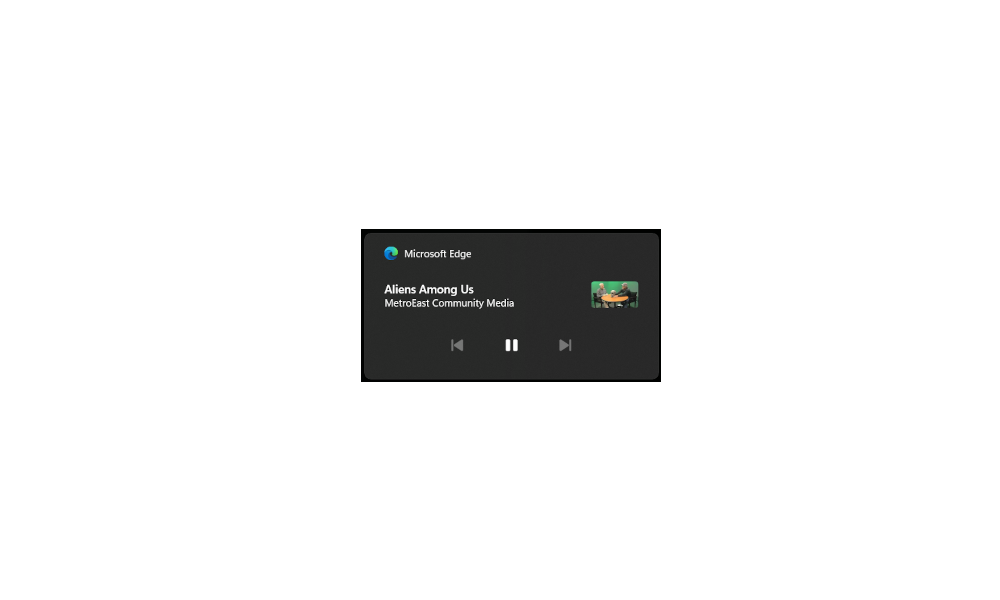
  • [Lock screen] New! Media controls now show in the lower part of the lock screen at its center when media is playing.

  • [Battery life] New! When your device’s battery power is running low, a pop-up window will appear that asks you to plug in your device. This occurs when the battery level reaches 20% and while Energy Saver is set to “Always On”.

Normal rollout

This update includes the following features and improvements that are rolling out as part of this update. Text bolded in brackets indicates the area of the change being documented.
  • [Open Source Software] This update adds attributions to credits.txt files for Rust OSS components.
  • [Input Method Editor (IME)] When a combo box has input focus, a memory leak might occur when you close that window.
  • [WebView2 apps] They do not detect input from Xbox 360 and Bluetooth controllers.
  • [ADDED 9/24] [Screen readers] The NonVisual Desktop Access (NVDA) app and other screen readers fail to narrate all the screen content from some apps. This occurs when those apps run with administrator privileges.
Thanks,
Windows Insider Program Team


 Source:


Check Windows Updates


UUP Dump:

64-bit ISO download:

ARM64 ISO download:

 
Last edited:
Thank you all for your replies.

I did manage to chat with an agent with my ISP this morning. They reset the modem remotely with a new very simple password and when I tried it, it did not work. Then I was asked what IP address I was using and it was the one printed on the modem 192.168.1.254. I was told to try 198.168.1.58 and that worked. I had tried that 198.168.1.58 address before I reset the modem, but not afterwards.

I think this confusion is caused because their modem is connected to their fibre-net modem that is in my closet.

AK
 

My Computer My Computer

At a glance

Window 11 ProAMD 8700GG.Skill DDR5 2x32GB EXPO 6000 32-38-38-96Radeon 5700 XT Gold
OS
Window 11 Pro
Computer type
PC/Desktop
CPU
AMD 8700G
Motherboard
Asus ROG Strix X670E-E Wifi
Memory
G.Skill DDR5 2x32GB EXPO 6000 32-38-38-96
Graphics Card(s)
Radeon 5700 XT Gold
Hard Drives
Samsung 990 PRO SSD 1 TB
PSU
Corsair 860i
Case
Cooler Master Haf X
Cooling
Corsair H100i
Keyboard
Logitech G19
Mouse
Logitech G700s
Internet Speed
1 GPS up and 1 GPS down
Browser
Edge
Antivirus
Defender
Other Info
Systen currently being built
Windows 11 Pro Version 24H2 (Installed on ‎30/‎09/‎2024 OS build 26100.1876, ) update completed successfully
but I am unable to delete the Windows update-clean 8GB file. I have tried many options:

Delete the contents of the SoftwareDistribution folder manually:
net stop wuauserv
net stop bits
net stop cryptsvc
ren C:\Windows\SoftwareDistribution SoftwareDistribution.old
ren C:\Windows\System32\catroot2 catroot2.old
net start wuauserv
net start bits
net start cryptsvc

Delete the contents of the Windows.old folder manually.
Run Disk Cleanup in Clean Boot State or Safe Mode.
Run the Windows Update Troubleshooter.
Run DISM to fix Component Store Corruption:
schtasks.exe /Run /TN "\Microsoft\Windows\Servicing\StartComponentCleanup"
Dism.exe /online /Cleanup-Image /StartComponentCleanup
Dism.exe /online /Cleanup-Image /StartComponentCleanup /ResetBase
Dism.exe /online /Cleanup-Image /SPSuperseded

Run sfc /scannow:
found corrupt files
2024-09-30 18:46:11, Info CSI 00000236 [SR] Repairing 1 component
2024-09-30 18:46:11, Info CSI 00000237 [SR] Beginning Verify and Repair transaction
2024-09-30 18:46:12, Info CSI 00000239 [SR] Repairing file \??\C:\WINDOWS\SystemApps\Microsoft.WindowsAppRuntime.CBS_8wekyb3d8bbwe\\Microsoft.Web.WebView2.Core.dll from store
2024-09-30 18:46:12, Info CSI 0000023b [SR] Repairing file \??\C:\WINDOWS\SystemApps\Microsoft.WindowsAppRuntime.CBS_8wekyb3d8bbwe\\Microsoft.Web.WebView2.Core.winmd from store
2024-09-30 18:46:12, Info CSI 0000023d [SR] Repair complete

None of these worked for me. Please help!
1727720474079.png

1727720428595.png
 

My Computer My Computer

At a glance

Windows 10Intel Core i5-6200U12 GB DDR4-2400 / PC4-19200 DDR4 SDRAM SO-DIMMIntel HD Graphics 520 (Skylake-U GT2) [D0/D1]...
OS
Windows 10
Computer type
Laptop
Manufacturer/Model
Lenovo ThinkPad T470s W10DG (Type 20JT)
CPU
Intel Core i5-6200U
Motherboard
LENOVO 20JTS21X0A
Memory
12 GB DDR4-2400 / PC4-19200 DDR4 SDRAM SO-DIMM
Graphics Card(s)
Intel HD Graphics 520 (Skylake-U GT2) [D0/D1] [Lenovo]
Sound Card
Realtek High Definition Audio
Monitor(s) Displays
LEN40A9
Screen Resolution
1920 x 1080(p) (60.031Hz)
Hard Drives
SanDisk SD8TN8U256G1001 243.6 GB
PSU
Lenovo 65W Standard AC Adapter (USB Type-C)
Internet Speed
24Mb Speed ADSL
Browser
Edge
Antivirus
Microsoft Defender Antivirus,
Windows 11 Pro Version 24H2 (Installed on ‎30/‎09/‎2024 OS build 26100.1876, ) update completed successfully
but I am unable to delete the Windows update-clean 8GB file. I have tried many options:
Known reported problem. 😝🤬

1727721608316.png
 

My Computer My Computer

At a glance

Windows 11 Pro 25H2Intel I9-9900K64GBNVIDIA RTX 2060
OS
Windows 11 Pro 25H2
Computer type
PC/Desktop
Manufacturer/Model
Dell XPS 8930
CPU
Intel I9-9900K
Memory
64GB
Graphics Card(s)
NVIDIA RTX 2060
Sound Card
NVIDIA High Definition Audio
Monitor(s) Displays
4k Samsung
Screen Resolution
3840 x 2160
Hard Drives
512GB NVMe, ADATA SU 800, 2TB HDD
Thank you all for your replies.

I did manage to chat with an agent with my ISP this morning. They reset the modem remotely with a new very simple password and when I tried it, it did not work. Then I was asked what IP address I was using and it was the one printed on the modem 192.168.1.254. I was told to try 198.168.1.58 and that worked. I had tried that 198.168.1.58 address before I reset the modem, but not afterwards.

I think this confusion is caused because their modem is connected to their fibre-net modem that is in my closet.

AK
My Modem IP address is also 192.168.1.254, but I don't have fiber.
I had fiber 10 years ago, but unfortunately it is still not available on my new address. 😝🤬
 

My Computer My Computer

At a glance

Windows 11 Pro 25H2Intel I9-9900K64GBNVIDIA RTX 2060
OS
Windows 11 Pro 25H2
Computer type
PC/Desktop
Manufacturer/Model
Dell XPS 8930
CPU
Intel I9-9900K
Memory
64GB
Graphics Card(s)
NVIDIA RTX 2060
Sound Card
NVIDIA High Definition Audio
Monitor(s) Displays
4k Samsung
Screen Resolution
3840 x 2160
Hard Drives
512GB NVMe, ADATA SU 800, 2TB HDD
Windows 11 Pro Version 24H2 (Installed on ‎30/‎09/‎2024 OS build 26100.1876, ) update completed successfully
but I am unable to delete the Windows update-clean 8GB file. I have tried many options.
Everybody who installed this build, either by running the 26/09/24 KB5043178 Cumulative Update for Windows 11 Version 24H2 or upgrading to Windows 11 Build (26200.1876), is in the same position as you.

It is the general opinion of most of the members of this forum that it will (?) not be corrected until the next cumulative update on 8 October.
 

My Computer My Computer

At a glance

Windows 11 Pro 25H2 (Build 26200.8968)Intel Core Ultra 9 285 5.6 GHz32.00 GBIntel Integrated Graphics (128 MB)
OS
Windows 11 Pro 25H2 (Build 26200.8968)
Computer type
PC/Desktop
Manufacturer/Model
Dell Pro Max Tower T2 FCT2250
CPU
Intel Core Ultra 9 285 5.6 GHz
Motherboard
64-bit operating system, x64-based processor
Memory
32.00 GB
Graphics Card(s)
Intel Integrated Graphics (128 MB)
Sound Card
Realtek Audio
Monitor(s) Displays
Dell P2714H Monitor
Screen Resolution
1920 x 1080
Hard Drives
1 x 512GB M.2 XG10d SED KIOXIA PCIe solid state drive (Internal)
1 x 2TB Seagate ST2000DM008-2UB102 HDD (Internal)
1 x 4TB Seagate STGX4000400 External HDD
1 x 6TB WD Elements AE 2689 External HDD
PSU
500 Watts
Cooling
Air
Keyboard
Microsoft Wired Keyboard 600
Mouse
Microsoft USB Basic Optical Mouse v2.0
Browser
Firefox
Antivirus
Windows Defender + Malwarebytes Premium
Other Info
BaseBoard Manufacturer Dell Inc.
BaseBoard Product 022RY57
BaseBoard Version A01
Everybody who installed this build, either by running the 26/09/24 KB5043178 Cumulative Update for Windows 11 Version 24H2 or upgrading to Windows 11 Build (26200.1876), is in the same position as you.

It is the general opinion of most of the members of this forum that it will (?) not be corrected until the next cumulative update on 8 October.
Between the Disk Cleanup bug, the recurring SFC/ Scannow errors, and the broken Desktop Slideshow I haven't been to impressed with this 24H2 build thus far lol.
 

My Computers My Computers

  • At a glance

    Windows 11 25H2Intel Core Ultra 9 275HX (24-Core)64GB DDR5 6400MT/sNVIDIA GeForce RTX 5080 and Intel UHD Graphics
    OS
    Windows 11 25H2
    Computer type
    Laptop
    Manufacturer/Model
    Alienware 18 Area-51
    CPU
    Intel Core Ultra 9 275HX (24-Core)
    Motherboard
    Alienware
    Memory
    64GB DDR5 6400MT/s
    Graphics Card(s)
    NVIDIA GeForce RTX 5080 and Intel UHD Graphics
    Sound Card
    Onboard, Realtek high-performance Audio chips (ALC3329 & ALC1708))
    Monitor(s) Displays
    300HZ 18-inch QHD 500 nit Comfort View+
    Screen Resolution
    2560 x 1600
    Hard Drives
    2TB NVMe M.2 PCIe Gen 5 SSD
    Case
    Magnesium Alloy
    Cooling
    Advanced Cryo-Tech Quad-Fan Cooling system & large vapor chamber
    Keyboard
    Cherry MX ultra low profile mechanical keyboard with per key AlienFX RGB lighting
    Mouse
    Logitech MX Master 4
    Browser
    Vivaldi (main), Firefox, Chrome, Edge
    Antivirus
    MS Defender and Malwarebytes Free
  • At a glance

    Windows 11 25H2Qualcomm Snapdragon X Elite (12 Core) ARM bas...16GB LPDDR5Qualcomm Adreno X1-85
    Operating System
    Windows 11 25H2
    Computer type
    Laptop
    Manufacturer/Model
    Microsoft Surface Laptop 7
    CPU
    Qualcomm Snapdragon X Elite (12 Core) ARM based CPU
    Motherboard
    Microsoft Corp.
    Memory
    16GB LPDDR5
    Graphics card(s)
    Qualcomm Adreno X1-85
    Sound Card
    Omnisonic speakers with Dolby Atmos spatial sound
    Monitor(s) Displays
    120 Hz 13.8-inch 600 nit PixelSense Flow touchscreen
    Screen Resolution
    2304x1536
    Hard Drives
    1TB NVMe Gen 4 SSD
    Case
    Anodized Aluminum
    Cooling
    Traditional active cooling fan system
    Keyboard
    Mechanical QWERTY, backlit when in use
    Mouse
    Logitech MX Master 4 and Surface Arc Mouse
    Browser
    Vivaldi (main), Firefox, Chrome, Edge
    Antivirus
    MS Defender and Malwarebytes Free

My Computers My Computers

  • At a glance

    Windows 11 25H2Intel Core Ultra 9 275HX (24-Core)64GB DDR5 6400MT/sNVIDIA GeForce RTX 5080 and Intel UHD Graphics
    OS
    Windows 11 25H2
    Computer type
    Laptop
    Manufacturer/Model
    Alienware 18 Area-51
    CPU
    Intel Core Ultra 9 275HX (24-Core)
    Motherboard
    Alienware
    Memory
    64GB DDR5 6400MT/s
    Graphics Card(s)
    NVIDIA GeForce RTX 5080 and Intel UHD Graphics
    Sound Card
    Onboard, Realtek high-performance Audio chips (ALC3329 & ALC1708))
    Monitor(s) Displays
    300HZ 18-inch QHD 500 nit Comfort View+
    Screen Resolution
    2560 x 1600
    Hard Drives
    2TB NVMe M.2 PCIe Gen 5 SSD
    Case
    Magnesium Alloy
    Cooling
    Advanced Cryo-Tech Quad-Fan Cooling system & large vapor chamber
    Keyboard
    Cherry MX ultra low profile mechanical keyboard with per key AlienFX RGB lighting
    Mouse
    Logitech MX Master 4
    Browser
    Vivaldi (main), Firefox, Chrome, Edge
    Antivirus
    MS Defender and Malwarebytes Free
  • At a glance

    Windows 11 25H2Qualcomm Snapdragon X Elite (12 Core) ARM bas...16GB LPDDR5Qualcomm Adreno X1-85
    Operating System
    Windows 11 25H2
    Computer type
    Laptop
    Manufacturer/Model
    Microsoft Surface Laptop 7
    CPU
    Qualcomm Snapdragon X Elite (12 Core) ARM based CPU
    Motherboard
    Microsoft Corp.
    Memory
    16GB LPDDR5
    Graphics card(s)
    Qualcomm Adreno X1-85
    Sound Card
    Omnisonic speakers with Dolby Atmos spatial sound
    Monitor(s) Displays
    120 Hz 13.8-inch 600 nit PixelSense Flow touchscreen
    Screen Resolution
    2304x1536
    Hard Drives
    1TB NVMe Gen 4 SSD
    Case
    Anodized Aluminum
    Cooling
    Traditional active cooling fan system
    Keyboard
    Mechanical QWERTY, backlit when in use
    Mouse
    Logitech MX Master 4 and Surface Arc Mouse
    Browser
    Vivaldi (main), Firefox, Chrome, Edge
    Antivirus
    MS Defender and Malwarebytes Free

My Computers My Computers

  • At a glance

    Windows 11 Pro for WorkstationsIntel i7-8700K 5 GHz64 GB (4x16GB) G.SKILL TridentZ RGB DDR4 3600...ASUS ROG-STRIX-GTX1080TI-O11G-GAMING (11GB GD...
    OS
    Windows 11 Pro for Workstations
    Computer type
    PC/Desktop
    Manufacturer/Model
    Custom self build
    CPU
    Intel i7-8700K 5 GHz
    Motherboard
    ASUS ROG Maximus XI Formula Z390
    Memory
    64 GB (4x16GB) G.SKILL TridentZ RGB DDR4 3600 MHz (F4-3600C18D-32GTZR)
    Graphics Card(s)
    ASUS ROG-STRIX-GTX1080TI-O11G-GAMING (11GB GDDR5X)
    Sound Card
    Integrated Digital Audio (S/PDIF)
    Monitor(s) Displays
    2 x Samsung Odyssey G75 27"
    Screen Resolution
    2560x1440
    Hard Drives
    1TB Samsung 990 PRO M.2,
    4TB Samsung 990 PRO M.2,
    TerraMaster F8 SSD Plus NAS
    PSU
    Seasonic Prime Titanium 850W
    Case
    Thermaltake Core P3 wall mounted
    Cooling
    Corsair Hydro H115i
    Keyboard
    Amazon Basics Wired Full Keyboard MD005
    Mouse
    Logitech MX Master 4
    Internet Speed
    2 Gbps Download and 100 Mbps Upload
    Browser
    Chrome and Edge
    Antivirus
    Microsoft Defender
    Other Info
    Logitech Z625 speaker system,
    Logitech BRIO 4K Pro webcam,
    HP Color LaserJet Pro MFP M477fdn,
    CyberPower CP1500PFCLCD
    Galaxy S23 Plus phone
  • At a glance

    Windows 11 ProSnapdragon X Elite (12 core) 3.42 GHz16 GB LPDDR5x-7467 MHz
    Operating System
    Windows 11 Pro
    Computer type
    Laptop
    Manufacturer/Model
    Surface Laptop 7 Copilot+ PC
    CPU
    Snapdragon X Elite (12 core) 3.42 GHz
    Memory
    16 GB LPDDR5x-7467 MHz
    Monitor(s) Displays
    15" HDR
    Screen Resolution
    2496 x 1664
    Hard Drives
    1 TB SSD
    Internet Speed
    Wi-Fi 7 and Bluetooth 5.4
    Browser
    Chrome and Edge
    Antivirus
    Microsoft Defender

Snipping Tool Update

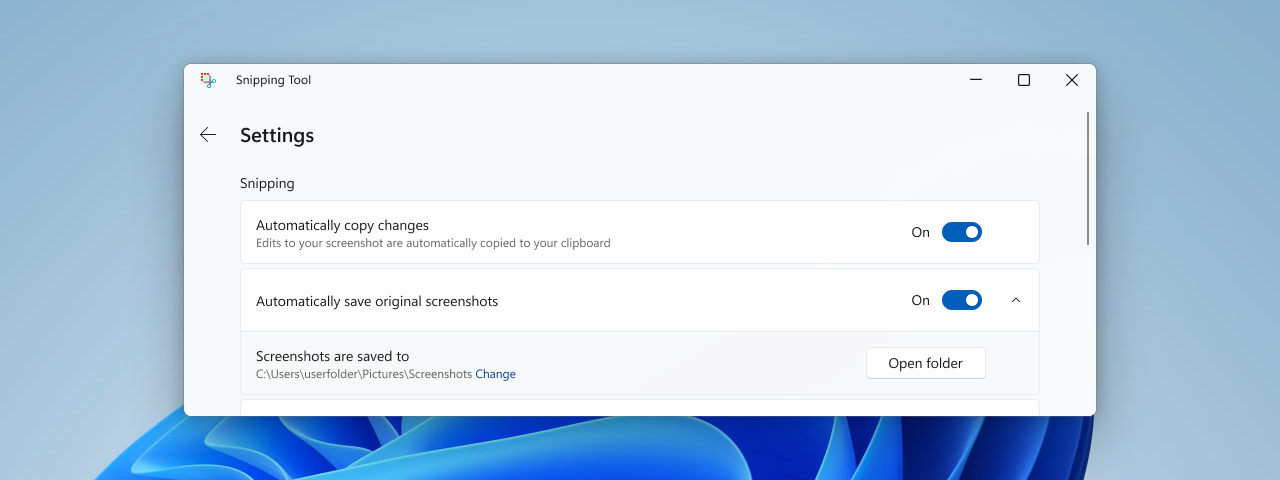
We are rolling out an update for Snipping Tool (version 11.2408.15.0 and newer) to Windows Insiders in the Beta and Release Preview Channels that introduces the ability to change the folder that original screenshots and screen recordings are automatically saved to. Just go to app settings in Snipping Tool to select a new default folder to try it out!


Setting in Snipping Tool to change the folder that screenshots and screen recordings are automatically saved.
 

My Computers My Computers

  • At a glance

    Windows 11 Pro for WorkstationsIntel i7-8700K 5 GHz64 GB (4x16GB) G.SKILL TridentZ RGB DDR4 3600...ASUS ROG-STRIX-GTX1080TI-O11G-GAMING (11GB GD...
    OS
    Windows 11 Pro for Workstations
    Computer type
    PC/Desktop
    Manufacturer/Model
    Custom self build
    CPU
    Intel i7-8700K 5 GHz
    Motherboard
    ASUS ROG Maximus XI Formula Z390
    Memory
    64 GB (4x16GB) G.SKILL TridentZ RGB DDR4 3600 MHz (F4-3600C18D-32GTZR)
    Graphics Card(s)
    ASUS ROG-STRIX-GTX1080TI-O11G-GAMING (11GB GDDR5X)
    Sound Card
    Integrated Digital Audio (S/PDIF)
    Monitor(s) Displays
    2 x Samsung Odyssey G75 27"
    Screen Resolution
    2560x1440
    Hard Drives
    1TB Samsung 990 PRO M.2,
    4TB Samsung 990 PRO M.2,
    TerraMaster F8 SSD Plus NAS
    PSU
    Seasonic Prime Titanium 850W
    Case
    Thermaltake Core P3 wall mounted
    Cooling
    Corsair Hydro H115i
    Keyboard
    Amazon Basics Wired Full Keyboard MD005
    Mouse
    Logitech MX Master 4
    Internet Speed
    2 Gbps Download and 100 Mbps Upload
    Browser
    Chrome and Edge
    Antivirus
    Microsoft Defender
    Other Info
    Logitech Z625 speaker system,
    Logitech BRIO 4K Pro webcam,
    HP Color LaserJet Pro MFP M477fdn,
    CyberPower CP1500PFCLCD
    Galaxy S23 Plus phone
  • At a glance

    Windows 11 ProSnapdragon X Elite (12 core) 3.42 GHz16 GB LPDDR5x-7467 MHz
    Operating System
    Windows 11 Pro
    Computer type
    Laptop
    Manufacturer/Model
    Surface Laptop 7 Copilot+ PC
    CPU
    Snapdragon X Elite (12 core) 3.42 GHz
    Memory
    16 GB LPDDR5x-7467 MHz
    Monitor(s) Displays
    15" HDR
    Screen Resolution
    2496 x 1664
    Hard Drives
    1 TB SSD
    Internet Speed
    Wi-Fi 7 and Bluetooth 5.4
    Browser
    Chrome and Edge
    Antivirus
    Microsoft Defender
All three of my Windows 11 computers updated this morning. The only problem that remains on all three computers is that sfc /scannow consistently show errors that have successfully repaired but running sfc again show the same message.
 

My Computers My Computers

  • At a glance

    Windows 11 ProAMD Ryzen 9 7950X32 GB DDR5XFX RX 7900XT
    OS
    Windows 11 Pro
    Computer type
    PC/Desktop
    Manufacturer/Model
    Self Built
    CPU
    AMD Ryzen 9 7950X
    Motherboard
    ROG STRIX X870E-E GAMING WIFi
    Memory
    32 GB DDR5
    Graphics Card(s)
    XFX RX 7900XT
    Monitor(s) Displays
    LG 32GK850F-B 32 Inch UltraGear™ QHD
    Browser
    Firefox
  • At a glance

    Windows 11 HomeAMD 7940HS32 GB DDR5Nvidia 4060
    Operating System
    Windows 11 Home
    Computer type
    Laptop
    Manufacturer/Model
    ASUS TUF Gaming A17 FA707XV-MS94 17.3" Laptop
    CPU
    AMD 7940HS
    Memory
    32 GB DDR5
    Graphics card(s)
    Nvidia 4060
    Screen Resolution
    1080P
    Browser
    Firefox
There are many issues that continue unresolved so don't sweat it and stop looking at it. Go watch a show or listen to some tunes with some friends.
 

My Computers My Computers

  • At a glance

    Windows 11 ProIntel Core i9 14900k, Intel UHD 770 integrated32gb G.Skill Trident Z5 7200Gigabyte RTX 4090 Gaming OC
    OS
    Windows 11 Pro
    Computer type
    PC/Desktop
    Manufacturer/Model
    Self Built
    CPU
    Intel Core i9 14900k, Intel UHD 770 integrated
    Motherboard
    Gigabyte Z790 Aorus Master X
    Memory
    32gb G.Skill Trident Z5 7200
    Graphics Card(s)
    Gigabyte RTX 4090 Gaming OC
    Sound Card
    EVGA Nu Audio, Razer Kraken V3 Pro, Realtek Onboard
    Monitor(s) Displays
    Dell U4025QW nano IPS monitor, Samsung Odyssey G75F, Wisecoco 12.6" IPS sensor panel
    Screen Resolution
    5120X2160 x 2 1920x515
    Hard Drives
    WD Black SN8100, Samsung 990 Pro x 3, WD BLACK SN850x, WD Black 8tb HD
    PSU
    FSP Hydro PTM Pro 1350w
    Case
    Thermaltake Level 20 XT
    Cooling
    ARCTIC Liquid Freezer III 420 ARGB in push/pull, Antec Prism X 120mm ARGB Fans x 15
    Keyboard
    Razer Blackwidow V4 Pro
    Mouse
    Razer Basilik V3 Pro on Razer Firefly V2 mouse pad.
    Internet Speed
    950 Mbps cable primary, 6Mbps secondary vdsl
    Browser
    Chrome primary, FF-Edge-IE secondary
    Antivirus
    Norton 360 Premium
    Other Info
    I sit on a Libernovo Omni chair.😍 Sound by Fosi Audio DA-2120C pushing Magnat Series 503 bookshelf speakers and a SVS SB-1000 Pro subwoofer.

  • At a glance

    Windows 11 ProIntel 14900HX32gb ddr 5 5600Nvidia RTX 4090 mobile
    Operating System
    Windows 11 Pro
    Computer type
    Laptop
    Manufacturer/Model
    2023 Acer Predator Helios 18
    CPU
    Intel 14900HX
    Motherboard
    factory
    Memory
    32gb ddr 5 5600
    Graphics card(s)
    Nvidia RTX 4090 mobile
    Sound Card
    onboard
    Monitor(s) Displays
    18" 250hz IPS
    Screen Resolution
    2560X1600
    Hard Drives
    Samsung 9100 Pro, 990 Pro
    PSU
    factory 330W
    Case
    factory
    Cooling
    factory
    Keyboard
    individual key argb
    Mouse
    touchpad
    Internet Speed
    WiFi 7, 2.5gb ethernet
    Browser
    Chrome primary, FF-IE and Edge secondary
    Antivirus
    Norton 360 Premium
    Other Info
    Acer will not allow WD Black SN8100 to function in m.2 slot 0 and Crucial T710 ssd's to function in either slot.
There are many issues that continue unresolved so don't sweat it and stop looking at it. Go watch a show or listen to some tunes with some friends.
Some stay and complain. Some do not and just revert to the .1742. If you can't or won't run with these errors, all has been said and we all know about the bugs.
 

My Computer My Computer

At a glance

Win 11 Insider Release Preview and Beta chann...i5 Core [email protected] (Unsupported for Win 11)12GBGeneric PnP Monitor (1920x1080@60Hz) Intel HD...
OS
Win 11 Insider Release Preview and Beta channels.
Computer type
Laptop
Manufacturer/Model
HP ENVY Bought: March 2017
CPU
i5 Core [email protected] (Unsupported for Win 11)
Motherboard
HP 81AD (U3E1)
Memory
12GB
Graphics Card(s)
Generic PnP Monitor (1920x1080@60Hz) Intel HD Graphics 620 (HP)
Sound Card
Conexant ISST audio
Monitor(s) Displays
Generic PnP Monitor
Screen Resolution
1536x864 pixels
Hard Drives
HGST HTS721010A9E630
PSU
Well...PSU you too!! What's this mean?
Case
HP ENVY SILVER
Cooling
A fan.
Keyboard
USA
Mouse
Logitec Anywhere 2
Internet Speed
Good enough for me! Fast!
Browser
Edge/Waterfox
Antivirus
Windows Defender
Other Info
No 'mo.
 

My Computers My Computers

  • At a glance

    Windows 11 Pro for WorkstationsIntel i7-8700K 5 GHz64 GB (4x16GB) G.SKILL TridentZ RGB DDR4 3600...ASUS ROG-STRIX-GTX1080TI-O11G-GAMING (11GB GD...
    OS
    Windows 11 Pro for Workstations
    Computer type
    PC/Desktop
    Manufacturer/Model
    Custom self build
    CPU
    Intel i7-8700K 5 GHz
    Motherboard
    ASUS ROG Maximus XI Formula Z390
    Memory
    64 GB (4x16GB) G.SKILL TridentZ RGB DDR4 3600 MHz (F4-3600C18D-32GTZR)
    Graphics Card(s)
    ASUS ROG-STRIX-GTX1080TI-O11G-GAMING (11GB GDDR5X)
    Sound Card
    Integrated Digital Audio (S/PDIF)
    Monitor(s) Displays
    2 x Samsung Odyssey G75 27"
    Screen Resolution
    2560x1440
    Hard Drives
    1TB Samsung 990 PRO M.2,
    4TB Samsung 990 PRO M.2,
    TerraMaster F8 SSD Plus NAS
    PSU
    Seasonic Prime Titanium 850W
    Case
    Thermaltake Core P3 wall mounted
    Cooling
    Corsair Hydro H115i
    Keyboard
    Amazon Basics Wired Full Keyboard MD005
    Mouse
    Logitech MX Master 4
    Internet Speed
    2 Gbps Download and 100 Mbps Upload
    Browser
    Chrome and Edge
    Antivirus
    Microsoft Defender
    Other Info
    Logitech Z625 speaker system,
    Logitech BRIO 4K Pro webcam,
    HP Color LaserJet Pro MFP M477fdn,
    CyberPower CP1500PFCLCD
    Galaxy S23 Plus phone
  • At a glance

    Windows 11 ProSnapdragon X Elite (12 core) 3.42 GHz16 GB LPDDR5x-7467 MHz
    Operating System
    Windows 11 Pro
    Computer type
    Laptop
    Manufacturer/Model
    Surface Laptop 7 Copilot+ PC
    CPU
    Snapdragon X Elite (12 core) 3.42 GHz
    Memory
    16 GB LPDDR5x-7467 MHz
    Monitor(s) Displays
    15" HDR
    Screen Resolution
    2496 x 1664
    Hard Drives
    1 TB SSD
    Internet Speed
    Wi-Fi 7 and Bluetooth 5.4
    Browser
    Chrome and Edge
    Antivirus
    Microsoft Defender
Back
Top Bottom