Win Update KB5044284 Windows 11 Cumulative Update build 26100.2033 (24H2) - Oct. 8


UPDATE 10/24:


 Microsoft Support:

October 8, 2024 - KB5044284 (OS Build 26100.2033)​


For information about Windows update terminology, see the article about the types of Windows updates and the monthly quality update types. For an overview of Windows 11, version 24H2, see its update history page.

Note Follow @WindowsUpdate to find out when new content is published to the Windows release health dashboard.


Highlights

  • This update addresses security issues for your Windows operating system.

Improvements

This security update includes improvements that were a part of update KB5043178 (released September 26, 2024). Below is a summary of the key issues that this update addresses when you install this KB. If there are new features, it lists them as well. The bold text within the brackets indicates the item or area of the change we are documenting.
  • [Remote Desktop Gateway Service] Fixed: The service stops responding. This occurs when a service uses remote procedure calls (RPC) over HTTP. Because of this, the clients that are using the service disconnect.
If you installed earlier updates, only the new updates contained in this package will be downloaded and installed on your device.

For more information about security vulnerabilities, please refer to the Security Update Guide website and the October 2024 Security Updates.

Windows 11 servicing stack update (KB 5046306)- 26100.2032​

This update makes quality improvements to the servicing stack, which is the component that installs Windows updates. Servicing stack updates (SSU) ensure that you have a robust and reliable servicing stack so that your devices can receive and install Microsoft updates.

Known issues in this update

Applies toSymptomWorkaround
All usersWe’re aware of an issue where players on Arm devices are unable to download and play Roblox via the Microsoft Store on Windows.Players on Arm devices can play Roblox by downloading the title directly from www.Roblox.com.
Enterprise usersAfter a fresh install or an In-place upgrade to Windows 11, version 24H2, you might face issues with connecting via DirectAccess. You might observe that the DirectAccess connection is not completing and remains in a ‘connecting’ state. Additionally, you can determine if you are affected by this issue by following the below steps:
  • Open Windows PowerShell in administrator prompt. This can be accomplished by opening the Start menu and typing ‘powershell’ and selecting from the results on the right side of the start menu.
  • Type the text ‘netsh interface httpstunnel show interface’ and press enter
  • If your device is experiencing this issue, you’ll observe that the output includes the following text:
    • Last Error Code : 0x57
    • Interface Status : failed to connect to the IPHTTPS server. Waiting to reconnect
You are more likely to face this issue if your device is remotely connecting to a corporate intranet using DirectAccess. Home users of Windows using Home or Pro editions are unlikely to face this issue as DirectAccess is more commonly used in enterprise environments.

Note: Enterprise customers that require DirectAccess are recommended to evaluate Always On VPN (AOVPN) until a fix becomes available.
This issue is addressed in KB5044384.
All usersFollowing the installation of the October 2024 security update, some customers report that the OpenSSH (Open Secure Shell) service fails to start, preventing SSH connections. The service fails with no detailed logging, and manual intervention is required to run the sshd.exe process.

This issue is affecting both enterprise, IOT, and education customers, with a limited number of devices impacted. Microsoft is investigating whether consumer customers using Home or Pro editions of Windows are affected.
Customers can temporarily resolve the issue by updating permissions (ACLs) on the affected directories. Follow these steps:
  1. Open PowerShell as an Administrator.
  2. Update the permissions for C:\ProgramData\ssh and C:\ProgramData\ssh\logs to allow full control for SYSTEM and the Administrators group, while allowing read access for Authenticated Users. You can restrict read access to specific users or groups by modifying the permissions string if needed.

    Use the following commands to update the permissions:
    $directoryPath = "C:\ProgramData\ssh" $acl = Get-Acl -Path $directoryPath $sddlString = "O:BAD:PAI(A;OICI;FA;;;SY)(A;OICI;FA;;;BA)(A;OICI;0x1200a9;;;AU)" $securityDescriptor = New-Object System.Security.AccessControl.RawSecurityDescriptor $sddlString $acl.SetSecurityDescriptorSddlForm($securityDescriptor.GetSddlForm("All")) Set-Acl -Path $directoryPath -AclObject $acl
  3. Repeat the above steps for C:\ProgramData\ssh\logs.
Microsoft is actively investigating the issue and will provide a resolution in an upcoming Windows update. Further communications will be provided when a resolution or additional workarounds are available.

How to get this update

Before you install this update

Microsoft combines the latest servicing stack update (SSU) for your operating system with the latest cumulative update (LCU). For general information about SSUs, see Servicing stack updates and Servicing Stack Updates (SSU): Frequently Asked Questions.

Install this update

To install this update, use one of the following Windows and Microsoft release channels.

AvailableNext Step
Yes (Windows Update)None. This update will be downloaded and installed automatically from Windows Update and Microsoft Update.
Yes (MSU)Before you install this update
To get the standalone package(s) for this update, go to the Microsoft Update Catalog website. This KB contains one or more MSU files that must be installed in order.

Install this update

Method 1: Install all MSU files together

Download all MSU files for KB5044284 from Microsoft Update Catalog and place them in the same folder (for example, C:/Packages). Use Deployment Image Servicing and Management (DISM.exe) to install the target update. DISM will use the folder specified in PackagePath to discover and install one or more prerequisite MSU files as needed.

Updating Windows PC
To apply this update to a running Windows PC, run the following command from an elevated Command Prompt:
DISM /Online /Add-Package /PackagePath:c:\packages\Windows11.0-KB5044284-x64.msu

Or, run the following command from an elevated Windows PowerShell prompt:
Add-WindowsPackage -Online -PackagePath "c:\packages\Windows11.0-KB5044284-x64.msu"

Updating Windows Installation media
To apply this update to Windows Installation media, see Update Windows installation media with Dynamic Update.

To add this update to a mounted image, run the following command from an elevated Command Prompt:
DISM /Image:mountdir /Add-Package /PackagePath:Windows11.0-KB5044284-x64.msu

Or, run the following command from an elevated Windows PowerShell prompt:
Add-WindowsPackage -Path "c:\offline" -PackagePath "Windows11.0-KB5044284-x64.msu" -PreventPending

If you want to remove the LCU

To remove the LCU after installing the combined SSU and LCU package, use the DISM/Remove-Package command line option with the LCU package name as the argument. You can find the package name by using this command: DISM /online /get-packages.

Running Windows Update Standalone Installer (wusa.exe) with the /uninstall switch on the combined package will not work because the combined package contains the SSU. You cannot remove the SSU from the system after installation.

File information

For a list of the files that are provided in this update, download the file information for cumulative update 5044284.

For a list of the files that are provided in the servicing stack update, download the file information for the SSU (KB 5046306) - version 26100.2032.


 Source:


Check Windows Updates


ISO from Microsoft Media Creation Tool (MCT):



UUP Dump:

64-bit ISO download:

ARM64 ISO download:

 
Last edited:
Thank you Mark. Greatly appreciate your reply
 

My Computer My Computer

At a glance

Windows 11 ProIntel Core i7-11700K Desktop Processor 8 CoresCorsair Vengeance LPX 32GB (2 x 16GB) DDR4 DR...ASUS GTX ROG STRIX 1080 8GB
OS
Windows 11 Pro
Computer type
PC/Desktop
Manufacturer/Model
ASUS
CPU
Intel Core i7-11700K Desktop Processor 8 Cores
Motherboard
ASUS ROG Strix Z590-A Gaming WiFi LGA 1200
Memory
Corsair Vengeance LPX 32GB (2 x 16GB) DDR4 DRAM 3600MHz
Graphics Card(s)
ASUS GTX ROG STRIX 1080 8GB
Sound Card
Sound Blaster Z SE
Monitor(s) Displays
ASUS VG34VQL1B plus a Samsung 60" Smartv
Screen Resolution
3440x1440, 165Hz
Hard Drives
Samsung 980 Series - (OS)1TB Pro Gen4 NVMe M.2, 1TB Gen3. x4 NVMe 1.4 - M.2, WD 1TB, WD 500GB, WD 350GB
PSU
Silverstone Olympia OP1000W PSW
Case
Phanteks Enthoo Pro
Cooling
Noctua NH-D15 SSO2 D-Type Premium CPU Cooler, NF-A15 x 2 PWM Fans
Keyboard
Corsair K70 RGB
Mouse
Logitech 310 wireless
Internet Speed
1 GB
Browser
Firefox
Antivirus
ESET Internet Security
Other Info
Testing Windows 10 Pro on 350GB drive
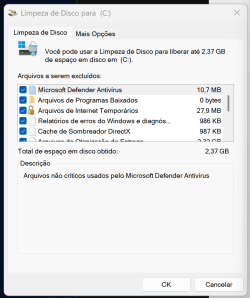
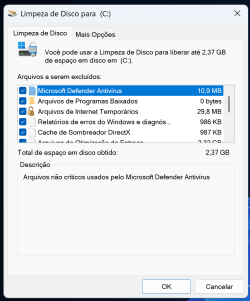
I'm on 26100.2033 through a clean install in a new SSD (1TB) on my Dell Inspiron. And I don't have 8,6 GB of Windows waste. See my DiskClean result image. 1728502520144.png
 

My Computer My Computer

At a glance

windows 11Intel Core i7 - 8550U24 GB DDR4 SDRAMIntel UHD 620 / AMD Radeon R7 M465/530/535 4GB
OS
windows 11
Computer type
PC/Desktop
Manufacturer/Model
Dell/Inspiron 5570
CPU
Intel Core i7 - 8550U
Motherboard
Dell 0X34T0
Memory
24 GB DDR4 SDRAM
Graphics Card(s)
Intel UHD 620 / AMD Radeon R7 M465/530/535 4GB
Sound Card
Foucusrite Scarlett Solo 2nd Generation
Monitor(s) Displays
Dell S2817Q
Screen Resolution
2560 x 1440
Hard Drives
SSD Samsung 750 EVO 250GB
Mouse
Logitech M720
Internet Speed
300Mbps - Fiber
Browser
Edge
And I don't have 8,6 GB of Windows waste


Yeah, there's two bugs on 24H2 after (26100.1742)

Disk Cleanup (we ALL show 8.63GB of junk, which isn't really there).

And when you run sfc /scannow... it will keep saying "found and repaired errors", no matter how many times you run it.
 

My Computers My Computers

  • At a glance

    Win 11 Home ♦♦♦26200.8737 ♦♦♦♦♦♦♦25H2AMD Ryzen 7 3700XG.Skill (F4-3200C14D-16GTZKW)EVGA RTX 2070 (08G-P4-2171-KR)
    OS
    Win 11 Home ♦♦♦26200.8737 ♦♦♦♦♦♦♦25H2
    Computer type
    PC/Desktop
    Manufacturer/Model
    Built by Ghot® [May 2020]
    CPU
    AMD Ryzen 7 3700X
    Motherboard
    Asus Pro WS X570-ACE (BIOS 5302)
    Memory
    G.Skill (F4-3200C14D-16GTZKW)
    Graphics Card(s)
    EVGA RTX 2070 (08G-P4-2171-KR)
    Sound Card
    Realtek ALC1220P / ALC S1220A
    Monitor(s) Displays
    Dell U3011 30"
    Screen Resolution
    2560 x 1600
    Hard Drives
    2x Samsung 860 EVO 500GB,
    WD 4TB Black FZBX - SATA III,
    WD 8TB Black FZBX - SATA III,
    DRW-24B1ST CD/DVD Burner
    PSU
    PC Power & Cooling 750W Quad EPS12V
    Case
    Cooler Master ATCS 840 Tower
    Cooling
    CM Hyper 212 EVO (push/pull)
    Keyboard
    Ducky DK9008 Shine II Blue LED
    Mouse
    Logitech Optical M-100
    Internet Speed
    300/300
    Browser
    Firefox (latest)
    Antivirus
    Bitdefender Total Security
    Other Info
    Speakers: Klipsch Pro Media 2.1
  • At a glance

    Windows XP Pro 32bit w/SP3AMD Athlon 64 X2 5000+ (OC'd @ 3.2Ghz)TWIN2X2048-6400C4DHX (2 x 1GB, DDR2 800)EVGA 256-P2-N758-TR GeForce 8600GT SSC
    Operating System
    Windows XP Pro 32bit w/SP3
    Computer type
    PC/Desktop
    Manufacturer/Model
    Built by Ghot® (not in use)
    CPU
    AMD Athlon 64 X2 5000+ (OC'd @ 3.2Ghz)
    Motherboard
    ASUS M2N32-SLI Deluxe Wireless Edition
    Memory
    TWIN2X2048-6400C4DHX (2 x 1GB, DDR2 800)
    Graphics card(s)
    EVGA 256-P2-N758-TR GeForce 8600GT SSC
    Sound Card
    Onboard
    Monitor(s) Displays
    ViewSonic G90FB Black 19" Professional (CRT)
    Screen Resolution
    up to 2048 x 1536
    Hard Drives
    WD 36GB 10,000rpm Raptor SATA
    Seagate 80GB 7200rpm SATA
    Lite-On LTR-52246S CD/RW
    Lite-On LH-18A1P CD/DVD Burner
    PSU
    PC Power & Cooling Silencer 750 Quad EPS12V
    Case
    Generic Beige case, 80mm fans
    Cooling
    ZALMAN 9500A 92mm CPU Cooler
    Keyboard
    Logitech Classic Keybooard 200
    Mouse
    Logitech Optical M-BT96a
    Internet Speed
    300/300
    Browser
    Firefox 3.x ??
    Antivirus
    Symantec (Norton)
    Other Info
    Still assembled, still runs. Haven't turned it on for 15 years?
i was away since Sept 15th and had my win11 pro shut down so I didn't get any updates. Yesterday I got home and started my computer and took the updates but it was only 23H2 and >NET and Software Removal tool that updated. I left it running all night but have not got the 24H2 appear yet. Also my new laptop which is fully updated because I took it with me on vacation but only is downloading the 23H2. Why is it that my desktop and laptop is not getting the 24H2, anyone know?


Last edited:

My Computers My Computers

  • At a glance

    Win 11 Home ♦♦♦26200.8737 ♦♦♦♦♦♦♦25H2AMD Ryzen 7 3700XG.Skill (F4-3200C14D-16GTZKW)EVGA RTX 2070 (08G-P4-2171-KR)
    OS
    Win 11 Home ♦♦♦26200.8737 ♦♦♦♦♦♦♦25H2
    Computer type
    PC/Desktop
    Manufacturer/Model
    Built by Ghot® [May 2020]
    CPU
    AMD Ryzen 7 3700X
    Motherboard
    Asus Pro WS X570-ACE (BIOS 5302)
    Memory
    G.Skill (F4-3200C14D-16GTZKW)
    Graphics Card(s)
    EVGA RTX 2070 (08G-P4-2171-KR)
    Sound Card
    Realtek ALC1220P / ALC S1220A
    Monitor(s) Displays
    Dell U3011 30"
    Screen Resolution
    2560 x 1600
    Hard Drives
    2x Samsung 860 EVO 500GB,
    WD 4TB Black FZBX - SATA III,
    WD 8TB Black FZBX - SATA III,
    DRW-24B1ST CD/DVD Burner
    PSU
    PC Power & Cooling 750W Quad EPS12V
    Case
    Cooler Master ATCS 840 Tower
    Cooling
    CM Hyper 212 EVO (push/pull)
    Keyboard
    Ducky DK9008 Shine II Blue LED
    Mouse
    Logitech Optical M-100
    Internet Speed
    300/300
    Browser
    Firefox (latest)
    Antivirus
    Bitdefender Total Security
    Other Info
    Speakers: Klipsch Pro Media 2.1
  • At a glance

    Windows XP Pro 32bit w/SP3AMD Athlon 64 X2 5000+ (OC'd @ 3.2Ghz)TWIN2X2048-6400C4DHX (2 x 1GB, DDR2 800)EVGA 256-P2-N758-TR GeForce 8600GT SSC
    Operating System
    Windows XP Pro 32bit w/SP3
    Computer type
    PC/Desktop
    Manufacturer/Model
    Built by Ghot® (not in use)
    CPU
    AMD Athlon 64 X2 5000+ (OC'd @ 3.2Ghz)
    Motherboard
    ASUS M2N32-SLI Deluxe Wireless Edition
    Memory
    TWIN2X2048-6400C4DHX (2 x 1GB, DDR2 800)
    Graphics card(s)
    EVGA 256-P2-N758-TR GeForce 8600GT SSC
    Sound Card
    Onboard
    Monitor(s) Displays
    ViewSonic G90FB Black 19" Professional (CRT)
    Screen Resolution
    up to 2048 x 1536
    Hard Drives
    WD 36GB 10,000rpm Raptor SATA
    Seagate 80GB 7200rpm SATA
    Lite-On LTR-52246S CD/RW
    Lite-On LH-18A1P CD/DVD Burner
    PSU
    PC Power & Cooling Silencer 750 Quad EPS12V
    Case
    Generic Beige case, 80mm fans
    Cooling
    ZALMAN 9500A 92mm CPU Cooler
    Keyboard
    Logitech Classic Keybooard 200
    Mouse
    Logitech Optical M-BT96a
    Internet Speed
    300/300
    Browser
    Firefox 3.x ??
    Antivirus
    Symantec (Norton)
    Other Info
    Still assembled, still runs. Haven't turned it on for 15 years?
Right-click it and run it as Admin
I'm running Disk Cleanup from search/run. There is no way to right-click it. But it's searching the system files too.
 

My Computer My Computer

At a glance

windows 11Intel Core i7 - 8550U24 GB DDR4 SDRAMIntel UHD 620 / AMD Radeon R7 M465/530/535 4GB
OS
windows 11
Computer type
PC/Desktop
Manufacturer/Model
Dell/Inspiron 5570
CPU
Intel Core i7 - 8550U
Motherboard
Dell 0X34T0
Memory
24 GB DDR4 SDRAM
Graphics Card(s)
Intel UHD 620 / AMD Radeon R7 M465/530/535 4GB
Sound Card
Foucusrite Scarlett Solo 2nd Generation
Monitor(s) Displays
Dell S2817Q
Screen Resolution
2560 x 1440
Hard Drives
SSD Samsung 750 EVO 250GB
Mouse
Logitech M720
Internet Speed
300Mbps - Fiber
Browser
Edge
Yeah, there's two bugs on 24H2 after (26100.1742)

Disk Cleanup (we ALL show 8.63GB of junk, which isn't really there).

And when you run sfc /scannow... it will keep saying "found and repaired errors", no matter how many times you run it.
Yes, I also have the SFC/Scannow issue.
 

My Computer My Computer

At a glance

windows 11Intel Core i7 - 8550U24 GB DDR4 SDRAMIntel UHD 620 / AMD Radeon R7 M465/530/535 4GB
OS
windows 11
Computer type
PC/Desktop
Manufacturer/Model
Dell/Inspiron 5570
CPU
Intel Core i7 - 8550U
Motherboard
Dell 0X34T0
Memory
24 GB DDR4 SDRAM
Graphics Card(s)
Intel UHD 620 / AMD Radeon R7 M465/530/535 4GB
Sound Card
Foucusrite Scarlett Solo 2nd Generation
Monitor(s) Displays
Dell S2817Q
Screen Resolution
2560 x 1440
Hard Drives
SSD Samsung 750 EVO 250GB
Mouse
Logitech M720
Internet Speed
300Mbps - Fiber
Browser
Edge
Yeah, there's two bugs on 24H2 after (26100.1742)

Disk Cleanup (we ALL show 8.63GB of junk, which isn't really there).

And when you run sfc /scannow... it will keep saying "found and repaired errors", no matter how many times you run it.
Regarding sfc /scannow bug... I already said it months ago and my predictions was right and on point... it did happen on general release :nope:
KB5043178 Windows 11 Insider Release Preview build 26100.1876 (24H2) - Sept. 23
Just to show how incompetent Microsoft are :lmao:
 

My Computer My Computer

At a glance

Win11 Insider[Always the latest Dev/Beta rele...AMD Ryzen 7 4800H with Radeon GraphicsG.SKILL [Samsung Die] DRR4 - 3200Mhz CL18 (18...nVidia GTX 1660ti GDDR6 6GB(90W) 2.02Ghz Core...
OS
Win11 Insider[Always the latest Dev/Beta releases]
Computer type
Laptop
Manufacturer/Model
Asus TUF Gaming FA506IU Laptop
CPU
AMD Ryzen 7 4800H with Radeon Graphics
Motherboard
AMD K17.6 FCH, AMD K17.6 IMC
Memory
G.SKILL [Samsung Die] DRR4 - 3200Mhz CL18 (18-19-19-36) - 32GB(16GBx2)
Graphics Card(s)
nVidia GTX 1660ti GDDR6 6GB(90W) 2.02Ghz Core & +548Mhz Mem-OC'ed [VBIOS Unlocked]
Sound Card
Realtek ALC256 @ AMD K17.6
Monitor(s) Displays
LM156LF-2F03 144HZ with Adaptive SYNC
Screen Resolution
1920x1080 - 144Hz
Hard Drives
WDC PC SN530 SDBPNPZ-256G-1002 + SHGP31-500GM-2 + ST1000LM035-1RK172 + Samsung SSD 870 QVO 1TB 1000.2 GB
PSU
ASUS Power Brick 180W
Case
Laptop Case with Dual Fan
Cooling
Dual Fans Design with Self-Cleaning Cooling
Keyboard
Asus Aura RGB with Overstroke technology
Mouse
ROG SICA Gaming Mouse
Internet Speed
100Mbps FiberOptic [100 Mbps Down - 50 Mbps Up]
Browser
Chrome/Firefox/Tor
Antivirus
Symantec Endpoint Protection with Windows Defender (Active Mode) + Custom DNS Server
Other Info
CPU with -15 Curve Optimizer all cores and -50 Cure optimizer on iGPU
BCLK OC to 101.6Mhz
Benchmark Scores:-
CineBench R23 Single core:- 1290 points
CineBench R23 Multi core:- 11111 points
ok.... hmm.... I am always sketchy about forcing an update... lol


New topic about this...


My Computers My Computers

  • At a glance

    Win 11 Home ♦♦♦26200.8737 ♦♦♦♦♦♦♦25H2AMD Ryzen 7 3700XG.Skill (F4-3200C14D-16GTZKW)EVGA RTX 2070 (08G-P4-2171-KR)
    OS
    Win 11 Home ♦♦♦26200.8737 ♦♦♦♦♦♦♦25H2
    Computer type
    PC/Desktop
    Manufacturer/Model
    Built by Ghot® [May 2020]
    CPU
    AMD Ryzen 7 3700X
    Motherboard
    Asus Pro WS X570-ACE (BIOS 5302)
    Memory
    G.Skill (F4-3200C14D-16GTZKW)
    Graphics Card(s)
    EVGA RTX 2070 (08G-P4-2171-KR)
    Sound Card
    Realtek ALC1220P / ALC S1220A
    Monitor(s) Displays
    Dell U3011 30"
    Screen Resolution
    2560 x 1600
    Hard Drives
    2x Samsung 860 EVO 500GB,
    WD 4TB Black FZBX - SATA III,
    WD 8TB Black FZBX - SATA III,
    DRW-24B1ST CD/DVD Burner
    PSU
    PC Power & Cooling 750W Quad EPS12V
    Case
    Cooler Master ATCS 840 Tower
    Cooling
    CM Hyper 212 EVO (push/pull)
    Keyboard
    Ducky DK9008 Shine II Blue LED
    Mouse
    Logitech Optical M-100
    Internet Speed
    300/300
    Browser
    Firefox (latest)
    Antivirus
    Bitdefender Total Security
    Other Info
    Speakers: Klipsch Pro Media 2.1
  • At a glance

    Windows XP Pro 32bit w/SP3AMD Athlon 64 X2 5000+ (OC'd @ 3.2Ghz)TWIN2X2048-6400C4DHX (2 x 1GB, DDR2 800)EVGA 256-P2-N758-TR GeForce 8600GT SSC
    Operating System
    Windows XP Pro 32bit w/SP3
    Computer type
    PC/Desktop
    Manufacturer/Model
    Built by Ghot® (not in use)
    CPU
    AMD Athlon 64 X2 5000+ (OC'd @ 3.2Ghz)
    Motherboard
    ASUS M2N32-SLI Deluxe Wireless Edition
    Memory
    TWIN2X2048-6400C4DHX (2 x 1GB, DDR2 800)
    Graphics card(s)
    EVGA 256-P2-N758-TR GeForce 8600GT SSC
    Sound Card
    Onboard
    Monitor(s) Displays
    ViewSonic G90FB Black 19" Professional (CRT)
    Screen Resolution
    up to 2048 x 1536
    Hard Drives
    WD 36GB 10,000rpm Raptor SATA
    Seagate 80GB 7200rpm SATA
    Lite-On LTR-52246S CD/RW
    Lite-On LH-18A1P CD/DVD Burner
    PSU
    PC Power & Cooling Silencer 750 Quad EPS12V
    Case
    Generic Beige case, 80mm fans
    Cooling
    ZALMAN 9500A 92mm CPU Cooler
    Keyboard
    Logitech Classic Keybooard 200
    Mouse
    Logitech Optical M-BT96a
    Internet Speed
    300/300
    Browser
    Firefox 3.x ??
    Antivirus
    Symantec (Norton)
    Other Info
    Still assembled, still runs. Haven't turned it on for 15 years?
Went back to 23H2 , lost all my settings ( contextmenus , etc.etc ) , will wait with this buggy upgrade......... ;-)
 

My Computers My Computers

  • At a glance

    Windows11 Pro 25H2i732GBnVidia
    OS
    Windows11 Pro 25H2
    Computer type
    PC/Desktop
    Manufacturer/Model
    Asus
    CPU
    i7
    Motherboard
    z97k
    Memory
    32GB
    Graphics Card(s)
    nVidia
    Sound Card
    Realtek
    Hard Drives
    3
    Cooling
    air
    Browser
    Edge
    Antivirus
    ESET
  • At a glance

    Windows11 ProIntel i516GBIntel
    Operating System
    Windows11 Pro
    Computer type
    PC/Desktop
    Manufacturer/Model
    ASUS
    CPU
    Intel i5
    Motherboard
    ASUS Basic
    Memory
    16GB
    Graphics card(s)
    Intel
    Sound Card
    Realtek
    Monitor(s) Displays
    Samsung
    Hard Drives
    one intern , 0ne extern, OS on SSD
    Cooling
    air
    Keyboard
    wireless Logitech
    Mouse
    wireless Logitech
    Internet Speed
    1GB
    Browser
    Edge
    Antivirus
    ESET
Went back to 23H2 , lost all my settings ( contextmenus , etc.etc ) , will wait with this buggy upgrade......... ;-)
Did you revert by the recovery menus?
Far better to make an image backup first and use that to revert.
 

My Computer My Computer

At a glance

Windows 11 Pro + Win11 Canary VM.I9 13th gen i9-13900H 2.60 GHZ16 GB solderedIntegrated Intel Iris XE
OS
Windows 11 Pro + Win11 Canary VM.
Computer type
Laptop
Manufacturer/Model
ASUS Zenbook 14
CPU
I9 13th gen i9-13900H 2.60 GHZ
Motherboard
Yep, Laptop has one.
Memory
16 GB soldered
Graphics Card(s)
Integrated Intel Iris XE
Sound Card
Realtek built in
Monitor(s) Displays
laptop OLED screen
Screen Resolution
2880x1800 touchscreen
Hard Drives
1 TB NVME SSD (only weakness is only one slot)
PSU
Internal + 65W thunderbolt USB4 charger
Case
Yep, got one
Cooling
Stella Artois (UK pint cans - 568 ml) - extra cost.
Keyboard
Built in UK keybd
Mouse
Bluetooth , wireless dongled, wired
Internet Speed
900 mbs (ethernet), wifi 6 typical 350-450 mb/s both up and down
Browser
Edge
Antivirus
Defender
Other Info
TPM 2.0, 2xUSB4 thunderbolt, 1xUsb3 (usb a), 1xUsb-c, hdmi out, 3.5 mm audio out/in combo, ASUS backlit trackpad (inc. switchable number pad)

Macrium Reflect Home V8
Office 365 Family (6 users each 1TB onedrive space)
Hyper-V (a vm runs almost as fast as my older laptop)
All apps > Windows Tools > Disk Cleanup (right-click and run as administrator)
Otherwise the file will not show
I did what you said, but the result was the same. 1728509184887.png
 

My Computer My Computer

At a glance

windows 11Intel Core i7 - 8550U24 GB DDR4 SDRAMIntel UHD 620 / AMD Radeon R7 M465/530/535 4GB
OS
windows 11
Computer type
PC/Desktop
Manufacturer/Model
Dell/Inspiron 5570
CPU
Intel Core i7 - 8550U
Motherboard
Dell 0X34T0
Memory
24 GB DDR4 SDRAM
Graphics Card(s)
Intel UHD 620 / AMD Radeon R7 M465/530/535 4GB
Sound Card
Foucusrite Scarlett Solo 2nd Generation
Monitor(s) Displays
Dell S2817Q
Screen Resolution
2560 x 1440
Hard Drives
SSD Samsung 750 EVO 250GB
Mouse
Logitech M720
Internet Speed
300Mbps - Fiber
Browser
Edge
Downloading, and will report any problems I see.
 

My Computer My Computer

At a glance

Win11 Experimental Channel for 26H2 buildsAMD R7 7800X3DGSkill 2x16GB @ 6400MT/sXFX 9070 XT SWIFT tri-fan (PCIe5.0)
OS
Win11 Experimental Channel for 26H2 builds
Computer type
PC/Desktop
Manufacturer/Model
a cherry-picked assembly
CPU
AMD R7 7800X3D
Motherboard
MSI x870 Tomahawk Wi-Fi, 8-layer, 2 oz copper, server PCB
Memory
GSkill 2x16GB @ 6400MT/s
Graphics Card(s)
XFX 9070 XT SWIFT tri-fan (PCIe5.0)
Sound Card
Creative Labs G8 USB External Sound device, Gaming DAC, Sound Card & Earphone AMP.. HIGHLY RECOMMENDED, btw. Totally changed my opinion of external USB sound. I like!...;)
Monitor(s) Displays
Philips 42" OLED @ 4k
Screen Resolution
3840x2160
Hard Drives
*Boot: Samsung 980 Pro 2 TB NVMe (PCIe4x4)
*Samsung 980 EVO NVMe 500GB (PCIe 4x4)
*Kingston SNV3S2000G 2TB NVMe (PCIe4x4)
*Samsung 960 EVO 250GB NVMe(PCIe3x2)
*8TB Toshiba x300 HDD
*ST4000DM004 S3 4TB HDD
PSU
Gigabyte 850W Gold, Rev 2
Case
Lian Li Lancool 217, white, with wood trim, very nice looking--tired of black, 5-fans standard
Cooling
Air coutesy Lian Li
Keyboard
Cherry MX 2.0S RGB
Mouse
Razer Basilisk V3 24k DPI
Internet Speed
~950Mbps down and up!
Browser
Firefox x64 DE
Antivirus
Defender
Other Info
Great New system. Exceeds my expectations by quite a bit, btw. I love the USB G8 SoundBlaster, it's quite an improvement over the G6!
Updated both of my supported devices. Systems seem to function well even with the reported sfc bug and the disk cleanup bug. However, on my unsupported system, there seemed to be other issues, so I took it back to Windows 10 by restoring an image I made just prior to upgrading that system to W11 24H2.
 

My Computers My Computers

  • At a glance

    Windows 11 Pro 25H2AMD Ryzen 9 7940HS32 GBRadeon 780M Graphics
    OS
    Windows 11 Pro 25H2
    Computer type
    PC/Desktop
    Manufacturer/Model
    Geekom AX7 Pro
    CPU
    AMD Ryzen 9 7940HS
    Memory
    32 GB
    Graphics Card(s)
    Radeon 780M Graphics
    Monitor(s) Displays
    Dell S2425H 24"
    Screen Resolution
    1920 x 1080
    Hard Drives
    2 TB NVMe SSD
    Internet Speed
    100 Mbs
    Browser
    Microsoft Edge / Firefox
    Antivirus
    F-Secure Security Suite
  • At a glance

    Windows 11 Pro 25H212th Gen Intel Core i7-12700 processor (12-Co...16 GBIntel(R) UHD Graphics 770 with shared graphic...
    Operating System
    Windows 11 Pro 25H2
    Computer type
    PC/Desktop
    Manufacturer/Model
    Dell Inspiron 3910
    CPU
    12th Gen Intel Core i7-12700 processor (12-Core, 25M Cache, 2.1GHz to 4.8GHz)
    Motherboard
    Dell 0KHP4K
    Memory
    16 GB
    Graphics card(s)
    Intel(R) UHD Graphics 770 with shared graphics memory
    Monitor(s) Displays
    Dell 27" Monitor S2721DS,
    Screen Resolution
    QHD 2560 x 1440 @ 75 Hz
    Hard Drives
    1TB M.2, PCIe NVMe, SSD
    Internet Speed
    100 Mbps
    Browser
    Edge
    Antivirus
    F-Secure Security Suite
Went back to 23H2 , will wait with this buggy upgrade......... ;-)
Now, this is why my daily-driver still has 23H2. I never even tried to install 24H2 on my daily-driver.

The daily-driver is "System One".

24H2 was tested with the following hardware:

ASRock A320M/ac

Ryzen 7 3700X

2x8 GB DDR4 2666

Samsung 970 Evo Plus 250 GB NVMe SSD

Sapphire Nitro+ Radeon RX 6600 XT

This system has a legitimate Windows 10 Home license, so it's legal for 11 Home. (Came with 10 Home) (digital license)
 

My Computers My Computers

  • At a glance

    Windows 11 Pro x64 24H2Ryzen 9 5900X64 GB G.Skill RipJaws V F4-3200C16D-64GVKASRock Steel Legend Arc B580 12 GB
    OS
    Windows 11 Pro x64 24H2
    Computer type
    PC/Desktop
    CPU
    Ryzen 9 5900X
    Motherboard
    ASRock B550 PG Velocita (UEFI-BIOS 3.90)
    Memory
    64 GB G.Skill RipJaws V F4-3200C16D-64GVK
    Graphics Card(s)
    ASRock Steel Legend Arc B580 12 GB
    Monitor(s) Displays
    Alienware AW3423DWF OLED ultrawide
    Hard Drives
    Samsung 990 Pro 1 TB NVMe SSD
    PSU
    eVGA Supernova 750 G3
    Case
    Corsair 275R
    Internet Speed
    VTel FTTH 1 Gb down and 1 Gb up
  • At a glance

    Windows 11 Home x64 25H2Ryzen 7 5800X3D32 GB (2x16 GB G.Skill TridentZ Neo)Sapphire Nitro+ Radeon RX 6750 XT
    Operating System
    Windows 11 Home x64 25H2
    Computer type
    PC/Desktop
    CPU
    Ryzen 7 5800X3D
    Motherboard
    Asus ROG Strix B550-F Gaming (UEFI-BIOS version 3636)
    Memory
    32 GB (2x16 GB G.Skill TridentZ Neo)
    Graphics card(s)
    Sapphire Nitro+ Radeon RX 6750 XT
    Hard Drives
    Samsung 970 Pro 512 GB NVMe SSD
    PSU
    Corsair RM850x
    Case
    Fractal Focus G
I did what you said, but the result was the same.
For me the windows update cleanup problem did not start until I ran Dism.exe /online /Cleanup-Image /StartComponentCleanup /ResetBase. After that, I had 8.63GB of unremovable windows update files, as reported above. And like everyone else, sfc /scannow attempts to repair Webview2 (and fails repeatedly). What is not clear to me is whether these two problems are just cosmetic.
 

My Computer My Computer

At a glance

Windows 11 ProIntel i9-13900KF32 GB Corsair Vengeance DDR5-6000 MHzASUS Dual GeForce RTX 4070
OS
Windows 11 Pro
Computer type
PC/Desktop
Manufacturer/Model
iBUYPOWER
CPU
Intel i9-13900KF
Motherboard
ASUS ROG Maximus Z790 Hero
Memory
32 GB Corsair Vengeance DDR5-6000 MHz
Graphics Card(s)
ASUS Dual GeForce RTX 4070
Sound Card
none
Monitor(s) Displays
Dell U2412M
Screen Resolution
1920 x 1200
Hard Drives
WD Black SN850X NVMe SSD - 1 TB
PSU
Thermaltake Toughpower GF3 1000W
Case
Fractal Design Meshify 2 RGB
Cooling
Corsair H150i RGB Elite
Keyboard
Deck Hassium Pro
Mouse
Logitech MX Master 4
Internet Speed
1500 Mbps download, 40 Mbps upload
Browser
Firefox
Antivirus
Bitdefender Internet Security
It's possibly worth noting that with Windows 24H2, unless you've chosen to bypass (however possible), there are Checkpoint cumulative updates. So maybe they'll push a fix

As noted by @Brink

Checkpoint cumulative updates

Microsoft is introducing checkpoint cumulative updates, a new servicing model that enables devices running Windows 11, version 24H2 or later to save time, bandwidth and hard drive space when getting features and security enhancements via the latest cumulative update. Previously, the cumulative updates contained all changes to the binaries since the last release to manufacturing (RTM) version. The size of the cumulative updates could grow large over time since RTM was used as the baseline for each update.

With checkpoint cumulative updates, the update file level differentials are based on a previous cumulative update instead of the RTM release. Cumulative updates that serve as a checkpoint will be released periodically. Using a checkpoint rather than RTM means the subsequent update packages are smaller, which makes downloads and installations faster. Using a checkpoint also means that in order for a device to install the latest cumulative update, the installation of a prerequisite cumulative update might be required. For more information about checkpoint cumulative updates, see https://aka.ms/CheckpointCumulativeUpdates.

I had read this. My opinion is it means more issues and difficulty for the consumer user. Errors will creep in. Many will have differences in Windows that are of the same version (A fact that is already true thanks to feature update activation). My prognostication FWIW. :(
 

My Computers My Computers

  • At a glance

    Windows 11 Pro x64i9 14900K P/E 5.8/4.5 GHz, cache 5.0 GHz96GB (2x48) G.skill Ripjaws 6800 MT/sAsus ROG Strix 4070 Ti OC
    OS
    Windows 11 Pro x64
    Computer type
    PC/Desktop
    Manufacturer/Model
    📷🔈🎧 🪛 DIY Photoshop/Audio/Game/tinker
    CPU
    i9 14900K P/E 5.8/4.5 GHz, cache 5.0 GHz
    Motherboard
    Asus ROG Maximus Z790 Dark Hero
    Memory
    🐏 96GB (2x48) G.skill Ripjaws 6800 MT/s
    Graphics Card(s)
    Asus ROG Strix 4070 Ti OC
    Sound Card
    🔊Bowers & Wilkins 606 S3 speakers; Audiolabs 7000a integrated amp; RSL 10S Mk2 sub; Creative Pebble Pro Minimilist
    Monitor(s) Displays
    🖥️🖥️ Eizo CG2730 ColorEdge, ViewSonic VP2768
    Screen Resolution
    🖥️🖥️ 2560 x 1440p x 2
    Hard Drives
    💾 WDC SN850X 4TB nvme, SN850 1TB nvme, SK-Hynix 2 TB P41 nvme,. Sabrent USB-C DS-SC5B 5-bay docking station: 6TB WDC Black, 6TB Ironwolf Pro; 2x 2TB WDC Black HDD
    PSU
    ⚡️ 850W Seasonic Vertex PX-850 ATX 3.0/PCI-E 5.0
    Case
    Fractal Design North XL Mesh, Black Walnut
    Cooling
    ❄️ EK Nucleus black 360 AIO w/Phanteks T30-120 fans, 2 Noctua NF-A14 Chromax case fan, 1 T30-120 fan cooling memory
    Keyboard
    ⌨️ Keychron Q3 Max TKL with custom GMK Redsuns Red Samuri keycaps, TX Stabs
    Mouse
    🖱️ Logitech G305 wireless gaming
    Internet Speed
    ⬇️ 500 Mb/s ⬆️ 12 Mb/s
    Browser
    🔥🦊 Firefox
    Antivirus
    🦺 Defender, Macrium Reflect X 🏆
    Other Info
    Phangkey Amaterasu V2 Desk Mat
  • At a glance

    Apple M1
    Computer type
    Laptop
    Manufacturer/Model
    💻 Apple 13" Macbook Pro 2020 (m1)
    CPU
    Apple M1
    Screen Resolution
    2560x1600
    Browser
    Firefox
I had read this. My opinion is it means more issues and difficulty for the consumer user. Errors will creep in. Many will have differences in Windows that are of the same version (A fact that is already true thanks to feature update activation). My prognostication FWIW. :(

I also have my doubts. I think WAU Manager might come in handy. I hadn't ever used it until now, which is why I am still on Windows 11 Pro 24H2 Build: 26100.1742
 

My Computers My Computers

  • At a glance

    Windows 11 Pro 25H2 Build 26200.8655Intel(R) Core(TM) i7-4770K CPU @ 3.50GHz32.0 GB of I forget and the box is in storage.Gigabyte nVidia GeForce GTX 1660 Super OC 6GB
    OS
    Windows 11 Pro 25H2 Build 26200.8655
    Computer type
    PC/Desktop
    Manufacturer/Model
    Sin-built 2013
    CPU
    Intel(R) Core(TM) i7-4770K CPU @ 3.50GHz
    Motherboard
    ASUS ROG Maximus VI Formula
    Memory
    32.0 GB of I forget and the box is in storage.
    Graphics Card(s)
    Gigabyte nVidia GeForce GTX 1660 Super OC 6GB
    Sound Card
    ROG SupremeFX Formula 8-Channel High Definition Audio
    Monitor(s) Displays
    5 x LG 25MS500-B - 1 x 24MK430H-B - 1 x Wacom Pro 22" Touch Screen Tablet
    Screen Resolution
    All over the place
    Hard Drives
    Too many to list. OS on Samsung 1TB 870 QVO SATA
    PSU
    Silverstone 1500
    Case
    NZXT Phantom 820 Full-Tower Case
    Cooling
    Noctua NH-D15 Elite Class Dual Tower CPU Cooler / 6 x EziDIY 120mm / 2 x Corsair 140mm somethings / 1 x 140mm Thermaltake something / 2 x 200mm Corsair.
    Keyboard
    Corsair K95 / Logitech diNovo Edge Wireless
    Mouse
    Logitech: G402 / G502 / Mx Masters / Mx Air Cordless
    Internet Speed
    2000/500Mbps
    Browser
    All sorts
    Antivirus
    Kaspersky Premium
    Other Info
    ㅤㅤㅤㅤㅤㅤㅤㅤㅤㅤㅤㅤㅤㅤㅤㅤㅤㅤㅤㅤㅤㅤㅤㅤㅤㅤㅤㅤㅤㅤㅤㅤㅤㅤㅤㅤㅤㅤㅤㅤ⠀⠀⠀⠀⠀⠀⠀⠀⠀⠀
    TP-Link BE9300 WiFi 7 Bluetooth 5.4 (Archer TBE550E)
    TP-Link TX201 V1 2.5GB Lan

    Grandstream HT812 - VoIP
    ASUS DSL-AX82U - Mesh
    ASUS RT-AC68U - Mesh
    ASUS RT-BE88U Router

    Brother MFC-L2880DW Printer

    I’m on a horse.
  • At a glance

    Windows 11 Pro 25H2 Build 26200.8655 (Wifes)13th Generation Intel® Core™ i5-1340P Process...16GB LPDDR5-52001x Intel® Iris® Xe Graphics
    Operating System
    Windows 11 Pro 25H2 Build 26200.8655 (Wifes)
    Computer type
    Laptop
    Manufacturer/Model
    LENOVO Yoga 7 14IRL8 - Type 82YL
    CPU
    13th Generation Intel® Core™ i5-1340P Processor(Core™ i5-1340P)
    Memory
    16GB LPDDR5-5200
    Graphics card(s)
    1x Intel® Iris® Xe Graphics
    Sound Card
    Optimized with Dolby Atmos®
    Screen Resolution
    QHD 2880 x 1800 OLED
    Hard Drives
    M.2 512 GB SSD PCIe
    Mouse
    Logiteck MX Master 3S
    Internet Speed
    2000/500
    Antivirus
    Defender / Malwarebytes
    Other Info
    …still on a horse.


    Wireless Network: Wi-Fi 6E 2x2 AX; Bluetooth® 5.1 or above
    Ports: 1x 1 Novo button; 2 in 1 Audio Combo jack; Micro SD Card Reader; HDMI 1.4b; 2 x USB Type-C (TBT4)
    USB 3.2 Gen 2 DP 1.4a
    PD 3.0); 1 x USB 3.2 Gen1 Type A
    Camera
    1x 1080P FHD IR/RGB Hybrid with Privacy Shutter and Dual Array Microphone
    Graphics
    1x Intel® Iris® Xe Graphics
    Monitor
    14" WUXGA
    Form Factor
    Convertible Notebook
  • Windows 11 Pro 25H2 Build 26200.8655 (Wifes)

    Yoga 7 2-in-1 14IML9 - Type 83DJ

    Processor: Intel® Core™ Ultra 7 155H Processor(Core™ Ultra 7 155H)

    Memory: 32GB LPD5X-7467

    Hard Drive: 1 TB SSD PCIe

    Wireless Network: 1x Wi-Fi 6E 2x2 AX; Bluetooth® 5.1 or above

    Ports: 1 x HDMI 2.1 TMDS; 1 x Novo Button; 1 x Combo Audio Jack
    2 x USB-C (USB 4.0)
    1 x USB-A 3.2 Gen 1

    Camera: 1080P FHD IR Hybrid with Dual Microphone

    Graphics: Intel® Arc™ Graphics

    Monitor: 14" 2.8K

    ...Where's my horse?
I also have my doubts. I think WAU Manager might come in handy. I hadn't ever used it until now, which is why I am still on Windows 11 Pro 24H2 Build: 26100.1742
I am on .2033 but can go back to a backup. It means updating a lot of crap again though.

I just don't understand why Microsoft aren't fixing these issues instead of, say, moving the widgets from the left side to the right side of the taskbar, Just pushing junk around :boom:
 

My Computers My Computers

  • At a glance

    Windows 11 Pro x64i9 14900K P/E 5.8/4.5 GHz, cache 5.0 GHz96GB (2x48) G.skill Ripjaws 6800 MT/sAsus ROG Strix 4070 Ti OC
    OS
    Windows 11 Pro x64
    Computer type
    PC/Desktop
    Manufacturer/Model
    📷🔈🎧 🪛 DIY Photoshop/Audio/Game/tinker
    CPU
    i9 14900K P/E 5.8/4.5 GHz, cache 5.0 GHz
    Motherboard
    Asus ROG Maximus Z790 Dark Hero
    Memory
    🐏 96GB (2x48) G.skill Ripjaws 6800 MT/s
    Graphics Card(s)
    Asus ROG Strix 4070 Ti OC
    Sound Card
    🔊Bowers & Wilkins 606 S3 speakers; Audiolabs 7000a integrated amp; RSL 10S Mk2 sub; Creative Pebble Pro Minimilist
    Monitor(s) Displays
    🖥️🖥️ Eizo CG2730 ColorEdge, ViewSonic VP2768
    Screen Resolution
    🖥️🖥️ 2560 x 1440p x 2
    Hard Drives
    💾 WDC SN850X 4TB nvme, SN850 1TB nvme, SK-Hynix 2 TB P41 nvme,. Sabrent USB-C DS-SC5B 5-bay docking station: 6TB WDC Black, 6TB Ironwolf Pro; 2x 2TB WDC Black HDD
    PSU
    ⚡️ 850W Seasonic Vertex PX-850 ATX 3.0/PCI-E 5.0
    Case
    Fractal Design North XL Mesh, Black Walnut
    Cooling
    ❄️ EK Nucleus black 360 AIO w/Phanteks T30-120 fans, 2 Noctua NF-A14 Chromax case fan, 1 T30-120 fan cooling memory
    Keyboard
    ⌨️ Keychron Q3 Max TKL with custom GMK Redsuns Red Samuri keycaps, TX Stabs
    Mouse
    🖱️ Logitech G305 wireless gaming
    Internet Speed
    ⬇️ 500 Mb/s ⬆️ 12 Mb/s
    Browser
    🔥🦊 Firefox
    Antivirus
    🦺 Defender, Macrium Reflect X 🏆
    Other Info
    Phangkey Amaterasu V2 Desk Mat
  • At a glance

    Apple M1
    Computer type
    Laptop
    Manufacturer/Model
    💻 Apple 13" Macbook Pro 2020 (m1)

    CPU
    Apple M1
    Screen Resolution
    2560x1600
    Browser
    Firefox
I just don't understand why Microsoft aren't fixing these issues instead of, say, moving the widgets from the left side to the right side of the taskbar, Just pushing junk around :boom:

Perhaps some departments are more ahead than others.
I haven't seen mention of why these bugs are present. Maybe it's buried deep within the system and changes are delicate?
 

My Computers My Computers

  • At a glance

    Windows 11 Pro 25H2 Build 26200.8655Intel(R) Core(TM) i7-4770K CPU @ 3.50GHz32.0 GB of I forget and the box is in storage.Gigabyte nVidia GeForce GTX 1660 Super OC 6GB
    OS
    Windows 11 Pro 25H2 Build 26200.8655
    Computer type
    PC/Desktop
    Manufacturer/Model
    Sin-built 2013
    CPU
    Intel(R) Core(TM) i7-4770K CPU @ 3.50GHz
    Motherboard
    ASUS ROG Maximus VI Formula
    Memory
    32.0 GB of I forget and the box is in storage.
    Graphics Card(s)
    Gigabyte nVidia GeForce GTX 1660 Super OC 6GB
    Sound Card
    ROG SupremeFX Formula 8-Channel High Definition Audio
    Monitor(s) Displays
    5 x LG 25MS500-B - 1 x 24MK430H-B - 1 x Wacom Pro 22" Touch Screen Tablet
    Screen Resolution
    All over the place
    Hard Drives
    Too many to list. OS on Samsung 1TB 870 QVO SATA
    PSU
    Silverstone 1500
    Case
    NZXT Phantom 820 Full-Tower Case
    Cooling
    Noctua NH-D15 Elite Class Dual Tower CPU Cooler / 6 x EziDIY 120mm / 2 x Corsair 140mm somethings / 1 x 140mm Thermaltake something / 2 x 200mm Corsair.
    Keyboard
    Corsair K95 / Logitech diNovo Edge Wireless
    Mouse
    Logitech: G402 / G502 / Mx Masters / Mx Air Cordless
    Internet Speed
    2000/500Mbps
    Browser
    All sorts
    Antivirus
    Kaspersky Premium
    Other Info
    ㅤㅤㅤㅤㅤㅤㅤㅤㅤㅤㅤㅤㅤㅤㅤㅤㅤㅤㅤㅤㅤㅤㅤㅤㅤㅤㅤㅤㅤㅤㅤㅤㅤㅤㅤㅤㅤㅤㅤㅤ⠀⠀⠀⠀⠀⠀⠀⠀⠀⠀
    TP-Link BE9300 WiFi 7 Bluetooth 5.4 (Archer TBE550E)
    TP-Link TX201 V1 2.5GB Lan

    Grandstream HT812 - VoIP
    ASUS DSL-AX82U - Mesh
    ASUS RT-AC68U - Mesh
    ASUS RT-BE88U Router

    Brother MFC-L2880DW Printer

    I’m on a horse.
  • At a glance

    Windows 11 Pro 25H2 Build 26200.8655 (Wifes)13th Generation Intel® Core™ i5-1340P Process...16GB LPDDR5-52001x Intel® Iris® Xe Graphics
    Operating System
    Windows 11 Pro 25H2 Build 26200.8655 (Wifes)
    Computer type
    Laptop
    Manufacturer/Model
    LENOVO Yoga 7 14IRL8 - Type 82YL
    CPU
    13th Generation Intel® Core™ i5-1340P Processor(Core™ i5-1340P)
    Memory
    16GB LPDDR5-5200
    Graphics card(s)
    1x Intel® Iris® Xe Graphics
    Sound Card
    Optimized with Dolby Atmos®
    Screen Resolution
    QHD 2880 x 1800 OLED
    Hard Drives
    M.2 512 GB SSD PCIe
    Mouse
    Logiteck MX Master 3S
    Internet Speed
    2000/500
    Antivirus
    Defender / Malwarebytes
    Other Info
    …still on a horse.


    Wireless Network: Wi-Fi 6E 2x2 AX; Bluetooth® 5.1 or above
    Ports: 1x 1 Novo button; 2 in 1 Audio Combo jack; Micro SD Card Reader; HDMI 1.4b; 2 x USB Type-C (TBT4)
    USB 3.2 Gen 2 DP 1.4a
    PD 3.0); 1 x USB 3.2 Gen1 Type A
    Camera
    1x 1080P FHD IR/RGB Hybrid with Privacy Shutter and Dual Array Microphone
    Graphics
    1x Intel® Iris® Xe Graphics
    Monitor
    14" WUXGA
    Form Factor
    Convertible Notebook
  • Windows 11 Pro 25H2 Build 26200.8655 (Wifes)

    Yoga 7 2-in-1 14IML9 - Type 83DJ

    Processor: Intel® Core™ Ultra 7 155H Processor(Core™ Ultra 7 155H)

    Memory: 32GB LPD5X-7467

    Hard Drive: 1 TB SSD PCIe

    Wireless Network: 1x Wi-Fi 6E 2x2 AX; Bluetooth® 5.1 or above

    Ports: 1 x HDMI 2.1 TMDS; 1 x Novo Button; 1 x Combo Audio Jack
    2 x USB-C (USB 4.0)
    1 x USB-A 3.2 Gen 1

    Camera: 1080P FHD IR Hybrid with Dual Microphone

    Graphics: Intel® Arc™ Graphics

    Monitor: 14" 2.8K

    ...Where's my horse?
Perhaps some departments are more ahead than others.
I haven't seen mention of why these bugs are present. Maybe it's buried deep within the system and changes are delicate?

Probably but we shouldn't be the ones to find them on a major release LOL
 

My Computers My Computers

  • At a glance

    Windows 11 Pro x64i9 14900K P/E 5.8/4.5 GHz, cache 5.0 GHz96GB (2x48) G.skill Ripjaws 6800 MT/sAsus ROG Strix 4070 Ti OC
    OS
    Windows 11 Pro x64
    Computer type
    PC/Desktop
    Manufacturer/Model
    📷🔈🎧 🪛 DIY Photoshop/Audio/Game/tinker
    CPU
    i9 14900K P/E 5.8/4.5 GHz, cache 5.0 GHz
    Motherboard
    Asus ROG Maximus Z790 Dark Hero
    Memory
    🐏 96GB (2x48) G.skill Ripjaws 6800 MT/s
    Graphics Card(s)
    Asus ROG Strix 4070 Ti OC
    Sound Card
    🔊Bowers & Wilkins 606 S3 speakers; Audiolabs 7000a integrated amp; RSL 10S Mk2 sub; Creative Pebble Pro Minimilist
    Monitor(s) Displays
    🖥️🖥️ Eizo CG2730 ColorEdge, ViewSonic VP2768
    Screen Resolution
    🖥️🖥️ 2560 x 1440p x 2
    Hard Drives
    💾 WDC SN850X 4TB nvme, SN850 1TB nvme, SK-Hynix 2 TB P41 nvme,. Sabrent USB-C DS-SC5B 5-bay docking station: 6TB WDC Black, 6TB Ironwolf Pro; 2x 2TB WDC Black HDD
    PSU
    ⚡️ 850W Seasonic Vertex PX-850 ATX 3.0/PCI-E 5.0
    Case
    Fractal Design North XL Mesh, Black Walnut
    Cooling
    ❄️ EK Nucleus black 360 AIO w/Phanteks T30-120 fans, 2 Noctua NF-A14 Chromax case fan, 1 T30-120 fan cooling memory
    Keyboard
    ⌨️ Keychron Q3 Max TKL with custom GMK Redsuns Red Samuri keycaps, TX Stabs
    Mouse
    🖱️ Logitech G305 wireless gaming
    Internet Speed
    ⬇️ 500 Mb/s ⬆️ 12 Mb/s
    Browser
    🔥🦊 Firefox
    Antivirus
    🦺 Defender, Macrium Reflect X 🏆
    Other Info
    Phangkey Amaterasu V2 Desk Mat
  • At a glance

    Apple M1
    Computer type
    Laptop
    Manufacturer/Model
    💻 Apple 13" Macbook Pro 2020 (m1)

    CPU
    Apple M1
    Screen Resolution
    2560x1600
    Browser
    Firefox
Back
Top Bottom