Win Update KB5044284 Windows 11 Cumulative Update build 26100.2033 (24H2) - Oct. 8


UPDATE 10/24:


 Microsoft Support:

October 8, 2024 - KB5044284 (OS Build 26100.2033)​


For information about Windows update terminology, see the article about the types of Windows updates and the monthly quality update types. For an overview of Windows 11, version 24H2, see its update history page.

Note Follow @WindowsUpdate to find out when new content is published to the Windows release health dashboard.


Highlights

  • This update addresses security issues for your Windows operating system.

Improvements

This security update includes improvements that were a part of update KB5043178 (released September 26, 2024). Below is a summary of the key issues that this update addresses when you install this KB. If there are new features, it lists them as well. The bold text within the brackets indicates the item or area of the change we are documenting.
  • [Remote Desktop Gateway Service] Fixed: The service stops responding. This occurs when a service uses remote procedure calls (RPC) over HTTP. Because of this, the clients that are using the service disconnect.
If you installed earlier updates, only the new updates contained in this package will be downloaded and installed on your device.

For more information about security vulnerabilities, please refer to the Security Update Guide website and the October 2024 Security Updates.

Windows 11 servicing stack update (KB 5046306)- 26100.2032​

This update makes quality improvements to the servicing stack, which is the component that installs Windows updates. Servicing stack updates (SSU) ensure that you have a robust and reliable servicing stack so that your devices can receive and install Microsoft updates.

Known issues in this update

Applies toSymptomWorkaround
All usersWe’re aware of an issue where players on Arm devices are unable to download and play Roblox via the Microsoft Store on Windows.Players on Arm devices can play Roblox by downloading the title directly from www.Roblox.com.
Enterprise usersAfter a fresh install or an In-place upgrade to Windows 11, version 24H2, you might face issues with connecting via DirectAccess. You might observe that the DirectAccess connection is not completing and remains in a ‘connecting’ state. Additionally, you can determine if you are affected by this issue by following the below steps:
  • Open Windows PowerShell in administrator prompt. This can be accomplished by opening the Start menu and typing ‘powershell’ and selecting from the results on the right side of the start menu.
  • Type the text ‘netsh interface httpstunnel show interface’ and press enter
  • If your device is experiencing this issue, you’ll observe that the output includes the following text:
    • Last Error Code : 0x57
    • Interface Status : failed to connect to the IPHTTPS server. Waiting to reconnect
You are more likely to face this issue if your device is remotely connecting to a corporate intranet using DirectAccess. Home users of Windows using Home or Pro editions are unlikely to face this issue as DirectAccess is more commonly used in enterprise environments.

Note: Enterprise customers that require DirectAccess are recommended to evaluate Always On VPN (AOVPN) until a fix becomes available.
This issue is addressed in KB5044384.
All usersFollowing the installation of the October 2024 security update, some customers report that the OpenSSH (Open Secure Shell) service fails to start, preventing SSH connections. The service fails with no detailed logging, and manual intervention is required to run the sshd.exe process.

This issue is affecting both enterprise, IOT, and education customers, with a limited number of devices impacted. Microsoft is investigating whether consumer customers using Home or Pro editions of Windows are affected.
Customers can temporarily resolve the issue by updating permissions (ACLs) on the affected directories. Follow these steps:
  1. Open PowerShell as an Administrator.
  2. Update the permissions for C:\ProgramData\ssh and C:\ProgramData\ssh\logs to allow full control for SYSTEM and the Administrators group, while allowing read access for Authenticated Users. You can restrict read access to specific users or groups by modifying the permissions string if needed.

    Use the following commands to update the permissions:
    $directoryPath = "C:\ProgramData\ssh" $acl = Get-Acl -Path $directoryPath $sddlString = "O:BAD:PAI(A;OICI;FA;;;SY)(A;OICI;FA;;;BA)(A;OICI;0x1200a9;;;AU)" $securityDescriptor = New-Object System.Security.AccessControl.RawSecurityDescriptor $sddlString $acl.SetSecurityDescriptorSddlForm($securityDescriptor.GetSddlForm("All")) Set-Acl -Path $directoryPath -AclObject $acl
  3. Repeat the above steps for C:\ProgramData\ssh\logs.
Microsoft is actively investigating the issue and will provide a resolution in an upcoming Windows update. Further communications will be provided when a resolution or additional workarounds are available.

How to get this update

Before you install this update

Microsoft combines the latest servicing stack update (SSU) for your operating system with the latest cumulative update (LCU). For general information about SSUs, see Servicing stack updates and Servicing Stack Updates (SSU): Frequently Asked Questions.

Install this update

To install this update, use one of the following Windows and Microsoft release channels.

AvailableNext Step
Yes (Windows Update)None. This update will be downloaded and installed automatically from Windows Update and Microsoft Update.
Yes (MSU)Before you install this update
To get the standalone package(s) for this update, go to the Microsoft Update Catalog website. This KB contains one or more MSU files that must be installed in order.

Install this update

Method 1: Install all MSU files together

Download all MSU files for KB5044284 from Microsoft Update Catalog and place them in the same folder (for example, C:/Packages). Use Deployment Image Servicing and Management (DISM.exe) to install the target update. DISM will use the folder specified in PackagePath to discover and install one or more prerequisite MSU files as needed.

Updating Windows PC
To apply this update to a running Windows PC, run the following command from an elevated Command Prompt:
DISM /Online /Add-Package /PackagePath:c:\packages\Windows11.0-KB5044284-x64.msu

Or, run the following command from an elevated Windows PowerShell prompt:
Add-WindowsPackage -Online -PackagePath "c:\packages\Windows11.0-KB5044284-x64.msu"

Updating Windows Installation media
To apply this update to Windows Installation media, see Update Windows installation media with Dynamic Update.

To add this update to a mounted image, run the following command from an elevated Command Prompt:
DISM /Image:mountdir /Add-Package /PackagePath:Windows11.0-KB5044284-x64.msu

Or, run the following command from an elevated Windows PowerShell prompt:
Add-WindowsPackage -Path "c:\offline" -PackagePath "Windows11.0-KB5044284-x64.msu" -PreventPending

If you want to remove the LCU

To remove the LCU after installing the combined SSU and LCU package, use the DISM/Remove-Package command line option with the LCU package name as the argument. You can find the package name by using this command: DISM /online /get-packages.

Running Windows Update Standalone Installer (wusa.exe) with the /uninstall switch on the combined package will not work because the combined package contains the SSU. You cannot remove the SSU from the system after installation.

File information

For a list of the files that are provided in this update, download the file information for cumulative update 5044284.

For a list of the files that are provided in the servicing stack update, download the file information for the SSU (KB 5046306) - version 26100.2032.


 Source:


Check Windows Updates


ISO from Microsoft Media Creation Tool (MCT):



UUP Dump:

64-bit ISO download:

ARM64 ISO download:

 
Last edited:
Probably but we shouldn't be the ones to find them on a major release LOL


I agree, it seems the new standard for so many software vendors, I'd say they save a lot of money by using the public as beta testers.
 

My Computers My Computers

  • At a glance

    Windows 11 Pro 25H2 Build 26200.8655Intel(R) Core(TM) i7-4770K CPU @ 3.50GHz32.0 GB of I forget and the box is in storage.Gigabyte nVidia GeForce GTX 1660 Super OC 6GB
    OS
    Windows 11 Pro 25H2 Build 26200.8655
    Computer type
    PC/Desktop
    Manufacturer/Model
    Sin-built 2013
    CPU
    Intel(R) Core(TM) i7-4770K CPU @ 3.50GHz
    Motherboard
    ASUS ROG Maximus VI Formula
    Memory
    32.0 GB of I forget and the box is in storage.
    Graphics Card(s)
    Gigabyte nVidia GeForce GTX 1660 Super OC 6GB
    Sound Card
    ROG SupremeFX Formula 8-Channel High Definition Audio
    Monitor(s) Displays
    5 x LG 25MS500-B - 1 x 24MK430H-B - 1 x Wacom Pro 22" Touch Screen Tablet
    Screen Resolution
    All over the place
    Hard Drives
    Too many to list. OS on Samsung 1TB 870 QVO SATA
    PSU
    Silverstone 1500
    Case
    NZXT Phantom 820 Full-Tower Case
    Cooling
    Noctua NH-D15 Elite Class Dual Tower CPU Cooler / 6 x EziDIY 120mm / 2 x Corsair 140mm somethings / 1 x 140mm Thermaltake something / 2 x 200mm Corsair.
    Keyboard
    Corsair K95 / Logitech diNovo Edge Wireless
    Mouse
    Logitech: G402 / G502 / Mx Masters / Mx Air Cordless
    Internet Speed
    2000/500Mbps
    Browser
    All sorts
    Antivirus
    Kaspersky Premium
    Other Info
    ㅤㅤㅤㅤㅤㅤㅤㅤㅤㅤㅤㅤㅤㅤㅤㅤㅤㅤㅤㅤㅤㅤㅤㅤㅤㅤㅤㅤㅤㅤㅤㅤㅤㅤㅤㅤㅤㅤㅤㅤ⠀⠀⠀⠀⠀⠀⠀⠀⠀⠀
    TP-Link BE9300 WiFi 7 Bluetooth 5.4 (Archer TBE550E)
    TP-Link TX201 V1 2.5GB Lan

    Grandstream HT812 - VoIP
    ASUS DSL-AX82U - Mesh
    ASUS RT-AC68U - Mesh
    ASUS RT-BE88U Router

    Brother MFC-L2880DW Printer

    I’m on a horse.
  • At a glance

    Windows 11 Pro 25H2 Build 26200.8655 (Wifes)13th Generation Intel® Core™ i5-1340P Process...16GB LPDDR5-52001x Intel® Iris® Xe Graphics
    Operating System
    Windows 11 Pro 25H2 Build 26200.8655 (Wifes)
    Computer type
    Laptop
    Manufacturer/Model
    LENOVO Yoga 7 14IRL8 - Type 82YL
    CPU
    13th Generation Intel® Core™ i5-1340P Processor(Core™ i5-1340P)
    Memory
    16GB LPDDR5-5200
    Graphics card(s)
    1x Intel® Iris® Xe Graphics
    Sound Card
    Optimized with Dolby Atmos®
    Screen Resolution
    QHD 2880 x 1800 OLED
    Hard Drives
    M.2 512 GB SSD PCIe
    Mouse
    Logiteck MX Master 3S
    Internet Speed
    2000/500
    Antivirus
    Defender / Malwarebytes
    Other Info
    …still on a horse.


    Wireless Network: Wi-Fi 6E 2x2 AX; Bluetooth® 5.1 or above
    Ports: 1x 1 Novo button; 2 in 1 Audio Combo jack; Micro SD Card Reader; HDMI 1.4b; 2 x USB Type-C (TBT4)
    USB 3.2 Gen 2 DP 1.4a
    PD 3.0); 1 x USB 3.2 Gen1 Type A
    Camera
    1x 1080P FHD IR/RGB Hybrid with Privacy Shutter and Dual Array Microphone
    Graphics
    1x Intel® Iris® Xe Graphics
    Monitor
    14" WUXGA
    Form Factor
    Convertible Notebook
  • Windows 11 Pro 25H2 Build 26200.8655 (Wifes)

    Yoga 7 2-in-1 14IML9 - Type 83DJ

    Processor: Intel® Core™ Ultra 7 155H Processor(Core™ Ultra 7 155H)

    Memory: 32GB LPD5X-7467

    Hard Drive: 1 TB SSD PCIe

    Wireless Network: 1x Wi-Fi 6E 2x2 AX; Bluetooth® 5.1 or above

    Ports: 1 x HDMI 2.1 TMDS; 1 x Novo Button; 1 x Combo Audio Jack
    2 x USB-C (USB 4.0)
    1 x USB-A 3.2 Gen 1

    Camera: 1080P FHD IR Hybrid with Dual Microphone

    Graphics: Intel® Arc™ Graphics

    Monitor: 14" 2.8K

    ...Where's my horse?

My Computers My Computers

  • At a glance

    Win 11 Pro 25H2 (10.0.26200)i7-1360p 2.20 GHz32 GBIntel® Iris® Xe Graphics
    OS
    Win 11 Pro 25H2 (10.0.26200)
    Computer type
    Laptop
    Manufacturer/Model
    HP EliteBook 840 14 inch G10 Notebook (BIOS HP V70 Ver. 01.11.00, 11/6/202)5
    CPU
    i7-1360p 2.20 GHz
    Motherboard
    HP Model 8B41 KBC Version 51.40.00
    Memory
    32 GB
    Graphics Card(s)
    Intel® Iris® Xe Graphics
    Sound Card
    Realtek High Definition Audio; Intel® Smart Sound Technology for Bluetooth® Audio; Intel® Smart Sound Technology for USB Audio Intel® Smart Sound Technology for Digital Microphones
    Monitor(s) Displays
    as outfitted
    Screen Resolution
    1920 x 1200 (as recommended)
    Hard Drives
    (1) Samsung SSD 990 EVO Plus 2TB; (2) external Samsung Portable SSD T5 Shield 8TB
    Case
    N/A
    Cooling
    as outfitted
    Keyboard
    integrated
    Mouse
    integrated touchpad
    Internet Speed
    800MB/sec up & down
    Browser
    Chrome
    Antivirus
    Malwarebytes
    Other Info
    Device name AWC-840
    Processor 13th Gen Intel(R) Core(TM) i7-1360P 2.20 GHz
    Installed RAM 32.0 GB (31.6 GB usable)
    Product ID 00355-61334-62672-AAOEM
    System type 64-bit operating system, x64-based processor
    Pen and touch Touch support with 10 touch points
  • At a glance

    Win 11 Pro 25H2 (10.0.26200)Intel i7 (14th generation)64 GB(1) Intel UHD Graphics 770 (integrated); (2) ...
    Operating System
    Win 11 Pro 25H2 (10.0.26200)
    Computer type
    PC/Desktop
    Manufacturer/Model
    HP Elite Tower 800 G9 Desktop PC (7E5P9AV)
    CPU
    Intel i7 (14th generation)
    Motherboard
    8AC1 KBC Version 12.03.39
    Memory
    64 GB
    Graphics card(s)
    (1) Intel UHD Graphics 770 (integrated); (2) Intel Arc B580 graphics card
    Sound Card
    Topping E30 II DAC Preamp Audio Decoder running @ 384.0 kHz
    Monitor(s) Displays
    ASUS ProArt Display PA279CV
    Screen Resolution
    3840 x 2160
    Hard Drives
    (1) Samsung SSD 990 PRO with Heatsink 2TB; (2) internal HHD CT2000BX500SSD1 2 TB; (3) external Samsung Portable SSD T7 Shield 4 TB
    Case
    HP Elite Tower 800
    Cooling
    As God dictates the room temperature
    Keyboard
    HHKB Lite 2
    Mouse
    Microsoft wheel mouse
    Internet Speed
    800MB/sec up & down
    Browser
    Chrome
    Antivirus
    Malwarebytes
    Other Info
    BIOS U01 Ver. 02.18.10
" Far better to make an image backup first and use that to revert. "..............thats what I did , first Macrium backup , then upgrade with the K:\setup.exe /product server ( K is a flashdrive with the 24H2 mounted ISO on it ) Had to uninstall some software also ( not "compatible" with 24H2 ) first !
Took some time , bot booted fine , its just terrible ( !) all system settings are gone ( contextmenus , etc, etc ) , also lost my widgets , and some software also.
So, this costs me looots of time , to make it look the way I want it ( my " 23H2-look " !)
Went back to 23H2 , will keep on using it , untill 24H2-upgrade gets better............... :-)


My Computers My Computers

  • At a glance

    Windows11 Pro 25H2i732GBnVidia
    OS
    Windows11 Pro 25H2
    Computer type
    PC/Desktop
    Manufacturer/Model
    Asus
    CPU
    i7
    Motherboard
    z97k
    Memory
    32GB
    Graphics Card(s)
    nVidia
    Sound Card
    Realtek
    Hard Drives
    3
    Cooling
    air
    Browser
    Edge
    Antivirus
    ESET
  • At a glance

    Windows11 ProIntel i516GBIntel
    Operating System
    Windows11 Pro
    Computer type
    PC/Desktop
    Manufacturer/Model
    ASUS
    CPU
    Intel i5
    Motherboard
    ASUS Basic
    Memory
    16GB
    Graphics card(s)
    Intel
    Sound Card
    Realtek
    Monitor(s) Displays
    Samsung
    Hard Drives
    one intern , 0ne extern, OS on SSD
    Cooling
    air
    Keyboard
    wireless Logitech
    Mouse
    wireless Logitech
    Internet Speed
    1GB
    Browser
    Edge
    Antivirus
    ESET
Did not receive windows update advice of 24H2, so impatiently installed iso's from UUPDump up to 2033 version !

MISTAKE !

One or 2 random errors ( not shown on screen ) and Creative X3 sound software not working correctly at all, and EM Client email had incorrect functions, including backup that did not appear at all .

This is on Asus Z790 E !
Back to the drawing board with reverted 23H2 backup, having left messages on both above software forums for possible updates to come.
 
Last edited:

My Computers My Computers

  • At a glance

    Windows 11 Pro 25 H2 / Windows 3.11 EmulatorPentium I9 14900K64 GB Corsair Dominator DDR5Sapphire Radeon Pure RX 9060 XT , 16 GB , ARG...
    OS
    Windows 11 Pro 25 H2 / Windows 3.11 Emulator
    Computer type
    PC/Desktop
    Manufacturer/Model
    Self build Dec 2023
    CPU
    Pentium I9 14900K
    Motherboard
    Asus Rog Z790 E Wifi 7
    Memory
    64 GB Corsair Dominator DDR5
    Graphics Card(s)
    Sapphire Radeon Pure RX 9060 XT , 16 GB , ARGB Lighting ,.
    Sound Card
    Realtek Codec ALC 4080 internal + Creative Soundblaster X3 External , when former sometimes a problem
    Monitor(s) Displays
    32" Toshiba PC / TV , Corsair Xeneon Edge 14.5" screen Res : 2560 x 720
    Screen Resolution
    2560 x 1440
    Hard Drives
    4 x Corsair MP 600 Pro 500GB M2 drives ( Main ), + Samsung M2 USB 500GB +Corsair M2 1TB Ext USB+ Hitachi Sata Drive 1TB , 2 x DVD-RW
    PSU
    Corsair 1000 w
    Case
    NZXT Phantom 240 , 5 fans built in system
    Cooling
    Silentium PC Spartan 5 Max
    Keyboard
    Seenda Luminous
    Mouse
    1) Aston Martin DB9 Car , 2) McLaren Yellow P2 car , 3) Seenda Wireless
    Internet Speed
    950 mbps
    Browser
    Edge , Opera , Firefox , Brave, Samsung Browsers .
    Antivirus
    Norton 360 , 10 User
    Other Info
    Asus GT BE 98 Wifi 7 Router
    Pertelian X2040 ,
    Echo Show 8"
    Logitech Z906 5.1 speakers
    Aura Sync LED's Internal case lighting
  • At a glance

    Windows 11 25H28GB
    Operating System
    Windows 11 25H2
    Computer type
    Laptop
    Manufacturer/Model
    Microsoft Surface Go
    Memory
    8GB
    Hard Drives
    128 GB and 256 GB Micro SD
    Internet Speed
    950 mbps
should i get this update when i am opted in for

insider Release Preview build?​


My Computer My Computer

At a glance

Windows 11 Pro (Currently 25H2)Intel Core i7 5820k32GB RAMNvidia RTX 5090
OS
Windows 11 Pro (Currently 25H2)
Computer type
PC/Desktop
CPU
Intel Core i7 5820k
Motherboard
Asus X99A
Memory
32GB RAM
Graphics Card(s)
Nvidia RTX 5090
Sound Card
Intergraded
Monitor(s) Displays
Samsung OdysseyG7
Screen Resolution
4K HDR
Hard Drives
2x Samsung M2 990Pro 4TB
PSU
Corsair RM1000X
Case
Fractal Design
Cooling
In & Outtake Noctua 3000 RPMs
Keyboard
Razer Black widow
Mouse
Razer Naga Trinity
Internet Speed
1000Mbit
Browser
Edge
Antivirus
Custom
Thanks Ghot, I may do that on my unsupported pc. I may wait for it to appear in WU on this one and the laptop.

cheers
 

My Computer My Computer

At a glance

Windows 11 ProIntel Core i7-11700K Desktop Processor 8 CoresCorsair Vengeance LPX 32GB (2 x 16GB) DDR4 DR...ASUS GTX ROG STRIX 1080 8GB
OS
Windows 11 Pro
Computer type
PC/Desktop
Manufacturer/Model
ASUS
CPU
Intel Core i7-11700K Desktop Processor 8 Cores
Motherboard
ASUS ROG Strix Z590-A Gaming WiFi LGA 1200
Memory
Corsair Vengeance LPX 32GB (2 x 16GB) DDR4 DRAM 3600MHz
Graphics Card(s)
ASUS GTX ROG STRIX 1080 8GB
Sound Card
Sound Blaster Z SE
Monitor(s) Displays
ASUS VG34VQL1B plus a Samsung 60" Smartv
Screen Resolution
3440x1440, 165Hz
Hard Drives
Samsung 980 Series - (OS)1TB Pro Gen4 NVMe M.2, 1TB Gen3. x4 NVMe 1.4 - M.2, WD 1TB, WD 500GB, WD 350GB
PSU
Silverstone Olympia OP1000W PSW
Case
Phanteks Enthoo Pro
Cooling
Noctua NH-D15 SSO2 D-Type Premium CPU Cooler, NF-A15 x 2 PWM Fans
Keyboard
Corsair K70 RGB
Mouse
Logitech 310 wireless
Internet Speed
1 GB
Browser
Firefox
Antivirus
ESET Internet Security
Other Info
Testing Windows 10 Pro on 350GB drive
should i get this update when i am opted in for

insider Release Preview build?​

Suggest you use on a secondary machine

;-)
 

My Computers My Computers

  • At a glance

    Windows 11 Pro 25 H2 / Windows 3.11 EmulatorPentium I9 14900K64 GB Corsair Dominator DDR5Sapphire Radeon Pure RX 9060 XT , 16 GB , ARG...
    OS
    Windows 11 Pro 25 H2 / Windows 3.11 Emulator
    Computer type
    PC/Desktop
    Manufacturer/Model
    Self build Dec 2023
    CPU
    Pentium I9 14900K
    Motherboard
    Asus Rog Z790 E Wifi 7
    Memory
    64 GB Corsair Dominator DDR5
    Graphics Card(s)
    Sapphire Radeon Pure RX 9060 XT , 16 GB , ARGB Lighting ,.
    Sound Card
    Realtek Codec ALC 4080 internal + Creative Soundblaster X3 External , when former sometimes a problem
    Monitor(s) Displays
    32" Toshiba PC / TV , Corsair Xeneon Edge 14.5" screen Res : 2560 x 720
    Screen Resolution
    2560 x 1440
    Hard Drives
    4 x Corsair MP 600 Pro 500GB M2 drives ( Main ), + Samsung M2 USB 500GB +Corsair M2 1TB Ext USB+ Hitachi Sata Drive 1TB , 2 x DVD-RW
    PSU
    Corsair 1000 w
    Case
    NZXT Phantom 240 , 5 fans built in system
    Cooling
    Silentium PC Spartan 5 Max
    Keyboard
    Seenda Luminous
    Mouse
    1) Aston Martin DB9 Car , 2) McLaren Yellow P2 car , 3) Seenda Wireless
    Internet Speed
    950 mbps
    Browser
    Edge , Opera , Firefox , Brave, Samsung Browsers .
    Antivirus
    Norton 360 , 10 User
    Other Info
    Asus GT BE 98 Wifi 7 Router
    Pertelian X2040 ,
    Echo Show 8"
    Logitech Z906 5.1 speakers
    Aura Sync LED's Internal case lighting
  • At a glance

    Windows 11 25H28GB
    Operating System
    Windows 11 25H2
    Computer type
    Laptop
    Manufacturer/Model
    Microsoft Surface Go
    Memory
    8GB
    Hard Drives
    128 GB and 256 GB Micro SD
    Internet Speed
    950 mbps
Does anyone use the Windows HDR Calibration app? Just tried using it myself to setup my TV and no matter where I put the sliders it always configures the TV with a peak brightness of 4500 nits (which is completely incorrect of course). Is it still working normally for anyone else? Never got around to using it on 26100.1742 so can't say if it worked there. Thanks.
 

My Computer My Computer

At a glance

11 Pro 24H2 26100.21527820X (thrashed to within an inch of it's life)32GB Corsair DDR4 3200mhzRTX 3080 10GB
OS
11 Pro 24H2 26100.2152
Computer type
PC/Desktop
Manufacturer/Model
DIY
CPU
7820X (thrashed to within an inch of it's life)
Motherboard
Asus X299 Gaming II
Memory
32GB Corsair DDR4 3200mhz
Graphics Card(s)
RTX 3080 10GB
Sound Card
Topping Audio D50 USB DAC
Monitor(s) Displays
TCL 50C805K
Screen Resolution
3840x2160
Hard Drives
1TB Adata SX2800 NVMe
8TB Toshiba HDWR480
PSU
Corsair 750W Modular
Cooling
Arctic Freezer II 240
Does anyone use the Windows HDR Calibration app? Just tried using it myself to setup my TV and no matter where I put the sliders it always configures the TV with a peak brightness of 4500 nits (which is completely incorrect of course). Is it still working normally for anyone else? Never got around to using it on 26100.1742 so can't say if it worked there. Thanks.

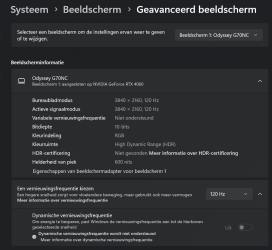
Yes I used it for calibrating my connected HDR Samsung TV (Odyssey G70NC). Windows found no HDR certification, but the HDR is supported, and calibrating with a max of 600 nits, which was read and respected by the Windows HDR calibrating app. By the way, I disabled the VRR (Variable Refresh rate) in my TV, because I use my computer also for emulation of old computers, and the VRR-function causes lagging :)

1728570482469.png
 

My Computers My Computers

  • At a glance

    Windows 11 ProIntel® Core™ i9-10940X - 14 CoresKingston HyperX Fury RGB 64GB DDR4-3200NVIDIA RTX 3060 Ti 8GB
    OS
    Windows 11 Pro
    Computer type
    PC/Desktop
    Manufacturer/Model
    Sharkoon SGC1 - RGB
    CPU
    Intel® Core™ i9-10940X - 14 Cores
    Motherboard
    Asus Prime X299-A II
    Memory
    Kingston HyperX Fury RGB 64GB DDR4-3200
    Graphics Card(s)
    NVIDIA RTX 3060 Ti 8GB
    Monitor(s) Displays
    LG Ultra HD
    Screen Resolution
    3840 x 2160
    Hard Drives
    SSD 4000GB Samsung 870 QVO SSD 500GB Crucial MX500 PSSD 2T Samsung T7 SCSI
    PSU
    850W Cooler Master
    Case
    Sharkoon SGC1 - RGB
    Cooling
    Cooler Master H412R
    Keyboard
    Corsair Vengeance-K70-RGB
    Mouse
    CONTUS Gaming Mouse
    Internet Speed
    1000/1000 (Mbps)
    Browser
    Chrome
    Antivirus
    Windows Defender
    Other Info
    CPU: Intel Core i9-10940X (Cascade Lake-X, L1)
    3300 MHz (33.00x100.0) @ 1183 MHz (12.00x98.6)
    Motherboard: ASUS PRIME X299-A II
    BIOS: 2001, 11/06/2024
    Chipset: Intel X299 (Kaby Lake)
    Memory: 65536 MBytes @ 1190 MHz, 17-17-17-39
    - 16384 MB PC25600 DDR4 SDRAM - Kingston KHX3200C16D4/16GX
    - 16384 MB PC25600 DDR4 SDRAM - Kingston KHX3200C16D4/16GX
    - 16384 MB PC25600 DDR4 SDRAM - Kingston KHX3200C16D4/16GX
    - 16384 MB PC25600 DDR4 SDRAM - Kingston KHX3200C16D4/16GX
    Graphics: NVIDIA GeForce RTX 3060 Ti
    NVIDIA GeForce RTX 3060 Ti, 8192 MB GDDR6 SDRAM
    Drive: CT500MX500SSD1, 488.4 GB, Serial ATA 6Gb/s @ 6Gb/s
    Drive: Samsung SSD 870 QVO 4TB, 3907.0 GB, Serial ATA 6Gb/s @ 6Gb/s
    Drive: Samsung SSD 860 QVO 4TB, 3907.0 GB, Serial ATA 6Gb/s @ 6Gb/s <-> USB
    Drive: Samsung SSD 860 EVO 4TB, 3907.0 GB, Serial ATA 6Gb/s @ 6Gb/s <-> USB
    Drive: Samsung Portable SSD T7, 1953.5 GB, NVMe
    Drive: Samsung Portable SSD T9, 3907.0 GB, NVMe
    Sound: Intel Kaby Lake - High Definition Audio / cAVS (Audio, Voice, Speech) [A0]
    Sound: NVIDIA GA104 - High Definition Audio Controller
    Network: Intel Ethernet Connection I219-V
    OS: Microsoft Windows 11 Professional (x64) Build 26200.8655 (25H2)


    MY THIRD DESKTOP SYSTEM
    ===================
    Computer: PCSpecialist Amd Trx50
    CPU: AMD Ryzen Threadripper 9980X (Shimada Peak, SHP-C1)
    3200 MHz (32.00x100.0) @ 2481 MHz (24.86x99.8)
    Motherboard: ASUS Pro WS TRX50-SAGE WIFI
    BIOS: 1203, 07/18/2025
    Chipset: AMD TRX50 (Promontory PROM21L.1)
    Memory: 262144 MBytes @ 3200 MHz, 52-52-52-103
    - 65536 MB PC51200 DDR5 SDRAM - Kingston 9965844-002.A01G
    - 65536 MB PC51200 DDR5 SDRAM - Kingston 9965844-002.A01G
    - 65536 MB PC51200 DDR5 SDRAM - Kingston 9965844-002.A01G
    - 65536 MB PC51200 DDR5 SDRAM - Kingston 9965844-002.A01G
    Graphics: Palit GeForce RTX 5080
    NVIDIA GeForce RTX 5080, 16303 MB GDDR7 SDRAM
    Drive: Samsung SSD 9100 PRO 4TB, 3907.0 GB, NVMe
    Drive: Corsair MP600 PRO NH, 7814.0 GB, NVMe
    Drive: CT2000T705SSD3, 1953.5 GB, NVMe
    Sound: NVIDIA GB203 - High Definition Audio Controller
    Sound: AMD Stones/Breithorn - HD Audio Controller (AZ)
    Network: Aquantia/Marvell AQC113 FastLinQ Edge 10Gbit Network Adapter
    Network: Intel Ethernet Controller I226-LM
    OS: Microsoft Windows 11 Professional (x64) Build 26200.8655 (25H2)
  • At a glance

    Windows 11 ProIntel® Core™ i5-12600KF - 10 CoresRAIDER GAMING 64GB DDR4-3200MSI GeForce RTX 4060 Ventus 2X Black 8G OC
    Operating System
    Windows 11 Pro
    Computer type
    PC/Desktop
    Manufacturer/Model
    MSI Intel
    CPU
    Intel® Core™ i5-12600KF - 10 Cores
    Motherboard
    MSI Pro B660M-G DDR4
    Memory
    RAIDER GAMING 64GB DDR4-3200
    Graphics card(s)
    MSI GeForce RTX 4060 Ventus 2X Black 8G OC
    Monitor(s) Displays
    Odyssey G70NC
    Screen Resolution
    3840 x 2160, 120 Hz - (HDR)
    Hard Drives
    MSI Spatium M371 500GB + 7x SSD 4TB
    PSU
    550 Watt MSI
    Case
    MSI MAG Forge 112R
    Cooling
    Watercooling MSI MAG CoreLiquid 240R V2 Black
    Internet Speed
    1000/1000 (Mbps)
    Browser
    Brave
    Antivirus
    Windows Defender
    Other Info
    Computer: MSI MS-7D45
    CPU: Intel Core i5-12600KF (Alder Lake-S 640, C0)
    3700 MHz (37.00x100.0) @ 798 MHz (8.00x99.8)
    Motherboard: MSI PRO B660M-G DDR4 (MS-7D45)
    BIOS: 1.O0, 08/07/2025
    Chipset: Intel B660 (Alder Lake-S PCH)
    Memory: 65536 MBytes @ 1596 MHz, 22-22-22-52
    - 32768 MB PC25600 DDR4 SDRAM - Crucial Technology CT32G4DFD832A.C16FF
    - 32768 MB PC25600 DDR4 SDRAM - Crucial Technology CT32G4DFD832A.C16FF
    Graphics: MSI RTX 4060 Ventus 2X Black OC
    NVIDIA GeForce RTX 4060, 8188 MB GDDR6 SDRAM
    Drive: MSI M371 500GB, 488.4 GB, NVMe
    Drive: Samsung SSD 870 QVO 8TB, 7814.0 GB, Serial ATA 6Gb/s @ 6Gb/s <-> USB
    Drive: Samsung SSD 870 QVO 8TB, 7814.0 GB, Serial ATA 6Gb/s @ 6Gb/s <-> USB
    Drive: Samsung Portable SSD T9, 3907.0 GB, NVMe
    Drive: Samsung Portable SSD T9, 3907.0 GB, NVMe
    Sound: Intel Alder Lake-S PCH - cAVS (Audio, Voice, Speech)
    Sound: NVIDIA AD106 - High Definition Audio Controller
    Network: RealTek Semiconductor RTL8125 Gaming 2.5GbE Family Ethernet Controller
    OS: Microsoft Windows 11 Professional (x64) Build 26200.8655 (25H2)
the Media Creation Tool has been updated so now downloads and installs 26100.2033 by default
 
Last edited:

My Computer My Computer

At a glance

Windows 11 Pro 25H2i7 10700Kddr4 16gbnvidia 1080 8GB
OS
Windows 11 Pro 25H2
Computer type
PC/Desktop
CPU
i7 10700K
Motherboard
MSI Z590 Gaming Carbon Wifi
Memory
ddr4 16gb
Graphics Card(s)
nvidia 1080 8GB
Screen Resolution
1920x1080p
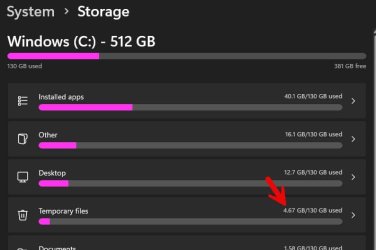
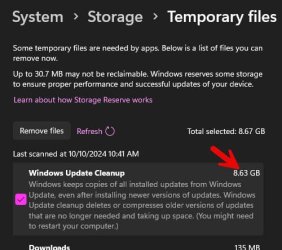
I am now 99% sure that this 8.63GB is simply a reporting error. First, it reports the same value for everyone. What are the chances that everyone happens to have 8.63 GB of temp files?

Second, look at this discrepancy:

Image1.jpg

Image2.jpg


On other systems the discrepancy is even greater with the first screen reporting only a few hundred MB temp files.

Third, I just reinstalled clean on a system last night that has only 32 GB total disk space (!). It reports the same thing (8.63 GB) but there is NO WAY that system has room for 8.63 GB of temp files.
 

My Computers My Computers

  • At a glance

    Win11 Pro 25H2 (RTM+)Intel i7-14650HX32 GBNo GPU - Built-in Intel Graphics
    OS
    Win11 Pro 25H2 (RTM+)
    Computer type
    PC/Desktop
    Manufacturer/Model
    Acemagic
    CPU
    Intel i7-14650HX
    Memory
    32 GB
    Graphics Card(s)
    No GPU - Built-in Intel Graphics
    Sound Card
    Integrated
    Monitor(s) Displays
    Varies as machine will often be moved to locations with different monitors
    Screen Resolution
    Varies
    Hard Drives
    1 x 1TB Gen 4 NVMe SSD
    PSU
    120W Power Brick
    Keyboard
    Corsair K70 Max RGB Magnetic Keyboard
    Mouse
    Logitech MX Master 3
    Internet Speed
    1Gb Up / 1 Gb Down
    Browser
    Edge
    Antivirus
    Windows Defender
  • At a glance

    Win11 Pro 25H2 (RTM+)Intel i7-1255U16 GBIntel Iris Xe Graphics
    Operating System
    Win11 Pro 25H2 (RTM+)
    Computer type
    Laptop
    Manufacturer/Model
    Lenovo ThinkBook 13x Gen 2
    CPU
    Intel i7-1255U
    Memory
    16 GB
    Graphics card(s)
    Intel Iris Xe Graphics
    Sound Card
    Realtek® ALC3306-CG codec
    Monitor(s) Displays
    13.3-inch IPS Display
    Screen Resolution
    WQXGA (2560 x 1600)
    Hard Drives
    2 TB 4 x 4 NVMe SSD
    PSU
    USB-C / Thunderbolt 4 Power / Charging
    Keyboard
    Backlit, spill resistant keyboard
    Mouse
    Buttonless Glass Precision Touchpad
    Internet Speed
    1Gb Up / 1Gb Down
    Browser
    Edge
    Antivirus
    Windows Defender
    Other Info
    WiFi 6e / Bluetooth 5.1 / Facial Recognition / Fingerprint Sensor / ToF (Time of Flight) Human Presence Sensor
Suggest you use on a secondary machine

;-)
Only have 1 machine. And i was opted to Release Preview Channel
and i got this update! so my question is, Is this correct that i got this update or is there a problem!
1728579229089.png
 

My Computer My Computer

At a glance

Windows 11 Pro (Currently 25H2)Intel Core i7 5820k32GB RAMNvidia RTX 5090
OS
Windows 11 Pro (Currently 25H2)
Computer type
PC/Desktop
CPU
Intel Core i7 5820k
Motherboard
Asus X99A
Memory
32GB RAM
Graphics Card(s)
Nvidia RTX 5090
Sound Card
Intergraded
Monitor(s) Displays
Samsung OdysseyG7
Screen Resolution
4K HDR
Hard Drives
2x Samsung M2 990Pro 4TB
PSU
Corsair RM1000X
Case
Fractal Design
Cooling
In & Outtake Noctua 3000 RPMs
Keyboard
Razer Black widow
Mouse
Razer Naga Trinity
Internet Speed
1000Mbit
Browser
Edge
Antivirus
Custom

My Computer My Computer

At a glance

11 Pro 24H2 26100.21527820X (thrashed to within an inch of it's life)32GB Corsair DDR4 3200mhzRTX 3080 10GB
OS
11 Pro 24H2 26100.2152
Computer type
PC/Desktop
Manufacturer/Model
DIY
CPU
7820X (thrashed to within an inch of it's life)
Motherboard
Asus X299 Gaming II
Memory
32GB Corsair DDR4 3200mhz
Graphics Card(s)
RTX 3080 10GB
Sound Card
Topping Audio D50 USB DAC
Monitor(s) Displays
TCL 50C805K
Screen Resolution
3840x2160
Hard Drives
1TB Adata SX2800 NVMe
8TB Toshiba HDWR480
PSU
Corsair 750W Modular
Cooling
Arctic Freezer II 240
Does the Microsoft PC Manager ( Microsoft PC Manager - Free download and install on Windows | Microsoft Store ) successfully clean up these Windows Update left overs? I don't have the problem myself so can't test, but I it definitely cleans up more stuff than the standard disk clean. Perhaps worth a look?
It appears that it does cleanup the windows update leftovers, but upon running disk cleanup from Control Panel. it still shows about 8.6 GB of Windows Update files that can be removed. It's probably a bug somewhere in build 2033.
 

My Computers My Computers

  • At a glance

    Windows 11 Pro 25H2AMD Ryzen 9 7940HS32 GBRadeon 780M Graphics
    OS
    Windows 11 Pro 25H2
    Computer type
    PC/Desktop
    Manufacturer/Model
    Geekom AX7 Pro
    CPU
    AMD Ryzen 9 7940HS
    Memory
    32 GB
    Graphics Card(s)
    Radeon 780M Graphics
    Monitor(s) Displays
    Dell S2425H 24"
    Screen Resolution
    1920 x 1080
    Hard Drives
    2 TB NVMe SSD
    Internet Speed
    100 Mbs
    Browser
    Microsoft Edge / Firefox
    Antivirus
    F-Secure Security Suite
  • At a glance

    Windows 11 Pro 25H212th Gen Intel Core i7-12700 processor (12-Co...16 GBIntel(R) UHD Graphics 770 with shared graphic...
    Operating System
    Windows 11 Pro 25H2
    Computer type
    PC/Desktop
    Manufacturer/Model
    Dell Inspiron 3910
    CPU
    12th Gen Intel Core i7-12700 processor (12-Core, 25M Cache, 2.1GHz to 4.8GHz)
    Motherboard
    Dell 0KHP4K
    Memory
    16 GB
    Graphics card(s)
    Intel(R) UHD Graphics 770 with shared graphics memory
    Monitor(s) Displays
    Dell 27" Monitor S2721DS,
    Screen Resolution
    QHD 2560 x 1440 @ 75 Hz
    Hard Drives
    1TB M.2, PCIe NVMe, SSD
    Internet Speed
    100 Mbps
    Browser
    Edge
    Antivirus
    F-Secure Security Suite

My Computers My Computers

  • At a glance

    Solus PlasmaIntel Core i5 9400FCorsair 32 gb VengeanceNvidia GT1030
    OS
    Solus Plasma
    Computer type
    PC/Desktop
    Manufacturer/Model
    Novatech BB90014
    CPU
    Intel Core i5 9400F
    Motherboard
    Gigabyte H310M S2H 2
    Memory
    Corsair 32 gb Vengeance
    Graphics Card(s)
    Nvidia GT1030
    Sound Card
    On board Realtek
    Monitor(s) Displays
    Dell 2412M Sharpscreen
    Screen Resolution
    1920x1080
    Hard Drives
    Corsair MP510 NvME 1tb
    Crucial MX500 500gb
    WD 2.5Tb
    Hitachi Deskstar 500
    PSU
    Novatech 800W
    Case
    Novatech
    Cooling
    3 x front fans, 1 rear
    Keyboard
    Logitech G11
    Mouse
    Logitech G203
    Internet Speed
    1000/110 Mbps
    Browser
    Vivaldi
    Antivirus
    ClamTK
  • At a glance

    win 11 ProIntel i58gb HynixIntel
    Operating System
    win 11 Pro
    Computer type
    Laptop
    Manufacturer/Model
    HP
    CPU
    Intel i5
    Motherboard
    HP Intel
    Memory
    8gb Hynix
    Graphics card(s)
    Intel
    Sound Card
    Realtek
    Monitor(s) Displays
    HP
    Screen Resolution
    1920x1081
    Hard Drives
    Samsung 256
    PSU
    HP
    Case
    HP
    Cooling
    Single fan
    Keyboard
    HP
    Internet Speed
    80/20
    Browser
    Firefox
    Antivirus
    Win Defender

My Computers My Computers

  • At a glance

    Win 11 Pro (25H2 RP)Intel(R) Core(TM) i5-9300H CPU @ 2.40GHz 2.40...32GBNvidia GeForce GTX 1650, Intel UHD 630
    OS
    Win 11 Pro (25H2 RP)
    Computer type
    Laptop
    Manufacturer/Model
    Acer AN515-54
    CPU
    Intel(R) Core(TM) i5-9300H CPU @ 2.40GHz 2.40 GHz
    Memory
    32GB
    Graphics Card(s)
    Nvidia GeForce GTX 1650, Intel UHD 630
    Monitor(s) Displays
    Acer CB272D
    Screen Resolution
    1920x1080
    Hard Drives
    256GB and 1T SSD
    Internet Speed
    500MB
    Browser
    Edge (Stable)
    Antivirus
    Microsoft Defender
  • At a glance

    Win 11 Pro (RP)Intel(R) Core(TM) Ultra 9 275HX (2.70 GHz)32GB DDR5-5600NVIDIA® GeForce RTX™ 5060 8GB
    Operating System
    Win 11 Pro (RP)
    Computer type
    Laptop
    Manufacturer/Model
    Lenovo Legion 5 16IAX10 - Type 83NX
    CPU
    Intel(R) Core(TM) Ultra 9 275HX (2.70 GHz)
    Memory
    32GB DDR5-5600
    Graphics card(s)
    NVIDIA® GeForce RTX™ 5060 8GB
    Monitor(s) Displays
    Acer CB272D
    Screen Resolution
    1920x1080 75Hz
    Hard Drives
    WD Green SN3000 (2TB)
    Samsung Portable T5 (2TB)
    Keyboard
    Logi MX Keys
    Mouse
    Logi MX Anywhere 3
    Internet Speed
    500MB
    Browser
    Edge
    Antivirus
    MS Defender
To automate disk cleanup:

Powershell
Powershell:
# V2 admin check
If (-NOT ([Security.Principal.WindowsPrincipal] [Security.Principal.WindowsIdentity]::GetCurrent()).IsInRole([Security.Principal.WindowsBuiltInRole] "Administrator"))
{
    Write-Warning "Please run this script as an Administrator!"
    Exit 1
}

# Create reg keys
$volumeCaches = Get-ChildItem "HKLM:\Software\Microsoft\Windows\CurrentVersion\Explorer\VolumeCaches"
foreach($key in $volumeCaches)
{
    New-ItemProperty -Path "$($key.PSPath)" -Name StateFlags0099 -Value 2 -Type DWORD -Force | Out-Null
}

# Run Disk Cleanup
Start-Process -Wait "$env:SystemRoot\System32\cleanmgr.exe" -ArgumentList "/sagerun:99"

# Delete the keys
$volumeCaches = Get-ChildItem "HKLM:\Software\Microsoft\Windows\CurrentVersion\Explorer\VolumeCaches"
foreach($key in $volumeCaches)
{
    Remove-ItemProperty -Path "$($key.PSPath)" -Name StateFlags0099 -Force | Out-Null
}
 

My Computer My Computer

At a glance

Windows 11 EducationIntel® Core™ i9-13900K Desktop Processor 16 (...G.Skill Ripjaws V Series 32gb (2x16gb) DDR4 3...Asus Dual Geforce Rtx™ 3060 TI Edition 8gb Gddr6
OS
Windows 11 Education
Computer type
PC/Desktop
CPU
Intel® Core™ i9-13900K Desktop Processor 16 (8P+8E)
Motherboard
Asus TUF Gaming Z790-PLUS WIFI D4
Memory
G.Skill Ripjaws V Series 32gb (2x16gb) DDR4 3600mhz
Graphics Card(s)
Asus Dual Geforce Rtx™ 3060 TI Edition 8gb Gddr6
Monitor(s) Displays
BenQ EW3270U 31.5” 3840x2160 UHD 16:9 HDR LED 4K LG 27UK850-W 27'' 4K UHD IPS LED Monitor with HDR10
Screen Resolution
3840x2160
Hard Drives
Samsung 990 with heatsink PRO PCIe 4.0 Gen 4 NVMe® SSD 1TB
WD_BLACK SN850X NVMe M.2 2280 1TB PCI-Express 4.0
Crucial T500 2TB Gen4
Samsung 970 Evo M.2 2280 2tb Pcie Gen3. X4
PSU
Corsair AXi Series AX860i Digital 860W 80 PLUS PSU
Case
Fractal Meshify C ATX Mid Tower Case
Keyboard
Logi MX Keys
Mouse
Logi M705
Internet Speed
400 mbs
Browser
Firefox
Antivirus
Eset NOD32
Other Info
Love fast boots
I have been doing some work to integrate KB5044284 into an offline image and I am receiving the same error regardless of what I try (0x8000ffff or 0x800f0922). I know this months cumulative also contains the associated Servicing Stack update and this is not to be installed standalone so I am simply adding the MSU package for KB5044284 and letting it do it's thing.

The action gets to 100% after taking 20-30 minutes and then fails with 0x8000ffff or 0x800f0922 at 100% relating to:

An error occurred applying the Unattend.xml file from the .msu package

Weirdly the update applies enough to change the image version to 10.0.26100.2033 and this does persist in the image but the update is never successful.

I wasn't running the Windows ADK for 24H2 when I first tried so I've now updated to 24H2 ADK but this hasn't changed anything.

I attempted to install the second MSU KB5043080 manually which causes the integration of KB5044284 to fail at 73% with exactly the same code but I know this isn't the way to apply it (just trying other things).

This is an extract from the DISM.log

2024-10-11 11:52:38, Error DISM DISM Package Manager: PID=3684 TID=9152 Failed to install UUP package. - CMsuPackage::DoInstall(hr:0x800f0922)
2024-10-11 11:52:38, Error DISM DISM Package Manager: PID=3684 TID=9152 Failed to execute the install in expanded MSU folder E:\Mount\Windows\Temp\F57876BB-3B0A-4348-AEB3-352DE3FFC118. - CMsuPackage::ProcessMsu(hr:0x800f0922)
2024-10-11 11:52:38, Error DISM DISM Package Manager: PID=3684 TID=9152 Failed to apply the MSU unattend file to the image. - CMsuPackage::Install(hr:0x800f0922)
2024-10-11 11:52:38, Info DISM DISM Package Manager: PID=3684 TID=9152 Trying to delete expand dir - CMsuPackage::Install

I'm unsure what else to try at this point so now I'm wondering if any of you have come across the same issue integrating KB5044284 into an offline 24H2 WIM.

Getting no issues installing the update online via WSUS though so that's good!
 
Last edited:

My Computer My Computer

At a glance

Windows 11
OS
Windows 11
Only have 1 machine. And i was opted to Release Preview Channel
and i got this update! so my question is, Is this correct that i got this update or is there a problem!
View attachment 111894
Yes, You've got the right update, but as you've seen here, it is full of holes.

I used the combined updates of 24H2 via UUPDump and removed crap via NT Lite and still had issues.

This is after Microsoft supposed Insider testing for many months.

This must be the worst major update for many a long year.

Perhaps you should pause Insider updates , and keep checking here, until the rabbit hole dug by Microsoft heals up
 

My Computers My Computers

  • At a glance

    Windows 11 Pro 25 H2 / Windows 3.11 EmulatorPentium I9 14900K64 GB Corsair Dominator DDR5Sapphire Radeon Pure RX 9060 XT , 16 GB , ARG...
    OS
    Windows 11 Pro 25 H2 / Windows 3.11 Emulator
    Computer type
    PC/Desktop
    Manufacturer/Model
    Self build Dec 2023
    CPU
    Pentium I9 14900K
    Motherboard
    Asus Rog Z790 E Wifi 7
    Memory
    64 GB Corsair Dominator DDR5
    Graphics Card(s)
    Sapphire Radeon Pure RX 9060 XT , 16 GB , ARGB Lighting ,.
    Sound Card
    Realtek Codec ALC 4080 internal + Creative Soundblaster X3 External , when former sometimes a problem
    Monitor(s) Displays
    32" Toshiba PC / TV , Corsair Xeneon Edge 14.5" screen Res : 2560 x 720
    Screen Resolution
    2560 x 1440
    Hard Drives
    4 x Corsair MP 600 Pro 500GB M2 drives ( Main ), + Samsung M2 USB 500GB +Corsair M2 1TB Ext USB+ Hitachi Sata Drive 1TB , 2 x DVD-RW
    PSU
    Corsair 1000 w
    Case
    NZXT Phantom 240 , 5 fans built in system
    Cooling
    Silentium PC Spartan 5 Max
    Keyboard
    Seenda Luminous
    Mouse
    1) Aston Martin DB9 Car , 2) McLaren Yellow P2 car , 3) Seenda Wireless
    Internet Speed
    950 mbps
    Browser
    Edge , Opera , Firefox , Brave, Samsung Browsers .
    Antivirus
    Norton 360 , 10 User
    Other Info
    Asus GT BE 98 Wifi 7 Router
    Pertelian X2040 ,
    Echo Show 8"
    Logitech Z906 5.1 speakers
    Aura Sync LED's Internal case lighting
  • At a glance

    Windows 11 25H28GB
    Operating System
    Windows 11 25H2
    Computer type
    Laptop
    Manufacturer/Model
    Microsoft Surface Go
    Memory
    8GB
    Hard Drives
    128 GB and 256 GB Micro SD
    Internet Speed
    950 mbps
Anything after Build: 26100.1742 (from my testing) is broken
 

My Computers My Computers

  • At a glance

    Windows 11 Pro 25H2 Build 26200.8655Intel(R) Core(TM) i7-4770K CPU @ 3.50GHz32.0 GB of I forget and the box is in storage.Gigabyte nVidia GeForce GTX 1660 Super OC 6GB
    OS
    Windows 11 Pro 25H2 Build 26200.8655
    Computer type
    PC/Desktop
    Manufacturer/Model
    Sin-built 2013
    CPU
    Intel(R) Core(TM) i7-4770K CPU @ 3.50GHz
    Motherboard
    ASUS ROG Maximus VI Formula
    Memory
    32.0 GB of I forget and the box is in storage.
    Graphics Card(s)
    Gigabyte nVidia GeForce GTX 1660 Super OC 6GB
    Sound Card
    ROG SupremeFX Formula 8-Channel High Definition Audio
    Monitor(s) Displays
    5 x LG 25MS500-B - 1 x 24MK430H-B - 1 x Wacom Pro 22" Touch Screen Tablet
    Screen Resolution
    All over the place
    Hard Drives
    Too many to list. OS on Samsung 1TB 870 QVO SATA
    PSU
    Silverstone 1500
    Case
    NZXT Phantom 820 Full-Tower Case
    Cooling
    Noctua NH-D15 Elite Class Dual Tower CPU Cooler / 6 x EziDIY 120mm / 2 x Corsair 140mm somethings / 1 x 140mm Thermaltake something / 2 x 200mm Corsair.
    Keyboard
    Corsair K95 / Logitech diNovo Edge Wireless
    Mouse
    Logitech: G402 / G502 / Mx Masters / Mx Air Cordless
    Internet Speed
    2000/500Mbps
    Browser
    All sorts
    Antivirus
    Kaspersky Premium
    Other Info
    ㅤㅤㅤㅤㅤㅤㅤㅤㅤㅤㅤㅤㅤㅤㅤㅤㅤㅤㅤㅤㅤㅤㅤㅤㅤㅤㅤㅤㅤㅤㅤㅤㅤㅤㅤㅤㅤㅤㅤㅤ⠀⠀⠀⠀⠀⠀⠀⠀⠀⠀
    TP-Link BE9300 WiFi 7 Bluetooth 5.4 (Archer TBE550E)
    TP-Link TX201 V1 2.5GB Lan

    Grandstream HT812 - VoIP
    ASUS DSL-AX82U - Mesh
    ASUS RT-AC68U - Mesh
    ASUS RT-BE88U Router

    Brother MFC-L2880DW Printer

    I’m on a horse.
  • At a glance

    Windows 11 Pro 25H2 Build 26200.8655 (Wifes)13th Generation Intel® Core™ i5-1340P Process...16GB LPDDR5-52001x Intel® Iris® Xe Graphics
    Operating System
    Windows 11 Pro 25H2 Build 26200.8655 (Wifes)
    Computer type
    Laptop
    Manufacturer/Model
    LENOVO Yoga 7 14IRL8 - Type 82YL
    CPU
    13th Generation Intel® Core™ i5-1340P Processor(Core™ i5-1340P)
    Memory
    16GB LPDDR5-5200
    Graphics card(s)
    1x Intel® Iris® Xe Graphics
    Sound Card
    Optimized with Dolby Atmos®
    Screen Resolution
    QHD 2880 x 1800 OLED
    Hard Drives
    M.2 512 GB SSD PCIe
    Mouse
    Logiteck MX Master 3S
    Internet Speed
    2000/500
    Antivirus
    Defender / Malwarebytes
    Other Info
    …still on a horse.


    Wireless Network: Wi-Fi 6E 2x2 AX; Bluetooth® 5.1 or above
    Ports: 1x 1 Novo button; 2 in 1 Audio Combo jack; Micro SD Card Reader; HDMI 1.4b; 2 x USB Type-C (TBT4)
    USB 3.2 Gen 2 DP 1.4a
    PD 3.0); 1 x USB 3.2 Gen1 Type A
    Camera
    1x 1080P FHD IR/RGB Hybrid with Privacy Shutter and Dual Array Microphone
    Graphics
    1x Intel® Iris® Xe Graphics
    Monitor
    14" WUXGA
    Form Factor
    Convertible Notebook
  • Windows 11 Pro 25H2 Build 26200.8655 (Wifes)

    Yoga 7 2-in-1 14IML9 - Type 83DJ

    Processor: Intel® Core™ Ultra 7 155H Processor(Core™ Ultra 7 155H)

    Memory: 32GB LPD5X-7467

    Hard Drive: 1 TB SSD PCIe

    Wireless Network: 1x Wi-Fi 6E 2x2 AX; Bluetooth® 5.1 or above

    Ports: 1 x HDMI 2.1 TMDS; 1 x Novo Button; 1 x Combo Audio Jack
    2 x USB-C (USB 4.0)
    1 x USB-A 3.2 Gen 1

    Camera: 1080P FHD IR Hybrid with Dual Microphone

    Graphics: Intel® Arc™ Graphics

    Monitor: 14" 2.8K

    ...Where's my horse?
Back
Top Bottom