UPDATE 11/12:
 www.elevenforum.com
For information about Windows update terminology, see the article about the types of Windows updates and the monthly quality update types. For an overview of Windows 11, version 24H2, see its update history page.
Note Follow @WindowsUpdate to find out when new content is published to the Windows release health dashboard.
Microsoft combines the latest servicing stack update (SSU) for your operating system with the latest cumulative update (LCU). For general information about SSUs, see Servicing stack updates and Servicing Stack Updates (SSU): Frequently Asked Questions.
Install this update
To install this update, use one of the following Windows and Microsoft release channels.
If you want to remove the LCU
To remove the LCU after installing the combined SSU and LCU package, use the DISM/Remove-Package command line option with the LCU package name as the argument. You can find the package name by using this command: DISM /online /get-packages.
Running Windows Update Standalone Installer (wusa.exe) with the /uninstall switch on the combined package will not work because the combined package contains the SSU. You cannot remove the SSU from the system after installation.
File information
For a list of the files that are provided in this update, download the file information for cumulative update 5044384.
For a list of the files that are provided in the servicing stack update, download the file information for the SSU (KB5046908) - version 26100.2160.
 support.microsoft.com
Check Windows Updates
UUP Dump:
64-bit ISO download:

ARM64 ISO download:
 www.elevenforum.com
KB5046617 Windows 11 Cumulative Update build 26100.2314 (24H2) - Nov. 12
UPDATE 11/21: https://www.elevenforum.com/t/kb5046740-windows-11-cumulative-update-preview-build-26100-2454-24h2-nov-21.30825/ Microsoft Support: November 12, 2024 - KB5046617 (OS Build 26100.2314) IMPORTANT Because of minimal operations during the Western holidays and the upcoming new year...
www.elevenforum.com
Microsoft Support:
October 24, 2024 - KB5044384 (OS Build 26100.2161) Preview
For information about Windows update terminology, see the article about the types of Windows updates and the monthly quality update types. For an overview of Windows 11, version 24H2, see its update history page.
Note Follow @WindowsUpdate to find out when new content is published to the Windows release health dashboard.
Highlights
Note: Below is a summary of the key issues that this update addresses when you install this KB. If there are new features, it lists them as well. The bold text within the brackets indicates the item or area of the change we are documenting.Gradual rollout
These might not be available to all users because they will roll out gradually.- [Notifications] New! You can now stop the suggestions to turn off notifications from certain apps. Select the ellipses (…) in the notification and turn it off. You can also go to Settings > System > Notifications and turn it off from there. Look for “Notification Suggestions” in the senders list. An entry will only appear in the list after you receive a notification.

Enable or Disable Notification Suggestions in Windows 11
This tutorial will show you how to turn on or off Notification Suggestions for your account in Windows 11. Notification Suggestions is when Windows detects if you are interacting with toasts or not and provide a suggestion to turn the notification banners (toasts) off for such apps. This will...
www.elevenforum.com
- [Wi-Fi password dialog] New! The dialog now has the Windows 11 visual design. Go to Settings > Network & internet.

Find Wi-Fi Network Security Key Password in Windows 11
This tutorial will show you how to find and see the security key password of your Wi-Fi network connection in Windows 10 and Windows 11. Wi-Fi is a wireless local area network (WLAN) technology and standard that uses high-frequency radio waves to provide wireless Internet and network...
www.elevenforum.com
- [Narrator]
- New! This update adds a new Narrator shortcut. Press the Narrator key + Ctrl + X to copy what Narrator last spoke to the clipboard. This shortcut is useful when you want to quickly copy some content, like codes or numbers for use.
- New! It will now auto read the contents of an email message in the new Outlook. This is like the behavior in Outlook classic.
[Gamepad keyboard]New! This update starts the roll out of a new Gamepad keyboard layout for the on-screen keyboard. With it, you can use your Xbox controller to move around the screen and type. Button accelerators are also available; these include the X button for backspace and the Y button for the spacebar. For better movement patterns, the keyboard keys are aligned vertically.

Change Touch Keyboard Layout in Windows 11
This tutorial will show you how to change the touch keyboard layout for your account in Windows 11. Windows 11 includes a touch keyboard you can click/tap on to enter text. This can be handy if you have a PC with a touchscreen without a physical keyboard. There are four different layouts you...
www.elevenforum.com
- [Start menu] New! “All apps” has the new name, “All.”

Open Start Menu in Windows 11
This tutorial will show you how to open the Start menu in Windows 11. Starting with Windows 11 build 26200.5641 (Dev 24H2) and build 26120.4250 (Beta 24H2), Microsoft introduced a new redesigned Start menu. The new scrollable Start Menu is comprised of three sections: Pinned, All apps, and...
www.elevenforum.com
- [ALT + Tab] Fixed: The screen goes black on some PCs for a few seconds when you switch between certain windows.
- [Scanning apps] Fixed: They don't detect certain scanners although they are connected.
Normal rollout
- [Web sign-in] Fixed: You cannot sign in to your account from the web because the screen stops responding.
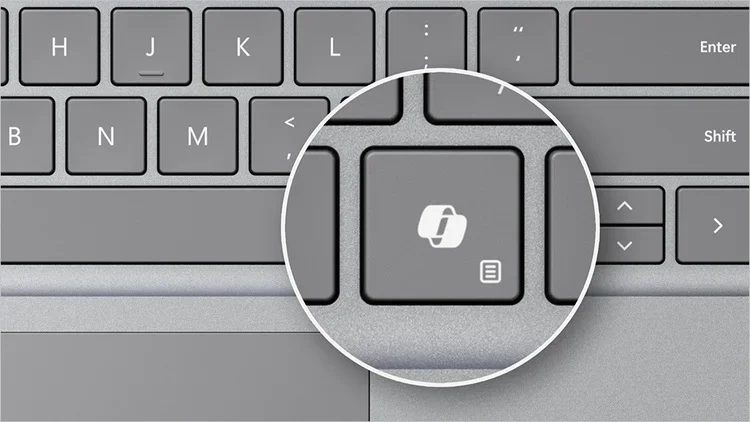
- [Copilot key settings] New! You can configure the Copilot key on the keyboard. On new devices, the key opens the Copilot app. If you sign in to your account using a Microsoft Entra ID, the key opens the M365 app. You can make the key open a different app or open Search. To do this, go to Settings > Personalization > Text input. To make the key open a different app, the app must be in a signed MSIX package. This ensures that the app meets security and privacy standards to keep you safe. If your PC’s keyboard does not have a Copilot key, changing this setting will do nothing.
Change App Copilot Key on Keyboard or Win+C Opens in Windows 11
This tutorial will show you how to change which app opens when you press the hardware Copilot key or Windows :win: + C keys for your account or all users in Windows 11. If you have a Windows 11 Copilot+ PC, it will have a Copilot key on the keyboard. When you press this Copilot key, it opens...
www.elevenforum.com
- [WindowsDisk Cleanup app] Fixed: After you use this app, it might show the wrong amount of disk space that you can free up in the 'Windows Update Cleanup' category.
Use Disk Cleanup in Windows 11
This tutorial will show you how to free up drive space with Disk Cleanup in Windows 11. You can use Disk Cleanup on a regular basis to reduce the number of unnecessary files on your drives, which can free up drive space and help your PC run better. It can delete temporary files and system...
www.elevenforum.com
Improvements
This non-security update includes quality improvements. Below is a summary of the key issues that this update addresses when you install this KB. If there are new features, it lists them as well. The bold text within the brackets indicates the item or area of the change we are documenting.- [Virtual hard disk (VHD/VHDx)] New! This update adds a detach virtual hard disk button to Settings. In the properties for your VHD or VHDx, go to Settings > System > Storage > Disks & Volumes. This might not be available to all users because it will roll out gradually.

Mount or Unmount VHD and VHDX file as Drive in Windows 11
This tutorial will show you how to natively mount (attach) or unmount (detach) a VHD or VHDX virtual hard disk file as a drive in Windows 11. Virtual hard disks (VHDs) are disk image file formats that have similar functionalities to a physical hard drive and are designed primarily for use with...
www.elevenforum.com
- [Networking] New! If you use the netsh wlan show networks command, it can now read SSIDs that are encoded using UTF-8. This means that Wi-Fi SSIDs that have Unicode characters (like emoji) will display properly in netsh output. This might not be available to all users because it will roll out gradually.

See List of All Wi-Fi Network Profiles in Windows 11
This tutorial will show you how to view a list of all known Wi-Fi network profiles configured on the system in Windows 11. When you connect to a Wi-Fi network for the first time, Windows will automatically add a profile for the Wi-Fi network. The saved profile contains the SSID (network name)...
www.elevenforum.com
- [Windows Sandbox Client Preview] New! This update adds the Windows Sandbox Client Preview. It includes:
- Runtime clipboard redirection
- Audio and video input control
- The sharing of folders with the host at runtime
To access these, select the ellipses (…) at the upper right on the app. This preview also includes a version of command-line support. (The commands might change over time). To learn more, use the wsb.exe–help command. You can find new updates for this app in the Microsoft Store. This might not be available to all users because it will roll out gradually.

Enable or Disable Windows Sandbox in Windows 11
This tutorial will show you how to enable or disable the Windows Sandbox feature for all users in Windows 11 Pro, Enterprise, or Education. Windows Sandbox provides a lightweight desktop environment to safely run applications in isolation. Software installed inside the Windows Sandbox...
www.elevenforum.com
- [User interface (UI)] Fixed: You cannot view some parts of the UI when you run certain apps.
- [HTML Applications (HTA)] Fixed: HTA optional components (OC) are now in ARM64 Windows PE.
- [Live kernel debug files (dumps)] Fixed: win32kbase.sys creates live kernel debug files when it should not.
- [Winlogon] Fixed: A stop error occurs during shutdown.
- [Windows Kernel Vulnerable Driver Blocklist file (DriverSiPolicy.p7b)] This update adds to the list of drivers that are at risk for Bring Your Own Vulnerable Driver (BYOVD) attacks.
- [sfc /scannow command] Fixed: You get errors every time you run the command.
Use System File Checker (SFC) to Repair System Files in Windows 11
This tutorial will show you how to run the System File Checker (SFC) tool to repair missing, corrupted, and modified system files in Windows 10 and Windows 11. System File Checker (SFC) is a tool built into Windows that will check for system file corruption. The SFC /SCANNOW command scans and...
www.elevenforum.com
- [Service for User to Self (S4U2self)] Fixed: Your device might have issues using S4U2self to authenticate. This occurs if Credential Guard is off, and the device joins an Active Directory domain that does not allow the RC4 cipher.
- [DirectAccess (known issue)] Fixed: After a clean install or an in-place upgrade to Windows 11, version 24H2, you might face issues using DirectAccess. The connection might not complete and stays in a ‘connecting’ state.
Windows 11 servicing stack update (KB5046908) - 26100.2160
This update makes quality improvements to the servicing stack, which is the component that installs Windows updates. Servicing stack updates (SSU) ensure that you have a robust and reliable servicing stack so that your devices can receive and install Microsoft updates.Known issues in this update
| Applies to | Symptom | Workaround |
|---|---|---|
| All users | We’re aware of an issue where players on Arm devices are unable to download and play Roblox via the Microsoft Store on Windows. | Players on Arm devices can play Roblox by downloading the title directly from www.Roblox.com. |
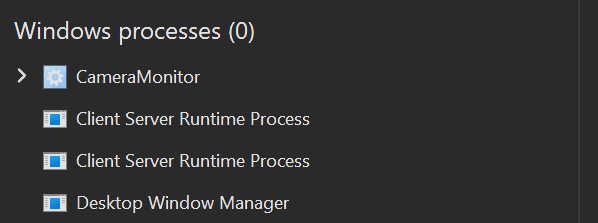
| All users | After installing this update, users will encounter an issue where the number of Apps, Background Processes, and Windows Processes in Task Manager display a count of zero, despite having active applications running. This issue appears specifically on the Processes page when the "Group by Type" view is enabled. Normally, Task Manager displays the count of processes next to each group name (e.g., Apps, Background processes), providing users with a quick view of active processes. However, due to this issue, Task Manager instead shows (0) for each group, regardless of the actual number of running processes. 
Enable or Disable "Group by Type" view on Processes page in Task Manager in Windows 11This tutorial will show you how to enable or disable "Group by Type" view on the Processes page in Task Manager for your account in Windows 11. Task Manager can be used to view and manage your processes, performance statistics, app history, startup apps, users, process details, and services in...
www.elevenforum.com
| We are working on a resolution and will provide more information when it is available. |
| All users | Following the installation of the October 2024 security update, some customers report that the OpenSSH (Open Secure Shell) service fails to start, preventing SSH connections. The service fails with no detailed logging, and manual intervention is required to run the sshd.exe process. This issue is affecting both enterprise, IOT, and education customers, with a limited number of devices impacted. Microsoft is investigating whether consumer customers using Home or Pro editions of Windows are affected. | Customers can temporarily resolve the issue by updating permissions (ACLs) on the affected directories. Follow these steps:
|
How to get this update
Before you install this updateMicrosoft combines the latest servicing stack update (SSU) for your operating system with the latest cumulative update (LCU). For general information about SSUs, see Servicing stack updates and Servicing Stack Updates (SSU): Frequently Asked Questions.
Install this update
To install this update, use one of the following Windows and Microsoft release channels.
| Available | Next Step |
|---|---|
| Yes (Windows Update) | Go to Settings > Update & Security > Windows Update. In the Optional updates available area, you will find the link to download and install the update. |
| Yes (MSU) | Before you install this update To get the standalone package(s) for this update, go to the Microsoft Update Catalog website. This KB contains one or more MSU files that must be installed in order. Install this update Method 1: Install all MSU files together Download all MSU files for KB5044384 from Microsoft Update Catalog and place them in the same folder (for example, C:/Packages). Use Deployment Image Servicing and Management (DISM.exe) to install the target update. DISM will use the folder specified in PackagePath to discover and install one or more prerequisite MSU files as needed. Updating Windows PC To apply this update to a running Windows PC, run the following command from an elevated Command Prompt: DISM /Online /Add-Package /PackagePath:c:\packages\Windows11.0-KB5044384-x64.msuOr, run the following command from an elevated Windows PowerShell prompt: Add-WindowsPackage -Online -PackagePath "c:\packages\Windows11.0-KB5044384-x64.msu"Updating Windows Installation media To apply this update to Windows Installation media, see Update Windows installation media with Dynamic Update. To add this update to a mounted image, run the following command from an elevated Command Prompt: DISM /Image:mountdir /Add-Package /PackagePath:Windows11.0-KB5044384-x64.msuOr, run the following command from an elevated Windows PowerShell prompt: Add-WindowsPackage -Path "c:\offline" -PackagePath "Windows11.0-KB5044384-x64.msu" -PreventPending |
If you want to remove the LCU
To remove the LCU after installing the combined SSU and LCU package, use the DISM/Remove-Package command line option with the LCU package name as the argument. You can find the package name by using this command: DISM /online /get-packages.
Running Windows Update Standalone Installer (wusa.exe) with the /uninstall switch on the combined package will not work because the combined package contains the SSU. You cannot remove the SSU from the system after installation.
File information
For a list of the files that are provided in this update, download the file information for cumulative update 5044384.
For a list of the files that are provided in the servicing stack update, download the file information for the SSU (KB5046908) - version 26100.2160.
Source:
October 24, 2024—KB5044384 (OS Build 26100.2161) Preview - Microsoft Support
support.microsoft.com
Check Windows Updates
UUP Dump:
64-bit ISO download:
Select language for Windows 11, version 24H2 (26100.2161) amd64
Select language for Windows 11, version 24H2 (26100.2161) amd64 on UUP dump. UUP dump lets you download Unified Update Platform files, like Windows Insider updates, directly from Windows Update.
uupdump.net
ARM64 ISO download:
Select language for Windows 11, version 24H2 (26100.2161) arm64
Select language for Windows 11, version 24H2 (26100.2161) arm64 on UUP dump. UUP dump lets you download Unified Update Platform files, like Windows Insider updates, directly from Windows Update.
uupdump.net
UUP Dump - Download Windows Insider ISO
UUP Dump is the most practical and easy way to get ISO images of any Insider Windows 10 or Windows 11 version, as soon as Microsoft has released a new build. UUP Dump creates a download configuration file according to your choices, downloads necessary files directly from Microsoft servers, and...
www.elevenforum.com
Last edited: