Win Update KB5053598 Windows 11 Cumulative Update build 26100.3476 (24H2) - March 11


UPDATE 3/27:


 Microsoft Support:

March 11, 2025 - KB5053598 (OS Build 26100.3476)​

For information about Windows update terminology, see types of Windows updates and the monthly quality update types. To find an overview of Windows 11, version 24H2, see its update history page.

Follow @WindowsUpdate to find out when new content is published to the Windows release health dashboard.

Important: Windows updates do not install Microsoft Store application updates. If you are an enterprise user, see Microsoft Store apps - Configuration Manager. If you are a consumer user, see Get updates for apps and games in Microsoft Store.


Highlights

This update addresses security issues for your Windows operating system.

Improvements

This security update includes improvements that were a part of update KB5052093 (released February 25, 2025). This security update includes quality improvements. The following summary outlines key issues addressed by the KB update after you install it. Also, included are available new features. The bold text within the brackets indicates the item or area of the change.
  • This update makes miscellaneous security improvements to internal OS functionality. No additional issues were documented for this release.
If you installed earlier updates, your device downloads and installs only the new updates contained in this package.

For more information about security vulnerabilities, see the Security Update Guide and the March 2025 Security Updates.

Windows 11 servicing stack update (KB5052915)- 26100.3321​

This update makes quality improvements to the servicing stack, which is the component that installs Windows updates. Servicing stack updates (SSU) ensure that you have a robust and reliable servicing stack so that your devices can receive and install Microsoft updates. To learn more about SSUs, see Simplifying on-premises deployment of servicing stack updates.

Known issues in this update

1 Roblox

Applies to: All Users

Symptoms
We’re aware of an issue where players on Arm devices are unable to download and play Roblox from the Microsoft Store on Windows.

Workaround
Roblox is working on a resolution to address this issue. Please refer to the Roblox support site for updates. Until the resolution is available, players on Arm devices can play Roblox by downloading the title directly from www.Roblox.com.

2 Citrix

Applies to: IT Admin

Symptoms
Devices that have certain Citrix components installed might be unable to complete installation of the January 2025 Windows security update. This issue was observed on devices with Citrix Session Recording Agent (SRA) version 2411. The 2411 version of this application was released in December 2024.

Affected devices might initially download and apply the January 2025 Windows security update correctly, such as via the Windows Update page in Settings. However, when restarting the device to complete the update installation, an error message with text similar to “Something didn’t go as planned. No need to worry – undoing changes” appears. The device will then revert to the Windows updates previously present on the device.

This issue likely affects a limited number of organizations as version 2411 of the SRA application is a new version. Home users are not expected to be affected by this issue.

Workaround
Citrix has documented this issue, including a workaround, which can be performed prior to installing the January 2025 Windows security update. For details, see Citrix’s documentation.

Microsoft is working with Citrix to address this issue and will update this documentation once a resolution is available.

3 Microsoft Copilot

Applies to: All Users

Symptoms

We're aware of an issue with the Microsoft Copilot app affecting some devices. The app is unintentionally uninstalled and unpinned from the taskbar.

Note: This issue has not been observed with the Microsoft 365 Copilot app.

Workaround

This issue has been fixed, and the affected devices are being returned to their original state. You can also reinstall the app from the Microsoft Store and pin it to the taskbar.


How to get this update

Before you install this update

Microsoft combines the latest servicing stack update (SSU) for your operating system with the latest cumulative update (LCU). For general information about SSUs, see Servicing stack updates and Servicing Stack Updates (SSU): Frequently Asked Questions.

Install this update

To install this update, use one of the following Windows and Microsoft release channels.

AvailableNext Step
Included
This update downloads and installs automatically from Windows Update and Microsoft Update.
Included
Before you install this update
To get the standalone package(s) for this update, go to the Microsoft Update Catalog website. This KB contains one or more MSU files that must be installed in order.

Install this update
Method 1: Install all MSU files together
Download all MSU files for KB5053598 from Microsoft Update Catalog and place them in the same folder (for example, C:/Packages). Use Deployment Image Servicing and Management (DISM.exe) to install the target update. DISM will use the folder specified in PackagePath to discover and install one or more prerequisite MSU files as needed.

Updating Windows PC
To apply this update to a running Windows PC, run the following command from an elevated Command Prompt:

DISM /Online /Add-Package /PackagePath:c:\packages\Windows11.0-KB5053598-x64.msu

Or, run the following command from an elevated Windows PowerShell prompt:

Add-WindowsPackage -Online -PackagePath "c:\packages\Windows11.0-KB5053598-x64.msu"

Updating Windows Installation media
To apply this update to Windows Installation media, see Update Windows installation media with Dynamic Update.

To add this update to a mounted image, run the following command from an elevated Command Prompt:

DISM /Image:mountdir /Add-Package /PackagePath:Windows11.0-KB5053598-x64.msu

Or, run the following command from an elevated Windows PowerShell prompt:

Add-WindowsPackage -Path "c:\offline" -PackagePath "Windows11.0-KB5053598-x64.msu" -PreventPending

If you want to remove the LCU

To remove the LCU after installing the combined SSU and LCU package, use the DISM/Remove-Package command line option with the LCU package name as the argument. You can find the package name by using this command: DISM /online /get-packages.

Running Windows Update Standalone Installer (wusa.exe) with the /uninstall switch on the combined package will not work because the combined package contains the SSU. You cannot remove the SSU from the system after installation.

File information

For a list of the files that are provided in this update, download the file information for cumulative update 5053598.

For a list of the files that are provided in the servicing stack update, download the file information for the SSU (KB5052915) - version 26100.3321.


 Source:


Check Windows Updates


UUP Dump:

64-bit ISO download:

ARM64 ISO download:

 
Last edited:
Ready to install (already)...

1741719162939.webp
 

My Computer My Computer

At a glance

Windows 11Intel® Xeon® X5690 3.47GHz Six-CoreG.Skill PC3-12800 1600MHz 24GBNVIDIA GeForce GTX 1050
OS
Windows 11
Computer type
PC/Desktop
Manufacturer/Model
Asus/Custom Build
CPU
Intel® Xeon® X5690 3.47GHz Six-Core
Motherboard
Asus P6T Deluxe v2
Memory
G.Skill PC3-12800 1600MHz 24GB
Graphics Card(s)
NVIDIA GeForce GTX 1050
Sound Card
SoundMAX ADI AD2000B HD Audio
Monitor(s) Displays
Acer T232HL Touch Screen
Screen Resolution
1920 x 1080 @ 60Hz
Hard Drives
6 Crucial MX500 SSD 1TB each.
PSU
Thermaltake Toughpower Gold 850W
Case
Thermaltake Armor VA8000SWA
Cooling
Thermaltake Air Cooling System
Keyboard
Illuminated Multimedia LED Keyboard
Mouse
M16 Dual Mode Illuminated Mouse - Bluetooth / 2.4 GHz Mode
Internet Speed
800 Mbps
Browser
Edge / Opera / Vivaldi / Chrome / Firefox / Brave
Antivirus
Windows Defender Security
.net Usually, .net updates come out every 2 months.
okyyy, so is it 2 months for those that get it and not for those that dont??
 

My Computer My Computer

At a glance

W11Pro 25H2I5-11500H32gIntel on board 630
OS
W11Pro 25H2
Computer type
Laptop
Manufacturer/Model
Dell 7760 Precision
CPU
I5-11500H
Motherboard
Dell
Memory
32g
Graphics Card(s)
Intel on board 630
Sound Card
on board
Monitor(s) Displays
laptop/Samsung 27" external
Screen Resolution
1920x1080
Hard Drives
1TB
PSU
Dell laptop 137.1
Case
Dell
Cooling
Dell laptop
Keyboard
Logitech K120 external USB
Mouse
Logitech N-211 external USB
Internet Speed
100mps
Browser
FF/Chrome/Edge/Firefox
Antivirus
Windows Defender
Other Info
Bought off eBay, working.
Sfc only same BT errors
The error that appeared after the sfc check in the Cumulative Preview version is no longer there.

The SFC scan found and fixed the usual BT errors
Also the component store is corrupted again, I did a restore health.

So far I haven't seen anything ridiculous.
 

My Computer My Computer

At a glance

Windows 11 Home - 26200.8246 - 25H2Ryzen 5500U
OS
Windows 11 Home - 26200.8246 - 25H2
Computer type
Laptop
Manufacturer/Model
Huawei Matebook D15 Ryzen 5500U 8GB / 512 SSD, Windows 11 Home Single Language
CPU
Ryzen 5500U
Keyboard
Logitech K380, G15
Mouse
Logi m350, Everest SM-620, Logitech G9, Lecoo WS210
Browser
Chrome (Desktop), Vivaldi (Mobile)
Antivirus
Windows Security, (Alternative Eset)
Performed the updated and ran my usual scans and cleanup scripts. All looked goo, but then noticed that Copilot was no longer installed. Not sure if this was from the WU or the scripts. Not worth doing a system restore to identify when it was removed. Anyway, just reinstalled it from the MS store.
 

My Computer My Computer

At a glance

Windows 11 ProIntel Core Ultra16GBIntel(R) Arc Graphics
OS
Windows 11 Pro
Computer type
Laptop
Manufacturer/Model
ASUS Zenbook 14 OLED
CPU
Intel Core Ultra
Memory
16GB
Graphics Card(s)
Intel(R) Arc Graphics
Sound Card
Realtek High Definition Audio(SST)
Screen Resolution
2880 x 1800
Hard Drives
500 GB NVMe SSD
Internet Speed
1,500Mbps
Browser
Firefox, Edge
Antivirus
Windows Defender
I had to run restore health to have this done. Something was wrong.
No it seems to be OK. Otherwise no issues so far.


1741720137117.webp
 

My Computer My Computer

At a glance

Windows 11 Pro x64, 24H2Ryzen 7 7700xKingston 32GB KIT DDR5 6000MHz CL36 FURY Beas...SAPPHIRE PULSE AMD Radeon RX 7900 XTX 24G
OS
Windows 11 Pro x64, 24H2
Computer type
PC/Desktop
Manufacturer/Model
Asus
CPU
Ryzen 7 7700x
Motherboard
ASUS TUF GAMING B650-PLUS WIFI
Memory
Kingston 32GB KIT DDR5 6000MHz CL36 FURY Beast Black EXPO
Graphics Card(s)
SAPPHIRE PULSE AMD Radeon RX 7900 XTX 24G
Sound Card
DTS APO4x
Monitor(s) Displays
27" Philips 27M1N3500LS Gaming, 27" Philips 275S9JAL
Screen Resolution
2560 x 1440
Hard Drives
2x Kingston KC3000 NVMe 2TB
PSU
Corsair RM850 White (2021)
Case
be quiet! Pure Base 500DX White
Cooling
DeepCool AK620 White
Keyboard
YENKEE YKB 3400 PANZER - CZ
Mouse
Razer DeathAdder V2
Internet Speed
200Mbps
Browser
Google Chrome
Antivirus
Microsoft Defender
Other Info
It is a gaming PC.
Updated okay, quick and easy!

1741720175902.webp
 

My Computer My Computer

At a glance

Windows 11Intel® Xeon® X5690 3.47GHz Six-CoreG.Skill PC3-12800 1600MHz 24GBNVIDIA GeForce GTX 1050
OS
Windows 11
Computer type
PC/Desktop
Manufacturer/Model
Asus/Custom Build
CPU
Intel® Xeon® X5690 3.47GHz Six-Core
Motherboard
Asus P6T Deluxe v2
Memory
G.Skill PC3-12800 1600MHz 24GB
Graphics Card(s)
NVIDIA GeForce GTX 1050
Sound Card
SoundMAX ADI AD2000B HD Audio
Monitor(s) Displays
Acer T232HL Touch Screen
Screen Resolution
1920 x 1080 @ 60Hz
Hard Drives
6 Crucial MX500 SSD 1TB each.
PSU
Thermaltake Toughpower Gold 850W
Case
Thermaltake Armor VA8000SWA
Cooling
Thermaltake Air Cooling System
Keyboard
Illuminated Multimedia LED Keyboard
Mouse
M16 Dual Mode Illuminated Mouse - Bluetooth / 2.4 GHz Mode
Internet Speed
800 Mbps
Browser
Edge / Opera / Vivaldi / Chrome / Firefox / Brave
Antivirus
Windows Defender Security

My Computer My Computer

At a glance

Windows 11 Pro x64, 24H2Ryzen 7 7700xKingston 32GB KIT DDR5 6000MHz CL36 FURY Beas...SAPPHIRE PULSE AMD Radeon RX 7900 XTX 24G
OS
Windows 11 Pro x64, 24H2
Computer type
PC/Desktop
Manufacturer/Model
Asus
CPU
Ryzen 7 7700x
Motherboard
ASUS TUF GAMING B650-PLUS WIFI
Memory
Kingston 32GB KIT DDR5 6000MHz CL36 FURY Beast Black EXPO
Graphics Card(s)
SAPPHIRE PULSE AMD Radeon RX 7900 XTX 24G
Sound Card
DTS APO4x
Monitor(s) Displays
27" Philips 27M1N3500LS Gaming, 27" Philips 275S9JAL
Screen Resolution
2560 x 1440
Hard Drives
2x Kingston KC3000 NVMe 2TB
PSU
Corsair RM850 White (2021)
Case
be quiet! Pure Base 500DX White
Cooling
DeepCool AK620 White
Keyboard
YENKEE YKB 3400 PANZER - CZ
Mouse
Razer DeathAdder V2
Internet Speed
200Mbps
Browser
Google Chrome
Antivirus
Microsoft Defender
Other Info
It is a gaming PC.
Done on 2 machines, Went well. SFC and DISM found no issues after the update.
 

My Computers My Computers

  • At a glance

    Windows 11 Pro 25H2AMD Ryzen 9 7940HS32 GBRadeon 780M Graphics
    OS
    Windows 11 Pro 25H2
    Computer type
    PC/Desktop
    Manufacturer/Model
    Geekom AX7 Pro
    CPU
    AMD Ryzen 9 7940HS
    Memory
    32 GB
    Graphics Card(s)
    Radeon 780M Graphics
    Monitor(s) Displays
    Dell S2425H 24"
    Screen Resolution
    1920 x 1080
    Hard Drives
    2 TB NVMe SSD
    Internet Speed
    100 Mbs
    Browser
    Microsoft Edge / Firefox
    Antivirus
    F-Secure Security Suite
  • At a glance

    Windows 11 Pro 25H212th Gen Intel Core i7-12700 processor (12-Co...16 GBIntel(R) UHD Graphics 770 with shared graphic...
    Operating System
    Windows 11 Pro 25H2
    Computer type
    PC/Desktop
    Manufacturer/Model
    Dell Inspiron 3910
    CPU
    12th Gen Intel Core i7-12700 processor (12-Core, 25M Cache, 2.1GHz to 4.8GHz)
    Motherboard
    Dell 0KHP4K
    Memory
    16 GB
    Graphics card(s)
    Intel(R) UHD Graphics 770 with shared graphics memory
    Monitor(s) Displays
    Dell 27" Monitor S2721DS,
    Screen Resolution
    QHD 2560 x 1440 @ 75 Hz
    Hard Drives
    1TB M.2, PCIe NVMe, SSD
    Internet Speed
    100 Mbps
    Browser
    Edge
    Antivirus
    F-Secure Security Suite
Zrzut ekranu 2025-03-11 210634.webp
Everything works as expected, no errors so far, and performance better than the previous version.

I still have the error of the cursor disappearing when it is close to a sentence, such as on a page or in an article.
 

My Computer My Computer

At a glance

Windows 11 25H2 ProAMD Ryzen 5 4600H32 GBNVIDIA GTX 1650
OS
Windows 11 25H2 Pro
Computer type
Laptop
Manufacturer/Model
HP
CPU
AMD Ryzen 5 4600H
Memory
32 GB
Graphics Card(s)
NVIDIA GTX 1650
Sound Card
Realtek Audio
Monitor(s) Displays
AMD Radeon (TM) Graphics
Hard Drives
INTEL SSD
Mouse
Rival 5
Gradual rollout of features in Windows 11 24H2 Build 26100.3476.

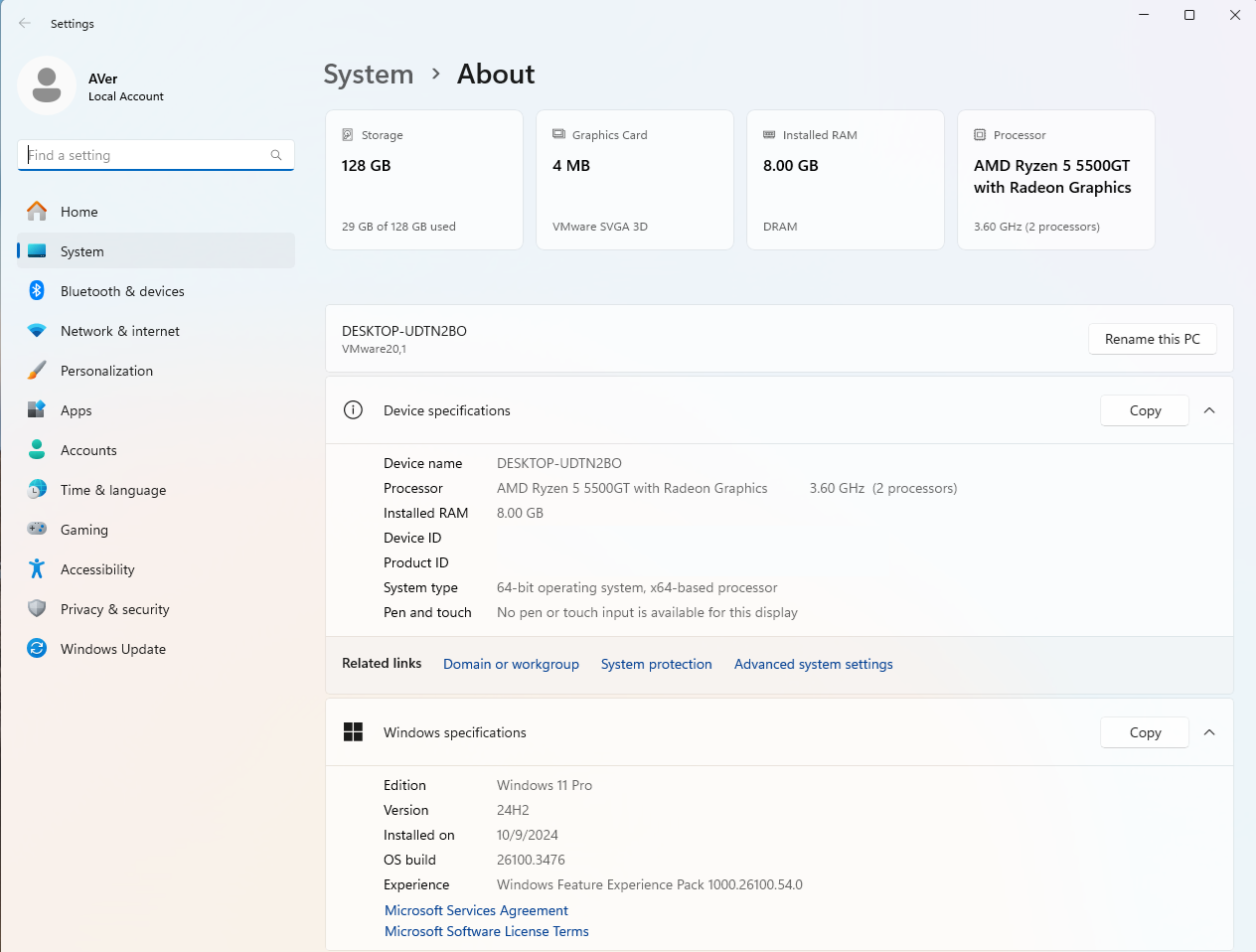
#CFR Key: 156965516, 1853569164, 1958247566, 607965839 > [Settings] New! We are rolling out “top cards” under Settings > System > About. These top cards provide an easy way to view your PC’s key specifications—processor, RAM, storage, and GPU—helping you understand your PC’s capabilities at a glance. This is designed to simplify decision-making by highlighting potential areas for hardware improvements while giving you a clear snapshot of your PC. Top Cards won’t appear yet on managed commercial PCs. Note this change appears only on specific PC form-factors such as desktops.

xMgAToJ.png


Code:
Windows Registry Editor Version 5.00

[HKEY_LOCAL_MACHINE\SYSTEM\ControlSet001\Control\FeatureManagement\Overrides\0]

[HKEY_LOCAL_MACHINE\SYSTEM\ControlSet001\Control\FeatureManagement\Overrides\0\156965516]
"EnabledState"=dword:00000002
"EnabledStateOptions"=dword:00000000

[HKEY_LOCAL_MACHINE\SYSTEM\ControlSet001\Control\FeatureManagement\Overrides\0\1853569164]
"EnabledState"=dword:00000002
"EnabledStateOptions"=dword:00000000

[HKEY_LOCAL_MACHINE\SYSTEM\ControlSet001\Control\FeatureManagement\Overrides\0\1958247566]
"EnabledState"=dword:00000002
"EnabledStateOptions"=dword:00000000

[HKEY_LOCAL_MACHINE\SYSTEM\ControlSet001\Control\FeatureManagement\Overrides\0\607965839]
"EnabledState"=dword:00000002
"EnabledStateOptions"=dword:00000000

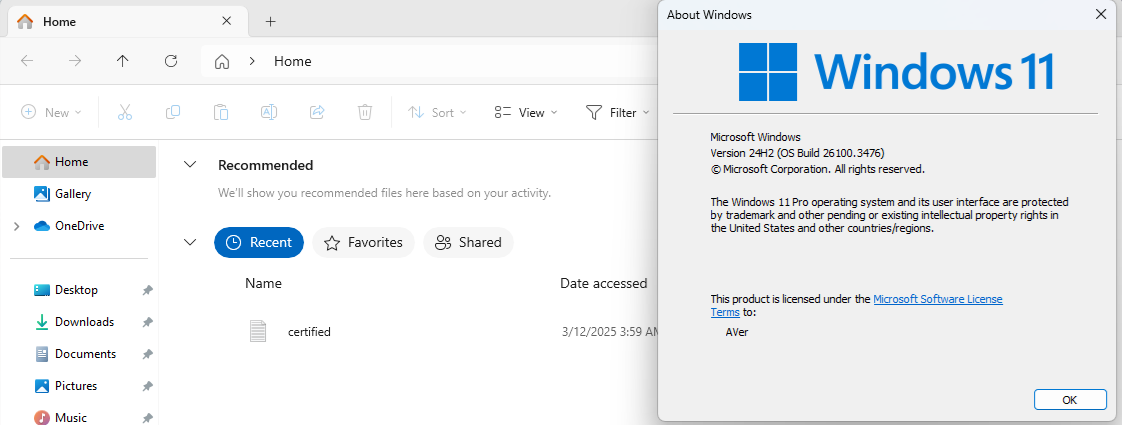
#CFR Key: 156965516, 1916873356, 3878395533, 436524174 > [File Explorer] New! Recommended files in File Explorer Home are now available to all Windows Insiders who are signed in with their personal Microsoft account (and local accounts). These files will provide you quick access to relevant files based on your activity in the Recommended section which is displayed as a carousel with thumbnail previews. This includes content such as files you frequently use, have recently downloaded, or added to your File Explorer Gallery. Users with a work/school account (Entra ID) will have additional types of recommendations available with this update. This change is not yet rolling out in the EEA (European Economic Area). Quick access folders will continue to be available in the navigation pane for easy access to pinned folders.

Szxaxas.png


Code:
Windows Registry Editor Version 5.00

[HKEY_LOCAL_MACHINE\SYSTEM\ControlSet001\Control\FeatureManagement\Overrides\0]

[HKEY_LOCAL_MACHINE\SYSTEM\ControlSet001\Control\FeatureManagement\Overrides\0\156965516]
"EnabledState"=dword:00000002
"EnabledStateOptions"=dword:00000000

[HKEY_LOCAL_MACHINE\SYSTEM\ControlSet001\Control\FeatureManagement\Overrides\0\1916873356]
"EnabledState"=dword:00000002
"EnabledStateOptions"=dword:00000000

[HKEY_LOCAL_MACHINE\SYSTEM\ControlSet001\Control\FeatureManagement\Overrides\0\3878395533]
"EnabledState"=dword:00000002
"EnabledStateOptions"=dword:00000000

[HKEY_LOCAL_MACHINE\SYSTEM\ControlSet001\Control\FeatureManagement\Overrides\0\436524174]
"EnabledState"=dword:00000002
"EnabledStateOptions"=dword:00000000

Gradual rollout of features in Windows 11 24H2 Build 26100.3323.

#CFR Key: 2224106123, 372314253 > [Task Manager] New! We are beginning to roll out a change to the way Task Manager calculates CPU utilization for the Processes, Performance, and Users pages. Task Manager will now use the standard metrics to display CPU workload consistently across all pages and aligning with industry standards and third-party tools. For backward compatibility, a new optional column called CPU Utility is available (hidden by default) on the Details tab showing the previous CPU value used on the Processes page.


Code:
Windows Registry Editor Version 5.00

[HKEY_LOCAL_MACHINE\SYSTEM\ControlSet001\Control\FeatureManagement\Overrides\0]

[HKEY_LOCAL_MACHINE\SYSTEM\ControlSet001\Control\FeatureManagement\Overrides\0\2224106123]
"EnabledState"=dword:00000002
"EnabledStateOptions"=dword:00000000

[HKEY_LOCAL_MACHINE\SYSTEM\ControlSet001\Control\FeatureManagement\Overrides\0\372314253]
"EnabledState"=dword:00000002
"EnabledStateOptions"=dword:00000000

#CFR Key: 1853569164, 2792562829, 3036241548 > [Start Menu] New! We are introducing two new views to the “All” page in the Start menu: grid and category view. Grid and list view shows your apps in alphabetical order and category view groups all your apps into categories, ordered by usage.

Code:
Windows Registry Editor Version 5.00

[HKEY_LOCAL_MACHINE\SYSTEM\ControlSet001\Control\FeatureManagement\Overrides\0]

[HKEY_LOCAL_MACHINE\SYSTEM\ControlSet001\Control\FeatureManagement\Overrides\0\1853569164]
"EnabledState"=dword:00000002
"EnabledStateOptions"=dword:00000000

[HKEY_LOCAL_MACHINE\SYSTEM\ControlSet001\Control\FeatureManagement\Overrides\0\2792562829]
"EnabledState"=dword:00000002
"EnabledStateOptions"=dword:00000000

[HKEY_LOCAL_MACHINE\SYSTEM\ControlSet001\Control\FeatureManagement\Overrides\0\3036241548]
"EnabledState"=dword:00000002
"EnabledStateOptions"=dword:00000000


Gradual rollout of features in Windows 11 24H2 Build 26100.3194.

#CFR Key: 1798011530 > [Taskbar] New! This update improves the previews that show when your cursor hovers over apps on the taskbar. The update also improves their animations.

Code:
Windows Registry Editor Version 5.00

[HKEY_LOCAL_MACHINE\SYSTEM\ControlSet001\Control\FeatureManagement\Overrides\0]

[HKEY_LOCAL_MACHINE\SYSTEM\ControlSet001\Control\FeatureManagement\Overrides\0\1798011530]
"EnabledState"=dword:00000002
"EnabledStateOptions"=dword:00000000


#CFR Key: 156965516, 1853569164, 3870238861 > [Taskbar] New! Show jump list when hovering on inactive taskbar apps.

Code:
Windows Registry Editor Version 5.00

[HKEY_LOCAL_MACHINE\SYSTEM\ControlSet001\Control\FeatureManagement\Overrides\0]

[HKEY_LOCAL_MACHINE\SYSTEM\ControlSet001\Control\FeatureManagement\Overrides\0\156965516]
"EnabledState"=dword:00000002
"EnabledStateOptions"=dword:00000000

[HKEY_LOCAL_MACHINE\SYSTEM\ControlSet001\Control\FeatureManagement\Overrides\0\1853569164]
"EnabledState"=dword:00000002
"EnabledStateOptions"=dword:00000000

[HKEY_LOCAL_MACHINE\SYSTEM\ControlSet001\Control\FeatureManagement\Overrides\0\3870238861]
"EnabledState"=dword:00000002
"EnabledStateOptions"=dword:00000000

#CFR Key: 1853569164, 3058906765 > New! During text entry, type Windows logo key + . (period). The emoji keyboard will appear. Select an emoji with the mouse, or keep typing to search through the available emojis for one you like.

Code:
Windows Registry Editor Version 5.00

[HKEY_LOCAL_MACHINE\SYSTEM\ControlSet001\Control\FeatureManagement\Overrides\0]

[HKEY_LOCAL_MACHINE\SYSTEM\ControlSet001\Control\FeatureManagement\Overrides\0\1853569164]
"EnabledState"=dword:00000002
"EnabledStateOptions"=dword:00000000

[HKEY_LOCAL_MACHINE\SYSTEM\ControlSet001\Control\FeatureManagement\Overrides\0\3058906765]
"EnabledState"=dword:00000002
"EnabledStateOptions"=dword:00000000

#CFR Key: 1853569164, 3231150730 > [Taskbar] New! Show smaller taskbar icons" option in the Settings app.

Code:
Windows Registry Editor Version 5.00

[HKEY_LOCAL_MACHINE\SYSTEM\ControlSet001\Control\FeatureManagement\Overrides\0]

[HKEY_LOCAL_MACHINE\SYSTEM\ControlSet001\Control\FeatureManagement\Overrides\0\1853569164]
"EnabledState"=dword:00000002
"EnabledStateOptions"=dword:00000000

[HKEY_LOCAL_MACHINE\SYSTEM\ControlSet001\Control\FeatureManagement\Overrides\0\3231150730]
"EnabledState"=dword:00000002
"EnabledStateOptions"=dword:00000000

#CFR Key: 1507140749, 3037514383 > [File Explorer] New! Opening new folders in a new tab instead of creating additional windows.

Code:
Windows Registry Editor Version 5.00

[HKEY_LOCAL_MACHINE\SYSTEM\ControlSet001\Control\FeatureManagement\Overrides\0]

[HKEY_LOCAL_MACHINE\SYSTEM\ControlSet001\Control\FeatureManagement\Overrides\0\1507140749]
"EnabledState"=dword:00000002
"EnabledStateOptions"=dword:00000000

[HKEY_LOCAL_MACHINE\SYSTEM\ControlSet001\Control\FeatureManagement\Overrides\0\3037514383]
"EnabledState"=dword:00000002
"EnabledStateOptions"=dword:00000000
 

My Computer My Computer

At a glance

Windows 11, version 25H2 (26200)AMD Ryzen 9 9950X 16-Core ProcessorDDR5-6000 (CL36) 64.0 GBNVIDIA GeForce RTX 4090
OS
Windows 11, version 25H2 (26200)
Computer type
PC/Desktop
CPU
AMD Ryzen 9 9950X 16-Core Processor
Motherboard
ASRock B650M PG Riptide
Memory
DDR5-6000 (CL36) 64.0 GB
Graphics Card(s)
NVIDIA GeForce RTX 4090
PSU
1200W
Case
Phanteks Enthoo Pro 2
Cooling
Noctua NH-D12L
What is it net update?

I did never get this one.
Just some information

I do have net 3.5 and 4.8.1 updates on my Dell, which did get some updates last time. But I assume no .8 or .9 So I checked, and it says it's ok to manually install .Net 8 and or .Net 9 yourself. I downloaded them and installed both just now. I restarted my system and no problems. I rechecked Windows update, but nothing showed, so I assume I have the latest updates now.
These seem to be some sort of security updates to the main .net, which are used to make or run different programs, from what I read.

I have had other things like this with Dell Support Assistant and Intel Support Assistant. One (Dell) says no updates, and one (Intel) says my WiFI and Bluetooth has updates.
 

My Computer My Computer

At a glance

W11Pro 25H2I5-11500H32gIntel on board 630
OS
W11Pro 25H2
Computer type
Laptop
Manufacturer/Model
Dell 7760 Precision
CPU
I5-11500H
Motherboard
Dell
Memory
32g
Graphics Card(s)
Intel on board 630
Sound Card
on board
Monitor(s) Displays
laptop/Samsung 27" external
Screen Resolution
1920x1080
Hard Drives
1TB
PSU
Dell laptop 137.1
Case
Dell
Cooling
Dell laptop
Keyboard
Logitech K120 external USB
Mouse
Logitech N-211 external USB
Internet Speed
100mps
Browser
FF/Chrome/Edge/Firefox
Antivirus
Windows Defender
Other Info
Bought off eBay, working.
Windows 11 OS build 26100.3476 updated successfully and no issues were encountered today. However, the File Explorer issue has not been fixed yet. When clicking the three-dot menu icon on the toolbar in File Explorer, the menu opens upwards.
 

My Computer My Computer

At a glance

Windows 10Intel Core i5-6200U12 GB DDR4-2400 / PC4-19200 DDR4 SDRAM SO-DIMMIntel HD Graphics 520 (Skylake-U GT2) [D0/D1]...
OS
Windows 10
Computer type
Laptop
Manufacturer/Model
Lenovo ThinkPad T470s W10DG (Type 20JT)
CPU
Intel Core i5-6200U
Motherboard
LENOVO 20JTS21X0A
Memory
12 GB DDR4-2400 / PC4-19200 DDR4 SDRAM SO-DIMM
Graphics Card(s)
Intel HD Graphics 520 (Skylake-U GT2) [D0/D1] [Lenovo]
Sound Card
Realtek High Definition Audio
Monitor(s) Displays
LEN40A9
Screen Resolution
1920 x 1080(p) (60.031Hz)
Hard Drives
SanDisk SD8TN8U256G1001 243.6 GB
PSU
Lenovo 65W Standard AC Adapter (USB Type-C)
Internet Speed
24Mb Speed ADSL
Browser
Edge
Antivirus
Microsoft Defender Antivirus,
Windows 11 OS build 26100.3476 updated successfully and no issues were encountered today. However, the File Explorer issue has not been fixed yet. When clicking the three-dot menu icon on the toolbar in File Explorer, the menu opens upwards.

1741728609396.webp
 

My Computer My Computer

At a glance

Windows 11 Home - 26200.8246 - 25H2Ryzen 5500U
OS
Windows 11 Home - 26200.8246 - 25H2
Computer type
Laptop
Manufacturer/Model
Huawei Matebook D15 Ryzen 5500U 8GB / 512 SSD, Windows 11 Home Single Language
CPU
Ryzen 5500U
Keyboard
Logitech K380, G15
Mouse
Logi m350, Everest SM-620, Logitech G9, Lecoo WS210
Browser
Chrome (Desktop), Vivaldi (Mobile)
Antivirus
Windows Security, (Alternative Eset)
I think I figured it out. Both Win 10 and 11, flawless Patch Tuesday.

MS must have been taken over by... (wait for it)... ALIENS !! :D

In that case we are lucky, we have an insider here

1741729474868.webp
 

My Computers My Computers

  • At a glance

    Windows 11 Pro x64i9 14900K P/E 5.8/4.5 GHz, cache 5.0 GHz96GB (2x48) G.skill Ripjaws 6800 MT/sAsus ROG Strix 4070 Ti OC
    OS
    Windows 11 Pro x64
    Computer type
    PC/Desktop
    Manufacturer/Model
    📷🔈🎧 🪛 DIY Photoshop/Audio/Game/tinker
    CPU
    i9 14900K P/E 5.8/4.5 GHz, cache 5.0 GHz
    Motherboard
    Asus ROG Maximus Z790 Dark Hero
    Memory
    🐏 96GB (2x48) G.skill Ripjaws 6800 MT/s
    Graphics Card(s)
    Asus ROG Strix 4070 Ti OC
    Sound Card
    🔊Bowers & Wilkins 606 S3 speakers; Audiolabs 7000a integrated amp; RSL 10S Mk2 sub; Creative Pebble Pro Minimilist
    Monitor(s) Displays
    🖥️🖥️ Eizo CG2730 ColorEdge, ViewSonic VP2768
    Screen Resolution
    🖥️🖥️ 2560 x 1440p x 2
    Hard Drives
    💾 WDC SN850X 4TB nvme, SN850 1TB nvme, SK-Hynix 2 TB P41 nvme,. Sabrent USB-C DS-SC5B 5-bay docking station: 6TB WDC Black, 6TB Ironwolf Pro; 2x 2TB WDC Black HDD
    PSU
    ⚡️ 850W Seasonic Vertex PX-850 ATX 3.0/PCI-E 5.0
    Case
    Fractal Design North XL Mesh, Black Walnut
    Cooling
    ❄️ EK Nucleus black 360 AIO w/Phanteks T30-120 fans, 2 Noctua NF-A14 Chromax case fan, 1 T30-120 fan cooling memory
    Keyboard
    ⌨️ Keychron Q3 Max TKL with custom GMK Redsuns Red Samuri keycaps, TX Stabs
    Mouse
    🖱️ Logitech G305 wireless gaming
    Internet Speed
    ⬇️ 500 Mb/s ⬆️ 12 Mb/s
    Browser
    🔥🦊 Firefox
    Antivirus
    🦺 Defender, Macrium Reflect X 🏆
    Other Info
    Phangkey Amaterasu V2 Desk Mat
  • At a glance

    Apple M1
    Computer type
    Laptop
    Manufacturer/Model
    💻 Apple 13" Macbook Pro 2020 (m1)

    CPU
    Apple M1
    Screen Resolution
    2560x1600
    Browser
    Firefox
I'm on RP and this is the second Cumulative Update I've received. Anyhow, for the first time in a while both SFC and DISM scans found something to repair... did a restart and all seems to be fine. :thumbsup:

Screen Shot 03-11-25 at 05.17 PM.webp
 

My Computer My Computer

At a glance

Windows 11 25H2 Pro (RP Build 26200.8524)
OS
Windows 11 25H2 Pro (RP Build 26200.8524)
Computer type
PC/Desktop
Manufacturer/Model
Alienware
I think this updated fixed the DLL hooking issue with antivirus software / RTSS that was in the preview. Can anyone from the preview thread confirm please?

Run sfc/scannow and see if you get a “bad image” error pop up.
Yes, no more bad image error here too (with Avast Premium Security).
 

My Computer My Computer

At a glance

Win 11 ProIntel Core i7-12650H
OS
Win 11 Pro
Computer type
Laptop
CPU
Intel Core i7-12650H
I'm on RP and this is the second Cumulative Update I've received. Anyhow, for the first time in a while both SFC and DISM scans found something to repair... did a restart and all seems to be fine. :thumbsup:

View attachment 128061
If you don't check the logs, you don't know what needed to be repaired. 😎
Probably nothing to do with the restart. 😵‍💫
 

My Computer My Computer

At a glance

Windows 11 Pro 25H2Intel I9-9900K64GBNVIDIA RTX 2060
OS
Windows 11 Pro 25H2
Computer type
PC/Desktop
Manufacturer/Model
Dell XPS 8930
CPU
Intel I9-9900K
Memory
64GB
Graphics Card(s)
NVIDIA RTX 2060
Sound Card
NVIDIA High Definition Audio
Monitor(s) Displays
4k Samsung
Screen Resolution
3840 x 2160
Hard Drives
512GB NVMe, ADATA SU 800, 2TB HDD
Windows 11 OS build 26100.3476 updated successfully and no issues were encountered today. However, the File Explorer issue has not been fixed yet. When clicking the three-dot menu icon on the toolbar in File Explorer, the menu opens upwards.
File explorer experimental fix for the 3 dots menu was only rolled out to some users with Build 26120.3380.
MS did not release the same fix on 26100.xxxx nor Canary 27808.1000. Hopefully they will propagate the same fix to all affected Builds.
It took over 4 months, to finally get a working experimental fix for that problem without adding an extra bug. 🤣🤣🤣😝🤬🤷‍♂️
 

My Computer My Computer

At a glance

Windows 11 Pro 25H2Intel I9-9900K64GBNVIDIA RTX 2060
OS
Windows 11 Pro 25H2
Computer type
PC/Desktop
Manufacturer/Model
Dell XPS 8930
CPU
Intel I9-9900K
Memory
64GB
Graphics Card(s)
NVIDIA RTX 2060
Sound Card
NVIDIA High Definition Audio
Monitor(s) Displays
4k Samsung
Screen Resolution
3840 x 2160
Hard Drives
512GB NVMe, ADATA SU 800, 2TB HDD
Windows 11 OS build 26100.3476 updated successfully and no issues were encountered today. However, the File Explorer issue has not been fixed yet. When clicking the three-dot menu icon on the toolbar in File Explorer, the menu opens upwards.
Same here, as well as on the latest beta build. Maybe one of these days we'll be surprised when we check and click the three dots lol.
 

My Computers My Computers

  • At a glance

    Windows 11 25H2Intel Core Ultra 9 275HX (24-Core)64GB DDR5 6400MT/sNVIDIA GeForce RTX 5080 and Intel UHD Graphics
    OS
    Windows 11 25H2
    Computer type
    Laptop
    Manufacturer/Model
    Alienware 18 Area-51
    CPU
    Intel Core Ultra 9 275HX (24-Core)
    Motherboard
    Alienware
    Memory
    64GB DDR5 6400MT/s
    Graphics Card(s)
    NVIDIA GeForce RTX 5080 and Intel UHD Graphics
    Sound Card
    Onboard, Realtek high-performance Audio chips (ALC3329 & ALC1708))
    Monitor(s) Displays
    300HZ 18-inch QHD 500 nit Comfort View+
    Screen Resolution
    2560 x 1600
    Hard Drives
    2TB NVMe M.2 PCIe Gen 5 SSD
    Case
    Magnesium Alloy
    Cooling
    Advanced Cryo-Tech Quad-Fan Cooling system & large vapor chamber
    Keyboard
    Cherry MX ultra low profile mechanical keyboard with per key AlienFX RGB lighting
    Mouse
    Logitech MX Master 4
    Browser
    Vivaldi (main), Firefox, Chrome, Edge
    Antivirus
    MS Defender and Malwarebytes Free
  • At a glance

    Windows 11 25H2Qualcomm Snapdragon X Elite (12 Core) ARM bas...16GB LPDDR5Qualcomm Adreno X1-85
    Operating System
    Windows 11 25H2
    Computer type
    Laptop
    Manufacturer/Model
    Microsoft Surface Laptop 7
    CPU
    Qualcomm Snapdragon X Elite (12 Core) ARM based CPU
    Motherboard
    Microsoft Corp.
    Memory
    16GB LPDDR5
    Graphics card(s)
    Qualcomm Adreno X1-85
    Sound Card
    Omnisonic speakers with Dolby Atmos spatial sound
    Monitor(s) Displays
    120 Hz 13.8-inch 600 nit PixelSense Flow touchscreen
    Screen Resolution
    2304x1536
    Hard Drives
    1TB NVMe Gen 4 SSD
    Case
    Anodized Aluminum
    Cooling
    Traditional active cooling fan system
    Keyboard
    Mechanical QWERTY, backlit when in use
    Mouse
    Logitech MX Master 4 and Surface Arc Mouse
    Browser
    Vivaldi (main), Firefox, Chrome, Edge
    Antivirus
    MS Defender and Malwarebytes Free
1741730903712.webp
Thank you for sharing the screenshot. Could you please explain how you were able to resolve the file explorer issue?
I ran an SFC scan, and it did not find any issues. I do not believe Microsoft is going to fix this File Explorer bug.
Why has Microsoft ruined almost everything good about Windows in Windows 11. Why does Microsoft want to discontinue products that are good and working perfectly without issues. They have also discontinued several products, apps, and services over the years.
 

My Computer My Computer

At a glance

Windows 10Intel Core i5-6200U12 GB DDR4-2400 / PC4-19200 DDR4 SDRAM SO-DIMMIntel HD Graphics 520 (Skylake-U GT2) [D0/D1]...
OS
Windows 10
Computer type
Laptop
Manufacturer/Model
Lenovo ThinkPad T470s W10DG (Type 20JT)
CPU
Intel Core i5-6200U
Motherboard
LENOVO 20JTS21X0A
Memory
12 GB DDR4-2400 / PC4-19200 DDR4 SDRAM SO-DIMM
Graphics Card(s)
Intel HD Graphics 520 (Skylake-U GT2) [D0/D1] [Lenovo]
Sound Card
Realtek High Definition Audio
Monitor(s) Displays
LEN40A9
Screen Resolution
1920 x 1080(p) (60.031Hz)
Hard Drives
SanDisk SD8TN8U256G1001 243.6 GB
PSU
Lenovo 65W Standard AC Adapter (USB Type-C)
Internet Speed
24Mb Speed ADSL
Browser
Edge
Antivirus
Microsoft Defender Antivirus,

Latest Support Threads

Back
Top Bottom