UPDATE 3/24:
 www.elevenforum.com
 www.elevenforum.com
Hello Windows Insiders, today we are releasing Windows 11 Insider Preview Build 26120.3576 (KB5053650) to the Dev and Beta Channels.
As a reminder – we’re also offering the same Dev Channel updates based on Windows 11, version 24H2 to Windows Insiders in the Beta Channel. These updates will be optional at first, so if you are in the Beta Channel today, you can upgrade when you are ready to do so. We plan to make these updates recommended later this year, which means you will eventually get upgraded to 24H2-based updates automatically in the Beta Channel.
If you are an Insider in the Dev Channel, the window is open to switch from the Dev Channel to the Beta Channel if you would like. This window will only be open for as long as we’re releasing the same 24H2-based updates (same build numbers) across both the Dev and Beta Channels. When the Dev Channel jumps ahead (higher build numbers), the window to switch will close. Please note that switching from the Dev Channel to the Beta Channel may result in the loss of some features temporarily.
IMPORTANT: This window is closing soon, so we highly encourage you to evaluate which channel you would like to be in during this time in which the window to switch is still open.
 www.elevenforum.com
 www.elevenforum.com
Traditionally, voice commands in voice access would require you to follow a fixed syntax, making interactions rigid and sometimes frustrating. For example, if you said “Can you Open Edge application” instead of “Open Edge” which is the actual command, it wouldn’t work. With this improvement to voice access, you can now say “Can you open Edge application”, or “Switch to Microsoft Edge”, or “Please open the Edge browser”. Voice access understands your intent and executes the right action for the voice command you speak. This means that you no longer need to pause and remember the exact phrasing of a command, just say what feels most intuitive.
Just in case something doesn’t get picked up correctly, voice access will also show you real-time command suggestions based on your last utterance to help you recollect the right commands.
 www.elevenforum.com

Real-time command suggestions in voice access to help you remember the right commands.
We’re making voice access more flexible, intelligent, and easy to use on your Copilot+ PC. Let us know what you think!
FEEDBACK: Please file feedback in Feedback Hub (WIN + F) under Accessibility > Voice access.
Amanda & Brandon

 blogs.windows.com
Check Windows Updates
UUP Dump:
64-bit ISO download:

ARM64 ISO download:
 www.elevenforum.com
KB5053644 Windows 11 Insider Beta build 26120.3585 (24H2) - March 24
UPDATE 3/28: https://www.elevenforum.com/t/kb5053658-windows-11-insider-beta-build-26120-3653-24h2-march-28.34704/ Windows Blogs: Hello Windows Insiders, today we are releasing Windows 11 Insider Preview Build 26120.3585 (KB5053644) to the Beta Channel for Windows Insiders on Windows 11...
www.elevenforum.com
KB5054148 Windows 11 Insider Dev build 26200.5510 (24H2) - March 24
UPDATE 3/24: Source: https://blogs.windows.com/windows-insider/2025/03/24/announcing-windows-11-insider-preview-build-26200-5510-dev-channel/ Check Windows Updates UUP Dump: 64-bit ISO download: https://uupdump.net/selectlang.php?id=b8bb9d42-dc6b-4967-9c4f-348a8889622b ARM64 ISO...
www.elevenforum.com
Windows Blogs:
Hello Windows Insiders, today we are releasing Windows 11 Insider Preview Build 26120.3576 (KB5053650) to the Dev and Beta Channels.
As a reminder – we’re also offering the same Dev Channel updates based on Windows 11, version 24H2 to Windows Insiders in the Beta Channel. These updates will be optional at first, so if you are in the Beta Channel today, you can upgrade when you are ready to do so. We plan to make these updates recommended later this year, which means you will eventually get upgraded to 24H2-based updates automatically in the Beta Channel.
If you are an Insider in the Dev Channel, the window is open to switch from the Dev Channel to the Beta Channel if you would like. This window will only be open for as long as we’re releasing the same 24H2-based updates (same build numbers) across both the Dev and Beta Channels. When the Dev Channel jumps ahead (higher build numbers), the window to switch will close. Please note that switching from the Dev Channel to the Beta Channel may result in the loss of some features temporarily.
IMPORTANT: This window is closing soon, so we highly encourage you to evaluate which channel you would like to be in during this time in which the window to switch is still open.
Change Windows Insider Program Channel in Windows 11
This tutorial will show you how to change your Windows Insider Program channel to the Beta, Experimental, or Release Preview channel to get Insider preview builds of Windows 11 on your PC. Flighting is the process of running Windows Insider Preview Builds on your device. When you run these...
www.elevenforum.com
Enable or Disable Get Latest Updates as soon as available in Windows 11
This tutorial will show you how to turn on or off "Get the latest updates as soon as they are available" in Windows 11. Starting with Windows 11 build 22621.1635, Microsoft added a new "Get the latest updates as soon as they are available" toggle under Settings > Windows Update. When you turn...
www.elevenforum.com
New features gradually being rolled out to the Dev Channel with toggle on*
Voice access commanding made more intuitive and user-friendly
On Snapdragon-powered Copilot+ PCs, we’re introducing the ability for you to speak more flexibly while giving existing commands in voice access.Traditionally, voice commands in voice access would require you to follow a fixed syntax, making interactions rigid and sometimes frustrating. For example, if you said “Can you Open Edge application” instead of “Open Edge” which is the actual command, it wouldn’t work. With this improvement to voice access, you can now say “Can you open Edge application”, or “Switch to Microsoft Edge”, or “Please open the Edge browser”. Voice access understands your intent and executes the right action for the voice command you speak. This means that you no longer need to pause and remember the exact phrasing of a command, just say what feels most intuitive.
Just in case something doesn’t get picked up correctly, voice access will also show you real-time command suggestions based on your last utterance to help you recollect the right commands.
Turn On or Off Voice Access in Windows 11
This tutorial will show you how to turn on or off voice access for your account in Windows 11. Voice access is a new experience starting with Windows 11 build 22518 that enables everyone, including people with mobility disabilities, to control their PC and author text using only their voice and...
www.elevenforum.com
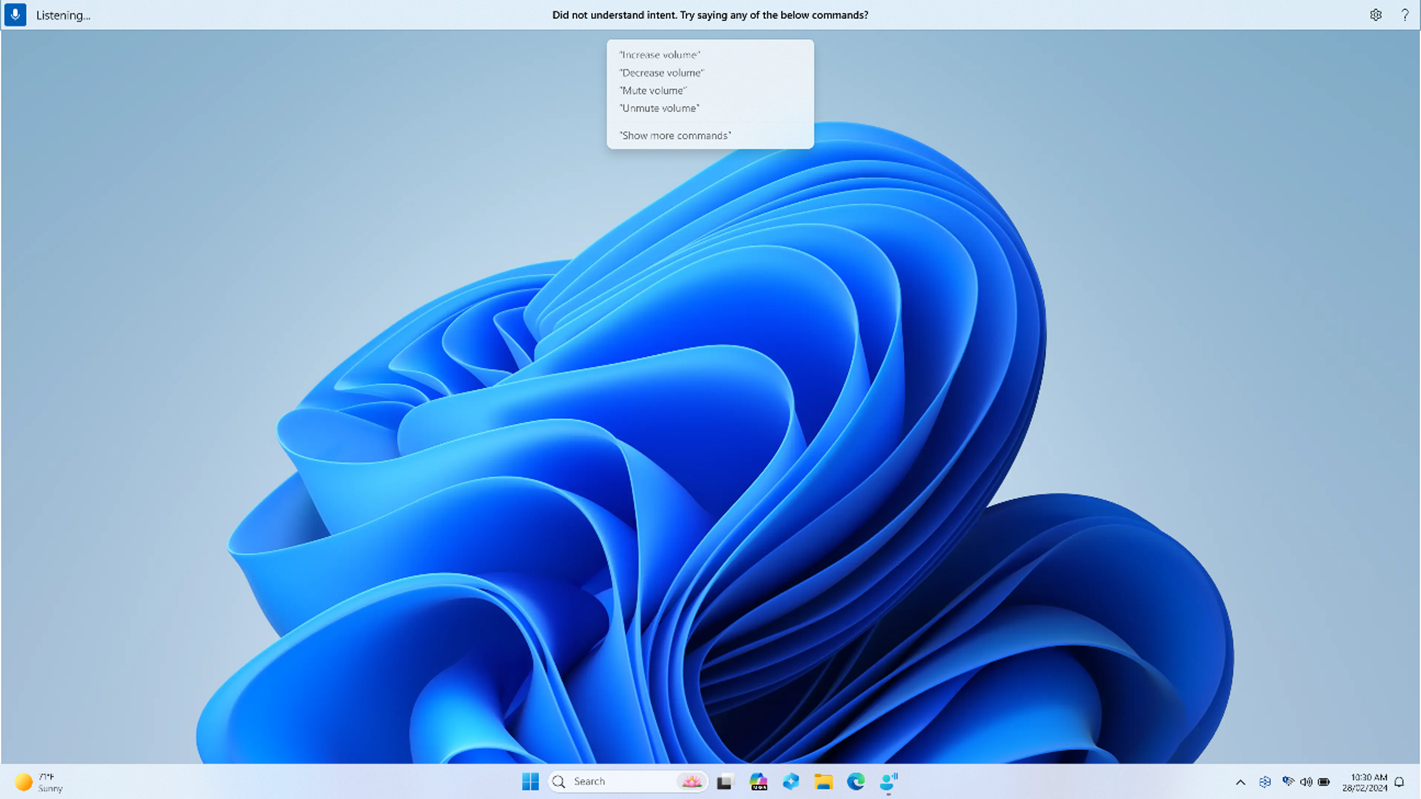
Real-time command suggestions in voice access to help you remember the right commands.
We’re making voice access more flexible, intelligent, and easy to use on your Copilot+ PC. Let us know what you think!
FEEDBACK: Please file feedback in Feedback Hub (WIN + F) under Accessibility > Voice access.
Changes and Improvements gradually being rolled out to the Dev Channel with toggle on*
[Voice access]
- We are introducing Chinese support for voice access. You can now use Voice access to navigate, dictate, and interact with Windows using voice commands in Simplified Chinese (zh-cn) and Traditional Chinese (zh-tw).
[Settings]
- [ADDED 3/20] We’re beginning to introduce a new settings page under Settings > Apps > Actions for managing which apps Windows can recommend actions from on Copilot+ PCs. For example, turning off the Photos app on this settings page will turn off the available actions from the Photos app in Click to Do on Copilot+ PCs.

Enable or Disable Recommended Actions from Apps in Windows 11
This tutorial will show you how to turn on or off showing recommended AI Actions from apps as contextual suggestions for your account in Windows 11. Starting with Windows 11 build 26100.3915 (24H2) Microsoft is beginning to introduce a new settings page under Settings > Apps > Actions for...
www.elevenforum.com
Fixes gradually being rolled out to the Dev Channel with toggle on*
[File Explorer]
- Fixed an issue causing the see more “…” menu in the command bar to open in the wrong direction for some resolutions.
[Login and Lock screen]
- Fixed an issue which could cause the login screen to crash if you clicked the sign in options link.
[Recall (Preview)]
The following fixes are rolling out for Recall on Copilot+ PCs:- We fixed the issue where if you were trying out Recall on a PC managed by an IT administrator in your organization (signed in with a Microsoft Entra ID), you would see your Recall snapshots get deleted after installing Build 26120.3380 and after each reboot on that build.
[Settings]
- Fixed an issue causing an unexpected amount of extra space at the top of Settings > System > Sound, and a couple other pages.
[Printing]
- Fixed an issue which was causing some Insiders to unexpectedly see a message saying a Send to OneNote driver for printing wasn’t working.
- Fixed an issue where non-admin users couldn’t uninstall printers that they’d added.
Known issues
[General]
- [NEW] When joining the Dev or Beta Channels on Windows 11, version 24H2 – you will be offered Build 26120.3360 After installing Build 26120.3360, you will be offered the most recent update available. This 2-hop experience to get onto the latest flight in the Dev or Beta Channels is just temporary.
- [NEW] If you use the option “Fix problems using Windows Update” under Settings > System > Recovery, you will experience a 0x80070005 error attempting to reinstall this build.
- [NEW] The toggle to get the latest updates as they are available via Settings > Windows Update is not rendering correctly and gets turned off by itself. This is just a visual issue and will be fixed in a future flight soon.
- After you do a PC reset under Settings > System > Recovery, your build version may incorrectly show as Build 26100 instead of Build 26120. This will not prevent you from getting future Dev Channel updates which will resolve this issue.
[Recall]
- [REMINDER] Make sure you update Microsoft 365 apps to the latest version so you can jump back into specific documents.
- [NEW] Recall is no longer able to save new snapshots or modify settings. This will be fixed in a future flight.
- [NEW] Some Insiders may experience an issue where Recall is unable to automatically save snapshots, and the setting can’t be turned on in Settings. We’re working on a fix for this issue.
- Recall can be enabled or disabled from “Turn Windows features on or off”. We are caching the Recall binaries on disk while we test add/remove. In a future update we will completely remove the binaries.
[Click to Do]
- [UPDATED 3/17] The intelligent text actions are now locally moderated to ensure the safety of prompts and responses and has replaced the cloud endpoint. Now that these intelligent text actions are fully local, they are also available in Click to Do in Recall.
- [REMINDER] If any of your actions on image entities are no longer appearing, please ensure you have the latest updates for the Photos and Paint app from the Microsoft Store.
- Sometimes additional context is given when using more intelligent text actions powered by Phi Silica.
[Improved Windows Search]
- [REMINDER] For improved Windows Search on Copilot+ PCs, it is recommended that you plug in your Copilot+ PC for the initial search indexing to get completed. You can check your search indexing status under Settings > Privacy & security > Searching Windows.
[File Explorer]
- We’re working on the fix for an issue causing File Explorer to be very slow to close for some Insiders when closing using the X button. This may also have an impact on the other title bar buttons.
- [NEW] We’re working on the fix for an issue causing File Explorer Home to crash for some Insiders. If you launch File Explorer to a different folder (for example, using search or the Run dialog), you should be able to navigate your folders.
[Taskbar]
- [NEW] We’re working on the fix for an issue where the taskbar icons aren’t increasing in size as they should when using your PC in a tablet posture.
[Task Manager]
- After adding the new CPU Utility column, you may notice that System Idle Process always shows as 0.
- The CPU graphs in the Performance page are still using the old CPU utility calculations.
Reminders for Windows Insiders in the Beta Channel
- Windows Insiders in the Beta Channel on Windows 11, version 24H2 will receive updates based on Windows 11, version 24H2 via an enablement package (Build 26120.xxxx).
- Updates delivered to the Dev Channel are in a format that offers a preview of enhancements to servicing technology on Windows 11, version 24H2. To learn more, see Introducing Windows 11 checkpoint cumulative updates | Windows IT Pro Blog.
- Many features in the Dev Channel are rolled out using Control Feature Rollout technology, starting with a subset of Insiders and ramping up over time as we monitor feedback to see how they land before pushing them out to everyone in this channel.
- For Windows Insiders in the Dev Channel who want to be the first to get features gradually rolled out to you, you can turn ON the toggle to get the latest updates as they are available via Settings > Windows Update*. Over time, we will increase the rollouts of features to everyone with the toggle turned on. Should you keep this toggle off, new features will gradually be rolled out to your PC over time once they are ready.
- Features and experiences included in these builds may never get released as we try out different concepts and get feedback. Features may change over time, be removed, or replaced and never get released beyond Windows Insiders. Some of these features and experiences could show up in future Windows releases when they’re ready.
- Some features in active development we preview with Windows Insiders may not be fully localized and localization will happen over time as features are finalized. As you see issues with localization in your language, please report those issues to us via Feedback Hub.
- Please note that some accessibility features may not work with features like Recall and Click to Do while in preview with Windows Insiders.
- Because the Dev and Beta Channels represent parallel development paths from our engineers, there may be cases where features and experiences show up in the Beta Channel first.
- Check out Flight Hub for a complete look at what build is in which Insider channel.
Amanda & Brandon
Source:
Announcing Windows 11 Insider Preview Build 26120.3576 (Dev and Beta Channels)
Hello Windows Insiders, today we are releasing Windows 11 Insider Preview Build 26120.3576 (KB5053650) to the Dev and Beta Channels. As a reminder – we’re also offering the same Dev Channel updates based on
blogs.windows.com
Check Windows Updates
UUP Dump:
64-bit ISO download:
Select language for Windows 11 Insider Preview 10.0.26120.3576 (ge_release_upr) amd64
Select language for Windows 11 Insider Preview 10.0.26120.3576 (ge_release_upr) amd64 on UUP dump. UUP dump lets you download Unified Update Platform files, like Windows Insider updates, directly from Windows Update.
uupdump.net
ARM64 ISO download:
Select language for Windows 11 Insider Preview 10.0.26120.3576 (ge_release_upr) arm64
Select language for Windows 11 Insider Preview 10.0.26120.3576 (ge_release_upr) arm64 on UUP dump. UUP dump lets you download Unified Update Platform files, like Windows Insider updates, directly from Windows Update.
uupdump.net
UUP Dump - Download Windows Insider ISO
UUP Dump is the most practical and easy way to get ISO images of any Insider Windows 10 or Windows 11 version, as soon as Microsoft has released a new build. UUP Dump creates a download configuration file according to your choices, downloads necessary files directly from Microsoft servers, and...
www.elevenforum.com
Last edited: