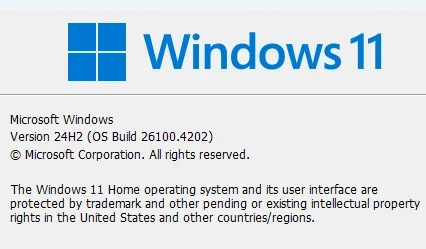
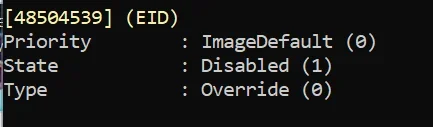
UPDATE 6/10:
 www.elevenforum.com
Be sure to follow @WindowsUpdate to find out when new content is published to the Windows release health dashboard.
Note: Experience seamless device migration with Windows Backup for Organizations, now available for a limited public preview. This feature ensures a smooth transition to Windows 11 for new or reimaged Microsoft Entra joined devices. To learn more, see Announcing Windows Backup for Organizations.
KB5060842 Windows 11 Cumulative Update build 26100.4349 (24H2) - June 10
UPDATE 6/26: https://www.elevenforum.com/t/kb5060829-windows-11-cumulative-update-preview-build-26100-4484-24h2-june-26.37384/ Microsoft Support: June 10, 2025 - KB5060842 (OS Build 26100.4343) For information about Windows update terminology, see types of Windows updates and the monthly...
www.elevenforum.com
Microsoft Support:
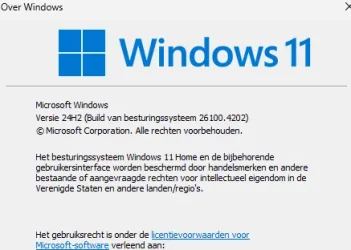
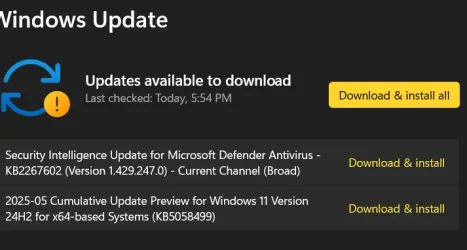
May 28, 2025 - KB5058499 (OS Build 26100.4202) Preview
For information about Windows update terminology, see types of Windows updates and the monthly quality update types. To find an overview of Windows 11, version 24H2, see its update history page.Be sure to follow @WindowsUpdate to find out when new content is published to the Windows release health dashboard.
Note: Experience seamless device migration with Windows Backup for Organizations, now available for a limited public preview. This feature ensures a smooth transition to Windows 11 for new or reimaged Microsoft Entra joined devices. To learn more, see Announcing Windows Backup for Organizations.
Highlights
Gradual rollout
A gradual rollout distributes a release update over a period of time, rather than all at once. This means that users receive the updates at different times, and it might not be immediately available to all users. To see the status of this feature, go to Windows release health dashboard.- [Click to Do (preview)]
- New!1 Ask Copilot is a new action within Click to Do. When you highlight text or an image, Click to Do offers the Ask Copilot option. Selecting it opens Microsoft Copilot with your content in the prompt box. You can send the selected text or image directly to the Copilot app to complete your prompt.

Use Click to Do in Windows 11
This tutorial will show you how to use Click to Do to perform AI actions with text and images for your account on a Windows 11 Copilot+ PC. Click to Do (preview) helps you get things done faster by identifying text and images on your screen that you can take actions with. Click to Do analyzes...
www.elevenforum.com
- New! Enhance your Click to Do experience with more intelligent text actions on AMD and Intel™-powered Copilot+ PCs. Use the WIN key + mouse-click or WIN + Q to select a text block, then drag to choose the text you want. Options will appear to Summarize, Create a bulleted list, or to help you Rewrite your text to sound more casual, more formal, or more polished.
- New! 2 Click to Do (preview) is now available in the European Economic Area (EEA), bringing NPU-powered intelligent text actions for English to more users, along with new support for Spanish and French—enabling actions Summarize, Create a bulleted list, and Refine in these languages.
- New! If your PC has pen and inking capabilities, you can configure the shortcut button to open Click to Do with a single-click, double-click, or press and hold through Settings > Bluetooth & devices > Pen & Windows Ink.

Change what Pen Shortcut Button Does in Windows 11
This tutorial will show you how to change what your pen shortcut button does when you single-click, double-click, or press and hold the shortcut button for your account in Windows 11. You can pair a pen via Bluetooth to connect the pen with your Windows 11 PC and use with the pen menu. You can...
www.elevenforum.com
- New! You can add Click to Do as one of the four apps in the pen menu on your PC. If all slots for the pen menu are full, you might need to replace one app with Click to Do in the menu settings.
- New! Click to Do can now perform intelligent text actions in Spanish and French.
- New!1 Ask Copilot is a new action within Click to Do. When you highlight text or an image, Click to Do offers the Ask Copilot option. Selecting it opens Microsoft Copilot with your content in the prompt box. You can send the selected text or image directly to the Copilot app to complete your prompt.
- [Copilot]
- New! You can open Copilot on Windows with Win + C. You can personalize your Copilot key and Win + C experience at any time with the existing “Customize Copilot key on keyboard” under Settings > Personalization > Text input.

Open Copilot in Windows 11
This tutorial will show you different ways to open Copilot in Windows 11 and Windows 10. Windows is the first PC platform to provide centralized AI assistance to you. Together with Microsoft Copilot (formerly Bing Chat), Copilot in Windows helps you get answers and inspirations from across the...
www.elevenforum.com
- New! To start Press to talk with Copilot on Windows, hold the Copilot key—or Win + C if your keyboard doesn’t have one—for two seconds. Press Esc or stay silent for a few seconds to end the call. Use Alt + Spacebar to talk with Copilot on Windows. You can interact with Copilot using your voice and receive instant responses while continuing your tasks.

Change How Copilot Opens with Alt+Spacebar shortcut in Windows 11
This tutorial will show you how to change how Copilot launches when using the Alt + Spacebar keyboard shortcut for your account in Windows 11. Microsoft Copilot is your everyday AI companion, empowering you to achieve anything you can imagine. Copilot Voice allows you to talk with Copilot with...
www.elevenforum.com
- New! You can open Copilot on Windows with Win + C. You can personalize your Copilot key and Win + C experience at any time with the existing “Customize Copilot key on keyboard” under Settings > Personalization > Text input.
- [Cross device resume] New! Seamlessly resume working on OneDrive files from your phone (iOS and Android) on your Windows 11 PC with a single click. With this feature, you’ll get a notification asking if you want to pick up where you left off editing a OneDrive file, like a Word document, that you viewed or edited on your phone within the last 5 minutes before unlocking your PC.

Enable or Disable Resume App from Device and Continue on Windows 11 PC
This tutorial will show you how to enable or disable cross device Resume (aka: Hand Off) apps for your account or all users in Windows 11. Resume (aka: Hand Off) allows you to start something in an app on one device (ex: Android phone) and continue on your PC. Starting with Windows 11 build...
www.elevenforum.com
- [Energy Saver] New! IT admins can manage Energy saver settings on Windows 11 PCs through group policies and MDM configurations using Microsoft Intune. This feature helps extend battery life by limiting background activity, dimming the screen, and contributing to environmental sustainability. To configure the policy, go to the Local Group Policy under Computer Configuration > Administrative Templates > System > Power Management > Energy Saver Settings and “Enable Energy Saver to Always Be On.”

Turn On or Off Energy Saver in Windows 11
This tutorial will show you how to turn on or off energy saver for all users in Windows 11. Energy Saver replaces battery saver and exists on Windows 11 24H2 and later versions. It significantly extends battery life and reduces energy consumption by automatically managing power usage across...
www.elevenforum.com
- [Graphics] New! Manage your PC’s HDR features under Settings > System > Display. Updates include: A clearer label for “Use HDR” that better explains which media types are supported. The ability to stream HDR video even when HDR is turned off. On PCs with Dolby Vision, a new switch lets you turn Dolby Vision on or off independently of HDR—giving you more control over your viewing experience.

Turn On or Off HDR for Display in Windows 11
This tutorial will show you how to turn on or off use HDR for a display in Windows 11. HDR content on Windows offers better brightness and color capabilities compared to traditional content (sometimes called standard dynamic range [SDR] content). Traditional content typically shows details in a...
www.elevenforum.com

Enable or Disable HDR Video Streaming even when HDR is Off in Windows 11
This tutorial will show you how to enable or disable allowing HDR video streaming even when HDR is off for your account in Windows 11. HDR content offers better brightness and color capabilities compared to traditional content (sometimes called standard dynamic range [SDR] content). Traditional...
www.elevenforum.com

Enable or Disable Dolby Vision HDR mode for Display in Windows 11
This tutorial will show you how to turn on or off use Dolby Vision HDR mode for a display in Windows 11. Starting with Windows 11 build 26100.4202 (24H2), on PCs with Dolby Vision, a new switch lets you turn Dolby Vision on or off independently of HDR—giving you more control over your viewing...
www.elevenforum.com
- [Narrator] New! Enhance digital accessibility with AI-powered image descriptions in Narrator on Copilot+ PCs. This feature provides detailed descriptions of images, charts, and graphs for blind and low-vision users. To turn on Narrator, press Ctrl + Windows key + Enter or search for 'Narrator' in Windows search. Use Narrator key + Ctrl + D for image descriptions.
- [Improved Windows Search]
- New! Discover the new feature that makes finding settings easier on Copilot+ PCs. Type the setting you’re looking for in the Windows search box on your taskbar without needing to remember the exact setting name. For example, use your own words to find settings like “change my theme” or “about my PC.” You no longer need to remember the exact setting name.
- New! In the EEA, you can now find cloud photos using improved Windows Search on the taskbar. Describe the photos, like 'European castles' or 'summer picnics,' in the search box. Photos from the cloud and your Copilot+ PC appear in the search results. Exact keyword matches within your cloud files will also show up. This feature is gradually rolling out to Snapdragon-powered Copilot+ PCs, with support for AMD and Intel-powered PCs coming soon.
- [Search on Taskbar] New! Improved support for web search providers in Windows Search for the EEA, including with increased discoverability.
- [Settings]
- New! Find answers to commonly asked questions about your PC and Windows 11 in the new FAQs section under Settings > System > About. It covers topics like system setup, performance, and compatibility – all in one place.

Check Frequently Asked Questions (FAQs) about your PC and Windows 11
This tutorial will show you how to find answers to commonly asked questions about your PC and Windows 11. Starting with Windows 11 build 26100.4202 (24H2), build 22631.5413 (23H2), and build 27881.1000 (Canary), Microsoft added a new FAQs section under Settings > System > About to help find...
www.elevenforum.com
- New! The dialog to rename your printer under Settings > Bluetooth & devices > Printers & scanners now matches the Windows 11 look and feel.
- New! Mouse settings are now easier to access under Settings > Accessibility > Mouse and Mouse pointer and touch, with no need to open Control Panel. You’ll find updated icons for Mouse pointer speed and Enhance mouse pointer precision, plus options for customizing the mouse indicator, pointer trails, and hover activation time.
- New! Find answers to commonly asked questions about your PC and Windows 11 in the new FAQs section under Settings > System > About. It covers topics like system setup, performance, and compatibility – all in one place.
- [Taskbar]
- New! Admins can configure taskbar policies so users can unpin specific apps, ensuring they are not repinned during the next policy refresh. To turn on this feature, use the new PinGeneration option.
Pin to Taskbar an App, Drive, File, Folder, or Site in Windows 11
This tutorial will show you how to pin an app, drive, file, folder, or site to the taskbar for your account in Windows 11. The taskbar in Windows 11 shows the Start menu, Search, Task View, Widgets, Chat, File Explorer, Microsoft Edge, and Microsoft Store buttons (icons) aligned to the center...
www.elevenforum.com
- Fixed: When using Tab and Shift + Tab to move keyboard focus around the taskbar, if you go backwards at least once you can get keyboard focus stuck on the taskbar frame, which could lead screen readers to just say “pane.”
- Fixed: On login, the keyboard focus might unexpectedly be set to widgets in the taskbar, which can cause widgets to open.
- New! Admins can configure taskbar policies so users can unpin specific apps, ensuring they are not repinned during the next policy refresh. To turn on this feature, use the new PinGeneration option.
- [Voice Access]
- New! Voice access now includes an in-product experience that highlights new features and improvements. Use the settings menu to open or dismiss it anytime.
- New! You can find voice access under Accessibility in Quick Settings at the lower-right corner of your screen near the clock. To open Quick Settings, select the network, volume, or battery icon.

Turn On or Off Voice Access in Windows 11
This tutorial will show you how to turn on or off voice access for your account in Windows 11. Voice access is a new experience starting with Windows 11 build 22518 that enables everyone, including people with mobility disabilities, to control their PC and author text using only their voice and...
www.elevenforum.com
- Fixed: Voice access might stop responding with error “working on it” when dictating.
- [Voice Typing] New! You control the profanity filter. When you turn it on, it masks profanity with asterisks. When you turn it off, words appear as spoken. To change the setting, open voice typing (Win + H), select the settings icon, and turn on the Filter profanity switch.

Turn On or Off Profanity Filter for Voice Typing in Windows 11
This tutorial will show you how to turn on or off the profanity filter for voice typing for your account in Windows 11. Voice typing allows you to enter text on your PC by speaking. You can use voice typing commands to manually insert punctuation marks. Starting with Windows 11 build...
www.elevenforum.com
- [Windows Share]
- New! Make last-minute edits such as cropping, rotating, and adding filters to images shared through the Windows Share window.

Edit Image when Sharing in Windows 11
This tutorial will show you how to edit an image when you share it in Windows 11. You can use Windows Share in Windows 11 to share a file with an app, email contact, mobile device (phone), or nearby device. When you share an image file in the latest Windows 11 build 26100.4202 (24H2), build...
www.elevenforum.com
- New! When you drag a local file from File Explorer or your desktop, a tray appears at the top of your screen. Drop the file into a suggested app or select More to open the Windows share window.

Share File with Drop Tray in Windows 11
This tutorial will show you how to share files using the Drag/Drop Tray in Windows 11. Starting with Windows 11 build 26100.4202 (24H2) and build 22631.5413 (23H2), sharing files in Windows is getting a lot easier and quicker with our new drag tray feature. When you start dragging a local file...
www.elevenforum.com

Enable or Disable Drop Tray in Windows 11
This tutorial will show you how to enable or disable the Drag/Drop Tray feature for your account in Windows 11. Starting with Windows 11 build 26100.4202 (24H2) and build 22631.5413 (23H2), sharing files in Windows is getting a lot easier and quicker with the Drag Tray feature. When you start...
www.elevenforum.com
- New! Add apps that support sharing directly to the right-click menu for local files in File Explorer or on the desktop.

Share File with App in Windows 11
This tutorial will show you how to share a file with an app in Windows 11. Windows Share in Windows 11 allows you to share file(s) with an app to send from. Starting with Windows 11 build 22631.3810, Microsoft is rolling out the ability to copy files from the Windows share window. Just click...
www.elevenforum.com
- New! Make last-minute edits such as cropping, rotating, and adding filters to images shared through the Windows Share window.
Last edited:






 ).
).