Insider KB5062669 Windows 11 Insider Dev build 26200.5722 (25H2) - July 28


UPDATE 8/01:


 Windows Blogs:

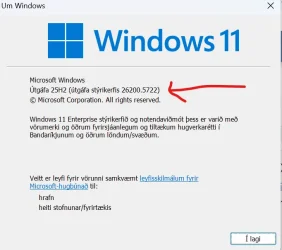
Hello Windows Insiders, today we are releasing Windows 11 Insider Preview Build 26200.5722 (KB5062669) to the Dev Channel.

Changes in Dev Channel builds and updates are documented in two buckets: new features, improvements, and fixes that are being gradually rolled out for Insiders who have turned on the toggle to get the latest updates as they are available (via Settings > Windows Update*) and then new features, improvements, and fixes rolling out to everyone in the Dev Channel. For more information, see the Reminders section at the bottom of this blog post.


New Copilot+ PC experiences

Introducing the new agent in Settings rolling out for AMD and Intel®-powered Copilot+ PCs

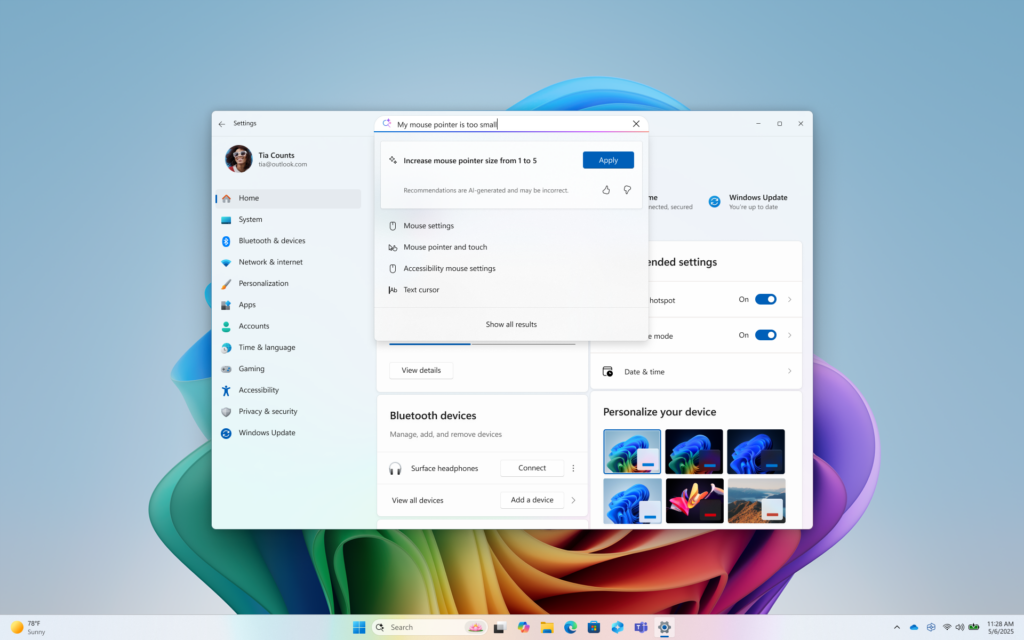
We are rolling out the new agent in Settings experience for AMD and Intel®-powered Copilot+ PCs. This experience is designed to help solve one of the most common frustrations we heard: finding and changing settings on your PC. With this update to Settings, you will be able to simply describe what you need help with like, “how to control my PC by voice” or “my mouse pointer is too small” and the agent will recommend the right steps you can take to address the issue. An agent uses AI on your PC to understand your intent and with your permission, automate and execute tasks on your behalf. Please note that this experience works if your primary display language is set to English.


Agent powered search results for my mouse pointer is too small in Settings.

FEEDBACK: Please file feedback in Feedback Hub (WIN + F) under Settings > All other settings.

Changes and Improvements gradually being rolled out to the Dev Channel with toggle on*

[General]

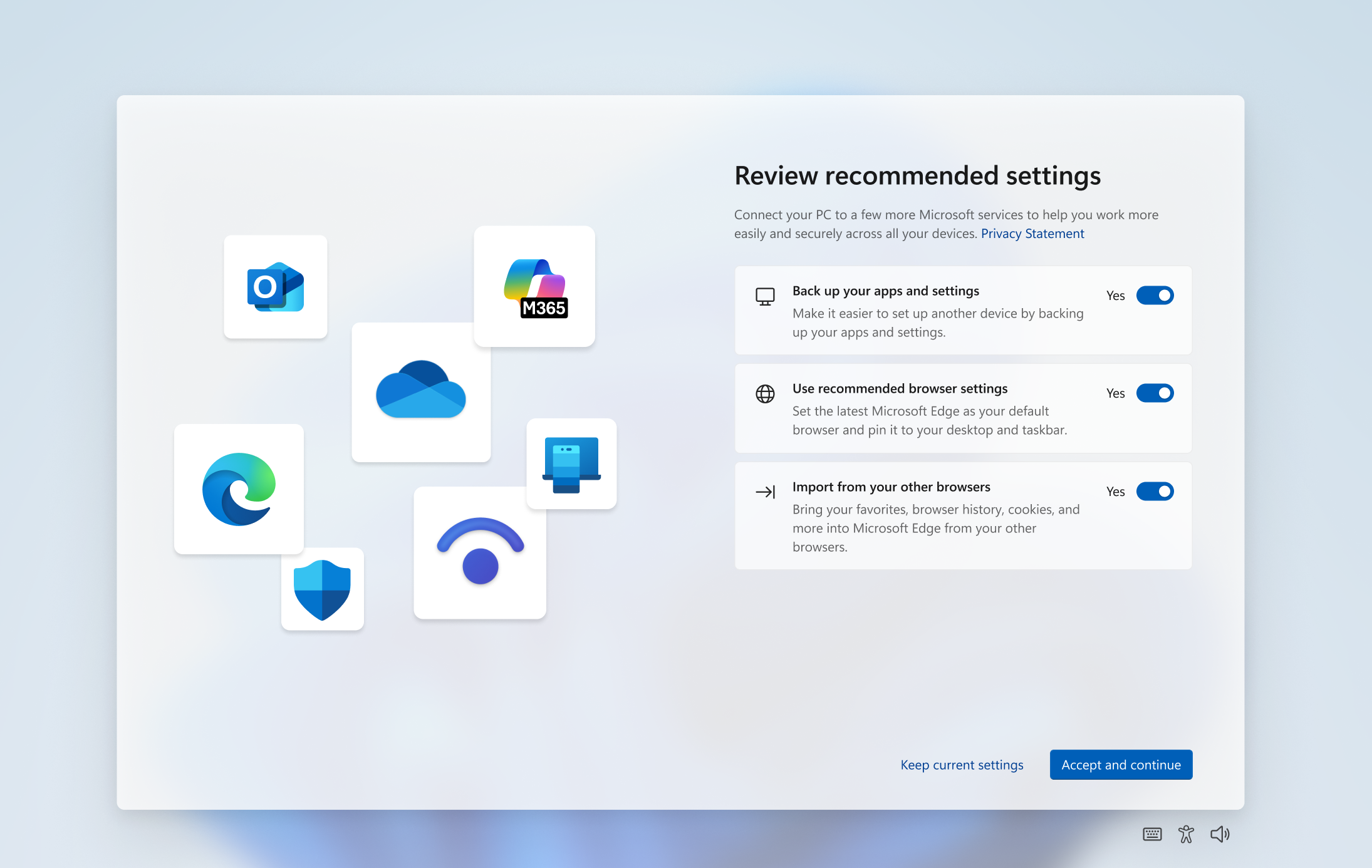
  • Some Windows Insiders in the Dev and Beta Channels will see a refreshed SCOOBE screen (Second Chance Out of Box Experience) for reviewing recommended settings on your PC. This redesigned screen is meant to be more intuitive and streamlined, allowing you to choose the recommended settings you want for your PC without having to navigate through multiple setup screens. If you see this screen, let us know if you have any feedback via Feedback Hub.

    ALT-TEXT: Refreshed SCCOBE screen for reviewing recommended settings.
    ALT-TEXT: Refreshed SCCOBE screen for reviewing recommended settings.

[Click to Do (Preview)]

The following changes and improvements are rolling out for Click to Do on Copilot+ PCs:
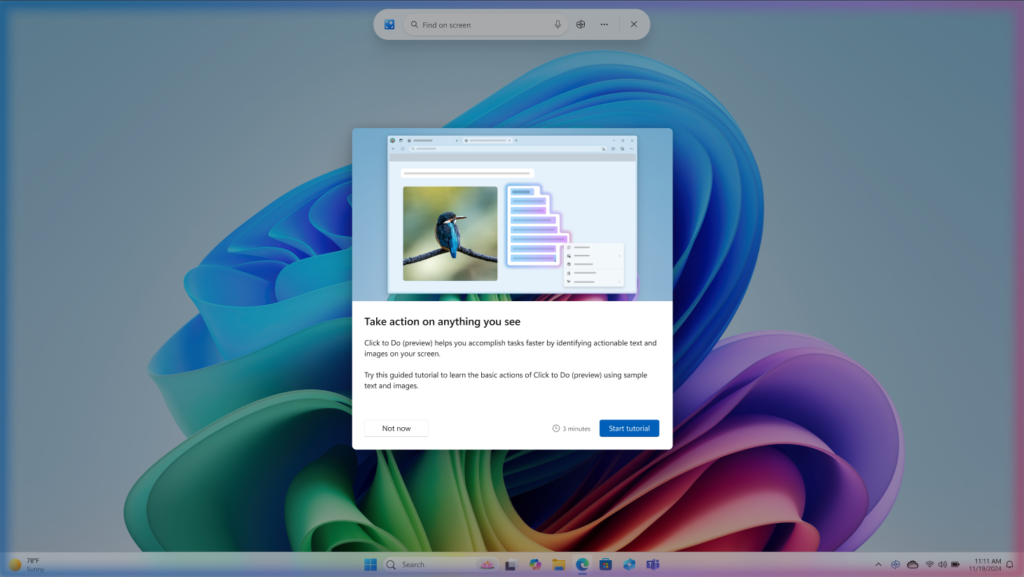
  • We are beginning to roll out a new tutorial for Click to Do. When you launch Click to Do for the first time, you’ll be offered a quick interactive tutorial that shows you how to accomplish tasks faster. During the tutorial, you’ll take actions on both text and images, so you’ll know how to quickly get a summary of a large block of text or remove the background from an image. You can revisit the tutorial at any time by selecting …, then Start tutorial.


    New tutorial in Click to Do on Copilot+ PCs.
    New tutorial in Click to Do on Copilot+ PCs.

[Taskbar & System Tray]

  • We are making a change to how quickly Windows can apply enterprise pins to the taskbar when initiated by the IT admins. We want to reduce the gap between an IT admin applying the pinning policy and when their users see a pin on their taskbar. Today, the policy only applies when explorer restarts. With this change, the gap is only up to ~8 hours (policy refresh interval) and sidesteps the explorer restart requirement.

[Search on the Taskbar]

  • In the left pane of the search results in the Windows Search box on the taskbar, we are introducing a new grid view to help you more quickly and accurately identify the desired image within your search.

    Search results in the Windows Search box with grid view of images highlighted in a red box.
    Search results in the Windows Search box with grid view of images highlighted in a red box.

[Lock screen]

  • We have made some updates to the UI for configuring widgets on the lock screen under Settings > Personalization > Lock screen.

[Notification Center]

  • To address your feedback, we are extending the functionality of Notification Center to secondary monitors. This means you will be able to see your calendar on any of your monitors as well as the option to show a bigger clock with seconds above calendar. You will be able to open Notification Center on any monitor by clicking the date and time in the system tray of your taskbar.

[Task Manager]

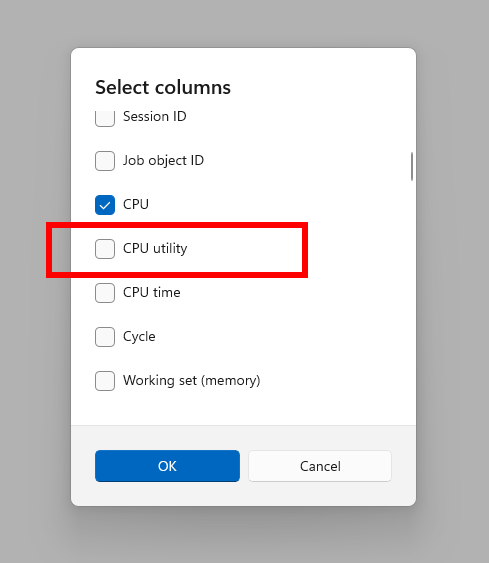
  • After disabling to fix some issues, we are beginning to roll out the change the way Task Manager calculates CPU utilization for the Processes, Performance, and Users pages again to Windows Insiders in the Dev and Beta Channels. Task Manager will now use the standard metrics to display CPU workload consistently across all pages and aligning with industry standards and third-party tools. For backward compatibility, a new optional column called CPU Utility is available (hidden by default) on the Details tab showing the previous CPU value used on the Processes page.


    New CPU utility column option for Details page in Task Manager.
    New CPU utility column option for Details page in Task Manager.

Fixes gradually being rolled out to the Dev Channel with toggle on*

[Taskbar]

  • Fixed an issue where the Task View icon in the taskbar might be unexpectedly invisible if you turned it off and back on in Settings (the space was reserved and you could click it to open Task View, but nothing showed in the space).
  • Fixed a race condition which could lead to the Widgets icon not displaying in the taskbar although it was enabled in Settings (no space reserved, clicking the area did nothing).

[Login and lock]

  • Fixed an issue which was causing the text for lock screen widgets to be unreadable in some cases because it was white on a light background.
  • Did some work to address an underlying issue which could lead to the taskbar being slow to load when unlocking your PC after coming out of sleep. This issue could also have led to the password field and other login screen contents not rendering when transitioning from lock screen to login screen after sleep. If you continue experiencing issues, please report them in the Feedback Hub under Install and Update > Logon hangs.

[File Explorer]

  • Fixed an issue where if you tried to use the unblock open in Properties for a file, it will still show as blocked when you opened Properties the next time.

[Start menu]

  • Fixed an issue for those with the new Start menu where if you used touch to navigate the new Start menu, it wasn’t working reliably. For example, it didn’t support the swipe-up gesture.

[Input]

  • Fixed an issue which was causing the Microsoft Changjie Input method to not work properly in the previous build.
  • Fixed an issue which was causing phonetic keyboards, such as the Hindi Phonetic Input keyboard and the Marathi Phonetic keyboard, to not work properly in the previous build.

[Administrator Protection]

  • Fixed an underlying issue where the Xbox app wouldn’t launch when administrator protection was enabled. This may have also impacted other apps too, showing error 0xC0000142 or 0xC0000045.

[Settings]

  • Fixed an issue where under Settings > System > Storage > Disks and Volumes there might show a link for BitLocker drive encryption although it wasn’t supported in that case. Clicking it would result in BitLocker opening and displaying error 0x80004005.

[Other]

  • Fixed an issue causing Insiders to see multiple error pop ups about unexpected elements when opening Group Policy Editor.
  • Fixed an underlying issue causing a small number of Insiders to experience a bugcheck with error DRIVER_IRQL_NOT_LESS_OR_EQUAL in the latest builds.
  • Fixed an underlying issue impacting installers for certain apps on ARM64 PCs, which could result in a long stall during the installation process.

Fixes for everyone in the Dev Channel

[Graphics]

  • Fixed an issue where external graphics cards connected over Thunderbolt were unexpectedly not discoverable in some cases.

Known issues

[General]

  • Some Windows Insiders may experience a rollback trying to install this update with a 0x80070005 in Windows Update. We’re working on a fix for Windows Insiders impacted. If you are impacted, using Settings > System > Recovery > “Fix issues using Windows update” may resolve the issue.

[Taskbar & System Tray]

  • [ADDED 7/30] We are investigating reports that all apps pinned to the taskbar are unpinned for some Insiders after updating to Build 26200.5722.

[Live Captions]

  • Live captions may crash when attempting to use live translation on a Copilot+ PC.

[Xbox Controllers]

  • Some Insiders are experiencing an issue where using their Xbox Controller via Bluetooth is causing their PC to bugcheck. Here is how to resolve the issue. Open Device Manager by searching for it via the search box on your taskbar. Once Device Manager is open, click on “View” and then “Devices by Driver”. Find the driver named “oemXXX.inf (XboxGameControllerDriver.inf)” where the “XXX” will be a specific number on your PC. Right-click on that driver and click “Uninstall”.

[Click to Do (Preview)]

The following known issues will be fixed in future updates to Windows Insiders:
  • Windows Insiders on AMD or Intel®-powered Copilot+ PCs may experience long wait times on the first attempt to perform intelligent text actions in Click to Do after a new build or model update.

Reminders for Windows Insiders in the Dev Channel

  • Windows Insiders in the Dev Channel receive updates based on Windows 11, version 25H2 via an enablement package (Build 26200.xxxx). For more information on Windows 11, version 25H2 – see this blog post.
  • Many features in the Dev Channel are rolled out using Control Feature Rollout technology, starting with a subset of Insiders and ramping up over time as we monitor feedback to see how they land before pushing them out to everyone in this channel.
  • For Windows Insiders in the Dev Channel who want to be the first to get features gradually rolled out to you, you can turn ON the toggle to get the latest updates as they are available via Settings > Windows Update*. Over time, we will increase the rollouts of features to everyone with the toggle turned on. Should you keep this toggle off, new features will gradually be rolled out to your PC over time once they are ready.
  • Features and experiences included in these builds may never get released as we try out different concepts and get feedback. Features may change over time, be removed, or replaced and never get released beyond Windows Insiders. Some of these features and experiences could show up in future Windows releases when they’re ready.
  • Some features in active development we preview with Windows Insiders may not be fully localized and localization will happen over time as features are finalized. As you see issues with localization in your language, please report those issues to us via Feedback Hub.
  • Please note that some accessibility features may not work with features like Recall and Click to Do while in preview with Windows Insiders.
  • Because the Dev and Beta Channels represent parallel development paths from our engineers, there may be cases where features and experiences show up in the Beta Channel first.
  • Check out Flight Hub for a complete look at what build is in which Insider channel.
Thanks,
Amanda & Brandon


 Source:


Check Windows Updates


UUP Dump:

64-bit ISO download:

ARM64 ISO download:

 
Last edited:

  • Like
Reactions: OAT
Successfully installed on a non-compatible machine (our laptop with an Intel i5 7500)

Seems pretty stable so far :)

No issue with the pinned items in the taskbar.

EDIT: it kinda messed up the Synaptics Driver (or just the scroll itself). Scrolling is not working in apps like Explorer, Device Manager, old Control Panel..., but working in my web browser (Firefox) or in Settings. This issue wasn't on the build 5710 though.
 
Last edited:

My Computers

System One System Two

  • OS
    Windows 11 Pro 24H2
    Computer type
    PC/Desktop
    Manufacturer/Model
    Multi
    CPU
    Intel i9-9900k
    Motherboard
    Gigabyte Z390 Aorus Master
    Memory
    Corsair Vengeance LPX 32GB (2 x 16GB)
    Graphics Card(s)
    Gigabyte RTX 2080Ti Gaming OC
    Monitor(s) Displays
    Samsung LC32HGQ
    Screen Resolution
    WQHD
    Hard Drives
    Samsung 970 Evo Plus 1 TB
    Crucial MX100 512 GB
    Samsung 840 Pro 256 GB
    Seagate ST4000DM000-1F2168 4 TB
    PSU
    Seasonic P-860 Platinium
    Case
    Corsair Graphite 780T
    Cooling
    Noctua NH-U14S
    Keyboard
    Corsair K70 MK.2 Low profile
    Mouse
    Logitech G Pro HERO
    Internet Speed
    200 Mb/s
    Browser
    Mozilla Firefox
    Antivirus
    Windows Defender
    Other Info
    BIOS version F11
  • Operating System
    Windows 11 Home 24H2
    Computer type
    Laptop
    Manufacturer/Model
    Clevo W650KJ1
    CPU
    Intel i5 7500
    Motherboard
    Clevo W65KK/KJ1
    Memory
    2×8 Go Corsair Vengeance 2400Mhz DDR4
    Graphics card(s)
    Nvidia GeForce GTX 1050
    Sound Card
    Integrated
    Screen Resolution
    1920x1080
    Hard Drives
    Samsung 850 Evo M.2 SATA 250 GB
    Seagate ST1000LM035 1 TB
    Browser
    Mozilla Firefox
    Antivirus
    Windows Defender
    Other Info
    Replaced original Wi-Fi card by an Intel® Wireless-AC 9260
    BIOS version 1.05.13
A good result for unsupported HW on a full-install build. As mentioned back on the first page, there's some question about what's actually needed to WU going forward. It used to be that Skip_TPM_Check_on_Dynamic_Update.cmd was important, but it might only not be needed now, it might actually cause problems. I won't know until the next CU. What do you use normally to get WU?
 

My Computer

System One

  • OS
    Windows 11

My Computer

System One

  • OS
    Windows 11
    Computer type
    PC/Desktop
    Manufacturer/Model
    Asus/Custom Build
    CPU
    Intel® Xeon® X5690 3.47GHz Six-Core
    Motherboard
    Asus P6T Deluxe v2
    Memory
    G.Skill PC3-12800 1600MHz 24GB
    Graphics Card(s)
    NVIDIA GeForce GTX 1050
    Sound Card
    SoundMAX ADI AD2000B HD Audio
    Monitor(s) Displays
    Acer T232HL Touch Screen
    Screen Resolution
    1920 x 1080 @ 60Hz
    Hard Drives
    6 Crucial MX500 SSD 1TB each.
    PSU
    Thermaltake Toughpower Gold 850W
    Case
    Thermaltake Armor VA8000SWA
    Cooling
    Thermaltake Air Cooling System
    Keyboard
    Illuminated Multimedia LED Keyboard
    Mouse
    M16 Dual Mode Illuminated Mouse - Bluetooth / 2.4 GHz Mode
    Internet Speed
    800 Mbps
    Browser
    Edge / Opera / Vivaldi / Chrome / Firefox / Brave
    Antivirus
    Windows Defender Security
A good result for unsupported HW on a full-install build. As mentioned back on the first page, there's some question about what's actually needed to WU going forward. It used to be that Skip_TPM_Check_on_Dynamic_Update.cmd was important, but it might only not be needed now, it might actually cause problems. I won't know until the next CU. What do you use normally to get WU?
I used it as usual.

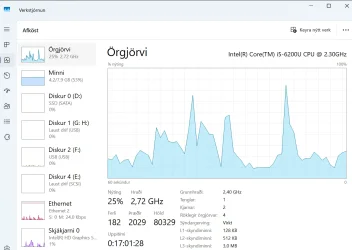
Task manager - performance doesn't works.
 

My Computer

System One

  • OS
    Windows 11 Pro 24H2 26120.2130
    Computer type
    Laptop
    Manufacturer/Model
    Lenovo ZHAOYANG K49
    CPU
    Intel(R) Core(TM) i5-3230M CPU @ 2.60GHz 2.60 GHz
    Memory
    12.0 GB (11.5 GB usable)
    Graphics Card(s)
    NVIDIA NVS 5400M and Intel HD 4000
    Hard Drives
    SAMSUNG SSD PM830 mSATA 32GB
    WDC WD10JPVX-22JC3T0(1.0TB)
    Browser
    Chrome

My Computer

System One

  • OS
    Windows 11 Pro 24H2 26120.2130
    Computer type
    Laptop
    Manufacturer/Model
    Lenovo ZHAOYANG K49
    CPU
    Intel(R) Core(TM) i5-3230M CPU @ 2.60GHz 2.60 GHz
    Memory
    12.0 GB (11.5 GB usable)
    Graphics Card(s)
    NVIDIA NVS 5400M and Intel HD 4000
    Hard Drives
    SAMSUNG SSD PM830 mSATA 32GB
    WDC WD10JPVX-22JC3T0(1.0TB)
    Browser
    Chrome

My Computer

System One

  • OS
    Windows 11 Stable, Beta, Dev, Canary
    Computer type
    PC/Desktop
    Manufacturer/Model
    Micro-Star International Co., Ltd. MS-7D54
    CPU
    AMD Ryzen 9 PRO 5950X
    Motherboard
    MSI MAG X570S Tomahawk Max WiFi (MS-7D54) (2 PCI-E x1, 2 PCI-E x16, 2 M.2, 4 DDR4 DIMM, Audio, Video, 2.5GbE LAN, WiFi)
    Memory
    128 Gb
    Graphics Card(s)
    Intel(R) Arc(TM) A380 Graphics (2 ГБ)
    Sound Card
    Устройство с поддержкой High Definition Audio
    Monitor(s) Displays
    HP X34 [34" LCD] (6CM1300J5J) {2021}
    Screen Resolution
    3440x1440
    Hard Drives
    KINGSTON SFYRD2000G (2000 ГБ, PCI-E 4.0 x4)
    PSU
    Be Quiet! Dark Rock Pro 4
    Case
    Cooler Master HAF XB EVO
    Internet Speed
    1000 Mb/s
    Browser
    Chrome
    Antivirus
    Windows Defender

My Computers

System One System Two

  • OS
    Windows 11 Pro build 26200.8524
    Computer type
    PC/Desktop
    Manufacturer/Model
    Home Built
    CPU
    Intel i7-4790
    Motherboard
    Asus H97 Pro Gamer with add-on TPM1.2 module
    Memory
    Teams DDR3-1600 4x4 GB
    Graphics Card(s)
    MSI Nvidia GeForce GTX 1050Ti
    Sound Card
    Realtek ALC1150
    Monitor(s) Displays
    Dell P2425D
    Screen Resolution
    2560 by 1440 pixels
    Hard Drives
    Corsair NVMe M.2 Core XT 1000 GB (Windows 11 v.25H2); Samsung SATA Evo 870 500 GB (Windows 11 v.25H2);
    PSU
    Corsair HX850
    Case
    Gigabyte Solo 210
    Cooling
    Zalman CNPS7X Tower
    Keyboard
    Microsoft AIO Wireless (includes touchpad)
    Mouse
    HP S1000 Plus Wireless
    Internet Speed
    500 Mb fiber optic
    Browser
    Chrome; MS Edge
    Antivirus
    Windows Defender
  • Operating System
    MacOS 12 Monterey
    Computer type
    Laptop
    Manufacturer/Model
    Apple Macbook Air
    CPU
    Intel Core i5
    Memory
    8 GB
    Graphics card(s)
    Intel integrated
    Screen Resolution
    1440 by 900 pixels
    Hard Drives
    128 GB
    Keyboard
    Built-in
    Mouse
    Microsoft Wireless
    Internet Speed
    802.11 ac
    Browser
    Chrome; Safari
    Antivirus
    N/A
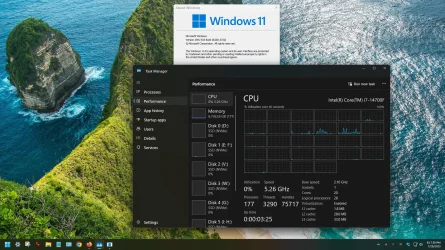
No problem with Performance here either.

1753856396669.webp
 

My Computers

System One System Two

  • OS
    Win 11 Pro 25H2 26200.8524
    Computer type
    PC/Desktop
    Manufacturer/Model
    Self Built
    CPU
    Intel® Core™ i7-14700K
    Motherboard
    ASUS TUF Z690-PLUS WIFI BIOS 4505 11/29/25
    Memory
    G.SKILL Ripjaws S5 Series 64GB (2 x 32GB) DDR5
    Graphics Card(s)
    ASUS GeForce RTX 4070 Super 12GB
    Sound Card
    Sound Blaster AE-5 Plus
    Monitor(s) Displays
    ASUS TUF Gaming 27" 2K HDR Gaming
    Screen Resolution
    2560 x 1440
    Hard Drives
    Samsung 990 Pro 1TB NVMe (Win 11 25H2)
    SK hynix P41 500GB NVMe 25H2 DEV/Games
    SK hynix P41 2TB NVMe (x3)
    Crucial P3 Plus 4TB
    PSU
    Corsair RM850x Shift
    Case
    Antec Dark Phantom DP502 FLUX
    Cooling
    Corsair Nautilus 360 RS AIO
    Keyboard
    Logitech MK 320
    Mouse
    Razer Basilisk V3
    Internet Speed
    350Mbs
    Browser
    Firefox
    Antivirus
    Winows Security
    Other Info
    MR 8.1 Home

    System 3 Specs
    Win 11 Pro 25H2 26200.8524
    ASUS PRIME Z370-P II BIOS 3004 7/12/21
    Intel Core i7-8700 CPU @ 3.20GHz
    32GB DDR4 RAM (4x8)
    iGPU Intel UHD Graphics 630
  • Operating System
    Win 11 Pro 25H2 26200.8524
    Computer type
    PC/Desktop
    Manufacturer/Model
    Self Built
    CPU
    Intel Core i7-11700F
    Motherboard
    Asus TUF Gaming Z590 Plus WiFi (BIOS 2803)
    Memory
    64 GB DDR4
    Graphics card(s)
    MSI GeForce RTX 3060 Ventus 2X 12GB
    Sound Card
    SoundBlaster Audigy Fx V2
    Monitor(s) Displays
    Samsung F27T350
    Screen Resolution
    1920x1080
    Hard Drives
    Samsung 980 Pro 1TB
    Samsung 970 EVO Plus 2TB
    Samsung 870 EVO 500GB SSD
    PSU
    Corsair HX750
    Case
    Cougar MX330-G Window
    Cooling
    Thermalright Frozen Edge 240 Black AIO
    Internet Speed
    350Mbps
    Browser
    Firefox
    Antivirus
    Windows Security
1753856820174.webp1753856870779.webp1753856891444.webp
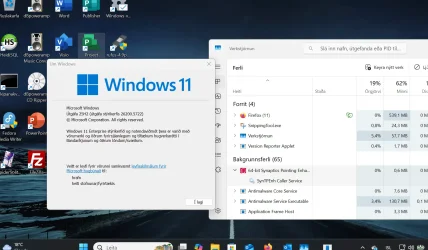
Not for me, and CPU in progress all 0%, details all blank.
 

My Computer

System One

  • OS
    Windows 11 Pro 24H2 26120.2130
    Computer type
    Laptop
    Manufacturer/Model
    Lenovo ZHAOYANG K49
    CPU
    Intel(R) Core(TM) i5-3230M CPU @ 2.60GHz 2.60 GHz
    Memory
    12.0 GB (11.5 GB usable)
    Graphics Card(s)
    NVIDIA NVS 5400M and Intel HD 4000
    Hard Drives
    SAMSUNG SSD PM830 mSATA 32GB
    WDC WD10JPVX-22JC3T0(1.0TB)
    Browser
    Chrome
Bonus round: how to get the App History section in Task Manager to remember its data.
 

My Computer

System One

  • OS
    Windows 11
Working fine for me - running on an EXTERNAL NVME (SSD type) ->USB3 adapter using vhdx physical files on an old 8GB RAM i5 Gen6 CPU HP envy laptop (officially not supported) although it does have a tpm. No problems encountered.It's even possible to get a decently performing HYPER-V Linux VM running on it too --!! The laptop itself only has a 256GB internal SSD so using the external NVME device (2TB) where I've got several Windows releases / versions in it works perfectly. For backup I just copy the vhdx files !! No need for Macrium or any other specific backup software for the OS.

Skjámynd 2025-07-30 084301.webp


BTW to quickly create a WindowstoGO system from your existing OS - you don't need Hasleo or any paid for utilities -
just do the following (It helps though to keep the OS small - have user data / multi-media etc on different disks / partitions so you can restrict the OS to around 70GB -- that's plenty for a few apps like photoshop and Ms Office plus enough if doing a Windows update on the WindowstoGO system.

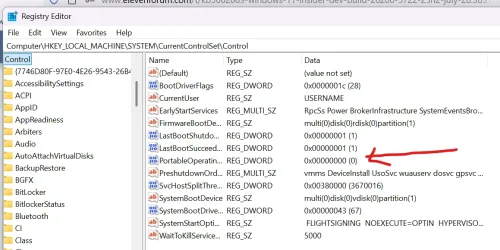
Note though -- After cloning and before booting "Poodlefake" the OS into thinking it's NOT a Windowstogo system by setting this reg key to '0'. That way you can use regular windows upates to new builds wtc and copy the system back to an internal drive - otherwise the system thinks your internal drive is a windowstogo system which yields all sorts of problems.

Skjámynd 2025-07-30 085738.webp

so
1) Create EFI partition on the external device plus a windows partition for your OS -- using here std windows partition not vhdx for example. Use a Windows install stick and boot -->repair system-->command mode --> diskpart to create the efi partition and the windows partition.

2) Use any cloning software to copy just the Windows partition - not the EFI one - to the device -- the bootable macrium (the last free one is fine - still available from majorgeeks website) or anything else -- e.g gparted and use dd to copy the partition.

3) boot the windows install stick again and create the bootloader -- assign say the EFI partition to S and the windows partition to W (in Diskpart) then exit but stay in command mode. Simply run in command mode cd f:\windows\system32 cd f:\ bcdboot f:\windows /s S: /f UEFI

4) boot your Windowstogo system

5) change the value of PortableOperatingSystem regkey to 0

6) reboot and enjoy your windows to go system.

(there are other ways to do this but I've found this the easiest way to get it to work seamlessly).

Cheers
jimbo
 

My Computer

System One

  • OS
    Windows XP,11 Linux Fedora Rawhide pre-release 45
    Computer type
    PC/Desktop
    CPU
    2 X Intel i7
    Screen Resolution
    4KUHD X 2
@Scott I am very impressed with your CPU cores/threads and a little bit jealous of how tremendous its performance power might be. 😎😎
 

My Computers

System One System Two

  • OS
    Windows 11 Pro build 26200.8524
    Computer type
    PC/Desktop
    Manufacturer/Model
    Home Built
    CPU
    Intel i7-4790
    Motherboard
    Asus H97 Pro Gamer with add-on TPM1.2 module
    Memory
    Teams DDR3-1600 4x4 GB
    Graphics Card(s)
    MSI Nvidia GeForce GTX 1050Ti
    Sound Card
    Realtek ALC1150
    Monitor(s) Displays
    Dell P2425D
    Screen Resolution
    2560 by 1440 pixels
    Hard Drives
    Corsair NVMe M.2 Core XT 1000 GB (Windows 11 v.25H2); Samsung SATA Evo 870 500 GB (Windows 11 v.25H2);
    PSU
    Corsair HX850
    Case
    Gigabyte Solo 210
    Cooling
    Zalman CNPS7X Tower
    Keyboard
    Microsoft AIO Wireless (includes touchpad)
    Mouse
    HP S1000 Plus Wireless
    Internet Speed
    500 Mb fiber optic
    Browser
    Chrome; MS Edge
    Antivirus
    Windows Defender
  • Operating System
    MacOS 12 Monterey
    Computer type
    Laptop
    Manufacturer/Model
    Apple Macbook Air
    CPU
    Intel Core i5
    Memory
    8 GB
    Graphics card(s)
    Intel integrated
    Screen Resolution
    1440 by 900 pixels
    Hard Drives
    128 GB
    Keyboard
    Built-in
    Mouse
    Microsoft Wireless
    Internet Speed
    802.11 ac
    Browser
    Chrome; Safari
    Antivirus
    N/A
@nic2024 A second restart may put your system in order and bring Task Manager back to life. Just a thought.
 

My Computers

System One System Two

  • OS
    Windows 11 Pro build 26200.8524
    Computer type
    PC/Desktop
    Manufacturer/Model
    Home Built
    CPU
    Intel i7-4790
    Motherboard
    Asus H97 Pro Gamer with add-on TPM1.2 module
    Memory
    Teams DDR3-1600 4x4 GB
    Graphics Card(s)
    MSI Nvidia GeForce GTX 1050Ti
    Sound Card
    Realtek ALC1150
    Monitor(s) Displays
    Dell P2425D
    Screen Resolution
    2560 by 1440 pixels
    Hard Drives
    Corsair NVMe M.2 Core XT 1000 GB (Windows 11 v.25H2); Samsung SATA Evo 870 500 GB (Windows 11 v.25H2);
    PSU
    Corsair HX850
    Case
    Gigabyte Solo 210
    Cooling
    Zalman CNPS7X Tower
    Keyboard
    Microsoft AIO Wireless (includes touchpad)
    Mouse
    HP S1000 Plus Wireless
    Internet Speed
    500 Mb fiber optic
    Browser
    Chrome; MS Edge
    Antivirus
    Windows Defender
  • Operating System
    MacOS 12 Monterey
    Computer type
    Laptop
    Manufacturer/Model
    Apple Macbook Air
    CPU
    Intel Core i5
    Memory
    8 GB
    Graphics card(s)
    Intel integrated
    Screen Resolution
    1440 by 900 pixels
    Hard Drives
    128 GB
    Keyboard
    Built-in
    Mouse
    Microsoft Wireless
    Internet Speed
    802.11 ac
    Browser
    Chrome; Safari
    Antivirus
    N/A
@Scott

It runs very well even on this lowly theoretically unsupported laptop with only 8GB RAM and running from an external NVME->usb3 device as a Windowstogo from a physical vhdx file so on decent hardware it should run very nicely indeed -- Ms might be finally getting its act together !!!

I'm on this Windows release

Skjámynd 2025-07-30 100147.webp

performance (don't forget this is running on an external Windowstogo device (Nvme ssd type-->usb3 connection) too.Can't complain.

I think performance wise this is one of the best releases yet -- OK nothing stunningly different app wise but who cares - I want the OS to work as decently as possible first !!! - Not sure if because I'm using Enterprise rather than W11 Pro that it makes a lot of difference on this laptop -- OK less bloat -- and on modern hardware W11 Enterprise and W11 pro for workstations will support more CPU's / have more threads / cores etc etc but you need good hardware to get that improvement though.

Skjámynd 2025-07-30 095336.webp


Cheers
jimbo
 

My Computer

System One

  • OS
    Windows XP,11 Linux Fedora Rawhide pre-release 45
    Computer type
    PC/Desktop
    CPU
    2 X Intel i7
    Screen Resolution
    4KUHD X 2

My Computer

System One

  • OS
    Windows 11 Pro 24H2 26120.2130
    Computer type
    Laptop
    Manufacturer/Model
    Lenovo ZHAOYANG K49
    CPU
    Intel(R) Core(TM) i5-3230M CPU @ 2.60GHz 2.60 GHz
    Memory
    12.0 GB (11.5 GB usable)
    Graphics Card(s)
    NVIDIA NVS 5400M and Intel HD 4000
    Hard Drives
    SAMSUNG SSD PM830 mSATA 32GB
    WDC WD10JPVX-22JC3T0(1.0TB)
    Browser
    Chrome

My Computers

System One System Two

  • OS
    Windows 11 Pro 24H2
    Computer type
    PC/Desktop
    Manufacturer/Model
    Multi
    CPU
    Intel i9-9900k
    Motherboard
    Gigabyte Z390 Aorus Master
    Memory
    Corsair Vengeance LPX 32GB (2 x 16GB)
    Graphics Card(s)
    Gigabyte RTX 2080Ti Gaming OC
    Monitor(s) Displays
    Samsung LC32HGQ
    Screen Resolution
    WQHD
    Hard Drives
    Samsung 970 Evo Plus 1 TB
    Crucial MX100 512 GB
    Samsung 840 Pro 256 GB
    Seagate ST4000DM000-1F2168 4 TB
    PSU
    Seasonic P-860 Platinium
    Case
    Corsair Graphite 780T
    Cooling
    Noctua NH-U14S
    Keyboard
    Corsair K70 MK.2 Low profile
    Mouse
    Logitech G Pro HERO
    Internet Speed
    200 Mb/s
    Browser
    Mozilla Firefox
    Antivirus
    Windows Defender
    Other Info
    BIOS version F11
  • Operating System
    Windows 11 Home 24H2
    Computer type
    Laptop
    Manufacturer/Model
    Clevo W650KJ1
    CPU
    Intel i5 7500
    Motherboard
    Clevo W65KK/KJ1
    Memory
    2×8 Go Corsair Vengeance 2400Mhz DDR4
    Graphics card(s)
    Nvidia GeForce GTX 1050
    Sound Card
    Integrated
    Screen Resolution
    1920x1080
    Hard Drives
    Samsung 850 Evo M.2 SATA 250 GB
    Seagate ST1000LM035 1 TB
    Browser
    Mozilla Firefox
    Antivirus
    Windows Defender
    Other Info
    Replaced original Wi-Fi card by an Intel® Wireless-AC 9260
    BIOS version 1.05.13
EDIT: it kinda messed up the Synaptics Driver (or just the scroll itself). Scrolling is not working in apps like Explorer, Device Manager, old Control Panel..., but working in my web browser (Firefox) or in Settings. This issue wasn't on the build 5710 though.

Specifically two-finger scrolling, Working sporadically for me on 64-bit. Works in some applications - Word, Firefox. Not in others - iTunes, Quicken. Works in right-hand side of Windows Explorer, but not left (the file tree).

ETA: Two-finger scrolling is not working in Outlook, either scrolling through the Inbox or through an open message.


Yes, I've rebooted.
 
Last edited:

My Computer

System One

  • OS
    Windows 11
    Computer type
    Laptop
    Manufacturer/Model
    MSFT Surface Pro 8
    CPU
    11th Gen Intel(R) Core(TM) i7-1185G7 @ 3.00GH
    Memory
    16GB
Updated 3 machines, pretty slow on all 3. 🤬
I have two Dev machines. I saw that on one but not the other. A few updates ago it was the other way round, the one that kept them today lost them, and the one that lost then today kept them - upgrades seem to be a bit flaky these days....
Did I say 2? I forgot that I also had Dev on my unsupported System Four. Its poor little Celeron N2930 is really not up to doing feature updates, took a painfully slow five and a half hours. I had long ago given up trying to use Canary on it - life's just too short....

My other two Insider test machines have just done today's Canary feature update. The supported one with its modest Pentium Silver N5030 took a more reasonable couple of hours, with the unsupported one's 1st gen i5 520M not far behind.

1753905993251.webp
Intel Celeron N2930 vs i5-520M vs Pentium Silver N5030 [cpubenchmark.net] by PassMark Software

It's now 2 out of 3 that have lost the pinned apps from their taskbar...

Task manager - performance doesn't works.
...and that too - made doubly awkward as I'd set Performance as my default.
 
Last edited:

My Computers

System One System Two

  • OS
    Windows 11 Home
    Computer type
    Laptop
    Manufacturer/Model
    Acer Aspire 3 A315-23-R9VY
    CPU
    AMD Athlon Silver 3050U
    Memory
    8GB
    Graphics Card(s)
    Radeon Graphics
    Monitor(s) Displays
    laptop screen
    Screen Resolution
    1366x768 native resolution, up to 2560x1440 with Radeon Virtual Super Resolution
    Hard Drives
    1TB Samsung EVO 870 SSD (from April 2026: 250GB EVO 850)
    Internet Speed
    150 Mbps
    Browser
    Edge, Firefox
    Antivirus
    Defender
    Other Info
    fully 'Windows 11 ready' laptop. Windows 10 C: partition migrated from my old unsupported 'main machine' then upgraded to 11. A test migration ran Insider builds for 2 months. When 11 was released on 5th October 2021 it was re-imaged back to 10 and was offered the upgrade in Windows Update on 20th October. Windows Update offered the 22H2 Feature Update on 20th September 2022. It got the 23H2 Feature Update on 4th November 2023 through Windows Update, 24H2 on 3rd October 2024 through Windows Update by setting the Target Release Version for 24H2, and 25H2 on 30th September 2025 through Windows Update by setting the Target Release Version for 25H2.

    UPDATE - 11 April 2026: due to mechanical deterioration this PC has been retired from active duty. The OS with all software and files has been migrated to my System Seven below to carry on as my general purpose 'main machine'.

    My SYSTEM THREE is a Dell Latitude 5410, i7-10610U, 32GB RAM, 512GB NVMe ssd, supported device running Windows 11 Pro.

    My SYSTEM FOUR is a 2-in-1 convertible Lenovo Yoga 11e 20DA, Celeron N2930, 8GB RAM, 256GB ssd. Unsupported device: currently running Win10 Pro, plus Win11 Pro RTM and Insider Dev, Beta, and RP 24H2 as native boot vhdx.

    My SYSTEM FIVE is a Dell Latitude 3190 2-in-1, Pentium Silver N5030, 8GB RAM, 1TB NVMe ssd, supported device running Windows 11 Pro, plus Insider Beta, Dev, and Canary builds (and a few others) as a native boot .vhdx.

    My SYSTEM SIX is a Dell Latitude 5550, Core Ultra 7 165H, 64GB RAM, 1TB NVMe SSD, supported device, Windows 11 Pro 24H2, Hyper-V host machine. Updated to 25H2 on 30th September 2025.

    My SYSTEM SEVEN is a Lenovo Thinkpad T580, Intel Core i7-8650U, 16GB RAM, 512GB NVMe SSD + 2nd 512GB NVMe SSD, a supported device for Windows 11. This is my current general purpose 'main machine'. The installed Windows 11 Home from my System One has been migrated to this machine.
  • Operating System
    Windows 11 Pro
    Computer type
    Laptop
    Manufacturer/Model
    Dell Latitude E4310
    CPU
    Intel® Core™ i5-520M
    Motherboard
    0T6M8G
    Memory
    8GB
    Graphics card(s)
    (integrated graphics) Intel HD Graphics
    Screen Resolution
    1366x768
    Hard Drives
    500GB Crucial MX500 SSD
    Browser
    Firefox, Edge
    Antivirus
    Defender
    Other Info
    unsupported machine: Legacy bios, MBR, TPM 1.2, upgraded from W10 to W11 using W10/W11 hybrid install media workaround. In-place upgrade to 22H2 using ISO and a workaround. Feature Update to 23H2 by manually installing the Enablement Package. In-place upgrade to 24H2 using hybrid 23H2/24H2 install media. Upgraded to 25H2 by Enablement Package. Also running Insider Dev, and Canary builds and Windows 10 as native boot .vhdx.

    My SYSTEM THREE is a Dell Latitude 5410, i7-10610U, 32GB RAM, 512GB NVMe ssd, supported device running Windows 11 Pro.

    My SYSTEM FOUR is a 2-in-1 convertible Lenovo Yoga 11e 20DA, Celeron N2930, 8GB RAM, 256GB ssd. Unsupported device: currently running Win10 Pro, plus Win11 Pro RTM and Insider Dev, Beta, and RP 24H2 as native boot vhdx.

    My SYSTEM FIVE is a Dell Latitude 3190 2-in-1, Pentium Silver N5030, 8GB RAM, 1TB NVMe ssd, supported device running Windows 11 Pro, plus Insider Beta, Dev, and Canary builds (and a few others) as a native boot .vhdx.

    My SYSTEM SIX is a Dell Latitude 5550, Core Ultra 7 165H, 64GB RAM, 1TB NVMe SSD, supported device, Windows 11 Pro 24H2, Hyper-V host machine. Updated to 25H2 on 30th September 2025.

    My SYSTEM SEVEN is a Lenovo Thinkpad T580, Intel Core i7-8650U, 16GB RAM, 512GB NVMe SSD + 2nd 512GB NVMe SSD, a supported device for Windows 11. This is my current general purpose 'main machine'. The installed Windows 11 Home from my System One has been migrated to this machine.
Had weird crashes yesterday, don't know if it's my laptop itself that went nuts or Windows that caused the crashes. The PC was in sleep mode and when my wife woke it, it started to reboot in a loop. The battery was low but charger was plugged in so I don't think it's related, really. Sometimes it went to the logon screen, sometimes the reboot was triggered much sooner. At first it looks like an hardware issue. I removed the battery and tried some sort of "cold" boot but the reboot still occurred, until I got to the UEFI setup, wait for a while, then boot on the Windows Boot Manager and... tada. I don't understand what happened. Hope my computer isn't slowly dying but after more than 8 years of service I won't be totally surprised.
 

My Computers

System One System Two

  • OS
    Windows 11 Pro 24H2
    Computer type
    PC/Desktop
    Manufacturer/Model
    Multi
    CPU
    Intel i9-9900k
    Motherboard
    Gigabyte Z390 Aorus Master
    Memory
    Corsair Vengeance LPX 32GB (2 x 16GB)
    Graphics Card(s)
    Gigabyte RTX 2080Ti Gaming OC
    Monitor(s) Displays
    Samsung LC32HGQ
    Screen Resolution
    WQHD
    Hard Drives
    Samsung 970 Evo Plus 1 TB
    Crucial MX100 512 GB
    Samsung 840 Pro 256 GB
    Seagate ST4000DM000-1F2168 4 TB
    PSU
    Seasonic P-860 Platinium
    Case
    Corsair Graphite 780T
    Cooling
    Noctua NH-U14S
    Keyboard
    Corsair K70 MK.2 Low profile
    Mouse
    Logitech G Pro HERO
    Internet Speed
    200 Mb/s
    Browser
    Mozilla Firefox
    Antivirus
    Windows Defender
    Other Info
    BIOS version F11
  • Operating System
    Windows 11 Home 24H2
    Computer type
    Laptop
    Manufacturer/Model
    Clevo W650KJ1
    CPU
    Intel i5 7500
    Motherboard
    Clevo W65KK/KJ1
    Memory
    2×8 Go Corsair Vengeance 2400Mhz DDR4
    Graphics card(s)
    Nvidia GeForce GTX 1050
    Sound Card
    Integrated
    Screen Resolution
    1920x1080
    Hard Drives
    Samsung 850 Evo M.2 SATA 250 GB
    Seagate ST1000LM035 1 TB
    Browser
    Mozilla Firefox
    Antivirus
    Windows Defender
    Other Info
    Replaced original Wi-Fi card by an Intel® Wireless-AC 9260
    BIOS version 1.05.13
[ADDED 7/30] We are investigating reports that all apps pinned to the taskbar are unpinned for some Insiders after updating to Build 26200.5722.
 

My Computers

System One System Two

  • OS
    Windows 11 Pro for Workstations
    Computer type
    PC/Desktop
    Manufacturer/Model
    Custom self build
    CPU
    Intel i7-8700K 5 GHz
    Motherboard
    ASUS ROG Maximus XI Formula Z390
    Memory
    64 GB (4x16GB) G.SKILL TridentZ RGB DDR4 3600 MHz (F4-3600C18D-32GTZR)
    Graphics Card(s)
    ASUS ROG-STRIX-GTX1080TI-O11G-GAMING (11GB GDDR5X)
    Sound Card
    Integrated Digital Audio (S/PDIF)
    Monitor(s) Displays
    2 x Samsung Odyssey G75 27"
    Screen Resolution
    2560x1440
    Hard Drives
    1TB Samsung 990 PRO M.2,
    4TB Samsung 990 PRO M.2,
    TerraMaster F8 SSD Plus NAS
    PSU
    Seasonic Prime Titanium 850W
    Case
    Thermaltake Core P3 wall mounted
    Cooling
    Corsair Hydro H115i
    Keyboard
    Amazon Basics Wired Full Keyboard MD005
    Mouse
    Logitech MX Master 4
    Internet Speed
    2 Gbps Download and 100 Mbps Upload
    Browser
    Chrome and Edge
    Antivirus
    Microsoft Defender
    Other Info
    Logitech Z625 speaker system,
    Logitech BRIO 4K Pro webcam,
    HP Color LaserJet Pro MFP M477fdn,
    CyberPower CP1500PFCLCD
    Galaxy S23 Plus phone
  • Operating System
    Windows 11 Pro
    Computer type
    Laptop
    Manufacturer/Model
    Surface Laptop 7 Copilot+ PC
    CPU
    Snapdragon X Elite (12 core) 3.42 GHz
    Memory
    16 GB LPDDR5x-7467 MHz
    Monitor(s) Displays
    15" HDR
    Screen Resolution
    2496 x 1664
    Hard Drives
    1 TB SSD
    Internet Speed
    Wi-Fi 7 and Bluetooth 5.4
    Browser
    Chrome and Edge
    Antivirus
    Microsoft Defender
  • Like
Reactions: OAT
Back
Top Bottom