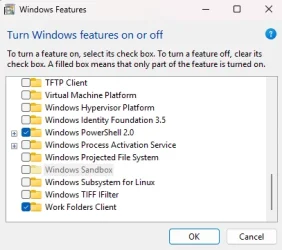
I figured out the reason causing error 0x800F0825, at least in my case.
If you have Windows Sandbox enabled, that is the reason. You have to disable it in the "Turn Windows Features on and off" menu, reboot, then you'll be able to uninstall KB5063878.
You'll even be able to uninstall with the regular GUI "Uninstall" option in the Windows Update settings menu, no need for a special command. You'll probably want to pause updates in the update settings before restarting after uninstalling it though.
Basically in the CBS.log file it revealed the problem:
Code:
2025-08-23 13:09:12, Error   CBS    Container base layer depends on LCU version greater than '10.0.26100.4946'.: 800f0825 [Error,Facility=(000f),Code=2085 (0x0825)]
2025-08-23 13:09:12, Info   CBS    Failed verifying that the target package: Package_for_RollupFix~31bf3856ad364e35~amd64~~26100.4946.1.26 doesn't have a container layer dependency [HRESULT = 0x800f0825 - CBS_E_CANNOT_REMOVE]
The "Container base layer" it's talking about has to do with the Windows Sandbox. Disabling the feature removes that dependency allowing the uninstall to proceed.
You can turn the feature back on after uninstalling the update.