UPDATE 9/12:
 www.elevenforum.com
Hello Windows Insiders!
Today, we are making this year’s annual feature update Windows 11, version 25H2(Build 26200.5074) available in the Release Preview Channel for customers to preview ahead of general availability later this calendar year.
Windows 11, version 25H2 will be delivered as an enablement package (eKB). This means that Windows 11, version 24H2 and version 25H2 use a shared servicing branch. It also means that they also share the same new features and enhancements delivered through our continuous innovation efforts. Windows 11, version 25H2 also includes some feature removals such as PowerShell 2.0 and Windows Management Instrumentation command-line (WMIC). And for our commercial customers, Windows 11, version 25H2 includes the ability for IT admins to remove select pre-installed Microsoft Store apps via Group Policy/MDM CSP on Enterprise/EDU devices. For more details on Windows 11, version 25H2, see this blog post.
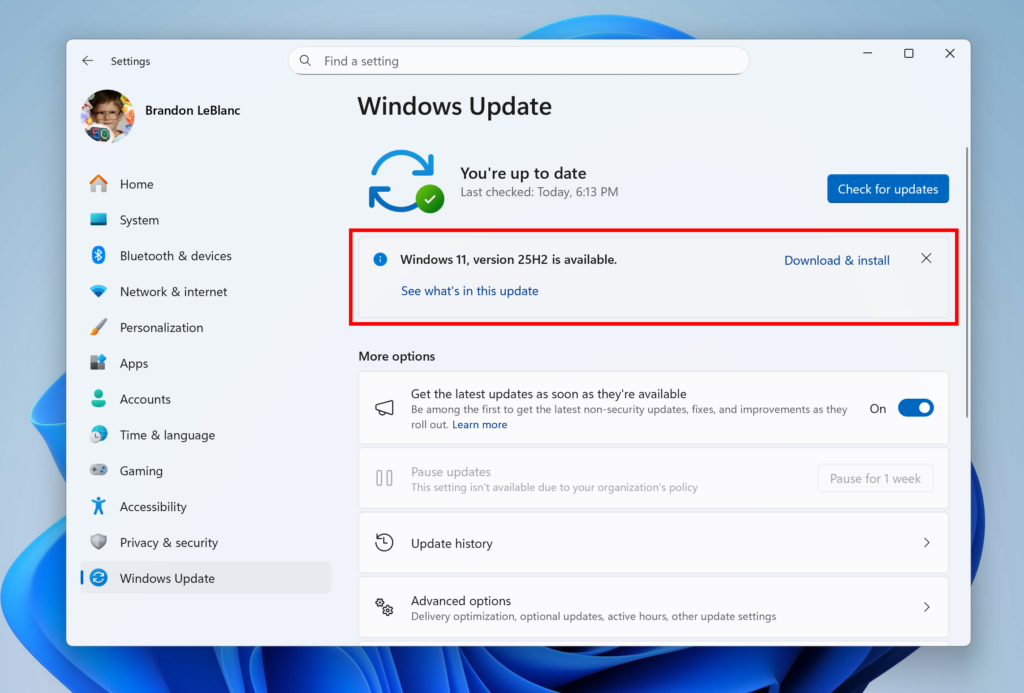
Windows 11, version 25H2 shown as available as an optional update highlighted in a red box.
Windows Insiders in the Release Preview Channel can install Windows 11, version 25H2 via our “seeker” experience in Windows Update. This means if you are an Insider currently in the Release Preview Channel on a PC that meets the Windows 11 hardware requirements, you can go to Settings and Windows Update and choose to download and install Windows 11, version 25H2 if you want. Once you update your PC to Windows 11, version 25H2, you will continue to automatically receive new servicing updates through Windows Update (the typical monthly update process). For instructions on how to join the Windows Insider Program and join your PC to the Release Preview Channel, click here.
Commercial* customers enrolled in the Windows Insider Program for Business can begin validating Windows 11, version 25H2 on PCs in their organizations. For these customers, the Windows 11, version 25H2 is available through Windows Update for Business (WUfB) and Windows Server Update Service (WSUS). Azure Marketplace will be available later today. You can learn more about deploying pre-release feature updates using these deployment methods here. Should any issues arise, IT admins in organizations deploying Release Preview updates can request Microsoft Support.
And finally – ISOs will be available for download for Windows 11, version 25H2 via the Windows Insider ISO download pagenext week. [UPDATE 9/10] The ISOs for Windows 11, version 25H2 are now available for download.
Thanks,
Windows Insider Program Team
*We consider a device a commercial device if it is not running the Windows 11 Home edition AND is being managed by an IT administrator (whether via Microsoft Endpoint Manager or other management solution) or has a volume license key or commercial ID or is joined to a domain.

 blogs.windows.com
Check Windows Updates
For 64-bit Windows 11
Windows11.0-KB5054156-x64 (ZIP 163KB)
Download
OR
For ARM64 Windows 11
Windows11.0-KB5054156-arm64 (ZIP 167KB)
Download
25H2 Build 26200.5074 ISO from Microsoft:
 www.elevenforum.com
UUP Dump:
64-bit ISO download:

ARM64 ISO download:
 www.elevenforum.com
KB5065789 Windows 11 Insider Release Preview build 26100.6713 (24H2) and 26200.6713 (25H2) - Sep. 12
Windows Insider Blog: Hello Windows Insiders, today we’re releasing Windows 11 Builds 26100.6713 and 26200.6713 (KB5065789) to Insiders in the Release Preview Channel on Windows 11, version 24H2 (Build 26100) and version 25H2 (Build 26200). Below is a summary of the new features and...
www.elevenforum.com
Microsoft Support:
Hello Windows Insiders!
Today, we are making this year’s annual feature update Windows 11, version 25H2
Windows 11, version 25H2 will be delivered as an enablement package (eKB). This means that Windows 11, version 24H2 and version 25H2 use a shared servicing branch. It also means that they also share the same new features and enhancements delivered through our continuous innovation efforts. Windows 11, version 25H2 also includes some feature removals such as PowerShell 2.0 and Windows Management Instrumentation command-line (WMIC). And for our commercial customers, Windows 11, version 25H2 includes the ability for IT admins to remove select pre-installed Microsoft Store apps via Group Policy/MDM CSP on Enterprise/EDU devices. For more details on Windows 11, version 25H2, see this blog post.
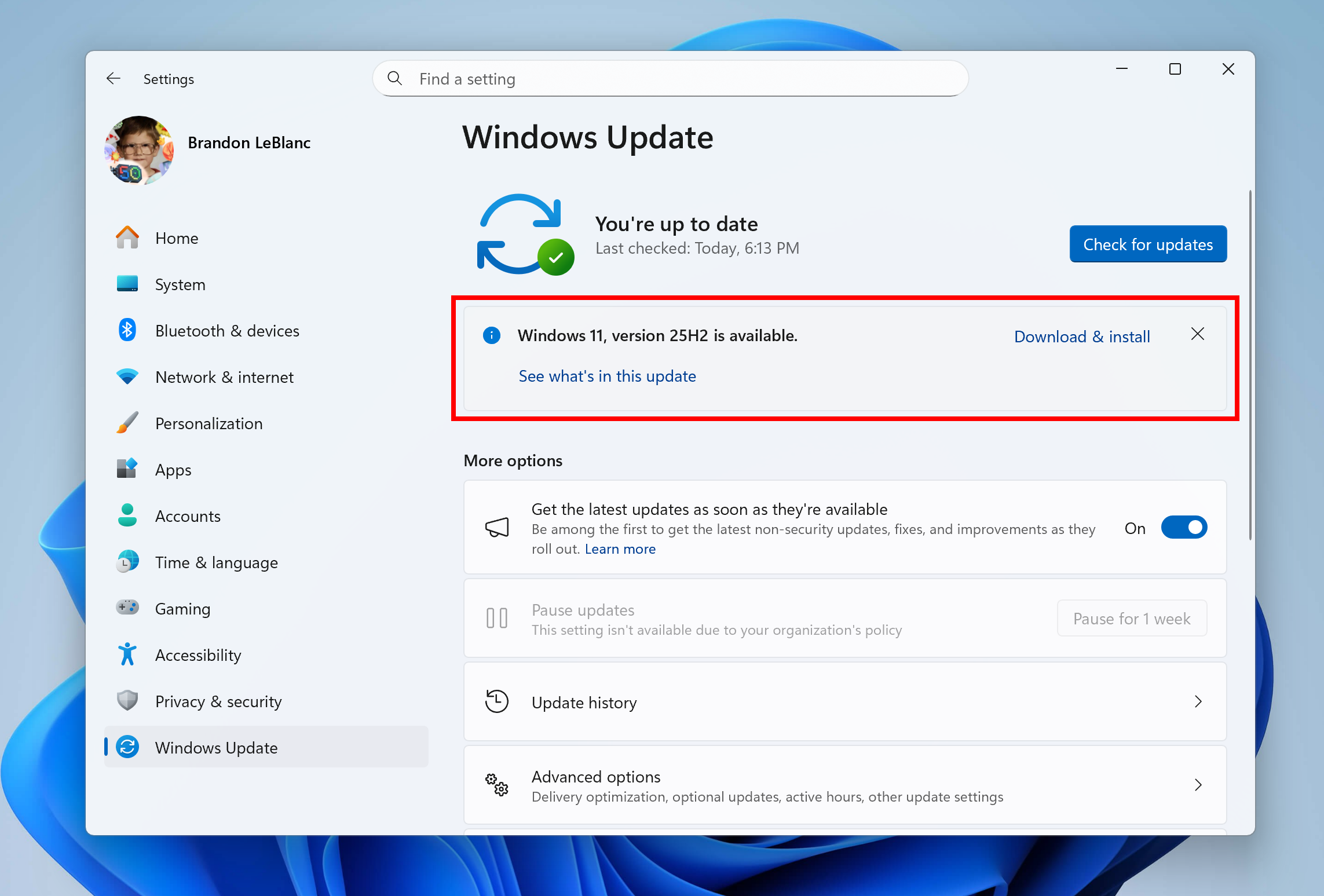
Windows 11, version 25H2 shown as available as an optional update highlighted in a red box.
Windows Insiders in the Release Preview Channel can install Windows 11, version 25H2 via our “seeker” experience in Windows Update. This means if you are an Insider currently in the Release Preview Channel on a PC that meets the Windows 11 hardware requirements, you can go to Settings and Windows Update and choose to download and install Windows 11, version 25H2 if you want. Once you update your PC to Windows 11, version 25H2, you will continue to automatically receive new servicing updates through Windows Update (the typical monthly update process). For instructions on how to join the Windows Insider Program and join your PC to the Release Preview Channel, click here.
Commercial* customers enrolled in the Windows Insider Program for Business can begin validating Windows 11, version 25H2 on PCs in their organizations. For these customers, the Windows 11, version 25H2 is available through Windows Update for Business (WUfB) and Windows Server Update Service (WSUS). Azure Marketplace will be available later today. You can learn more about deploying pre-release feature updates using these deployment methods here. Should any issues arise, IT admins in organizations deploying Release Preview updates can request Microsoft Support.
And finally – ISOs will be available for download for Windows 11, version 25H2 via the Windows Insider ISO download page
Thanks,
Windows Insider Program Team
*We consider a device a commercial device if it is not running the Windows 11 Home edition AND is being managed by an IT administrator (whether via Microsoft Endpoint Manager or other management solution) or has a volume license key or commercial ID or is joined to a domain.
Source:
Releasing Windows 11, version 25H2 to the Release Preview Channel
Hello Windows Insiders! Today, we are making this year’s annual feature update Windows 11, version 25H2 (Build 26200.5074) available in the Release Preview Channel for customers to preview ahead of general availability later th
blogs.windows.com
Check Windows Updates
25H2 Enablement Package MSU Download:
For 64-bit Windows 11
Windows11.0-KB5054156-x64 (ZIP 163KB)
Download
OR
For ARM64 Windows 11
Windows11.0-KB5054156-arm64 (ZIP 167KB)
Download
25H2 Build 26200.5074 ISO from Microsoft:
Download Official Windows 11 ISO file from Microsoft
This tutorial will show you how to download an official Windows Server or Windows 11 64-bit or ARM64 ISO file from Microsoft. Microsoft provides ISO files for Windows Server and Windows 11 to download. You can use these ISO files to clean install or in-place upgrade Windows 11. The Flight Hub...
www.elevenforum.com
UUP Dump:
64-bit ISO download:
Select language for Windows 11, version 25H2 (26200.6584) amd64
Select language for Windows 11, version 25H2 (26200.6584) amd64 on UUP dump. UUP dump lets you download Unified Update Platform files, like Windows Insider updates, directly from Windows Update.
uupdump.net
ARM64 ISO download:
Select language for Windows 11, version 25H2 (26200.6584) arm64
Select language for Windows 11, version 25H2 (26200.6584) arm64 on UUP dump. UUP dump lets you download Unified Update Platform files, like Windows Insider updates, directly from Windows Update.
uupdump.net
UUP Dump - Download Windows Insider ISO
UUP Dump is the most practical and easy way to get ISO images of any Insider Windows 10 or Windows 11 version, as soon as Microsoft has released a new build. UUP Dump creates a download configuration file according to your choices, downloads necessary files directly from Microsoft servers, and...
www.elevenforum.com
Attachments
Last edited: