Insider KB5065782 Windows 11 Insider Dev build 26220.6682 (25H2) - Sep. 12


UPDATE 9/19:


 Windows Insider Blog:

Hello Windows Insiders, today we are releasing Windows 11 Insider Preview Build 26220.6682 (KB5065782) to the Dev Channel for Windows Insiders on Windows 11, version 25H2.

Changes in Dev Channel builds and updates are documented in two buckets: new features, improvements, and fixes that are being gradually rolled out for Insiders who have turned on the toggle to get the latest updates as they are available (via Settings > Windows Update*) and then new features, improvements, and fixes rolling out to everyone in the Dev Channel. For more information, see the Reminders section at the bottom of this blog post.


Changes and Improvements gradually being rolled out to the Dev Channel with toggle on*

[Click to Do (Preview)]

The following changes and improvements are rolling out for Click to Do on Copilot+ PCs:
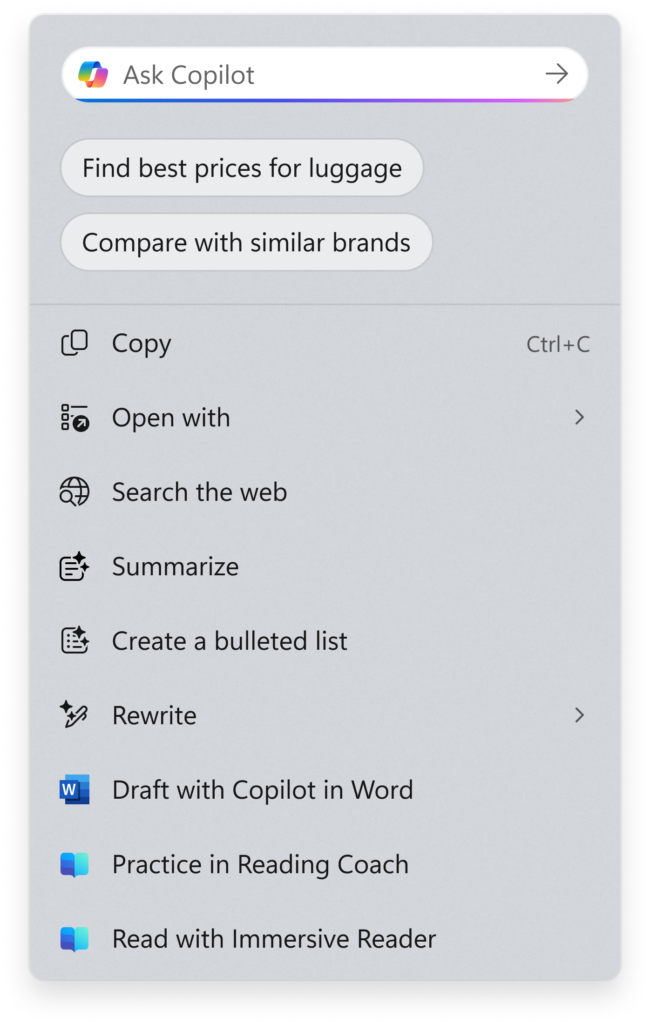
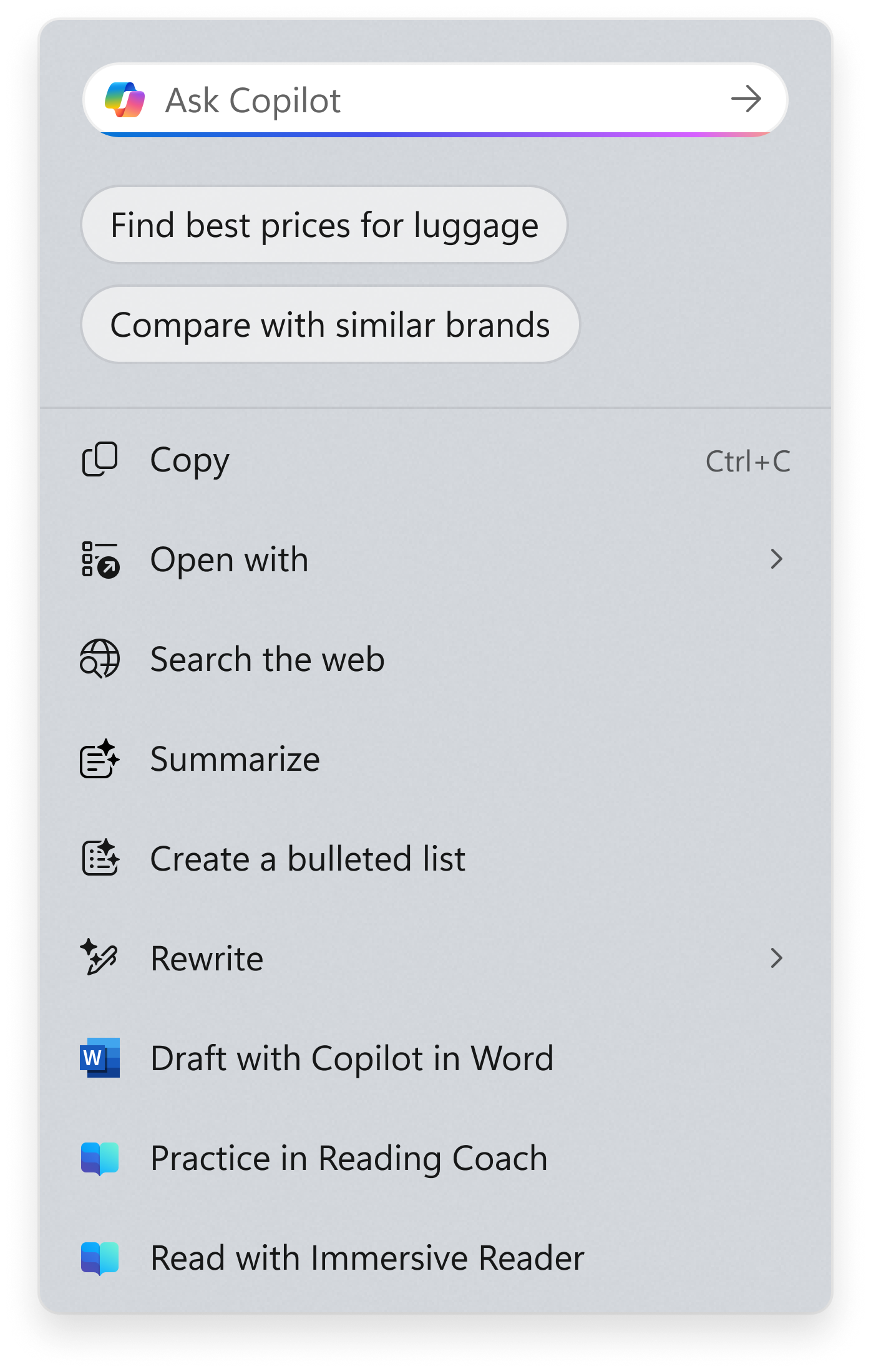
  • Copilot prompt box: The new Copilot prompt box in Click to Do is designed to streamline user interaction with Microsoft Copilot. This enhancement helps save time and allows users to type a custom prompt directly into a text box, which is then sent to Copilot along with your selected content on screen. Suggested prompts appear below the text box as well, powered locally by Phi-Silica (supported for text selections only and English, Spanish, and French). This change is not yet rolling out to Windows Insiders in the EEA (European Economic Area) or China.


    New Copilot prompt box at the top of the Click to Do context menu.
    New Copilot prompt box at the top of the Click to Do context menu.
  • New visual animations for the right edge gesture in Click to Do: These new visual animations are designed to give you a clear visual cue as you swipe and follow your finger for a more delightful, intuitive experience. These animations help you better understand the gesture’s intent, making interactions feel more purposeful.
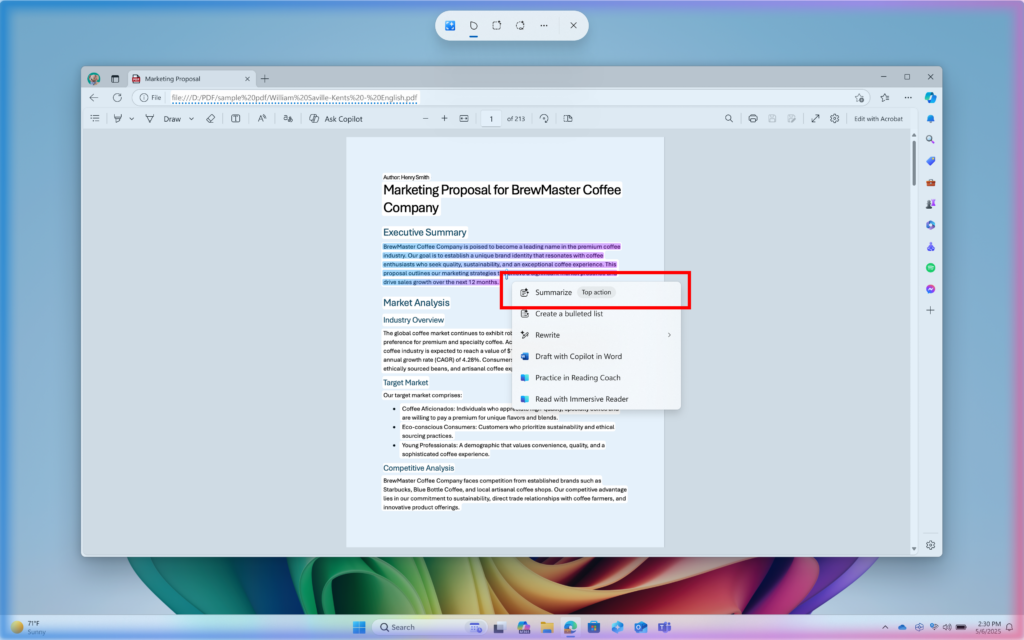
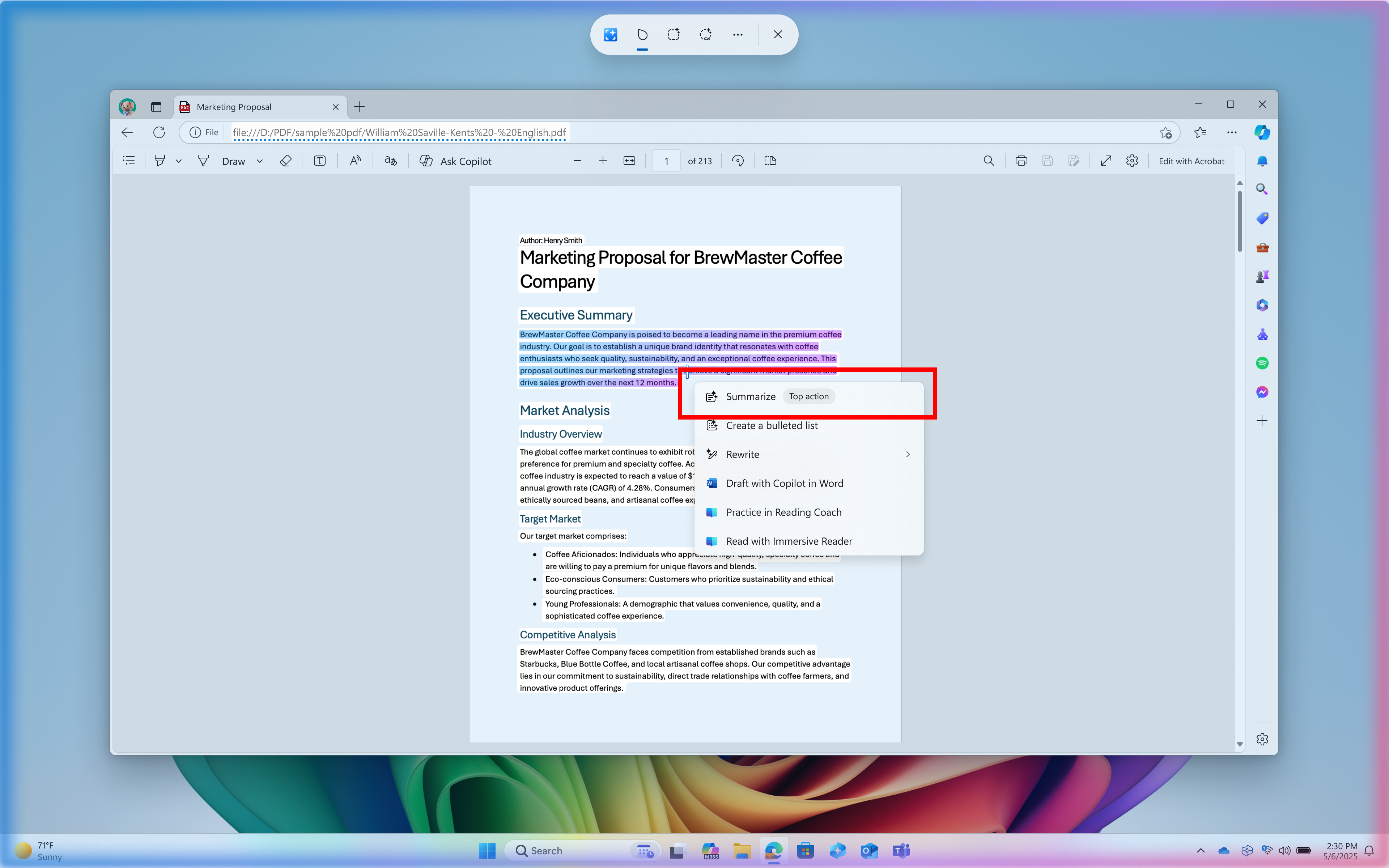
  • New and popular action tags: New and popular action tags to the context menu in Click to Do are designed to help new you discover our newest and most popular AI-powered actions available to use.

    Example of a top action highlighted in a red box in Click to Do’s context menu.
    Example of a top action highlighted in a red box in Click to Do’s context menu.
  • The output from the Summarize action for text entities in Click to Do should start to feel even more brief and concise as we continue to tune for improvements.

[Start menu]

  • We are trying out a small change in the Recommended section of the Start menu where we will show examples of prompts that you can try using in the Copilot app such as creating an image with Copilot.

[Emoji]

The Emoji 16.0 release introduces a small but thoughtfully curated set of new emojis—one from each major category—designed to resonate across cultures and contexts. Each emoji carries timeless symbolism and practical versatility. With this build, you will see these new emoji available in the emoji panel.


New Emoji 16.0 emoji from left to right: Face with Bags Under Eyes, Fingerprint, Root Vegetable, Leafless Tree, Harp, Shovel, and Splatter.

  • Face with Bags Under Eyes: Captures exhaustion or the need to rest.
  • Fingerprint: Identity or security.
  • Root Vegetable: Represents healthy eating and gardening.
  • Leafless Tree: Symbolizes winter, emptiness, or dormancy.
  • Harp: A timeless musical icon with ancient roots.
  • Shovel: Useful for gardening or metaphorically digging out of trouble.
  • Splatter: Expressive and fun.

[Gaming]

  • We have made some improvements for using Xbox game controllers for gaming on Windows 11. Short pressing the Xbox button opens Game Bar. A new change we’re introducing is when you long press the Xbox button, it will open Task View. Pressing and holding the Xbox button continues to turn off the game controller.

[Narrator]

We’ve made several improvements to ensure Narrator delivers smoother, more reliable experience when working with documents in Word. These updates focus on making reading, writing, and editing more natural and efficient.

  • More natural voice feedback: Narrator no longer raises pitch dramatically when announcing headings or grammar/spelling errors, making the experience smoother and less distracting when using Natural Voices.
  • Better footnote navigation: You can now navigate a document via footnotes and clearly hear the footnote number, helping you stay oriented while reading or editing documents with references.
  • Reliable continuous reading: Narrator will no longer stop unexpectedly during long passages of text. Continuous reading now flows smoothly from start to finish.
  • Improved comment reading: Narrator now correctly tracks focus when moving from the document canvas into the comments pane, so you can review and read comments without losing context
Creating & Consuming List
  • Coherent and consistent announcements: Narrator now reads lists in a consistent manner across surfaces and navigation methods. List entities such as style and level will be announced as per the chosen verbosity to ensure users have context about the formatting and their position in the list.
  • Complete list reading: Narrator will no longer cut off when a list item continues onto the next line — the entire content is announced properly.
  • Navigation List Items: You can now navigate Up and down from one list item to another using Ctrl + Up/Down keys.
Creating & Consuming Tables
  • Easier navigation commands:Narrator now supports quick navigation in Scan Mode to the first or last cell in a row or column, helping users move through tables more efficiently. You can navigate using the following commands:
    • Beginning of Row – Ctrl + Alt + comma
    • End of Row – Ctrl + Alt + period
    • Beginning of Column – Ctrl + Alt + Shift + comma
    • End of Column – Ctrl + Alt + Shift + period
  • Clearer guidance at table boundaries: When navigating with the Tab key inside an editable table, Narrator now provides an announcement when reaching the last cell. This prevents confusion and accidental row additions.
  • Less confusing entry announcements: Narrator no longer announces “entering table” twice when moving across cells. You’ll now hear this feedback only once, making it easier to track whether you’re still inside the same table.
  • Better feedback during selection: Narrator now make clear announcements as you select one or more cells across row and columns or both. It also clearly announces when a text selection extends across multiple cells, so you know exactly how much content they’ve selected.
  • Awareness of non-uniform tables: Narrator now alerts users if a table is non-uniform (for example, missing cells in certain rows or columns), giving important context about table structure.

[Settings]

  • After being temporarily disabled, Advanced Settings is rolling out again to Windows Insiders in the Dev and Beta Channels. However, we have temporarily removed the long path and virtual workspaces options to address some issues.

[Other]

  • We’re introducing a simple reminder that appears as a SCOOBE screen (Second Chance Out of Box Experience) to let you know your Microsoft subscription needs attention (for example, if a renewal payment didn’t go through). In just a few clicks, you can review and update your payment method and keep your subscription benefits uninterrupted.
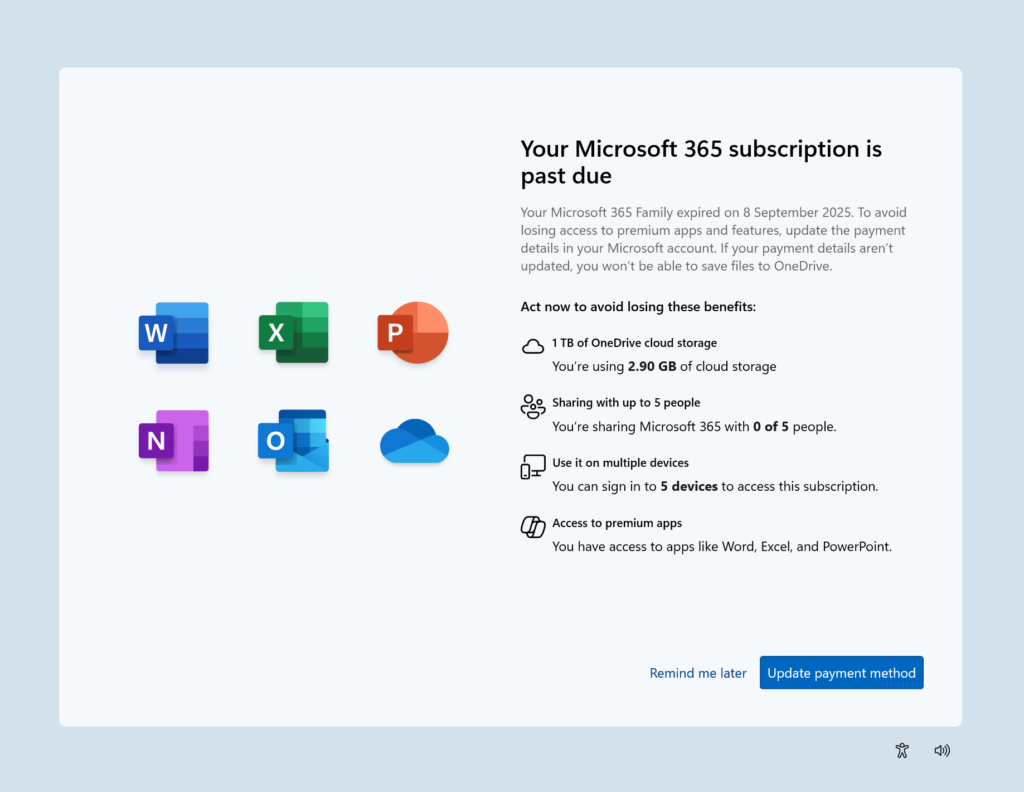
    SCOOBE screen for notifying you your Microsoft 365 subscription is past due with link to take action.
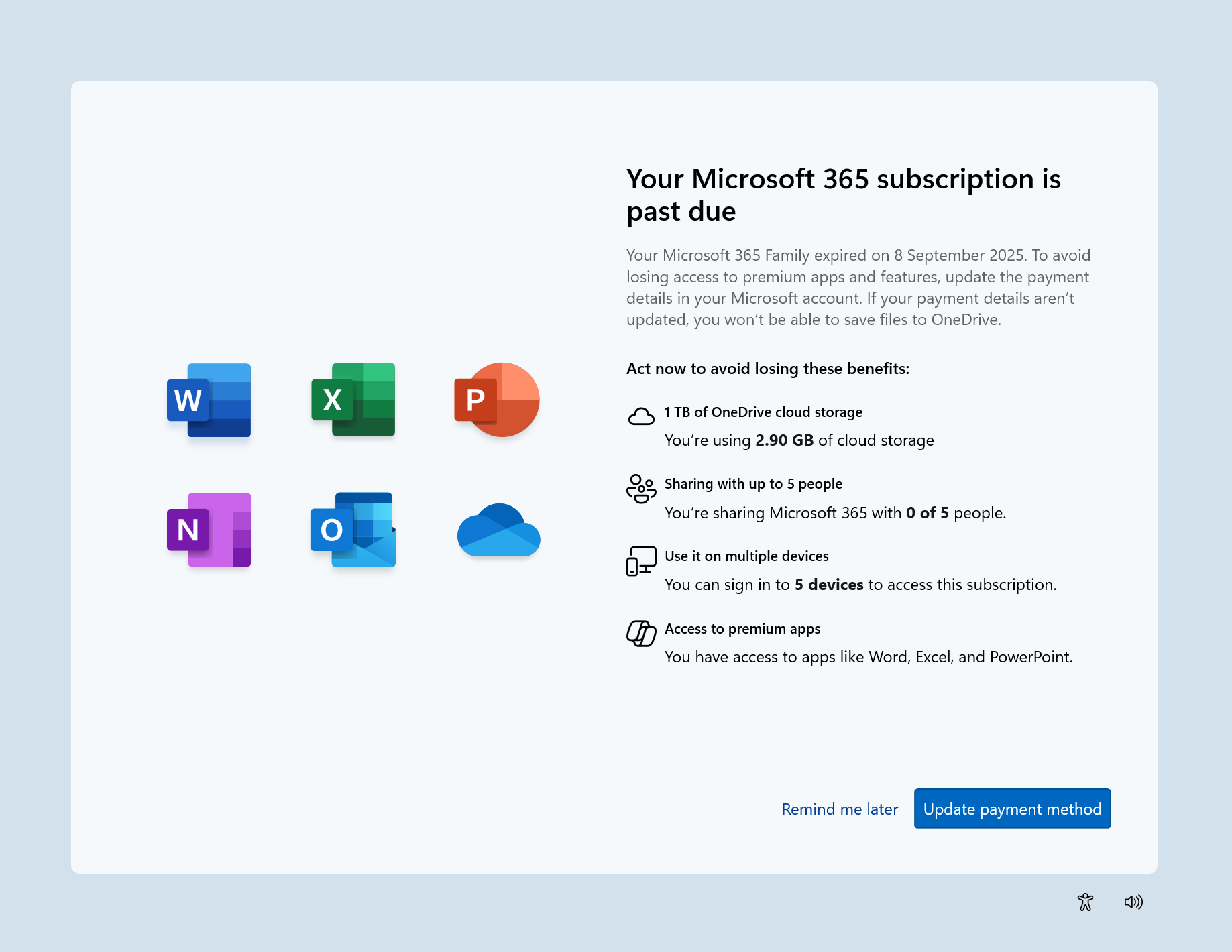
    SCOOBE screen for notifying you your Microsoft 365 subscription is past due with link to take action.

Fixes gradually being rolled out to the Dev Channel with toggle on*

[General]

  • Fixed an issue causing some PCs to bugcheck (green screen) while hibernating after the latest flights. This may have made it look like hibernation had shut down your PC. This issue is believed to also be the cause of some Insiders finding that shutdown had hung and would sit on a black screen with a fan noise.

[Taskbar & System Tray]

  • Did some work to help improve reliability of taskbar hiding and unhiding when the setting “automatically hide the taskbar” is enabled. As part of this work, the animation may be smoother for you now. As a reminder – if an app has an alert (the orange highlight on the app icon) then the taskbar will show.
  • Fixed a couple issues which could lead to you not being able to interact with apps or the desktop in the area directly above the taskbar.

[File Explorer]

  • Fixed an issue for some users, where the Shared section in File Explorer Home might be visible even if there was no content to display.
  • Fixed an issue which was Fixed an issue where File Explorer was unexpectedly not showing thumbnails for video files containing certain EXIF metadata.
  • Fixed an issue where interacting with the context menu in File Explorer could lead to the body of File Explorer becoming unresponsive to clicks.
  • Fixed an issue which could lead to certain apps hanging when launching the Open or Save Dialog.

[Lock and Login screens]

  • Fixed an issue which could cause the lock screen to crash when interacting with the power button in the latest builds.

[Start menu]

  • Fixed an underlying issue which was causing Start menu to dismiss if you tried to use WIN + Shift + S to take a screenshot of it.
  • Fixed an issue impacting Start menu reliability in the latest builds.
  • Fixed an issue which was causing Start menu to randomly scroll back up to the top sometimes.

[Windows Sandbox]

  • Fixed an issue for Windows Sandbox users which could lead to the vmmemCmFirstBoot process consuming large amounts of CPU after login, causing your PC to potentially become unresponsive.

[Search]

  • We did some work to help reduce instances where search may get stuck in a loading state.

[Settings]

  • Fixed an issue which could lead to Settings crashing when interacting with Settings > System > Optional Features.

[Voice Access]

  • Fixed an issue which could result in Voice Access not working, showing error 9001.

[Windows Hello]

  • Fixed an issue where booting into safe mode wasn’t working, with a message saying “Something happened and your PIN isn’t available” for some people.
  • Fixed an issue where Windows Hello Pin setup might fail with error 0x80090010 on Entra-domain joined devices that had installed the latest updates.

[Other]

Fixes for everyone in the Dev Channel

[General]

  • This update addresses an issue that affects audio in apps using the Network Device Interface (NDI). Audio stutters when Display Capture is on in OBS Studio Application. This could occur after installing the latest updates.

Known issues

[Click to Do]

  • [NEW] Launching Click to Do on your primary display via right-edge gesture will result in the swipe visuals appearing on the incorrect display. The issue is being investigated.

[Lock and login screens]

  • [NEW] We’re investigating an issue in this build where the media controls may not display on the lock screen.

[Windows Studio Effects]

  • [NEW] For some classes of external webcams, turning on “Use Windows Studio Effects” in the advanced camera setting may result in a camera preview failure. This is due to a compatibility issue with the camera firmware and is being addressed with a future update. In the meantime, if you are impacted by this issue, turn off Windows Studio Effects inside the camera settings.

[For developers]

  • PIX on Windows is unable to play back GPU captures on this OS version. This will be addressed by a new PIX release, estimated to arrive by the end of September. In the meantime, if you are impacted, you can use the “Send Feedback” button in PIX or contact us on the DirectX Discord server and we can help provide private builds.

[Settings]

  • [NEW] The placeholder text in the Settings search box may appear vertically misaligned.

 
Last edited:
  • Like
Reactions: OAT
1757738027579.webp
 

My Computers My Computers

  • At a glance

    Win 11 Pro 25H2 26200.8894Intel® Core™ i7-14700KG.SKILL Ripjaws S5 Series 64GB (2 x 32GB) DDR5ASUS GeForce RTX 4070 Super 12GB
    OS
    Win 11 Pro 25H2 26200.8894
    Computer type
    PC/Desktop
    Manufacturer/Model
    Self Built
    CPU
    Intel® Core™ i7-14700K
    Motherboard
    ASUS TUF Z690-PLUS WIFI (BIOS 4505)
    Memory
    G.SKILL Ripjaws S5 Series 64GB (2 x 32GB) DDR5
    Graphics Card(s)
    ASUS GeForce RTX 4070 Super 12GB
    Sound Card
    Sound Blaster AE-5 Plus
    Monitor(s) Displays
    ASUS TUF Gaming 27" 2K HDR Gaming
    Screen Resolution
    2560 x 1440
    Hard Drives
    Samsung 990 Pro 1TB NVMe (Win 11 25H2)
    SK hynix P41 500GB NVMe
    SK hynix P41 2TB NVMe (x3)
    Crucial P3 Plus 4TB
    PSU
    Corsair RM850x Shift
    Case
    Antec Dark Phantom DP502 FLUX
    Cooling
    Corsair Nautilus 360 RS AIO
    Keyboard
    Logitech MK 320
    Mouse
    Razer Basilisk V3
    Internet Speed
    750Mbs
    Browser
    Firefox
    Antivirus
    Winows Security
    Other Info
    MR 8.1 Home
  • At a glance

    Win 11 Pro 25H2 26200.8894Intel Core i5-1140064 GB DDR4MSI GeForce RTX 3060 Ventus 2X 12GB
    Operating System
    Win 11 Pro 25H2 26200.8894
    Computer type
    PC/Desktop
    Manufacturer/Model
    Self Built
    CPU
    Intel Core i5-11400
    Motherboard
    Asus TUF Gaming Z590 Plus WiFi (BIOS 2803)
    Memory
    64 GB DDR4
    Graphics card(s)
    MSI GeForce RTX 3060 Ventus 2X 12GB
    Sound Card
    SoundBlaster Audigy Fx V2
    Monitor(s) Displays
    Samsung F27T350
    Screen Resolution
    1920x1080
    Hard Drives
    Samsung 980 Pro 1TB
    Samsung 970 EVO Plus 2TB
    Samsung 870 EVO 500GB SSD
    PSU
    Corsair HX750
    Case
    Cougar MX330-G Window
    Cooling
    Thermalright Frozen Edge 240 Black AIO
    Internet Speed
    350Mbps
    Browser
    Firefox
    Antivirus
    Windows Security
  • System Three
    Win 11 Pro 25H2 26200.8894
    ASUS PRIME Z370-P II BIOS 3004 7/12/21
    Intel Core i7-8700 CPU @ 3.20GHz
    32GB DDR4 RAM (4x8)
    iGPU Intel UHD Graphics 630
    Mid-Tower Desktop
1757743465450.webp
This morning when I opened my PC, I found the update ready to start without any problems - For now everything is OK
 

My Computer My Computer

At a glance

Windows 11 Pro Insider Preview DevAMD Ryzen™ 5 5600G with Radeon Graphics 3.90 GHz16,0 GBNVIDIA GeForce GT 720, NVIDIA compatible
OS
Windows 11 Pro Insider Preview Dev
Computer type
PC/Desktop
Manufacturer/Model
To be filled by O.E.M.
CPU
AMD Ryzen™ 5 5600G with Radeon Graphics 3.90 GHz
Motherboard
MSI B450 GAMING PLUS MAX
Memory
16,0 GB
Graphics Card(s)
NVIDIA GeForce GT 720, NVIDIA compatible
Sound Card
NVIDIA High Definition Audio
Monitor(s) Displays
BenQ GW2270 Color Profile.D6500
Screen Resolution
1920 x 1080
Hard Drives
Samsung SSD 850 EVO 250GB + CT1000BX500SSD1 + ST2000DM006-2DM164 + WDC WD5000AAKS-07TMA0 +WDC WD10EARX-00N0YB0
PSU
EVGA 600 W2, 80+ WHITE 600W, 3 Year Warranty, Power Supply 100-W2-0600-K2 (EU)
Case
RAIJINTEK Agos - mid tower - ATX
Cooling
Cooler Master Hyper 212 Evo heatsink + Fans: 2 front+1 back+1 up
Keyboard
Logitech Internet 350 Keyboard
Mouse
Logitech MX Revolution
Internet Speed
Download 159.29 Mbps - Upload 80.14 Mbps
Browser
Google Crome Dev
Antivirus
Microsoft Windows Security
I updated with this update now my taskbar only partially hides, there is still a thin line at the bottom of the screen. I have oled monitor and I need to be able to fully autohide the taskbar. It worked fine until this update. Sometimes when I have something minimized on the screen it won't auto hide at all. Any help with this problem would be appreciated.

Thanks
 

My Computer My Computer

At a glance

Windows 11 Pro
OS
Windows 11 Pro
Hello

It Stucks at 72 % :/

Ths for help
 

My Computer My Computer

At a glance

Windows 11 Insider Experimental (26H2) ChannelIntel Core i5-13600K32 Go DDR4ASUS Dual GeForce RTX 4060 Ti OC Edition 8GB
OS
Windows 11 Insider Experimental (26H2) Channel
Computer type
PC/Desktop
Manufacturer/Model
Made
CPU
Intel Core i5-13600K
Motherboard
ASUS PRIME B760-PLUS D4
Memory
32 Go DDR4
Graphics Card(s)
ASUS Dual GeForce RTX 4060 Ti OC Edition 8GB
Monitor(s) Displays
ViewSonic 1080p
Screen Resolution
1080p
Hard Drives
2 NVMe + SSD Intern + 1 HHD Interne + 4 HDD extern
Keyboard
Roccat Swamm
Internet Speed
Fibre
Browser
Microsoft Edge
Antivirus
Windows Defender
All seems OK for me although the first prompted restart after installing the updates brought this up after a few minutes. A second restart and it did not reappear:

Screenshot 2025-09-13 114624.webp
 

My Computer My Computer

At a glance

W11 Pro x64 ongoing Canary 29500 latest buildsIntel i58GbIntel HD Graphics
OS
W11 Pro x64 ongoing Canary 29500 latest builds
Computer type
Laptop
Manufacturer/Model
Dell 7760 Mobile Precision 17"
CPU
Intel i5
Motherboard
Unknown
Memory
8Gb
Graphics Card(s)
Intel HD Graphics
Sound Card
Realtek
Monitor(s) Displays
Internal
Hard Drives
2 x 256Gb SSD
PSU
Dell 240 watt
Mouse
Dell Premier Bluetooth
Internet Speed
50Mbps
Browser
Edge
Antivirus
Default Microsoft Security
Still had an extra reclaimable package to cleanup. Went from 3 to the usual 2 left. 🤣🤣🤷‍♂️
Several people have experienced more issues after trying to reclaim that small amount of space for reclaimable packages. Unless there's some burning need, I just leave the system image to take care of itself. As long as it passes the health scan, it can be whatever size it likes.

As you can see, I have gobs of free space on the Windows boot drive, so saving a small amount and risking problems that way just doesn't make sense to me.

1757773689495.webp
 

My Computers My Computers

  • At a glance

    Win 11 Pro 25H2, Build 26200.8894Intel Core i5 1450064GB DDR4GeForce RTX 4060
    OS
    Win 11 Pro 25H2, Build 26200.8894
    Computer type
    PC/Desktop
    Manufacturer/Model
    Home Brew
    CPU
    Intel Core i5 14500
    Motherboard
    Gigabyte B760M G P WIFI
    Memory
    64GB DDR4
    Graphics Card(s)
    GeForce RTX 4060
    Sound Card
    Chipset Realtek
    Monitor(s) Displays
    LG 45" Ultragear, Acer 24" 1080p
    Screen Resolution
    5120x1440, 1920x1080
    Hard Drives
    Crucial P310 2TB 2280 PCIe Gen4 3D NAND NVMe M.2 SSD (O/S)
    Silicon Power 2TB US75 NVMe PCIe Gen4 M.2 2280 SSD (backup)
    Crucial BX500 2TB 3D NAND (2nd backup)
    Seagate 4TB Ironwolf, rotating HDD archive files
    External off-line backup Drives: 2 NVMe 4TB drives in external enclosures
    PSU
    Thermaltake Toughpower GF3 750W
    Case
    LIAN LI LANCOOL 216 E-ATX PC Case
    Cooling
    Lots of fans!
    Keyboard
    Microsoft Comfort Curve 2000
    Mouse
    Logitech G305
    Internet Speed
    Verizon FiOS 1GB
    Browser
    Firefox
    Antivirus
    Malware Bytes & Windows Defender Security
  • At a glance

    Win 11 Pro 25H2, Build 26200.8894Intel Core i5 1440032GB DDR5Intel 700 Embedded GPU
    Operating System
    Win 11 Pro 25H2, Build 26200.8894
    Computer type
    PC/Desktop
    Manufacturer/Model
    Home Brew
    CPU
    Intel Core i5 14400
    Motherboard
    Gigabyte B760M DS3H AX
    Memory
    32GB DDR5
    Graphics card(s)
    Intel 700 Embedded GPU
    Sound Card
    Realtek Embedded
    Monitor(s) Displays
    27" HP 1080p
    Screen Resolution
    1920x1080
    Hard Drives
    Crucial P310 2TB 2280 PCIe Gen4 eD NAND PCIe SSD
    Samsung EVO 990 2TB NVMe Gen4 SSD
    Samsung 2TB SATA SSD
    PSU
    Thermaltake Smart BM3 650W
    Case
    Okinos Micro ATX Case
    Cooling
    Fans
    Keyboard
    Microsoft Comfort Curve 2000
    Mouse
    Logitech G305
    Internet Speed
    Verizon FiOS 1GB
    Browser
    Firefox
    Antivirus
    Malware Bytes & Windows Defender Security
  • Nimo N171 17" Laptop, (Intel i3-1215U, 16GB RAM, 2TB NVMe, Win11 Pro)
    Acemagic Vista Mini PC V1 (Intel N150, 16GB RAM, 1TB NVMe, Win11 Pro)
    HP ENVY h8-1540t, (24GB RAM, 2TB SSD, 2TB HDD, Win11 Pro)
Several people have experienced more issues after trying to reclaim that small amount of space for reclaimable packages. Unless there's some burning need, I just leave the system image to take care of itself. As long as it passes the health scan, it can be whatever size it likes.

As you can see, I have gobs of free space on the Windows boot drive, so saving a small amount and risking problems that way just doesn't make sense to me.
I just follow what is recommended. Never had a problem with that. 🤷‍♂️

1757791979053.webp
 

My Computer My Computer

At a glance

Windows 11 Pro 25H2Intel I9-9900K64GBNVIDIA RTX 2060
OS
Windows 11 Pro 25H2
Computer type
PC/Desktop
Manufacturer/Model
Dell XPS 8930
CPU
Intel I9-9900K
Memory
64GB
Graphics Card(s)
NVIDIA RTX 2060
Sound Card
NVIDIA High Definition Audio
Monitor(s) Displays
4k Samsung
Screen Resolution
3840 x 2160
Hard Drives
512GB NVMe, ADATA SU 800, 2TB HDD
Yep, but just because Windows says it's alright, I don't always believe it. :LOL:
 

My Computers My Computers

  • At a glance

    Win 11 Pro 25H2, Build 26200.8894Intel Core i5 1450064GB DDR4GeForce RTX 4060
    OS
    Win 11 Pro 25H2, Build 26200.8894
    Computer type
    PC/Desktop
    Manufacturer/Model
    Home Brew
    CPU
    Intel Core i5 14500
    Motherboard
    Gigabyte B760M G P WIFI
    Memory
    64GB DDR4
    Graphics Card(s)
    GeForce RTX 4060
    Sound Card
    Chipset Realtek
    Monitor(s) Displays
    LG 45" Ultragear, Acer 24" 1080p
    Screen Resolution
    5120x1440, 1920x1080
    Hard Drives
    Crucial P310 2TB 2280 PCIe Gen4 3D NAND NVMe M.2 SSD (O/S)
    Silicon Power 2TB US75 NVMe PCIe Gen4 M.2 2280 SSD (backup)
    Crucial BX500 2TB 3D NAND (2nd backup)
    Seagate 4TB Ironwolf, rotating HDD archive files
    External off-line backup Drives: 2 NVMe 4TB drives in external enclosures
    PSU
    Thermaltake Toughpower GF3 750W
    Case
    LIAN LI LANCOOL 216 E-ATX PC Case
    Cooling
    Lots of fans!
    Keyboard
    Microsoft Comfort Curve 2000
    Mouse
    Logitech G305
    Internet Speed
    Verizon FiOS 1GB
    Browser
    Firefox
    Antivirus
    Malware Bytes & Windows Defender Security
  • At a glance

    Win 11 Pro 25H2, Build 26200.8894Intel Core i5 1440032GB DDR5Intel 700 Embedded GPU
    Operating System
    Win 11 Pro 25H2, Build 26200.8894
    Computer type
    PC/Desktop
    Manufacturer/Model
    Home Brew
    CPU
    Intel Core i5 14400
    Motherboard
    Gigabyte B760M DS3H AX
    Memory
    32GB DDR5
    Graphics card(s)
    Intel 700 Embedded GPU
    Sound Card
    Realtek Embedded
    Monitor(s) Displays
    27" HP 1080p
    Screen Resolution
    1920x1080
    Hard Drives
    Crucial P310 2TB 2280 PCIe Gen4 eD NAND PCIe SSD
    Samsung EVO 990 2TB NVMe Gen4 SSD
    Samsung 2TB SATA SSD
    PSU
    Thermaltake Smart BM3 650W
    Case
    Okinos Micro ATX Case
    Cooling
    Fans
    Keyboard
    Microsoft Comfort Curve 2000
    Mouse
    Logitech G305
    Internet Speed
    Verizon FiOS 1GB
    Browser
    Firefox
    Antivirus
    Malware Bytes & Windows Defender Security
  • Nimo N171 17" Laptop, (Intel i3-1215U, 16GB RAM, 2TB NVMe, Win11 Pro)
    Acemagic Vista Mini PC V1 (Intel N150, 16GB RAM, 1TB NVMe, Win11 Pro)
    HP ENVY h8-1540t, (24GB RAM, 2TB SSD, 2TB HDD, Win11 Pro)
From the last Dev build:

First shutdown and the following boot an hour or so later was abnormally slow at around 50 seconds. Even a restart is quicker than that. Normally it should be in the 20 second zone.

Will have to see how this one pans out.

This seems fixed now and along with the latest Dev build I got this video driver update. Fast Start now working correctly. I re-enabled it yesterday and its been fine:

Screenshot 2025-09-13 110247.webp
 

My Computer My Computer

At a glance

W11 Pro x64 ongoing Canary 29500 latest buildsIntel i58GbIntel HD Graphics
OS
W11 Pro x64 ongoing Canary 29500 latest builds
Computer type
Laptop
Manufacturer/Model
Dell 7760 Mobile Precision 17"
CPU
Intel i5
Motherboard
Unknown
Memory
8Gb
Graphics Card(s)
Intel HD Graphics
Sound Card
Realtek
Monitor(s) Displays
Internal
Hard Drives
2 x 256Gb SSD
PSU
Dell 240 watt
Mouse
Dell Premier Bluetooth
Internet Speed
50Mbps
Browser
Edge
Antivirus
Default Microsoft Security
Anyone know why an updated .iso has been released on UUP?

1.webp
@Brink
 

My Computer My Computer

At a glance

Windows 11 Pro 25H2 (Build 26200.8968)Intel Core Ultra 9 285 5.6 GHz32.00 GBIntel Integrated Graphics (128 MB)
OS
Windows 11 Pro 25H2 (Build 26200.8968)
Computer type
PC/Desktop
Manufacturer/Model
Dell Pro Max Tower T2 FCT2250
CPU
Intel Core Ultra 9 285 5.6 GHz
Motherboard
64-bit operating system, x64-based processor
Memory
32.00 GB
Graphics Card(s)
Intel Integrated Graphics (128 MB)
Sound Card
Realtek Audio
Monitor(s) Displays
Dell P2714H Monitor
Screen Resolution
1920 x 1080
Hard Drives
1 x 512GB M.2 XG10d SED KIOXIA PCIe solid state drive (Internal)
1 x 2TB Seagate ST2000DM008-2UB102 HDD (Internal)
1 x 4TB Seagate STGX4000400 External HDD
1 x 6TB WD Elements AE 2689 External HDD
PSU
500 Watts
Cooling
Air
Keyboard
Microsoft Wired Keyboard 600
Mouse
Microsoft USB Basic Optical Mouse v2.0
Browser
Firefox
Antivirus
Windows Defender + Malwarebytes Premium
Other Info
BaseBoard Manufacturer Dell Inc.
BaseBoard Product 022RY57
BaseBoard Version A01
Will Spotify appear with resume in the taskbar?
 

My Computer My Computer

At a glance

Win11Pro Dev 25H2 26220.6972
OS
Win11Pro Dev 25H2 26220.6972
Computer type
PC/Desktop
Screen Resolution
4k
Browser
Microsoft Edge Beta
Antivirus
Eset Smart Security Premium
Anyone know why an updated .iso has been released on UUP?

View attachment 145344
@Brink
I think somebody already answer that, see post #47 on the thread below for that build.


My Computer My Computer

At a glance

Windows 11 Pro 25H2Intel I9-9900K64GBNVIDIA RTX 2060
OS
Windows 11 Pro 25H2
Computer type
PC/Desktop
Manufacturer/Model
Dell XPS 8930
CPU
Intel I9-9900K
Memory
64GB
Graphics Card(s)
NVIDIA RTX 2060
Sound Card
NVIDIA High Definition Audio
Monitor(s) Displays
4k Samsung
Screen Resolution
3840 x 2160
Hard Drives
512GB NVMe, ADATA SU 800, 2TB HDD
Anyone know why an updated .iso has been released on UUP?

View attachment 145344
@Brink

Hello mate, :alien:

This ISO is for the latest RP build below instead. There was an issue with the first ISO UUP released for it, so they released a fixed version.


My Computers My Computers

  • At a glance

    Windows 11 Pro for WorkstationsIntel i7-8700K 5 GHz64 GB (4x16GB) G.SKILL TridentZ RGB DDR4 3600...ASUS ROG-STRIX-GTX1080TI-O11G-GAMING (11GB GD...
    OS
    Windows 11 Pro for Workstations
    Computer type
    PC/Desktop
    Manufacturer/Model
    Custom self build
    CPU
    Intel i7-8700K 5 GHz
    Motherboard
    ASUS ROG Maximus XI Formula Z390
    Memory
    64 GB (4x16GB) G.SKILL TridentZ RGB DDR4 3600 MHz (F4-3600C18D-32GTZR)
    Graphics Card(s)
    ASUS ROG-STRIX-GTX1080TI-O11G-GAMING (11GB GDDR5X)
    Sound Card
    Integrated Digital Audio (S/PDIF)
    Monitor(s) Displays
    2 x Samsung Odyssey G75 27"
    Screen Resolution
    2560x1440
    Hard Drives
    1TB Samsung 990 PRO M.2,
    4TB Samsung 990 PRO M.2,
    TerraMaster F8 SSD Plus NAS
    PSU
    Seasonic Prime Titanium 850W
    Case
    Thermaltake Core P3 wall mounted
    Cooling
    Corsair Hydro H115i
    Keyboard
    Amazon Basics Wired Full Keyboard MD005
    Mouse
    Logitech MX Master 4
    Internet Speed
    2 Gbps Download and 100 Mbps Upload
    Browser
    Chrome and Edge
    Antivirus
    Microsoft Defender
    Other Info
    Logitech Z625 speaker system,
    Logitech BRIO 4K Pro webcam,
    HP Color LaserJet Pro MFP M477fdn,
    CyberPower CP1500PFCLCD
    Galaxy S23 Plus phone
  • At a glance

    Windows 11 ProSnapdragon X Elite (12 core) 3.42 GHz16 GB LPDDR5x-7467 MHz
    Operating System
    Windows 11 Pro
    Computer type
    Laptop
    Manufacturer/Model
    Surface Laptop 7 Copilot+ PC
    CPU
    Snapdragon X Elite (12 core) 3.42 GHz
    Memory
    16 GB LPDDR5x-7467 MHz
    Monitor(s) Displays
    15" HDR
    Screen Resolution
    2496 x 1664
    Hard Drives
    1 TB SSD
    Internet Speed
    Wi-Fi 7 and Bluetooth 5.4
    Browser
    Chrome and Edge
    Antivirus
    Microsoft Defender
The Drag Tray is no longer going to be exclusively for file sharing. It'll be getting more actions, with a basic one hidden in the latest Dev/Beta CU - moving files between folders.


My Computers My Computers

  • At a glance

    Windows 11 Pro for WorkstationsIntel i7-8700K 5 GHz64 GB (4x16GB) G.SKILL TridentZ RGB DDR4 3600...ASUS ROG-STRIX-GTX1080TI-O11G-GAMING (11GB GD...
    OS
    Windows 11 Pro for Workstations
    Computer type
    PC/Desktop
    Manufacturer/Model
    Custom self build
    CPU
    Intel i7-8700K 5 GHz
    Motherboard
    ASUS ROG Maximus XI Formula Z390
    Memory
    64 GB (4x16GB) G.SKILL TridentZ RGB DDR4 3600 MHz (F4-3600C18D-32GTZR)
    Graphics Card(s)
    ASUS ROG-STRIX-GTX1080TI-O11G-GAMING (11GB GDDR5X)
    Sound Card
    Integrated Digital Audio (S/PDIF)
    Monitor(s) Displays
    2 x Samsung Odyssey G75 27"
    Screen Resolution
    2560x1440
    Hard Drives
    1TB Samsung 990 PRO M.2,
    4TB Samsung 990 PRO M.2,
    TerraMaster F8 SSD Plus NAS
    PSU
    Seasonic Prime Titanium 850W
    Case
    Thermaltake Core P3 wall mounted
    Cooling
    Corsair Hydro H115i
    Keyboard
    Amazon Basics Wired Full Keyboard MD005
    Mouse
    Logitech MX Master 4
    Internet Speed
    2 Gbps Download and 100 Mbps Upload
    Browser
    Chrome and Edge
    Antivirus
    Microsoft Defender
    Other Info
    Logitech Z625 speaker system,
    Logitech BRIO 4K Pro webcam,
    HP Color LaserJet Pro MFP M477fdn,
    CyberPower CP1500PFCLCD
    Galaxy S23 Plus phone
  • At a glance

    Windows 11 ProSnapdragon X Elite (12 core) 3.42 GHz16 GB LPDDR5x-7467 MHz
    Operating System
    Windows 11 Pro
    Computer type
    Laptop
    Manufacturer/Model
    Surface Laptop 7 Copilot+ PC
    CPU
    Snapdragon X Elite (12 core) 3.42 GHz
    Memory
    16 GB LPDDR5x-7467 MHz
    Monitor(s) Displays
    15" HDR
    Screen Resolution
    2496 x 1664
    Hard Drives
    1 TB SSD
    Internet Speed
    Wi-Fi 7 and Bluetooth 5.4
    Browser
    Chrome and Edge
    Antivirus
    Microsoft Defender
The mobile devices settings page is being revamped! You will now be able to see connected devices and toggle all the options for them in this page, no separate manage mobile devices window needed. Related settings links are also being added.


My Computers My Computers

  • At a glance

    Windows 11 Pro for WorkstationsIntel i7-8700K 5 GHz64 GB (4x16GB) G.SKILL TridentZ RGB DDR4 3600...ASUS ROG-STRIX-GTX1080TI-O11G-GAMING (11GB GD...
    OS
    Windows 11 Pro for Workstations
    Computer type
    PC/Desktop
    Manufacturer/Model
    Custom self build
    CPU
    Intel i7-8700K 5 GHz
    Motherboard
    ASUS ROG Maximus XI Formula Z390
    Memory
    64 GB (4x16GB) G.SKILL TridentZ RGB DDR4 3600 MHz (F4-3600C18D-32GTZR)
    Graphics Card(s)
    ASUS ROG-STRIX-GTX1080TI-O11G-GAMING (11GB GDDR5X)
    Sound Card
    Integrated Digital Audio (S/PDIF)
    Monitor(s) Displays
    2 x Samsung Odyssey G75 27"
    Screen Resolution
    2560x1440
    Hard Drives
    1TB Samsung 990 PRO M.2,
    4TB Samsung 990 PRO M.2,
    TerraMaster F8 SSD Plus NAS
    PSU
    Seasonic Prime Titanium 850W
    Case
    Thermaltake Core P3 wall mounted
    Cooling
    Corsair Hydro H115i
    Keyboard
    Amazon Basics Wired Full Keyboard MD005
    Mouse
    Logitech MX Master 4
    Internet Speed
    2 Gbps Download and 100 Mbps Upload
    Browser
    Chrome and Edge
    Antivirus
    Microsoft Defender
    Other Info
    Logitech Z625 speaker system,
    Logitech BRIO 4K Pro webcam,
    HP Color LaserJet Pro MFP M477fdn,
    CyberPower CP1500PFCLCD
    Galaxy S23 Plus phone
  • At a glance

    Windows 11 ProSnapdragon X Elite (12 core) 3.42 GHz16 GB LPDDR5x-7467 MHz
    Operating System
    Windows 11 Pro
    Computer type
    Laptop
    Manufacturer/Model
    Surface Laptop 7 Copilot+ PC
    CPU
    Snapdragon X Elite (12 core) 3.42 GHz
    Memory
    16 GB LPDDR5x-7467 MHz
    Monitor(s) Displays
    15" HDR
    Screen Resolution
    2496 x 1664
    Hard Drives
    1 TB SSD
    Internet Speed
    Wi-Fi 7 and Bluetooth 5.4
    Browser
    Chrome and Edge
    Antivirus
    Microsoft Defender
The network icon in the system tray's context menu and the Wi-Fi quick settings page in Windows 11 are getting buttons to let you quickly run a network speed test. (Takes you to Bing to do the speed test.)


My Computers My Computers

  • At a glance

    Windows 11 Pro for WorkstationsIntel i7-8700K 5 GHz64 GB (4x16GB) G.SKILL TridentZ RGB DDR4 3600...ASUS ROG-STRIX-GTX1080TI-O11G-GAMING (11GB GD...
    OS
    Windows 11 Pro for Workstations
    Computer type
    PC/Desktop
    Manufacturer/Model
    Custom self build
    CPU
    Intel i7-8700K 5 GHz
    Motherboard
    ASUS ROG Maximus XI Formula Z390
    Memory
    64 GB (4x16GB) G.SKILL TridentZ RGB DDR4 3600 MHz (F4-3600C18D-32GTZR)
    Graphics Card(s)
    ASUS ROG-STRIX-GTX1080TI-O11G-GAMING (11GB GDDR5X)
    Sound Card
    Integrated Digital Audio (S/PDIF)
    Monitor(s) Displays
    2 x Samsung Odyssey G75 27"
    Screen Resolution
    2560x1440
    Hard Drives
    1TB Samsung 990 PRO M.2,
    4TB Samsung 990 PRO M.2,
    TerraMaster F8 SSD Plus NAS
    PSU
    Seasonic Prime Titanium 850W
    Case
    Thermaltake Core P3 wall mounted
    Cooling
    Corsair Hydro H115i
    Keyboard
    Amazon Basics Wired Full Keyboard MD005
    Mouse
    Logitech MX Master 4
    Internet Speed
    2 Gbps Download and 100 Mbps Upload
    Browser
    Chrome and Edge
    Antivirus
    Microsoft Defender
    Other Info
    Logitech Z625 speaker system,
    Logitech BRIO 4K Pro webcam,
    HP Color LaserJet Pro MFP M477fdn,
    CyberPower CP1500PFCLCD
    Galaxy S23 Plus phone
  • At a glance

    Windows 11 ProSnapdragon X Elite (12 core) 3.42 GHz16 GB LPDDR5x-7467 MHz
    Operating System
    Windows 11 Pro
    Computer type
    Laptop
    Manufacturer/Model
    Surface Laptop 7 Copilot+ PC
    CPU
    Snapdragon X Elite (12 core) 3.42 GHz
    Memory
    16 GB LPDDR5x-7467 MHz
    Monitor(s) Displays
    15" HDR
    Screen Resolution
    2496 x 1664
    Hard Drives
    1 TB SSD
    Internet Speed
    Wi-Fi 7 and Bluetooth 5.4
    Browser
    Chrome and Edge
    Antivirus
    Microsoft Defender
The main (L1) privacy & security settings page is being revamped. New headings have been added and all the pages have been moved around, with descriptions for more pages. There's also a "background AI tasks" page coming (just crashes atm.)


My Computers My Computers

  • At a glance

    Windows 11 Pro for WorkstationsIntel i7-8700K 5 GHz64 GB (4x16GB) G.SKILL TridentZ RGB DDR4 3600...ASUS ROG-STRIX-GTX1080TI-O11G-GAMING (11GB GD...
    OS
    Windows 11 Pro for Workstations
    Computer type
    PC/Desktop
    Manufacturer/Model
    Custom self build
    CPU
    Intel i7-8700K 5 GHz
    Motherboard
    ASUS ROG Maximus XI Formula Z390
    Memory
    64 GB (4x16GB) G.SKILL TridentZ RGB DDR4 3600 MHz (F4-3600C18D-32GTZR)
    Graphics Card(s)
    ASUS ROG-STRIX-GTX1080TI-O11G-GAMING (11GB GDDR5X)
    Sound Card
    Integrated Digital Audio (S/PDIF)
    Monitor(s) Displays
    2 x Samsung Odyssey G75 27"
    Screen Resolution
    2560x1440
    Hard Drives
    1TB Samsung 990 PRO M.2,
    4TB Samsung 990 PRO M.2,
    TerraMaster F8 SSD Plus NAS
    PSU
    Seasonic Prime Titanium 850W
    Case
    Thermaltake Core P3 wall mounted
    Cooling
    Corsair Hydro H115i
    Keyboard
    Amazon Basics Wired Full Keyboard MD005
    Mouse
    Logitech MX Master 4
    Internet Speed
    2 Gbps Download and 100 Mbps Upload
    Browser
    Chrome and Edge
    Antivirus
    Microsoft Defender
    Other Info
    Logitech Z625 speaker system,
    Logitech BRIO 4K Pro webcam,
    HP Color LaserJet Pro MFP M477fdn,
    CyberPower CP1500PFCLCD
    Galaxy S23 Plus phone
  • At a glance

    Windows 11 ProSnapdragon X Elite (12 core) 3.42 GHz16 GB LPDDR5x-7467 MHz
    Operating System
    Windows 11 Pro
    Computer type
    Laptop
    Manufacturer/Model
    Surface Laptop 7 Copilot+ PC
    CPU
    Snapdragon X Elite (12 core) 3.42 GHz
    Memory
    16 GB LPDDR5x-7467 MHz
    Monitor(s) Displays
    15" HDR
    Screen Resolution
    2496 x 1664
    Hard Drives
    1 TB SSD
    Internet Speed
    Wi-Fi 7 and Bluetooth 5.4
    Browser
    Chrome and Edge
    Antivirus
    Microsoft Defender
Downloaded and installed all ok so far
 

My Computer My Computer

At a glance

Windows 11 64 bitSnapdragon(R) X Elite - X1E80100 - Qualcomm(R...3982 Megabytes Usable Installed MemorySnapdragon
OS
Windows 11 64 bit
Computer type
Laptop
Manufacturer/Model
Samsung Galaxy Book4 Pro 360 5G
CPU
Snapdragon(R) X Elite - X1E80100 - Qualcomm(R) Oryon(TM
Motherboard
Samsung
Memory
3982 Megabytes Usable Installed Memory
Graphics Card(s)
Snapdragon
Sound Card
Samsung
Hard Drives
Built In
Case
Grey
Cooling
Fan
Keyboard
Built in
Mouse
None
Internet Speed
Fast
Browser
Microsoft Dev
Antivirus
Windows Defender
Other Info
Also have a Samsung watch7, Samsung 65 inch TV, and a Samsung Galaxy 25Ultra phone!

And all three of these can get windows 11 and 12 so never out of touch

Also Alexa
Also now a Windows Insider
Lost the smooth animated taskbar thumbnails when hovering over the icons.
 

My Computer My Computer

At a glance

WIN11 Insider DevAMD Ryzen 5 360016GBRadeon
OS
WIN11 Insider Dev
Computer type
PC/Desktop
Manufacturer/Model
DIY
CPU
AMD Ryzen 5 3600
Motherboard
Asrock B550M Pro
Memory
16GB
Graphics Card(s)
Radeon
Sound Card
Presonus Studio 24c
Monitor(s) Displays
Samsung M7
Screen Resolution
3840x2160
Hard Drives
PNY NVMe 1TB
PSU
650W
Case
DIY
Cooling
Cooler Master
Keyboard
Microsoft Wireless
Mouse
Logitech M590
Browser
Firefox, Edge, Chrome, Brave

My Computers My Computers

  • At a glance

    Windows 11 Pro for WorkstationsIntel i7-8700K 5 GHz64 GB (4x16GB) G.SKILL TridentZ RGB DDR4 3600...ASUS ROG-STRIX-GTX1080TI-O11G-GAMING (11GB GD...
    OS
    Windows 11 Pro for Workstations
    Computer type
    PC/Desktop
    Manufacturer/Model
    Custom self build
    CPU
    Intel i7-8700K 5 GHz
    Motherboard
    ASUS ROG Maximus XI Formula Z390
    Memory
    64 GB (4x16GB) G.SKILL TridentZ RGB DDR4 3600 MHz (F4-3600C18D-32GTZR)
    Graphics Card(s)
    ASUS ROG-STRIX-GTX1080TI-O11G-GAMING (11GB GDDR5X)
    Sound Card
    Integrated Digital Audio (S/PDIF)
    Monitor(s) Displays
    2 x Samsung Odyssey G75 27"
    Screen Resolution
    2560x1440
    Hard Drives
    1TB Samsung 990 PRO M.2,
    4TB Samsung 990 PRO M.2,
    TerraMaster F8 SSD Plus NAS
    PSU
    Seasonic Prime Titanium 850W
    Case
    Thermaltake Core P3 wall mounted
    Cooling
    Corsair Hydro H115i
    Keyboard
    Amazon Basics Wired Full Keyboard MD005
    Mouse
    Logitech MX Master 4
    Internet Speed
    2 Gbps Download and 100 Mbps Upload
    Browser
    Chrome and Edge
    Antivirus
    Microsoft Defender
    Other Info
    Logitech Z625 speaker system,
    Logitech BRIO 4K Pro webcam,
    HP Color LaserJet Pro MFP M477fdn,
    CyberPower CP1500PFCLCD
    Galaxy S23 Plus phone
  • At a glance

    Windows 11 ProSnapdragon X Elite (12 core) 3.42 GHz16 GB LPDDR5x-7467 MHz
    Operating System
    Windows 11 Pro
    Computer type
    Laptop
    Manufacturer/Model
    Surface Laptop 7 Copilot+ PC
    CPU
    Snapdragon X Elite (12 core) 3.42 GHz
    Memory
    16 GB LPDDR5x-7467 MHz
    Monitor(s) Displays
    15" HDR
    Screen Resolution
    2496 x 1664
    Hard Drives
    1 TB SSD
    Internet Speed
    Wi-Fi 7 and Bluetooth 5.4
    Browser
    Chrome and Edge
    Antivirus
    Microsoft Defender
Back
Top Bottom