Insider KB5065793 Windows 11 Insider Beta build 26120.6760 (24H2) - Sep. 29


UPDATE 10/06:


  Windows Insider Blog:

[Updated 10/2/2025]

Known Issue: We’ve been hearing your feedback that some Insiders on Dev and Beta Channels have lost some updated features that were rolled recently rolled out to Insiders with the “Get the latest updates as soon as they’re available” toggle on*.

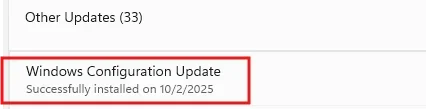
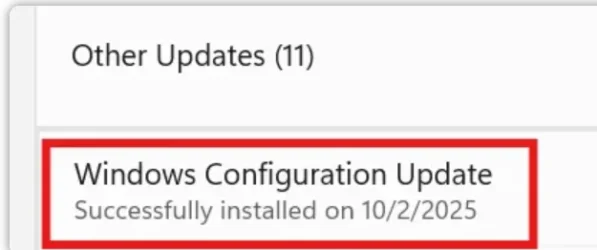
Insiders may see an update on their devices for “Windows Configuration Update” that is meant to address this issue.

We have paused new flights of 26120.6760 while we address this fix.


Hello Windows Insiders, today we are releasing Windows 11 Insider Preview Build 26120.6760 (KB5065793) to the Beta Channel for Windows Insiders on Windows 11, version 24H2.

Changes in Beta Channel builds and updates are documented in two buckets: new features, improvements, and fixes that are being gradually rolled out for Insiders who have turned on the toggle to get the latest updates as they are available (via Settings > Windows Update*) and then new features, improvements, and fixes rolling out to everyone in the Beta Channel. For more information, see the Reminders section at the bottom of this blog post.


New features gradually being rolled out to the Beta Channel with toggle on*

[Taskbar & System Tray]

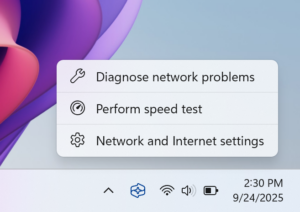
  • We are introducing the ability to do built-in network speed test accessible from the taskbar. You can launch it via the Wi-Fi and Cellular Quick Settings pages or by right-clicking the network icon in the system tray. The tool opens in your default browser and supports testing Ethernet, Wi-Fi, and Cellular connections. This feature helps assess network performance and supports troubleshooting.


    Menu options to Diagnose network problems, Perform speed test, and Network and Internet settings from the network icon in the system tray.

    Menu options to Diagnose network problems, Perform speed test, and Network and Internet settings from the network icon in the system tray.

[Get Started/Microsoft 365 Copilot]

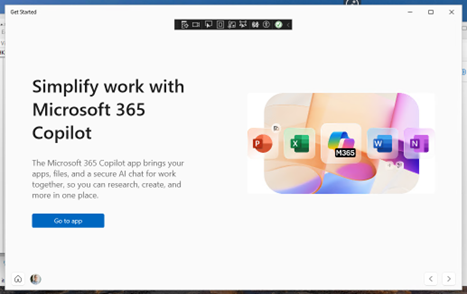
  • We’re adding a new Microsoft 365 Copilot page to the Get Started experience for managed commercial devices that are managed with an active Microsoft 365 subscription. This experience is designed to help users discover and engage with Microsoft 365 Copilot more easily, providing quick access to key features and helpful guidance directly within the Get Started flow.

    Menu options to Diagnose network problems, Perform speed test, and Network and Internet settings from the network icon in the system tray.

    Menu options to Diagnose network problems, Perform speed test, and Network and Internet settings from the network icon in the system tray.
    ALT-TEXT: Get Started experience describing what Microsoft 365 Copilot can do and offers a link to the application.

Changes and Improvements gradually being rolled out to the Beta Channel with toggle on*

[Windows Search]

The following changes and improvements are rolling out for improved Windows Search on Copilot+ PCs:
  • For Insiders with Copilot+ PCs, we’re updating the File Explorer Search Box placeholder text to raise awareness of the improved Windows Search experience introduced earlier this year. Learn more in our January blog post.

    File Explore Search Box with a magnifying glass search icon with the words “Try describing an image or file”.

    File Explorer Search Box with a magnifying glass search icon with the words “Try describing an image or file”.

[File Explorer]

  • New! StorageProvider APIs for cloud providers to integrate with File Explorer Home. Developer documentation available here.

[Emoji]

  • We are temporarily turning off Emoji 16.0 and will bring it back in a future release.

[Voice access]

  • We are introducing a new ‘Wait time before acting’ setting in voice access, allowing users to configure the delay before a voice command is executed. This provides greater flexibility for users with varying speech patterns, enabling more accurate recognition whether speaking slowly or quickly. To set this up, navigate to voice access settings > Wait time before acting, and choose the option that best fits your preferences.

Fixes gradually being rolled out to the Beta Channel with toggle on*

[General]

  • Fixed an underlying issue which was leading to some screen readers no longer being able to read screen content after the latest flights.

[Click to Do (Preview)]

The following fixes are rolling out for Click to Do on Copilot+ PCs:
  • Fixed an issue where Click to Do may unexpectedly invoke sometimes when pressing WIN + P.

[Taskbar & System Tray]

  • Fixed an issue in the latest builds where the battery icon could get out of sync with the actual charging state (for example, it would show that you weren’t plugged in when you were).

[File Explorer]

  • Fixed an issue where when you customized a folder’s view (for example, sorting files by name or changing the icon size), those settings only applied to the specific navigation path. If you opened the same folder from another app (like a browser), the settings wouldn’t carry over, leading you to need to manually reapply them every time. This was particularly noticeable with the Downloads folder, if you had turned off Group By Date.

[Lock and Login screens]

  • Fixed an issue in the latest build where the media controls might not be displayed on the lock screen although media was playing in an app that supports these controls.

[Windows Update]

  • Fixed an underlying issue which could lead “Update and shutdown” to not actually shut down your PC after.

[Settings]

  • Fixed an issue causing Settings to crash for some Insiders when accessing drive information under Settings > System > Storage. This also impacted accessing the drive information from the properties when you right clicked a drive in File Explorer.
  • Fixed an issue causing the placeholder text in the Settings search box to potentially appear vertically misaligned.

Fixes for everyone in the Beta Channel

[Networking]

  • Fixed an issue where you might not be able to connect to shared files and folders if you were using the Server Message Block (SMB) v1 protocol on NetBIOS over TCP/IP NetBIOS (NetBT) after the latest updates.

[For Developers]

  • There was an issue where PIX on Windows was unable to play back GPU captures on the latest OS versions. This was addressed by a new PIX release late last week.

[Video Playback]

Known issues

[Click to Do]

  • Launching Click to Do on your primary display via right-edge gesture will result in the swipe visuals appearing on the incorrect display. The issue is being investigated.

[Taskbar & System Tray]

  • Our new animations on taskbar previews have been turned off temporarily because they were interfering with the ability to share a window from its preview, we will note when they’re brought back.
  • We have a few issues that need ironing out with the changes in the previous flight when “automatically hide the taskbar” is enabled, including that the system tray may unexpectedly peek up – thanks Insiders that have shared feedback about it. We’re working on it.

[Search]

  • Certain searches may show unexpected text instead of the expected results and images.

[Windows Studio Effects]

  • For some classes of external webcams, turning on “Use Windows Studio Effects” in the advanced camera setting may result in a camera preview failure. This is due to a compatibility issue with the camera firmware and is being addressed with a future update. In the meantime, if you are impacted by this issue, turn off Windows Studio Effects inside the camera settings.

[Xbox Controllers]

  • Some Insiders are experiencing an issue where using their Xbox Controller via Bluetooth is causing their PC to bugcheck. Here is how to resolve the issue. Open Device Manager by searching for it via the search box on your taskbar. Once Device Manager is open, click on “View” and then “Devices by Driver”. Find the driver named “oemXXX.inf (XboxGameControllerDriver.inf)” where the “XXX” will be a specific number on your PC. Right-click on that driver and click “Uninstall”.

Reminders for Windows Insiders in the Beta Channel

  • Windows Insiders in the Beta Channel on Windows 11, version 24H2 will receive updates based on Windows 11, version 24H2 via an enablement package (Build 26120.xxxx).
  • Updates delivered to the Beta Channel are in a format that offers a preview of enhancements to servicing technology on Windows 11, version 24H2. To learn more, see Introducing Windows 11 checkpoint cumulative updates | Windows IT Pro Blog.
  • Many features in the Beta Channel are rolled out using Controlled Feature Rollout technology, starting with a subset of Insiders and ramping up over time as we monitor feedback to see how they land before pushing them out to everyone in this channel.
  • For Windows Insiders in the Beta Channel who want to be the first to get features gradually rolled out to you, you can turn ON the toggle to get the latest updates as they are available via Settings > Windows Update*. Over time, we will increase the rollouts of features to everyone with the toggle turned on. Should you keep this toggle off, new features will gradually be rolled out to your PC over time once they are ready.
  • Features and experiences included in these builds may never get released as we try out different concepts and get feedback. Features may change over time, be removed, or replaced and never get released beyond Windows Insiders. Some of these features and experiences could show up in future Windows releases when they’re ready.
  • Some features in active development we preview with Windows Insiders may not be fully localized and localization will happen over time as features are finalized. As you see issues with localization in your language, please report those issues to us via Feedback Hub.
  • Please note that some accessibility features may not work with features like Recall and Click to Do while in preview with Windows Insiders.
  • Because the Dev and Beta Channels represent parallel development paths from our engineers, there may be cases where features and experiences show up in the Beta Channel first.
  • Check out Flight Hub for a complete look at what build is in which Insider channel.
Thanks,
Amanda


 Source:


Check Windows Updates


UUP Dump:

64-bit ISO download:

ARM64 ISO download:

 
Last edited:
Maybe try going the opposite way to 150% to see what it does.
Daone. The same - still 6. This was a known issue two releases ago so I'll guess it will be fixed. Hopefully.
 

My Computer

System One

  • OS
    windows 11 64
    Computer type
    PC/Desktop
    Manufacturer/Model
    HP
    CPU
    i7-12700T
    Memory
    32 GB
    Graphics Card(s)
    Nvidia GeForce 1650 / Intel 770
    Screen Resolution
    1920 / 1080
    Hard Drives
    Samsubg 990 Pro 1TB
    Case
    All in One
    Keyboard
    USB
    Mouse
    USB
    Internet Speed
    600 MBS
    Browser
    Chrome
    Antivirus
    MS
[Updated 10/2/2025]

Known Issue: We’ve been hearing your feedback that some Insiders on Dev and Beta Channels have lost some updated features that were rolled recently rolled out to Insiders with the “Get the latest updates as soon as they’re available” toggle on*.

Insiders may see an update on their devices for “Windows Configuration Update” that is meant to address this issue.
 

My Computers

System One System Two

  • OS
    Windows 11 Pro for Workstations
    Computer type
    PC/Desktop
    Manufacturer/Model
    Custom self build
    CPU
    Intel i7-8700K 5 GHz
    Motherboard
    ASUS ROG Maximus XI Formula Z390
    Memory
    64 GB (4x16GB) G.SKILL TridentZ RGB DDR4 3600 MHz (F4-3600C18D-32GTZR)
    Graphics Card(s)
    ASUS ROG-STRIX-GTX1080TI-O11G-GAMING (11GB GDDR5X)
    Sound Card
    Integrated Digital Audio (S/PDIF)
    Monitor(s) Displays
    2 x Samsung Odyssey G75 27"
    Screen Resolution
    2560x1440
    Hard Drives
    1TB Samsung 990 PRO M.2,
    4TB Samsung 990 PRO M.2,
    TerraMaster F8 SSD Plus NAS
    PSU
    Seasonic Prime Titanium 850W
    Case
    Thermaltake Core P3 wall mounted
    Cooling
    Corsair Hydro H115i
    Keyboard
    Amazon Basics Wired Full Keyboard MD005
    Mouse
    Logitech MX Master 4
    Internet Speed
    2 Gbps Download and 100 Mbps Upload
    Browser
    Chrome and Edge
    Antivirus
    Microsoft Defender
    Other Info
    Logitech Z625 speaker system,
    Logitech BRIO 4K Pro webcam,
    HP Color LaserJet Pro MFP M477fdn,
    CyberPower CP1500PFCLCD
    Galaxy S23 Plus phone
  • Operating System
    Windows 11 Pro
    Computer type
    Laptop
    Manufacturer/Model
    Surface Laptop 7 Copilot+ PC
    CPU
    Snapdragon X Elite (12 core) 3.42 GHz
    Memory
    16 GB LPDDR5x-7467 MHz
    Monitor(s) Displays
    15" HDR
    Screen Resolution
    2496 x 1664
    Hard Drives
    1 TB SSD
    Internet Speed
    Wi-Fi 7 and Bluetooth 5.4
    Browser
    Chrome and Edge
    Antivirus
    Microsoft Defender
[Updated 10/2/2025]

Known Issue: We’ve been hearing your feedback that some Insiders on Dev and Beta Channels have lost some updated features that were rolled recently rolled out to Insiders with the “Get the latest updates as soon as they’re available” toggle on*.

Insiders may see an update on their devices for “Windows Configuration Update” that is meant to address this issue.
Ah, I just got that and was wondering what in the world that was about lol. Thanks
 

My Computers

System One System Two

  • OS
    Windows 11 25H2
    Computer type
    Laptop
    Manufacturer/Model
    Alienware 18 Area-51
    CPU
    Intel Core Ultra 9 275HX (24-Core)
    Motherboard
    Alienware
    Memory
    64GB DDR5 6400MT/s
    Graphics Card(s)
    NVIDIA GeForce RTX 5080 and Intel UHD Graphics
    Sound Card
    Onboard, Realtek high-performance Audio chips (ALC3329 & ALC1708))
    Monitor(s) Displays
    300HZ 18-inch QHD 500 nit Comfort View+
    Screen Resolution
    2560 x 1600
    Hard Drives
    2TB NVMe M.2 PCIe Gen 5 SSD
    Case
    Magnesium Alloy
    Cooling
    Advanced Cryo-Tech Quad-Fan Cooling system & large vapor chamber
    Keyboard
    Cherry MX ultra low profile mechanical keyboard with per key AlienFX RGB lighting
    Mouse
    Logitech MX Master 4
    Browser
    Vivaldi (main), Firefox, Chrome, Edge
    Antivirus
    MS Defender and Malwarebytes Free
  • Operating System
    Windows 11 25H2
    Computer type
    Laptop
    Manufacturer/Model
    Microsoft Surface Laptop 7
    CPU
    Qualcomm Snapdragon X Elite (12 Core) ARM based CPU
    Motherboard
    Microsoft Corp.
    Memory
    16GB LPDDR5
    Graphics card(s)
    Qualcomm Adreno X1-85
    Sound Card
    Omnisonic speakers with Dolby Atmos spatial sound
    Monitor(s) Displays
    120 Hz 13.8-inch 600 nit PixelSense Flow touchscreen
    Screen Resolution
    2304x1536
    Hard Drives
    1TB NVMe Gen 4 SSD
    Case
    Anodized Aluminum
    Cooling
    Traditional active cooling fan system
    Keyboard
    Mechanical QWERTY, backlit when in use
    Mouse
    Logitech MX Master 4 and Surface Arc Mouse
    Browser
    Vivaldi (main), Firefox, Chrome, Edge
    Antivirus
    MS Defender and Malwarebytes Free
For the sake of interest, I applied the package on build 26120.6760 windows11.0-kb5054156-x64_a0c1638cbcf4cf33dbe9a5bef69db374b4786974 and got that 26200.6760 is a Beta build, and Windows Update shows something completely different. Can someone answer how to understand this?

Beta.webp
 

My Computer

System One

  • OS
    Windows 11 Stable, Beta, Dev, Canary
    Computer type
    PC/Desktop
    Manufacturer/Model
    Micro-Star International Co., Ltd. MS-7D54
    CPU
    AMD Ryzen 9 PRO 5950X
    Motherboard
    MSI MAG X570S Tomahawk Max WiFi (MS-7D54) (2 PCI-E x1, 2 PCI-E x16, 2 M.2, 4 DDR4 DIMM, Audio, Video, 2.5GbE LAN, WiFi)
    Memory
    128 Gb
    Graphics Card(s)
    Intel(R) Arc(TM) A380 Graphics (2 ГБ)
    Sound Card
    Устройство с поддержкой High Definition Audio
    Monitor(s) Displays
    HP X34 [34" LCD] (6CM1300J5J) {2021}
    Screen Resolution
    3440x1440
    Hard Drives
    KINGSTON SFYRD2000G (2000 ГБ, PCI-E 4.0 x4)
    PSU
    Be Quiet! Dark Rock Pro 4
    Case
    Cooler Master HAF XB EVO
    Internet Speed
    1000 Mb/s
    Browser
    Chrome
    Antivirus
    Windows Defender
[Updated 10/2/2025]

Known Issue: We’ve been hearing your feedback that some Insiders on Dev and Beta Channels have lost some updated features that were rolled recently rolled out to Insiders with the “Get the latest updates as soon as they’re available” toggle on*.

Insiders may see an update on their devices for “Windows Configuration Update” that is meant to address this issue.
I'm not getting this “Windows Configuration Update” yet. 🤷‍♂️
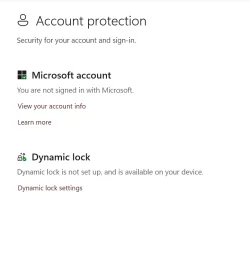
I lost the Administrator Account Protection after the latest update. It was available before, but not anymore. 🤷‍♂️

1759428558835.webp
 

My Computer

System One

  • OS
    Windows 11 Pro 25H2
    Computer type
    PC/Desktop
    Manufacturer/Model
    Dell XPS 8930
    CPU
    Intel I9-9900K
    Memory
    64GB
    Graphics Card(s)
    NVIDIA RTX 2060
    Sound Card
    NVIDIA High Definition Audio
    Monitor(s) Displays
    4k Samsung
    Screen Resolution
    3840 x 2160
    Hard Drives
    512GB NVMe, ADATA SU 800, 2TB HDD
I lost the Administrator Account Protection after the latest update. It was available before, but not anymore. 🤷‍♂️

Looks like that was pulled again.


Change dateChange description
October 01, 2025A feature previously listed in the September 2025 non-security update (KB5065789) will roll out in a future date.

[Administrator Protection Preview] Administrator protection aims to protect free floating admin rights for administrator users allowing them to still perform all admin functions with just-in-time admin privileges. This feature is off by default and needs to be enabled via OMA-URI in Intune or via group policy.
 

My Computers

System One System Two

  • OS
    Windows 11 Pro for Workstations
    Computer type
    PC/Desktop
    Manufacturer/Model
    Custom self build
    CPU
    Intel i7-8700K 5 GHz
    Motherboard
    ASUS ROG Maximus XI Formula Z390
    Memory
    64 GB (4x16GB) G.SKILL TridentZ RGB DDR4 3600 MHz (F4-3600C18D-32GTZR)
    Graphics Card(s)
    ASUS ROG-STRIX-GTX1080TI-O11G-GAMING (11GB GDDR5X)
    Sound Card
    Integrated Digital Audio (S/PDIF)
    Monitor(s) Displays
    2 x Samsung Odyssey G75 27"
    Screen Resolution
    2560x1440
    Hard Drives
    1TB Samsung 990 PRO M.2,
    4TB Samsung 990 PRO M.2,
    TerraMaster F8 SSD Plus NAS
    PSU
    Seasonic Prime Titanium 850W
    Case
    Thermaltake Core P3 wall mounted
    Cooling
    Corsair Hydro H115i
    Keyboard
    Amazon Basics Wired Full Keyboard MD005
    Mouse
    Logitech MX Master 4
    Internet Speed
    2 Gbps Download and 100 Mbps Upload
    Browser
    Chrome and Edge
    Antivirus
    Microsoft Defender
    Other Info
    Logitech Z625 speaker system,
    Logitech BRIO 4K Pro webcam,
    HP Color LaserJet Pro MFP M477fdn,
    CyberPower CP1500PFCLCD
    Galaxy S23 Plus phone
  • Operating System
    Windows 11 Pro
    Computer type
    Laptop
    Manufacturer/Model
    Surface Laptop 7 Copilot+ PC
    CPU
    Snapdragon X Elite (12 core) 3.42 GHz
    Memory
    16 GB LPDDR5x-7467 MHz
    Monitor(s) Displays
    15" HDR
    Screen Resolution
    2496 x 1664
    Hard Drives
    1 TB SSD
    Internet Speed
    Wi-Fi 7 and Bluetooth 5.4
    Browser
    Chrome and Edge
    Antivirus
    Microsoft Defender
Looks like that was pulled again.


Change dateChange description
October 01, 2025A feature previously listed in the September 2025 non-security update (KB5065789) will roll out in a future date.

[Administrator Protection Preview] Administrator protection aims to protect free floating admin rights for administrator users allowing them to still perform all admin functions with just-in-time admin privileges. This feature is off by default and needs to be enabled via OMA-URI in Intune or via group policy.
I noticed that Administrator Protection Preview was causing an error message when I was starting Minitool Partition Wizard 13.0.
Complaining about MS EDGE that could not access some folders. When I get it again, I'll post the exact message. 😵‍💫
 

My Computer

System One

  • OS
    Windows 11 Pro 25H2
    Computer type
    PC/Desktop
    Manufacturer/Model
    Dell XPS 8930
    CPU
    Intel I9-9900K
    Memory
    64GB
    Graphics Card(s)
    NVIDIA RTX 2060
    Sound Card
    NVIDIA High Definition Audio
    Monitor(s) Displays
    4k Samsung
    Screen Resolution
    3840 x 2160
    Hard Drives
    512GB NVMe, ADATA SU 800, 2TB HDD
Just got this on Beta too. 😉 No difference on features so far.
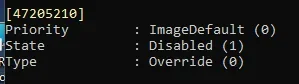
It seems to have removed some that I had before, now I don't see the new start menu nor the new battery icon in system tray. 😵‍💫🤷‍♂️
We'll have to wait and see which IDs MS will enable next. 🤣🤣

1759430395022.webp

Edition Windows 11 Pro
Version 24H2
Installed on ‎1/‎24/‎2025
OS build 26120.6760
Experience Windows Feature Experience Pack 1000.26100.260.0

This one for the new start menu is disabled. 🤣
1759443617791.webp
 
Last edited:

My Computer

System One

  • OS
    Windows 11 Pro 25H2
    Computer type
    PC/Desktop
    Manufacturer/Model
    Dell XPS 8930
    CPU
    Intel I9-9900K
    Memory
    64GB
    Graphics Card(s)
    NVIDIA RTX 2060
    Sound Card
    NVIDIA High Definition Audio
    Monitor(s) Displays
    4k Samsung
    Screen Resolution
    3840 x 2160
    Hard Drives
    512GB NVMe, ADATA SU 800, 2TB HDD
I wonder If Microsoft will release a Iso for the newest Beta build, Will they?
 

My Computer

System One

  • OS
    Windows 11
    Computer type
    PC/Desktop
    Manufacturer/Model
    HP
    CPU
    12th Gen Intel(R) Core(TM) i3-12100, 3300 Mhz, 4 Core(s
    Motherboard
    HP
    Memory
    8.00 GB
    Graphics Card(s)
    Intel(R) UHD Graphics 730
    Sound Card
    Realtek High Definition Audio
    Monitor(s) Displays
    Generic PnP Monitor
    Screen Resolution
    1920 x 1080(p) (60.000Hz)
    Hard Drives
    SAMSUNG MZVL4512HBLU-00BH1
    Keyboard
    HP 510 Wireless KBMS Combo
    Mouse
    HP 510 Wireless KBMS Combo
    Browser
    Microsoft Edge
    Antivirus
    Windows Defender
UPDATE:

We have paused new flights of 26120.6760 while we address this fix.
 

My Computers

System One System Two

  • OS
    Windows 11 Pro for Workstations
    Computer type
    PC/Desktop
    Manufacturer/Model
    Custom self build
    CPU
    Intel i7-8700K 5 GHz
    Motherboard
    ASUS ROG Maximus XI Formula Z390
    Memory
    64 GB (4x16GB) G.SKILL TridentZ RGB DDR4 3600 MHz (F4-3600C18D-32GTZR)
    Graphics Card(s)
    ASUS ROG-STRIX-GTX1080TI-O11G-GAMING (11GB GDDR5X)
    Sound Card
    Integrated Digital Audio (S/PDIF)
    Monitor(s) Displays
    2 x Samsung Odyssey G75 27"
    Screen Resolution
    2560x1440
    Hard Drives
    1TB Samsung 990 PRO M.2,
    4TB Samsung 990 PRO M.2,
    TerraMaster F8 SSD Plus NAS
    PSU
    Seasonic Prime Titanium 850W
    Case
    Thermaltake Core P3 wall mounted
    Cooling
    Corsair Hydro H115i
    Keyboard
    Amazon Basics Wired Full Keyboard MD005
    Mouse
    Logitech MX Master 4
    Internet Speed
    2 Gbps Download and 100 Mbps Upload
    Browser
    Chrome and Edge
    Antivirus
    Microsoft Defender
    Other Info
    Logitech Z625 speaker system,
    Logitech BRIO 4K Pro webcam,
    HP Color LaserJet Pro MFP M477fdn,
    CyberPower CP1500PFCLCD
    Galaxy S23 Plus phone
  • Operating System
    Windows 11 Pro
    Computer type
    Laptop
    Manufacturer/Model
    Surface Laptop 7 Copilot+ PC
    CPU
    Snapdragon X Elite (12 core) 3.42 GHz
    Memory
    16 GB LPDDR5x-7467 MHz
    Monitor(s) Displays
    15" HDR
    Screen Resolution
    2496 x 1664
    Hard Drives
    1 TB SSD
    Internet Speed
    Wi-Fi 7 and Bluetooth 5.4
    Browser
    Chrome and Edge
    Antivirus
    Microsoft Defender
I just got the new menu on 26120.6760.

Edition Windows 11 Pro
Version 24H2
Installed on ‎1/‎24/‎2025
OS build 26120.6760
Experience Windows Feature Experience Pack 1000.26100.260.0


1759456119360.webp

1759456184723.webp

1759456079364.webpThen disabled again after another restart. 🤣😝🤷‍♂️

1759456585187.webp
 
Last edited:

My Computer

System One

  • OS
    Windows 11 Pro 25H2
    Computer type
    PC/Desktop
    Manufacturer/Model
    Dell XPS 8930
    CPU
    Intel I9-9900K
    Memory
    64GB
    Graphics Card(s)
    NVIDIA RTX 2060
    Sound Card
    NVIDIA High Definition Audio
    Monitor(s) Displays
    4k Samsung
    Screen Resolution
    3840 x 2160
    Hard Drives
    512GB NVMe, ADATA SU 800, 2TB HDD
UPDATE:

We have paused new flights of 26120.6760 while we address this fix.
Huoo huoo huoooo !
Resignation !!!
 

My Computer

System One

  • OS
    Win11Pro Dev 25H2 26220.6972
    Computer type
    PC/Desktop
    Screen Resolution
    4k
    Browser
    Microsoft Edge Beta
    Antivirus
    Eset Smart Security Premium
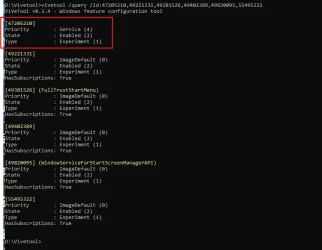
The missing features showed up after this update and a couple of reboots on Dev Build 26220.6760, but the same update on Beta 26120.6760 did nothing. 😵‍💫🤷‍♂️

1759519448368.webp
 

My Computer

System One

  • OS
    Windows 11 Pro 25H2
    Computer type
    PC/Desktop
    Manufacturer/Model
    Dell XPS 8930
    CPU
    Intel I9-9900K
    Memory
    64GB
    Graphics Card(s)
    NVIDIA RTX 2060
    Sound Card
    NVIDIA High Definition Audio
    Monitor(s) Displays
    4k Samsung
    Screen Resolution
    3840 x 2160
    Hard Drives
    512GB NVMe, ADATA SU 800, 2TB HDD
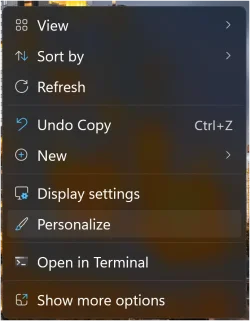
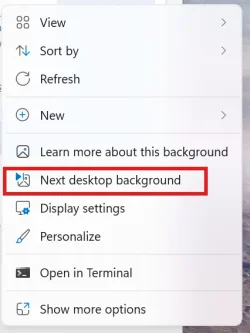
Just noticed this morning they got rid of Next Desktop Background for slideshow on the front right click menu for the beta build. Wonder why they did that?
 

Attachments

  • Screenshot 2025-10-04 120010.webp
    Screenshot 2025-10-04 120010.webp
    27.4 KB · Views: 1
  • Screenshot 2025-10-04 120137.webp
    Screenshot 2025-10-04 120137.webp
    32.5 KB · Views: 1

My Computers

System One System Two

  • OS
    Windows 11 25H2
    Computer type
    Laptop
    Manufacturer/Model
    Alienware 18 Area-51
    CPU
    Intel Core Ultra 9 275HX (24-Core)
    Motherboard
    Alienware
    Memory
    64GB DDR5 6400MT/s
    Graphics Card(s)
    NVIDIA GeForce RTX 5080 and Intel UHD Graphics
    Sound Card
    Onboard, Realtek high-performance Audio chips (ALC3329 & ALC1708))
    Monitor(s) Displays
    300HZ 18-inch QHD 500 nit Comfort View+
    Screen Resolution
    2560 x 1600
    Hard Drives
    2TB NVMe M.2 PCIe Gen 5 SSD
    Case
    Magnesium Alloy
    Cooling
    Advanced Cryo-Tech Quad-Fan Cooling system & large vapor chamber
    Keyboard
    Cherry MX ultra low profile mechanical keyboard with per key AlienFX RGB lighting
    Mouse
    Logitech MX Master 4
    Browser
    Vivaldi (main), Firefox, Chrome, Edge
    Antivirus
    MS Defender and Malwarebytes Free
  • Operating System
    Windows 11 25H2
    Computer type
    Laptop
    Manufacturer/Model
    Microsoft Surface Laptop 7
    CPU
    Qualcomm Snapdragon X Elite (12 Core) ARM based CPU
    Motherboard
    Microsoft Corp.
    Memory
    16GB LPDDR5
    Graphics card(s)
    Qualcomm Adreno X1-85
    Sound Card
    Omnisonic speakers with Dolby Atmos spatial sound
    Monitor(s) Displays
    120 Hz 13.8-inch 600 nit PixelSense Flow touchscreen
    Screen Resolution
    2304x1536
    Hard Drives
    1TB NVMe Gen 4 SSD
    Case
    Anodized Aluminum
    Cooling
    Traditional active cooling fan system
    Keyboard
    Mechanical QWERTY, backlit when in use
    Mouse
    Logitech MX Master 4 and Surface Arc Mouse
    Browser
    Vivaldi (main), Firefox, Chrome, Edge
    Antivirus
    MS Defender and Malwarebytes Free
Just noticed this morning they got rid of Next Desktop Background for slideshow on the front right click menu for the beta build. Wonder why they did that?
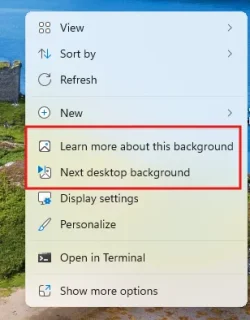
They put it and another setting to one context menu :

[Desktop Spotlight]

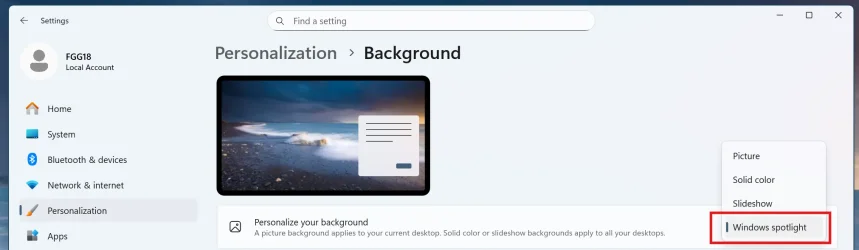
  • We are trying out a change that adds “Learn more about this background” and “Next desktop background” to the context menu when you click on your desktop if you have Windows Spotlight chosen as your desktop background under Settings > Personalization > Background.
 

My Computer

System One

  • OS
    26200.8037
    Computer type
    PC/Desktop
    CPU
    i5-11400F
    Motherboard
    Gigabyte
    Memory
    32GB
    Graphics Card(s)
    Geforce GT-1030
    Keyboard
    Logitech K400
    Mouse
    Logitech M720
    Internet Speed
    600 Mb
    Browser
    Edge
They put it and another setting to one context menu :
Ah ok, except I don't use Windows Spotlight for my desktop backgrounds, I use my own slideshow folders but I guess it was removed for any slideshow now. Looks like extra clicks for me from now on when I want to manually advance the background.
 

My Computers

System One System Two

  • OS
    Windows 11 25H2
    Computer type
    Laptop
    Manufacturer/Model
    Alienware 18 Area-51
    CPU
    Intel Core Ultra 9 275HX (24-Core)
    Motherboard
    Alienware
    Memory
    64GB DDR5 6400MT/s
    Graphics Card(s)
    NVIDIA GeForce RTX 5080 and Intel UHD Graphics
    Sound Card
    Onboard, Realtek high-performance Audio chips (ALC3329 & ALC1708))
    Monitor(s) Displays
    300HZ 18-inch QHD 500 nit Comfort View+
    Screen Resolution
    2560 x 1600
    Hard Drives
    2TB NVMe M.2 PCIe Gen 5 SSD
    Case
    Magnesium Alloy
    Cooling
    Advanced Cryo-Tech Quad-Fan Cooling system & large vapor chamber
    Keyboard
    Cherry MX ultra low profile mechanical keyboard with per key AlienFX RGB lighting
    Mouse
    Logitech MX Master 4
    Browser
    Vivaldi (main), Firefox, Chrome, Edge
    Antivirus
    MS Defender and Malwarebytes Free
  • Operating System
    Windows 11 25H2
    Computer type
    Laptop
    Manufacturer/Model
    Microsoft Surface Laptop 7
    CPU
    Qualcomm Snapdragon X Elite (12 Core) ARM based CPU
    Motherboard
    Microsoft Corp.
    Memory
    16GB LPDDR5
    Graphics card(s)
    Qualcomm Adreno X1-85
    Sound Card
    Omnisonic speakers with Dolby Atmos spatial sound
    Monitor(s) Displays
    120 Hz 13.8-inch 600 nit PixelSense Flow touchscreen
    Screen Resolution
    2304x1536
    Hard Drives
    1TB NVMe Gen 4 SSD
    Case
    Anodized Aluminum
    Cooling
    Traditional active cooling fan system
    Keyboard
    Mechanical QWERTY, backlit when in use
    Mouse
    Logitech MX Master 4 and Surface Arc Mouse
    Browser
    Vivaldi (main), Firefox, Chrome, Edge
    Antivirus
    MS Defender and Malwarebytes Free
Just noticed this morning they got rid of Next Desktop Background for slideshow on the front right click menu for the beta build. Wonder why they did that?
This is what I see.
On Beta and Dev. It was changed in Builds 26120.6690 and 26220.6690.
1759609422001.webp


Edition Windows 11 Pro
Version 24H2
Installed on ‎1/‎24/‎2025
OS build 26120.6760
Experience Windows Feature Experience Pack 1000.26100.260.0

26120.6690 and 26220.6690 blogs:

[Desktop Spotlight]

  • We are trying out a change that adds “Learn more about this background” and “Next desktop background” to the context menu when you click on your desktop if you have Windows Spotlight chosen as your desktop background under Settings > Personalization > Background.
 

My Computer

System One

  • OS
    Windows 11 Pro 25H2
    Computer type
    PC/Desktop
    Manufacturer/Model
    Dell XPS 8930
    CPU
    Intel I9-9900K
    Memory
    64GB
    Graphics Card(s)
    NVIDIA RTX 2060
    Sound Card
    NVIDIA High Definition Audio
    Monitor(s) Displays
    4k Samsung
    Screen Resolution
    3840 x 2160
    Hard Drives
    512GB NVMe, ADATA SU 800, 2TB HDD
This is what I see.
On Beta and Dev. It was changed in Builds 26120.6690 and 26220.6690.
View attachment 147705


Edition Windows 11 Pro
Version 24H2
Installed on ‎1/‎24/‎2025
OS build 26120.6760
Experience Windows Feature Experience Pack 1000.26100.260.0

26120.6690 and 26220.6690 blogs:

[Desktop Spotlight]

  • We are trying out a change that adds “Learn more about this background” and “Next desktop background” to the context menu when you click on your desktop if you have Windows Spotlight chosen as your desktop background under Settings > Personalization > Background.
I lost Next Desktop Background on build 26120.6760. I'm guessing the learn more about this background only shows if your using spotlight.

Edit; I also don't even have a Windows Spotlight option for the desktop under the background settings.
 

My Computers

System One System Two

  • OS
    Windows 11 25H2
    Computer type
    Laptop
    Manufacturer/Model
    Alienware 18 Area-51
    CPU
    Intel Core Ultra 9 275HX (24-Core)
    Motherboard
    Alienware
    Memory
    64GB DDR5 6400MT/s
    Graphics Card(s)
    NVIDIA GeForce RTX 5080 and Intel UHD Graphics
    Sound Card
    Onboard, Realtek high-performance Audio chips (ALC3329 & ALC1708))
    Monitor(s) Displays
    300HZ 18-inch QHD 500 nit Comfort View+
    Screen Resolution
    2560 x 1600
    Hard Drives
    2TB NVMe M.2 PCIe Gen 5 SSD
    Case
    Magnesium Alloy
    Cooling
    Advanced Cryo-Tech Quad-Fan Cooling system & large vapor chamber
    Keyboard
    Cherry MX ultra low profile mechanical keyboard with per key AlienFX RGB lighting
    Mouse
    Logitech MX Master 4
    Browser
    Vivaldi (main), Firefox, Chrome, Edge
    Antivirus
    MS Defender and Malwarebytes Free
  • Operating System
    Windows 11 25H2
    Computer type
    Laptop
    Manufacturer/Model
    Microsoft Surface Laptop 7
    CPU
    Qualcomm Snapdragon X Elite (12 Core) ARM based CPU
    Motherboard
    Microsoft Corp.
    Memory
    16GB LPDDR5
    Graphics card(s)
    Qualcomm Adreno X1-85
    Sound Card
    Omnisonic speakers with Dolby Atmos spatial sound
    Monitor(s) Displays
    120 Hz 13.8-inch 600 nit PixelSense Flow touchscreen
    Screen Resolution
    2304x1536
    Hard Drives
    1TB NVMe Gen 4 SSD
    Case
    Anodized Aluminum
    Cooling
    Traditional active cooling fan system
    Keyboard
    Mechanical QWERTY, backlit when in use
    Mouse
    Logitech MX Master 4 and Surface Arc Mouse
    Browser
    Vivaldi (main), Firefox, Chrome, Edge
    Antivirus
    MS Defender and Malwarebytes Free
I lost Next Desktop Background on build 26120.6760. I'm guessing the learn more about this background only shows if your using spotlight.

Edit; I also don't even have a Windows Spotlight option for the desktop under the background settings.
Sounds like you have a bug. 😵‍💫🤷‍♂️
1759613096778.webp


Edition Windows 11 Pro
Version 25H2
Installed on ‎9/‎12/‎2025
OS build 26220.6760
Experience Windows Feature Experience Pack 1000.26100.260.0

This option now only shows with Windows Spotlight, not with Slideshow. 🤷‍♂️
1759613343450.webp
 

My Computer

System One

  • OS
    Windows 11 Pro 25H2
    Computer type
    PC/Desktop
    Manufacturer/Model
    Dell XPS 8930
    CPU
    Intel I9-9900K
    Memory
    64GB
    Graphics Card(s)
    NVIDIA RTX 2060
    Sound Card
    NVIDIA High Definition Audio
    Monitor(s) Displays
    4k Samsung
    Screen Resolution
    3840 x 2160
    Hard Drives
    512GB NVMe, ADATA SU 800, 2TB HDD
Sounds like you have a bug. 😵‍💫🤷‍♂️
View attachment 147716


Edition Windows 11 Pro
Version 25H2
Installed on ‎9/‎12/‎2025
OS build 26220.6760
Experience Windows Feature Experience Pack 1000.26100.260.0
Apparently, as Windows Spotlight is completely missing from the background setting and the Next Desktop Background is missing from the right click context menu although it shows and works on Show More Options menu.
 

My Computers

System One System Two

  • OS
    Windows 11 25H2
    Computer type
    Laptop
    Manufacturer/Model
    Alienware 18 Area-51
    CPU
    Intel Core Ultra 9 275HX (24-Core)
    Motherboard
    Alienware
    Memory
    64GB DDR5 6400MT/s
    Graphics Card(s)
    NVIDIA GeForce RTX 5080 and Intel UHD Graphics
    Sound Card
    Onboard, Realtek high-performance Audio chips (ALC3329 & ALC1708))
    Monitor(s) Displays
    300HZ 18-inch QHD 500 nit Comfort View+
    Screen Resolution
    2560 x 1600
    Hard Drives
    2TB NVMe M.2 PCIe Gen 5 SSD
    Case
    Magnesium Alloy
    Cooling
    Advanced Cryo-Tech Quad-Fan Cooling system & large vapor chamber
    Keyboard
    Cherry MX ultra low profile mechanical keyboard with per key AlienFX RGB lighting
    Mouse
    Logitech MX Master 4
    Browser
    Vivaldi (main), Firefox, Chrome, Edge
    Antivirus
    MS Defender and Malwarebytes Free
  • Operating System
    Windows 11 25H2
    Computer type
    Laptop
    Manufacturer/Model
    Microsoft Surface Laptop 7
    CPU
    Qualcomm Snapdragon X Elite (12 Core) ARM based CPU
    Motherboard
    Microsoft Corp.
    Memory
    16GB LPDDR5
    Graphics card(s)
    Qualcomm Adreno X1-85
    Sound Card
    Omnisonic speakers with Dolby Atmos spatial sound
    Monitor(s) Displays
    120 Hz 13.8-inch 600 nit PixelSense Flow touchscreen
    Screen Resolution
    2304x1536
    Hard Drives
    1TB NVMe Gen 4 SSD
    Case
    Anodized Aluminum
    Cooling
    Traditional active cooling fan system
    Keyboard
    Mechanical QWERTY, backlit when in use
    Mouse
    Logitech MX Master 4 and Surface Arc Mouse
    Browser
    Vivaldi (main), Firefox, Chrome, Edge
    Antivirus
    MS Defender and Malwarebytes Free
Back
Top Bottom